Introduction
“Batuta orchestrates sovereign AI infrastructure — autonomous agents, ML serving, code analysis, and transpilation pipelines in pure Rust.”
Welcome to The Batuta Book
This book is your comprehensive guide to Batuta, the orchestration framework for the Sovereign AI Stack. Batuta provides autonomous agent runtimes, ML model serving, proactive bug hunting, and transpilation pipelines that convert Python/C/Shell to Rust with semantic preservation.
The Sovereign AI Stack is built on a foundation of peer-reviewed research—over 30 academic citations across component specifications—ensuring every design decision is grounded in proven computer science and manufacturing principles.
What is Batuta?
Batuta (Spanish for “conductor’s baton”) orchestrates the 22-component Sovereign AI Stack from Pragmatic AI Labs to convert, optimize, and validate code migrations:

Layer 0: Compute Primitives
- Trueno v0.16 - SIMD/GPU compute primitives with zero-copy operations
- Trueno-DB v0.3 - Vector database with HNSW indexing ([Malkov 2020])
- Trueno-Graph v0.1 - Graph analytics and lineage DAG tracking
- Trueno-Viz v0.2 - SIMD/GPU/WASM visualization
- Trueno-RAG v0.2 - RAG pipeline: semantic chunking, BM25+dense hybrid retrieval ([Lewis 2020]), cross-encoder reranking
Layer 1: ML Algorithms
- Aprender v0.27 - First-principles ML in pure Rust
Layer 2: Training & Inference
- Entrenar v0.7 - Training with autograd, LoRA, quantization, DP-SGD
- Realizar v0.8 - LLM inference (GGUF, safetensors, transformers)
Layer 3: Transpilers
- Depyler - Python → Rust with type inference
- Decy - C/C++ → Rust with ownership inference
- Bashrs v6.57 - Rust → Shell (bootstrap scripts)
- Ruchy v4.1 - Script → Rust (systems scripting)
Layer 4: Orchestration
- Batuta v0.7 - Orchestration, agents, serving, analysis
- Repartir v2.0 - Distributed computing primitives
- pforge v0.1.4 - MCP server framework (rust-mcp-sdk)
Layer 5: Quality
- Certeza - Quality validation framework
- PMAT - AI context & code quality
- Renacer v0.10 - Syscall tracing & golden traces
- Provable Contracts - YAML → Kani formal verification for ML kernels
- Tiny Model Ground Truth - Popperian model conversion parity tests
Layer 6: Data & MLOps
- Alimentar - Data loading with .ald AES-256-GCM encryption
- Pacha - Model/Data/Recipe Registry with BLAKE3 content-addressing, Model Cards ([Mitchell 2019]), Datasheets ([Gebru 2021]), W3C PROV-DM provenance
The Philosophy
Batuta is built on three core principles, each deeply integrated throughout the stack.
1. Toyota Way Manufacturing
We apply Lean Manufacturing principles systematically across all 22 components. This isn’t marketing—every specification includes Toyota Way Review sections that audit designs against these principles:
Muda (Waste Elimination)
The seven wastes, applied to software:
| Waste Type | Traditional Software | Batuta Solution |
|---|---|---|
| Transport | Data copying between services | Zero-copy operations in Trueno |
| Inventory | Unused dependencies | Content-addressed deduplication in Pacha |
| Motion | Context switching | Single-language stack (pure Rust) |
| Waiting | Build times, cold starts | 53,000x faster Lambda cold start |
| Overproduction | Features nobody uses | Modular components, use only what you need |
| Overprocessing | Redundant transformations | IR-based semantic preservation |
| Defects | Bugs, rework | Built-in quality gates at every phase |
“By removing dependency hell, we eliminate the waste of waiting and waste of processing associated with complex environments.” — Trueno-RAG Spec
Jidoka (Built-in Quality)
Stop the line when defects occur. In Batuta:
- Chunking: Semantic chunking stops based on meaning, not arbitrary size—reducing downstream correction waste
- Validation gates: Each phase must pass quality checks before proceeding
- Andon signals: Immediate visualization of problems via PMAT quality scoring
“Fixed-size chunking is prone to defects (cutting semantic context). Semantic chunking stops the chunk based on quality rather than an arbitrary quota.” — Trueno-RAG Spec
Kaizen (Continuous Improvement)
Incremental refinement through:
- Model lineage tracking in Pacha enables iterative improvement
- Experiment comparison identifies what works
- Golden trace evolution captures behavioral improvements over time
Heijunka (Level Scheduling)
Balance load to avoid overburdening:
- HNSW parameters tuned to balance indexing speed with search accuracy
- Batch processing in Realizar avoids GPU memory spikes
- Distributed workloads via Repartir prevent node overload
Genchi Genbutsu (Go and See)
Process data where it resides:
- Local inference eliminates waste of transport (sending data to external APIs)
- Edge deployment brings computation to the data
- Sovereign processing keeps data within your infrastructure
Nemawashi (Consensus Decision Making)
Make decisions slowly by consensus, implement rapidly:
- Hybrid retrieval uses Reciprocal Rank Fusion (RRF) to integrate diverse “perspectives” (dense and sparse)
- Multi-query retrieval pulls more relevant information based on user intent
- Cross-encoder reranking ([Nogueira 2019]) refines results through pairwise scoring
“Reciprocal Rank Fusion acts as a consensus mechanism, integrating diverse perspectives to make a better decision. This aligns with making decisions slowly by consensus, then implementing rapidly.” — Trueno-RAG Spec
One-Piece Flow (Continuous Flow)
Reduce batch sizes to minimize waiting:
- Streaming retrieval delivers results the moment they become available
- Incremental chunking processes documents as they arrive
- Async pipelines eliminate blocking operations
“Streaming results implements continuous flow, reducing the batch size to one. This eliminates the waste of waiting for the user, delivering value the moment it is created.” — Trueno-RAG Spec
2. Semantic Preservation
Code migration is NOT a lossy transformation. Batuta ensures behavioral equivalence through multiple verification layers:
Source Code (Python/C/Shell)
        │
        ▼
┌───────────────────┐
│   IR Analysis     │  ← Abstract semantic representation
└───────────────────┘
        │
        ▼
┌───────────────────┐
│   Transpilation   │  ← Idiomatic Rust generation
└───────────────────┘
        │
        ▼
┌───────────────────┐
│   Validation      │  ← Syscall tracing (Renacer)
└───────────────────┘
        │
        ▼
┌───────────────────┐
│ Golden Trace Diff │  ← Behavioral equivalence proof
└───────────────────┘
3. First Principles Thinking
Rather than blindly translating code, Batuta rebuilds from fundamental truths:
- What does this code actually do? — IR-level semantic analysis
- What is the minimal correct implementation? — Eliminate accidental complexity
- How can we express this idiomatically in Rust? — Leverage ownership, not fight it
The 5-Phase Workflow
Batuta follows a strict 5-phase Kanban workflow with visual control:
┌──────────┐    ┌──────────────┐    ┌──────────────┐    ┌───────────┐    ┌────────────┐
│ Analysis │ -> │ Transpilation│ -> │ Optimization │ -> │ Validation│ -> │ Deployment │
└──────────┘    └──────────────┘    └──────────────┘    └───────────┘    └────────────┘
    20%              40%                  60%               80%               100%

 Languages       depyler/decy         SIMD/GPU           Renacer          WASM/Lambda
   Deps          bashrs/ruchy          MoE              Certeza             Edge
   TDG            Caching            Trueno              Tests             Binary
Each phase has:
- Clear entry criteria — Dependencies on previous phase (Jidoka)
- Specific deliverables — Outputs that feed next phase (One-piece flow)
- Quality gates — Validation before proceeding (Stop and fix)
- Automated tracking — State persistence and progress (Visual control)
Sovereign AI: Complete Stack
The Sovereign AI Stack is 100% Rust, no Python/C++ dependencies:
| Capability | Component | Replaces | Key Differentiator |
|---|---|---|---|
| Tensor ops | Trueno | NumPy | SIMD + GPU, zero-copy operations |
| Vector DB | Trueno-DB | Pinecone, Milvus | Embedded HNSW ([Malkov 2020]) |
| RAG | Trueno-RAG | LangChain | BM25 + dense hybrid, RRF fusion, streaming |
| ML algorithms | Aprender | scikit-learn | .apr format, AES-256-GCM encryption |
| Training | Entrenar | PyTorch | LoRA, quantization, DP-SGD privacy |
| Inference | Realizar | vLLM | GGUF, safetensors, KV-cache, 9.6x faster |
| Data loading | Alimentar | pandas | .ald encryption, Argon2id KDF |
| MLOps | Pacha | MLflow | BLAKE3 deduplication, PROV-DM lineage |
Why sovereign matters:
- No external API calls — Data never leaves your infrastructure
- AES-256-GCM encryption — .apr and .ald formats protect artifacts at rest
- X25519 + Ed25519 — Key exchange and signatures for secure sharing
- Pure Rust — Single audit surface, no C/C++ CVE tracking
Academic Foundation
Every component specification cites peer-reviewed research. This isn’t theory—it’s engineering rigor applied to every design decision:
| Specification | References | Key Citations |
|---|---|---|
| Pacha (MLOps) | 20 papers | Model Cards [Mitchell 2019], Datasheets [Gebru 2021], PROV-DM [W3C 2013], Reproducibility [Pineau 2021] |
| Trueno-RAG | 10 papers | RAG [Lewis 2020], DPR [Karpukhin 2020], HNSW [Malkov 2020], BM25 [Robertson 2009], Lost in Middle [Liu 2024] |
| Oracle Mode | 20 papers | Stack query interface with academic grounding |
Selected References
- [Lewis 2020] - “Retrieval-Augmented Generation for Knowledge-Intensive NLP Tasks” (NeurIPS)
- [Karpukhin 2020] - “Dense Passage Retrieval for Open-Domain Question Answering” (EMNLP)
- [Malkov 2020] - “Efficient and Robust Approximate Nearest Neighbor Search Using HNSW” (IEEE TPAMI)
- [Mitchell 2019] - “Model Cards for Model Reporting” (FAT*)
- [Gebru 2021] - “Datasheets for Datasets” (CACM)
- [Robertson 2009] - “The Probabilistic Relevance Framework: BM25 and Beyond” (FnTIR)
- [Liu 2024] - “Lost in the Middle: How Language Models Use Long Contexts” (TACL)
- [Nogueira 2019] - “Passage Re-ranking with BERT” (arXiv)
Who is This Book For?
This book is for:
- Legacy codebase maintainers drowning in Python/C/C++ technical debt
- Performance engineers seeking ML inference speedups (10-100x)
- Systems programmers modernizing shell-based infrastructure
- Engineering managers planning strategic rewrites
- AI/ML engineers building sovereign, private AI systems
- Security teams requiring single-language audit surfaces
What You’ll Learn
By the end of this book, you will:
- Understand the philosophy — Toyota Way applied to code migration
- Master the 5-phase workflow — Analysis through deployment
- Use all stack components — Hands-on integration patterns
- Apply waste elimination — Identify and remove Muda in your projects
- Validate semantic equivalence — Syscall tracing with Renacer
- Optimize performance — SIMD/GPU acceleration with Trueno
- Build RAG pipelines — Hybrid retrieval with Trueno-RAG
- Deploy LLM inference — GGUF models with Realizar
- Track ML experiments — Model lineage with Pacha
- Ensure data privacy — Encryption and DP-SGD
Prerequisites
Required:
- Basic understanding of Rust (ownership, lifetimes, traits)
- Familiarity with at least one source language (Python, C, C++, Shell)
- Command-line proficiency
Helpful but not required:
- Experience with build systems (Cargo, Make, CMake)
- Understanding of ML frameworks (NumPy, PyTorch, scikit-learn)
- Lean manufacturing concepts (helpful for philosophy sections)
How to Read This Book
If you’re brand new to Batuta: Read Part I (Core Philosophy) to understand the “why”, then work through Part II (5-Phase Workflow) hands-on with a small example project.
If you’re experienced with transpilers: Start with Part III (Tool Ecosystem) to understand Batuta’s orchestration capabilities, then dive into Part IV (Practical Examples) for real-world patterns.
If you’re migrating a specific project: Begin with Part II (5-Phase Workflow) for the systematic approach, consult Part V (Configuration) for customization, and keep Part VIII (Troubleshooting) handy.
If you’re building AI/ML systems: Focus on Part III (Tool Ecosystem) for Trueno/Aprender/Realizar integration, and Pacha for MLOps. Use Oracle Mode for intelligent stack queries.
Running Examples
Batuta includes 30+ runnable examples demonstrating stack capabilities:
# Core pipeline demo (no features required)
cargo run --example pipeline_demo

# Oracle-mode examples
cargo run --example oracle_local_demo --features oracle-mode

# Stack quality analysis
cargo run --example stack_quality_demo --features native

# PMAT query: function-level code search with quality grades
cargo run --example pmat_query_demo --features native

# Bug-hunter: proactive bug detection with GPU/CUDA patterns
cargo run --example bug_hunter_demo --features native

# ML framework conversion
cargo run --example numpy_conversion
cargo run --example sklearn_conversion
cargo run --example pytorch_conversion
See Part IV: Example Overview for the complete list with feature requirements.
Oracle Mode
Batuta includes Oracle Mode — an intelligent query interface backed by a knowledge graph of all 22 components:
# Natural language queries
batuta oracle "How do I train a model on GPU?"
batuta oracle "What's best for vector similarity search?"
batuta oracle "Which components support WASM?"

# Component discovery
batuta oracle --list-capabilities trueno
batuta oracle --integrations "aprender -> realizar"

# JSON output for automation
batuta oracle --json "RAG pipeline components"
Oracle Mode knows capabilities, integration patterns, and recommends optimal component combinations based on your requirements.
Conventions
Throughout this book:
- Bold text emphasizes key concepts
Inline coderepresents commands, code snippets, or file names- 💡 Tips provide helpful shortcuts
- ⚠️ Warnings highlight potential pitfalls
- 🎯 Best practices recommend proven approaches
- 🏭 Toyota Way callouts show lean manufacturing applications
Community and Support
- GitHub: paiml/Batuta
- Book: paiml.github.io/batuta
- Issues: Report bugs and request features
- Discussions: Ask questions and share experiences
Let’s Begin
The journey from legacy code to modern Rust is challenging but immensely rewarding. With Batuta orchestrating the 22-component Sovereign AI Stack, you’re equipped with:
| Category | Components | Count |
|---|---|---|
| Compute primitives | Trueno, Trueno-DB, Trueno-Graph, Trueno-Viz, Trueno-RAG | 5 |
| ML pipeline | Aprender, Entrenar, Realizar | 3 |
| Transpilers | Depyler, Decy, Bashrs, Ruchy | 4 |
| Orchestration | Batuta, Repartir, pforge | 3 |
| Quality | Certeza, PMAT, Renacer, Provable Contracts, Tiny Model GT | 5 |
| Data & MLOps | Alimentar, Pacha | 2 |
| Total | 22 |
Every component follows Toyota Way principles. Every specification cites peer-reviewed research. Every design decision eliminates waste.
Welcome to systematic code migration. Let’s conduct this orchestra. 🎵
Next: Part I: Core Philosophy
The Orchestration Paradigm
“A single instrument cannot play a symphony. Neither can a single transpiler migrate a complex codebase.”
The Problem with Simple Transpilation
Traditional transpilers make a fundamental mistake: they treat code migration as a one-step translation problem. This is like trying to move a house by picking it up and dropping it in a new location. It might work for a shed, but not for complex structures.
Why Simple Transpilation Fails
1. Loss of Semantic Meaning
# Python
x = [1, 2, 3]
y = x
y.append(4)
# x is now [1, 2, 3, 4] - shared reference
Simple transpilation to Rust:
#![allow(unused)]
fn main() {
// Naive transpilation
let mut x = vec![1, 2, 3];
let mut y = x;  // ❌ Moved! x is now invalid
y.push(4);
}
Correct Batuta approach (via Depyler):
#![allow(unused)]
fn main() {
// Semantic preservation
let mut x = vec![1, 2, 3];
let y = &mut x;  // ✓ Shared mutable reference
y.push(4);
// x is [1, 2, 3, 4] - semantics preserved
}
2. Missing Optimizations
Simple transpilers translate code literally. Batuta recognizes opportunities:
# Python - CPU only
import numpy as np
result = np.dot(large_matrix_a, large_matrix_b)
Batuta orchestration (Depyler + Trueno):
#![allow(unused)]
fn main() {
// Automatic SIMD/GPU dispatch
use trueno::linalg::dot;
let result = dot(&matrix_a, &matrix_b)?;
// ✓ Dispatches to GPU if matrices > threshold
// ✓ Falls back to SIMD for smaller operations
}
3. No Validation
How do you know the transpiled code is correct? Simple transpilers say “it compiles, ship it!” Batuta says “prove it with syscall tracing, test execution, and benchmarks.”
The Orchestra Metaphor
Consider a symphony orchestra:
- Conductor (Batuta): Coordinates all musicians, maintains tempo, ensures harmony
- String Section (Transpilers): Decy, Depyler, Bashrs convert code to Rust
- Brass Section (Foundation Libraries): Trueno, Aprender, Realizar provide runtime capabilities
- Percussion (Support Tools): Ruchy, PMAT, Renacer provide quality and validation
Each instrument is virtuoso in its domain. But without coordination, you get noise, not music.
The Conductor’s Role
Batuta coordinates:
- Timing: When to invoke which tool (5-phase workflow)
- Communication: How tools share outputs (IR, AST, config)
- Quality: Validation at each phase boundary
- Optimization: Automatic selection of best tool for task
Orchestration vs. Monolithic Tools
| Aspect | Monolithic Transpiler | Batuta Orchestration |
|---|---|---|
| Scope | Single-language focus | Multi-language support |
| Optimization | Basic or none | Automatic SIMD/GPU |
| Validation | “It compiles” | Syscall tracing + tests |
| ML Support | External libraries | Native (Aprender/Realizar) |
| Gradual Migration | All-or-nothing | Ruchy scripting support |
| Quality Metrics | None | PMAT TDG scoring |
| Workflow | Linear | 5-phase Kanban |
Core Principles
1. Specialization
Each tool excels at ONE thing:
- Decy: C/C++ ownership inference
- Trueno: Multi-backend compute dispatch
- Renacer: Syscall-level validation
Do NOT try to make Depyler handle C code. Use the right tool for the job.
2. Composition
Tools are composable building blocks:
Python + NumPy  →  Depyler + Trueno  →  Rust + SIMD/GPU
Python + sklearn → Depyler + Aprender → Rust + ML primitives
3. State Management
Orchestration requires tracking:
- Which phase are we in?
- What completed successfully?
- What failed and why?
- What’s next?
This is why Batuta has a workflow state machine (.batuta-state.json).
4. Incremental Progress
Unlike monolithic transpilers, orchestration supports:
- Partial completion (Phase 1-2 done, 3-5 pending)
- Resume after errors
- Selective re-execution
- Caching of completed work
Real-World Example
Consider migrating a Python ML web service:
project/
├── api.py            # Flask web server
├── model.py          # ML inference
├── preprocessing.py  # NumPy data transforms
├── utils.sh          # Deployment scripts
└── requirements.txt
Monolithic Approach
# Try to transpile everything with one tool
some-transpiler --input project/ --output rust-project/
# ❌ Fails because:
# - Shell scripts not supported
# - NumPy performance poor
# - No validation of ML accuracy
# - No optimization
Batuta Orchestration
# Phase 1: Analysis
batuta analyze --languages --dependencies --tdg
# ✓ Detects: Python (80%), Shell (20%)
# ✓ Identifies: Flask, NumPy, sklearn
# ✓ TDG Score: 73/100 (B)

# Phase 2: Transpilation
batuta transpile
# ✓ Depyler: api.py, model.py, preprocessing.py → Rust
# ✓ Bashrs: utils.sh → Rust CLI
# ✓ NumPy → Trueno: Automatic mapping
# ✓ sklearn → Aprender: Model conversion

# Phase 3: Optimization
batuta optimize --enable-gpu
# ✓ Trueno: SIMD for small matrices
# ✓ Trueno: GPU dispatch for large batch inference
# ✓ Memory layout optimization

# Phase 4: Validation
batuta validate --trace-syscalls --benchmark
# ✓ Renacer: Syscall equivalence check
# ✓ API tests: All passing
# ✓ Performance: 12x faster, 60% less memory

# Phase 5: Deployment
batuta build --release
# ✓ Optimized binary: 8MB (vs 200MB Python + deps)
# ✓ No interpreter, no GC pauses
When NOT to Use Orchestration
Orchestration has overhead. Don’t use Batuta if:
- Single file, simple logic: Just hand-write Rust
- Already have Rust version: You’re done!
- Prototype/throwaway code: Not worth the effort
- Actively changing code: Finish development first
Use Batuta when:
- Multiple languages/files
- Complex dependencies
- Performance critical
- Need validation
- Long-term maintenance
- Team knowledge transfer
Key Takeaways
Orchestration is:
- ✓ Systematic and repeatable
- ✓ Tool-agnostic (uses best tool for each task)
- ✓ Validatable at each step
- ✓ Optimizable automatically
- ✓ Recoverable from failures
Orchestration is NOT:
- ✗ Magic (it’s systematic process)
- ✗ Perfect (tools have limitations)
- ✗ Instant (phases take time)
- ✗ Suitable for all projects
Next Steps
Now that you understand the orchestration paradigm, let’s explore how it embodies Toyota Way principles - the manufacturing philosophy that makes systematic code migration possible.
Previous: Introduction Next: Toyota Way Principles
Toyota Way Principles
“The Toyota Production System is not just about cars. It’s about eliminating waste, building quality in, and continuous improvement - principles that apply equally to code migration.”
Why Toyota Way for Software?
In the 1950s, Toyota revolutionized manufacturing by focusing on:
- Eliminating waste (Muda)
- Building quality into the process (Jidoka)
- Continuous improvement (Kaizen)
- Level production scheduling (Heijunka)
- Visual workflow management (Kanban)
- Immediate problem signaling (Andon)
These principles transformed automobile manufacturing from craft work to systematic process. Batuta applies the same transformation to code migration.
The Six Principles
1. Muda (Waste Elimination)
In Manufacturing: Eliminate unnecessary movement, waiting, overproduction, defects.
In Code Migration:
Waste: Re-analyzing code multiple times
# ❌ Wasteful approach
analyze-tool project/
transpile-tool project/  # Re-analyzes!
optimize-tool project/   # Re-analyzes again!
Batuta Solution: Single analysis, cached results
# ✓ Efficient orchestration
batuta analyze    # Analyzes once, saves state
batuta transpile  # Uses cached analysis
batuta optimize   # Reuses type information
Waste: Manual tool coordination
# ❌ Manual orchestration
decy file1.c > out1.rs
depyler file2.py > out2.rs
# Wait, did I handle dependencies?
# Which order should these run?
Batuta Solution: Automatic orchestration
# ✓ Handles dependencies automatically
batuta transpile
# ✓ Detects languages, selects tools
# ✓ Orders operations correctly
Impact: Batuta’s caching reduces repeated work by ~40% compared to running tools independently.
2. Jidoka (Built-in Quality)
In Manufacturing: Machines stop automatically when defects detected. Workers can stop the production line.
In Code Migration:
Jidoka Mechanism: Phase dependencies enforce quality gates
# ❌ Without Jidoka
transpile --force  # Transpiles even if analysis failed
optimize           # Optimizes broken code
validate           # Validates incorrect transformation
Batuta with Jidoka:
$ batuta optimize
⚠️  Transpilation phase not completed!

Run batuta transpile first to transpile your project.

📊 Workflow Progress
──────────────────────────────────────────────
  ✓ Analysis [Completed]
  ✗ Transpilation [Failed]
  ○ Optimization [Not Started]
  ...
Quality Gates:
-
Analysis Gate: Must complete before transpilation
- All languages detected?
- Dependencies resolved?
- TDG score calculated?
-
Transpilation Gate: Must succeed before optimization
- Code compiles?
- All errors addressed?
- Tests pass?
-
Optimization Gate: Must validate before deployment
- Performance improved?
- Semantics preserved?
- Tests still pass?
Principle: “Never pass defects downstream.”
3. Kaizen (Continuous Improvement)
In Manufacturing: Small, incremental improvements by everyone, continuously.
In Code Migration:
Bad: One-shot migration, then manual maintenance
#![allow(unused)]
fn main() {
// After transpilation: ugly but working code
fn ugly_function_that_works_but_could_be_better() { /* ... */ }
// Never gets improved because "it works"
}
Batuta Approach: Iterative improvement cycles
Iteration 1: Basic transpilation
#![allow(unused)]
fn main() {
// Depyler output - functional but not idiomatic
pub fn process_data(data: Vec<i32>) -> Vec<i32> {
    let mut result: Vec<i32> = Vec::new();
    for i in 0..data.len() {
        result.push(data[i] * 2);
    }
    return result;
}
}
Iteration 2: Post-transpilation optimization (manual or automatic)
#![allow(unused)]
fn main() {
// Idiomatic Rust
pub fn process_data(data: Vec<i32>) -> Vec<i32> {
    data.into_iter().map(|x| x * 2).collect()
}
}
Iteration 3: Performance optimization (Trueno integration)
#![allow(unused)]
fn main() {
// SIMD-accelerated
use trueno::simd::*;
pub fn process_data(data: Vec<i32>) -> Vec<i32> {
    simd_map(data, |x| x * 2)
}
}
Metrics Track Improvement:
| Iteration | Compile Time | Runtime | Memory | Idiomatic Score |
|---|---|---|---|---|
| 1 (Basic) | 2.3s | 450ms | 120MB | 60% |
| 2 (Idiomatic) | 2.1s | 380ms | 95MB | 85% |
| 3 (Optimized) | 2.2s | 85ms | 85MB | 90% |
4. Heijunka (Level Scheduling)
In Manufacturing: Level production load to avoid bottlenecks and idle time.
In Code Migration:
Problem: Unbalanced tool usage causes bottlenecks
Transpiler    [████████████████████                    ] 60% CPU
Optimizer     [████                                    ] 10% CPU (waiting)
Validator     [                                        ]  0% CPU (waiting)
Batuta Solution: Balanced orchestration
# Parallel transpilation of independent modules
batuta transpile --modules auth,api,db --parallel
# ✓ auth: Depyler running (30% CPU)
# ✓ api:  Depyler running (30% CPU)
# ✓ db:   Depyler running (30% CPU)
# Total: 90% CPU utilization
Heijunka in Action:
#![allow(unused)]
fn main() {
// Batuta's internal scheduler (simplified)
fn schedule_transpilation(modules: Vec<Module>) {
    let dependency_graph = build_dag(modules);
    let parallel_batches = toposort(dependency_graph);

    for batch in parallel_batches {
        // Run independent modules in parallel
        batch.par_iter().for_each(|module| {
            transpile(module);  // Balanced load
        });
    }
}
}
5. Kanban (Visual Workflow)
In Manufacturing: Visual cards show work status, prevent overproduction, signal when to start next task.
In Code Migration:
Batuta’s Kanban Board:
📊 Workflow Progress
──────────────────────────────────────────────
  ✓ Analysis [Completed]           ← Done
  ⏳ Transpilation [In Progress]   ← Current
  ○ Optimization [Not Started]     ← Waiting
  ○ Validation [Not Started]       ← Waiting
  ○ Deployment [Not Started]       ← Waiting

  Overall: 40% complete
Kanban Rules:
- Visualize: Always know current state
- Limit WIP: One phase in-progress at a time
- Pull System: Phase pulls from previous (doesn’t push)
- Explicit Policies: Clear phase entry/exit criteria
Example: Pull System
# Transpilation phase "pulls" from Analysis
$ batuta transpile
✓ Loaded configuration
✓ Detecting installed tools...
✓ Primary language: Python

# Pulls analysis results from state file
✓ Analysis completed: 2025-11-19 14:21:32 UTC
  Files: 127 | Lines: 8,432 | TDG: 73.2/100

# Now proceeds with transpilation...
6. Andon (Problem Visualization)
In Manufacturing: Cord workers pull to stop production line when issues detected. Lights signal problem type immediately.
In Code Migration:
Andon Mechanism: Immediate, visible error feedback
$ batuta transpile

❌ Transpilation failed!

Error: No transpiler available for Python.

💡 Troubleshooting:
  • Verify depyler is properly installed
  • Check that source path is correct: "./project"
  • Try running with --verbose for more details
  • See transpiler docs: https://github.com/paiml/depyler

📊 Workflow Progress
──────────────────────────────────────────────
  ✓ Analysis [Completed]
  ✗ Transpilation [Failed]  ← Problem here!
  ○ Optimization [Not Started]
  ...
Andon Lights:
| Symbol | Meaning | Action Required |
|---|---|---|
| ✓ | Success | Continue |
| ⏳ | In Progress | Wait |
| ○ | Not Started | Prerequisite needed |
| ✗ | Failed | Fix immediately |
| ⚠️ | Warning | Consider addressing |
Applying All Principles Together
Example: Complete migration with Toyota Way
# Muda: Single analysis, cached
$ batuta analyze --languages --tdg
✓ Analysis cached to .batuta-state.json

# Jidoka: Quality gate enforces prerequisites
$ batuta optimize
⚠️ Transpilation not completed!

# Kaizen: Iterative improvement
$ batuta transpile --incremental
✓ Transpiled 80% (20% with warnings for review)

# Review, fix, iterate
$ batuta transpile --modules problematic_module
✓ 100% transpiled

# Heijunka: Balanced optimization
$ batuta optimize --profile balanced
✓ SIMD: 234 loops, GPU: 12 operations

# Kanban: Visual progress
$ batuta status
📊 Workflow: 80% complete

# Andon: Clear error signaling
$ batuta validate
✗ Syscall mismatch in module auth.py
  Expected: write(fd=3, buf=...)
  Got:      write(fd=4, buf=...)
Metrics: Toyota Way Impact
Comparing Batuta (with Toyota Way) vs. ad-hoc tool usage:
| Metric | Ad-hoc Tools | Batuta | Improvement |
|---|---|---|---|
| Repeated work | High (3-4x analysis) | Low (cached) | -75% |
| Defect escape | 23% downstream | 3% downstream | -87% |
| Time to completion | 8.5 days | 5.2 days | -39% |
| Rework cycles | 4.2 avg | 1.8 avg | -57% |
| Developer confidence | 62% | 91% | +47% |
Key Takeaways
Toyota Way principles are not metaphors - they are operational requirements:
✓ Muda: Batuta caches analysis, reuses results ✓ Jidoka: Phase dependencies enforce quality ✓ Kaizen: Iterative optimization cycles ✓ Heijunka: Parallel module transpilation ✓ Kanban: Visual workflow state tracking ✓ Andon: Immediate error visualization
These aren’t nice-to-haves. They’re how Batuta ensures reliable, systematic code migration.
Next Steps
Now let’s dive deep into each Toyota Way principle and see concrete implementation details.
Previous: The Orchestration Paradigm Next: Muda: Waste Elimination
Muda: Waste Elimination
Muda (無駄) means “waste” – any activity that consumes resources without producing value. The Toyota Production System identifies seven types of waste and systematically eliminates each one.
The Seven Wastes in Software
| Toyota Waste | Software Equivalent | Batuta Mitigation |
|---|---|---|
| Overproduction | Building features nobody uses | Targeted transpilation of requested files only |
| Waiting | Idle CPU during I/O or serial builds | Parallel tool execution via Repartir |
| Transport | Unnecessary data movement | Cost-based backend selection (5x PCIe rule) |
| Overprocessing | Redundant analysis passes | Incremental analysis with state caching |
| Inventory | Stale build artifacts | Deterministic builds, no artifact hoarding |
| Motion | Context switching between tools | Single batuta transpile entry point |
| Defects | Bugs that require rework | Jidoka quality gates at every phase |
Waste Elimination in Batuta
Caching and Incremental Compilation
Batuta tracks pipeline state in .batuta-state.json. When a phase completes successfully, it is not re-run unless inputs change.
# First run: all 5 phases execute
$ batuta transpile --input ./project
Phase 1: Analysis       [2.1s]
Phase 2: Transpilation   [8.4s]
Phase 3: Optimization    [3.2s]
Phase 4: Validation      [5.1s]
Phase 5: Deployment      [1.0s]

# Second run: only changed phases re-execute
$ batuta transpile --input ./project
Phase 1: Analysis       [cached]
Phase 2: Transpilation   [1.2s]  # Only modified files
Phase 3: Optimization    [cached]
Phase 4: Validation      [5.1s]  # Re-validates changed output
Phase 5: Deployment      [1.0s]
Cost Circuit Breakers
GPU dispatch is expensive. Batuta prevents waste by applying the Gregg 5x rule: GPU is only selected when the compute benefit exceeds five times the data transfer cost.
#![allow(unused)]
fn main() {
// Muda: avoid wasteful GPU transfers for small operations
let backend = if data_size > threshold && compute_ratio > 5.0 {
    Backend::Gpu
} else {
    Backend::Simd  // SIMD avoids PCIe transfer entirely
};
}
Eliminating Redundant Analysis
PMAT quality analysis uses hash-based invalidation. If source files have not changed, the cached TDG score is reused. Cold cache takes approximately 7 seconds; warm cache responds in under 100 milliseconds. Invalidation triggers are explicit: Cargo.toml changes, git HEAD moves, or TTL expiration.
Eliminating Unnecessary Transpilation
Batuta only transpiles files that match a known source language with an available transpiler. Files already in Rust or belonging to unsupported languages are skipped:
$ batuta transpile --input ./mixed_project
Skipping: src/lib.rs (already Rust)
Transpiling: scripts/preprocess.py (via Depyler)
Transpiling: vendor/parser.c (via Decy)
The goal is not zero time per phase, but zero time spent on work that does not change the output.
Benefits
- Faster iteration – cached phases complete in milliseconds
- Lower cost – circuit breakers prevent unnecessary GPU spend
- Focused effort – only changed files are reprocessed
- Predictable builds – deterministic state tracking eliminates surprise rebuilds
Navigate: Table of Contents
Jidoka: Built-in Quality
Jidoka (自働化) means “automation with a human touch” - the practice of building quality into the process itself.
Core Principle
Stop the line when a defect is detected. Fix the root cause before continuing.
In Batuta, Jidoka manifests as automatic quality gates that halt the pipeline when issues are found.
Jidoka in Batuta
Pre-commit Hooks
# Automatic checks before every commit
cargo fmt --check     # Formatting
cargo clippy          # Linting
cargo test            # Tests
pmat demo-score       # Quality gate
If any check fails, the commit is blocked.
Quality Gates
| Gate | Threshold | Action |
|---|---|---|
| Demo Score | A- (85) | Block release |
| Test Coverage | 85% | Warning |
| Clippy | 0 warnings | Block commit |
| Format | 100% | Block commit |
Stop-the-Line Examples
#![allow(unused)]
fn main() {
// Jidoka: Fail fast on type errors
fn transpile(source: &str) -> Result<String, Error> {
    let ast = parse(source)?;  // Stop if parse fails
    let typed = typecheck(ast)?;  // Stop if types invalid
    generate(typed)
}
}
Benefits
- Early detection - Issues caught immediately
- Root cause focus - Fix problems, not symptoms
- No defect propagation - Bad code never reaches production
- Team awareness - Everyone knows quality status
Implementation
Andon Board
Batuta’s diagnostics module provides Andon-style status:
🟢 Green  - All systems healthy
🟡 Yellow - Attention needed
🔴 Red    - Stop the line
Automated Response
When issues are detected:
- Pipeline stops
- Team is notified
- Root cause is investigated
- Fix is verified
- Pipeline resumes
Navigate: Table of Contents | Next: Kaizen
Kaizen: Continuous Improvement
Kaizen (改善) means “change for the better” - the philosophy of continuous, incremental improvement.
Core Principle
Small improvements, consistently applied, compound into transformational change.
In Batuta, Kaizen drives the iterative refinement of transpiled code and quality metrics.
Kaizen in Batuta
Iterative Optimization
Iteration 1: Basic transpilation     → 60% quality
Iteration 2: Type inference          → 75% quality
Iteration 3: Memory optimization     → 85% quality
Iteration 4: SIMD acceleration       → 95% quality
MoE Backend Selection
Mixture-of-Experts continuously improves backend selection:
#![allow(unused)]
fn main() {
// Kaizen: Learn from each execution
let backend = BackendSelector::new()
    .with_moe(true)          // Enable learning
    .with_feedback(metrics)   // Improve from results
    .select(&operation);
}
Quality Trending
Track improvement over time:
Week 1: Demo Score 78.5 (C+)
Week 2: Demo Score 81.2 (B)
Week 3: Demo Score 84.1 (B+)
Week 4: Demo Score 86.3 (A-)  ✅ Quality gate passed
Kaizen Practices
Daily Improvements
| Practice | Frequency | Impact |
|---|---|---|
| Code review | Every PR | Catch issues early |
| Refactoring | Weekly | Reduce complexity |
| Dependency updates | Monthly | Security & performance |
| Architecture review | Quarterly | Strategic alignment |
PDCA Cycle
- Plan - Identify improvement opportunity
- Do - Implement change
- Check - Measure results
- Act - Standardize or adjust
Metrics-Driven
# Track quality over time
pmat demo-score --history

# Identify improvement areas
pmat analyze complexity --project-path .

# Measure progress
pmat quality-gate --strict
Benefits
- Sustainable pace - Small changes are manageable
- Compound gains - Improvements build on each other
- Team engagement - Everyone contributes
- Reduced risk - Incremental vs. big-bang changes
Example: Improving Demo Score
# Week 1: Identify issues
pmat demo-score --verbose
# Result: 78.5 - Error gracefulness: 0.5/3.0

# Week 2: Fix error handling
# Add Result returns, replace unwrap()

# Week 3: Improve documentation
# Fill placeholder chapters

# Week 4: Quality gate passes
pmat demo-score
# Result: 86.3 (A-) ✅
Navigate: Table of Contents | Next: Heijunka
Heijunka: Level Scheduling
Heijunka (平準化) means “leveling” - the practice of smoothing workload to prevent resource spikes and idle periods.
Core Principle
Level the load. Bursty demand causes waste; steady flow maximizes throughput.
In Batuta, Heijunka governs how compute workloads are distributed across CPU, GPU, and SIMD backends to prevent any single resource from becoming a bottleneck.
Heijunka in Batuta
MoE Backend Selection
The Mixture-of-Experts backend selector levels load across compute targets:
#![allow(unused)]
fn main() {
// Heijunka: select backend based on current load, not just capability
let backend = BackendSelector::new()
    .with_cost_model(CostModel::Gregg5x)  // 5x PCIe transfer rule
    .with_load_balancing(true)              // Level across backends
    .select(&operation);

// Small matrix multiply → SIMD (avoid GPU transfer overhead)
// Large batch inference → GPU (amortize PCIe cost)
// Mixed workload → distribute across both
}
The 5x PCIe Rule
Backend selection follows Gregg & Hazelwood (2011): GPU dispatch is only worthwhile when compute savings exceed 5x the PCIe transfer cost.
| Operation Size | Transfer Cost | Compute Savings | Backend |
|---|---|---|---|
| < 1K elements | Low | < 2x | Scalar |
| 1K - 100K | Medium | 2-5x | SIMD (AVX2/AVX-512) |
| > 100K | High | > 5x | GPU (wgpu) |
Spillover Routing
The serve module implements Heijunka for inference requests:
#![allow(unused)]
fn main() {
// Heijunka: spillover prevents overloading primary backend
pub fn route_request(req: &InferenceRequest, state: &ServerState) -> Backend {
    let primary = state.primary_backend();

    if primary.queue_depth() < primary.capacity() {
        primary  // Primary has headroom
    } else {
        state.spillover_backend()  // Level to secondary
    }
}
}
Circuit Breakers
Cost circuit breakers prevent runaway GPU usage — a Heijunka safety valve:
# Circuit breaker configuration
# batuta.toml
[serve.circuit_breaker]
gpu_cost_limit = 100.0      # Max GPU-seconds per minute
queue_depth_limit = 64       # Max queued requests
fallback = "cpu"             # Degrade gracefully to CPU
When the GPU budget is exhausted, requests spill over to CPU/SIMD backends rather than queuing unboundedly. Load stays level.
Stack Release Leveling
Releases across the Sovereign AI Stack are leveled to avoid dependency cascades:
Week 1: trueno 0.16.1          (foundation)
Week 2: aprender 0.27.2        (depends on trueno)
Week 3: realizar 0.8.0         (depends on both)
Week 4: batuta 0.7.2           (orchestration)
Sequential, leveled releases prevent the “big bang” integration problem.
Benefits
- No resource spikes - GPU and CPU utilization stays predictable
- Cost control - Circuit breakers enforce budget limits
- Graceful degradation - Spillover routing prevents failures under load
- Predictable latency - Level scheduling avoids queuing delays
Navigate: Table of Contents | Next: Kanban
Kanban: Visual Workflow
Kanban (看板) means “signboard” - the practice of making work visible so teams can manage flow and limit work in progress.
Core Principle
Make the invisible visible. Limit work in progress to maximize throughput.
In Batuta, Kanban manifests as real-time dashboards that surface pipeline state, stack health, and quality metrics at a glance.
Kanban in Batuta
Pipeline State Visibility
# Show current pipeline state across all phases
batuta status

# Phase      | Status     | Duration
# -----------|------------|----------
# Analysis   | Complete   | 1.2s
# Transpile  | Running    | 3.4s (depyler)
# Optimize   | Pending    | -
# Validate   | Pending    | -
# Build      | Pending    | -
Each phase of the 5-phase pipeline is a Kanban column. Work items flow left to right, and Jidoka stops the line if any phase fails.
Stack Quality Matrix
# TUI dashboard showing all stack components
batuta stack status

# Component   | Version | Health | Coverage | TDG
# ------------|---------|--------|----------|-----
# trueno      | 0.16.x  | Green  | 95%      | A
# aprender    | 0.27.x  | Green  | 95%      | A-
# realizar    | 0.8.x   | Yellow | 91%      | B+
# repartir    | 2.0.x   | Green  | 93%      | A
WIP Limits
Batuta enforces WIP limits to prevent overloading any stage:
| Resource | WIP Limit | Rationale |
|---|---|---|
| Concurrent transpilations | 4 | CPU-bound, avoid thrashing |
| GPU kernel dispatches | 1 | Single GPU context |
| Validation suites | 2 | Memory-intensive |
| Stack releases | 1 | Sequential dependency graph |
Pull-Based Execution
#![allow(unused)]
fn main() {
// Kanban: downstream phases pull work when ready
fn run_pipeline(config: &Config) -> Result<Report> {
    let analysis = analyze(config)?;        // Phase 1
    let transpiled = transpile(&analysis)?;  // Phase 2 pulls from 1
    let optimized = optimize(&transpiled)?;  // Phase 3 pulls from 2
    let validated = validate(&optimized)?;   // Phase 4 pulls from 3
    build(&validated)                        // Phase 5 pulls from 4
}
}
Benefits
- Flow visibility - See bottlenecks before they stall the pipeline
- WIP control - Prevent resource exhaustion from over-parallelism
- Pull scheduling - Each phase processes work only when capacity allows
- Stack awareness - One dashboard for the entire Sovereign AI Stack
Board Layout
| Backlog | Analysis | Transpile | Optimize | Validate | Done |
|---------|----------|-----------|----------|----------|------|
|         | app.py   |           |          |          |      |
|         |          | lib.c     |          |          |      |
|         |          |           |          | util.sh  |      |
| WIP: -  | WIP: 2/4 | WIP: 1/4 | WIP: 0/2 | WIP: 1/2 |      |
Navigate: Table of Contents | Next: Andon
Andon: Problem Visualization
Andon (行灯) means “lantern” - a signal board that makes quality problems immediately visible to the entire team.
Core Principle
Problems must be visible the moment they occur. Hidden failures compound into catastrophes.
In Batuta, Andon manifests as the diagnostics engine that provides colored, at-a-glance status for every stack component and pipeline phase.
Andon in Batuta
Stack Health Dashboard
# Real-time health across all components
batuta stack status

# Component      | Signal | Detail
# ---------------|--------|----------------------------
# trueno         | 🟢     | v0.16.1 — all tests pass
# aprender       | 🟢     | v0.27.2 — coverage 95%
# realizar       | 🟡     | v0.8.0 — 2 clippy warnings
# whisper-apr    | 🔴     | v0.1.0 — build failure
Signal Levels
| Signal | Meaning | Response |
|---|---|---|
| 🟢 Green | All quality gates pass | Continue |
| 🟡 Yellow | Non-blocking warnings detected | Investigate soon |
| 🔴 Red | Blocking failure — stop the line | Fix immediately |
Diagnostics Engine
The diagnostics module continuously monitors quality signals:
#![allow(unused)]
fn main() {
// Andon: aggregate signals from all quality sources
pub fn diagnose(workspace: &Workspace) -> HealthReport {
    let mut report = HealthReport::new();

    for component in workspace.components() {
        let signal = match (component.tests_pass(), component.clippy_clean()) {
            (true, true)  => Signal::Green,
            (true, false) => Signal::Yellow,
            (false, _)    => Signal::Red,
        };
        report.add(component.name(), signal);
    }

    report
}
}
Pipeline Andon
Each pipeline phase reports its own Andon signal:
# Pipeline status with timing and errors
batuta status --verbose

# Phase 1: Analysis    🟢  1.2s
# Phase 2: Transpile   🟢  4.1s (depyler)
# Phase 3: Optimize    🟡  2.3s (SIMD fallback: no AVX-512)
# Phase 4: Validate    🔴  FAILED — output mismatch at line 42
# Phase 5: Build       --  Skipped (Jidoka stop)
When Phase 4 signals red, Jidoka halts the pipeline. The Andon board shows exactly where and why.
Benefits
- Instant awareness - Problems surface immediately, not at release time
- Root cause focus - Signal includes context, not just pass/fail
- Team alignment - Everyone sees the same board, same priorities
- Escalation path - Yellow warns, Red blocks — graduated response
Andon Cord: Manual Signals
Any team member can pull the Andon cord to flag an issue:
# Flag a component for investigation
batuta stack flag realizar --reason "output mismatch on Q4K models"

# Clear after resolution
batuta stack clear realizar
Navigate: Table of Contents | Next: First Principles
First Principles Thinking
First Principles Thinking means building from fundamental truths rather than adopting existing frameworks with their inherited assumptions and technical debt.
Core Principle
Own every layer. External frameworks are borrowed complexity — first-principles implementations are permanent assets.
The Sovereign AI Stack builds each capability from scratch in pure Rust, producing a vertically integrated system with no opaque dependencies.
Why First Principles?
The Framework Tax
Traditional ML stacks depend on layers of borrowed complexity:
| Layer | Typical Stack | Sovereign AI Stack |
|---|---|---|
| Compute | PyTorch (C++/CUDA) | trueno (Rust, AVX2/AVX-512/NEON, wgpu) |
| ML | scikit-learn (Python/C) | aprender (Rust) |
| Inference | ONNX Runtime (C++) | realizar (Rust, fused quantized kernels) |
| Serving | Flask/FastAPI (Python) | batuta serve (Rust, async) |
| Distribution | Ray (Python/C++) | repartir (Rust, work-stealing) |
| Speech | Whisper (Python/PyTorch) | whisper-apr (Rust, WASM-first) |
Each external dependency brings: build complexity, ABI instability, Python runtime overhead, and opaque failure modes.
What First Principles Gives You
No Python runtime    → Deploy as a single static binary
No C++ dependencies  → Cross-compile to any target
No CUDA SDK          → GPU via wgpu (Vulkan/Metal/DX12/WebGPU)
No framework lock-in → Swap any layer independently
WASM support         → Run ML in the browser
First Principles in Batuta
Compute: trueno
Instead of wrapping BLAS/LAPACK, trueno implements SIMD kernels directly:
#![allow(unused)]
fn main() {
// First principles: hand-written AVX2 dot product
// No opaque C library — every instruction is visible and auditable
#[cfg(target_arch = "x86_64")]
unsafe fn dot_avx2(a: &[f32], b: &[f32]) -> f32 {
    use std::arch::x86_64::*;
    let mut sum = _mm256_setzero_ps();
    for i in (0..a.len()).step_by(8) {
        let va = _mm256_loadu_ps(a.as_ptr().add(i));
        let vb = _mm256_loadu_ps(b.as_ptr().add(i));
        sum = _mm256_fmadd_ps(va, vb, sum);
    }
    hsum_avx2(sum)
}
}
ML: aprender
Algorithms implemented from the math, not wrapped from scikit-learn:
#![allow(unused)]
fn main() {
// First principles: Random Forest from decision theory
// Not a binding to a C library — pure Rust, fully auditable
let model = RandomForest::builder()
    .n_trees(100)
    .max_depth(10)
    .criterion(SplitCriterion::Gini)
    .build(&training_data)?;
}
The Stack Builds on Itself
Each layer depends only on the layers below it — no circular or external dependencies:
trueno          → SIMD/GPU primitives (no dependencies)
aprender        → ML algorithms (depends on trueno)
realizar        → Inference runtime (depends on trueno + aprender)
whisper-apr     → Speech recognition (depends on all three)
batuta          → Orchestrates everything
Benefits
- Total auditability - Every computation is visible in Rust source
- No supply chain risk - No opaque native binaries in the dependency tree
- Cross-platform - WASM, embedded, server — all from the same codebase
- Performance ownership - Optimize any layer directly, no FFI boundaries
- Privacy by construction - No telemetry, no cloud calls, sovereign by default
Navigate: Table of Contents
Semantic Preservation
Semantic Preservation is Batuta’s core guarantee: transpiled Rust code produces results identical to the original source.
Core Principle
Correctness is non-negotiable. A transpilation that changes behavior is worse than no transpilation at all.
Every pipeline execution validates that the output program is semantically equivalent to the input, across numerical results, API behavior, and system interactions.
Three Pillars
1. Numerical Fidelity
Floating-point operations must produce bitwise-identical or epsilon-bounded results:
#![allow(unused)]
fn main() {
// Python: numpy.dot(a, b)
// Rust:   trueno::simd::dot(a, b)

// Validation: compare outputs within machine epsilon
fn verify_numerical_fidelity(python_out: &[f64], rust_out: &[f64]) -> bool {
    python_out.iter().zip(rust_out).all(|(p, r)| {
        (p - r).abs() < f64::EPSILON * 10.0
    })
}
}
2. API Equivalence
Public interfaces must accept the same inputs and produce the same outputs:
| Python | Rust (Transpiled) | Guarantee |
|---|---|---|
sklearn.fit(X, y) | aprender::fit(&x, &y) | Same model weights |
numpy.linalg.svd(A) | trueno::linalg::svd(&a) | Same decomposition |
torch.inference(x) | realizar::infer(&x) | Same predictions |
3. Behavioral Parity
Side effects — file I/O, network calls, exit codes — must match:
# Validate behavioral parity via syscall tracing
batuta validate --trace

# Renacer captures syscalls from both programs
# Python run:  open("out.csv", W) → write(1024 bytes) → close()
# Rust run:    open("out.csv", W) → write(1024 bytes) → close()
# Result: MATCH
Validation Pipeline
Batuta’s Phase 4 (Validation) enforces semantic preservation automatically:
Source Program ──► Run + Capture ──► Reference Output
                                          │
                                    ┌─────┴─────┐
                                    │  Compare   │
                                    └─────┬─────┘
                                          │
Transpiled Rust ──► Run + Capture ──► Actual Output
Example: NumPy to Trueno
# Original Python
import numpy as np
a = np.array([1.0, 2.0, 3.0])
b = np.array([4.0, 5.0, 6.0])
result = np.dot(a, b)  # 32.0
#![allow(unused)]
fn main() {
// Transpiled Rust — semantically identical
use trueno::Tensor;
let a = Tensor::from_slice(&[1.0, 2.0, 3.0]);
let b = Tensor::from_slice(&[4.0, 5.0, 6.0]);
let result = a.dot(&b);  // 32.0
}
Batuta validates that both produce 32.0 before marking the transpilation as successful.
Benefits
- Confidence - Teams trust that transpiled code is correct
- Automation - No manual verification needed
- Regression prevention - Every change is validated against the reference
- Auditability - Syscall traces provide a provable equivalence record
Navigate: Table of Contents
Workflow Overview
“A conductor doesn’t play all instruments at once. Each section performs in sequence, building upon the previous. So too with code migration.”
The 5-Phase Workflow
Batuta enforces a strict 5-phase Kanban workflow. You cannot skip phases. You cannot run phases out of order. This is not a limitation - it’s a quality guarantee.
┌──────────────────────────────────────────────────────────────────┐
│                    BATUTA 5-PHASE WORKFLOW                        │
└──────────────────────────────────────────────────────────────────┘

Phase 1: Analysis (20%)
├─ Language detection
├─ Dependency analysis
├─ Technical Debt Grade (TDG)
├─ ML framework identification
└─ Transpiler recommendation
      ↓
Phase 2: Transpilation (40%)
├─ Tool selection (Decy/Depyler/Bashrs)
├─ Code conversion
├─ Type inference
├─ Ownership analysis
└─ Initial Rust generation
      ↓
Phase 3: Optimization (60%)
├─ SIMD vectorization (Trueno)
├─ GPU dispatch (Trueno)
├─ Memory layout optimization
└─ MoE backend selection
      ↓
Phase 4: Validation (80%)
├─ Syscall tracing (Renacer)
├─ Output comparison
├─ Test suite execution
└─ Performance benchmarking
      ↓
Phase 5: Deployment (100%)
├─ Release build
├─ Cross-compilation
├─ WebAssembly target
└─ Distribution packaging
Phase Dependencies
Why enforce order?
Consider what happens if you skip Analysis:
# ❌ Without Analysis
$ batuta transpile
Error: Don't know what language this is!
Error: Don't know which transpiler to use!
Error: Don't know about dependencies!
Each phase builds on the previous:
| Phase | Consumes | Produces |
|---|---|---|
| Analysis | Source files | Language map, dependency graph, TDG score |
| Transpilation | Language map | Rust code, type signatures, ownership info |
| Optimization | Rust code | Optimized Rust, SIMD/GPU annotations |
| Validation | Original + optimized | Test results, syscall traces, benchmarks |
| Deployment | Validated Rust | Binary artifacts, distribution packages |
State Persistence
Every phase updates .batuta-state.json:
{
  "current_phase": "Transpilation",
  "phases": {
    "Analysis": {
      "status": "Completed",
      "started_at": "2025-11-19T14:21:32Z",
      "completed_at": "2025-11-19T14:21:33Z",
      "duration": "0.13s"
    },
    "Transpilation": {
      "status": "InProgress",
      "started_at": "2025-11-19T14:22:15Z"
    },
    "Optimization": {
      "status": "NotStarted"
    },
    ...
  }
}
Benefits:
- Resume after errors: Fix the problem, run same command
- Track progress: Know exactly where you are
- Performance analysis: See which phases take longest
- Audit trail: Complete history of migration
Workflow Commands
Start Fresh
# Reset everything
$ batuta reset --yes
✅ Workflow state reset successfully!

# Begin migration
$ batuta status
No workflow started yet.

💡 Get started:
  1. Run batuta analyze to analyze your project
Run Full Pipeline
# Standard workflow (all phases in sequence)
$ batuta analyze --languages --dependencies --tdg
$ batuta init --source ./my-python-app
$ batuta transpile --incremental --cache
$ batuta optimize --enable-gpu --profile aggressive
$ batuta validate --trace-syscalls --benchmark
$ batuta build --release
Check Progress Anytime
$ batuta status

📊 Workflow Progress
──────────────────────────────────────────────
  ✓ Analysis [Completed]
  ✓ Transpilation [Completed]
  ⏳ Optimization [In Progress]
  ○ Validation [Not Started]
  ○ Deployment [Not Started]

  Overall: 60% complete

Phase Details:
──────────────────────────────────────────────

✓ Analysis
  Started: 2025-11-19 14:21:32 UTC
  Completed: 2025-11-19 14:21:33 UTC
  Duration: 0.13s

✓ Transpilation
  Started: 2025-11-19 14:22:15 UTC
  Completed: 2025-11-19 14:25:48 UTC
  Duration: 213.2s

⏳ Optimization
  Started: 2025-11-19 14:26:02 UTC
Phase Entry Criteria
Each phase has explicit entry criteria that must be satisfied:
Phase 1: Analysis
- Entry: Valid source directory
- Exit: Language map generated, dependencies resolved, TDG calculated
Phase 2: Transpilation
- Entry: Analysis completed successfully
- Exit: All source files transpiled, code compiles, basic tests pass
Phase 3: Optimization
- Entry: Transpilation completed, code compiles
- Exit: Optimizations applied, code still compiles, tests pass
Phase 4: Validation
- Entry: Optimization completed
- Exit: Equivalence verified, benchmarks complete, acceptance criteria met
Phase 5: Deployment
- Entry: Validation passed
- Exit: Binaries built, packaged, ready for distribution
Error Handling
Principle: Fail fast, fail clearly, provide actionable guidance.
Phase Failure Example
$ batuta transpile

🔄 Transpiling code...

✓ Loaded configuration
✓ Detected tools: Depyler (Python → Rust)
✓ Primary language: Python

❌ Transpilation failed!

Error: depyler exited with code 1
  File "complex_class.py", line 42
    Unsupported Python feature: metaclass with __prepare__

💡 Troubleshooting:
  • Simplify metaclass usage in complex_class.py
  • Use Ruchy for gradual migration of complex features
  • See: https://github.com/paiml/depyler/issues/23

📊 Workflow Progress
──────────────────────────────────────────────
  ✓ Analysis [Completed]
  ✗ Transpilation [Failed]  ← Fix this!
  ○ Optimization [Not Started]
  ○ Validation [Not Started]
  ○ Deployment [Not Started]

  Overall: 20% complete
Note: Phase status is “Failed”, not “In Progress”. This prevents downstream phases from using broken output.
Workflow Patterns
Pattern 1: Iterate on Single Phase
# Fix transpilation errors iteratively
$ batuta transpile
✗ Failed on module auth.py

# Fix auth.py manually or with Ruchy
$ batuta transpile --modules auth
✓ auth.py transpiled successfully

# Continue with full transpilation
$ batuta transpile
✓ All modules transpiled
Pattern 2: Skip Completed Phases
# Workflow state persists
$ batuta status
Current phase: Optimization

# Running earlier phases does nothing
$ batuta analyze
ℹ️ Analysis already completed

# But you can force re-analysis
$ batuta analyze --force
⚠️  This will reset downstream phases!
Proceed? [y/N] y
Pattern 3: Parallel Development
# Developer A works on transpilation
$ batuta transpile --modules frontend

# Developer B works on different modules
$ batuta transpile --modules backend

# Merge and complete
$ batuta transpile --modules shared
$ batuta status
✓ Transpilation: 100% complete
Performance Characteristics
Typical phase durations (varies by project size):
| Phase | Small Project (<10K LOC) | Medium (10-100K LOC) | Large (100K+ LOC) |
|---|---|---|---|
| Analysis | 0.1-0.5s | 1-5s | 10-30s |
| Transpilation | 5-30s | 1-10min | 10-60min |
| Optimization | 2-10s | 30s-5min | 5-30min |
| Validation | 1-5s | 10-60s | 2-20min |
| Deployment | 0.5-2s | 2-10s | 10-60s |
| Total | ~1min | ~20min | ~2hr |
Note: Incremental compilation reduces re-transpilation time by 60-80%.
Workflow Visualization
The workflow is a state machine:
    [Not Started]
         ↓
    start_phase()
         ↓
    [In Progress] ─── fail_phase() ───→ [Failed]
         ↓                                   ↑
    complete_phase()                         │
         ↓                                   │
    [Completed] ──── retry ─────────────────┘
State transitions:
| From | To | Trigger |
|---|---|---|
| NotStarted | InProgress | start_phase() |
| InProgress | Completed | complete_phase() |
| InProgress | Failed | fail_phase() |
| Failed | InProgress | Retry after fixes |
| Completed | (stays) | Cannot regress without reset |
Key Takeaways
✓ 5 phases, strict order: No skipping, no reordering ✓ State persistence: Resume after errors, track progress ✓ Quality gates: Each phase validates previous output ✓ Visual progress: Always know where you are ✓ Fail fast: Errors stop pipeline, require fixes ✓ Actionable errors: Clear guidance on how to proceed
Next Steps
Now let’s dive deep into each phase, starting with Phase 1: Analysis.
Previous: Toyota Way Principles Next: Phase 1: Analysis
Phase 1: Analysis
Phase 1 is the entry point of the Batuta transpilation pipeline. It scans the source project to build a complete understanding of what needs to be converted before any code transformation begins.
What Analysis Produces
The AnalysisStage walks the source directory and generates a ProjectAnalysis containing:
- Language map – which files are Python, C, Shell, or mixed
- Dependency graph – pip, Conda, npm, Makefile dependencies detected
- TDG score – Technical Debt Grade from PMAT static analysis
- ML framework usage – PyTorch, sklearn, NumPy import detection
- Transpiler recommendation – which tool handles each language
Pipeline Integration
Analysis populates the PipelineContext that flows through all subsequent stages:
#![allow(unused)]
fn main() {
pub struct PipelineContext {
    pub input_path: PathBuf,
    pub output_path: PathBuf,
    pub primary_language: Option<Language>,
    pub file_mappings: Vec<(PathBuf, PathBuf)>,
    pub metadata: HashMap<String, serde_json::Value>,
    // ...
}
}
The primary_language field drives transpiler selection in Phase 2. The metadata map carries TDG scores, dependency counts, and ML framework details forward.
CLI Usage
# Full analysis with all sub-phases
batuta analyze --languages --dependencies --tdg /path/to/project

# Language detection only
batuta analyze --languages /path/to/project

# JSON output for tooling integration
batuta analyze --languages --format json /path/to/project
Analysis Sub-Phases
| Sub-Phase | Input | Output |
|---|---|---|
| Language Detection | File extensions, shebangs | Vec<LanguageStats>, primary_language |
| Dependency Analysis | requirements.txt, Makefile, etc. | Vec<DependencyInfo> |
| TDG Scoring | Source code via PMAT | tdg_score: Option<f64> |
| ML Detection | Python import statements | Conversion recommendations |
Jidoka Behavior
If the source directory does not exist or contains no recognizable files, the AnalysisStage returns an error. The pipeline’s ValidationStrategy::StopOnError setting halts execution immediately, preventing downstream stages from operating on invalid input.
Phase 1 fails --> Phase 2 never starts --> No broken output
Transpiler Recommendation
Based on the detected primary language, Analysis recommends a transpiler:
| Primary Language | Recommended Transpiler |
|---|---|
| Python | Depyler (Python to Rust) |
| C / C++ | Decy (C/C++ to Rust) |
| Shell | Bashrs (Shell to Rust) |
| Rust | Already Rust (consider Ruchy) |
Sub-Phase Details
Each sub-phase is documented in its own section:
- Language Detection – file extension and content-based detection
- Dependency Analysis – package manager parsing
- TDG Scoring – quality grading via PMAT
- ML Framework Detection – PyTorch, sklearn, NumPy mapping
Navigate: Table of Contents
Language Detection
Language detection is the first sub-phase of Analysis. It identifies every programming language present in the source project and calculates line-count statistics.
Detection Method
Batuta uses a two-layer detection strategy:
- File extension mapping –
.pyto Python,.c/.hto C,.shto Shell, etc. - Content inspection – shebang lines (
#!/usr/bin/env python3) disambiguate extensionless scripts
The Language enum in src/types.rs covers all supported languages:
#![allow(unused)]
fn main() {
pub enum Language {
    Python, C, Cpp, Rust, Shell,
    JavaScript, TypeScript, Go, Java,
    Other(String),
}
}
Parsing from strings is case-insensitive with common aliases:
#![allow(unused)]
fn main() {
// All of these resolve to Language::Shell
"shell".parse::<Language>()  // Ok(Shell)
"bash".parse::<Language>()   // Ok(Shell)
"sh".parse::<Language>()     // Ok(Shell)
}
Multi-Language Projects
Most real projects contain multiple languages. Batuta produces a LanguageStats vector sorted by line count:
#![allow(unused)]
fn main() {
pub struct LanguageStats {
    pub language: Language,
    pub file_count: usize,
    pub line_count: usize,
    pub percentage: f64,
}
}
The language with the highest percentage becomes the primary_language, which determines the default transpiler in Phase 2.
Example Output
$ batuta analyze --languages ./my-project

Language Analysis
-----------------
Python     |  142 files |  28,400 lines |  72.3%  (primary)
Shell      |   18 files |   4,200 lines |  10.7%
C          |   12 files |   3,800 lines |   9.7%
JavaScript |    8 files |   2,900 lines |   7.3%
Supported Extensions
| Extension | Language | Notes |
|---|---|---|
.py | Python | Includes .pyw, .pyi stubs |
.c, .h | C | Header files counted separately |
.cpp, .cc, .cxx, .hpp | C++ | All common variants |
.sh, .bash | Shell | Also detects via shebang |
.rs | Rust | Detected but not transpiled |
.js, .mjs | JavaScript | ESM and CJS |
.ts, .tsx | TypeScript | Including JSX variant |
.go | Go | Single extension |
.java | Java | Single extension |
Mixed-Language Handling
When a project contains multiple transpilable languages (e.g., Python and Shell), Batuta processes each language with its corresponding transpiler in Phase 2. The primary_language sets the default, but all detected languages are stored in the analysis results for per-file transpiler dispatch.
Navigate: Table of Contents
Dependency Analysis
Dependency analysis identifies package managers and their manifest files in the source project, building a graph of external libraries that must be mapped to Rust equivalents.
Supported Package Managers
Batuta’s DependencyManager enum recognizes manifests from all major ecosystems:
| Manager | Manifest File | Language |
|---|---|---|
| Pip | requirements.txt | Python |
| Pipenv | Pipfile | Python |
| Poetry | pyproject.toml | Python |
| Conda | environment.yml | Python |
| npm | package.json | JavaScript |
| Yarn | yarn.lock | JavaScript |
| Cargo | Cargo.toml | Rust |
| Go modules | go.mod | Go |
| Maven | pom.xml | Java |
| Gradle | build.gradle | Java |
| Make | Makefile | Multi-language |
Detection Output
Each detected manifest produces a DependencyInfo record:
#![allow(unused)]
fn main() {
pub struct DependencyInfo {
    pub manager: DependencyManager,
    pub file_path: PathBuf,
    pub count: Option<usize>,
}
}
The count field holds the number of declared dependencies when parseable. This feeds into TDG scoring since high dependency counts correlate with migration complexity.
Python to Rust Mapping
For Python projects, the most critical output is mapping pip packages to Rust crate equivalents within the Sovereign AI Stack:
| Python Package | Rust Crate | Stack Layer |
|---|---|---|
numpy | trueno | Compute primitives |
scikit-learn | aprender | ML algorithms |
torch / transformers | realizar | Inference |
pandas | alimentar | Data loading |
CLI Usage
# Dependency-only analysis
$ batuta analyze --dependencies ./my-project

Dependencies
------------
pip (requirements.txt)  |  24 packages
Conda (environment.yml) |  18 packages
Make (Makefile)         |  detected
Dependency Graph Construction
When multiple manifest files reference the same packages, Batuta deduplicates and builds a unified dependency graph. Version constraints are preserved for compatibility checking during transpilation.
For projects using requirements.txt, Batuta parses version specifiers:
numpy>=1.24,<2.0    -->  trueno = "0.14"
scikit-learn~=1.3    -->  aprender = "0.24"
torch>=2.0           -->  realizar = "0.5"
ML Dependency Detection
The has_ml_dependencies() method on ProjectAnalysis checks whether any Python package manager (Pip, Conda, Poetry) is present. When true, the ML detection sub-phase activates to perform deeper import-level analysis.
Navigate: Table of Contents
Technical Debt Grade (TDG)
The Technical Debt Grade is a composite quality score computed by PMAT static analysis. It provides a single letter grade (A through F) that summarizes the migration readiness of the source project.
Grading Scale
| Grade | Score Range | Meaning |
|---|---|---|
| A | 85-100 | Excellent – clean code, low complexity, high coverage |
| B | 70-84 | Good – minor issues, suitable for automated transpilation |
| C | 55-69 | Fair – moderate debt, some manual intervention needed |
| D | 40-54 | Poor – significant debt, plan for refactoring |
| F | 0-39 | Critical – major rewrite may be more efficient than migration |
What TDG Measures
TDG is a weighted composite of four dimensions:
- Cyclomatic Complexity – number of independent paths through functions
- Cognitive Complexity – how difficult code is for humans to understand
- Test Coverage – percentage of lines exercised by tests
- Code Quality – linting violations, dead code, duplication
How TDG Is Computed
Batuta delegates TDG computation to the PMAT tool:
# PMAT runs complexity analysis and returns JSON
pmat analyze complexity /path/to/project --format json
The analyze_quality() function in src/tools.rs invokes PMAT and parses the result:
#![allow(unused)]
fn main() {
pub fn analyze_quality(path: &Path) -> Result<String> {
    let args = vec!["analyze", "complexity", &path_str, "--format", "json"];
    run_tool("pmat", &args, None)
}
}
The resulting score is stored as tdg_score: Option<f64> in ProjectAnalysis.
CLI Usage
$ batuta analyze --tdg ./my-python-app

Technical Debt Grade
--------------------
Overall: B (78.3)

  Complexity:  72/100  (12 functions above threshold)
  Coverage:    85/100  (85% line coverage)
  Quality:     81/100  (3 clippy-equivalent warnings)
  Duplication: 75/100  (2 code clones detected)
Migration Priority
TDG scores guide migration order. High-scoring modules are the best candidates for automated transpilation because they have well-defined behavior and test coverage to validate against.
| TDG | Migration Strategy |
|---|---|
| A-B | Fully automated transpilation via Depyler/Decy/Bashrs |
| C | Automated with manual review of flagged functions |
| D | Partial automation, refactor complex functions first |
| F | Consider rewrite rather than transpilation |
Pre-commit Integration
Batuta’s pre-commit hook enforces complexity thresholds to prevent TDG regression:
# Pre-commit runs on staged .rs files
pmat analyze complexity --max-cyclomatic 30 --max-cognitive 25
Functions exceeding these thresholds block the commit until the complexity is reduced.
Navigate: Table of Contents
ML Framework Detection
ML framework detection scans Python source files for import statements from NumPy, scikit-learn, and PyTorch. Each detected operation is mapped to its equivalent in the Sovereign AI Stack.
Detection Pipeline
The LibraryAnalyzer in src/pipeline_analysis.rs walks all .py files and checks for library-specific import patterns:
#![allow(unused)]
fn main() {
pub struct LibraryAnalyzer {
    numpy_converter: NumPyConverter,
    sklearn_converter: SklearnConverter,
    pytorch_converter: PyTorchConverter,
}
}
Detection is import-gated: a file must contain import numpy or from numpy before individual operations are scanned. This avoids false positives from string matches in comments or documentation.
Framework Mapping
| Python Framework | Sovereign Stack Crate | Layer |
|---|---|---|
| NumPy | trueno | SIMD/GPU compute primitives |
| scikit-learn | aprender | ML algorithms |
| PyTorch / Transformers | realizar | Inference engine |
NumPy to Trueno
The NumPyConverter maps 12 NumPy operations to Trueno equivalents:
| NumPy | Trueno | Complexity |
|---|---|---|
np.array([...]) | Vector::from_slice(&[...]) | Low |
np.add(a, b) | a.add(&b).unwrap() | Low |
np.subtract(a, b) | a.sub(&b).unwrap() | Low |
np.multiply(a, b) | a.mul(&b).unwrap() | Low |
np.dot(a, b) | a.dot(&b).unwrap() | High |
np.sum(a) | a.sum() | Medium |
Each operation carries a complexity level that feeds into the MoE backend selector during Phase 3 optimization.
scikit-learn to Aprender
The SklearnConverter maps algorithms across six sklearn module groups:
| sklearn Module | Example Algorithm | Aprender Equivalent |
|---|---|---|
linear_model | LinearRegression | aprender::linear_model::LinearRegression |
cluster | KMeans | aprender::cluster::KMeans |
tree | DecisionTreeClassifier | aprender::tree::DecisionTreeClassifier |
preprocessing | StandardScaler | aprender::preprocessing::StandardScaler |
model_selection | train_test_split | aprender::model_selection::train_test_split |
metrics | accuracy_score | aprender::metrics::accuracy_score |
PyTorch to Realizar
The PyTorchConverter handles inference-focused operations:
| PyTorch | Realizar | Notes |
|---|---|---|
torch.load() / from_pretrained() | GGUFModel::from_file() | Model loading |
model.forward(x) | model.forward(&input) | Inference |
model.generate() | generate_text(&model, &tokens, len) | Text generation |
AutoTokenizer | Tokenizer::from_file() | Tokenization |
nn.Linear | LinearLayer::new(in, out) | Layer types |
nn.MultiheadAttention | AttentionLayer::new(dim, heads) | Attention |
CLI Usage
$ batuta analyze --languages --dependencies --tdg ./ml-project

ML Framework Detection
----------------------
NumPy:    model.py (np.array, np.dot, np.sum) --> trueno::Vector
sklearn:  train.py (LinearRegression, KMeans) --> aprender
PyTorch:  infer.py (torch.load, .forward)     --> realizar
Navigate: Table of Contents
Phase 2: Transpilation
Phase 2 converts source code from the detected language into Rust using external transpiler tools. It dispatches each file to the appropriate transpiler based on the language map produced by Phase 1.
Transpiler Dispatch
The TranspilationStage reads the primary_language from PipelineContext and selects the matching tool from the ToolRegistry:
| Language | Transpiler | Command |
|---|---|---|
| Python | Depyler | depyler transpile --input <src> --output <dst> --format project |
| C / C++ | Decy | decy transpile --input <src> --output <dst> |
| Shell | Bashrs | bashrs build <src> -o <dst> --target posix --verify strict |
The ToolRegistry::get_transpiler_for_language() method performs the lookup:
#![allow(unused)]
fn main() {
pub fn get_transpiler_for_language(&self, lang: &Language) -> Option<&ToolInfo> {
    match lang {
        Language::C | Language::Cpp => self.decy.as_ref(),
        Language::Python => self.depyler.as_ref(),
        Language::Shell => self.bashrs.as_ref(),
        _ => None,
    }
}
}
Pipeline Context Flow
Phase 2 receives the context from Phase 1 and adds file mappings:
PipelineContext {
    primary_language: Some(Python),    // <-- from Phase 1
    file_mappings: [                   // <-- populated by Phase 2
        ("src/main.py", "src/main.rs"),
        ("src/utils.py", "src/utils.rs"),
    ],
}
These mappings are consumed by Phase 4 (Validation) for equivalence checking.
Parallel File Processing
For multi-file projects, transpilation processes files independently. Each file is dispatched to its language-specific transpiler in parallel, with results collected and merged into the pipeline context.
Jidoka Stop-on-Error
If any file fails to transpile, the ValidationStrategy::StopOnError setting halts the pipeline. The error includes the specific file and transpiler output:
Error: Stage 'Transpilation' failed
  Caused by: depyler exited with code 1
  File "complex_class.py", line 42
    Unsupported Python feature: metaclass with __prepare__
The workflow state records the failure, and Phase 3 refuses to start until the issue is resolved.
Sub-Topics
- Tool Selection – how transpilers are detected and validated
- Incremental Compilation – only retranspile changed files
- Caching Strategy – cross-run persistence of transpilation results
- Error Handling – Jidoka error patterns
CLI Usage
# Transpile the entire project
batuta transpile --incremental --cache

# Transpile specific modules
batuta transpile --modules auth,api

# Force retranspilation of all files
batuta transpile --force
Navigate: Table of Contents
Tool Selection
Batuta orchestrates external transpiler tools rather than implementing transpilation itself. The ToolRegistry detects which tools are available on the system and selects the appropriate one for each source language.
Tool Detection
On startup, ToolRegistry::detect() probes the system PATH for each known tool using the which crate:
#![allow(unused)]
fn main() {
fn detect_tool(name: &str) -> Option<ToolInfo> {
    let path = which::which(name).ok()?;
    let version = get_tool_version(name);
    Some(ToolInfo {
        name: name.to_string(),
        version,
        path: path.to_string_lossy().to_string(),
        available: true,
    })
}
}
Version detection runs <tool> --version and extracts the version string from the last whitespace-delimited token in the first line of output.
Registry Contents
The full registry checks for nine tools:
| Tool | Purpose | Install Command |
|---|---|---|
depyler | Python to Rust | cargo install depyler |
decy | C/C++ to Rust | cargo install decy |
bashrs | Shell to Rust | cargo install bashrs |
ruchy | Rust scripting | cargo install ruchy |
pmat | Quality analysis | cargo install pmat |
trueno | SIMD/GPU compute | Cargo.toml dependency |
aprender | ML library | Cargo.toml dependency |
realizar | Inference runtime | Cargo.toml dependency |
renacer | Syscall tracing | cargo install renacer |
Fallback Strategies
When a required transpiler is missing, Batuta provides actionable installation instructions:
$ batuta transpile

Error: No transpiler available for Python
Install Depyler: cargo install depyler
The get_installation_instructions() method generates per-tool instructions. CLI tools use cargo install, while library crates reference Cargo.toml additions.
Version Compatibility
Each transpiler version is recorded in the ToolInfo struct. Batuta logs the detected version at the start of transpilation for reproducibility. Future versions will enforce minimum version requirements to prevent compatibility issues.
Checking Available Tools
$ batuta tools

Detected Tools
--------------
Depyler (Python -> Rust)     v2.1.0  /usr/local/bin/depyler
Bashrs (Shell -> Rust)       v1.3.0  /usr/local/bin/bashrs
PMAT (Quality analysis)      v1.8.0  /usr/local/bin/pmat
Renacer (Syscall tracing)    v0.9.0  /usr/local/bin/renacer

Missing:
  Decy (C/C++ -> Rust)       cargo install decy
  Ruchy (Rust scripting)     cargo install ruchy
Tool Invocation
All tool invocation goes through the run_tool() function in src/tools.rs, which captures stdout and stderr, checks exit codes, and wraps failures in structured anyhow errors with the tool name and exit code.
Navigate: Table of Contents
Incremental Compilation
Incremental compilation avoids retranspiling files that have not changed since the last run. This reduces Phase 2 execution time by 60-80% on subsequent runs.
How It Works
Batuta tracks file modification times and content hashes for every source file processed during transpilation. On the next run, only files whose hash has changed are sent to the transpiler.
Run 1: 50 files transpiled (all new)         -- 45s
Run 2: 3 files changed, 47 skipped           -- 2.8s
Run 3: 0 files changed, 50 skipped           -- 0.1s
Change Detection
For each source file, Batuta stores:
| Field | Purpose |
|---|---|
path | Absolute path to the source file |
hash | SHA-256 of file contents |
mtime | Last modification timestamp |
output_path | Corresponding transpiled .rs file |
The check uses a two-tier strategy for speed:
- Fast path: Compare
mtime– if unchanged, skip hash computation - Slow path: If
mtimediffers, compute SHA-256 and compare to stored hash
This handles cases where a file is touched (mtime changes) but content remains identical.
Dependency-Aware Invalidation
When a file changes, Batuta also invalidates files that depend on it. For Python projects, this means if utils.py is modified, any file that imports utils is also retranspiled.
utils.py changed
  --> retranspile utils.py
  --> retranspile main.py     (imports utils)
  --> retranspile test_app.py (imports utils)
  --> skip config.py          (no dependency)
CLI Usage
# Enable incremental compilation (default)
batuta transpile --incremental

# Force full retranspilation
batuta transpile --force

# Show what would be retranspiled without doing it
batuta transpile --incremental --dry-run
State File
Incremental state is persisted to .batuta-state.json alongside the workflow state. This file survives across terminal sessions and CI runs when cached appropriately.
{
  "file_hashes": {
    "src/main.py": "a1b2c3d4...",
    "src/utils.py": "e5f6g7h8..."
  },
  "dependency_graph": {
    "src/main.py": ["src/utils.py"],
    "src/test_app.py": ["src/utils.py"]
  }
}
When to Force Full Rebuild
Use --force when:
- Upgrading the transpiler tool to a new version
- Changing transpilation options (e.g.,
--format projectto--format module) - Suspecting cache corruption
- After modifying shared configuration files
Navigate: Table of Contents
Caching Strategy
Batuta employs multiple caching layers to minimize redundant work across pipeline runs. Caching operates at the file level, the AST level, and the build artifact level.
Cache Layers
| Layer | What Is Cached | Invalidation Trigger |
|---|---|---|
| File hash | SHA-256 of source files | File content change |
| AST parse | Parsed syntax trees | Source file change |
| Transpilation output | Generated .rs files | Source or config change |
| Build artifacts | Compiled .o and binary files | Rust code change |
| PMAT analysis | TDG scores per function | Source file change |
File-Level Cache
The file hash cache is the foundation. Every source file’s SHA-256 is stored in .batuta-state.json. Before any processing, the hash is checked:
Source file --> compute SHA-256 --> compare to cache
  |                                     |
  |  (match)                            |  (mismatch)
  v                                     v
  Skip                              Retranspile + update cache
AST Parse Cache
For Python files, the initial AST parse (used for import detection and ML framework scanning) is cached separately. This allows re-running analysis without re-parsing unchanged files.
Build Artifact Cache
After transpilation, cargo build uses its own incremental compilation cache in target/. Batuta does not manage this directly but ensures the output directory is stable across runs so that Cargo’s cache remains valid.
Cross-Run Persistence
All caches are stored in the project directory:
my-project/
  .batuta-state.json     # File hashes, dependency graph, workflow state
  .batuta-cache/         # AST parse cache, analysis results
  rust-output/
    target/              # Cargo's build cache (managed by Cargo)
Cache Invalidation
Caches are invalidated automatically when:
- A source file’s content hash changes
- The transpiler version changes (detected via
--version) - Configuration in
batuta.tomlchanges - The user passes
--forceto any command
CLI Usage
# Use cache (default behavior)
batuta transpile --cache

# Clear all caches
batuta cache clear

# Show cache statistics
batuta cache stats

Cache Statistics
----------------
File hashes:   142 entries (28 KB)
AST cache:      89 entries (1.2 MB)
Build cache:   managed by Cargo (340 MB)
Last full run: 2025-11-19 14:21:32 UTC
Cache Size Management
AST and analysis caches are bounded by a configurable maximum size. When the cache exceeds the limit, least-recently-used entries are evicted. Build artifacts are managed by Cargo and can be cleaned with cargo clean in the output directory.
Navigate: Table of Contents
Error Handling
Batuta applies the Toyota Production System principle of Jidoka (autonomation) to its pipeline: when an error is detected, the pipeline stops immediately rather than propagating broken state to downstream phases.
Validation Strategies
The TranspilationPipeline supports three error handling modes:
#![allow(unused)]
fn main() {
pub enum ValidationStrategy {
    StopOnError,      // Jidoka: halt on first failure
    ContinueOnError,  // Collect all errors, report at end
    None,             // Skip validation entirely
}
}
The default is StopOnError, which ensures no phase operates on invalid input.
Stop-on-Error Flow
Each pipeline stage is validated after execution. If validation fails under StopOnError, the pipeline bails immediately:
#![allow(unused)]
fn main() {
if !validation_result.passed
    && self.validation == ValidationStrategy::StopOnError
{
    anyhow::bail!(
        "Validation failed for stage '{}': {}",
        stage.name(),
        validation_result.message
    );
}
}
This prevents a cascade of errors where Phase 3 tries to optimize code that Phase 2 failed to transpile correctly.
Structured Error Types
Pipeline errors are wrapped with context using anyhow::Context:
#![allow(unused)]
fn main() {
ctx = stage
    .execute(ctx)
    .await
    .with_context(|| format!("Stage '{}' failed", stage.name()))?;
}
This produces error chains that trace back to the root cause:
Error: Stage 'Transpilation' failed
  Caused by: Tool 'depyler' failed with exit code 1
    stderr: Unsupported feature at line 42: async generators
Validation Results
Each stage produces a ValidationResult that is accumulated in the pipeline context:
#![allow(unused)]
fn main() {
pub struct ValidationResult {
    pub stage: String,
    pub passed: bool,
    pub message: String,
    pub details: Option<serde_json::Value>,
}
}
The final PipelineOutput checks all results: validation_passed is true only if every stage passed.
Workflow State on Failure
When a phase fails, WorkflowState::fail_phase() records the error and keeps current_phase pointed at the failed phase. The workflow does not advance. Downstream phases refuse to start until the prerequisite completes.
Recovery Pattern
# Phase fails
$ batuta transpile
Error: Transpilation failed for auth.py

# Fix the issue, then retry (incremental)
$ batuta transpile
Success: All files transpiled

# Now Phase 3 will accept
$ batuta optimize
Navigate: Table of Contents
Phase 3: Optimization
Phase 3 analyzes transpiled code for compute-intensive patterns and selects optimal execution backends using Mixture-of-Experts (MoE) routing.
Overview
After transpilation produces Rust code, the optimization phase identifies opportunities for hardware acceleration:
Transpiled .rs files
       │
       ▼
┌──────────────────┐
│ Pattern Scanner  │ ← Scan for matmul, reduce, iter patterns
└────────┬─────────┘
         │
         ▼
┌──────────────────┐
│  MoE Router      │ ← BackendSelector::select_with_moe()
│  (5× PCIe Rule)  │
└────────┬─────────┘
         │
    ┌────┼────┐
    ▼    ▼    ▼
 Scalar SIMD  GPU     ← Per-pattern recommendation
The 5x PCIe Dispatch Rule
Based on Gregg & Hazelwood (2011), GPU dispatch is only beneficial when:
compute_time > 5 × transfer_time
This prevents wasteful GPU dispatch for small workloads where PCIe transfer overhead dominates. The --gpu-threshold flag controls the matrix size cutoff (default: 500).
Compute Pattern Classification
| Pattern | Complexity | Recommended Backend |
|---|---|---|
matmul/gemm/dot_product | High | GPU (if above threshold) |
.sum()/.fold()/reduce | Medium | SIMD |
.iter().map()/.zip() | Low | Scalar |
Cargo Profile Optimization
The optimizer writes [profile.release] settings to Cargo.toml:
| Profile | opt-level | LTO | codegen-units | Strip |
|---|---|---|---|---|
| Fast | 2 | off | 16 | — |
| Balanced | 3 | thin | 4 | — |
| Aggressive | 3 | full | 1 | symbols |
Jidoka Integration
If optimization analysis fails (e.g., output directory missing), the phase is marked as failed in the workflow state machine. Subsequent phases (Validation, Build) will refuse to run until the issue is resolved.
CLI Reference
See batuta optimize for full command documentation.
Previous: Phase 2: Transpilation Next: Phase 4: Validation
SIMD Vectorization
SIMD (Single Instruction, Multiple Data) vectorization is the primary optimization target in Phase 3. The Trueno crate provides portable SIMD backends that accelerate element-wise and reduction operations across CPU architectures.
Supported SIMD Backends
| Backend | Architecture | Register Width | Typical Speedup |
|---|---|---|---|
| AVX2 | x86-64 (Haswell+) | 256-bit (8 x f32) | 4-8x |
| AVX-512 | x86-64 (Skylake-X+) | 512-bit (16 x f32) | 8-16x |
| NEON | ARM (ARMv8+) | 128-bit (4 x f32) | 2-4x |
| Scalar | All | 32/64-bit | 1x (baseline) |
Automatic Detection
Trueno detects the best available SIMD instruction set at runtime using cpuid (x86) or feature registers (ARM). When the BackendSelector returns Backend::SIMD, it maps to trueno::Backend::Auto, letting Trueno pick the optimal instruction set:
#![allow(unused)]
fn main() {
pub fn to_trueno_backend(backend: Backend) -> trueno::Backend {
    match backend {
        Backend::Scalar => trueno::Backend::Scalar,
        Backend::SIMD   => trueno::Backend::Auto,
        Backend::GPU    => trueno::Backend::GPU,
    }
}
}
When SIMD Is Selected
The MoE router selects SIMD for:
- Low complexity operations (element-wise add, multiply) at 1M+ elements
- Medium complexity operations (reductions, dot product) at 10K-100K elements
- High complexity operations (matrix multiply) at 1K-10K elements
Below these thresholds, scalar code is sufficient. Above them, GPU dispatch becomes beneficial.
Code Patterns That Benefit
| Pattern | Python | Trueno (SIMD) |
|---|---|---|
| Vector addition | np.add(a, b) | a.add(&b) |
| Element-wise multiply | a * b | a.mul(&b) |
| Dot product | np.dot(a, b) | a.dot(&b) |
| Sum reduction | np.sum(a) | a.sum() |
| Matrix multiply | a @ b | mat_a.matmul(&mat_b) |
Example: Vector Addition
#![allow(unused)]
fn main() {
use trueno::Vector;

let a = Vector::from_slice(&[1.0, 2.0, 3.0, 4.0]);
let b = Vector::from_slice(&[5.0, 6.0, 7.0, 8.0]);
let c = a.add(&b).unwrap();
// c = [6.0, 8.0, 10.0, 12.0]
// Automatically uses AVX2/AVX-512/NEON based on CPU
}
Verifying SIMD Usage
# Check which SIMD features are available
rustc --print cfg | grep target_feature

# Verify Trueno detected the correct backend
RUST_LOG=trueno=debug cargo run 2>&1 | grep "Selected backend"
Portability
Code using trueno::Backend::Auto compiles and runs on any platform. On systems without SIMD support, Trueno falls back to scalar loops with identical results. No conditional compilation or feature flags are needed in user code.
Navigate: Table of Contents
GPU Acceleration
GPU acceleration is the highest tier of the MoE backend selection in Phase 3. Batuta uses the wgpu crate (via Trueno) for portable GPU compute across Vulkan, Metal, DX12, and WebGPU.
The 5x PCIe Dispatch Rule
GPU dispatch incurs overhead from data transfer across the PCIe bus. Based on Gregg and Hazelwood (2011), GPU compute is only beneficial when:
compute_time > 5 * transfer_time
The BackendSelector implements this as a cost model:
#![allow(unused)]
fn main() {
pub fn select_backend(&self, data_bytes: usize, flops: u64) -> Backend {
    let transfer_s = data_bytes as f64 / self.pcie_bandwidth;
    let compute_s = flops as f64 / self.gpu_gflops;

    if compute_s > self.min_dispatch_ratio * transfer_s {
        Backend::GPU
    } else {
        Backend::SIMD
    }
}
}
Default parameters assume PCIe 4.0 x16 (32 GB/s) and A100-class throughput (20 TFLOPS).
When GPU Is Beneficial
| Operation | Data Size | Recommended Backend | Why |
|---|---|---|---|
| Element-wise add | Any | Never GPU | Memory-bound, PCIe overhead dominates |
| Dot product | < 100K | SIMD | Transfer cost exceeds compute |
| Dot product | > 100K | GPU | Sufficient compute to amortize transfer |
| Matrix multiply | < 10K | SIMD | Small matrices fit in SIMD registers |
| Matrix multiply | > 10K | GPU | O(n^3) compute dominates O(n^2) transfer |
Matrix Multiplication Example
#![allow(unused)]
fn main() {
let selector = BackendSelector::new();

// Small matrix: SIMD is faster
let backend = selector.select_for_matmul(64, 64, 64);
// --> Backend::SIMD

// Large matrix: GPU is faster
let backend = selector.select_for_matmul(1024, 1024, 1024);
// --> Backend::GPU
}
Customizing Thresholds
The selector can be configured for different hardware:
#![allow(unused)]
fn main() {
let selector = BackendSelector::new()
    .with_pcie_bandwidth(64e9)       // PCIe 5.0
    .with_gpu_gflops(40e12)          // RTX 4090
    .with_min_dispatch_ratio(3.0);   // More aggressive dispatch
}
GPU Backends via wgpu
Trueno abstracts GPU compute through wgpu, which maps to the native GPU API on each platform:
| Platform | API |
|---|---|
| Linux | Vulkan |
| macOS | Metal |
| Windows | DX12 / Vulkan |
| Browser | WebGPU |
When to Avoid GPU
GPU dispatch should be avoided when:
- Data fits entirely in L1/L2 cache (SIMD will be faster)
- The operation is memory-bound (element-wise operations)
- The program will run in WASM without WebGPU support
- Latency matters more than throughput (kernel launch overhead is ~10us)
Navigate: Table of Contents
Memory Layout
The Sovereign AI Stack enforces a row-major tensor layout across all components. This is a critical architectural decision documented as LAYOUT-002 that affects aprender, realizar, and all model conversion pipelines.
LAYOUT-002: Row-Major Mandate
All tensors in the stack use row-major (C-style) memory layout. External formats that use column-major layout are transposed at import time.
External Formats                    Stack Internal (Row-Major)
----------------                    -------------------------
SafeTensors (row-major) ----------> APR v2 --> realizar --> output
                         (native)       ^
GGUF (column-major) ---------------/
                    (transposed by aprender)
Why Row-Major
Three factors drive this decision:
-
PyTorch/SafeTensors compatibility – HuggingFace models are natively row-major. No conversion needed for the most common import path.
-
Cache efficiency – Row-major matches C memory layout. When iterating over rows (the common case in matrix-vector products), data is contiguous in memory, maximizing L1/L2 cache utilization.
-
Kernel simplicity – Realizar’s fused quantization kernels (
fused_q4k_parallel_matvec,fused_q6k_parallel_matvec) assume row-major layout. A single layout eliminates runtime branching.
Component Responsibilities
| Component | Role |
|---|---|
| aprender | Transposes GGUF column-major data to row-major during apr import |
| realizar | Assumes row-major layout in all inference kernels |
| trueno | Provides both column-major and row-major kernels; APR code uses row-major |
Diagnosing Layout Bugs
If model output produces garbage text like "olumbia+lsi nunca/localENTS" instead of coherent language, the root cause is almost always a layout mismatch: column-major data fed to a row-major kernel.
Fix: Ensure the model was converted through aprender’s GGUF converter, which transposes weight matrices to row-major.
Cache-Friendly Access Patterns
Row-major layout means elements in the same row are contiguous:
Row-major [3x4]:
  [a b c d | e f g h | i j k l]
   row 0     row 1     row 2

Column-major [3x4]:
  [a e i | b f j | c g k | d h l]
   col 0   col 1   col 2   col 3
For a matrix-vector product y = Wx, each output element computes dot(row_i, x). In row-major layout, row_i is a contiguous memory span, which the CPU prefetcher handles efficiently.
Quantized Tensor Layout
Quantized formats (Q4K, Q6K) store data in 256-element blocks. Each block contains scales, minimums, and quantized values packed together. The block layout is row-major at the block level:
| Format | Block Size | Bytes per Block | Per-Row Blocks |
|---|---|---|---|
| Q4K | 256 elements | 144 bytes | ceil(dim / 256) |
| Q6K | 256 elements | 210 bytes | ceil(dim / 256) |
APR v2 Format
The APR v2 binary format stores tensors with 64-byte alignment for zero-copy memory mapping. Metadata (including layout information) is padded to 64-byte boundaries:
[header] [metadata (64-byte aligned)] [tensor data (64-byte aligned)]
Navigate: Table of Contents
MoE Backend Selection
The Mixture-of-Experts (MoE) router is the core decision engine in Phase 3 optimization. It classifies each compute operation by complexity and data size, then selects the optimal backend: Scalar, SIMD, or GPU.
How MoE Routing Works
The BackendSelector::select_with_moe() method takes two inputs:
- Operation complexity – Low, Medium, or High
- Data size – number of elements in the operation
#![allow(unused)]
fn main() {
pub fn select_with_moe(&self, complexity: OpComplexity, data_size: usize) -> Backend {
    match complexity {
        OpComplexity::Low => {
            if data_size > 1_000_000 { Backend::SIMD }
            else { Backend::Scalar }
        }
        OpComplexity::Medium => {
            if data_size > 100_000 { Backend::GPU }
            else if data_size > 10_000 { Backend::SIMD }
            else { Backend::Scalar }
        }
        OpComplexity::High => {
            if data_size > 10_000 { Backend::GPU }
            else if data_size > 1_000 { Backend::SIMD }
            else { Backend::Scalar }
        }
    }
}
}
Complexity Classification
| Level | Operations | Algorithmic Complexity | Memory Pattern |
|---|---|---|---|
| Low | add, subtract, multiply, reshape | O(n) | Memory-bound |
| Medium | sum, mean, max, min, dot product | O(n) | Moderate compute |
| High | matmul, convolution, attention | O(n^2) or O(n^3) | Compute-bound |
Threshold Table
| Complexity | Scalar | SIMD | GPU |
|---|---|---|---|
| Low | < 1M elements | >= 1M elements | Never |
| Medium | < 10K elements | 10K – 100K elements | > 100K elements |
| High | < 1K elements | 1K – 10K elements | > 10K elements |
These thresholds are derived from empirical benchmarks on Trueno SIMD kernels and the 5x PCIe dispatch rule from Gregg and Hazelwood (2011).
Per-Converter Integration
Each framework converter embeds complexity metadata in its operation mappings:
#![allow(unused)]
fn main() {
// NumPy
NumPyOp::Add.complexity()                         // Low
NumPyOp::Sum.complexity()                         // Medium
NumPyOp::Dot.complexity()                         // High

// sklearn
SklearnAlgorithm::StandardScaler.complexity()     // Low
SklearnAlgorithm::LinearRegression.complexity()   // Medium
SklearnAlgorithm::KMeans.complexity()             // High

// PyTorch
PyTorchOperation::TensorCreation.complexity()     // Low
PyTorchOperation::Linear.complexity()             // Medium
PyTorchOperation::Forward.complexity()            // High
}
End-to-End Example
#![allow(unused)]
fn main() {
let converter = NumPyConverter::new();

// Small array addition: Scalar
converter.recommend_backend(&NumPyOp::Add, 100);       // Scalar

// Large array addition: SIMD
converter.recommend_backend(&NumPyOp::Add, 2_000_000); // SIMD

// Large matrix multiply: GPU
converter.recommend_backend(&NumPyOp::Dot, 50_000);    // GPU
}
The cost model parameters are configurable for different hardware. See GPU Acceleration for tuning details.
Navigate: Table of Contents
Phase 4: Validation
Phase 4 verifies that transpiled code preserves the semantic behavior of the original source through multiple independent validation methods.
Overview
Validation is the critical quality gate before deployment. It answers: “Does the transpiled code do the same thing as the original?”
Original Binary ──┬── Syscall Trace ──┐
                  ├── Stdout Capture ──┤── Compare ── Pass/Fail
Transpiled Binary ┬── Syscall Trace ──┘             │
                  ├── Stdout Capture ──────────────┘
                  ├── cargo test ───── Test Results ──┘
                  └── Timing ──── Benchmark Report ───┘
Validation Methods
1. Syscall Tracing (Renacer)
The deepest validation: traces system calls made by both binaries using the Renacer tracer. If the syscall sequences match, the programs exhibit equivalent OS-level behavior.
batuta validate --trace-syscalls
Uses ValidationStage from the pipeline library, which creates a Tokio runtime to execute the async tracing comparison.
2. Output Comparison
Runs both binaries and compares stdout line-by-line. Differences are displayed in a unified diff format (truncated to 20 lines). This catches functional regressions where the program logic diverges.
batuta validate --diff-output
3. Test Suite Execution
Runs cargo test in the transpiled output directory. This validates that any tests generated during transpilation (or manually added) pass. The output directory is read from batuta.toml (transpilation.output_dir).
batuta validate --run-original-tests
4. Performance Benchmarking
Times both binaries over 3 iterations and reports the average execution time and speedup factor. This is informational — performance regression does not fail the validation phase.
batuta validate --benchmark
Jidoka Stop-on-Error
Each validation method independently contributes to the overall pass/fail result. If any enabled method detects a mismatch:
- The Validation phase is marked as failed in the workflow state
- The failure reason is recorded
- Phase 5 (Build) will refuse to start until validation passes
Missing binaries (for syscall tracing, diff, or benchmark) are treated as warnings, not failures. This allows validation to proceed even in environments where the original binary is not available.
CLI Reference
See batuta validate for full command documentation.
Previous: Phase 3: Optimization Next: Phase 5: Deployment
Syscall Tracing
Syscall tracing is the deepest validation method in Phase 4. It uses the Renacer tool to capture system calls made by both the original and transpiled programs, then compares the sequences to verify behavioral equivalence at the OS level.
Why Syscall Tracing
Unit tests verify individual functions. Output comparison verifies stdout. Syscall tracing verifies everything else: file operations, network calls, memory mapping, process management, and signal handling. If two programs make the same system calls in the same order with the same arguments, they exhibit equivalent OS-level behavior.
How It Works
Original program -----> Renacer -----> Syscall trace A
                                              |
Transpiled program ---> Renacer -----> Syscall trace B
                                              |
                                        Compare A vs B
                                              |
                                        Pass / Fail
Renacer intercepts system calls using ptrace (Linux) and records each call with:
- Syscall number and name (e.g.,
open,read,write) - Arguments (file paths, buffer sizes, flags)
- Return value
- Timestamp
Source-Aware Correlation
Renacer provides source-level correlation: each syscall is linked back to the source line that triggered it. This makes debugging mismatches straightforward:
Mismatch at syscall #47:
  Original:   write(1, "Hello, World!\n", 14) = 14    [main.py:12]
  Transpiled: write(1, "Hello World!\n", 13)  = 13    [main.rs:18]
                          ^ missing comma
CLI Usage
# Run syscall validation
batuta validate --trace-syscalls

# Run with verbose trace output
batuta validate --trace-syscalls --verbose

# Compare specific binaries
batuta validate --trace-syscalls \
    --original ./python_app \
    --transpiled ./rust-output/target/release/app
What Is Compared
| Aspect | Compared | Notes |
|---|---|---|
| Syscall names | Yes | Must be identical sequence |
| File paths | Yes | Normalized to absolute paths |
| Read/write sizes | Yes | Byte counts must match |
| Return values | Yes | Errors must match |
| Timing | No | Only ordering matters |
| Thread IDs | No | Thread scheduling is non-deterministic |
Filtering Noise
Some syscalls are non-deterministic by nature (e.g., brk for heap allocation, mmap for library loading). Renacer applies filters to exclude these from comparison:
- Memory management syscalls (
brk,mmap,munmap) - Thread scheduling (
futex,sched_yield) - Signal handling (
rt_sigaction,rt_sigprocmask) - Clock queries (
clock_gettime)
Limitations
Syscall tracing requires:
- Linux (uses
ptrace; macOS and Windows are not supported) - Both original and transpiled binaries must be executable
- Programs must be deterministic (same input produces same syscall sequence)
When the original binary is not available (e.g., the source was Python without a compiled binary), syscall tracing is skipped with a warning rather than a failure.
Navigate: Table of Contents
Output Comparison
Output comparison runs both the original and transpiled programs with identical input and verifies that their stdout output matches. This is the most intuitive validation method: if both programs print the same thing, they likely compute the same result.
Comparison Process
Input data ------> Original program ------> Capture stdout A
     |
     +-----------> Transpiled program ----> Capture stdout B
                                                   |
                                            Compare A vs B
                                                   |
                                            Pass / Fail
Byte-Level Comparison
The default comparison mode is byte-level exact match. Each line of stdout from the original program must be identical to the corresponding line from the transpiled program.
Differences are displayed in unified diff format, truncated to 20 lines:
--- original output
+++ transpiled output
@@ -3,4 +3,4 @@
 Processing batch 1...
 Processing batch 2...
-Total: 42.0
+Total: 42.00000000000001
 Done.
Numerical Tolerance
Floating-point computations may produce slightly different results due to instruction ordering differences between Python and Rust. Batuta supports configurable tolerance:
| Mode | Tolerance | Use Case |
|---|---|---|
| Exact | 0 | Integer output, string output |
| Relative | 1e-6 | Scientific computing, ML inference |
| Absolute | 1e-9 | Financial calculations |
| Custom | User-defined | Domain-specific requirements |
# Exact comparison (default)
batuta validate --diff-output

# With floating-point tolerance
batuta validate --diff-output --tolerance 1e-6
Structured Output Comparison
For programs that produce structured output (JSON, CSV, XML), Batuta can perform semantic comparison rather than byte-level diff:
# JSON comparison (ignores key ordering)
batuta validate --diff-output --format json

# CSV comparison (ignores column ordering)
batuta validate --diff-output --format csv
CLI Usage
# Basic output comparison
batuta validate --diff-output

# With specific input file
batuta validate --diff-output --input test-data.txt

# Compare specific binaries
batuta validate --diff-output \
    --original ./run_original.sh \
    --transpiled ./rust-output/target/release/app
Handling Non-Determinism
Some programs produce non-deterministic output (timestamps, random numbers, process IDs). Strategies for handling this:
- Seed random generators – pass
--seed 42to both programs - Filter timestamps –
--ignore-pattern '\d{4}-\d{2}-\d{2}' - Sort output –
--sort-linesfor set-like output
If the original program binary is not available, the comparison is skipped with a warning rather than a failure.
Navigate: Table of Contents
Test Suite Execution
Test suite execution validates the transpiled Rust code by running cargo test in the output directory. This catches regressions in both transpiler-generated tests and manually written tests.
How It Works
The ValidationStage reads the output directory from batuta.toml and runs the test suite:
# Batuta runs this internally
cd ./rust-output && cargo test
Test output is captured and parsed. A non-zero exit code marks the validation as failed.
Test Sources
Transpiled projects can contain tests from multiple origins:
| Source | Description |
|---|---|
| Transpiler-generated | Depyler/Decy/Bashrs generate test stubs from the original code |
| Manually written | Developer-added tests for edge cases |
| Property-based | Generated by proptest for invariant checking |
| Migrated | Original test suite adapted to Rust |
Property-Based Testing
For numerical code (common in ML pipelines), property-based testing with proptest provides stronger guarantees than example-based tests:
#![allow(unused)]
fn main() {
use proptest::prelude::*;

proptest! {
    #[test]
    fn vector_add_commutative(
        a in prop::collection::vec(-1e6f32..1e6, 1..1000),
        b in prop::collection::vec(-1e6f32..1e6, 1..1000),
    ) {
        let len = a.len().min(b.len());
        let a = &a[..len];
        let b = &b[..len];
        // a + b == b + a
        let result1 = vector_add(a, b);
        let result2 = vector_add(b, a);
        assert_eq!(result1, result2);
    }
}
}
Coverage Tracking
Batuta integrates with cargo llvm-cov to track test coverage of the transpiled code:
# Run tests with coverage
batuta validate --run-original-tests --coverage

# Coverage report
batuta validate --coverage-report

Coverage: 87.3% (target: 95%)
  src/main.rs     92.1%
  src/utils.rs    84.5%
  src/parser.rs   79.2%  <-- below target
CLI Usage
# Run transpiled test suite
batuta validate --run-original-tests

# Run with verbose test output
batuta validate --run-original-tests --verbose

# Run specific test
batuta validate --run-original-tests --test test_name

# Run with nextest for parallel execution
batuta validate --run-original-tests --nextest
Test Failure Handling
Test failures are recorded in the ValidationResult with full output. The validation phase is marked as failed, blocking Phase 5 (Deployment) until all tests pass.
Navigate: Table of Contents
Benchmarking
Benchmarking measures the performance of the transpiled Rust binary against the original program. It is the final check in Phase 4, providing quantitative evidence that the migration preserved or improved performance.
Benchmark Method
Batuta runs both binaries multiple times and computes average execution time:
Original program   x3 iterations --> avg: 1.24s
Transpiled program x3 iterations --> avg: 0.31s
                                     Speedup: 4.0x
The number of iterations is configurable. Three iterations is the default to balance accuracy against validation time.
Benchmark Report
$ batuta validate --benchmark

Performance Benchmark
---------------------
Original:    1.243s (avg of 3 runs)
Transpiled:  0.312s (avg of 3 runs)
Speedup:     3.99x

Breakdown:
  Run 1: 1.251s vs 0.315s
  Run 2: 1.238s vs 0.310s
  Run 3: 1.241s vs 0.311s

Status: PASS (informational -- regression does not fail validation)
Criterion Integration
For micro-benchmarking individual functions, transpiled projects can include Criterion benchmarks. Criterion provides statistical analysis, regression detection, and HTML reports:
# Run Criterion benchmarks in the transpiled project
cd rust-output && cargo bench
Regression Detection
While the Phase 4 benchmark is informational (it does not fail the pipeline), Criterion benchmarks can detect regressions between runs:
matmul_1024x1024    time: [312.45 us 315.21 us 318.02 us]
                    change: [+2.1% +3.4% +4.8%] (p = 0.02 < 0.05)
                    Performance has regressed.
Before/After Comparison
| Metric | Original (Python) | Transpiled (Rust) | Change |
|---|---|---|---|
| Startup time | 450ms | 2ms | 225x faster |
| Peak memory | 128 MB | 12 MB | 10.7x less |
| Throughput | 1.2K ops/s | 48K ops/s | 40x faster |
| Binary size | N/A (interpreter) | 3.2 MB | Standalone |
CLI Usage
# Run performance benchmark
batuta validate --benchmark

# With custom iteration count
batuta validate --benchmark --iterations 10

# Save benchmark results to file
batuta validate --benchmark --output benchmark-results.json
Navigate: Table of Contents
Phase 5: Deployment
Phase 5 builds the transpiled Rust project into a final binary, with support for release optimization, cross-compilation, and WebAssembly targets.
Overview
Deployment is the final phase of the transpilation pipeline. It compiles the validated Rust code into a distributable binary:
Validated .rs project
       │
       ▼
┌──────────────────────────┐
│  cargo build             │
│  --release               │ ← Optional: release mode
│  --target <triple>       │ ← Optional: cross-compile
│  --target wasm32-unknown │ ← Optional: WebAssembly
│  [extra cargo_flags]     │ ← From batuta.toml
└────────────┬─────────────┘
             │
             ▼
    Final Binary / .wasm
Build Modes
Debug Build
Default mode for quick iteration:
batuta build
Release Build
Optimized binary with the profile settings from Phase 3:
batuta build --release
WebAssembly
Builds for wasm32-unknown-unknown target:
batuta build --wasm --release
Cross-Compilation
Target a specific platform:
batuta build --release --target aarch64-unknown-linux-gnu
batuta build --release --target x86_64-apple-darwin
Configuration
Build settings are read from batuta.toml:
[transpilation]
output_dir = "./rust-output"    # Compiled project location

[build]
cargo_flags = ["--locked"]      # Extra flags for cargo build
The build command:
- Reads
transpilation.output_dirto locate the project - Verifies
Cargo.tomlexists - Appends
build.cargo_flagsto the cargo command - Runs
cargo buildwith inherited stdio
Jidoka Integration
Build failures (non-zero cargo exit code) mark the Deployment phase as failed in the workflow state. The exit code is captured and reported. Success marks the full 5-phase migration as complete.
Beyond batuta build
For production deployment of ML models (not transpiled code), Batuta also provides:
batuta serve— Serve models via Realizar with OpenAI-compatible APIbatuta deploy— Generate Docker, Lambda, K8s, Fly.io, or Cloudflare deploymentsbatuta pacha— Model registry with versioning and Ed25519 signatures
CLI Reference
See batuta build for full command documentation.
Previous: Phase 4: Validation Next: Part III: The Tool Ecosystem
Release Builds
Release builds produce optimized binaries for production deployment. Phase 5 applies Cargo profile settings tuned during Phase 3 optimization.
Optimization Profiles
Phase 3 writes [profile.release] settings to the output project’s Cargo.toml. Three profiles are available:
| Profile | opt-level | LTO | codegen-units | Strip | Use Case |
|---|---|---|---|---|---|
| Fast | 2 | off | 16 | No | Quick iteration, CI |
| Balanced | 3 | thin | 4 | No | Default production |
| Aggressive | 3 | full | 1 | symbols | Maximum performance |
Cargo.toml Configuration
[profile.release]
opt-level = 3
lto = "fat"
codegen-units = 1
strip = "symbols"
panic = "abort"
What Each Setting Does
opt-level = 3 – Maximum optimization. Enables auto-vectorization, loop unrolling, and function inlining beyond the default level 2.
lto = "fat" – Link-Time Optimization across all crates. Allows the linker to optimize across crate boundaries, eliminating dead code and enabling cross-crate inlining. Increases build time significantly.
codegen-units = 1 – Forces single-threaded code generation. This allows LLVM to see the entire crate at once, enabling better optimization at the cost of slower compilation.
strip = "symbols" – Removes debug symbols from the final binary, reducing size by 50-80%.
panic = "abort" – Generates abort on panic instead of unwinding. Reduces binary size and improves performance by eliminating unwind tables.
Profile-Guided Optimization (PGO)
For maximum performance, PGO uses a profiling run to guide optimization:
# Step 1: Build with instrumentation
RUSTFLAGS="-Cprofile-generate=/tmp/pgo-data" \
    cargo build --release

# Step 2: Run representative workload
./target/release/app < benchmark-input.txt

# Step 3: Rebuild with profile data
RUSTFLAGS="-Cprofile-use=/tmp/pgo-data/merged.profdata" \
    cargo build --release
PGO typically provides an additional 5-15% speedup over standard release builds by optimizing branch prediction and code layout.
Size Optimization
For deployment-constrained environments (embedded, WASM):
[profile.release]
opt-level = "z"      # Optimize for size
lto = true
codegen-units = 1
strip = true
panic = "abort"
CLI Usage
# Standard release build
batuta build --release

# With aggressive optimization
batuta build --release --profile aggressive

# Check binary size
ls -lh rust-output/target/release/app
Navigate: Table of Contents
Cross-Compilation
Cross-compilation builds the transpiled Rust project for a target platform different from the host. Batuta supports cross-compilation through Cargo’s target triple system and the cross tool.
Target Triples
A target triple specifies the architecture, vendor, OS, and ABI:
<arch>-<vendor>-<os>-<abi>
Common Targets
| Target Triple | Platform | Use Case |
|---|---|---|
x86_64-unknown-linux-gnu | Linux x86-64 (glibc) | Standard Linux servers |
x86_64-unknown-linux-musl | Linux x86-64 (musl) | Static binaries, Alpine |
aarch64-unknown-linux-gnu | Linux ARM64 | AWS Graviton, Raspberry Pi 4 |
x86_64-apple-darwin | macOS Intel | Mac development |
aarch64-apple-darwin | macOS Apple Silicon | M1/M2/M3 Macs |
x86_64-pc-windows-msvc | Windows x86-64 | Windows deployment |
wasm32-unknown-unknown | WebAssembly | Browser deployment |
Using Cargo Directly
# Install target toolchain
rustup target add aarch64-unknown-linux-gnu

# Cross-compile
batuta build --release --target aarch64-unknown-linux-gnu
Using the cross Tool
The cross tool uses Docker containers with pre-configured cross-compilation toolchains:
# Install cross
cargo install cross

# Cross-compile without manual toolchain setup
cross build --release --target aarch64-unknown-linux-gnu
This is the recommended approach because it handles linker configuration, system libraries, and C dependencies automatically.
musl Static Linking
The musl target produces fully static binaries with no dynamic library dependencies, ideal for Docker scratch containers, Lambda functions, and air-gapped environments:
rustup target add x86_64-unknown-linux-musl
batuta build --release --target x86_64-unknown-linux-musl
WebAssembly Target
WASM builds require special handling. See the Batuta wasm feature flag:
# WASM debug build
batuta build --wasm

# WASM release build
batuta build --wasm --release
The WASM build disables filesystem access and uses in-memory analysis, controlled by the wasm feature flag in Cargo.toml.
Configuration
Cross-compilation settings in batuta.toml:
[build]
target = "x86_64-unknown-linux-musl"
cargo_flags = ["--locked"]
Navigate: Table of Contents
WebAssembly (WASM) Build Target
“Batuta in the browser: Analyze, convert, and optimize code without leaving your documentation or web IDE.”
Overview
Batuta can be compiled to WebAssembly (WASM) to run directly in web browsers, enabling client-side code analysis, conversion demonstrations, and interactive documentation. This brings Batuta’s core capabilities to:
- Interactive documentation with live code conversion examples
- Web-based IDEs integrating Batuta’s analysis engine
- Educational platforms demonstrating transpilation techniques
- Browser extensions for code quality analysis
- Offline-first web applications without server-side dependencies
Why WASM?
Running Batuta in the browser provides several advantages:
1. Zero Server Costs
All analysis and conversion happens client-side. No need for backend infrastructure to demonstrate transpilation capabilities.
2. Instant Feedback
No network latency - code analysis and conversion results appear immediately as users type.
3. Privacy
User code never leaves their browser. Perfect for proprietary code analysis or security-sensitive environments.
4. Educational Value
Interactive examples in documentation allow users to experiment with Batuta’s features before installing.
5. Integration Flexibility
Embed Batuta into React, Vue, or vanilla JavaScript applications as a lightweight library.
Building for WASM
Prerequisites
Install the WASM toolchain:
# Add WASM target
rustup target add wasm32-unknown-unknown

# Install wasm-bindgen CLI (matches Cargo.toml version)
cargo install wasm-bindgen-cli --version 0.2.89

# Install wasm-opt for size optimization (optional)
cargo install wasm-opt
Quick Build
Use the provided build script:
# Debug build (faster compilation, larger size)
./scripts/build-wasm.sh debug

# Release build (optimized, ~500-800 KB)
./scripts/build-wasm.sh release
The script will:
- Compile Rust to WASM (
wasm32-unknown-unknowntarget) - Generate JavaScript bindings (
wasm-bindgen) - Optimize WASM binary (
wasm-opt -Oz) - Copy browser demo files to
wasm-dist/
Manual Build
For custom builds:
# Build WASM module
cargo build --target wasm32-unknown-unknown \
    --no-default-features \
    --features wasm \
    --release

# Generate JavaScript bindings
wasm-bindgen target/wasm32-unknown-unknown/release/batuta.wasm \
    --out-dir wasm-dist \
    --target web \
    --no-typescript

# Optimize (optional, reduces size by 30-50%)
wasm-opt -Oz wasm-dist/batuta_bg.wasm \
    -o wasm-dist/batuta_bg_opt.wasm
Build Output
After building, wasm-dist/ contains:
wasm-dist/
├── batuta.js              # JavaScript glue code
├── batuta_bg.wasm         # WASM module (~1.5 MB debug)
├── batuta_bg_opt.wasm     # Optimized WASM (~500 KB release)
├── index.html             # Interactive demo
└── README.md              # Integration guide
JavaScript API
Batuta exposes a JavaScript-friendly API via wasm-bindgen. All functions are asynchronous and return Promises.
Initialization
import init, * as batuta from './batuta.js';

// Initialize WASM module (call once)
await init();

// Module is ready to use
console.log('Batuta version:', batuta.version());
Code Analysis
Detect language and ML library usage:
const code = `
import numpy as np
import sklearn.linear_model as lm

X = np.array([[1, 2], [3, 4]])
model = lm.LinearRegression()
`;

const analysis = batuta.analyze_code(code);

console.log(analysis);
// Output:
// {
//   language: "Python",
//   has_numpy: true,
//   has_sklearn: true,
//   has_pytorch: false,
//   lines_of_code: 5
// }
NumPy Conversion
Convert NumPy operations to Trueno:
const numpy_code = "np.add(a, b)";
const data_size = 10000;

const result = batuta.convert_numpy(numpy_code, data_size);

console.log(result);
// Output:
// {
//   rust_code: "trueno::add(&a, &b)",
//   imports: ["use trueno;"],
//   backend_recommendation: "SIMD",
//   explanation: "Array addition using SIMD vectorization"
// }
For GPU-scale operations:
const large_matmul = "np.dot(a, b)";
const gpu_size = 1000000;

const result = batuta.convert_numpy(large_matmul, gpu_size);

// backend_recommendation: "GPU"
// Uses trueno's CUDA/Metal backend for large matrices
sklearn Conversion
Convert scikit-learn to Aprender:
const sklearn_code = "LinearRegression()";

const result = batuta.convert_sklearn(sklearn_code, 5000);

console.log(result);
// Output:
// {
//   rust_code: "aprender::LinearRegression::new()",
//   imports: ["use aprender::LinearRegression;"],
//   backend_recommendation: "CPU",
//   explanation: "First-principles linear regression implementation"
// }
Supported algorithms:
- Linear Models:
LinearRegression,LogisticRegression,Ridge,Lasso - Clustering:
KMeans,DBSCAN - Ensemble:
RandomForest(limited support) - Preprocessing:
StandardScaler,MinMaxScaler
PyTorch Conversion
Convert PyTorch inference to Realizar:
const pytorch_code = "model.generate(prompt, max_length=100)";

const result = batuta.convert_pytorch(pytorch_code, 2000);

console.log(result);
// Output:
// {
//   rust_code: "realizar::generate_text(&model, prompt, 100)",
//   imports: ["use realizar;"],
//   backend_recommendation: "GPU",
//   explanation: "Optimized LLM inference with KV cache"
// }
Backend Recommendation
Get MoE backend selection for specific operations:
// Small dataset → CPU
const backend1 = batuta.backend_recommend("matrix_multiply", 1000);
console.log(backend1); // "CPU"

// Medium dataset → SIMD
const backend2 = batuta.backend_recommend("matrix_multiply", 50000);
console.log(backend2); // "SIMD"

// Large dataset → GPU
const backend3 = batuta.backend_recommend("matrix_multiply", 1000000);
console.log(backend3); // "GPU"
Supported operation types:
"matrix_multiply"- Dense matrix multiplication"element_wise"- Element-wise operations (add, sub, mul)"reduction"- Sum, mean, max, min"dot_product"- Vector dot products"convolution"- 2D convolutions (CNN)"linear_regression"- ML training"kmeans"- Clustering"text_generation"- LLM inference
Browser Integration
Vanilla JavaScript
<!DOCTYPE html>
<html>
<head>
    <title>Batuta WASM Demo</title>
</head>
<body>
    <textarea id="code" rows="10" cols="80">
import numpy as np
x = np.array([1, 2, 3])
    </textarea>
    <button onclick="analyzeCode()">Analyze</button>
    <pre id="output"></pre>

    <script type="module">
        import init, * as batuta from './batuta.js';

        await init();

        window.analyzeCode = async () => {
            const code = document.getElementById('code').value;
            const result = batuta.analyze_code(code);
            document.getElementById('output').textContent =
                JSON.stringify(result, null, 2);
        };
    </script>
</body>
</html>
React Integration
import { useEffect, useState } from 'react';
import init, * as batuta from './batuta.js';

function BatutaConverter() {
    const [initialized, setInitialized] = useState(false);
    const [code, setCode] = useState('');
    const [result, setResult] = useState(null);

    useEffect(() => {
        init().then(() => setInitialized(true));
    }, []);

    const handleConvert = () => {
        if (!initialized) return;

        const analysis = batuta.analyze_code(code);
        if (analysis.has_numpy) {
            const conversion = batuta.convert_numpy(code, 10000);
            setResult(conversion);
        }
    };

    return (
        <div>
            <textarea
                value={code}
                onChange={(e) => setCode(e.target.value)}
                placeholder="Paste NumPy code here..."
            />
            <button onClick={handleConvert} disabled={!initialized}>
                Convert to Rust
            </button>
            {result && (
                <pre>{result.rust_code}</pre>
            )}
        </div>
    );
}
Vue Integration
<template>
    <div>
        <textarea v-model="code"></textarea>
        <button @click="analyze" :disabled="!ready">
            Analyze
        </button>
        <pre v-if="analysis">{{ analysis }}</pre>
    </div>
</template>

<script>
import init, * as batuta from './batuta.js';

export default {
    data() {
        return {
            ready: false,
            code: '',
            analysis: null
        };
    },
    async mounted() {
        await init();
        this.ready = true;
    },
    methods: {
        analyze() {
            this.analysis = batuta.analyze_code(this.code);
        }
    }
};
</script>
Feature Flags
Batuta uses conditional compilation to support both native and WASM builds:
# Cargo.toml
[features]
default = ["native"]

native = [
    "clap",           # CLI parsing
    "walkdir",        # Filesystem traversal
    "tracing",        # Logging
    "serde_yaml",     # Config files
    # ... native-only dependencies
]

wasm = [
    "wasm-bindgen",       # JS bindings
    "wasm-bindgen-futures",
    "js-sys",             # JavaScript types
    "web-sys",            # Web APIs
]
This allows:
- Native builds: Full CLI with file I/O, logging, process spawning
- WASM builds: Browser-safe API with in-memory operations
Limitations
The WASM build has intentional limitations compared to the native CLI:
No Filesystem Access
- ❌ Cannot read/write files directly
- ✅ Works with in-memory code strings
- Workaround: Use File API in browser to read user-selected files
No Process Spawning
- ❌ Cannot call external transpilers (Decy, Depyler, Bashrs)
- ✅ Can analyze code and recommend conversions
- Workaround: Use WASM for analysis, native CLI for actual transpilation
No Logging Infrastructure
- ❌ No
tracingorenv_loggersupport - ✅ Uses JavaScript
console.log()viaweb-sys - Workaround: Stub macros for logging (
info!,debug!, etc.)
Synchronous-Only API
- ❌ No async file I/O or network requests
- ✅ All API calls are instant (no disk I/O)
- Workaround: Use Web Workers for long-running analysis
Size Constraints
- Release WASM binary: ~500-800 KB (after
wasm-opt -Oz) - Debug binary: ~1.5-2 MB
- Optimization: Use
wasm-opt, enable LTO, strip debug symbols
Capabilities
Despite limitations, WASM builds support:
✅ Language Detection: Identify Python, C, C++, Shell, Rust, JavaScript ✅ ML Library Detection: Recognize NumPy, sklearn, PyTorch usage ✅ Code Conversion: Generate Rust equivalents for ML operations ✅ Backend Selection: MoE-based compute backend recommendations ✅ Quality Analysis: Complexity estimation (without full PMAT) ✅ Interactive Demos: Real-time code analysis in documentation
Size Optimization
Reduce WASM binary size:
1. Use wasm-opt
wasm-opt -Oz input.wasm -o output.wasm
Savings: 30-50% reduction in file size.
2. Enable LTO
# Cargo.toml
[profile.release]
lto = true
codegen-units = 1
opt-level = "z"  # Optimize for size
3. Strip Debug Symbols
[profile.release]
strip = true
debug = false
4. Remove Unused Features
Only include necessary WASM features:
[dependencies.web-sys]
features = [
    "console",  # Only if logging needed
    # Omit unused features like "Window", "Document", etc.
]
5. Use wee_alloc
Smaller allocator for WASM:
[dependencies]
wee_alloc = "0.4"
#![allow(unused)]
fn main() {
#[cfg(feature = "wasm")]
#[global_allocator]
static ALLOC: wee_alloc::WeeAlloc = wee_alloc::WeeAlloc::INIT;
}
Savings: 10-20 KB reduction.
Deployment
Static Hosting
Serve WASM files from any static host:
# GitHub Pages
cp -r wasm-dist/* docs/demo/

# Netlify
netlify deploy --dir=wasm-dist

# Vercel
vercel wasm-dist/
CDN Distribution
Use a CDN for faster global access:
<script type="module">
    import init from 'https://cdn.example.com/batuta/batuta.js';
    await init('https://cdn.example.com/batuta/batuta_bg.wasm');
</script>
npm Package
Publish as an npm package:
{
  "name": "@paiml/batuta-wasm",
  "version": "0.1.0",
  "files": ["batuta.js", "batuta_bg.wasm"],
  "main": "batuta.js",
  "type": "module"
}
Users can install via:
npm install @paiml/batuta-wasm
Practical Use Cases
1. Interactive Documentation
Embed live code examples in Batuta’s docs:
Try converting NumPy code to Trueno:

<textarea id="numpy-input">np.dot(a, b)</textarea>
<button onclick="convertNumpy()">Convert</button>
<pre id="rust-output"></pre>
2. Web-Based Code Review
Build a browser extension that analyzes Python code for migration potential:
// Chrome extension content script
const code = getSelectedCodeFromGitHub();
const analysis = batuta.analyze_code(code);

if (analysis.has_numpy) {
    showMigrationSuggestion("This code can be 10x faster with Trueno!");
}
3. Educational Platforms
Interactive Rust learning platform:
- Students paste Python code
- Batuta generates Rust equivalent
- Side-by-side comparison with explanations
- Instant feedback without server costs
4. Code Quality Dashboards
Real-time complexity analysis:
const files = await loadProjectFiles();
const analyses = files.map(f => batuta.analyze_code(f.content));

const avgComplexity = analyses.reduce((sum, a) =>
    sum + a.lines_of_code, 0) / analyses.length;

renderDashboard({ avgComplexity, mlLibraries: ... });
5. Offline-First Migration Tool
Progressive Web App (PWA) for code migration:
- Works without internet connection
- Stores project state in IndexedDB
- Generates Rust code locally
- Syncs to cloud when online
Testing WASM Builds
Run WASM-specific tests:
# Run tests targeting WASM
cargo test --target wasm32-unknown-unknown \
    --no-default-features \
    --features wasm \
    --lib

# Run in headless browser (requires wasm-pack)
wasm-pack test --headless --firefox
Add WASM-specific tests:
#![allow(unused)]
fn main() {
#[cfg(all(test, target_arch = "wasm32"))]
mod wasm_tests {
    use super::*;
    use wasm_bindgen_test::*;

    #[wasm_bindgen_test]
    fn test_analyze_python() {
        let code = "import numpy as np";
        let result = analyze_code(code).unwrap();
        assert_eq!(result.language, "Python");
        assert!(result.has_numpy);
    }
}
}
Next Steps
- Tool Selection: How Batuta selects transpilers
- MoE Backend Selection: Mixture-of-Experts algorithm details
- Phase 3: Optimization: Backend-specific optimizations
Navigate: Table of Contents
Docker Containerization
“Package Batuta and all transpilation tools in reproducible containers for consistent development, CI/CD, and deployment.”
Overview
Batuta provides comprehensive Docker support for containerized development, testing, and deployment. Docker ensures:
- Reproducible environments across development, CI/CD, and production
- Isolated toolchains with all transpilers (Decy, Depyler, Bashrs) pre-installed
- Zero setup time for new team members
- Consistent CI/CD builds without “works on my machine” issues
- Multi-stage builds for minimal production image sizes
Quick Start
Running Batuta in Docker
# Pull the production image (when published)
docker pull paiml/batuta:latest

# Run Batuta CLI
docker run --rm -v $(pwd):/workspace paiml/batuta:latest \
    batuta analyze /workspace/my_project
Building Locally
# Build production image
make docker

# Build development image (with hot reload)
make docker-dev

# Run tests in container
make docker-test
Docker Images
Batuta provides three Docker images for different use cases:
1. Production Image (batuta:latest)
Minimal image for running Batuta CLI in production:
- Base:
debian:bookworm-slim(minimal Debian) - Size: ~150-200 MB (multi-stage build)
- Contents: Batuta binary only, minimal runtime dependencies
- User: Non-root user (
batuta:1000) - Use case: Production deployments, CI/CD pipelines
docker build -t batuta:latest .
2. Development Image (batuta:dev)
Full development environment with hot reload:
- Base:
rust:1.75-slim - Size: ~2-3 GB (includes Rust toolchain, build cache)
- Contents: Full Rust toolchain, source code, cargo watch
- Volumes: Cargo cache, target directory, source code
- Use case: Local development, interactive debugging
docker build -f Dockerfile.dev -t batuta:dev .
3. CI Image (batuta:ci)
Optimized for CI/CD pipelines:
- Base: Same as production
- Size: ~150-200 MB
- Contents: Batuta + test dependencies
- Use case: Automated testing, quality gates, PR checks
docker-compose up --abort-on-container-exit ci
Multi-Stage Build
The production Dockerfile uses multi-stage builds to minimize image size:
# ============================================
# Stage 1: Builder
# ============================================
FROM rust:1.75-slim as builder

# Install build dependencies
RUN apt-get update && apt-get install -y \
    pkg-config \
    libssl-dev \
    && rm -rf /var/lib/apt/lists/*

WORKDIR /build

# Copy dependency files first (layer caching)
COPY Cargo.toml Cargo.lock ./

# Build dependencies only (cached layer)
RUN mkdir src && \
    echo "fn main() {}" > src/main.rs && \
    cargo build --release --features native --locked && \
    rm -rf src

# Copy source code
COPY src ./src
COPY examples ./examples

# Build Batuta (only rebuilds if source changed)
RUN cargo build --release --features native --locked

# ============================================
# Stage 2: Runtime
# ============================================
FROM debian:bookworm-slim

# Install runtime dependencies only
RUN apt-get update && apt-get install -y \
    ca-certificates \
    libssl3 \
    && rm -rf /var/lib/apt/lists/*

# Create non-root user
RUN useradd -m -u 1000 -s /bin/bash batuta

# Copy binary from builder
COPY --from=builder /build/target/release/batuta /usr/local/bin/batuta

# Set working directory
WORKDIR /workspace

# Switch to non-root user
USER batuta

# Default command
CMD ["batuta", "--help"]
Key optimizations:
- Dependency caching: Build dependencies in separate layer (rarely changes)
- Minimal runtime: Only copy final binary to runtime stage
- Clean APT cache: Remove package lists after installation
- Non-root user: Security best practice
- Locked dependencies: Use
Cargo.lockfor reproducibility
Size reduction:
- Before multi-stage: ~1.5 GB (includes Rust toolchain)
- After multi-stage: ~150 MB (only runtime dependencies)
- Savings: ~1.35 GB (90% reduction)
Docker Compose
Batuta includes docker-compose.yml for orchestrating 5 services:
version: '3.8'

services:
  # ==========================================
  # Production CLI
  # ==========================================
  batuta:
    build:
      context: .
      dockerfile: Dockerfile
    image: batuta:latest
    volumes:
      - .:/workspace:rw
      - cargo-cache:/usr/local/cargo/registry
    working_dir: /workspace
    command: batuta --help

  # ==========================================
  # Development (hot reload)
  # ==========================================
  dev:
    build:
      context: .
      dockerfile: Dockerfile.dev
    image: batuta:dev
    volumes:
      - .:/workspace:rw
      - cargo-cache:/usr/local/cargo/registry
      - cargo-git:/usr/local/cargo/git
      - target-cache:/workspace/target
    working_dir: /workspace
    command: cargo watch -x check -x test -x run
    environment:
      - RUST_LOG=batuta=debug

  # ==========================================
  # CI/CD Testing
  # ==========================================
  ci:
    image: batuta:latest
    volumes:
      - .:/workspace:ro  # Read-only for CI
    working_dir: /workspace
    command: >
      bash -c "cargo test --all --features native &&
               cargo clippy --all-targets --all-features -- -D warnings"

  # ==========================================
  # WASM Build
  # ==========================================
  wasm:
    image: batuta:dev
    volumes:
      - .:/workspace:rw
      - cargo-cache:/usr/local/cargo/registry
      - target-cache:/workspace/target
    working_dir: /workspace
    command: cargo build --target wasm32-unknown-unknown --no-default-features --features wasm

  # ==========================================
  # Documentation Server
  # ==========================================
  docs:
    image: nginx:alpine
    volumes:
      - ./target/doc:/usr/share/nginx/html:ro
    ports:
      - "8000:80"
    depends_on:
      - batuta

# ==========================================
# Named Volumes (persistent cache)
# ==========================================
volumes:
  cargo-cache:
    driver: local
  cargo-git:
    driver: local
  target-cache:
    driver: local
Service Descriptions
| Service | Purpose | Command | Ports |
|---|---|---|---|
batuta | Production CLI | batuta --help | None |
dev | Hot reload development | cargo watch -x check -x test -x run | None |
ci | CI/CD testing | Run tests + clippy | None |
wasm | WASM build | Build for wasm32-unknown-unknown | None |
docs | Documentation server | Serve rustdoc HTML | 8000 |
Volume Mounts
Named volumes for caching (persist across container restarts):
cargo-cache: Cargo registry cache (~500 MB, rarely changes)cargo-git: Git dependencies cachetarget-cache: Build artifacts cache (~1-2 GB, speeds up rebuilds)
Bind mounts for live editing:
.:/workspace:rw: Source code (read-write).:/workspace:ro: Source code (read-only for CI)
Usage Patterns
1. Local Development
Start development container with hot reload:
# Start dev container
docker-compose up dev

# In another terminal, edit source code
vim src/main.rs

# Container automatically recompiles and runs tests
# Output shows in first terminal
Features:
- Automatic recompilation on file save
- Runs tests on every change
- Persistent cargo cache across restarts
- Full Rust toolchain available
2. Running CLI Commands
Execute Batuta commands in isolated container:
# Analyze a Python project
docker-compose run --rm batuta \
    batuta analyze /workspace/my_python_project

# Transpile with Depyler
docker-compose run --rm batuta \
    batuta transpile --input /workspace/src --output /workspace/target/rust

# Generate migration report
docker-compose run --rm batuta \
    batuta report --format html --output /workspace/report.html
Note: Use /workspace/ prefix for paths (container working directory).
3. CI/CD Integration
Run tests in clean container (CI/CD pipeline):
# Run full test suite + linting
docker-compose up --abort-on-container-exit ci

# Exit code indicates pass/fail
echo $?  # 0 = success, non-zero = failure
GitHub Actions example:
# .github/workflows/ci.yml
name: CI

on: [push, pull_request]

jobs:
  test:
    runs-on: ubuntu-latest
    steps:
      - uses: actions/checkout@v3

      - name: Run tests in Docker
        run: docker-compose up --abort-on-container-exit ci

      - name: Check exit code
        run: |
          if [ $? -ne 0 ]; then
            echo "Tests failed!"
            exit 1
          fi
GitLab CI example:
# .gitlab-ci.yml
test:
  image: docker:latest
  services:
    - docker:dind
  script:
    - docker-compose up --abort-on-container-exit ci
4. Building WASM
Build WASM in container:
# Build WASM target
docker-compose run --rm wasm

# Generated files in target/wasm32-unknown-unknown/
ls -lh target/wasm32-unknown-unknown/release/batuta.wasm
5. Serving Documentation
Build and serve rustdoc:
# Build documentation
docker-compose run --rm batuta cargo doc --no-deps

# Start documentation server
docker-compose up docs

# Open browser
open http://localhost:8000/batuta/
6. One-Off Commands
Run arbitrary commands in container:
# Run specific example
docker-compose run --rm batuta \
    cargo run --example full_transpilation

# Check clippy lints
docker-compose run --rm batuta \
    cargo clippy -- -D warnings

# Format code
docker-compose run --rm batuta \
    cargo fmt --all

# Run benchmarks
docker-compose run --rm batuta \
    cargo bench
Build Script
The scripts/docker-build.sh script automates Docker builds:
#!/usr/bin/env bash
set -euo pipefail

MODE="${1:-prod}"

case "$MODE" in
    prod)
        echo "🐳 Building production Docker image..."
        docker build -t batuta:latest \
            --target runtime \
            --build-arg FEATURES=native \
            .
        echo "✅ Built: batuta:latest"
        ;;

    dev)
        echo "🐳 Building development Docker image..."
        docker build -f Dockerfile.dev -t batuta:dev .
        echo "✅ Built: batuta:dev"
        ;;

    ci)
        echo "🐳 Building CI Docker image..."
        docker build -t batuta:ci \
            --target runtime \
            --build-arg FEATURES=native \
            .
        echo "✅ Built: batuta:ci"
        ;;

    wasm)
        echo "🐳 Building WASM Docker image..."
        docker build -t batuta:wasm \
            --target builder \
            --build-arg FEATURES=wasm \
            --build-arg TARGET=wasm32-unknown-unknown \
            .
        echo "✅ Built: batuta:wasm"
        ;;

    *)
        echo "Usage: $0 {prod|dev|ci|wasm}"
        exit 1
        ;;
esac
Usage:
# Build production image
./scripts/docker-build.sh prod

# Build development image
./scripts/docker-build.sh dev

# Build CI image
./scripts/docker-build.sh ci

# Build WASM-capable image
./scripts/docker-build.sh wasm
Dockerfile.dev
The development Dockerfile includes additional tools:
FROM rust:1.75-slim

# Install development dependencies
RUN apt-get update && apt-get install -y \
    pkg-config \
    libssl-dev \
    git \
    curl \
    && rm -rf /var/lib/apt/lists/*

# Install cargo-watch for hot reload
RUN cargo install cargo-watch

# Install wasm toolchain
RUN rustup target add wasm32-unknown-unknown

# Install external transpilation tools
RUN cargo install depyler bashrs pmat

WORKDIR /workspace

# Default: watch mode
CMD ["cargo", "watch", "-x", "check", "-x", "test"]
Additional tools:
cargo-watch: Automatic recompilation on file changeswasm32-unknown-unknown: WASM build targetdepyler,bashrs,pmat: External transpilers
.dockerignore
Exclude unnecessary files from Docker build context:
# Build artifacts
target/
wasm-dist/
dist/

# Dependency cache
Cargo.lock  # Keep if you want reproducible builds

# Git
.git/
.gitignore

# IDE
.vscode/
.idea/
*.swp
*.swo

# Documentation build
book/book/

# CI/CD
.github/
.gitlab-ci.yml

# Local config
.env
.batuta-state.json

# macOS
.DS_Store

# Logs
*.log
Benefits:
- Faster Docker builds (smaller context)
- No accidental secrets in images
- Cleaner build logs
Environment Variables
Configure Batuta via environment variables:
# Enable debug logging
docker-compose run -e RUST_LOG=batuta=debug batuta \
    batuta analyze /workspace/project

# Set custom config path
docker-compose run -e BATUTA_CONFIG=/workspace/custom.toml batuta \
    batuta transpile --input /workspace/src

# Disable GPU backend
docker-compose run -e BATUTA_DISABLE_GPU=1 batuta \
    batuta optimize --input /workspace/project
Supported variables:
| Variable | Description | Default |
|---|---|---|
RUST_LOG | Logging level | info |
BATUTA_CONFIG | Config file path | batuta.toml |
BATUTA_DISABLE_GPU | Disable GPU backend | 0 (enabled) |
BATUTA_CACHE_DIR | Cache directory | /tmp/batuta-cache |
Security Best Practices
1. Non-Root User
All images run as non-root user batuta:1000:
# Create user
RUN useradd -m -u 1000 -s /bin/bash batuta

# Switch user
USER batuta
Benefits:
- Limits container breakout impact
- Matches host user permissions (if UID=1000)
- Industry security standard
2. Read-Only Volumes
CI containers use read-only mounts:
volumes:
  - .:/workspace:ro  # Read-only
Prevents CI from modifying source code.
3. Minimal Attack Surface
Production image:
- No Rust toolchain (can’t compile malicious code)
- No package managers (can’t install backdoors)
- Only essential runtime dependencies
4. Trusted Base Images
Use official images:
rust:1.75-slim(official Rust image)debian:bookworm-slim(official Debian)nginx:alpine(official nginx)
Avoid unknown/untrusted bases.
5. Dependency Scanning
Scan for vulnerabilities:
# Using Trivy
docker run --rm -v /var/run/docker.sock:/var/run/docker.sock \
    aquasec/trivy image batuta:latest

# Using Snyk
snyk container test batuta:latest
Cleanup
Remove Docker artifacts:
# Clean all Batuta containers and images
make docker-clean

# Manually remove containers
docker-compose down

# Remove volumes (deletes cache!)
docker-compose down -v

# Remove all images
docker rmi batuta:latest batuta:dev batuta:ci

# Prune unused Docker resources
docker system prune -a --volumes
Performance Tips
1. Use BuildKit
Enable Docker BuildKit for faster builds:
# Enable BuildKit
export DOCKER_BUILDKIT=1

# Build with BuildKit
docker build -t batuta:latest .
Benefits:
- Parallel layer building
- Better caching
- Smaller images
2. Layer Caching
Order Dockerfile commands by change frequency:
# 1. Base image (rarely changes)
FROM rust:1.75-slim
# 2. System dependencies (rarely changes)
RUN apt-get update && apt-get install -y ...
# 3. Cargo dependencies (changes occasionally)
COPY Cargo.toml Cargo.lock ./
RUN cargo build --release
# 4. Source code (changes frequently)
COPY src ./src
RUN cargo build --release
3. Cargo Cache Volumes
Use named volumes for cargo cache:
volumes:
- cargo-cache:/usr/local/cargo/registry # Persistent cache
Speedup: 5-10x faster dependency builds after first run.
4. Parallel Builds
Build multiple images in parallel:
# Build prod and dev simultaneously
docker-compose build batuta dev &
wait
Integration with Makefile
The Makefile includes Docker targets:
# Build production Docker image
docker:
\t@echo "🐳 Building production Docker image..."
\t./scripts/docker-build.sh prod
# Build development Docker image
docker-dev:
\t@echo "🐳 Building development Docker image..."
\t./scripts/docker-build.sh dev
# Run tests in Docker
docker-test:
\t@echo "🧪 Running tests in Docker..."
\tdocker-compose up --abort-on-container-exit ci
# Clean Docker artifacts
docker-clean:
\t@echo "🧹 Cleaning Docker images and volumes..."
\tdocker-compose down -v
\tdocker rmi batuta:latest batuta:dev batuta:ci 2>/dev/null || true
\t@echo "✅ Docker cleanup complete"
Usage:
make docker # Build production image
make docker-dev # Build development image
make docker-test # Run tests in container
make docker-clean # Remove all artifacts
Troubleshooting
Issue: Slow builds
Cause: Docker not using layer cache.
Solution:
# Use BuildKit
export DOCKER_BUILDKIT=1
docker build --cache-from batuta:latest -t batuta:latest .
Issue: Permission denied
Cause: Container user UID doesn’t match host user.
Solution:
# Build with custom UID
docker build --build-arg UID=$(id -u) -t batuta:latest .
Or:
# Run as current user
docker-compose run --user $(id -u):$(id -g) batuta batuta --help
Issue: Out of disk space
Cause: Docker images and volumes consuming disk.
Solution:
# Check disk usage
docker system df
# Clean unused resources
docker system prune -a --volumes
# Remove specific volumes
docker volume rm batuta_cargo-cache batuta_target-cache
Issue: Cannot connect to Docker daemon
Cause: Docker service not running or permissions issue.
Solution:
# Start Docker service
sudo systemctl start docker
# Add user to docker group (Linux)
sudo usermod -aG docker $USER
newgrp docker
Next Steps
- Distribution: Publishing Batuta packages
- Release Builds: Production optimization
- Phase 4: Validation: Testing transpiled code
Navigate: Table of Contents
Distribution
Distribution is the final step in Phase 5, packaging the compiled binary for delivery to end users. Batuta supports multiple distribution channels depending on the target audience.
Distribution Channels
| Channel | Audience | Format |
|---|---|---|
| crates.io | Rust developers | Source crate |
| cargo-binstall | Rust developers | Pre-built binary |
| GitHub Releases | All developers | Tarball / zip |
| Homebrew | macOS / Linux users | Formula |
| Docker | Cloud deployment | Container image |
| npm/wasm-pack | Web developers | WASM package |
crates.io Publishing
For libraries that other Rust projects will depend on:
# Verify package contents
cargo package --list
# Dry run (no upload)
cargo publish --dry-run
# Publish to crates.io
cargo publish
Key checks before publishing:
Cargo.tomlhasversion,description,license,repository- No path dependencies (use crates.io versions)
- All tests pass with
--locked - MSRV (Minimum Supported Rust Version) is declared
Binary Distribution
For end-user tools, distribute pre-built binaries:
# Build release binaries for multiple targets
batuta build --release --target x86_64-unknown-linux-musl
batuta build --release --target aarch64-unknown-linux-gnu
batuta build --release --target x86_64-apple-darwin
# Package with checksums
tar czf app-linux-x86_64.tar.gz -C target/x86_64-unknown-linux-musl/release app
sha256sum app-linux-x86_64.tar.gz > app-linux-x86_64.tar.gz.sha256
cargo-binstall Support
Add metadata to Cargo.toml for automatic binary installation:
[package.metadata.binstall]
pkg-url = "{ repo }/releases/download/v{ version }/{ name }-{ target }.tar.gz"
bin-dir = "{ bin }{ binary-ext }"
pkg-fmt = "tgz"
Users can then install with:
cargo binstall my-app
Docker Distribution
For cloud deployment, Batuta’s batuta deploy command generates Dockerfiles using scratch base images (works because musl-linked binaries have no dynamic dependencies).
Stack Publish Status
For Sovereign AI Stack crates, batuta stack publish-status checks which crates need publishing. Results are cached (warm: <100ms, cold: ~7s) with invalidation on Cargo.toml changes, git HEAD moves, or crates.io TTL expiry (15 minutes).
Navigate: Table of Contents
Tool Overview
Batuta does not transpile code itself. It orchestrates a curated ecosystem of external tools, each purpose-built for a specific language or task. Tools are organized into three categories: transpilers that convert source languages to Rust, foundation libraries that provide compute and ML primitives, and support tools that handle analysis, testing, and tracing.
Tool Categories
Transpilers
Transpilers convert source code from one language to idiomatic Rust. Batuta selects the appropriate transpiler based on the detected source language.
| Tool | Direction | Install | Status |
|---|---|---|---|
| Depyler | Python to Rust | cargo install depyler | Production |
| Decy | C/C++ to Rust | cargo install decy | Production |
| Bashrs | Rust to Shell | cargo install bashrs | Production |
Foundation Libraries
Foundation libraries are Rust crates used as dependencies in generated code. They replace source-language libraries with SIMD/GPU-accelerated Rust equivalents.
| Library | Purpose | crates.io |
|---|---|---|
| Trueno | SIMD/GPU compute primitives (AVX2, AVX-512, NEON, wgpu) | trueno |
| Aprender | ML algorithms, APR v2 model format | aprender |
| Realizar | Inference runtime with quantized kernels | realizar |
| Repartir | Distributed compute (CPU, GPU, remote) | repartir |
| Trueno-zram | SIMD-accelerated compression (LZ4, ZSTD) | trueno-zram-core |
| Whisper.apr | Pure Rust speech recognition | whisper-apr |
Support Tools
Support tools assist with quality analysis, runtime validation, and scripting.
| Tool | Purpose | Install |
|---|---|---|
| PMAT | Static analysis and TDG scoring | cargo install pmat |
| Renacer | Syscall tracing for semantic validation | cargo install renacer |
| Ruchy | Rust scripting for automation | cargo install ruchy |
Tool Detection
Batuta discovers tools automatically at startup using PATH-based detection. The ToolRegistry struct in src/tools.rs drives this process:
#![allow(unused)]
fn main() {
// Batuta scans PATH for each known tool
let registry = ToolRegistry::detect();
// Check what is available
for tool in registry.available_tools() {
println!("Found: {}", tool);
}
}Detection follows three steps:
- PATH lookup –
which::which(name)locates the binary - Version probe – runs
tool --versionand parses the output - Registry population – stores name, path, version, and availability flag
If a tool is missing, Batuta provides installation instructions:
$ batuta analyze --input project/
Warning: Depyler not found. Install with: cargo install depyler
Language-to-Tool Mapping
When Batuta encounters source files, it maps the detected language to the appropriate transpiler:
| Source Language | Transpiler | Generated Dependencies |
|---|---|---|
| Python | Depyler | trueno, aprender, realizar |
| C / C++ | Decy | (pure Rust output) |
| Shell | Bashrs | (POSIX shell output) |
| Rust | (no transpilation) | – |
Languages without a matching transpiler are reported but not processed. Batuta never guesses – if the right tool is not installed, the pipeline stops with a clear error (Jidoka principle).
Checking Tool Status
# List all detected tools
batuta analyze --tools
# Install all stack tools at once
cargo install depyler decy bashrs pmat renacer ruchy
Navigate: Table of Contents
Transpilers
Batuta orchestrates three transpilers, each targeting a specific source language. All three are standalone Rust binaries installed via cargo install and discovered through PATH at runtime.
The Three Transpilers
| Transpiler | Direction | Input | Output |
|---|---|---|---|
| Depyler | Python to Rust | .py files and projects | Idiomatic Rust with trueno/aprender |
| Decy | C/C++ to Rust | .c, .cpp, .h files | Safe Rust with ownership inference |
| Bashrs | Rust to Shell | Rust source with bashrs macros | Portable POSIX shell scripts |
Note that Bashrs operates in the reverse direction: it takes Rust as input and produces shell scripts. This solves the bootstrap problem where installers need to run on systems that do not yet have Rust installed.
Automatic Detection
Batuta detects transpilers via PATH lookup at pipeline startup:
$ batuta transpile --input ./my_project
Detecting tools...
Depyler 3.20.0 /home/user/.cargo/bin/depyler
Decy 2.1.0 /home/user/.cargo/bin/decy
Bashrs 6.41.0 /home/user/.cargo/bin/bashrs
If the required transpiler is missing, Batuta halts with installation instructions rather than silently skipping files.
Common Transpilation Patterns
Single File
# Python file
batuta transpile --input script.py --output script.rs
# C file
batuta transpile --input parser.c --output parser.rs
Full Project
# Transpile entire Python project to a Cargo workspace
batuta transpile --input ./python_app --output ./rust_app --format project
Batuta delegates to the appropriate transpiler based on the file extension and detected language.
Mixed-Language Projects
For projects with multiple source languages, Batuta runs each transpiler on its respective files:
# Project contains .py, .c, and .sh files
batuta transpile --input ./mixed_project --output ./rust_project
# Internal dispatch:
# *.py -> depyler transpile
# *.c -> decy transpile
# *.sh -> (flagged for bashrs review)
Transpiler Invocation
Batuta calls each transpiler through run_tool(), which captures stdout/stderr and propagates errors. Failures are surfaced immediately (Jidoka), with the full tool stderr included in the error report.
Installation
# Install all three transpilers
cargo install depyler decy bashrs
# Verify
depyler --version
decy --version
bashrs --version
Next Steps
- Depyler: Python to Rust – type inference, ML library conversion
- Decy: C/C++ to Rust – ownership inference, memory management
- Bashrs: Rust to Shell – bootstrap scripts, cross-platform deployment
Navigate: Table of Contents
Decy: C/C++ to Rust
Decy transpiles C and C++ source code into safe, idiomatic Rust. Its core challenge is inferring Rust ownership semantics from C pointer patterns and replacing manual memory management with RAII.
Overview
| Attribute | Value |
|---|---|
| Direction | C/C++ to Rust |
| Install | cargo install decy |
| Input | .c, .cpp, .h, .hpp files |
| Output | Safe Rust with ownership and lifetime annotations |
Ownership Inference from Pointer Analysis
C uses raw pointers for everything: ownership, borrowing, output parameters, and arrays. Decy analyzes pointer usage patterns to infer the correct Rust ownership model.
| C Pattern | Decy Inference | Rust Output |
|---|---|---|
const T* read only | Shared reference | &T |
T* written through | Mutable reference | &mut T |
T* from malloc, returned | Owned value | Box<T> or T |
T* freed in same scope | Scoped owner | let val: T (stack) |
T** output parameter | Return value | -> T |
T* array + length | Slice | &[T] or &mut [T] |
Memory Management Translation
Decy replaces malloc/free pairs with Rust RAII, eliminating use-after-free and double-free at compile time.
Buffer* buf = (Buffer*)malloc(sizeof(Buffer));
buf->data = (char*)malloc(size);
free(buf->data);
free(buf);
#![allow(unused)]
fn main() {
// RAII: dropped automatically when buf goes out of scope
let buf = Buffer { data: vec![0u8; size], len: size };
}Common translations: char* + strlen() becomes String, strdup(s) becomes s.to_string(), strcmp(a,b)==0 becomes a == b, and snprintf becomes format!(...).
FFI Boundary Generation
For gradual migration, Decy generates extern "C" wrappers so existing C code can call the new Rust functions. This allows teams to migrate one file at a time, linking Rust objects into the existing C build system.
#![allow(unused)]
fn main() {
#[no_mangle]
pub extern "C" fn process_buffer(data: *const u8, len: usize) -> i32 {
let slice = unsafe { std::slice::from_raw_parts(data, len) };
process_buffer_safe(slice).unwrap_or(-1)
}
}Pass --ffi to decy transpile to generate these wrappers alongside the safe Rust implementation.
Common C Patterns and Rust Equivalents
| C Pattern | Rust Equivalent |
|---|---|
for (int i = 0; i < n; i++) | for i in 0..n |
switch / case | match |
typedef struct | struct |
union | enum with variants |
goto cleanup | ? operator or Drop trait |
#define MAX(a,b) | std::cmp::max(a, b) |
NULL check | Option<T> |
errno codes | Result<T, E> |
CLI Usage
# Transpile a single C file
decy transpile --input parser.c --output parser.rs
# Transpile with FFI wrappers for gradual migration
decy transpile --input lib.c --output lib.rs --ffi
# Transpile a C project directory
decy transpile --input ./c_project --output ./rust_project
# Via Batuta orchestration
batuta transpile --input ./c_project --output ./rust_project
Limitations
- Inline assembly: Not transpiled; must be replaced manually or wrapped in
unsafe - Complex macros: Preprocessor macros with side effects require manual review
- Void pointers:
void*used as generic storage needs manual type annotation - Bit fields: Struct bit fields are converted to explicit mask operations
Navigate: Table of Contents
Depyler: Python → Rust
“Depyler transpiles Python to Rust with automatic type inference, NumPy→Trueno conversion, and sklearn→Aprender migration.”
Overview
Depyler is Batuta’s Python-to-Rust transpiler that converts Python projects into idiomatic Rust code with:
- Automatic type inference: Infers Rust types from Python code
- NumPy → Trueno: Converts NumPy operations to SIMD/GPU-accelerated Trueno
- sklearn → Aprender: Migrates scikit-learn to first-principles Aprender
- PyTorch → Realizar: Transpiles PyTorch inference to optimized Realizar
- Project structure generation: Creates full Cargo projects with dependencies
Installation
# Install from crates.io
cargo install depyler
# Verify installation
depyler --version
# Output: depyler 3.20.0
Basic Usage
Single File Transpilation
# Transpile Python file to Rust
depyler transpile --input script.py --output script.rs
# View generated Rust code
cat script.rs
Example:
# script.py
import numpy as np
def add_arrays(a, b):
return np.add(a, b)
x = np.array([1, 2, 3])
y = np.array([4, 5, 6])
result = add_arrays(x, y)
print(result)
Generated Rust:
// script.rs
use trueno::Array;
fn add_arrays(a: &Array<f64>, b: &Array<f64>) -> Array<f64> {
trueno::add(a, b)
}
fn main() {
let x = Array::from_vec(vec![1.0, 2.0, 3.0]);
let y = Array::from_vec(vec![4.0, 5.0, 6.0]);
let result = add_arrays(&x, &y);
println!("{:?}", result);
}Project Transpilation
# Transpile entire Python project
depyler transpile \
--input /path/to/python_project \
--output /path/to/rust_project \
--format project
# Generated structure:
# rust_project/
# ├── Cargo.toml
# ├── src/
# │ ├── main.rs
# │ ├── lib.rs
# │ └── modules/
# ├── tests/
# └── benches/
Batuta Integration
Batuta automatically uses Depyler for Python transpilation:
# Batuta detects Depyler and uses it
batuta transpile --input my_python_app --output my_rust_app
Internal call:
depyler transpile \
--input my_python_app \
--output my_rust_app \
--format project
ML Library Conversion
NumPy → Trueno
Depyler converts NumPy operations to Trueno for SIMD/GPU acceleration:
| NumPy | Trueno | Backend |
|---|---|---|
np.add(a, b) | trueno::add(&a, &b) | SIMD/GPU |
np.dot(a, b) | trueno::dot(&a, &b) | SIMD/GPU |
np.matmul(a, b) | trueno::matmul(&a, &b) | GPU |
np.sum(a) | trueno::sum(&a) | SIMD |
np.mean(a) | trueno::mean(&a) | SIMD |
sklearn → Aprender
Converts scikit-learn to first-principles Aprender:
| sklearn | Aprender |
|---|---|
LinearRegression() | aprender::LinearRegression::new() |
LogisticRegression() | aprender::LogisticRegression::new() |
KMeans(n_clusters=3) | aprender::KMeans::new(3) |
StandardScaler() | aprender::StandardScaler::new() |
PyTorch → Realizar
Transpiles PyTorch inference to Realizar:
| PyTorch | Realizar |
|---|---|
model.generate(prompt) | realizar::generate_text(&model, prompt, max_len) |
model.forward(x) | realizar::forward(&model, &x) |
torch.load(path) | realizar::load_model(path) |
Features
Type Inference
Depyler infers Rust types from Python:
# Python (dynamic typing)
def multiply(x, y):
return x * y
result = multiply(5, 10) # int
#![allow(unused)]
fn main() {
// Rust (inferred types)
fn multiply(x: i32, y: i32) -> i32 {
x * y
}
let result: i32 = multiply(5, 10);
}Ownership Inference
Converts Python references to Rust ownership:
# Python
def process_list(items):
items.append(42)
return items
#![allow(unused)]
fn main() {
// Rust (mutable reference)
fn process_list(items: &mut Vec<i32>) -> &Vec<i32> {
items.push(42);
items
}
}Error Handling
Converts Python exceptions to Rust Result:
# Python
def divide(a, b):
if b == 0:
raise ValueError("Division by zero")
return a / b
#![allow(unused)]
fn main() {
// Rust
fn divide(a: f64, b: f64) -> Result<f64, String> {
if b == 0.0 {
Err("Division by zero".to_string())
} else {
Ok(a / b)
}
}
}Command-Line Options
depyler transpile [OPTIONS]
OPTIONS:
--input <PATH> Input Python file or directory
--output <PATH> Output Rust file or directory
--format <FORMAT> Output format: file, project [default: file]
--optimize <LEVEL> Optimization level: 0, 1, 2, 3 [default: 2]
--backend <BACKEND> Trueno backend: cpu, simd, gpu, auto [default: auto]
--strict Strict mode (fail on warnings)
--no-ml Disable ML library conversion
-h, --help Print help
-V, --version Print version
Examples:
# Strict mode (fail on type inference warnings)
depyler transpile --input script.py --output script.rs --strict
# Disable ML conversions (keep NumPy as-is)
depyler transpile --input ml_app.py --output ml_app.rs --no-ml
# Force GPU backend
depyler transpile --input gpu_code.py --output gpu_code.rs --backend gpu
Limitations
Depyler has some known limitations:
- Dynamic typing: Complex dynamic types may require manual annotations
- Metaprogramming: Decorators and metaclasses not fully supported
- C extensions: Python C extensions cannot be transpiled
- Runtime reflection:
eval(),exec(),getattr()limited support
Workarounds:
- Use type hints in Python code for better inference
- Refactor metaprogramming to explicit code
- Replace C extensions with pure Rust equivalents
- Avoid runtime reflection in critical paths
Version
Current version: 3.20.0
Check installed version:
depyler --version
Update to latest:
cargo install depyler --force
Next Steps
- Bashrs: Shell → Rust: Shell script transpilation
- Trueno: Multi-target Compute: SIMD/GPU acceleration
- Aprender: First-Principles ML: ML algorithms in Rust
Navigate: Table of Contents
Bashrs: Rust to Shell Transpiler
“Write Rust, deploy shell. Deterministic bootstrap scripts for any environment.”
Bashrs transpiles Rust code to portable POSIX shell scripts. It enables writing complex installation and bootstrap logic in Rust while deploying as zero-dependency shell scripts.
Overview
| Attribute | Value |
|---|---|
| Version | 6.41.0 |
| Layer | L3: Transpilers |
| Direction | Rust → Shell |
| Repository | github.com/paiml/bashrs |
Why Bashrs?
The Bootstrap Problem
When deploying software, you face a chicken-and-egg problem:
- Your installer needs dependencies (Rust, Python, Node…)
- But you’re trying to install those dependencies
- The only universal runtime is
/bin/sh
Traditional Solutions
| Approach | Problem |
|---|---|
| Shell scripts | Hard to test, platform bugs, no type safety |
| Python installers | Requires Python pre-installed |
| Go binaries | Large binaries, need per-platform builds |
| curl | bash | Security concerns, no verification |
Bashrs Solution
Write your installer in Rust with full type safety and testing, then transpile to a portable shell script:
Rust (tested, typed) → bashrs → Shell (universal, portable)
Capabilities
rust_to_shell
Transpile Rust functions to shell:
// install.rs
use bashrs::prelude::*;
#[bashrs::main]
fn main() {
// Check if Rust is installed
if !command_exists("rustc") {
println("Installing Rust...");
curl("https://sh.rustup.rs", "-sSf") | sh();
}
// Install the application
cargo(&["install", "batuta"]);
println("Installation complete!");
}Generates:
#!/bin/sh
set -e
main() {
# Check if Rust is installed
if ! command -v rustc >/dev/null 2>&1; then
echo "Installing Rust..."
curl -sSf https://sh.rustup.rs | sh
fi
# Install the application
cargo install batuta
echo "Installation complete!"
}
main "$@"
bootstrap_scripts
Generate deterministic bootstrap scripts for reproducible environments:
#![allow(unused)]
fn main() {
use bashrs::prelude::*;
#[bashrs::bootstrap]
fn setup_dev_environment() {
// Deterministic package installation
apt_install(&["build-essential", "pkg-config", "libssl-dev"]);
// Rust toolchain
rustup_install("stable");
rustup_component_add(&["clippy", "rustfmt", "llvm-tools-preview"]);
// Cargo tools
cargo_install(&["cargo-nextest", "cargo-llvm-cov", "cargo-mutants"]);
// Verify installation
assert_command("cargo --version");
assert_command("cargo nextest --version");
}
}cross_platform_shell
Generate POSIX-compliant shell code that works everywhere:
#![allow(unused)]
fn main() {
use bashrs::prelude::*;
#[bashrs::portable]
fn detect_os() -> String {
// Bashrs generates portable OS detection
match os() {
Os::Linux => "linux",
Os::MacOS => "darwin",
Os::Windows => "windows", // WSL/Git Bash
Os::FreeBSD => "freebsd",
}
}
#[bashrs::portable]
fn install_package(name: &str) {
// Generates package manager detection
match package_manager() {
Apt => apt_install(&[name]),
Brew => brew_install(&[name]),
Dnf => dnf_install(&[name]),
Pacman => pacman_install(&[name]),
}
}
}Generates:
detect_os() {
case "$(uname -s)" in
Linux*) echo "linux";;
Darwin*) echo "darwin";;
MINGW*|MSYS*|CYGWIN*) echo "windows";;
FreeBSD*) echo "freebsd";;
*) echo "unknown";;
esac
}
install_package() {
if command -v apt-get >/dev/null 2>&1; then
sudo apt-get install -y "$1"
elif command -v brew >/dev/null 2>&1; then
brew install "$1"
elif command -v dnf >/dev/null 2>&1; then
sudo dnf install -y "$1"
elif command -v pacman >/dev/null 2>&1; then
sudo pacman -S --noconfirm "$1"
else
echo "No supported package manager found" >&2
exit 1
fi
}
Integration with Batuta
Generate installation scripts for batuta deployments:
#![allow(unused)]
fn main() {
use bashrs::prelude::*;
#[bashrs::main]
fn install_batuta() {
println("=== Batuta Installation ===");
// Step 1: System dependencies
println("Installing system dependencies...");
install_build_essentials();
// Step 2: Rust toolchain
println("Setting up Rust...");
ensure_rust_installed();
rustup_update();
// Step 3: Install batuta
println("Installing batuta...");
cargo_install(&["batuta"]);
// Step 4: Verify
println("Verifying installation...");
let version = capture("batuta --version");
println(format!("Installed: {}", version));
println("=== Installation Complete ===");
}
}Integration with Repartir
Generate cluster node bootstrap scripts:
#![allow(unused)]
fn main() {
use bashrs::prelude::*;
#[bashrs::main]
fn bootstrap_worker_node() {
let coordinator = env_required("COORDINATOR_HOST");
let node_id = env_or("NODE_ID", &generate_node_id());
println(format!("Bootstrapping worker node: {}", node_id));
// Install repartir
cargo_install(&["repartir"]);
// Configure node
write_file("/etc/repartir/config.toml", &format!(r#"
[node]
id = "{}"
coordinator = "{}"
[resources]
cpus = {}
memory_gb = {}
"#, node_id, coordinator, num_cpus(), memory_gb()));
// Start worker service
systemctl_enable("repartir-worker");
systemctl_start("repartir-worker");
println("Worker node ready!");
}
}CLI Usage
# Transpile Rust to shell
bashrs transpile install.rs -o install.sh
# Build and run directly
bashrs run install.rs
# Generate with specific shell target
bashrs transpile --target bash install.rs # Bash-specific features
bashrs transpile --target posix install.rs # POSIX-only (most portable)
bashrs transpile --target zsh install.rs # Zsh-specific features
# Verify generated script
bashrs verify install.sh # Check for common issues
# Test on multiple shells
bashrs test install.rs --shells bash,dash,zsh
Example: Multi-Stage Installer
use bashrs::prelude::*;
#[bashrs::main]
fn main() {
let args = parse_args();
match args.command.as_str() {
"install" => install(),
"uninstall" => uninstall(),
"upgrade" => upgrade(),
"doctor" => doctor(),
_ => print_help(),
}
}
fn install() {
println("Installing Sovereign AI Stack...");
// Phase 1: Base dependencies
section("Phase 1: System Dependencies");
install_system_deps();
// Phase 2: Rust ecosystem
section("Phase 2: Rust Toolchain");
install_rust_ecosystem();
// Phase 3: Stack components
section("Phase 3: Stack Components");
cargo_install(&[
"trueno",
"aprender",
"batuta",
"repartir",
"renacer",
]);
// Phase 4: Verification
section("Phase 4: Verification");
verify_installation();
success("Installation complete!");
}
fn doctor() {
println("Checking installation health...");
check("Rust compiler", "rustc --version");
check("Cargo", "cargo --version");
check("Trueno", "cargo install --list | grep trueno");
check("Batuta", "batuta --version");
println("All checks passed!");
}Comparison with Alternatives
| Feature | Raw Shell | Bashrs | Ansible | Docker |
|---|---|---|---|---|
| Zero dependencies | Yes | Yes | No | No |
| Type safety | No | Yes | No | N/A |
| Testable | Hard | Yes | Hard | Yes |
| Cross-platform | Maybe | Yes | Yes | Yes |
| Reproducible | No | Yes | Yes | Yes |
| Size | Tiny | Tiny | Large | Large |
Key Takeaways
- Write Rust, deploy shell: Full Rust safety, universal deployment
- Zero dependencies: Generated scripts need only
/bin/sh - Deterministic: Same input always generates same output
- Testable: Test your Rust code, deploy the shell
- Cross-platform: POSIX-compliant output works everywhere
Previous: Decy: C/C++ to Rust Next: Ruchy: Systems Scripting
Foundation Libraries
The Sovereign AI Stack is built on a core set of foundation libraries that provide compute, ML, inference, and data management capabilities. All libraries are pure Rust with no Python/CUDA dependencies.
Current Versions (November 2025)
| Library | Version | Purpose | Crate |
|---|---|---|---|
| Trueno | 0.7.3 | Multi-target compute (SIMD/GPU/WASM) | trueno |
| Aprender | latest | First-principles ML training | aprender |
| Realizar | latest | ML inference runtime | realizar |
| Alimentar | 0.2.0 | Data loading & validation | alimentar |
| Pacha | 0.1.0 | Model/dataset registry | pacha |
Stack Architecture
┌─────────────────────────────────────────────────────────────────┐
│ Applications (Presentar, CLI tools) │
├─────────────────────────────────────────────────────────────────┤
│ Realizar (Inference) │ Aprender (Training) │ Alimentar (Data) │
├─────────────────────────────────────────────────────────────────┤
│ Trueno (Compute Foundation) │
│ ├── Backend: CPU (SIMD) │ WASM (SIMD) │ GPU (WebGPU) │
│ ├── Tensor operations │
│ └── Memory management │
└─────────────────────────────────────────────────────────────────┘
Trueno: The Compute Foundation
Trueno is the bedrock of the stack, providing:
- Multi-backend dispatch: CPU SIMD, WASM SIMD, WebGPU
- Array programming model: Following Iverson (1962)
- Columnar memory layout: For SIMD efficiency (Stonebraker et al., 2005)
- Zero-copy operations: Via lifetime-based borrowing
#![allow(unused)]
fn main() {
use trueno::{Tensor, Backend};
// Automatic backend selection
let a = Tensor::from_vec(vec![1.0, 2.0, 3.0], Backend::Auto);
let b = Tensor::from_vec(vec![4.0, 5.0, 6.0], Backend::Auto);
let c = &a + &b; // SIMD-accelerated
}Recent (v0.7.3): WebGPU support for WASM targets (gpu-wasm feature).
Aprender: First-Principles ML
Aprender implements ML algorithms from mathematical foundations:
- No PyTorch/TensorFlow dependency
- Transparent implementations: Every algorithm is readable
- Academic rigor: Peer-reviewed algorithm implementations
- Integration: Outputs
.aprmodel format
Realizar: ML Inference Runtime
Realizar executes trained models with:
- Multi-format support:
.apr, ONNX (limited) - Optimized inference: Quantization, pruning
- Batch processing: Efficient throughput
- WASM deployment: Browser-native inference
Alimentar: Data Pipeline
Alimentar manages data loading and validation:
- Format:
.ald(Alimentar Data format) - Schema validation: At load time, not runtime
- Quality scoring: 100-point weighted system (v0.2.0)
- Streaming: Large dataset support
#![allow(unused)]
fn main() {
use alimentar::{Dataset, Schema};
let schema = Schema::load("transactions.schema.yaml")?;
let dataset = Dataset::load("transactions.ald", &schema)?;
}Pacha: Content Registry
Pacha manages model and dataset versions:
- URI scheme:
pacha://models/name:version,pacha://datasets/name:version - Lineage tracking: W3C PROV-DM compliant
- Oracle Mode: Intelligent query interface for codebase understanding
# Reference in Presentar app.yaml
models:
classifier:
source: "pacha://models/fraud-detector:1.2.0"
Dependency Graph
presentar ─────► trueno-viz ─────► trueno
│
aprender ────────────┘
│
realizar ────────────► trueno
│
alimentar ───────────► trueno
│
pacha (registry, no compute deps)
Toyota Way Integration
Following the Toyota Production System:
| Principle | Implementation |
|---|---|
| Muda | No Python GIL, no runtime interpretation |
| Jidoka | Compile-time type checking |
| Kaizen | Continuous improvement via TDG scoring |
| Genchi Genbutsu | Transparent, readable implementations |
Further Reading
Navigate: Table of Contents | Tool Overview
Trueno: Multi-target Compute
Trueno (Spanish: “thunder”) is a Rust library providing unified, high-performance compute primitives across multiple execution targets. It serves as the foundation for numerical computation in the sovereign stack.
Overview
Trueno delivers:
- CPU SIMD - x86 (SSE2/AVX/AVX2/AVX-512), ARM (NEON), WASM (SIMD128)
- GPU - Vulkan/Metal/DX12/WebGPU via
wgpu - WebAssembly - Portable SIMD128 for browser/edge deployment
┌─────────────────────────────────────────────────┐
│ Trueno Public API (Safe) │
│ compute(), map(), reduce(), transform() │
└─────────────────────────────────────────────────┘
│
┌─────────────┼─────────────┐
▼ ▼ ▼
┌────────┐ ┌─────────┐ ┌──────────┐
│ SIMD │ │ GPU │ │ WASM │
│ Backend│ │ Backend │ │ Backend │
└────────┘ └─────────┘ └──────────┘
│ │ │
┌────┴────┐ ┌────┴────┐ ┌───┴─────┐
│ Runtime │ │ wgpu │ │ SIMD128 │
│ Detect │ │ Compute │ │ Portable│
└─────────┘ └─────────┘ └─────────┘
Installation
[dependencies]
trueno = "0.14"
# With GPU support
trueno = { version = "0.14", features = ["gpu"] }
# With CUDA monitoring (NVIDIA GPUs)
trueno = { version = "0.14", features = ["cuda-monitor"] }
What’s New in 0.14
- Streaming Tensors: Memory-mapped streaming for large datasets
- Q5K/Q6K Quantization: Extended quantization formats
- Improved WASM: Better WebAssembly SIMD128 support
- LZ4/ZSTD Compression: Built-in tensor compression for memory efficiency
- GPU PTX Fixes: Resolved NVIDIA PTX codegen issues
- AVX-512 Improvements: Better auto-vectorization
- Simulation Framework: Toyota-style Jidoka guards and stress testing
Core Features
Vector Operations
#![allow(unused)]
fn main() {
use trueno::{Vector, VectorOps};
// Create vectors
let a = Vector::from_slice(&[1.0, 2.0, 3.0, 4.0]);
let b = Vector::from_slice(&[5.0, 6.0, 7.0, 8.0]);
// Element-wise operations (auto-selects best SIMD backend)
let sum = a.add(&b)?; // [6.0, 8.0, 10.0, 12.0]
let product = a.mul(&b)?; // [5.0, 12.0, 21.0, 32.0]
let dot = a.dot(&b)?; // 70.0
// Reductions
let total = a.sum()?; // 10.0
let average = a.mean()?; // 2.5
}Matrix Operations
#![allow(unused)]
fn main() {
use trueno::Matrix;
let a = Matrix::from_slice(2, 3, &[
1.0, 2.0, 3.0,
4.0, 5.0, 6.0,
]);
let b = Matrix::from_slice(3, 2, &[
7.0, 8.0,
9.0, 10.0,
11.0, 12.0,
]);
// Matrix multiplication (SIMD-accelerated)
let c = a.matmul(&b)?; // 2x2 result
// Transpose
let at = a.transpose();
// Eigendecomposition (symmetric matrices)
let eigen = matrix.symmetric_eigen()?;
}Activation Functions
#![allow(unused)]
fn main() {
use trueno::activations::*;
let x = Vector::from_slice(&[-1.0, 0.0, 1.0, 2.0]);
// Neural network activations (SIMD-optimized)
let relu_out = relu(&x)?; // [0.0, 0.0, 1.0, 2.0]
let sigmoid_out = sigmoid(&x)?;
let gelu_out = gelu(&x)?;
let swish_out = swish(&x)?;
let tanh_out = tanh_activation(&x)?;
}Backend Selection
Trueno automatically selects the optimal backend based on:
- Data size - GPU only for large workloads (>100K elements)
- CPU features - AVX-512 > AVX2 > AVX > SSE2 > NEON
- Operation complexity - Complex ops benefit more from GPU
#![allow(unused)]
fn main() {
use trueno::Backend;
// Auto-select (recommended)
let result = vector.add(&other)?;
// Force specific backend
let result = vector.add_with_backend(&other, Backend::Avx2)?;
let result = vector.add_with_backend(&other, Backend::GPU)?;
}Backend Priority
| Priority | Backend | Condition |
|---|---|---|
| 1 | GPU | Available + size > 100K |
| 2 | AVX-512 | CPU supports |
| 3 | AVX2 | CPU supports |
| 4 | AVX | CPU supports |
| 5 | SSE2 | x86_64 baseline |
| 6 | NEON | ARM64 |
| 7 | SIMD128 | WASM |
| 8 | Scalar | Fallback |
Simulation Testing Framework (v0.8.5+)
Trueno 0.8.5 introduces a comprehensive simulation testing framework based on Toyota Production System principles.
SimRng: Deterministic Random Number Generator
#![allow(unused)]
fn main() {
use trueno::simulation::SimRng;
// Deterministic PCG-based RNG
let mut rng = SimRng::new(42); // Seed for reproducibility
// Generate deterministic random values
let value = rng.next_f32(); // [0.0, 1.0)
let int = rng.next_u32(); // Full u32 range
let range = rng.range(1.0, 10.0); // Custom range
let normal = rng.normal(0.0, 1.0); // Gaussian distribution
// Fork for parallel testing (maintains determinism)
let child_rng = rng.fork();
}BackendSelector: Intelligent Backend Selection
#![allow(unused)]
fn main() {
use trueno::simulation::{BackendSelector, BackendThresholds};
let thresholds = BackendThresholds {
gpu_min_elements: 100_000,
simd_min_elements: 32,
};
let selector = BackendSelector::new(thresholds);
let backend = selector.select(data_size, op_complexity);
}JidokaGuard: Stop-on-Defect Quality Checks
#![allow(unused)]
fn main() {
use trueno::simulation::JidokaGuard;
// Toyota-style quality gate - stops on first defect
let guard = JidokaGuard::new();
// Check for NaN/Inf values
guard.check_finite(&result)?;
// Custom invariant checking
guard.assert_invariant(|| value >= 0.0, "Value must be non-negative")?;
}BufferRenderer: Visual Regression Testing
#![allow(unused)]
fn main() {
use trueno::simulation::{BufferRenderer, ColorPalette};
let renderer = BufferRenderer::new(800, 600);
let palette = ColorPalette::viridis();
// Render data to RGBA buffer for visual comparison
let buffer = renderer.render_heatmap(&data, &palette)?;
// Compare with golden baseline
let diff = renderer.compare_buffers(&buffer, &golden)?;
assert!(diff.max_error < 1e-5);
}StressTestConfig: Stress Testing Infrastructure
#![allow(unused)]
fn main() {
use trueno::simulation::{StressTestConfig, StressTestResult};
let config = StressTestConfig {
iterations: 10_000,
data_size_range: 100..1_000_000,
anomaly_threshold: 3.0, // Standard deviations
};
let result = stress_test(&operation, &config)?;
assert!(result.anomaly_count == 0);
}BackendTolerance: Cross-Backend Comparison
#![allow(unused)]
fn main() {
use trueno::simulation::BackendTolerance;
let tolerance = BackendTolerance::relaxed();
// Get tolerance for comparing results across backends
let tol = tolerance.for_backends(Backend::GPU, Backend::Scalar);
assert!((gpu_result - scalar_result).abs() < tol);
}GPU Compute
Synchronous API
#![allow(unused)]
fn main() {
use trueno::gpu::GpuDevice;
let device = GpuDevice::new()?;
// Large matrix multiplication on GPU
let result = device.matmul(&a, &b)?;
// Batch operations
let results = device.batch_add(&vectors_a, &vectors_b)?;
}Async API
#![allow(unused)]
fn main() {
use trueno::gpu::GpuDevice;
let device = GpuDevice::new()?;
// Non-blocking GPU operations
let future = device.matmul_async(&a, &b);
let result = future.await?;
}NumPy Compatibility (via Batuta)
Trueno is the target for NumPy → Rust transpilation:
| NumPy | Trueno |
|---|---|
np.array([1,2,3]) | Vector::from_slice(&[1.0,2.0,3.0]) |
np.dot(a, b) | a.dot(&b)? |
a + b | a.add(&b)? |
a @ b | a.matmul(&b)? |
np.sum(a) | a.sum()? |
np.mean(a) | a.mean()? |
Performance
Expected speedups vs scalar baseline:
| Operation | Size | SSE2 | AVX2 | AVX-512 | GPU |
|---|---|---|---|---|---|
| add_f32 | 1K | 2x | 4x | 8x | - |
| add_f32 | 100K | 2x | 4x | 8x | 3x |
| add_f32 | 1M | 2x | 4x | 8x | 10x |
| add_f32 | 10M | 2x | 4x | 8x | 50x |
| dot_product | 1M | 3x | 6x | 12x | 20x |
| matmul | 1K×1K | 3x | 6x | 12x | 30x |
Related Crates
- trueno-gpu - CUDA monitoring via NVML
- trueno-db - High-performance vector database
- trueno-graph - Graph analytics engine
- trueno-viz - GPU-accelerated visualization
- trueno-rag - RAG pipeline components
References
Navigate: Table of Contents | Previous: Foundation Libraries | Next: Aprender
trueno-zram: SIMD Memory Compression
trueno-zram provides SIMD-accelerated compression for Linux zram and general-purpose memory compression. It achieves 3+ GB/s with LZ4 and up to 13 GB/s with ZSTD on AVX-512.
Overview
trueno-zram delivers:
- SIMD Acceleration: AVX2/AVX-512/NEON optimized
- Multiple Algorithms: LZ4 (speed) and ZSTD (ratio)
- Adaptive Selection: Entropy-based algorithm choice
- Page Compression: 4KB aligned for zram integration
- Optional CUDA: GPU acceleration for batch compression
┌─────────────────────────────────────────────────────────────┐
│ trueno-zram │
├─────────────────────────────────────────────────────────────┤
│ ┌─────────────┐ ┌─────────────┐ ┌─────────────────────┐ │
│ │ LZ4 SIMD │ │ ZSTD SIMD │ │ Adaptive Selector │ │
│ │ (3+ GB/s) │ │ (13 GB/s) │ │ (entropy-based) │ │
│ └─────────────┘ └─────────────┘ └─────────────────────┘ │
├─────────────────────────────────────────────────────────────┤
│ AVX-512 │ AVX2 │ NEON │ Scalar │
└─────────────────────────────────────────────────────────────┘
Installation
[dependencies]
trueno-zram-core = "0.1"
# With adaptive compression
trueno-zram-adaptive = "0.1"
# With CUDA support
trueno-zram-cuda = { version = "0.1", optional = true }
Quick Start
#![allow(unused)]
fn main() {
use trueno_zram_core::{Compressor, Algorithm};
// Create compressor with LZ4 (fastest)
let compressor = Compressor::new(Algorithm::Lz4);
// Compress data
let compressed = compressor.compress(&data)?;
println!("Ratio: {:.2}x", data.len() as f64 / compressed.len() as f64);
// Decompress
let decompressed = compressor.decompress(&compressed)?;
assert_eq!(data, decompressed);
}Algorithm Comparison
| Algorithm | Compress | Decompress | Ratio | Use Case |
|---|---|---|---|---|
| LZ4 | 3+ GB/s | 4+ GB/s | 2.1x | Speed-critical |
| ZSTD-1 | 500 MB/s | 1.5 GB/s | 2.8x | Balanced |
| ZSTD-3 | 300 MB/s | 1.5 GB/s | 3.2x | Better ratio |
| ZSTD-AVX512 | 13 GB/s | 15 GB/s | 3.2x | AVX-512 systems |
| Same-Fill | N/A | N/A | 2048:1 | Zero/repeated pages |
SIMD Backend Selection
#![allow(unused)]
fn main() {
use trueno_zram_core::{SimdBackend, detect_backend};
// Auto-detect best available backend
let backend = detect_backend();
println!("Using: {:?}", backend);
// Force specific backend
let compressor = Compressor::builder()
.algorithm(Algorithm::Lz4)
.backend(SimdBackend::Avx512)
.build()?;
}Backend Priority
| Priority | Backend | Condition |
|---|---|---|
| 1 | AVX-512 | x86_64 with avx512f |
| 2 | AVX2 | x86_64 with avx2 |
| 3 | NEON | aarch64 |
| 4 | Scalar | Fallback |
Page Compression
Optimized for 4KB page-aligned compression:
#![allow(unused)]
fn main() {
use trueno_zram_core::{PageCompressor, PAGE_SIZE};
let compressor = PageCompressor::new();
// Compress a 4KB page
let page: [u8; PAGE_SIZE] = get_page();
let compressed = compressor.compress_page(&page)?;
// Check if page is compressible
if compressed.len() < PAGE_SIZE / 2 {
store_compressed(compressed);
} else {
store_uncompressed(page); // Not worth compressing
}
}Adaptive Compression
Entropy-based algorithm selection:
#![allow(unused)]
fn main() {
use trueno_zram_adaptive::AdaptiveCompressor;
let compressor = AdaptiveCompressor::new();
// Automatically selects best algorithm per-page
let result = compressor.compress_adaptive(&data)?;
match result.algorithm_used {
Algorithm::SameFill => println!("Zero/repeated page"),
Algorithm::Lz4 => println!("High entropy, used LZ4"),
Algorithm::Zstd { .. } => println!("Compressible, used ZSTD"),
}
}Decision Tree
Is page all zeros/same byte?
YES → Same-Fill (2048:1 ratio)
NO → Check entropy
High entropy → LZ4 (fast, low ratio)
Low entropy → ZSTD (slower, high ratio)
Performance Benchmarks
Measured on AMD EPYC 7763 (AVX-512):
| Algorithm | Scalar | AVX2 | AVX-512 |
|---|---|---|---|
| LZ4 compress | 800 MB/s | 2.1 GB/s | 3.2 GB/s |
| LZ4 decompress | 1.2 GB/s | 3.5 GB/s | 4.5 GB/s |
| ZSTD-1 | 150 MB/s | 350 MB/s | 500 MB/s |
| ZSTD-fast | 400 MB/s | 8 GB/s | 13 GB/s |
Running the Example
cargo run --example trueno_zram_demo
Related Crates
- trueno-ublk: GPU-accelerated block device using trueno-zram
- trueno: SIMD/GPU compute primitives
References
Navigate: Table of Contents | Previous: whisper.apr | Next: trueno-ublk
trueno-ublk: GPU Block Device
trueno-ublk provides a GPU-accelerated ZRAM replacement using Linux’s userspace block device (ublk) interface. It achieves 10-50 GB/s throughput by offloading compression to GPU.
Overview
trueno-ublk delivers:
- ublk Driver: Userspace block device via libublk
- GPU Compression: CUDA/wgpu accelerated
- ZRAM Replacement: Drop-in swap device
- Adaptive Backend: Automatic GPU/SIMD/CPU selection
- High Throughput: 10-50 GB/s with GPU
┌─────────────────────────────────────────────────────────────┐
│ Linux Kernel │
│ /dev/ublkb0 │
└───────────────────────┬─────────────────────────────────────┘
│ io_uring
┌───────────────────────▼─────────────────────────────────────┐
│ trueno-ublk │
├─────────────────────────────────────────────────────────────┤
│ ┌─────────────┐ ┌─────────────┐ ┌─────────────────────┐ │
│ │ GPU Backend │ │ SIMD Backend│ │ CPU Backend │ │
│ │ (CUDA/wgpu) │ │ (AVX/NEON) │ │ (fallback) │ │
│ └─────────────┘ └─────────────┘ └─────────────────────┘ │
└─────────────────────────────────────────────────────────────┘
Installation
[dependencies]
trueno-ublk = "0.1"
# With CUDA support (NVIDIA GPUs)
trueno-ublk = { version = "0.1", features = ["cuda"] }
System requirements:
- Linux kernel 6.0+ (ublk support)
- libublk userspace library
- Root privileges for device creation
Quick Start
#![allow(unused)]
fn main() {
use trueno_ublk::{UblkDevice, DeviceConfig, Backend};
// Create device with 8GB capacity
let config = DeviceConfig {
capacity_bytes: 8 * 1024 * 1024 * 1024, // 8 GB
queue_depth: 128,
num_queues: 4,
backend: Backend::Auto, // Auto-select GPU/SIMD/CPU
};
let device = UblkDevice::create(config).await?;
println!("Created: /dev/{}", device.name());
// Run the device (blocks until shutdown)
device.run().await?;
}Backend Selection
| Backend | Throughput | Latency | Condition |
|---|---|---|---|
| CUDA | 50+ GB/s | 100 us | NVIDIA GPU |
| wgpu | 20+ GB/s | 200 us | Any GPU |
| AVX-512 | 13 GB/s | 10 us | x86_64 |
| AVX2 | 3 GB/s | 5 us | x86_64 |
| NEON | 2 GB/s | 5 us | ARM64 |
| Scalar | 800 MB/s | 2 us | Fallback |
#![allow(unused)]
fn main() {
use trueno_ublk::Backend;
// Force specific backend
let config = DeviceConfig {
backend: Backend::Cuda, // NVIDIA GPU only
..Default::default()
};
// Or use adaptive (switches based on load)
let config = DeviceConfig {
backend: Backend::Adaptive {
gpu_batch_threshold: 64, // Use GPU for 64+ pages
},
..Default::default()
};
}CLI Usage
# Create 8GB GPU-accelerated swap
sudo trueno-ublk --capacity 8G --backend auto
# Force CUDA backend with stats
sudo trueno-ublk --capacity 16G --backend cuda --stats
# Use as block device (not swap)
sudo trueno-ublk --capacity 4G --no-swap
sudo mkfs.ext4 /dev/ublkb0
sudo mount /dev/ublkb0 /mnt/fast-storage
systemd Integration
/etc/systemd/system/trueno-ublk.service:
[Unit]
Description=trueno-ublk GPU-accelerated swap
Before=swap.target
[Service]
Type=simple
ExecStart=/usr/local/bin/trueno-ublk \
--capacity 16G \
--backend auto
ExecStartPost=/sbin/mkswap /dev/ublkb0
ExecStartPost=/sbin/swapon -p 100 /dev/ublkb0
[Install]
WantedBy=swap.target
Enable:
sudo systemctl enable trueno-ublk
sudo systemctl start trueno-ublk
Performance Monitoring
#![allow(unused)]
fn main() {
use trueno_ublk::Stats;
let stats = device.stats();
println!("Compression ratio: {:.2}x", stats.compression_ratio);
println!("Read throughput: {:.1} GB/s", stats.read_gbps);
println!("Write throughput: {:.1} GB/s", stats.write_gbps);
println!("Backend: {:?}", stats.active_backend);
println!("GPU utilization: {:.0}%", stats.gpu_utilization * 100.0);
}Example output:
┌─────────────────────────────────────────────────────┐
│ trueno-ublk stats │
├─────────────────────────────────────────────────────┤
│ Device: /dev/ublkb0 │
│ Capacity: 16 GB │
│ Used: 8.2 GB (51%) │
│ Compressed: 2.1 GB (3.9x ratio) │
│ Backend: CUDA (RTX 4090) │
│ Read: 42.3 GB/s │
│ Write: 38.7 GB/s │
│ GPU util: 23% │
└─────────────────────────────────────────────────────┘
Comparison with zram
| Feature | zram | trueno-ublk |
|---|---|---|
| Compression | CPU only | GPU/SIMD/CPU |
| Throughput | ~1 GB/s | 10-50 GB/s |
| Algorithms | LZ4/ZSTD | LZ4/ZSTD + custom |
| Batch process | No | Yes (GPU) |
| Adaptive | No | Yes |
| Kernel req | Any | 6.0+ (ublk) |
Running the Example
cargo run --example trueno_ublk_demo
Note: Running the actual ublk driver requires root privileges and Linux 6.0+.
Related Crates
- trueno-zram-core: SIMD compression algorithms used by trueno-ublk
- trueno-zram-adaptive: Entropy-based algorithm selection
- trueno: SIMD/GPU compute primitives
References
Navigate: Table of Contents | Previous: trueno-zram | Next: Aprender
Repartir: Distributed Computing
repartir is the Sovereign AI Stack’s distributed computing library, providing CPU, GPU, and remote task execution with work-stealing scheduling.
Overview
Key Features
- 100% Rust, Zero C/C++: Complete auditability for sovereign AI
- Work-Stealing Scheduler: Based on Blumofe & Leiserson (1999)
- Multi-Backend Execution: CPU, GPU, and Remote executors
- Iron Lotus Quality: 95% coverage, 80% mutation score
Architecture
┌─────────────────────────────────────────────────────────────┐
│ repartir Pool │
├─────────────────────────────────────────────────────────────┤
│ Scheduler │
│ (Work-Stealing, Task Queue) │
├─────────────────────────────────────────────────────────────┤
│ ┌─────────────┐ ┌─────────────┐ ┌─────────────────────┐ │
│ │ CpuExecutor │ │ GpuExecutor │ │ RemoteExecutor │ │
│ │ │ │ │ │ │ │
│ │ Rayon-like │ │ wgpu │ │ TCP/TLS │ │
│ │ AVX2/512 │ │ Vulkan/Metal│ │ Multi-Node │ │
│ │ NEON │ │ DX12/WebGPU │ │ Distributed │ │
│ └─────────────┘ └─────────────┘ └─────────────────────┘ │
└─────────────────────────────────────────────────────────────┘
Feature Flags
| Feature | Description |
|---|---|
cpu (default) | Local multi-core execution with work-stealing |
gpu | wgpu GPU compute (Vulkan/Metal/DX12/WebGPU) |
remote | TCP-based distributed execution |
remote-tls | TLS-secured remote execution |
tensor | trueno SIMD tensor integration |
checkpoint | trueno-db + Parquet state persistence |
tui | Job flow TUI visualization |
full | All features enabled |
Quick Start
Installation
[dependencies]
repartir = { version = "1.1", features = ["cpu"] }
# With GPU support
repartir = { version = "1.1", features = ["cpu", "gpu"] }
# Full distributed with all features
repartir = { version = "1.1", features = ["full"] }
Basic CPU Pool
use repartir::{Pool, task::{Task, Backend}};
#[tokio::main]
async fn main() -> repartir::error::Result<()> {
// Create pool with 8 CPU workers
let pool = Pool::builder()
.cpu_workers(8)
.build()?;
// Submit a task
let task = Task::builder()
.binary("./worker")
.arg("--input").arg("data.csv")
.backend(Backend::Cpu)
.build()?;
let result = pool.submit(task).await?;
if result.is_success() {
println!("Output: {}", result.stdout_str()?);
}
pool.shutdown().await;
Ok(())
}GPU Execution
use repartir::executor::gpu::GpuExecutor;
use repartir::executor::Executor;
#[tokio::main]
async fn main() -> repartir::error::Result<()> {
// Initialize GPU executor (auto-selects best GPU)
let gpu = GpuExecutor::new().await?;
println!("GPU: {}", gpu.device_name());
println!("Compute units: {}", gpu.capacity());
// GPU selection priority:
// 1. Discrete GPU (dedicated graphics)
// 2. Integrated GPU (CPU-integrated)
// 3. Software rasterizer (fallback)
Ok(())
}Multi-Machine Distribution
Step 1: Start workers on each node
# On node1 (192.168.1.10)
repartir-worker --bind 0.0.0.0:9000
# On node2 (192.168.1.11)
repartir-worker --bind 0.0.0.0:9000
# On node3 (192.168.1.12)
repartir-worker --bind 0.0.0.0:9000
Step 2: Connect from coordinator
use repartir::executor::remote::RemoteExecutor;
use repartir::task::{Task, Backend};
#[tokio::main]
async fn main() -> repartir::error::Result<()> {
// Connect to remote workers
let executor = RemoteExecutor::builder()
.add_worker("192.168.1.10:9000")
.add_worker("192.168.1.11:9000")
.add_worker("192.168.1.12:9000")
.build()
.await?;
// Task distributed to available worker
let task = Task::builder()
.binary("./gpu-workload")
.arg("--shard=0")
.backend(Backend::Gpu)
.build()?;
let result = executor.execute(task).await?;
println!("Result: {:?}", result.stdout_str()?);
Ok(())
}TLS-Secured Remote Execution
#![allow(unused)]
fn main() {
use repartir::executor::tls::TlsRemoteExecutor;
let executor = TlsRemoteExecutor::builder()
.add_worker("node1.internal:9443")
.cert_path("./certs/client.pem")
.key_path("./certs/client.key")
.ca_path("./certs/ca.pem")
.build()
.await?;
}SIMD Tensor Operations
With the tensor feature, repartir integrates with trueno for SIMD-accelerated operations:
use repartir::tensor::{TensorExecutor, Tensor};
use repartir::task::Backend;
#[tokio::main]
async fn main() -> repartir::error::Result<()> {
let executor = TensorExecutor::builder()
.backend(Backend::Cpu) // Uses AVX2/AVX-512/NEON
.build()?;
let a = Tensor::from_slice(&[1.0, 2.0, 3.0, 4.0]);
let b = Tensor::from_slice(&[5.0, 6.0, 7.0, 8.0]);
// SIMD-accelerated operations
let sum = executor.add(&a, &b).await?;
let product = executor.mul(&a, &b).await?;
let dot = executor.dot(&a, &b).await?;
println!("Sum: {:?}", sum.as_slice());
println!("Product: {:?}", product.as_slice());
println!("Dot product: {}", dot);
Ok(())
}Checkpointing
With the checkpoint feature, repartir can persist state using trueno-db and Parquet:
#![allow(unused)]
fn main() {
use repartir::checkpoint::CheckpointManager;
let checkpoint = CheckpointManager::new("./checkpoints")?;
// Save state
checkpoint.save("training_epoch_10", &model_state).await?;
// Restore on failure
let state = checkpoint.load("training_epoch_10").await?;
}Job Flow TUI
Monitor distributed jobs with the TUI dashboard:
cargo run --bin job-flow --features tui,remote
┌─ Job Flow Monitor ─────────────────────────────────────────┐
│ Workers: 3 active │ Tasks: 45 pending / 120 completed │
├─────────────────────┴──────────────────────────────────────┤
│ Node │ Status │ Load │ Tasks │ Uptime │
├──────────────────────┼─────────┼──────┼───────┼────────────┤
│ 192.168.1.10:9000 │ Active │ 78% │ 15 │ 2h 34m │
│ 192.168.1.11:9000 │ Active │ 65% │ 18 │ 2h 34m │
│ 192.168.1.12:9000 │ Active │ 82% │ 12 │ 2h 30m │
└──────────────────────┴─────────┴──────┴───────┴────────────┘
Integration with Batuta
Batuta uses repartir for distributed orchestration:
#![allow(unused)]
fn main() {
use batuta::backend::{select_backend, to_repartir_backend};
use batuta::oracle::types::HardwareSpec;
// MoE router selects optimal backend
let backend = select_backend(
OpComplexity::High,
Some(DataSize::samples(1_000_000)),
&HardwareSpec {
has_gpu: true,
is_distributed: true,
node_count: Some(4),
..Default::default()
},
);
// Map to repartir backend
let repartir_backend = to_repartir_backend(backend);
}Backend Selection Criteria
Batuta’s MoE router uses the 5x PCIe rule (Gregg & Hazelwood, 2011):
| Complexity | Scalar | SIMD | GPU |
|---|---|---|---|
| Low (O(n)) | <1M | >1M | Never |
| Medium (O(n log n)) | <10K | 10K-100K | >100K |
| High (O(n³)) | <1K | 1K-10K | >10K |
GPU is beneficial when: compute_time > 5 × transfer_time
Performance Considerations
Work-Stealing Efficiency
The Blumofe & Leiserson work-stealing algorithm provides:
- O(T₁/P + T∞) expected time with P processors
- Near-linear speedup for embarrassingly parallel workloads
- Low contention through randomized stealing
GPU vs CPU Decision
#![allow(unused)]
fn main() {
// Automatic backend selection
let backend = if data_size > 100_000 && complexity == High {
Backend::Gpu
} else if data_size > 1_000 {
Backend::Cpu // SIMD-accelerated
} else {
Backend::Cpu // Scalar
};
}Remote Execution Overhead
- Serialization: bincode (fast, compact)
- Network: Length-prefixed TCP messages
- Latency: ~1ms per task submission (local network)
Comparison with Alternatives
| Feature | repartir | Rayon | tokio | Ray |
|---|---|---|---|---|
| Language | Rust | Rust | Rust | Python |
| GPU Support | Yes (wgpu) | No | No | Yes |
| Distributed | Yes | No | No | Yes |
| Work-Stealing | Yes | Yes | No | Yes |
| TLS | Yes | N/A | Yes | Yes |
| Pure Rust | Yes | Yes | Yes | No |
Example: Distributed ML Training
#![allow(unused)]
fn main() {
use repartir::executor::remote::RemoteExecutor;
use repartir::task::{Task, Backend};
async fn distributed_training(
nodes: &[&str],
epochs: usize,
) -> repartir::error::Result<()> {
let executor = RemoteExecutor::builder()
.add_workers(nodes)
.build()
.await?;
for epoch in 0..epochs {
// Distribute training shards
let tasks: Vec<_> = (0..nodes.len())
.map(|shard| {
Task::builder()
.binary("./train")
.arg("--epoch").arg(epoch.to_string())
.arg("--shard").arg(shard.to_string())
.arg("--total-shards").arg(nodes.len().to_string())
.backend(Backend::Gpu)
.build()
})
.collect::<Result<Vec<_>, _>>()?;
// Execute in parallel
for task in tasks {
let result = executor.execute(task).await?;
println!("Shard completed: {:?}", result.exit_code());
}
println!("Epoch {} complete", epoch);
}
Ok(())
}
}Navigate: Table of Contents | Trueno | Aprender
Pepita: Sovereign AI Kernel Interfaces
pepita is the Sovereign AI Stack’s kernel interface library, providing minimal Linux kernel interfaces (io_uring, ublk, blk-mq) and distributed computing primitives for sovereign AI workloads.
Overview
Key Features
- First-Principles Rust: Zero external dependencies in kernel mode
- 100% Rust, Zero C/C++: Complete auditability for sovereign AI
- no_std Compatible: Core kernel interfaces work without standard library
- Work-Stealing Scheduler: Blumofe-Leiserson algorithm implementation
- Iron Lotus Quality: 417 tests, 95% coverage
Design Principles
Pepita follows the Iron Lotus Framework:
- First-Principles Rust: Zero external dependencies in kernel mode
- Pure Rust Sovereignty: 100% auditable, zero C/C++ dependencies
- Toyota Way Quality: Jidoka, Poka-yoke, Genchi Genbutsu
- EXTREME TDD: Comprehensive test coverage
Architecture
┌─────────────────────────────────────────────────────────────────┐
│ User Code │
└──────────────────────────────┬──────────────────────────────────┘
│
┌──────────────────────────────▼──────────────────────────────────┐
│ pool.rs │
│ (High-level Pool API) │
└──────────────────────────────┬──────────────────────────────────┘
│
┌──────────────────────────────▼──────────────────────────────────┐
│ scheduler.rs │
│ (Work-Stealing, Blumofe-Leiserson) │
└──────────────────────────────┬──────────────────────────────────┘
│
┌──────────────────────────────▼──────────────────────────────────┐
│ executor.rs │
│ (Backend Dispatch) │
├─────────────┬─────────────┬─────────────┬───────────────────────┤
│ CPU │ GPU │ MicroVM │ SIMD │
│ (threads) │ (wgpu) │ (KVM) │ (AVX/NEON) │
└─────────────┴──────┬──────┴──────┬──────┴───────────┬───────────┘
│ │ │
┌──────▼──────┐ ┌────▼─────┐ ┌───────▼───────┐
│ gpu.rs │ │ vmm.rs │ │ simd.rs │
│ (wgpu) │ │ (KVM) │ │ (AVX-512/NEON)│
└─────────────┘ └────┬─────┘ └───────────────┘
│
┌──────▼──────┐
│ virtio.rs │
│(vsock,block)│
└─────────────┘
┌─────────────────────────────────────────────────────────────────┐
│ Kernel Interfaces (no_std) │
├─────────────┬─────────────┬─────────────┬───────────────────────┤
│ io_uring │ ublk │ blk_mq │ memory │
│ (async I/O) │(block dev) │ (multiqueue)│ (DMA/pages) │
└─────────────┴─────────────┴─────────────┴───────────────────────┘
Module Overview
Core Kernel Interfaces (no_std compatible)
| Module | Purpose | Key Types |
|---|---|---|
io_uring | Linux async I/O interface | IoUringSqe, IoUringCqe |
ublk | Userspace block device driver | UblkCtrlCmd, UblkIoDesc, UblkIoCmd |
blk_mq | Multi-queue block layer | TagSetConfig, Request, RequestOp |
memory | Physical/virtual memory management | DmaBuffer, PageAllocator, Pfn |
error | Unified error types | KernelError, Result |
Distributed Computing (std required)
| Module | Purpose | Key Types |
|---|---|---|
scheduler | Work-stealing scheduler | Scheduler, WorkerDeque |
executor | Execution backends | CpuExecutor, Backend |
task | Task definitions | Task, TaskId, ExecutionResult |
pool | High-level API | Pool, PoolBuilder |
transport | Wire protocol | Message, Transport |
fault | Fault tolerance | RetryPolicy, CircuitBreaker |
Sovereign Infrastructure (std required)
| Module | Purpose | Key Types |
|---|---|---|
zram | Compressed RAM block device | ZramDevice, ZramConfig, ZramStats |
vmm | KVM-based MicroVM runtime | MicroVm, VmConfig, VmState |
virtio | Virtio device implementations | VirtQueue, VirtioVsock, VirtioBlock |
simd | SIMD-accelerated operations | SimdCapabilities, SimdOps, MatrixOps |
gpu | GPU compute via wgpu | GpuDevice, ComputeKernel, GpuBuffer |
Feature Flags
| Feature | Description |
|---|---|
std (default) | Standard library support |
kernel | True no_std without alloc |
proptest | Property-based testing support |
Quick Start
Installation
[dependencies]
pepita = "0.1"
# Kernel mode (no_std)
pepita = { version = "0.1", default-features = false, features = ["kernel"] }
io_uring - Async I/O
#![allow(unused)]
fn main() {
use pepita::io_uring::{IoUringSqe, IoUringCqe, IORING_OP_URING_CMD};
// Submission queue entry - describes an I/O operation
let sqe = IoUringSqe::new(IORING_OP_URING_CMD, fd, addr, len);
// Completion queue entry - result of the operation
let cqe: IoUringCqe = /* from kernel */;
assert_eq!(cqe.res, 0); // Success
}Why it matters: io_uring eliminates syscall overhead by batching I/O operations. One syscall can submit hundreds of operations.
ublk - Userspace Block Devices
#![allow(unused)]
fn main() {
use pepita::ublk::{UblkCtrlCmd, UblkIoDesc, UBLK_U_CMD_ADD_DEV};
// Control command - add a new block device
let cmd = UblkCtrlCmd::new(UBLK_U_CMD_ADD_DEV, dev_id);
// I/O descriptor - describes a read/write request
let io_desc: UblkIoDesc = /* from kernel */;
let sector = io_desc.start_sector();
}Why it matters: ublk allows implementing block devices entirely in userspace with near-native performance.
zram - Compressed Memory
#![allow(unused)]
fn main() {
use pepita::zram::{ZramDevice, ZramConfig, ZramCompressor};
// Create a 1GB compressed RAM device
let config = ZramConfig::with_size(1024 * 1024 * 1024)
.compressor(ZramCompressor::Lz4);
let device = ZramDevice::new(config)?;
// Write a page (4KB)
let data = [0u8; 4096];
device.write_page(0, &data)?;
// Check compression stats
let stats = device.stats();
println!("Compression ratio: {:.2}x", stats.compression_ratio());
}Why it matters: zram provides swap/storage that lives in compressed RAM. A 4GB system can effectively have 12-16GB of memory.
MicroVM Runtime
#![allow(unused)]
fn main() {
use pepita::vmm::{MicroVm, VmConfig, VmState};
let config = VmConfig::builder()
.vcpus(2)
.memory_mb(256)
.kernel_path("/boot/vmlinuz")
.build()?;
let vm = MicroVm::create(config)?;
vm.start()?;
let exit_reason = vm.run()?;
}Why it matters: MicroVMs provide hardware-level isolation with sub-100ms cold start. Each function runs in its own VM.
Work-Stealing Scheduler
#![allow(unused)]
fn main() {
use pepita::scheduler::Scheduler;
use pepita::task::{Task, Priority};
let scheduler = Scheduler::with_workers(4);
let task = Task::builder()
.binary("./compute")
.priority(Priority::High)
.build()?;
scheduler.submit(task).await?;
}Why it matters: Work stealing provides automatic load balancing. Idle workers steal from busy workers’ queues.
Integration with Repartir
Pepita provides the low-level primitives that repartir uses for its high-level distributed computing API:
#![allow(unused)]
fn main() {
// repartir uses pepita's SIMD executor
use repartir::executor::simd::{SimdExecutor, SimdTask};
let executor = SimdExecutor::new(); // Uses pepita::simd internally
let task = SimdTask::vadd_f32(a, b);
let result = executor.execute_simd(task).await?;
// repartir uses pepita's MicroVM for serverless
use repartir::executor::microvm::MicroVmExecutor;
let executor = MicroVmExecutor::new(config)?; // Uses pepita::vmm internally
}Use Cases
Sovereign Infrastructure
Pepita provides building blocks for a complete Docker/Lambda/Kubernetes replacement in pure Rust:
| Use Case | Pepita Module |
|---|---|
| Container replacement | vmm (MicroVMs) |
| Storage backend | ublk, blk_mq |
| Swap/memory extension | zram |
| High-throughput I/O | io_uring |
| Serverless isolation | vmm + virtio |
High-Performance Computing
- SIMD acceleration: Auto-detects AVX-512/AVX2/SSE4.1/NEON
- GPU compute: Cross-platform via wgpu (Vulkan/Metal/DX12)
- Work stealing: Near-linear speedup for parallel workloads
Comparison with Alternatives
| Feature | pepita | QEMU | Firecracker | Docker |
|---|---|---|---|---|
| Language | Rust | C | Rust | Go/C |
| Isolation | VM | VM | VM | Container |
| Boot time | <100ms | seconds | ~100ms | ~500ms |
| Dependencies | 0 | many | few | many |
| Pure Rust | Yes | No | Partial | No |
| no_std | Yes | No | No | No |
Performance
running 417 tests
test result: ok. 417 passed; 0 failed; 0 ignored
Benchmarks
| Operation | pepita | Baseline |
|---|---|---|
| io_uring submit | 50ns | N/A |
| zram write (4KB) | 2us | 10us (disk) |
| MicroVM boot | 80ms | 500ms (Docker) |
| SIMD matmul (1Kx1K) | 5ms | 50ms (scalar) |
Navigate: Table of Contents | Repartir | Trueno
Aprender
Aprender is the ML library for the Sovereign AI Stack, providing training algorithms, model formats, and format conversion utilities.
Key Features
- Algorithms: Linear regression, logistic regression, k-means, decision trees, random forests, gradient boosting, SVM, KNN, Naive Bayes, PCA
- Formats: APR v2 native format, SafeTensors import, GGUF import
- Quantization: Q4_K, Q5_K, Q6_K encoding with row-padded super-blocks
LAYOUT-002: Row-Major Mandate
Critical: Aprender handles all layout conversion for the Sovereign AI Stack.
Format Conversion Architecture
┌─────────────────────────────────────────────────────────┐
│ APRENDER FORMAT CONVERTER │
│ src/format/converter/write.rs │
├─────────────────────────────────────────────────────────┤
│ │
│ SafeTensors (row-major) ───(pass-through)───► APR v2 │
│ │
│ GGUF (column-major) ───(TRANSPOSE)───► APR v2 │
│ dequant→transpose→requant │
│ │
└─────────────────────────────────────────────────────────┘
Key Functions
| Function | Location | Purpose |
|---|---|---|
transpose_q4k_for_matmul | mod.rs:1273 | GGUF Q4K → row-major Q4K |
transpose_q6k_for_matmul | mod.rs:1311 | GGUF Q6K → row-major Q6K |
quantize_q4_k_matrix | mod.rs:1195 | Row-padded Q4K encoding |
Transpose Process
- Dequantize: Q4K bytes → F32 floats
- Transpose:
[rows, cols]→[cols, rows] - Re-quantize: F32 → Q4K with row-padded super-blocks
Usage
# Import GGUF with automatic transpose
apr import model.gguf -o model.apr
# Import SafeTensors (no transpose needed)
apr import model.safetensors -o model.apr
Navigate: Table of Contents
Realizar
Realizar is the pure-Rust ML inference engine for the Sovereign AI Stack. It provides high-performance model serving with fused quantized kernels.
Key Features
- Format Support: APR v2, GGUF, SafeTensors
- Quantization: Q4_K, Q5_K, Q6_K, Q8_0 with fused dequant+matmul
- Performance: Ollama-parity throughput targets (100+ tok/s CPU, 500+ GPU)
- Architecture: Qwen2, LLaMA, Mistral, Phi model families
LAYOUT-002: Row-Major Mandate
Critical: Realizar exclusively uses row-major tensor layout.
All GGUF models must be converted to APR format using aprender’s converter, which transposes data from GGUF’s column-major layout to row-major.
# Correct workflow
apr import model.gguf -o model.apr
realizar run model.apr --prompt "Hello"
# WRONG - bypasses layout conversion
realizar run model.gguf # May produce garbage output
Fused Kernels (Row-Major Only)
| Kernel | Purpose | File |
|---|---|---|
fused_q4k_parallel_matvec | Q4_K matmul | src/quantize/fused_k.rs |
fused_q6k_parallel_matvec | Q6_K matmul | src/quantize/parallel_k.rs |
Never use trueno’s *_colmajor variants for APR/GGUF data.
Garbage Output Diagnosis
If output looks like "olumbia+lsi nunca/localENTS":
- Check that model was converted via
apr import - Verify APR file (not raw GGUF) is being loaded
- See
CLAUDE.mdLAYOUT-002 section for details
Navigate: Table of Contents
Whisper.apr: Pure Rust Speech Recognition
whisper.apr is a pure Rust implementation of OpenAI’s Whisper automatic speech recognition model, designed for the Sovereign AI Stack with WASM-first deployment and APR v2 model format.
Overview
whisper.apr delivers:
- Pure Rust: No Python, no C++ dependencies
- WASM-First: Browser deployment with full functionality
- APR v2 Format: LZ4/ZSTD compressed models
- Quantization: Int4/Int8 for reduced memory footprint
- Streaming: Real-time transcription support
- Multilingual: 99+ languages
┌─────────────────────────────────────────────────────────────┐
│ whisper.apr │
├─────────────────────────────────────────────────────────────┤
│ ┌─────────────┐ ┌─────────────┐ ┌─────────────────────┐ │
│ │ APR v2 Model│ │ Streaming │ │ Quantization │ │
│ │ LZ4/ZSTD │ │ Transcriber │ │ Int4/Int8 │ │
│ └─────────────┘ └─────────────┘ └─────────────────────┘ │
├─────────────────────────────────────────────────────────────┤
│ trueno (SIMD) │ aprender (ML) │ realizar (inference) │
└─────────────────────────────────────────────────────────────┘
Installation
[dependencies]
whisper-apr = "0.1"
# With GPU acceleration
whisper-apr = { version = "0.1", features = ["gpu"] }
# WASM-only (smaller bundle)
whisper-apr = { version = "0.1", default-features = false, features = ["wasm"] }
Quick Start
#![allow(unused)]
fn main() {
use whisper_apr::{WhisperModel, Transcriber, TranscribeOptions};
// Load model (APR v2 format with compression)
let model = WhisperModel::load_apr("whisper-small-int8.apr")?;
let transcriber = Transcriber::new(model);
// Transcribe audio file
let result = transcriber.transcribe_file(
"audio.wav",
TranscribeOptions::default(),
)?;
println!("Text: {}", result.text);
println!("Language: {}", result.language);
// With timestamps
for segment in result.segments {
println!("[{:.2}s - {:.2}s] {}",
segment.start, segment.end, segment.text);
}
}Model Sizes
| Model | FP32 | Int8 | Int4 | Languages |
|---|---|---|---|---|
| Tiny | 150 MB | 40 MB | 22 MB | 99+ |
| Base | 290 MB | 75 MB | 40 MB | 99+ |
| Small | 970 MB | 250 MB | 130 MB | 99+ |
| Medium | 3.0 GB | 780 MB | 400 MB | 99+ |
| Large | 6.2 GB | 1.6 GB | 820 MB | 99+ |
Streaming Transcription
Real-time transcription from audio stream:
#![allow(unused)]
fn main() {
use whisper_apr::{StreamingTranscriber, AudioChunk};
let mut streamer = StreamingTranscriber::new(model);
// Process audio chunks as they arrive
while let Some(chunk) = audio_source.next_chunk().await {
if let Some(partial) = streamer.process_chunk(&chunk)? {
print!("\r{}", partial.text); // Live update
}
}
// Finalize and get complete transcription
let final_result = streamer.finalize()?;
}WASM Deployment
Browser-compatible transcription:
#![allow(unused)]
fn main() {
use whisper_apr::wasm::{WasmWhisper, init_wasm};
#[wasm_bindgen]
pub async fn transcribe_audio(audio_data: &[u8]) -> String {
init_wasm().await;
let whisper = WasmWhisper::load_from_bytes(MODEL_BYTES).await?;
let result = whisper.transcribe(audio_data)?;
result.text
}
}Bundle sizes (gzipped):
| Model | WASM Runtime | Total |
|---|---|---|
| Tiny Int4 | 200 KB | 22 MB |
| Base Int4 | 200 KB | 40 MB |
| Small Int4 | 200 KB | 130 MB |
Language Detection
#![allow(unused)]
fn main() {
use whisper_apr::LanguageDetector;
let detector = LanguageDetector::new(&model);
let detection = detector.detect(&audio)?;
println!("Detected: {} ({:.1}% confidence)",
detection.language, detection.confidence * 100.0);
// Top 5 candidates
for (lang, prob) in detection.top_languages(5) {
println!(" {}: {:.1}%", lang, prob * 100.0);
}
}Stack Integration
whisper.apr integrates with the Sovereign AI Stack:
| Dependency | Version | Purpose |
|---|---|---|
| trueno | 0.10+ | SIMD tensor operations |
| aprender | 0.20+ | ML primitives, APR v2 format |
| realizar | 0.4+ | Inference runtime (optional) |
Running the Example
cargo run --example whisper_apr_demo
References
Navigate: Table of Contents | Previous: Realizar | Next: trueno-zram
trueno-cuda-edge: GPU Edge-Case Testing
trueno-cuda-edge is a GPU edge-case test framework implementing Popperian falsificationism for CUDA/GPU code. It provides 5 falsification frameworks with a 50-point verification checklist.
Overview
GPU code is notoriously difficult to test due to:
- Non-deterministic behavior
- Hardware-dependent edge cases
- Complex lifecycle management
- Numerical precision variations
trueno-cuda-edge addresses these challenges with systematic falsification testing that integrates with batuta’s orchestration pipelines.
Integration with Batuta
Batuta orchestrates GPU workloads across the Sovereign AI Stack. trueno-cuda-edge validates that these orchestrations handle GPU edge cases correctly.
Pipeline Validation
Use trueno-cuda-edge to validate batuta’s GPU backend selection:
#![allow(unused)]
fn main() {
use trueno_cuda_edge::shmem_prober::{ComputeCapability, shared_memory_limit, check_allocation};
// Validate backend selection considers GPU capabilities
let ampere = ComputeCapability::new(8, 0);
assert_eq!(shared_memory_limit(ampere), 164 * 1024); // 164 KB
// Check allocation fits before dispatching
check_allocation(ampere, 128 * 1024)?;
}Null Pointer Safety
Prevent null pointer bugs in GPU memory operations:
#![allow(unused)]
fn main() {
use trueno_cuda_edge::null_fuzzer::{NonNullDevicePtr, InjectionStrategy, NullFuzzerConfig};
// Type-safe device pointer that rejects null at construction
let ptr = NonNullDevicePtr::<f32>::new(0x7f00_0000_0000)?;
assert!(NonNullDevicePtr::<f32>::new(0).is_err());
// Fault injection for testing error handling
let config = NullFuzzerConfig {
strategy: InjectionStrategy::Periodic { interval: 10 },
total_calls: 1000,
fail_fast: false,
};
}ML Converter Quantization Parity
Validate CPU/GPU numerical parity in batuta’s ML converters:
#![allow(unused)]
fn main() {
use trueno_cuda_edge::quant_oracle::{QuantFormat, check_values_parity, ParityConfig};
// Format-specific tolerances
assert_eq!(QuantFormat::Q4K.tolerance(), 0.05); // 5% for 4-bit
assert_eq!(QuantFormat::Q6K.tolerance(), 0.01); // 1% for 6-bit
// Compare CPU and GPU results
let config = ParityConfig::new(QuantFormat::Q4K);
let report = check_values_parity(&cpu_values, &gpu_values, &config);
assert!(report.passed());
}PTX Kernel Validation
Validate PTX kernels generated by trueno:
#![allow(unused)]
fn main() {
use trueno_cuda_edge::ptx_poison::{PtxVerifier, PtxMutator, default_mutators};
let verifier = PtxVerifier::new();
// Structural verification (6 checks)
let verified = verifier.verify(ptx_source)?;
// Mutation testing with 8 operators
let mutators = default_mutators();
let mutated = PtxMutator::FlipAddSub.apply(ptx_source);
}Falsification Frameworks
F1: Null Pointer Sentinel Fuzzer
NonNullDevicePtr<T>: Type-safe device pointerInjectionStrategy: Periodic, SizeThreshold, Probabilistic, TargetedNullSentinelFuzzer: State machine for null injection
F2: Shared Memory Boundary Prober
ComputeCapability: GPU capability detectionshared_memory_limit(): SM-specific limitscheck_allocation(): Validate before dispatch
F3: Context Lifecycle Chaos
ChaosScenario: 8 lifecycle edge casesContextLeakDetector: Memory leak detection- 1 MB tolerance for driver allocations
F4: Quantization Parity Oracle
QuantFormat: Q4K, Q5K, Q6K, Q8_0, F16, F32BoundaryValueGenerator: Edge case inputscheck_values_parity(): CPU/GPU comparison
F5: PTX Compilation Poison Trap
PtxVerifier: 6 structural checksPtxMutator: 8 mutation operators- Mutation score calculation
50-Point Falsification Protocol
Track verification coverage:
#![allow(unused)]
fn main() {
use trueno_cuda_edge::falsification::{FalsificationReport, all_claims};
let mut report = FalsificationReport::new();
// Mark claims as verified during testing
report.mark_verified("NF-001"); // Null fuzzer claim
report.mark_verified("QO-001"); // Quantization oracle claim
// Track coverage
println!("Coverage: {:.1}%", report.coverage() * 100.0);
assert!(report.coverage() >= 0.80); // 80% minimum for release
}Supervision Integration
Erlang OTP-style supervision for GPU workers:
#![allow(unused)]
fn main() {
use trueno_cuda_edge::supervisor::{
SupervisionStrategy, SupervisionTree, GpuHealthMonitor, HeartbeatStatus
};
// OneForOne: isolated restarts
let mut tree = SupervisionTree::new(SupervisionStrategy::OneForOne, 4);
// Health monitoring
let monitor = GpuHealthMonitor::builder()
.max_missed(3)
.throttle_temp(85)
.shutdown_temp(95)
.build();
// Check worker health
let action = monitor.check_status(HeartbeatStatus::MissedBeats(2));
}See Also
Model Serving Ecosystem
The Model Serving Ecosystem provides a unified interface for local and remote model serving across the ML ecosystem. Built on Toyota Way principles, it ensures reliable, cost-effective, and privacy-aware model inference.
Toyota Way Principles
| Principle | Implementation |
|---|---|
| Standardized Work | Chat templates ensure consistent model interaction |
| Poka-Yoke | Privacy gates prevent accidental data leakage |
| Jidoka | Stateful failover maintains context on errors |
| Muda Elimination | Cost circuit breakers prevent waste |
| Heijunka | Spillover routing enables load leveling |
Components
ChatTemplateEngine
Unified prompt templating supporting multiple formats:
#![allow(unused)]
fn main() {
use batuta::serve::{ChatTemplateEngine, ChatMessage, TemplateFormat};
// Auto-detect from model name
let engine = ChatTemplateEngine::from_model("llama-2-7b-chat");
let messages = vec![
ChatMessage::system("You are a helpful assistant."),
ChatMessage::user("What is Rust?"),
];
let prompt = engine.apply(&messages);
}Supported Formats:
Llama2- Meta’s Llama 2 format with[INST]tagsMistral- Mistral’s format (similar to Llama2)ChatML- OpenAI-style<|im_start|>formatAlpaca- Stanford Alpaca instruction formatVicuna- Vicuna conversation formatRaw- Passthrough without formatting
BackendSelector
Intelligent backend selection with privacy tiers:
#![allow(unused)]
fn main() {
use batuta::serve::{BackendSelector, PrivacyTier, ServingBackend};
let selector = BackendSelector::new()
.with_privacy(PrivacyTier::Sovereign) // Local only
.with_latency(LatencyTier::Interactive);
let backends = selector.recommend();
// Returns: [Realizar, Ollama, LlamaCpp]
}Privacy Tiers:
| Tier | Description | Allowed Backends |
|---|---|---|
Sovereign | Local only, blocks ALL external API calls | Realizar, Ollama, LlamaCpp, Llamafile, Candle, Vllm, Tgi, LocalAI |
Private | Dedicated/VPC endpoints only | Local + AzureOpenAI, AwsBedrock, GoogleVertex |
Standard | Public APIs acceptable | All backends |
Supported Backends:
Local (8):
- Realizar, Ollama, LlamaCpp, Llamafile, Candle, Vllm, Tgi, LocalAI
Remote (12):
- HuggingFace, Together, Replicate, Anyscale, Modal, Fireworks, Groq
- OpenAI, Anthropic, AzureOpenAI, AwsBedrock, GoogleVertex
CostCircuitBreaker
Daily budget limits to prevent runaway costs:
#![allow(unused)]
fn main() {
use batuta::serve::{CostCircuitBreaker, CircuitBreakerConfig};
let config = CircuitBreakerConfig {
daily_budget_usd: 10.0,
warning_threshold: 0.8, // Warn at 80%
max_request_cost_usd: 1.0,
..Default::default()
};
let breaker = CostCircuitBreaker::new(config);
// Before each request
match breaker.check(estimated_cost) {
Ok(_) => { /* proceed */ },
Err(CostError::DailyBudgetExceeded { .. }) => { /* block */ },
Err(CostError::RequestTooExpensive { .. }) => { /* reject */ },
}
// After request completes
breaker.record(actual_cost);
}Token Pricing (per 1M tokens):
| Model | Input | Output |
|---|---|---|
| GPT-4 Turbo | $10.00 | $30.00 |
| GPT-4 | $30.00 | $60.00 |
| GPT-3.5 Turbo | $0.50 | $1.50 |
| Claude 3 Opus | $15.00 | $75.00 |
| Claude 3 Sonnet | $3.00 | $15.00 |
| Claude 3 Haiku | $0.25 | $1.25 |
| Llama (local) | $0.00 | $0.00 |
ContextManager
Automatic token counting and context truncation:
#![allow(unused)]
fn main() {
use batuta::serve::{ContextManager, TruncationStrategy};
let manager = ContextManager::for_model("gpt-4-turbo");
// Check if messages fit
if manager.fits(&messages) {
// Proceed directly
} else {
// Truncate using strategy
let truncated = manager.truncate(&messages)?;
}
}Context Windows:
| Model | Max Tokens | Output Reserve |
|---|---|---|
| GPT-4 Turbo | 128,000 | 4,096 |
| GPT-4 | 8,192 | 2,048 |
| Claude 3 | 200,000 | 4,096 |
| Llama 3 | 8,192 | 2,048 |
| Mixtral | 32,768 | 4,096 |
Truncation Strategies:
SlidingWindow- Remove oldest messages firstMiddleOut- Keep first and last, remove middleError- Fail instead of truncating
FailoverManager
Stateful failover for streaming with context preservation:
#![allow(unused)]
fn main() {
use batuta::serve::{FailoverManager, ServingBackend};
let mut manager = FailoverManager::with_defaults();
// Start tracking
manager.start_tracking("req-123", "Original prompt");
// Accumulate tokens during streaming
manager.append_tokens("req-123", "Generated ");
manager.append_tokens("req-123", "tokens here");
// On failure, prepare failover
if manager.should_failover("req-123") {
let failover_request = manager.prepare_failover("req-123");
// Contains continuation prompt with generated prefix
}
// On success
manager.complete("req-123");
}SpilloverRouter
Hybrid cloud spillover routing for load leveling:
#![allow(unused)]
fn main() {
use batuta::serve::{SpilloverRouter, RouterConfig};
let config = RouterConfig {
spillover_threshold: 10, // Queue depth before spillover
max_queue_depth: 50,
local_backend: ServingBackend::Realizar,
spillover_backends: vec![
ServingBackend::Groq,
ServingBackend::Together,
],
..Default::default()
};
let router = SpilloverRouter::new(config);
match router.route() {
RoutingDecision::Local(backend) => { /* use local */ },
RoutingDecision::Spillover(backend) => { /* use remote */ },
RoutingDecision::Reject(reason) => { /* queue full */ },
}
}Integration Example
Complete example combining all components:
#![allow(unused)]
fn main() {
use batuta::serve::{
ChatTemplateEngine, ChatMessage,
BackendSelector, PrivacyTier,
CostCircuitBreaker, CircuitBreakerConfig,
ContextManager,
SpilloverRouter, RouterConfig,
};
// 1. Select backend based on privacy requirements
let selector = BackendSelector::new()
.with_privacy(PrivacyTier::Private);
let backend = selector.recommend().first().copied()
.expect("No backend available");
// 2. Check cost budget
let breaker = CostCircuitBreaker::with_defaults();
let estimated_cost = 0.01;
breaker.check(estimated_cost)?;
// 3. Prepare messages with context management
let messages = vec![
ChatMessage::system("You are helpful."),
ChatMessage::user("Explain quantum computing."),
];
let manager = ContextManager::for_model("llama-2-70b");
let messages = manager.truncate(&messages)?;
// 4. Apply chat template
let engine = ChatTemplateEngine::from_model("llama-2-70b");
let prompt = engine.apply(&messages);
// 5. Route request
let router = SpilloverRouter::with_defaults();
let decision = router.route();
// 6. Execute and record cost
// ... inference call ...
breaker.record(actual_cost);
}Configuration
Default configurations are provided for common use cases:
#![allow(unused)]
fn main() {
// Sovereign mode - local only
let config = RouterConfig::sovereign();
// Enterprise mode - private endpoints
let selector = BackendSelector::new()
.with_privacy(PrivacyTier::Private);
// Cost-conscious mode
let config = CircuitBreakerConfig {
daily_budget_usd: 5.0,
max_request_cost_usd: 0.50,
..Default::default()
};
}Model Security (Spec §8)
The serving ecosystem integrates with Pacha’s security features for model integrity and confidentiality.
Model Signing (§8.2)
Ed25519 digital signatures ensure model integrity:
#![allow(unused)]
fn main() {
use pacha::signing::{generate_keypair, sign_model, verify_model};
// Generate signing keypair (once)
let (signing_key, verifying_key) = generate_keypair();
// Sign model before distribution
let model_data = std::fs::read("model.gguf")?;
let signature = sign_model(&model_data, &signing_key)?;
signature.save("model.gguf.sig")?;
// Verify before loading
let sig = ModelSignature::load("model.gguf.sig")?;
verify_model(&model_data, &sig)?;
}CLI Usage:
# Generate signing key
batuta pacha keygen --identity alice@example.com
# Sign a model
batuta pacha sign model.gguf --identity alice@example.com
# Verify signature
batuta pacha verify model.gguf
Encryption at Rest (§8.3)
ChaCha20-Poly1305 encryption for secure model distribution:
#![allow(unused)]
fn main() {
use pacha::crypto::{encrypt_model, decrypt_model, is_encrypted};
// Encrypt for distribution
let encrypted = encrypt_model(&model_data, "secure-password")?;
std::fs::write("model.gguf.enc", &encrypted)?;
// Decrypt at load time
let encrypted = std::fs::read("model.gguf.enc")?;
if is_encrypted(&encrypted) {
let password = std::env::var("MODEL_KEY")?;
let decrypted = decrypt_model(&encrypted, &password)?;
}
}CLI Usage:
# Encrypt model
batuta pacha encrypt model.gguf --password-env MODEL_KEY
# Decrypt at runtime
MODEL_KEY=secret batuta pacha decrypt model.gguf.enc
Encrypted File Format:
- Magic:
PACHAENC(8 bytes) - Version: 1 byte
- Salt: 32 bytes (key derivation)
- Nonce: 12 bytes
- Ciphertext: variable
- Auth tag: 16 bytes
Content-Addressed Storage (§8.1)
All models in Pacha are content-addressed with BLAKE3:
#![allow(unused)]
fn main() {
// Verify before loading
let expected = "blake3:a1b2c3...";
let actual = blake3::hash(&model_data);
assert_eq!(expected, format!("blake3:{}", actual.to_hex()));
}Feature Flag
The serve module requires the native feature:
[dependencies]
batuta = { version = "0.1", features = ["native"] }
Support Tools
The Sovereign AI Stack includes essential support tools for scripting, quality analysis, and system tracing. These tools integrate with Batuta’s orchestration workflow.
Tool Overview
| Tool | Purpose | Integration Point |
|---|---|---|
| Ruchy | Rust scripting language | Embedded scripting, automation |
| PMAT | Quality analysis (TDG scoring) | Phase 1: Analysis, CI/CD gates |
| APR-QA | APR model validation | Model quality assurance |
| Renacer | Syscall tracing | Phase 4: Validation |
| Provable Contracts | YAML → Kani formal verification | Kernel correctness proofs |
| Tiny Model Ground Truth | Popperian model parity tests | Conversion validation |
Ruchy: Rust Scripting
Ruchy provides a scripting language that compiles to Rust, enabling:
- Automation scripts: Build, deployment, data processing
- Embedded scripting: In Presentar apps (Section 8)
- REPL development: Interactive exploration
// Ruchy script for data processing
let data = load_dataset("transactions")
let filtered = data.filter(|row| row.amount > 100)
let aggregated = filtered.group_by("category").sum("amount")
save_dataset(aggregated, "output.ald")
Security (in Presentar):
- Max 1M instructions per script
- Max 16MB memory allocation
- 10ms time slices (cooperative yielding)
PMAT: Quality Analysis
PMAT computes Technical Debt Grade (TDG) scores for projects:
- 0-100 scale: F, D, C-, C, C+, B-, B, B+, A-, A, A+
- Multi-language: Rust, Python, C/C++, Shell
- Metrics: Complexity, coverage, duplication, dependencies
# Analyze a project
pmat analyze ./myproject --output report.json
# CI gate (fail if below B+)
pmat gate ./myproject --min-grade B+
Integration with Batuta:
- Phase 1 (Analysis): Initial TDG assessment
- Phase 4 (Validation): Post-transpilation quality check
- CI/CD: Gate enforcement
Renacer: Syscall Tracing
Renacer captures system call traces for validation:
- Deterministic replay: Ensures transpiled code matches original behavior
- Golden trace comparison: Baseline vs current
- Cross-platform: Linux, macOS, Windows
# Capture baseline trace
renacer capture ./original_binary -- args > baseline.trace
# Compare against transpiled
renacer compare baseline.trace ./transpiled_binary -- args
Integration with Batuta:
- Phase 4 (Validation): Behavioral equivalence testing
APR-QA: Model Quality Assurance
APR-QA provides a comprehensive QA playbook for APR models:
- Test Generation: Automatic QA test generation for APR models
- Model Validation: Verify model correctness and integrity
- Benchmark Runner: Performance benchmarks on APR models
- Coverage Reports: Model coverage analysis and reporting
# Generate QA tests for an APR model
apr-qa gen model.apr --output tests/
# Run QA suite
apr-qa run tests/ --report report.html
# Quick validation
apr-qa validate model.apr
Integration with Batuta:
- Stack quality gates for APR model artifacts
- Integration with certeza for CI/CD pipelines
- Works with aprender (training) and realizar (inference)
Provable Contracts: Formal Verification
Provable Contracts provides a YAML contract → Kani verification pipeline for ML kernels:
- Contract Parsing: YAML specifications for kernel pre/post conditions
- Scaffold Generation: Automatic Kani harness generation from contracts
- Probar Integration: Generate property-based tests from the same contracts
- Traceability Audit: Full contract-to-proof audit trail
# Example YAML contract for a SIMD kernel
contract:
name: fused_q4k_matmul
preconditions:
- input.len() % 256 == 0
- output.len() == input.len() / 256 * out_dim
postconditions:
- result.is_ok()
- output values within [-1e6, 1e6]
Integration with Batuta:
- Quality gates via Kani verification
- Integration with trueno (SIMD kernels) and realizar (Q4K/Q6K kernels)
- Contract-to-probar property test generation
Tiny Model Ground Truth: Parity Validation
Popperian falsification test suite for model conversion parity:
- Oracle Generation: Generate reference outputs from HuggingFace models
- Parity Checking: Validate realizar inference matches HuggingFace oracle
- Quantization Drift: Measure accuracy loss across format conversions
- Roundtrip Validation: Verify GGUF → APR → inference fidelity
# Generate oracle outputs from HuggingFace
python -m tiny_model_ground_truth generate --model tiny-llama
# Validate realizar inference against oracle
python -m tiny_model_ground_truth validate --oracle outputs/ --engine realizar
Integration with Batuta:
- Validates realizar and aprender conversion pipelines
- Popperian methodology: attempts to falsify, not just verify
- Part of stack quality gates for model format changes
Additional Support Tools
Trueno-RAG (v0.1.0)
Retrieval-Augmented Generation pipeline built on Trueno:
- Vector similarity search
- Document chunking
- Embedding generation
Trueno-Graph
Graph data structures and algorithms:
- Property graphs
- Traversal operations
- Connected component analysis
Trueno-DB
Embedded database with Trueno compute:
- Column-store backend
- SQL-like query interface
- ACID transactions
Tool Ecosystem Map
┌─────────────────────────────────────────────────────────────────┐
│ Batuta (Orchestration) │
├─────────────────────────────────────────────────────────────────┤
│ Transpilers │ Support Tools │ Data/ML │
│ ├── Depyler │ ├── Ruchy │ ├── Alimentar │
│ ├── Decy │ ├── PMAT │ ├── Aprender │
│ └── Bashrs │ ├── APR-QA │ └── Realizar │
│ │ ├── Provable Contracts │ │
│ │ ├── Tiny Model GT │ │
│ │ └── Renacer │ │
├─────────────────────────────────────────────────────────────────┤
│ Visualization │ Extensions │ Registry │
│ ├── Trueno-Viz │ ├── Trueno-RAG │ └── Pacha │
│ └── Presentar │ ├── Trueno-Graph │ │
│ │ └── Trueno-DB │ │
└─────────────────────────────────────────────────────────────────┘
Further Reading
Navigate: Table of Contents | Foundation Libraries
Ruchy: Systems Scripting to Rust
“Write scripts with shell-like ergonomics, get idiomatic Rust with extreme quality.”
Ruchy is a systems scripting language that transpiles to idiomatic Rust. It bridges the gap between quick shell scripts and production-grade Rust code, with built-in extreme TDD methodology.
Overview
| Attribute | Value |
|---|---|
| Version | 3.213.0 |
| Layer | L3: Transpilers |
| Direction | Script → Rust |
| Repository | github.com/paiml/ruchy |
Why Ruchy?
The Shell Script Problem
Shell scripts are:
- Quick to write
- Hard to maintain
- Impossible to test properly
- Platform-dependent
- Error-prone (silent failures)
The Rust Solution Problem
Rust is:
- Safe and fast
- Verbose for simple tasks
- Steep learning curve for scripts
- Overkill for one-off automation
Ruchy: Best of Both Worlds
Shell Ergonomics + Rust Safety = Ruchy
Capabilities
script_to_rust
Transpile ruchy scripts to idiomatic Rust:
#!/usr/bin/env ruchy
# Ruchy script - shell-like syntax
let files = glob("src/**/*.rs")
for file in files {
let content = read(file)
if content.contains("TODO") {
println("Found TODO in {file}")
}
}
Transpiles to:
use std::fs;
use glob::glob;
fn main() -> anyhow::Result<()> {
let files: Vec<_> = glob("src/**/*.rs")?.collect();
for file in files {
let file = file?;
let content = fs::read_to_string(&file)?;
if content.contains("TODO") {
println!("Found TODO in {}", file.display());
}
}
Ok(())
}shell_semantics
Shell-like semantics with Rust safety guarantees:
# Pipeline syntax
let result = cat("data.txt") | grep("error") | wc("-l")
# Command execution with proper error handling
let output = exec("cargo", ["build", "--release"])?
# Environment variables
let home = env("HOME")
let path = env("PATH").split(":")
# Process management
let pid = spawn("./server", ["--port", "8080"])
wait(pid)?
wasm_target
Compile ruchy scripts to WebAssembly:
# Compile to WASM
ruchy build --target wasm32-unknown-unknown script.rcy
# Run in browser or Node.js
node run_wasm.js
extreme_tdd
Built-in extreme TDD methodology:
#!/usr/bin/env ruchy
#[test]
fn test_file_processing() {
let temp = tempfile()
write(temp, "hello\nworld\n")
let lines = read_lines(temp)
assert_eq(lines.len(), 2)
assert_eq(lines[0], "hello")
}
# Property-based testing
#[proptest]
fn test_reverse_invariant(s: String) {
assert_eq(s.reverse().reverse(), s)
}
Integration with Batuta
Ruchy integrates seamlessly with the batuta orchestration pipeline:
#!/usr/bin/env ruchy
# Automated migration pipeline
let project = env("PROJECT_PATH")
# Phase 1: Analysis
println("Analyzing {project}...")
let analysis = batuta::analyze(project)?
# Phase 2: Transpilation
if analysis.languages.contains("python") {
println("Transpiling Python code...")
batuta::transpile(project, ["--incremental"])?
}
# Phase 3: Validation
println("Running validation...")
let result = batuta::validate(project)?
if result.passed {
println("Migration successful!")
} else {
println("Validation failed: {result.errors}")
exit(1)
}
Integration with Renacer
Automate syscall tracing with ruchy:
#!/usr/bin/env ruchy
# Performance regression testing
let binary = "target/release/myapp"
let baseline = "golden_traces/baseline.json"
# Capture new trace
let trace = renacer::trace(binary, ["--format", "json"])?
# Compare with baseline
let diff = renacer::compare(baseline, trace)?
if diff.regression_detected {
println("Performance regression detected!")
println("Syscall count: {diff.baseline_count} -> {diff.current_count}")
exit(1)
}
println("No regression detected")
CLI Usage
# Run a ruchy script
ruchy run script.rcy
# Transpile to Rust
ruchy transpile script.rcy -o output.rs
# Build to binary
ruchy build script.rcy
# Build to WASM
ruchy build --target wasm32 script.rcy
# Run tests
ruchy test script.rcy
# Format code
ruchy fmt script.rcy
Example: CI/CD Automation
#!/usr/bin/env ruchy
# ci.rcy - CI pipeline in ruchy
# Run linting
println("Running clippy...")
exec("cargo", ["clippy", "--", "-D", "warnings"])?
# Run tests with coverage
println("Running tests...")
exec("cargo", ["llvm-cov", "--lcov", "--output-path", "lcov.info"])?
# Check coverage threshold
let coverage = parse_lcov("lcov.info")
if coverage.line_rate < 0.95 {
println("Coverage {coverage.line_rate * 100}% < 95% threshold")
exit(1)
}
# Build release
println("Building release...")
exec("cargo", ["build", "--release"])?
println("CI passed!")
Comparison
| Feature | Shell | Python | Rust | Ruchy |
|---|---|---|---|---|
| Quick scripts | Yes | Yes | No | Yes |
| Type safety | No | No | Yes | Yes |
| Error handling | Poor | Ok | Excellent | Excellent |
| Performance | Ok | Ok | Excellent | Excellent |
| Testability | Poor | Good | Excellent | Excellent |
| Cross-platform | No | Yes | Yes | Yes |
| WASM support | No | No | Yes | Yes |
Key Takeaways
- Shell ergonomics: Write scripts as easily as bash
- Rust output: Get safe, fast, idiomatic Rust code
- Extreme TDD: Built-in testing methodology
- WASM ready: Compile to WebAssembly
- Batuta integration: Drive migration pipelines
Previous: Bashrs: Rust to Shell Next: Batuta: Workflow Orchestrator
PMAT: Quality Analysis
“PMAT (Pragmatic Metrics & Analysis Tool) provides TDG scoring, complexity analysis, and adaptive quality assessment for Batuta workflows.”
Overview
PMAT is Batuta’s quality analysis tool that measures code quality and generates actionable roadmaps:
- TDG (Technical Debt Grade): A-F grade for code quality
- Complexity analysis: Cyclomatic and cognitive complexity metrics
- Adaptive analysis: Muda (waste) elimination through smart analysis
- Roadmap generation: Prioritized task lists for improvement
- Multi-language support: Python, C, C++, Rust, Shell
Installation
# Install from crates.io
cargo install pmat
# Verify installation
pmat --version
# Output: pmat 2.199.0
Basic Usage
TDG Scoring
Calculate Technical Debt Grade for a project:
# Analyze current directory
pmat tdg .
# Output:
# 📊 Technical Debt Grade (TDG): B
# ━━━━━━━━━━━━━━━━━━━━━━━━━━━━━━━━
# Complexity: 72/100 (Good)
# Maintainability: 68/100 (Fair)
# Test Coverage: 85/100 (Excellent)
# Documentation: 45/100 (Poor)
# ━━━━━━━━━━━━━━━━━━━━━━━━━━━━━━━━
# Overall Score: 67.5/100 → Grade B
Complexity Analysis
Measure code complexity:
# Analyze complexity (JSON output)
pmat analyze complexity src/ --format json
# Output:
# {
# "files": [
# {
# "path": "src/main.rs",
# "cyclomatic_complexity": 12,
# "cognitive_complexity": 8,
# "lines_of_code": 245
# }
# ],
# "total_complexity": 12,
# "average_complexity": 3.2
# }
Language Detection
Detect languages in a project:
pmat detect languages /path/to/project
# Output:
# Python: 65% (12,450 lines)
# C: 25% (4,780 lines)
# Shell: 10% (1,920 lines)
Batuta Integration
Batuta uses PMAT for Phase 1 (Analysis):
# Batuta automatically runs PMAT
batuta analyze /path/to/project
# Internally calls:
pmat tdg /path/to/project
pmat analyze complexity /path/to/project --format json
pmat detect languages /path/to/project
Output integrates into Batuta’s analysis phase:
Phase 1: Analysis [████████████████████] 100%
✓ Language detection (Python: 65%, C: 25%, Shell: 10%)
✓ TDG score: B (67.5/100)
✓ Complexity: Medium (avg: 3.2)
✓ Recommendations: 5 optimizations identified
TDG Scoring System
Grade Scale
| Grade | Score | Interpretation |
|---|---|---|
| A | 90-100 | Excellent - minimal technical debt |
| B | 80-89 | Good - manageable technical debt |
| C | 70-79 | Fair - moderate technical debt |
| D | 60-69 | Poor - significant technical debt |
| F | <60 | Critical - severe technical debt |
Components
TDG is calculated from four weighted metrics:
- Complexity (30%): Cyclomatic and cognitive complexity
- Maintainability (25%): Code duplication, naming, structure
- Test Coverage (25%): Unit test coverage percentage
- Documentation (20%): Inline comments, API docs, README
Formula:
TDG = (Complexity × 0.30) + (Maintainability × 0.25) +
(TestCoverage × 0.25) + (Documentation × 0.20)
Complexity Metrics
Cyclomatic Complexity
Number of independent paths through code:
| Complexity | Rating | Action |
|---|---|---|
| 1-10 | Simple | No action needed |
| 11-20 | Moderate | Consider refactoring |
| 21-50 | Complex | Refactor recommended |
| >50 | Very Complex | Refactor required |
Example:
#![allow(unused)]
fn main() {
fn example(x: i32) -> i32 {
if x > 0 { // +1
if x > 10 { // +1
x * 2
} else { // +1
x + 1
}
} else {
x - 1
}
}
// Cyclomatic Complexity: 3
}Cognitive Complexity
Measures how difficult code is to understand:
- Nested conditions: +1 per level
- Recursion: +1
- Logical operators: +1 per operator
- Goto statements: +5
Lower is better - aim for cognitive complexity < 15.
Adaptive Analysis (Muda Elimination)
PMAT implements Muda (waste elimination) by skipping redundant analysis:
File Caching
Skip analysis of unchanged files:
# First run: analyzes all files
pmat analyze complexity src/
# Second run: only analyzes changed files
pmat analyze complexity src/
# ⏭️ Skipped 42 unchanged files (Muda elimination)
# 📊 Analyzed 3 changed files
Incremental TDG
Update TDG score incrementally:
# Initial full analysis
pmat tdg . --full
# Incremental update (only changed files)
pmat tdg . --incremental
# ⚡ Incremental TDG: B → A (3 files improved)
Roadmap Generation
PMAT generates prioritized improvement roadmaps:
pmat roadmap generate /path/to/project
# Output:
# 📋 Improvement Roadmap
# ━━━━━━━━━━━━━━━━━━━━━━━━━━━━━━━━
# Priority 1 (Critical):
# • Reduce complexity in src/pipeline.rs (CC: 45)
# • Add tests for src/converter.rs (0% coverage)
#
# Priority 2 (High):
# • Document public API in src/lib.rs
# • Refactor src/analyzer.rs (duplicated code)
#
# Priority 3 (Medium):
# • Improve naming in src/utils.rs
# • Add examples to README.md
Command-Line Options
pmat [COMMAND] [OPTIONS]
COMMANDS:
tdg Calculate Technical Debt Grade
analyze Run specific analysis
detect Detect project attributes
roadmap Generate improvement roadmap
work Workflow management
ANALYZE SUBCOMMANDS:
complexity Measure code complexity
coverage Analyze test coverage
duplication Detect code duplication
DETECT SUBCOMMANDS:
languages Detect programming languages
frameworks Detect ML frameworks
OPTIONS:
--format <FORMAT> Output format: text, json, html [default: text]
--full Force full analysis (disable caching)
--strict Fail on warnings
-h, --help Print help
-V, --version Print version
Workflow Management
PMAT integrates with Batuta’s workflow:
# Continue from last task
pmat work continue
# Start specific task
pmat work start BATUTA-008
# List available tasks
pmat work list
# Show workflow status
pmat work status
Example output:
📋 Workflow Status
━━━━━━━━━━━━━━━━━━━━━━━━━━━━━━━━
Phase 3: ML Library Conversion (60%)
In Progress:
• BATUTA-008: NumPy → Trueno [████████░░] 80%
• BATUTA-009: sklearn → Aprender [██████░░░░] 60%
Pending:
• BATUTA-010: PyTorch → Realizar
• BATUTA-012: PARF Analysis
Configuration
Configure PMAT via .pmat.toml:
[analysis]
# Skip patterns
skip = [
"target/",
"node_modules/",
"*.pyc"
]
# Complexity thresholds
max_cyclomatic_complexity = 15
max_cognitive_complexity = 20
[tdg]
# Custom weights
complexity_weight = 0.30
maintainability_weight = 0.25
coverage_weight = 0.25
documentation_weight = 0.20
[muda]
# Enable adaptive analysis
enable_caching = true
cache_dir = ".pmat-cache/"
Integration with Make
Add PMAT to Makefile:
# Run TDG analysis
tdg:
\t@command -v pmat >/dev/null 2>&1 || { echo "Error: pmat not installed"; exit 1; }
\tpmat tdg src/
# Quality gate (fail if TDG < B)
quality: lint test coverage tdg
\t@echo "✅ All quality gates passed"
Usage:
make tdg # Calculate TDG score
make quality # Run all quality checks
Version
Current version: 2.199.0
Check installed version:
pmat --version
Update to latest:
cargo install pmat --force
Next Steps
- Renacer: Syscall Tracing: Runtime validation
- TDG Scoring: Deep dive into TDG calculation
- Phase 1: Analysis: Batuta’s analysis workflow
Navigate: Table of Contents
OIP: Defect Intelligence
“OIP (Organizational Intelligence Plugin) provides ML-powered defect pattern analysis and spectrum-based fault localization.”
Overview
OIP analyzes git history and test coverage to identify defect patterns and locate bugs:
- SBFL Fault Localization: Tarantula, Ochiai, DStar algorithms
- Defect Classification: ML-based commit labeling
- Training Data Extraction: Convert git history to ML training data
- RAG Enhancement: Knowledge retrieval with trueno-rag
- Ensemble Models: Weighted multi-model predictions
Installation
# Install from crates.io
cargo install oip
# Verify installation
oip --version
# Output: oip 0.3.1
Basic Usage
Training Data Extraction
Extract defect patterns from git history:
oip extract-training-data --repo /path/to/project --max-commits 500
# Output:
# Training Data Statistics:
# Total examples: 146
# Avg confidence: 0.84
#
# Class Distribution:
# ASTTransform: 53 (36.3%)
# OwnershipBorrow: 43 (29.5%)
# ComprehensionBugs: 12 (8.2%)
# ...
Fault Localization
Find suspicious lines using SBFL:
oip localize \
--passed-coverage passed.lcov \
--failed-coverage failed.lcov \
--formula tarantula \
--top-n 10
# Output:
# 🎯 Tarantula Hotspot Report
# Line | Suspiciousness | Status
# ------|----------------|--------
# 142 | 0.950 | 🔴 HIGH
# 287 | 0.823 | 🔴 HIGH
# 56 | 0.612 | 🟡 MEDIUM
SBFL Formulas
OIP supports multiple fault localization formulas:
| Formula | Description | Best For |
|---|---|---|
| Tarantula | Classic SBFL | General use |
| Ochiai | Cosine similarity | High precision |
| DStar2 | D* with power 2 | Balanced |
| DStar3 | D* with power 3 | Aggressive |
Suspiciousness Calculation
Tarantula formula:
suspiciousness = (failed(line) / total_failed) /
((failed(line) / total_failed) + (passed(line) / total_passed))
Defect Pattern Categories
OIP classifies defects into these categories:
| Category | Description | Example |
|---|---|---|
| TraitBounds | Missing or incorrect trait bounds | T: Clone + Send |
| ASTTransform | Syntax/structure issues | Macro expansion bugs |
| OwnershipBorrow | Ownership/lifetime errors | Use after move |
| ConfigurationErrors | Config/environment issues | Missing feature flag |
| ConcurrencyBugs | Race conditions | Data races |
| SecurityVulnerabilities | Security issues | Buffer overflow |
| TypeErrors | Type mismatches | Wrong generic |
| MemorySafety | Memory bugs | Dangling pointer |
Advanced Features
RAG Enhancement
Use knowledge retrieval for better localization:
oip localize \
--passed-coverage passed.lcov \
--failed-coverage failed.lcov \
--rag \
--knowledge-base bugs.yaml \
--fusion rrf
Ensemble Models
Combine multiple models for higher accuracy:
oip localize \
--passed-coverage passed.lcov \
--failed-coverage failed.lcov \
--ensemble \
--ensemble-model trained-model.bin \
--include-churn
Calibrated Predictions
Get confidence-calibrated outputs:
oip localize \
--passed-coverage passed.lcov \
--failed-coverage failed.lcov \
--calibrated \
--calibration-model calibration.bin \
--confidence-threshold 0.7
Integration with Batuta
OIP integrates with Batuta’s validation phase:
# Batuta can invoke OIP for fault analysis
batuta validate --fault-localize
Comparison with pmat
| Capability | pmat | oip |
|---|---|---|
| SATD Detection | ✅ | ❌ |
| TDG Scoring | ✅ | ❌ |
| Complexity Analysis | ✅ | ❌ |
| Fault Localization | ❌ | ✅ |
| Defect ML | ❌ | ✅ |
| RAG Enhancement | ❌ | ✅ |
Key insight: pmat is for static analysis BEFORE tests run. OIP is for fault analysis AFTER tests fail.
Command Reference
oip [COMMAND] [OPTIONS]
COMMANDS:
analyze Analyze GitHub organization
summarize Summarize analysis report
review-pr Review PR with context
extract-training-data Extract training data from git
train-classifier Train ML classifier
export Export features
localize SBFL fault localization
LOCALIZE OPTIONS:
--passed-coverage <PATH> LCOV from passing tests
--failed-coverage <PATH> LCOV from failing tests
--formula <FORMULA> tarantula, ochiai, dstar2, dstar3
--top-n <N> Top suspicious lines
--rag Enable RAG enhancement
--ensemble Use ensemble model
--calibrated Calibrated predictions
Version
Current version: 0.3.1
Next Steps
- PMAT: Static Analysis: Pre-test quality checks
- Probar: Runtime Testing: Test execution and coverage
- Phase 4: Validation: Batuta’s validation workflow
Navigate: Table of Contents
Probar: Runtime Testing
“Probar (Spanish: ‘to test/prove’) is a Rust-native testing framework for WASM games and web applications.”
Overview
Probar provides comprehensive runtime testing capabilities:
- Browser Automation: Chrome DevTools Protocol (CDP)
- Visual Regression: Perceptual image diffing
- WASM Coverage: Block-level coverage instrumentation
- TUI Testing: Presentar YAML falsification
- Pixel Coverage: Heatmap visualization
- Fault Localization: Tarantula SBFL (basic)
Installation
# Cargo.toml
[dev-dependencies]
jugar-probar = "0.2"
# The crate is published as jugar-probar on crates.io
# (the name "probar" was taken)
Key Features
Browser Automation
Control browsers via CDP:
#![allow(unused)]
fn main() {
use jugar_probar::{Browser, BrowserConfig, Page};
#[tokio::test]
async fn test_login() -> Result<(), Box<dyn std::error::Error>> {
let browser = Browser::launch(BrowserConfig::default()).await?;
let page = browser.new_page().await?;
page.goto("https://example.com/login").await?;
page.fill("#username", "testuser").await?;
page.fill("#password", "secret").await?;
page.click("#submit").await?;
assert!(page.wait_for_selector(".dashboard").await.is_ok());
Ok(())
}
}Visual Regression Testing
Compare screenshots with perceptual diffing:
#![allow(unused)]
fn main() {
use jugar_probar::{VisualRegressionTester, VisualRegressionConfig, MaskRegion};
let tester = VisualRegressionTester::new(
VisualRegressionConfig::default()
.with_threshold(0.02) // 2% pixel difference allowed
.with_color_threshold(10) // Per-channel tolerance
);
// Add masks for dynamic content
let comparison = ScreenshotComparison::new()
.with_mask(MaskRegion::new(0, 0, 100, 50)) // Header
.with_mask(MaskRegion::new(0, 500, 800, 100)); // Footer
let result = tester.compare_images(&baseline, ¤t)?;
assert!(result.matches, "Visual regression: {}% diff", result.diff_percentage);
}TUI Testing (Presentar)
Test terminal UIs with falsification protocol:
#![allow(unused)]
fn main() {
use jugar_probar::{
TerminalSnapshot, TerminalAssertion,
PresentarConfig, validate_presentar_config
};
// Load presentar YAML config
let config = PresentarConfig::default();
let result = validate_presentar_config(&config);
assert!(result.is_ok());
// Test terminal output
let snapshot = TerminalSnapshot::from_string(
"CPU 45% ████████░░░░░░░░ 4 cores\n\
MEM 60% ██████████░░░░░░ 8GB/16GB",
80, 24
);
let assertions = [
TerminalAssertion::Contains("CPU".into()),
TerminalAssertion::NotContains("ERROR".into()),
TerminalAssertion::CharAt { x: 0, y: 0, expected: 'C' },
];
for assertion in &assertions {
assertion.check(&snapshot)?;
}
}Pixel Coverage Heatmaps
Visualize UI coverage:
#![allow(unused)]
fn main() {
use jugar_probar::pixel_coverage::{PixelCoverageTracker, HeatmapConfig};
let mut tracker = PixelCoverageTracker::new(800, 600);
// Record pixel interactions during tests
tracker.record_click(100, 200);
tracker.record_hover(150, 250);
// Generate heatmap
let heatmap = tracker.generate_heatmap(HeatmapConfig::viridis());
heatmap.save_png("coverage_heatmap.png")?;
}WASM Coverage
Block-level coverage for WASM modules:
#![allow(unused)]
fn main() {
use jugar_probar::coverage::{CoverageCollector, CoverageConfig, Granularity};
let collector = CoverageCollector::new(
CoverageConfig::default()
.with_granularity(Granularity::Block)
);
// Execute WASM with coverage
let report = collector.execute_with_coverage(wasm_module)?;
println!("Coverage: {:.1}%", report.summary().line_coverage * 100.0);
}Feature Flags
| Feature | Description |
|---|---|
browser | Enable CDP browser control (chromiumoxide, tokio) |
runtime | Enable WASM runtime (wasmtime) |
derive | Enable derive macros for type-safe selectors |
[dev-dependencies]
jugar-probar = { version = "0.2", features = ["browser", "runtime"] }
Brick Architecture
Probar’s unique Brick Architecture where tests ARE the interface:
#![allow(unused)]
fn main() {
use jugar_probar::brick::{Brick, BrickAssertion, BrickBudget};
struct StatusBrick {
message: String,
is_visible: bool,
}
impl Brick for StatusBrick {
fn brick_name(&self) -> &'static str {
"StatusBrick"
}
fn assertions(&self) -> &[BrickAssertion] {
&[
BrickAssertion::TextVisible,
BrickAssertion::ContrastRatio(4.5), // WCAG AA
]
}
fn budget(&self) -> BrickBudget {
BrickBudget::uniform(50) // 50ms render budget
}
fn verify(&self) -> BrickVerification {
// Verify assertions...
}
}
}Comparison with Other Tools
| Capability | probar | pmat | oip |
|---|---|---|---|
| Browser Automation | ✅ | ❌ | ❌ |
| Visual Regression | ✅ | ❌ | ❌ |
| WASM Coverage | ✅ | ❌ | ❌ |
| TUI Testing | ✅ | ❌ | ❌ |
| SATD Detection | ❌ | ✅ | ❌ |
| TDG Scoring | ❌ | ✅ | ❌ |
| Defect ML | ❌ | ❌ | ✅ |
Key insight: probar executes tests and measures runtime behavior. pmat analyzes static code. oip analyzes test results.
Toyota Way Principles
Probar applies Toyota Way principles:
| Principle | Implementation |
|---|---|
| Poka-Yoke | Type-safe selectors prevent stringly-typed errors |
| Muda | Zero-copy memory views eliminate serialization |
| Jidoka | Soft Jidoka (LogAndContinue vs Stop) |
| Heijunka | Superblock tiling for amortized scheduling |
Quality Standards
- 95% minimum test coverage
- Zero tolerance for panic paths (
deny(unwrap_used, expect_used)) - ZERO JavaScript - pure Rust compiling to
.wasm
Version
Current version: 0.2.x (crates.io: jugar-probar)
Agent Integration: BrowserTool
The BrowserTool in the Agent Runtime wraps jugar-probar
as an agent tool. Agents can navigate, screenshot, evaluate JS/WASM, and click
elements via tool calls.
# Enable in agent manifest
[[capabilities]]
type = "browser"
Privacy enforcement: Sovereign tier restricts navigation to
localhost/127.0.0.1/file:// URLs only. The agent uses BrowserTool
to interact with wos (WASM OS) for model validation
and visual regression testing.
See Agent Runtime: BrowserTool for full details.
Next Steps
- PMAT: Static Analysis: Pre-test quality checks
- OIP: Defect Intelligence: Post-test fault analysis
- Phase 4: Validation: Batuta’s validation workflow
- Agent Runtime: BrowserTool integration
Navigate: Table of Contents
Renacer: Syscall Tracing
“See what your code really does. Every syscall, every allocation, every I/O.”
Renacer is a pure Rust system call tracer with source-aware correlation. It captures what your binary actually does at the kernel level, enabling golden trace comparison and performance regression detection.
Overview
| Attribute | Value |
|---|---|
| Version | 0.6.5 |
| Layer | L5: Quality & Profiling |
| Type | Syscall Tracer |
| Repository | github.com/paiml/renacer |
Why Renacer?
The Observability Gap
Traditional profiling shows you:
- CPU time per function
- Memory allocations
- Call stacks
But misses:
- Actual I/O operations
- System call patterns
- Kernel-level behavior
- Resource contention
Renacer Fills the Gap
Your Code → Syscalls → Kernel → Hardware
↑
Renacer captures here
Capabilities
syscall_trace
Trace all system calls made by a binary:
# Basic tracing
$ renacer -- ./target/release/myapp
# Output
read(3, "config...", 4096) = 156
openat(AT_FDCWD, "data.csv", O_RDONLY) = 4
mmap(NULL, 1048576, PROT_READ|PROT_WRITE, ...) = 0x7f...
write(1, "Processing...", 13) = 13
flamegraph
Generate flamegraphs from syscall traces:
# Generate flamegraph
$ renacer --flamegraph -- ./target/release/myapp
📊 Flamegraph saved to: flamegraph.svg
# With filtering
$ renacer --flamegraph --filter "write|read" -- ./myapp
golden_trace_comparison
Compare traces for semantic equivalence:
# Capture baseline
$ renacer --format json -- ./baseline > golden.json
# Compare new version
$ renacer --format json -- ./new_version > current.json
$ renacer compare golden.json current.json
Comparison Results:
Syscall count: 1,234 → 1,456 (+18%)
Write operations: 45 → 42 (-7%)
Memory allocations: 23 → 89 (+287%) ⚠️
REGRESSION DETECTED: Memory allocations increased significantly
Output Formats
Summary Statistics
$ renacer --summary -- ./myapp
% time seconds usecs/call calls errors syscall
------ ----------- ----------- --------- --------- ----------------
58.67 0.000748 6 113 write
9.57 0.000122 9 13 mmap
4.63 0.000059 9 6 mprotect
2.51 0.000032 6 5 rt_sigaction
------ ----------- ----------- --------- --------- ----------------
100.00 0.001275 7 178 2 total
JSON Format
$ renacer --format json -- ./myapp
{
"version": "0.6.5",
"binary": "./myapp",
"syscalls": [
{
"name": "openat",
"args": ["AT_FDCWD", "config.toml", "O_RDONLY"],
"result": 3,
"duration_ns": 1234
},
{
"name": "read",
"args": ["3", "...", "4096"],
"result": 256,
"duration_ns": 456
}
],
"summary": {
"total_syscalls": 178,
"total_duration_ns": 1275000,
"by_type": {
"write": 113,
"mmap": 13,
"read": 12
}
}
}
Source-Aware Tracing
$ renacer -s -- ./myapp
# Output includes source locations
src/main.rs:42 openat("config.toml") = 3
src/config.rs:15 read(3, ..., 4096) = 256
src/process.rs:89 mmap(NULL, 1MB) = 0x7f...
Integration with Batuta
Performance Validation
Configure performance assertions in renacer.toml:
# renacer.toml
[[assertion]]
name = "orchestration_latency"
type = "critical_path"
max_duration_ms = 5000
fail_on_violation = true
[[assertion]]
name = "max_syscall_budget"
type = "span_count"
max_spans = 10000
fail_on_violation = true
[[assertion]]
name = "memory_allocation_budget"
type = "memory_usage"
max_bytes = 1073741824 # 1GB
fail_on_violation = true
Golden Trace Workflow
# 1. Capture golden traces for examples
$ ./scripts/capture_golden_traces.sh
# 2. Run validation in CI
$ cargo test --test golden_trace_validation
# 3. Compare on changes
$ renacer compare golden_traces/baseline.json new_trace.json
Integration with Certeza
Renacer integrates with certeza for comprehensive quality validation:
#![allow(unused)]
fn main() {
// In tests
#[test]
fn test_performance_budget() {
let trace = renacer::trace("./target/release/myapp")?;
// Assert syscall budget
assert!(trace.total_syscalls() < 1000);
// Assert no unexpected file access
assert!(!trace.has_syscall("openat", "/etc/passwd"));
// Assert memory budget
assert!(trace.total_memory_allocated() < 100 * 1024 * 1024);
}
}Anti-Pattern Detection
Renacer can detect common performance anti-patterns:
Tight Loop Detection
[[assertion]]
name = "detect_tight_loop"
type = "anti_pattern"
pattern = "TightLoop"
threshold = 0.7
fail_on_violation = true
Detects:
⚠️ Tight loop detected at src/process.rs:145
10,000 iterations without I/O
Consider: batch processing, yielding
God Process Detection
[[assertion]]
name = "prevent_god_process"
type = "anti_pattern"
pattern = "GodProcess"
threshold = 0.8
fail_on_violation = false # Warning only
Detects:
⚠️ God process pattern at src/main.rs
Single process handling 95% of work
Consider: delegation to worker processes
CLI Reference
# Basic tracing
renacer -- ./binary [args...]
# Summary statistics
renacer --summary -- ./binary
# Timing information
renacer --timing -- ./binary
# JSON output
renacer --format json -- ./binary
# Source correlation
renacer -s -- ./binary
# Flamegraph generation
renacer --flamegraph -- ./binary
# Compare traces
renacer compare baseline.json current.json
# Filter syscalls
renacer --filter "read|write" -- ./binary
# Assertions
renacer --config renacer.toml -- ./binary
Example: CI Integration
# .github/workflows/ci.yml
- name: Capture syscall trace
run: |
renacer --format json -- ./target/release/myapp > trace.json
- name: Compare with golden trace
run: |
renacer compare golden_traces/baseline.json trace.json
- name: Check performance assertions
run: |
renacer --config renacer.toml -- ./target/release/myapp
Key Takeaways
- Full visibility: See every syscall your code makes
- Golden traces: Detect regressions automatically
- Source correlation: Link syscalls to code locations
- Anti-patterns: Detect performance issues early
- CI integration: Automated performance validation
Previous: PMAT: Quality Analysis Next: Oracle Mode: Intelligent Query Interface
MCP Tooling
The Model Context Protocol (MCP) is an open standard for connecting AI assistants to external tools and data sources. The PAIML stack provides first-class MCP support through two complementary crates:
| Crate | Version | Purpose |
|---|---|---|
| pmcp | v1.8.6 | Low-level Rust SDK for building MCP servers and clients |
| pforge | v0.1.4 | High-level declarative framework for MCP servers |
Why MCP?
MCP enables AI assistants (like Claude) to:
- Execute tools and functions
- Access external data sources
- Integrate with APIs and services
- Maintain stateful sessions
┌─────────────────┐ MCP Protocol ┌─────────────────┐
│ AI Assistant │ ◄─────────────────► │ MCP Server │
│ (Claude) │ │ (Your Tools) │
└─────────────────┘ └─────────────────┘
Stack Integration
MCP tooling integrates with the broader PAIML ecosystem:
┌─────────────────────────────────────────────────────────┐
│ MCP Server (pforge) │
├─────────────────────────────────────────────────────────┤
│ Tool: train_model │ Tool: query_data │
│ → Entrenar │ → Trueno-DB │
├───────────────────────┼─────────────────────────────────┤
│ Tool: run_inference │ Tool: visualize │
│ → Realizar │ → Trueno-Viz │
└─────────────────────────────────────────────────────────┘
Quick Start
Option 1: pforge (Recommended)
For most use cases, pforge provides the fastest path to a working MCP server:
# Install pforge CLI
cargo install pforge-cli
# Create new server
pforge new my-ml-server
cd my-ml-server
# Run server
pforge serve
Option 2: pmcp (Low-Level)
For custom implementations or advanced use cases:
use pmcp::{Server, Tool, ToolHandler};
#[tokio::main]
async fn main() {
let server = Server::new("my-server")
.with_tool(MyTool::new())
.build();
server.serve_stdio().await.unwrap();
}Use Cases
| Use Case | Recommended Approach |
|---|---|
| Simple tool server | pforge with YAML config |
| Complex business logic | pforge with native handlers |
| Custom protocol needs | pmcp directly |
| Embedded in larger app | pmcp as library |
Next Steps
- pmcp: Rust MCP SDK - Deep dive into the SDK
- pforge: Declarative Framework - YAML-based server development
pmcp: Rust MCP SDK
pmcp (v1.8.6) is a high-quality Rust SDK for the Model Context Protocol with full TypeScript SDK compatibility.
Installation
[dependencies]
pmcp = "1.8"
Features
| Feature | Description |
|---|---|
| Full MCP compliance | Compatible with TypeScript SDK |
| Async-first | Built on Tokio for high performance |
| Type-safe | Rust’s type system prevents runtime errors |
| Transport agnostic | stdio, HTTP, WebSocket support |
| Schema generation | Automatic JSON Schema via schemars |
Architecture
┌─────────────────────────────────────────────────────────┐
│ pmcp SDK │
├─────────────────────────────────────────────────────────┤
│ Server │ Client │ Transport │
│ - Tool registry │ - Tool calling │ - Stdio │
│ - Resource mgmt │ - Resource read │ - HTTP/SSE │
│ - Prompt system │ - Prompt list │ - WebSocket │
└─────────────────────────────────────────────────────────┘
Basic Server
use pmcp::{Server, ServerBuilder};
use pmcp::tool::{Tool, ToolBuilder, ToolHandler};
use async_trait::async_trait;
struct GreetTool;
#[async_trait]
impl ToolHandler for GreetTool {
async fn call(&self, args: serde_json::Value) -> pmcp::Result<serde_json::Value> {
let name = args["name"].as_str().unwrap_or("World");
Ok(serde_json::json!({
"greeting": format!("Hello, {}!", name)
}))
}
}
#[tokio::main]
async fn main() -> pmcp::Result<()> {
let server = ServerBuilder::new("greeting-server")
.version("1.0.0")
.tool(
ToolBuilder::new("greet")
.description("Greet someone by name")
.param("name", "string", "Name to greet", true)
.handler(GreetTool)
.build()
)
.build();
server.serve_stdio().await
}Tool Definition
Tools are the primary way to expose functionality:
#![allow(unused)]
fn main() {
use pmcp::tool::{ToolBuilder, ToolSchema};
let tool = ToolBuilder::new("analyze_code")
.description("Analyze source code for issues")
.param("code", "string", "Source code to analyze", true)
.param("language", "string", "Programming language", false)
.param("strict", "boolean", "Enable strict mode", false)
.handler(AnalyzeHandler)
.build();
}Resources
Resources provide read-only data access:
#![allow(unused)]
fn main() {
use pmcp::resource::{Resource, ResourceBuilder};
let resource = ResourceBuilder::new("file://config.yaml")
.name("Configuration")
.description("Application configuration")
.mime_type("application/yaml")
.handler(ConfigResourceHandler)
.build();
}Prompts
Prompts are reusable message templates:
#![allow(unused)]
fn main() {
use pmcp::prompt::{Prompt, PromptBuilder};
let prompt = PromptBuilder::new("code_review")
.description("Review code for best practices")
.argument("code", "Code to review", true)
.argument("focus", "Area to focus on", false)
.build();
}Transport Options
Stdio (Default)
#![allow(unused)]
fn main() {
server.serve_stdio().await?;
}HTTP with SSE
#![allow(unused)]
fn main() {
server.serve_http("127.0.0.1:8080").await?;
}WebSocket
#![allow(unused)]
fn main() {
server.serve_websocket("127.0.0.1:8081").await?;
}Integration with PAIML Stack
Entrenar Integration
#![allow(unused)]
fn main() {
use pmcp::tool::ToolHandler;
use entrenar::train::Trainer;
struct TrainModelTool {
trainer: Trainer,
}
#[async_trait]
impl ToolHandler for TrainModelTool {
async fn call(&self, args: serde_json::Value) -> pmcp::Result<serde_json::Value> {
let config_path = args["config"].as_str().unwrap();
// Load YAML config and train
let metrics = self.trainer.train_from_yaml(config_path)?;
Ok(serde_json::to_value(metrics)?)
}
}
}Realizar Integration
#![allow(unused)]
fn main() {
use realizar::inference::InferenceEngine;
struct InferenceTool {
engine: InferenceEngine,
}
#[async_trait]
impl ToolHandler for InferenceTool {
async fn call(&self, args: serde_json::Value) -> pmcp::Result<serde_json::Value> {
let prompt = args["prompt"].as_str().unwrap();
let response = self.engine.generate(prompt).await?;
Ok(serde_json::json!({ "response": response }))
}
}
}Error Handling
#![allow(unused)]
fn main() {
use pmcp::{Error, ErrorCode};
// Return structured errors
Err(Error::new(
ErrorCode::InvalidParams,
"Missing required parameter: name"
))
}Testing
#![allow(unused)]
fn main() {
#[cfg(test)]
mod tests {
use super::*;
use pmcp::testing::MockClient;
#[tokio::test]
async fn test_greet_tool() {
let client = MockClient::new(server);
let result = client.call_tool("greet", json!({"name": "Alice"})).await;
assert_eq!(result["greeting"], "Hello, Alice!");
}
}
}Best Practices
- Use descriptive tool names -
analyze_python_codenotanalyze - Document all parameters - Include description and required flag
- Return structured JSON - Not raw strings
- Handle errors gracefully - Use proper error codes
- Keep tools focused - One tool, one purpose
Agent Integration: MCP Client
The Agent Runtime uses pmcp via McpClientTool to
discover and call external MCP servers. The agent manifest declares MCP
servers; at startup, tools are wrapped as McpClientTool instances:
# Agent manifest — connect to external MCP server
[[mcp_servers]]
name = "code-search"
transport = "stdio"
command = ["node", "server.js"]
capabilities = ["*"]
Privacy enforcement: Sovereign tier restricts to stdio transport only.
sse and websocket are blocked (both at validation and runtime).
See Agent Runtime: MCP Client Tool for details.
See Also
- pforge - Declarative framework built on pmcp
- Agent Runtime - McpClientTool integration
- MCP Specification - Official protocol docs
pforge: Declarative MCP Framework
pforge (v0.1.4) is a zero-boilerplate framework for building MCP servers using YAML configuration.
Installation
cargo install pforge-cli
Quick Start
# Create new project
pforge new my-server
cd my-server
# Project structure:
# my-server/
# ├── pforge.yaml # Server configuration
# ├── src/
# │ └── handlers/ # Native Rust handlers
# └── Cargo.toml
# Run the server
pforge serve
Configuration (pforge.yaml)
forge:
name: ml-tools-server
version: 0.1.0
transport: stdio
description: "ML tools for model training and inference"
tools:
# Native Rust handler
- type: native
name: train_model
description: "Train a model using YAML configuration"
handler:
path: handlers::train_model
params:
config_path:
type: string
required: true
description: "Path to training YAML config"
epochs:
type: integer
required: false
description: "Override number of epochs"
# CLI handler - execute shell commands
- type: cli
name: list_models
description: "List available models"
command: "ls -la models/"
# HTTP proxy handler
- type: http
name: huggingface_search
description: "Search HuggingFace Hub"
endpoint: "https://huggingface.co/api/models"
method: GET
params:
search:
type: string
required: true
# Pipeline handler - chain tools
- type: pipeline
name: train_and_export
description: "Train model and export to GGUF"
steps:
- tool: train_model
params:
config_path: "{{config}}"
- tool: export_gguf
params:
model_path: "{{previous.model_path}}"
Handler Types
Native Handlers
Full Rust implementation with type safety:
#![allow(unused)]
fn main() {
// src/handlers/mod.rs
use pforge_runtime::prelude::*;
pub async fn train_model(args: ToolArgs) -> ToolResult {
let config_path = args.get_string("config_path")?;
let epochs = args.get_optional_int("epochs");
// Your training logic here
let metrics = run_training(config_path, epochs).await?;
Ok(json!({
"status": "completed",
"metrics": metrics
}))
}
}CLI Handlers
Execute shell commands:
tools:
- type: cli
name: run_benchmark
description: "Run performance benchmark"
command: "cargo bench --bench inference"
timeout_ms: 60000
working_dir: "./benchmarks"
HTTP Handlers
Proxy external APIs:
tools:
- type: http
name: fetch_model_info
description: "Get model info from registry"
endpoint: "https://api.example.com/models/{{model_id}}"
method: GET
headers:
Authorization: "Bearer {{env.API_TOKEN}}"
Pipeline Handlers
Chain multiple tools:
tools:
- type: pipeline
name: full_workflow
description: "Complete ML workflow"
steps:
- tool: validate_data
params:
path: "{{data_path}}"
- tool: train_model
params:
data: "{{previous.validated_path}}"
- tool: evaluate_model
params:
model: "{{previous.model_path}}"
Resources
Define read-only data sources:
resources:
- uri: "file://config/default.yaml"
name: "Default Configuration"
description: "Default training configuration"
mime_type: "application/yaml"
- uri: "db://experiments"
name: "Experiment History"
description: "Past experiment results"
handler:
path: handlers::get_experiments
Prompts
Reusable prompt templates:
prompts:
- name: code_review
description: "Review code for ML best practices"
arguments:
- name: code
description: "Code to review"
required: true
- name: focus
description: "Specific area to focus on"
required: false
template: |
Review this ML code for best practices:
```{{language}}
{{code}}
```
{{#if focus}}Focus on: {{focus}}{{/if}}
Environment Variables
Reference environment variables:
forge:
name: secure-server
tools:
- type: http
name: api_call
endpoint: "{{env.API_ENDPOINT}}"
headers:
Authorization: "Bearer {{env.API_KEY}}"
CLI Commands
# Create new project
pforge new <name>
# Serve MCP server
pforge serve [--port 8080] [--transport stdio|http|ws]
# Validate configuration
pforge validate
# Generate Rust code (without running)
pforge codegen
# List defined tools
pforge list tools
# Test a specific tool
pforge test <tool_name> --args '{"param": "value"}'
Integration Examples
Entrenar Training Server
forge:
name: entrenar-mcp
version: 0.1.0
tools:
- type: native
name: train
description: "Train model from YAML config"
handler:
path: handlers::entrenar_train
params:
config: { type: string, required: true }
- type: native
name: quantize
description: "Quantize model to 4-bit"
handler:
path: handlers::entrenar_quantize
params:
model_path: { type: string, required: true }
bits: { type: integer, required: false, default: 4 }
Realizar Inference Server
forge:
name: realizar-mcp
version: 0.1.0
tools:
- type: native
name: generate
description: "Generate text with LLM"
handler:
path: handlers::realizar_generate
params:
prompt: { type: string, required: true }
max_tokens: { type: integer, required: false, default: 256 }
temperature: { type: number, required: false, default: 0.7 }
Trueno-DB Query Server
forge:
name: trueno-db-mcp
version: 0.1.0
tools:
- type: native
name: query
description: "Execute SQL query"
handler:
path: handlers::trueno_query
params:
sql: { type: string, required: true }
- type: native
name: vector_search
description: "Semantic vector search"
handler:
path: handlers::trueno_vector_search
params:
query: { type: string, required: true }
top_k: { type: integer, required: false, default: 10 }
MCP Registry
pforge servers can be published to the MCP Registry:
# Publish to registry
pforge publish
# Registry entry
# Name: io.github.paiml/my-server
# Install: cargo install my-server-mcp
Best Practices
- Keep tools atomic - One tool, one responsibility
- Use pipelines for workflows - Chain atomic tools
- Validate inputs - Use JSON Schema constraints
- Document thoroughly - Good descriptions help AI assistants
- Use native handlers for complex logic - CLI/HTTP for simple cases
- Test with
pforge test- Validate before deployment
Agent Integration: MCP Server
The Agent Runtime exposes agent tools as MCP server
endpoints via the HandlerRegistry, which is forward-compatible with
pforge’s Handler trait:
| Handler | Actions | Description |
|---|---|---|
MemoryHandler | store, recall | Agent memory fragments |
RagHandler | search | BM25+vector document retrieval |
ComputeHandler | run, parallel | Sandboxed command execution |
External LLM clients (Claude Code, other agents) can query the agent’s knowledge base and memory directly over MCP.
See Agent Runtime: MCP Server for details.
See Also
- pmcp - Low-level SDK that pforge builds on
- Agent Runtime - HandlerRegistry integration
- pforge GitHub - Source and examples
- MCP Registry - Published servers
Visualization & Apps
The Sovereign AI Stack includes a complete visualization and application layer built on GPU-accelerated primitives. This eliminates the need for Python-based tools like Streamlit, Gradio, or Panel.
Architecture
┌─────────────────────────────────────────────────────────────────┐
│ Presentar (App Framework) │
│ - YAML-driven configuration │
│ - Auto-display for .apr/.ald files │
│ - Quality scoring (F-A grade) │
├─────────────────────────────────────────────────────────────────┤
│ Trueno-Viz (GPU Rendering) v0.1.1 │
│ - WGSL shaders for paths, fills, text │
│ - WebGPU + WASM targets │
│ - 60fps rendering pipeline │
├─────────────────────────────────────────────────────────────────┤
│ Trueno (Compute Foundation) v0.7.3 │
│ - SIMD vectorization │
│ - GPU compute dispatch │
│ - Backend: CPU/WASM/WebGPU │
└─────────────────────────────────────────────────────────────────┘
Components
| Component | Version | Purpose |
|---|---|---|
| Trueno-Viz | 0.1.1 | GPU rendering primitives (paths, fills, text, charts) |
| Presentar | 0.1.0 | YAML-driven app framework with auto-display |
Design Principles
Following the Toyota Way:
- Muda (Waste Elimination): No Python GIL, no runtime interpretation, no server round-trips
- Jidoka (Built-in Quality): Compile-time type safety, deterministic rendering
- Poka-yoke (Mistake Proofing): Schema validation at load time, not runtime
80/20 Rule
The visualization layer follows the stack’s 80/20 principle:
- 80% Pure Stack: All rendering via Trueno-Viz GPU primitives (WGSL shaders)
- 20% Minimal External:
winitfor cross-platform windowing (WASM lacks native window APIs)fontduefor font rasterization (platform-specific font hinting)
Use Cases
- Model Dashboards: Display Aprender model performance metrics
- Data Exploration: Interactive views of Alimentar datasets
- Inference UIs: Real-time prediction interfaces
- Quality Reports: TDG score visualization
Further Reading
- Trueno-Viz: GPU Rendering - Low-level rendering primitives
- Presentar: App Framework - High-level application framework
Navigate: Table of Contents | Foundation Libraries
Trueno-Viz: GPU Rendering Primitives
Version: 0.1.1 | Crate: trueno-viz
Trueno-Viz provides GPU-accelerated 2D rendering primitives built on Trueno’s compute foundation. It serves as the rendering backend for Presentar and any visualization needs in the Sovereign AI Stack.
Position in Stack
Presentar (Apps)
│
▼
Trueno-Viz (Rendering) ← YOU ARE HERE
│
▼
Trueno (Compute)
Core Abstractions
Canvas
The primary drawing surface:
#![allow(unused)]
fn main() {
pub struct Canvas<'gpu> {
context: &'gpu GpuContext,
commands: Vec<DrawCommand>,
viewport: Viewport,
}
impl Canvas<'_> {
pub fn clear(&mut self, color: Color);
pub fn draw(&mut self, cmd: DrawCommand);
pub fn present(&mut self);
}
}Draw Commands
All rendering reduces to these primitives:
#![allow(unused)]
fn main() {
pub enum DrawCommand {
// Geometry
Path { points: Vec<Point>, closed: bool, style: StrokeStyle },
Fill { path: PathRef, color: Color, rule: FillRule },
Rect { bounds: Rect, radius: CornerRadius, style: BoxStyle },
Circle { center: Point, radius: f32, style: BoxStyle },
// Text (fontdue rasterization, GPU compositing)
Text { content: String, position: Point, style: TextStyle },
// Images (Trueno tensor → GPU texture)
Image { tensor: TensorRef, bounds: Rect, sampling: Sampling },
// Compositing
Group { children: Vec<DrawCommand>, transform: Transform2D },
Clip { bounds: Rect, child: Box<DrawCommand> },
Opacity { alpha: f32, child: Box<DrawCommand> },
}
}WGSL Shader Pipeline
Trueno-Viz uses WebGPU Shading Language for GPU rendering:
// Fill shader
@vertex fn vs_fill(in: VertexInput) -> VertexOutput {
var out: VertexOutput;
out.position = vec4<f32>(in.position, 0.0, 1.0);
out.color = in.color;
return out;
}
@fragment fn fs_fill(in: VertexOutput) -> @location(0) vec4<f32> {
return in.color;
}
Anti-Aliasing Strategy
| Technique | Use Case | Implementation |
|---|---|---|
| Hardware MSAA | Solid fills | 4x MSAA via WebGPU |
| SDF | Text, icons | Shader-based, resolution-independent |
| Analytical AA | Lines, curves | Edge distance in fragment shader |
// Analytical AA for lines
@fragment fn fs_line(in: LineVertexOutput) -> @location(0) vec4<f32> {
let dist = abs(in.edge_distance);
let alpha = 1.0 - smoothstep(in.line_width - 1.0, in.line_width, dist);
return vec4<f32>(in.color.rgb, in.color.a * alpha);
}
Chart Primitives
Built on the Grammar of Graphics (Wilkinson, 2005):
#![allow(unused)]
fn main() {
pub enum ChartType {
Line { series: Vec<Series>, interpolation: Interpolation },
Bar { series: Vec<Series>, orientation: Orientation },
Scatter { series: Vec<Series>, size_encoding: Option<String> },
Heatmap { matrix: TensorRef, color_scale: ColorScale },
Histogram { data: TensorRef, bins: BinStrategy },
}
impl ChartType {
pub fn to_commands(&self, bounds: Rect, theme: &Theme) -> Vec<DrawCommand>;
}
}Color System
Perceptually uniform color operations:
#![allow(unused)]
fn main() {
impl Color {
/// CIELAB color space (Levkowitz & Herman, 1992)
pub fn to_lab(&self) -> LabColor;
/// WCAG 2.1 contrast ratio
pub fn contrast_ratio(&self, other: &Color) -> f32 {
let l1 = self.relative_luminance();
let l2 = other.relative_luminance();
(l1.max(l2) + 0.05) / (l1.min(l2) + 0.05)
}
}
}Performance Targets
| Operation | Target | Backend |
|---|---|---|
| Path tessellation (1K points) | <1ms | Trueno SIMD |
| Fill rendering (10K triangles) | <2ms | WebGPU |
| Text layout (1K glyphs) | <5ms | fontdue + GPU |
| Chart update (100K points) | <16ms | Full pipeline |
Backend Support
| Backend | Status | Notes |
|---|---|---|
| WebGPU (native) | Stable | Primary target |
| WebGPU (WASM) | Stable | Browser deployment |
| WGPU fallback | Stable | Vulkan/Metal/DX12 |
Integration with Trueno
Trueno-Viz leverages Trueno for:
- Tensor → Texture: Direct GPU upload for image data
- SIMD tessellation: Path point processing
- Color math: LAB/sRGB conversions
#![allow(unused)]
fn main() {
// Load tensor as GPU texture
let tensor: Tensor<f32> = trueno::load("image.bin")?;
let texture = canvas.upload_tensor(&tensor)?;
canvas.draw(DrawCommand::Image {
tensor: texture,
bounds: Rect::new(0.0, 0.0, 256.0, 256.0),
sampling: Sampling::Linear,
});
}Recent Changes (v0.1.1)
- WebGPU compute physics demo
- WASM target support
- Comprehensive benchmark suite
Navigate: Table of Contents | Presentar | Trueno
Presentar: Sovereign AI Visualization & App Framework
Version: 0.1.0 | Status: Specification Complete
Presentar is a PURE WASM visualization and rapid application framework built entirely on Sovereign AI Stack primitives. It replaces Streamlit, Gradio, and Panel with 60fps GPU-accelerated rendering, compile-time type safety, and deterministic reproducibility.
Position in the Stack
┌─────────────────────────────────────────────────────────────────┐
│ Presentar (Visualization & Apps) ← YOU ARE HERE │
├─────────────────────────────────────────────────────────────────┤
│ Trueno-Viz (GPU Rendering Primitives) │
├─────────────────────────────────────────────────────────────────┤
│ Trueno (SIMD/GPU Compute) v0.7.3 │
├─────────────────────────────────────────────────────────────────┤
│ Aprender (ML) | Realizar (Inference) | Alimentar (Data) │
└─────────────────────────────────────────────────────────────────┘
Core Principles
| Principle | Implementation |
|---|---|
| 80% Pure Stack | All rendering via trueno-viz GPU primitives |
| 20% Minimal External | Only winit (windowing) + fontdue (fonts) |
| WASM-First | Browser deployment without server dependencies |
| YAML-Driven | Declarative app configuration |
| Graded Quality | Every app receives F-A score via TDG metrics |
Auto-Display: Convention Over Configuration
Presentar auto-generates UIs from Sovereign AI Stack file formats:
| File Type | Generated UI |
|---|---|
.apr (Aprender model) | ModelCard + inference panel |
.ald (Alimentar dataset) | DataCard + DataTable |
app.yaml | Custom layout from YAML |
Mixed .apr/.ald | Split-view grid |
# Point at a directory, get an app
presentar --serve ./fraud-detector/
# Bundle for deployment
presentar --bundle ./fraud-detector/ -o app.wasm
YAML App Configuration
presentar: "0.1"
name: "fraud-detection-dashboard"
version: "1.0.0"
# Data sources (Alimentar .ald files)
data:
transactions:
source: "pacha://datasets/transactions:latest"
format: "ald"
refresh: "5m"
# Model references (Aprender .apr files)
models:
fraud_detector:
source: "pacha://models/fraud-detector:1.2.0"
format: "apr"
# Layout definition (12-column responsive grid)
layout:
type: "dashboard"
columns: 12
sections:
- id: "metrics"
span: [1, 4]
widgets:
- type: "metric"
label: "Fraud Rate"
value: "{{ data.predictions | filter(fraud=true) | percentage }}"
- id: "main-chart"
span: [5, 12]
widgets:
- type: "chart"
chart_type: "line"
data: "{{ data.transactions }}"
x: "timestamp"
y: "amount"
Quality Scoring
Every Presentar app receives a TDG score (0-100, F-A):
| Category | Weight | Metrics |
|---|---|---|
| Structural | 25 | Widget complexity, layout depth |
| Performance | 20 | Frame time, memory, bundle size |
| Accessibility | 20 | WCAG AA, keyboard nav, ARIA |
| Data Quality | 15 | Completeness, freshness, schema |
| Documentation | 10 | Manifest, model/data cards |
| Consistency | 10 | Theme adherence, naming |
Integration with Batuta Workflow
Presentar apps integrate with Batuta’s 5-phase workflow:
Phase 1: Analysis → presentar analyze app.yaml
Phase 2: Transpile → (N/A - pure Rust)
Phase 3: Optimize → presentar optimize --wasm-opt
Phase 4: Validate → presentar test (zero-dep harness)
Phase 5: Deploy → presentar --bundle → pacha publish
presentar-test: Zero-Dependency E2E Testing
Critical constraint: No playwright, selenium, npm, or C bindings.
#![allow(unused)]
fn main() {
use presentar_test::*;
#[presentar_test]
fn inference_flow() {
let mut h = Harness::new(include_bytes!("fixtures/app.tar"));
h.type_text("[data-testid='input-amount']", "1500")
.click("[data-testid='predict-btn']");
h.assert_text_contains("[data-testid='result']", "Fraud Score:");
}
#[presentar_test]
fn visual_regression() {
let mut h = Harness::new(include_bytes!("fixtures/app.tar"));
Snapshot::assert_match("app-default", h.screenshot("[data-testid='app-root']"), 0.001);
}
}Determinism guarantees:
- Fixed DPI: 1.0
- Font antialiasing: Grayscale only
- Fixed viewport: 1280x720
- Embedded test font (Inter)
Trueno-Viz GPU Primitives
Presentar renders via Trueno-Viz draw commands:
#![allow(unused)]
fn main() {
pub enum DrawCommand {
Path { points: Vec<Point>, closed: bool, style: StrokeStyle },
Fill { path: PathRef, color: Color, rule: FillRule },
Rect { bounds: Rect, radius: CornerRadius, style: BoxStyle },
Text { content: String, position: Point, style: TextStyle },
Image { tensor: TensorRef, bounds: Rect, sampling: Sampling },
}
}Anti-aliasing strategy:
- Hardware MSAA (4x) for fills
- Analytical AA for lines/curves
- SDF for text rendering
Pacha Registry Integration
# Fetch models and datasets from Pacha
models:
classifier:
source: "pacha://models/mnist-cnn:1.0.0"
data:
training:
source: "pacha://datasets/mnist:latest"
Lineage tracking follows W3C PROV-DM for full provenance.
Performance Targets
| Operation | Target | Backend |
|---|---|---|
| Path tessellation (1K points) | <1ms | Trueno SIMD |
| Fill rendering (10K triangles) | <2ms | WebGPU |
| Full frame (complex dashboard) | <16ms | 60fps |
| Bundle size | <500KB | WASM |
Ruchy Script Integration (Future)
Embedded scripting for dynamic behavior:
scripts:
on_load: |
let data = load_dataset("transactions")
let filtered = data.filter(|row| row.amount > 100)
set_state("filtered_data", filtered)
Security: Resource limits (1M instructions, 16MB memory, 10ms slice) prevent DoS.
Comparison with Alternatives
| Feature | Presentar | Streamlit | Gradio |
|---|---|---|---|
| Runtime | WASM (no server) | Python | Python |
| Performance | 60fps GPU | ~10fps | ~10fps |
| Type Safety | Compile-time | Runtime | Runtime |
| Bundle Size | <500KB | ~50MB | ~30MB |
| Testing | Zero-dep harness | Manual | Manual |
| Reproducibility | Deterministic | Non-deterministic | Non-deterministic |
presentar-terminal: Native TUI Backend
For terminal-based applications, presentar-terminal provides efficient character-cell rendering with the same Brick Architecture as the WASM stack.
Architecture
┌─────────────────────────────────────────────────────────────────┐
│ presentar-terminal (TUI) │
├─────────────────────────────────────────────────────────────────┤
│ CellBuffer + DiffRenderer (efficient updates) │
├─────────────────────────────────────────────────────────────────┤
│ crossterm 0.28 (terminal control) │
└─────────────────────────────────────────────────────────────────┘
Key Components
| Component | Purpose |
|---|---|
CellBuffer | Character-cell buffer with RGBA colors |
DiffRenderer | Efficient partial updates (only changed cells) |
Modifiers | Text styling (bold, italic, underline) |
Color | RGBA colors with transparency support |
Example Usage
#![allow(unused)]
fn main() {
use presentar_terminal::{CellBuffer, Color, DiffRenderer, Modifiers};
// Create buffer
let mut buffer = CellBuffer::new(80, 24);
// Write colored text
buffer.update(0, 0, "H", Color::GREEN, Color::TRANSPARENT, Modifiers::NONE);
buffer.update(1, 0, "i", Color::GREEN, Color::TRANSPARENT, Modifiers::NONE);
// Render to terminal with diff optimization
let mut renderer = DiffRenderer::new();
renderer.flush(&mut buffer, &mut std::io::stdout())?;
}Widgets Available
- Table: Data tables with sorting and selection
- Gauge: Progress bars and meters
- Sparkline: Inline mini-charts
- ForceGraph: Force-directed network visualization
- Treemap: Hierarchical data visualization
- Heatmap: 2D density visualization
- BoxPlot/ViolinPlot: Statistical distributions
Stack Dashboards
Batuta uses presentar-terminal for its TUI dashboards:
# Stack health dashboard
cargo run --example stack_graph_tui --features native
# Oracle RAG dashboard
cargo run --example rag_oracle_demo --features native
Why Not ratatui?
presentar-terminal replaces ratatui for stack consistency:
| Feature | presentar-terminal | ratatui |
|---|---|---|
| Stack native | Yes | No |
| Diff rendering | Built-in | Manual |
| Color model | RGBA f32 | Limited |
| Brick Architecture | Yes | No |
| PROBAR-SPEC-009 | Compliant | N/A |
Agent Dashboard Integration
Presentar provides the visualization layer for the Agent Runtime
TUI dashboard. The AgentDashboard widget renders real-time agent loop state:
| Widget | Display | Source |
|---|---|---|
| Loop progress | Iteration / max, phase indicator | AgentDashboardState |
| Tool call log | Tool name, result, latency | ToolLogEntry |
| Token usage | Input/output tokens, cost | TokenUsage |
| Guard status | Ping-pong detection, budget | LoopGuard state |
Terminal mode: presentar-terminal renders the dashboard in-terminal
(used by batuta agent run --stream and batuta agent chat --stream).
WASM mode: When targeting wos, presentar renders via Canvas2D in the browser. Agents can screenshot their own dashboards via BrowserTool for visual regression testing.
See Agent Runtime: TUI Dashboard for details.
Academic Foundation
Key references (see full spec for 30+ citations):
- Czaplicki (2012): Elm Architecture
- Haas et al. (2017): WebAssembly performance model
- Mitchell et al. (2019): Model Cards
- Ohno (1988): Toyota Production System (Jidoka)
Navigate: Table of Contents | Trueno-Viz | Trueno
Agent Runtime
The Batuta Agent Runtime provides autonomous agent execution using the perceive-reason-act pattern. All inference runs locally by default (sovereign privacy), with optional remote fallback for hybrid deployments.
Architecture
AgentManifest (TOML)
→ PERCEIVE: recall memories (BM25 / substring)
→ REASON: LlmDriver.complete() with retry+backoff
→ ACT: Tool.execute() with capability checks
→ GUARD: LoopGuard checks iteration/cost/ping-pong
→ repeat until Done or circuit-break
Module Structure
src/agent/
mod.rs # AgentBuilder, pub exports
runtime.rs # run_agent_loop() — core perceive-reason-act
phase.rs # LoopPhase (Perceive, Reason, Act, Done, Error)
guard.rs # LoopGuard (Jidoka: iteration/cost/ping-pong/token budget)
guard_tests.rs # Unit + property tests for LoopGuard
result.rs # AgentLoopResult, AgentError, StopReason
manifest.rs # AgentManifest TOML config
capability.rs # Capability enum, capability_matches() (Poka-Yoke)
pool.rs # AgentPool, MessageRouter — multi-agent fan-out/fan-in
signing.rs # Ed25519 manifest signing via pacha+blake3
contracts.rs # Design-by-Contract YAML verification
tui.rs # AgentDashboardState (always), event application
tui_render.rs # AgentDashboard rendering (feature: presentar-terminal)
driver/
mod.rs # LlmDriver trait, CompletionRequest/Response
realizar.rs # RealizarDriver — sovereign local inference
mock.rs # MockDriver — deterministic testing
remote.rs # RemoteDriver — Anthropic/OpenAI HTTP
remote_stream.rs # SSE streaming parsers + response parsers
router.rs # RoutingDriver — local-first with fallback
tool/
mod.rs # Tool trait, ToolRegistry
rag.rs # RagTool — wraps oracle::rag::RagOracle
inference.rs # InferenceTool — sub-model invocation
memory.rs # MemoryTool — read/write agent state
shell.rs # ShellTool — sandboxed command execution
compute.rs # ComputeTool — parallel task execution
network.rs # NetworkTool — HTTP with host allowlisting
browser.rs # BrowserTool — headless Chromium (agents-browser)
spawn.rs # SpawnTool — depth-bounded sub-agent delegation
mcp_client.rs # McpClientTool, StdioMcpTransport
mcp_server.rs # HandlerRegistry — expose tools via MCP
memory/
mod.rs # MemorySubstrate trait, MemoryFragment
in_memory.rs # InMemorySubstrate (ephemeral)
trueno.rs # TruenoMemory (SQLite + FTS5 BM25)
Toyota Production System Principles
| Principle | Application |
|---|---|
| Jidoka | LoopGuard stops on ping-pong, budget, max iterations |
| Poka-Yoke | Capability system prevents unauthorized tool access |
| Muda | Cost circuit breaker prevents runaway spend |
| Heijunka | RoutingDriver balances load between local and remote |
| Genchi Genbutsu | Default sovereign — local hardware, no proxies |
LlmDriver Trait
The driver abstraction separates the agent loop from inference backends:
#![allow(unused)]
fn main() {
#[async_trait]
pub trait LlmDriver: Send + Sync {
async fn complete(
&self,
request: CompletionRequest,
) -> Result<CompletionResponse, AgentError>;
fn context_window(&self) -> usize;
fn privacy_tier(&self) -> PrivacyTier;
/// Estimate cost in USD for a completion's token usage.
/// Default: 0.0 (sovereign/local inference is free).
fn estimate_cost(&self, _usage: &TokenUsage) -> f64 { 0.0 }
}
}Cost Budget Enforcement (INV-005)
After each LLM completion, the runtime estimates cost via
driver.estimate_cost(usage) and feeds it to
guard.record_cost(cost). When accumulated cost exceeds
max_cost_usd, the guard triggers a CircuitBreak (Muda
elimination — prevent runaway spend).
| Driver | Cost Model |
|---|---|
RealizarDriver | 0.0 (sovereign, free) |
MockDriver | Configurable via with_cost_per_token(rate) |
RemoteDriver | $3/$15 per 1M tokens (input/output) |
Available Drivers
| Driver | Privacy | Feature | Use Case |
|---|---|---|---|
RealizarDriver | Sovereign | inference | Local GGUF/APR inference |
MockDriver | Sovereign | agents | Deterministic testing |
RemoteDriver | Standard | native | Anthropic/OpenAI APIs |
RoutingDriver | Configurable | native | Local-first with remote fallback |
RemoteDriver
The RemoteDriver supports both Anthropic Messages API and OpenAI Chat
Completions API for hybrid deployments:
| Provider | Endpoint | Tool Format |
|---|---|---|
| Anthropic | /v1/messages | tool_use content blocks |
| OpenAI | /v1/chat/completions | function tool_calls |
Error mapping: HTTP 429 → RateLimited, 529/503 → Overloaded, other → Network.
RoutingDriver
The RoutingDriver wraps a primary (typically local/sovereign) and fallback
(typically remote/cloud) driver with three strategies:
| Strategy | Behavior |
|---|---|
PrimaryWithFallback | Try primary; on retryable error, spillover to fallback |
PrimaryOnly | Primary only, no fallback |
FallbackOnly | Fallback only, skip primary |
Privacy tier inherits the most permissive of the two drivers — if the
fallback is Standard, data may leave the machine on spillover.
Metrics track primary attempts, spillovers, and fallback success rate.
The CLI automatically selects the driver based on manifest configuration:
model_pathonly →RealizarDriver(sovereign)remote_modelonly →RemoteDriver(cloud API)- Both →
RoutingDriver(local-first with remote fallback) - Neither →
MockDriver(dry-run)
API keys are read from ANTHROPIC_API_KEY or OPENAI_API_KEY environment
variables based on the model identifier prefix.
Streaming (SSE)
The LlmDriver trait supports optional streaming via stream():
#![allow(unused)]
fn main() {
async fn stream(
&self,
request: CompletionRequest,
tx: mpsc::Sender<StreamEvent>,
) -> Result<CompletionResponse, AgentError>;
}The default implementation wraps complete() in a single TextDelta +
ContentComplete pair. RemoteDriver overrides with native SSE parsing:
| Provider | SSE Format | Tool Call Accumulation |
|---|---|---|
| Anthropic | content_block_start/delta/stop, message_delta | partial_json concatenation |
| OpenAI | choices[0].delta, [DONE] sentinel | Indexed tool_calls array |
Stream events:
| Event | Content |
|---|---|
TextDelta | Incremental text token |
ToolUseStart | Tool call ID + name |
ToolUseEnd | Tool result |
ContentComplete | Final stop reason + usage |
PhaseChange | Loop phase transition |
SSE parsers live in remote_stream.rs (extracted for QA-002 ≤500 lines).
Tool System
Tools extend agent capabilities. Each declares a required Capability;
the manifest must grant it (Poka-Yoke error-proofing):
#![allow(unused)]
fn main() {
#[async_trait]
pub trait Tool: Send + Sync {
fn name(&self) -> &'static str;
fn definition(&self) -> ToolDefinition;
async fn execute(&self, input: serde_json::Value) -> ToolResult;
fn required_capability(&self) -> Capability;
fn timeout(&self) -> Duration;
}
}Builtin Tools
| Tool | Capability | Description |
|---|---|---|
MemoryTool | Memory | Read/write agent persistent state |
RagTool | Rag | Search indexed documentation via BM25+vector |
ShellTool | Shell | Sandboxed subprocess execution with allowlisting |
ComputeTool | Compute | Parallel task execution via JoinSet |
BrowserTool | Browser | Headless Chromium automation |
NetworkTool | Network | HTTP GET/POST with host allowlisting |
SpawnTool | Spawn | Depth-bounded sub-agent delegation |
InferenceTool | Inference | Sub-model invocation for chain-of-thought |
McpClientTool | Mcp | Proxy tool calls to external MCP servers |
ShellTool Security (Poka-Yoke)
The ShellTool executes shell commands with multi-layer protection:
- Allowlist: Only commands in the
allowed_commandslist can execute - Injection prevention: Metacharacters (
;|&&||$()`) are blocked - Working directory: Restricted to configured path
- Output truncation: Capped at 8192 bytes
- Timeout: Default 30 seconds, configurable
ComputeTool
Parallel task execution for compute-intensive workflows:
- Single task execution (
runaction) - Parallel execution (
parallelaction) via tokioJoinSet - Max concurrent tasks configurable (default: 4)
- Output truncated to 16KB per task
- Configurable timeout (default: 5 minutes)
MCP Client Tool
The McpClientTool wraps external MCP servers as agent tools. Each tool
discovered from an MCP server becomes a separate McpClientTool instance:
#![allow(unused)]
fn main() {
use batuta::agent::tool::mcp_client::{McpClientTool, McpTransport};
let tool = McpClientTool::new(
"code-search", // server name
"search", // tool name
"Search codebase", // description
serde_json::json!({ ... }), // input schema
Box::new(transport), // McpTransport impl
);
}| Aspect | Detail |
|---|---|
| Name format | mcp_{server}_{tool} |
| Capability | Mcp { server, tool } with wildcard support |
| Privacy | Sovereign tier restricts to stdio transport only |
| Timeout | Default 30 seconds, configurable |
Capability matching supports wildcards: Mcp { server: "code-search", tool: "*" }
grants access to all tools on the code-search server.
StdioMcpTransport
The StdioMcpTransport launches a subprocess and communicates via
JSON-RPC 2.0 over stdin/stdout. Allowed in Sovereign tier (no network).
#![allow(unused)]
fn main() {
use batuta::agent::tool::mcp_client::StdioMcpTransport;
let transport = StdioMcpTransport::new(
"code-search",
vec!["node".into(), "server.js".into()],
);
}Tool Output Sanitization (Poka-Yoke)
All tool results are sanitized before entering the conversation history.
The ToolResult::sanitized() method strips known prompt injection patterns:
| Pattern | Example |
|---|---|
| ChatML system | <|system|>, <|im_start|>system |
| LLaMA instruction | [INST], <<SYS>> |
| Override attempts | IGNORE PREVIOUS INSTRUCTIONS, DISREGARD PREVIOUS |
| System override | NEW SYSTEM PROMPT:, OVERRIDE: |
Matching is case-insensitive. Detected patterns are replaced with [SANITIZED].
This prevents a malicious tool output from hijacking the LLM’s behavior.
Multi-Agent Pool
The AgentPool manages concurrent agent instances with fan-out/fan-in
patterns. Each spawned agent runs its own perceive-reason-act loop in
a separate tokio task.
#![allow(unused)]
fn main() {
use batuta::agent::pool::{AgentPool, SpawnConfig};
let mut pool = AgentPool::new(driver, 4); // max 4 concurrent
// Fan-out: spawn multiple agents
pool.spawn(SpawnConfig {
manifest: summarizer_manifest,
query: "Summarize this doc".into(),
})?;
pool.spawn(SpawnConfig {
manifest: extractor_manifest,
query: "Extract entities".into(),
})?;
// Fan-in: collect all results
let results = pool.join_all().await;
}| Method | Purpose |
|---|---|
spawn(config) | Spawn a single agent, returns AgentId |
fan_out(configs) | Spawn multiple agents at once |
join_all() | Wait for all agents, return HashMap<AgentId, Result> |
join_next() | Wait for next agent to complete |
abort_all() | Cancel all running agents |
Capacity enforcement: spawn returns CircuitBreak error when the pool
is at max_concurrent. This prevents unbounded resource consumption (Muda).
SpawnTool (Agent-Callable Sub-Agent Delegation)
The SpawnTool lets an agent delegate work to a child agent as a tool call.
The child runs its own perceive-reason-act loop and returns its response.
# Enable in manifest:
[[capabilities]]
type = "spawn"
max_depth = 3
Depth tracking prevents unbounded recursive spawning (Jidoka):
current_depthtracks how deep the spawn chain is- Tool returns error when
current_depth >= max_depth - Child agents get reduced
max_iterations(capped at 10)
NetworkTool (HTTP Requests with Privacy Enforcement)
The NetworkTool allows agents to make HTTP GET/POST requests with
host allowlisting. Sovereign tier blocks all network (Poka-Yoke).
# Enable in manifest:
[[capabilities]]
type = "network"
allowed_hosts = ["api.example.com", "internal.corp"]
Security: requests to hosts not in allowed_hosts are rejected.
Wildcard ["*"] allows all hosts (not recommended for Sovereign tier).
BrowserTool (Headless Browser Automation)
The BrowserTool wraps jugar-probar for headless Chromium automation.
Requires agents-browser feature and Capability::Browser.
[[capabilities]]
type = "browser"
Privacy enforcement: Sovereign tier restricts navigation to
localhost, 127.0.0.1, and file:// URLs only.
RagTool (Document Retrieval)
The RagTool wraps oracle::rag::RagOracle for hybrid document retrieval
(BM25 + dense, RRF fusion). Requires rag feature and Capability::Rag.
[[capabilities]]
type = "rag"
The oracle indexes Sovereign AI Stack documentation. Query results include
source file, component, line range, and relevance score. Feature-gated
behind #[cfg(feature = "rag")].
InferenceTool (Sub-Model Invocation)
The InferenceTool allows an agent to run a secondary LLM completion
for chain-of-thought delegation or specialized reasoning sub-tasks.
Requires Capability::Inference.
[[capabilities]]
type = "inference"
The tool accepts a prompt and optional system_prompt, runs a single
completion via the agent’s driver, and returns the generated text.
Timeout is 300s (longer than standard 120s) for complex reasoning.
Tracing Instrumentation
The agent runtime emits structured tracing spans for debugging and
observability. Enable with RUST_LOG=batuta::agent=debug:
| Span | Fields | When |
|---|---|---|
run_agent_loop | agent, query_len | Entire agent session |
tool_execute | tool, id | Each tool call |
call_with_retry | — | LLM completion with retry |
handle_tool_calls | num_calls | Processing tool batch |
Key trace events:
agent loop initialized— tools and capabilities loadedloop iteration start— iteration count, total tool callstool execution complete— tool name, is_error, output_lenagent loop complete— final iterations, tool calls, stop reasonretryable driver error— attempt count, error details
MCP Server (Handler Registry)
The HandlerRegistry exposes agent tools as MCP server endpoints,
allowing external LLM clients to call the agent’s tools over MCP:
#![allow(unused)]
fn main() {
use batuta::agent::tool::mcp_server::{HandlerRegistry, MemoryHandler};
let mut registry = HandlerRegistry::new();
registry.register(Box::new(MemoryHandler::new(memory, "agent-id")));
// MCP tools/list
let tools = registry.list_tools();
// MCP tools/call
let result = registry.dispatch("memory", params).await;
}| Handler | Actions | Feature | Description |
|---|---|---|---|
MemoryHandler | store, recall | agents | Store/search agent memory fragments |
RagHandler | search | rag | Search indexed documentation via BM25+vector |
ComputeHandler | run, parallel | agents | Execute shell commands with output capture |
The handler pattern is forward-compatible with pforge Handler trait.
When pforge is added as a dependency, handlers implement the pforge
trait directly for full MCP protocol compliance.
Memory Substrate
Agents persist state across invocations via the MemorySubstrate trait:
| Implementation | Backend | Feature | Recall Strategy |
|---|---|---|---|
InMemorySubstrate | HashMap | agents | Case-insensitive substring |
TruenoMemory | SQLite + FTS5 | rag | BM25-ranked full-text search |
Manifest Signing
Agent manifests can be cryptographically signed using Ed25519 via
pacha + BLAKE3 hashing:
# Sign a manifest
batuta agent sign --manifest agent.toml --signer "admin@paiml.com"
# Verify a signature
batuta agent verify-sig --manifest agent.toml --pubkey key.pub
The signing system normalizes TOML to canonical form before hashing to ensure deterministic signatures regardless of formatting.
Design by Contract
Formal invariants are defined in contracts/agent-loop-v1.yaml and
verified at test time. Six functions have compile-time #[contract]
bindings (via provable-contracts-macros, feature-gated behind
agents-contracts):
| Function | Contract | Equation |
|---|---|---|
run_agent_loop | agent-loop-v1 | loop_termination |
capability_matches | agent-loop-v1 | capability_match |
LoopGuard::record_cost | agent-loop-v1 | guard_budget |
InferenceTool::execute | agent-loop-v1 | inference_timeout |
NetworkTool::execute | agent-loop-v1 | network_host_allowlist |
SpawnTool::execute | agent-loop-v1 | spawn_depth_bound |
| ID | Invariant | Verified By |
|---|---|---|
| INV-001 | Loop terminates within max iterations | test_iteration_limit |
| INV-002 | Guard counter monotonically increases | test_counters |
| INV-003 | Capability denied returns error | test_capability_denied_handled |
| INV-004 | Ping-pong detected and halted | test_pingpong_detection |
| INV-005 | Cost budget enforced | test_cost_budget |
| INV-006 | Consecutive MaxTokens circuit-breaks | test_consecutive_max_tokens |
| INV-007 | Conversation stored in memory | test_conversation_stored_in_memory |
| INV-008 | Pool capacity enforcement | test_pool_capacity_limit |
| INV-009 | Fan-out count preservation | test_pool_fan_out_fan_in |
| INV-010 | Fan-in completeness | test_pool_join_all |
| INV-011 | Tool output sanitization | test_sanitize_output_system_injection |
| INV-012 | Spawn depth bound (Jidoka) | test_spawn_tool_depth_limit |
| INV-013 | Network host allowlist (Poka-Yoke) | test_blocked_host |
| INV-014 | Inference timeout bound | test_inference_tool_timeout |
| INV-015 | Sovereign blocks network (Poka-Yoke) | test_sovereign_privacy_blocks_network |
| INV-016 | Token budget enforcement | test_token_budget_exhausted |
Contract Verification
Run the contract verification example to audit all 16 invariant bindings:
cargo run --example agent_contracts --features agents
The batuta agent contracts CLI command performs live verification
against cargo test --list output:
batuta agent contracts --manifest examples/agent.toml
Audit chain (paper → equation → code → test):
contracts/agent-loop-v1.yaml
└── INV-001 (loop-terminates)
├── equation: ∀ n > max_iterations ⟹ CircuitBreak
├── #[contract("agent-loop-v1", equation = "loop_termination")]
│ └── src/agent/runtime.rs:run_agent_loop
├── test: agent::guard::tests::test_iteration_limit
└── falsify: FALSIFY-AL-001 (infinite ToolUse → MaxIterationsReached)
Falsification Tests
Popperian tests that attempt to break invariants, per spec §13.2:
| ID | Invariant | Test |
|---|---|---|
| FALSIFY-AL-001 | Loop termination | Infinite ToolUse must hit max iterations |
| FALSIFY-AL-002 | Deny-by-default | Empty capabilities deny all tool calls |
| FALSIFY-AL-003 | Ping-pong detection | Same tool call 3x triggers Block |
| FALSIFY-AL-004 | Cost circuit breaker | High tokens + low budget = CircuitBreak |
| FALSIFY-AL-005 | MaxTokens circuit break | 5 consecutive MaxTokens = CircuitBreak |
| FALSIFY-AL-006 | MaxTokens reset | Interleaved ToolUse resets counter |
| FALSIFY-AL-007 | Memory storage | Conversation stored after loop completes |
| FALSIFY-AL-008 | Sovereign privacy | Sovereign tier blocks network egress |
Property Tests
Mutation-resistant property tests using proptest verify boundary
conditions across randomized inputs:
| Module | Property | Invariant |
|---|---|---|
guard.rs | Loop terminates within max_iterations | INV-001 |
guard.rs | Guard counter monotonically increases | INV-002 |
guard.rs | Ping-pong detected at threshold=3 | INV-004 |
guard.rs | Cost budget enforced for any positive budget | INV-005 |
guard.rs | MaxTokens circuit-breaks at exactly 5 | INV-006 |
capability.rs | Empty grants deny all capabilities | INV-003 |
capability.rs | Capability matches itself (reflexivity) | — |
capability.rs | Network wildcard matches any host | — |
capability.rs | Shell wildcard matches any command | — |
capability.rs | Spawn depth requires sufficient grant | — |
guard.rs | Cost accumulation is non-negative (monotonic) | INV-005 |
capability.rs | capability_matches is pure (idempotent) | — |
guard.rs | Token budget enforced when configured | INV-016 |
Feature Gates
agents = ["native"] # Core agent loop
agents-inference = ["agents", "inference"] # Local GGUF/APR inference
agents-rag = ["agents", "rag"] # RAG pipeline
agents-browser = ["agents", "jugar-probar"] # Headless browser tool
agents-mcp = ["agents", "pmcp", "pforge-runtime"] # MCP client+server
agents-contracts = ["agents", "provable-contracts"] # #[contract] macros
agents-viz = ["agents", "presentar"] # WASM agent dashboards
agents-full = ["agents-inference", "agents-rag"] # All agent features
MCP Manifest Configuration
When agents-mcp is enabled, AgentManifest gains an mcp_servers field
for declaring external MCP server connections:
[[mcp_servers]]
name = "code-search"
transport = "stdio"
command = ["node", "server.js"]
capabilities = ["*"]
| Transport | Privacy | Description |
|---|---|---|
stdio | Sovereign | Subprocess via stdin/stdout |
sse | Standard only | Server-Sent Events over HTTP |
websocket | Standard only | WebSocket full-duplex |
Sovereign privacy tier blocks sse and websocket transports at
both validation time and runtime (defense-in-depth Poka-Yoke).
Model Resolution (Auto-Pull)
The ModelConfig supports three model resolution strategies:
# Option A: explicit local path
[model]
model_path = "/models/llama-3-8b-q4k.gguf"
# Option B: pacha cache path
[model]
model_path = "~/.cache/pacha/models/meta-llama--Llama-3-8B-GGUF-q4_k_m.gguf"
# Option C: auto-pull from HuggingFace repo
[model]
model_repo = "meta-llama/Llama-3-8B-GGUF"
model_quantization = "q4_k_m"
Resolution order: model_path > model_repo > None (dry-run mode).
When model_repo is set but the cache file is missing,
batuta agent validate reports the download command.
Auto-Download via apr pull
Use the --auto-pull flag to automatically download models:
batuta agent run --manifest agent.toml --prompt "hello" --auto-pull
batuta agent chat --manifest agent.toml --auto-pull
This invokes apr pull <repo> (or apr pull <repo>:<quant>) as a subprocess.
The download timeout is 600 seconds (10 minutes).
Jidoka: agent startup is blocked if the download fails.
Errors are reported clearly:
NoRepo— nomodel_repoin manifestNotInstalled—aprbinary not found (install:cargo install apr-cli)Subprocess— download failed (network error, 404, timeout)
Model Validation (G0-G1)
batuta agent validate --manifest agent.toml --check-model
| Gate | Check | Action on Failure |
|---|---|---|
| G0 | File exists, BLAKE3 integrity hash | Block agent start |
| G1 | Format detection (GGUF/APR/SafeTensors magic bytes) | Block agent start |
| G2 | Inference sanity (probe prompt, entropy check) | Warn or block |
G2 Inference Sanity
batuta agent validate --manifest agent.toml --check-model --check-inference
G2 runs a probe prompt through the model and validates:
- Response is non-empty
- Character entropy is within normal bounds (1.0-5.5 bits/char)
- High entropy (> 5.5) indicates garbage output (LAYOUT-002 violation)
Shannon entropy thresholds:
- Normal English: 3.0-4.5 bits/char
- Garbage/layout-corrupted: > 5.5 bits/char
- Single repeated character: < 0.1 bits/char
Inter-Agent Messaging
AgentPool includes a MessageRouter for agent-to-agent communication:
#![allow(unused)]
fn main() {
let mut pool = AgentPool::new(driver, 4);
// Spawn agents (auto-registered in router)
pool.spawn(config1)?;
pool.spawn(config2)?;
// Send message from supervisor to agent 1
pool.router().send(AgentMessage {
from: 0, to: 1,
content: "priority task".into(),
}).await?;
}Each agent gets a bounded inbox (mpsc channel, capacity 32). Agents auto-unregister from the router on completion.
Quality Gates (QA)
All agent module code enforces strict quality thresholds:
| Gate | Threshold | Code |
|---|---|---|
| No SATD | 0 instances | QA-001 |
| File size | ≤500 lines per .rs file | QA-002 |
| Line coverage | ≥95% | QA-003 |
| Cyclomatic complexity | ≤30 per function | QA-004 |
| Cognitive complexity | ≤25 per function | QA-005 |
| Clippy warnings | 0 | QA-007 |
Zero unwrap() | 0 in non-test code | QA-010 |
Zero #[allow(dead_code)] | 0 instances | QA-011 |
CI enforced via .github/workflows/agent-quality.yml.
TUI Dashboard
The agent TUI dashboard provides real-time visualization of agent loop
execution using presentar-terminal. Feature-gated behind tui.
Module Structure
src/agent/
tui.rs # AgentDashboardState, ToolLogEntry (always available)
tui_render.rs # AgentDashboard rendering (feature: presentar-terminal)
Dashboard State
AgentDashboardState tracks agent execution without any feature gates:
#![allow(unused)]
fn main() {
use batuta::agent::tui::AgentDashboardState;
let state = AgentDashboardState::from_manifest(&manifest);
state.apply_event(&stream_event); // Update from StreamEvent
let pct = state.iteration_pct(); // 0-100
let tok = state.token_budget_pct(); // 0-100
}| Field | Description |
|---|---|
phase | Current LoopPhase |
iteration / max_iterations | Loop progress |
usage | Cumulative TokenUsage |
tool_calls / tool_log | Tool invocation history |
recent_text | Last 20 text fragments |
cost_usd / max_cost_usd | Budget tracking |
stop_reason | Final StopReason (when done) |
Interactive Dashboard
When the tui feature is enabled, AgentDashboard renders a full
terminal interface with progress bars, tool log, and real-time output:
#![allow(unused)]
fn main() {
use batuta::agent::tui::AgentDashboard;
let dashboard = AgentDashboard::new(state);
dashboard.run(&mut rx)?; // Blocks until q/Esc pressed
}Dashboard layout: title bar, phase indicator, iteration/tool/token
progress bars, token usage summary, scrolling tool log, recent output
text, and help bar. Press q or Esc to exit.
Streaming Output
The --stream flag enables real-time token-by-token output during
batuta agent run and batuta agent chat:
batuta agent run --manifest agent.toml --prompt "Hello" --stream
batuta agent chat --manifest agent.toml --stream
Without --stream, events are batch-drained after the loop completes.
With --stream, a concurrent tokio task displays events as they arrive.
CLI Commands
# Single-turn execution
batuta agent run --manifest agent.toml --prompt "Hello"
# With real-time streaming output
batuta agent run --manifest agent.toml --prompt "Hello" --stream
# With auto-download of model via apr pull
batuta agent run --manifest agent.toml --prompt "Hello" --auto-pull
# Interactive chat (with optional streaming)
batuta agent chat --manifest agent.toml --stream
# Validate manifest
batuta agent validate --manifest agent.toml
# Validate manifest + model file (G0-G1 gates)
batuta agent validate --manifest agent.toml --check-model
# Multi-agent fan-out
batuta agent pool \
--manifest summarizer.toml \
--manifest extractor.toml \
--manifest analyzer.toml \
--prompt "Analyze this document" \
--concurrency 2
# Sign and verify manifests
batuta agent sign --manifest agent.toml --signer "admin"
batuta agent verify-sig --manifest agent.toml --pubkey key.pub
# Show contract invariants
batuta agent contracts
# Show manifest status
batuta agent status --manifest agent.toml
| Subcommand | Purpose |
|---|---|
run | Single-turn agent execution |
chat | Interactive multi-turn session |
validate | Validate manifest (+ model with --check-model) |
pool | Fan-out multiple agents, fan-in results |
sign | Ed25519 manifest signing |
verify-sig | Verify manifest signature |
contracts | Display contract invariant bindings |
status | Show manifest configuration |
See batuta agent CLI Reference for full details.
Runnable Examples
The examples/ directory includes dogfooding demos that exercise the
agent APIs end-to-end. All require --features agents.
Agent Demo (27 scenarios)
cargo run --example agent_demo --features agents
Exercises all core APIs: manifest creation, loop execution, tool dispatch, capability enforcement, guard invariants, multi-agent pool, MCP handlers, memory operations, signing, TUI state management, context truncation, and streaming events.
Contract Verification
cargo run --example agent_contracts --features agents
Parses contracts/agent-loop-v1.yaml, displays all 16 invariants with
formal equations, and verifies every test binding resolves to a real
test in the crate. Reports coverage target (95%), mutation target (80%),
and complexity thresholds.
Memory Substrate
cargo run --example agent_memory --features agents
Demonstrates InMemorySubstrate: storing memories from conversations
and tool results, substring-based recall with filters, key-value
structured storage, and memory deletion (forget).
Multi-Agent Pool
cargo run --example agent_pool --features agents
Demonstrates AgentPool concurrency: individual agent spawning,
capacity enforcement (CircuitBreak at max), message routing between
agents, fan-out (batch spawn), and fan-in (join_all result collection).
Manifest Signing
cargo run --example agent_signing --features agents
Demonstrates Ed25519 manifest signing: keypair generation, BLAKE3 hashing + Ed25519 signing, tamper detection (modified content caught), wrong-key detection, and TOML sidecar serialization roundtrip.
Quality Gate Results
The agent module enforces strict quality gates per the PMAT methodology (spec §16). Current status:
| Gate | Threshold | Status |
|---|---|---|
| QA-001 SATD | Zero comments | PASS |
| QA-002 File Size | ≤500 lines | PASS |
| QA-003 Coverage | ≥95% line | PASS |
| QA-004 Cyclomatic | ≤30 per fn | PASS |
| QA-005 Cognitive | ≤25 per fn | PASS |
| QA-010 Unwrap | Zero in non-test | PASS |
| QA-011 Dead Code | Zero allow(dead_code) | PASS |
Design-by-Contract Verification
All 16 invariants from contracts/agent-loop-v1.yaml are verified:
INV-001 loop-terminates INV-009 fanout-count
INV-002 guard-monotonic INV-010 fanin-complete
INV-003 capability-poka-yoke INV-011 output-sanitization
INV-004 pingpong-halting INV-012 spawn-depth-bound
INV-005 cost-budget INV-013 network-host-allowlist
INV-006 truncation-circuit-break INV-014 inference-timeout
INV-007 memory-store INV-015 sovereign-blocks-network
INV-008 pool-capacity INV-016 token-budget-enforcement
Run cargo run --example agent_contracts --features agents to verify.
Specification Traceability
This page covers the complete agent specification
(docs/specifications/batuta-agent.md). Cross-references to related book pages:
| Spec Section | Topic | Book Location |
|---|---|---|
| 2-4 | Core architecture, types, loop algorithm | This page |
| 5-6 | RealizarDriver, ChatTemplate integration | This page |
| 7 | Feature gates | This page: Feature Gates |
| 8-10 | Manifest, tools, memory | This page |
| 11 | Deployment (forjar) | batuta agent CLI |
| 12 | probar + wos integration | Probar |
| 13 | Design by contract (provable-contracts) | This page: Design by Contract |
| 14 | Presentar WASM visualization | Presentar |
| 15 | MCP integration (pforge + pmcp) | pmcp, pforge |
| 16 | FIRM quality requirements | This page: Quality Gates |
| 17 | Falsification (round 2) | This page: Falsification Tests |
Stack Diagnostics & ML Insights
The Stack Diagnostics module provides ML-driven insights for monitoring PAIML stack health, implementing Toyota Way principles for observability.
Overview
┌─────────────────────────────────────────────────────────────────────────┐
│ SOVEREIGN AI STACK HEALTH DASHBOARD │
│ Timestamp: 2024-12-07 15:30:45 │
├─────────────────────────────────────────────────────────────────────────┤
│ │
│ ANDON STATUS: 🟢 All systems healthy │
│ │
│ STACK SUMMARY │
│ Total Components: 24 │
│ Healthy: 22 (92%) │
│ Warnings: 2 (8%) │
│ Critical: 0 (0%) │
│ │
└─────────────────────────────────────────────────────────────────────────┘
Toyota Way Principles
The diagnostics system implements several Toyota Production System concepts:
| Principle | Implementation |
|---|---|
| Mieruka | ASCII dashboards make health visible at a glance |
| Jidoka | ML anomaly detection surfaces issues automatically |
| Genchi Genbutsu | Evidence-based diagnosis from actual dependency data |
| Andon | Red/Yellow/Green status with stop-the-line alerts |
| Yokoten | Cross-component insight sharing via knowledge graph |
Andon Status System
The Andon system provides visual health indicators:
#![allow(unused)]
fn main() {
use batuta::{HealthStatus, QualityGrade};
// Status from quality grade
let status = HealthStatus::from_grade(QualityGrade::A);
assert_eq!(status, HealthStatus::Green);
// Visual indicators
println!("{} Green - All systems healthy", HealthStatus::Green.icon());
println!("{} Yellow - Attention needed", HealthStatus::Yellow.icon());
println!("{} Red - Stop-the-line", HealthStatus::Red.icon());
}Status Transitions
| Quality Grade | Health Status | Action |
|---|---|---|
| A+, A | 🟢 Green | Normal operation |
| A-, B+ | 🟡 Yellow | Attention needed |
| B, C, D, F | 🔴 Red | Stop-the-line |
Component Metrics
Each stack component tracks key quality metrics:
#![allow(unused)]
fn main() {
use batuta::{ComponentMetrics, ComponentNode, QualityStackLayer as StackLayer};
// Create component with metrics
let mut node = ComponentNode::new("trueno", "0.7.4", StackLayer::Compute);
node.metrics = ComponentMetrics {
demo_score: 95.5, // PMAT quality score
coverage: 92.0, // Test coverage %
mutation_score: 85.0, // Mutation testing kill rate
complexity_avg: 4.2, // Cyclomatic complexity
satd_count: 3, // Self-Admitted Technical Debt
dead_code_pct: 0.5, // Dead code percentage
grade: QualityGrade::APlus,
};
node.update_health();
}Graph Analytics
The system computes graph-level metrics for dependency analysis:
PageRank
Identifies critical components based on dependency centrality:
#![allow(unused)]
fn main() {
use batuta::StackDiagnostics;
let mut diag = StackDiagnostics::new();
// Add components...
let metrics = diag.compute_metrics()?;
// Top components by PageRank
for (name, score) in metrics.top_by_pagerank(5) {
println!("{}: {:.3}", name, score);
}
}Betweenness Centrality
Finds bottleneck components that many paths pass through:
#![allow(unused)]
fn main() {
// Find components with high betweenness (potential bottlenecks)
let bottlenecks = metrics.bottlenecks(0.5);
for name in bottlenecks {
println!("Bottleneck: {}", name);
}
}Depth Analysis
Measures dependency chain depth from root nodes:
#![allow(unused)]
fn main() {
for (name, depth) in &metrics.depth_map {
println!("{} at depth {}", name, depth);
}
println!("Maximum depth: {}", metrics.max_depth);
}ML Anomaly Detection
Isolation Forest
The Isolation Forest algorithm detects anomalies by measuring isolation:
#![allow(unused)]
fn main() {
use batuta::IsolationForest;
let mut forest = IsolationForest::new(100, 256, 42);
// Fit on component metrics
let data = vec![
vec![90.0, 85.0, 80.0, 5.0], // Normal
vec![88.0, 82.0, 78.0, 5.5], // Normal
vec![30.0, 20.0, 15.0, 25.0], // Anomaly!
];
forest.fit(&data);
// Score data points (higher = more anomalous)
let scores = forest.score(&data);
}Detecting Anomalies in Stack
#![allow(unused)]
fn main() {
// Detect anomalies in component metrics
let anomalies = forest.detect_anomalies(&diagnostics, 0.5);
for anomaly in &anomalies {
println!("{}: {} (score: {:.3})",
anomaly.component,
anomaly.description,
anomaly.score
);
if let Some(rec) = &anomaly.recommendation {
println!(" Recommendation: {}", rec);
}
}
}Anomaly Categories
| Category | Trigger | Example |
|---|---|---|
QualityRegression | Demo score < 70 | “Score dropped from 90 to 65” |
CoverageDrop | Coverage < 50% | “Coverage at 45% (target: 80%)” |
ComplexityIncrease | Avg complexity > 15 | “Complexity grew to 18.5” |
DependencyRisk | Dead code > 10% | “15% dead code detected” |
BuildTimeSpike | Build time increase | “Build time +40%” |
Error Forecasting
Predict future error trends using exponential smoothing:
#![allow(unused)]
fn main() {
use batuta::ErrorForecaster;
let mut forecaster = ErrorForecaster::new(0.3);
// Add historical observations
forecaster.observe(5.0);
forecaster.observe(8.0);
forecaster.observe(12.0);
forecaster.observe(10.0);
// Forecast next 4 periods
let forecast = forecaster.forecast(4);
println!("Predicted errors: {:?}", forecast);
// Check accuracy metrics
let metrics = forecaster.error_metrics();
println!("MAE: {:.2}", metrics.mae);
println!("RMSE: {:.2}", metrics.rmse);
}Dashboard Rendering
Generate ASCII dashboards for terminal display:
#![allow(unused)]
fn main() {
use batuta::{render_dashboard, StackDiagnostics};
let diag = StackDiagnostics::new();
// Add components and anomalies...
let output = render_dashboard(&diag);
println!("{}", output);
}Running the Demo
cargo run --example stack_diagnostics_demo --features native
This demonstrates:
- Phase 1: Andon Status Board
- Phase 2: Component Metrics
- Phase 3: Graph Analytics
- Phase 4: Isolation Forest Anomaly Detection
- Phase 5: Error Forecasting
- Phase 6: Dashboard Rendering
Integration with CLI
The diagnostics system integrates with batuta stack:
# Stack health dashboard
batuta stack status --diagnostics
# Run anomaly detection
batuta stack check --ml
# Forecast error trends
batuta stack forecast --days 7
Best Practices
- Regular Monitoring: Run diagnostics as part of CI/CD
- Threshold Tuning: Adjust anomaly threshold based on stack maturity
- Evidence Collection: Always include evidence in anomaly reports
- Action Items: Provide actionable recommendations
See Also
Oracle Mode
“Ask the Oracle, receive the wisdom of the stack.”
Oracle Mode is the intelligent query interface for the Sovereign AI Stack. Instead of manually researching which components to use, Oracle Mode guides you to the optimal solution based on your requirements.
Overview
Oracle Mode provides:
- Knowledge Graph: Complete registry of stack components with capabilities
- Natural Language Interface: Query in plain English
- Intelligent Recommendations: Algorithm and backend selection
- Code Generation: Ready-to-use examples
┌──────────────────────────────────────────────────────────────────┐
│ ORACLE MODE ARCHITECTURE │
└──────────────────────────────────────────────────────────────────┘
┌─────────────────┐
│ Natural Query │
│ "Train RF" │
└────────┬────────┘
↓
┌─────────────────────────────────────────────────────────────────┐
│ QUERY ENGINE │
│ ┌─────────────┐ ┌──────────────┐ ┌──────────────────────┐ │
│ │ Domain │ │ Algorithm │ │ Performance │ │
│ │ Detection │ │ Extraction │ │ Hints │ │
│ └─────────────┘ └──────────────┘ └──────────────────────┘ │
└────────────────────────────┬────────────────────────────────────┘
↓
┌─────────────────────────────────────────────────────────────────┐
│ KNOWLEDGE GRAPH │
│ ┌───────────────────────────────────────────────────────────┐ │
│ │ Layer 0: Primitives → trueno, trueno-db, trueno-graph │ │
│ │ Layer 1: ML → aprender │ │
│ │ Layer 2: Pipeline → entrenar, realizar │ │
│ │ Layer 3: Transpilers → depyler, decy, bashrs, ruchy │ │
│ │ Layer 4: Orchestration→ batuta, repartir │ │
│ │ Layer 5: Quality → certeza, pmat, renacer │ │
│ │ Layer 6: Data → alimentar │ │
│ │ Layer 7: Media → rmedia │ │
│ └───────────────────────────────────────────────────────────┘ │
└────────────────────────────┬────────────────────────────────────┘
↓
┌─────────────────────────────────────────────────────────────────┐
│ RECOMMENDER │
│ ┌─────────────┐ ┌──────────────┐ ┌──────────────────────┐ │
│ │ Component │ │ Backend │ │ Distribution │ │
│ │ Selection │ │ Selection │ │ Decision │ │
│ └─────────────┘ └──────────────┘ └──────────────────────┘ │
└────────────────────────────┬────────────────────────────────────┘
↓
┌─────────────────┐
│ Response │
│ + Code Example │
└─────────────────┘
The Sovereign AI Stack
Oracle Mode knows all 21 components in the stack:
| Layer | Components | Purpose |
|---|---|---|
| L0: Primitives | trueno, trueno-db, trueno-graph, trueno-viz, trueno-rag | SIMD/GPU compute, vector storage, graph ops, RAG |
| L1: ML | aprender | First-principles ML algorithms |
| L2: Pipeline | entrenar, realizar | Training loops, inference runtime |
| L3: Transpilers | depyler, decy, bashrs, ruchy | Python/C transpilers + Rust↔Shell bidirectional |
| L4: Orchestration | batuta, repartir, pforge | Migration workflow, distributed compute, MCP servers |
| L5: Quality | certeza, pmat, renacer | Testing, profiling, syscall tracing |
| L6: Data | alimentar, pacha | Data loading, model/recipe registry |
| L7: Media | rmedia | Headless video editing, MLT XML, course production |
Basic Usage
CLI Interface
# List all stack components
$ batuta oracle --list
# Show component details
$ batuta oracle --show trueno
# Find components by capability
$ batuta oracle --capabilities simd
# Query integration patterns
$ batuta oracle --integrate aprender realizar
# Interactive mode
$ batuta oracle --interactive
Interactive Mode
$ batuta oracle --interactive
🔮 Oracle Mode - Ask anything about the Sovereign AI Stack
oracle> How do I train a random forest on 1M samples?
📊 Analysis:
Problem class: Supervised Learning
Algorithm: random_forest
Data size: Large (1M samples)
💡 Primary Recommendation: aprender
Path: aprender::tree::RandomForest
Confidence: 95%
Rationale: Random forest is ideal for large tabular datasets
🔧 Backend: SIMD
Rationale: SIMD vectorization optimal for 1M samples with High complexity
📦 Supporting Components:
- trueno (95%): SIMD-accelerated tensor operations
- alimentar (70%): Parallel data loading
💻 Code Example:
use aprender::tree::RandomForest;
use alimentar::Dataset;
let dataset = Dataset::from_csv("data.csv")?;
let (x, y) = dataset.split_features_target("label")?;
let model = RandomForest::new()
.n_estimators(100)
.max_depth(Some(10))
.n_jobs(-1) // Use all cores
.fit(&x, &y)?;
📚 Related Queries:
- How to optimize random forest hyperparameters?
- How to serialize trained models with realizar?
- How to distribute training with repartir?
Backend Selection
Oracle Mode uses Amdahl’s Law and PCIe transfer overhead (Gregg & Hazelwood, 2011) to select the optimal compute backend.
The 5× Rule
GPU dispatch is only beneficial when compute time exceeds 5× the PCIe transfer time:
If compute_time > 5 × transfer_time → Use GPU
Otherwise → Use SIMD
Backend Decision Matrix
| Operation | Complexity | Small Data | Large Data | GPU Available |
|---|---|---|---|---|
| Element-wise | O(n) | Scalar | SIMD | SIMD (memory-bound) |
| Reductions | O(n) | Scalar | SIMD | SIMD |
| Matrix mult | O(n³) | SIMD | GPU | GPU |
| Conv2D | O(n²k²) | SIMD | GPU | GPU |
| Attention | O(n²d) | SIMD | GPU | GPU |
Backend Selection Example
oracle> What backend for 2048×2048 matrix multiplication?
🎯 Backend Selection:
Operation: Matrix multiplication
Size: 2048 × 2048 = 4.2M elements
Complexity: O(n³) = 8.6B FLOPs
PCIe Transfer: 4.2M × 4 bytes × 2 = 34 MB
Transfer time: 34 MB / 32 GB/s = 1.06 ms
Compute time: 8.6B FLOPs / 20 TFLOPS = 0.43 ms
Ratio: 0.43 / 1.06 = 0.41× (< 5×)
💡 Recommendation: SIMD
Rationale: PCIe overhead dominates. Use trueno SIMD backend.
GPU becomes beneficial at ~8192×8192.
Distribution Decision
Oracle uses Amdahl’s Law for distribution decisions:
Speedup = 1 / ((1 - P) + P/N)
Where:
P = Parallel fraction of workload
N = Number of nodes
Distribution Example
oracle> Should I distribute random forest on 4 nodes?
📊 Amdahl's Law Analysis:
Algorithm: Random Forest
Parallel fraction: 0.95 (tree training is parallelizable)
Nodes: 4
Theoretical speedup: 1 / (0.05 + 0.95/4) = 3.48×
Communication overhead: ~10% per node = 40%
Effective speedup: 3.48 × 0.6 = 2.09×
💡 Recommendation: Yes, distribute with repartir
Expected speedup: 2.09×
Break-even: 2+ nodes
📦 Code Example:
use repartir::{Executor, WorkStealing};
use aprender::tree::RandomForest;
let executor = Executor::new()
.with_workers(4)
.with_scheduler(WorkStealing);
let forest = executor.map(
trees.chunks(25),
|chunk| train_tree_subset(chunk, &data)
).await?;
Knowledge Graph Queries
Find by Capability
oracle> What components support GPU?
🔍 Components with GPU capability:
- trueno: SIMD-accelerated tensor operations with GPU dispatch
- realizar: GPU-accelerated inference runtime
Find by Domain
oracle> What do I need for graph analytics?
🧠 Graph Analytics Components:
- trueno-graph: Graph traversal and algorithms
- trueno-db: Vector storage with graph indexes
Integration Patterns
oracle> How do I integrate depyler with aprender?
🔗 Integration: depyler → aprender
Pattern: sklearn_migration
Description: Convert sklearn code to aprender
Example:
# Original Python (sklearn)
from sklearn.ensemble import RandomForestClassifier
model = RandomForestClassifier(n_estimators=100)
model.fit(X, y)
# After depyler transpilation
use aprender::tree::RandomForest;
let model = RandomForest::new()
.n_estimators(100)
.fit(&x, &y)?;
Academic Foundations
Oracle Mode is grounded in peer-reviewed research:
| Concept | Reference | Application |
|---|---|---|
| PCIe overhead | Gregg & Hazelwood (2011) | Backend selection |
| Amdahl’s Law | Amdahl (1967) | Distribution decisions |
| Roofline model | Williams et al. (2009) | Performance bounds |
| SIMD vectorization | Fog (2022) | Optimization hints |
| Decision trees | Breiman (2001) | Algorithm recommendations |
JSON Output
For programmatic access, use --format json:
$ batuta oracle --format json "random forest large data"
{
"problem_class": "Supervised Learning",
"algorithm": "random_forest",
"primary": {
"component": "aprender",
"path": "aprender::tree::RandomForest",
"confidence": 0.95,
"rationale": "Random forest is ideal for large tabular datasets"
},
"supporting": [
{
"component": "trueno",
"confidence": 0.95,
"rationale": "SIMD-accelerated tensor operations"
}
],
"compute": {
"backend": "SIMD",
"rationale": "SIMD vectorization optimal for large datasets"
},
"distribution": {
"needed": false,
"rationale": "Single-node sufficient for this workload size"
},
"code_example": "use aprender::tree::RandomForest;..."
}
Code Output
For Unix pipeline composition, use --format code to extract raw Rust code with no ANSI escapes and no metadata:
# From a natural language query
$ batuta oracle "train a random forest" --format code
use aprender::tree::RandomForest;
let model = RandomForest::new()
.n_estimators(100)
.max_depth(Some(10))
.fit(&x, &y)?;
# From a cookbook recipe
$ batuta oracle --recipe ml-random-forest --format code
# From an integration pattern
$ batuta oracle --integrate "aprender,realizar" --format code
# Pipe through rustfmt and copy
$ batuta oracle --recipe training-lora --format code | rustfmt | pbcopy
# Dump all recipes with delimiter comments
$ batuta oracle --cookbook --format code
// --- ml-random-forest ---
use aprender::prelude::*;
...
// --- ml-serving ---
use realizar::prelude::*;
...
Code output follows the Jidoka principle: when no code is available, the process exits with code 1 and a stderr diagnostic rather than emitting garbage. Commands like --list, --capabilities, and --rag have no code representation and always exit 1 with --format code.
TDD Test Companions
Every code example — both cookbook recipes and recommender-generated snippets — includes a TDD test companion: a #[cfg(test)] module with 3-4 focused tests. Test companions follow PMAT compliance rules: low cyclomatic complexity, single assertion per test, real crate types.
When using --format code, test companions are appended after the main code:
$ batuta oracle --recipe ml-random-forest --format code
use aprender::tree::RandomForest;
let model = RandomForest::new()
.n_estimators(100)
.max_depth(Some(10))
.fit(&x, &y)?;
#[cfg(test)]
mod tests {
#[test]
fn test_random_forest_construction() {
let n_estimators = 100;
let max_depth = Some(10);
assert!(n_estimators > 0);
assert!(max_depth.unwrap() > 0);
}
#[test]
fn test_prediction_count_matches_input() {
let n_samples = 50;
let predictions = vec![0usize; n_samples];
assert_eq!(predictions.len(), n_samples);
}
#[test]
fn test_feature_importance_sums_to_one() {
let importances = vec![0.4, 0.35, 0.25];
let sum: f64 = importances.iter().sum();
assert!((sum - 1.0).abs() < 1e-10);
}
}
Test companion categories:
| Recipe Type | Test Approach |
|---|---|
| Pure Rust (28 recipes) | Full #[cfg(test)] mod tests block |
| Python+Rust (2 recipes) | Test Rust portion only |
| WASM (3 recipes) | #[cfg(all(test, not(target_arch = "wasm32")))] guard |
| Recommender (5 examples) | Embedded in code_example string |
Recommender code examples (batuta oracle "train a model" --format code) also include test companions inline, so the output is always test-ready.
# Count test companions across all recipes
$ batuta oracle --cookbook --format code 2>/dev/null | grep -c '#\[cfg('
34
# Pipe a recipe with tests through rustfmt
$ batuta oracle --recipe ml-random-forest --format code | rustfmt
See docs/specifications/code-snippets.md for the full specification with Popperian falsification protocol.
Programmatic API
Use Oracle Mode from Rust code:
#![allow(unused)]
fn main() {
use batuta::oracle::{Recommender, OracleQuery, DataSize};
// Natural language query
let recommender = Recommender::new();
let response = recommender.query("train random forest on 1M samples");
println!("Primary: {}", response.primary.component);
println!("Backend: {:?}", response.compute.backend);
// Structured query with constraints
let query = OracleQuery::new("neural network training")
.with_data_size(DataSize::samples(1_000_000))
.with_hardware(HardwareSpec::with_gpu(16.0))
.sovereign_only();
let response = recommender.query_structured(&query);
if response.distribution.needed {
println!("Distribute with: {:?}", response.distribution.tool);
}
}RAG Oracle (APR-Powered)
The RAG Oracle extends Oracle Mode with Retrieval-Augmented Generation for stack documentation. It indexes all CLAUDE.md and README.md files from stack components and provides semantic search.
Architecture
┌─────────────────────────────────────────────────────────────────┐
│ RAG ORACLE PIPELINE │
└─────────────────────────────────────────────────────────────────┘
┌─────────────┐ ┌─────────────────┐ ┌─────────────────────────┐
│ Source │ │ Semantic │ │ Content-Addressable │
│ Docs │ → │ Chunker │ → │ Index (BLAKE3) │
│ (P0-P3) │ │ (Code-aware) │ │ (Poka-Yoke) │
└─────────────┘ └─────────────────┘ └─────────────────────────┘
↓
┌─────────────┐ ┌─────────────────┐ ┌─────────────────────────┐
│ Results │ │ RRF Fusion │ │ Hybrid Retrieval │
│ + Scores │ ← │ (k=60) │ ← │ (BM25 + Dense) │
└─────────────┘ └─────────────────┘ └─────────────────────────┘
Toyota Production System Integration
The RAG Oracle applies Toyota Way principles:
| Principle | Implementation |
|---|---|
| Jidoka | Stop-on-error validation (NaN/Inf detection, dimension mismatch) |
| Poka-Yoke | Content hashing prevents stale indexes (BLAKE3) |
| Heijunka | Load-leveled reindexing via priority queue |
| Muda | Delta-only updates skip unchanged documents |
| Kaizen | Model hash tracking for continuous improvement |
Index Persistence (Section 9.7)
The RAG index is persisted to disk for fast startup and offline usage:
Cache Location: ~/.cache/batuta/rag/
Cache Files:
~/.cache/batuta/rag/
├── manifest.json # Version, checksums, timestamps
├── index.json # Inverted index (BM25 terms)
└── documents.json # Document metadata + chunks
Integrity Validation (Jidoka):
- BLAKE3 checksums for index.json and documents.json
- Version compatibility check (major version must match)
- Checksum mismatch triggers load failure (stop-on-error)
Persistence Flow:
Index (CLI) Persist Load (CLI)
─────────── ─────── ──────────
batuta oracle ┌───────┐ batuta oracle
--rag-index ────▶ │ Cache │ ────▶ --rag "query"
└───────┘
│
▼
batuta oracle ──────▶ Stats
--rag-stats (no full load)
batuta oracle ──────▶ Full Rebuild (two-phase save)
--rag-index-force
RAG CLI Commands
# Index all stack documentation (CLAUDE.md, README.md)
$ batuta oracle --rag-index
📚 RAG Indexer (Heijunka Mode)
──────────────────────────────────────────────────
Scanning stack repositories...
✓ trueno/CLAUDE.md ████████░░░░░░░ (12 chunks)
✓ trueno/README.md ██████░░░░░░░░░ (8 chunks)
✓ aprender/CLAUDE.md ██████████░░░░░ (15 chunks)
...
Complete: 16 documents, 142 chunks indexed
Vocabulary: 2847 unique terms
Avg doc length: 89.4 tokens
# Query with RAG
$ batuta oracle --rag "How do I use SIMD for matrix operations?"
🔍 RAG Oracle Mode
──────────────────────────────────────────────────
Index: 16 documents, 142 chunks
Query: How do I use SIMD for matrix operations?
1. [trueno] trueno/CLAUDE.md#42 ████████░░ 78%
Trueno provides SIMD-accelerated tensor ops...
2. [trueno] trueno/README.md#15 ██████░░░░ 62%
Matrix multiplication with AVX2/AVX-512...
# Show TUI dashboard (native only)
$ batuta oracle --rag-dashboard
# Show cache statistics (fast, manifest only)
$ batuta oracle --rag-stats
📊 RAG Index Statistics
──────────────────────────────────────────────────
Version: 1.0.0
Batuta version: 0.6.2
Indexed at: 2025-01-30 14:23:45 UTC
Sources:
- trueno: 4 docs, 42 chunks
- aprender: 3 docs, 38 chunks
- hf-ground-truth-corpus: 12 docs, 100 chunks
# Force rebuild (old cache retained until save completes)
$ batuta oracle --rag-index-force
Force rebuild requested (old cache retained until save)...
📚 RAG Indexer (Heijunka Mode)
...
RAG TUI Dashboard
The dashboard shows real-time index health, query latency, and retrieval quality:
┌─ Oracle RAG Dashboard ──────────────────────────────────────┐
│ Index Health: 95% | Docs: 16 | Chunks: 142 │
├─────────────────────────────────────────────────────────────┤
│ │
│ Index Status Query Latency │
│ ───────────── ───────────── │
│ > trueno ████████░░ 42 ▁▂▃▄▅▆▇█▆▅▃▂▁ │
│ aprender █████████░ 38 avg: 12ms p99: 45ms │
│ realizar ██████░░░░ 24 │
│ entrenar █████░░░░░ 18 Retrieval Quality │
│ ───────────────── │
│ Recent Queries MRR 0.847 ████████░░ │
│ ───────────── NDCG 0.791 ███████░░░ │
│ 12:34:56 "SIMD tensor" trueno R@10 0.923 █████████░ │
│ 12:34:41 "train model" aprender │
│ │
├─────────────────────────────────────────────────────────────┤
│ [q]uit [r]efresh [↑/↓]navigate │
└─────────────────────────────────────────────────────────────┘
Hybrid Retrieval
RAG Oracle uses hybrid retrieval combining:
- BM25 (Sparse): Term-based matching with IDF weighting
- Dense Retrieval: Embedding-based semantic similarity (placeholder for trueno-db)
- RRF Fusion: Reciprocal Rank Fusion (k=60) combines both rankings
RRF Score = Σ 1/(k + rank) for each retriever
Scalar Int8 Rescoring (Two-Stage Retrieval)
For large-scale dense retrieval, the RAG Oracle implements scalar int8 rescoring based on the HuggingFace embedding quantization research:
┌─────────────────────────────────────────────────────────────────┐
│ TWO-STAGE RESCORING PIPELINE │
└─────────────────────────────────────────────────────────────────┘
Stage 1: Fast Approximate Search Stage 2: Precise Rescoring
──────────────────────────────── ──────────────────────────
┌─────────────┐ ┌─────────────────────────┐
│ Query (f32) │ │ Top 4k candidates │
│ → int8 │ ─────────────────────▶ │ (from Stage 1) │
│ │ i8 × i8 dot product │ │
└─────────────┘ O(n) fast scan │ f32 × i8 rescoring │
│ │ with scale factor │
▼ │ │
┌─────────────┐ │ Final top-k ranking │
│ Index (int8)│ └─────────────────────────┘
│ 4× smaller │
└─────────────┘
Benefits:
- 4× memory reduction (f32 → int8)
- 99% accuracy retention with rescoring
- 3.66× speedup via SIMD acceleration
SIMD Backend Detection:
| Backend | Ops/Cycle | Platforms |
|---|---|---|
| AVX-512 | 64 | Intel Skylake-X, Ice Lake |
| AVX2 | 32 | Intel Haswell+, AMD Zen+ |
| NEON | 16 | ARM64 (M1/M2, Raspberry Pi) |
| Scalar | 1 | Universal fallback |
Quantization (Kaizen):
The quantization uses absmax symmetric quantization with Welford’s online algorithm for numerically stable calibration:
scale = absmax / 127
quantized[i] = clamp(round(x[i] / scale), -128, 127)
Run the Demo:
# Run the scalar int8 rescoring demo
cargo run --example int8_rescore_demo --features native
# Output:
# 🚀 Scalar Int8 Rescoring Retriever Demo
# 🖥️ Detected SIMD Backend: AVX-512
# Int8 operations per cycle: 64
# 📊 Memory Comparison (10 documents × 384 dims):
# f32 storage: 15360 bytes
# int8 storage: 4320 bytes
# Compression: 3.56×
See docs/specifications/retriever-spec.md for the full specification with 100-point Popperian falsification checklist.
Document Priority (Genchi Genbutsu)
Documents are indexed with priority levels:
| Priority | Source | Trigger |
|---|---|---|
| P0 | CLAUDE.md | Every commit |
| P1 | README.md, Cargo.toml, pyproject.toml | On release |
| P2 | docs/.md, src/**/.py | Weekly scan |
| P3 | examples/.rs, tests/**/.py, Docstrings | Monthly scan |
Ground Truth Corpora (Cross-Language)
The RAG Oracle indexes external ground truth corpora for cross-language ML pattern discovery:
┌─────────────────────────────────────────────────────────────────┐
│ GROUND TRUTH CORPUS ARCHITECTURE │
├─────────────────────────────────────────────────────────────────┤
│ │
│ ┌──────────────────┐ ┌──────────────────┐ │
│ │ Rust Stack │ │ Python Corpus │ │
│ │ (trueno, etc) │ │ (hf-gtc) │ │
│ │ CLAUDE.md │ │ CLAUDE.md │ │
│ │ README.md │ │ src/**/*.py │ │
│ └────────┬─────────┘ └────────┬─────────┘ │
│ │ │ │
│ └─────────────┬─────────────┘ │
│ ▼ │
│ ┌─────────────────────────────────────────────────────────┐ │
│ │ RAG Oracle Index (BM25 + Dense) │ │
│ │ Cross-language search for ML patterns │ │
│ └─────────────────────────────────────────────────────────┘ │
│ │ │
│ ▼ │
│ Query: "How do I tokenize text for BERT?" │
│ ↓ │
│ Results: hf-gtc/preprocessing/tokenization.py │
│ + candle/trueno Rust equivalent │
│ │
└─────────────────────────────────────────────────────────────────┘
HuggingFace Ground Truth Corpus
Location: ../hf-ground-truth-corpus
A curated collection of production-ready Python recipes for HuggingFace ML workflows:
- 95%+ test coverage with property-based testing (Hypothesis)
- Module structure:
hf_gtc.hub,hf_gtc.inference,hf_gtc.preprocessing,hf_gtc.training - Cross-references: Maps Python patterns to Rust equivalents (candle/trueno)
Query Examples:
# Query for Python ML patterns
$ batuta oracle --rag "How do I tokenize text for BERT?"
# Returns: hf_gtc/preprocessing/tokenization.py + candle equivalent
$ batuta oracle --rag "sentiment analysis pipeline"
# Returns: hf_gtc/inference/pipelines.py patterns
Extending Ground Truth
To add new ground truth corpora:
- Rust stack components (with
Cargo.toml): Add torust_stack_dirsinsrc/cli/oracle/rag_index.rs:IndexConfig::new() - Rust reference material (books, cookbooks, ground truth corpora): Add to
rust_corpus_dirs - Python corpora (courses, transpilation corpora): Add to
python_corpus_dirs - Ensure corpus has CLAUDE.md and README.md for P0/P1 indexing
- Source in
src/**/*.rsorsrc/**/*.pyis indexed as P2 - Run
batuta oracle --rag-indexto rebuild index
The index currently spans 90+ repositories across categories:
- Core stack (trueno, aprender, realizar, entrenar, etc.)
- Transpilers (depyler, bashrs, decy, rascal, ruchy, ruchyruchy)
- Quality tooling (certeza, pmat, renacer, provable-contracts)
- Ground truth corpora (HF, JAX, vLLM, Databricks, TGI, Lean, Lua)
- Courses (HuggingFace, Databricks, GitHub Copilot, Agentic AI)
- Books/cookbooks (ruchy-book, pmat-book, apr-cookbook, etc.)
- Private repos via
.batuta-private.toml(see below)
Private Repositories (.batuta-private.toml)
For private repos that should be discoverable via Oracle RAG but never committed to version control, create a .batuta-private.toml at the project root. This file is git-ignored by default.
[private]
rust_stack_dirs = [
"../rmedia",
"../infra",
"../assetgen",
"../assetsearch",
]
rust_corpus_dirs = [
"../resolve-pipeline",
]
python_corpus_dirs = [
"../coursera-stats",
"../interactive.paiml.com",
]
Private directories are merged into the standard RAG index at runtime. The indexer confirms:
Private: 7 private directories merged from .batuta-private.toml
Edge cases:
- Missing file: silently ignored (no warning, no error)
- Malformed TOML: warning printed to stderr, indexing continues without private dirs
- Empty
[private]section: no-op (no “Private:” line printed) - Nonexistent directories: handled gracefully at scan time (“not found”)
- Partial config: only populate the categories you need; all fields default to empty
Query private content:
# After indexing, private repos are fully searchable
$ batuta oracle --rag "video editor"
1. [rmedia] rmedia/README.md#1 ██████████ 100%
Pure Rust headless video editor with MLT XML compatibility...
$ batuta oracle --rag "infrastructure SSH"
1. [infra] infra/docs/rag-video-corpus.md#25 ██████████ 100%
NO MANUAL SSH. All operations flow through forjar apply...
Future (Phase 2): Remote RAG endpoints via SSH/HTTP for searching indexes on other machines:
# Not yet implemented
[[private.endpoints]]
name = "intel"
type = "ssh"
host = "intel.local"
index_path = "/home/noah/.cache/batuta/rag/index.sqlite"
Python Chunking
Python files use specialized delimiters for semantic chunking:
| Delimiter | Purpose |
|---|---|
\ndef | Function definitions |
\nclass | Class definitions |
\n def | Method definitions |
\nasync def | Async function definitions |
\n## | Markdown section headers |
Programmatic RAG API
#![allow(unused)]
fn main() {
use batuta::oracle::rag::{RagOracle, ChunkerConfig, SemanticChunker};
// Create RAG Oracle
let oracle = RagOracle::new();
// Query the index
let results = oracle.query("SIMD tensor operations");
for result in results {
println!("{}: {} (score: {:.2})",
result.component,
result.source,
result.score
);
}
// Custom chunking
let config = ChunkerConfig::new(512, 64, &["\n## ", "\nfn "]);
let chunker = SemanticChunker::from_config(&config);
let chunks = chunker.split(content);
}Auto-Update System
The RAG index stays fresh automatically through a three-layer freshness system:
Layer 1: Shell Auto-Fresh (ora-fresh)
On every shell login, ora-fresh runs in the background to check index freshness:
# Runs automatically on shell login (non-blocking)
ora-fresh
# Manual check
ora-fresh
✅ Index is fresh (3h old)
# When stale
ora-fresh
📚 Stack changed since last index, refreshing...
ora-fresh checks two conditions:
- Stale marker:
~/.cache/batuta/rag/.stale(set by post-commit hooks) - Age: Index older than 24 hours
Layer 2: Post-Commit Hooks (26 repos)
Every commit in any Sovereign AI Stack repository touches a stale marker file:
# .git/hooks/post-commit (installed in all 26 stack repos)
#!/bin/bash
touch "$HOME/.cache/batuta/rag/.stale" 2>/dev/null
This is a zero-overhead signal — the next ora-fresh invocation picks it up and triggers a reindex. No work is done at commit time beyond a single touch call.
Layer 3: Fingerprint-Based Change Detection (BLAKE3)
When a reindex is triggered, BLAKE3 content fingerprints prevent unnecessary work:
batuta oracle --rag-index
✅ Index is current (no files changed since last index)
Each indexed file has a DocumentFingerprint containing:
- Content hash: BLAKE3 hash of file contents
- Chunker config hash: Detects chunking parameter changes
- Model hash: Detects embedding model changes
If no fingerprints have changed, the entire reindex is skipped instantly.
┌─────────────────────────────────────────────────────────────────┐
│ AUTO-UPDATE FLOW │
└─────────────────────────────────────────────────────────────────┘
git commit ─────▶ post-commit hook
touch ~/.cache/batuta/rag/.stale
│
▼
shell login ────▶ ora-fresh (background)
checks .stale marker + 24h age
│
▼
batuta oracle ──▶ fingerprint check (BLAKE3)
--rag-index compare content hashes
skip if nothing changed
│
(changed)│(unchanged)
│ └──▶ "Index is current"
▼
Full reindex (~30s)
Persist new fingerprints
Manual Commands
# Check freshness (instant)
ora-fresh
# Reindex with change detection (skips if current)
batuta oracle --rag-index
# Force full reindex (ignores fingerprints)
batuta oracle --rag-index-force
RAG Profiling Infrastructure
The RAG Oracle includes comprehensive profiling infrastructure for performance optimization and debugging.
Profiling Components
| Component | Purpose |
|---|---|
| Histogram | Track latency distributions (p50, p90, p99) |
| Counter | Count events (cache hits, misses) |
| Timed Span | Automatic duration recording on drop |
| Global Metrics | Centralized metrics collection |
CLI Profiling
# Enable profiling output
batuta oracle --rag "tokenization" --rag-profile
# Output includes timing breakdown:
# 📊 RAG Profiling Results
# ────────────────────────────────────────────────
# bm25_search: 4.21ms (count: 1)
# tfidf_search: 2.18ms (count: 1)
# rrf_fusion: 0.45ms (count: 1)
# ────────────────────────────────────────────────
# Total query time: 6.84ms
# Cache hit rate: 75.0%
# Enable detailed tracing
batuta oracle --rag "tokenization" --rag-trace
Programmatic Profiling
#![allow(unused)]
fn main() {
use batuta::oracle::rag::profiling::{span, Counter, Histogram, GLOBAL_METRICS};
use std::time::Duration;
// Track latencies with histogram
let histogram = Histogram::new();
histogram.observe(Duration::from_millis(12));
histogram.observe(Duration::from_millis(15));
println!("p50: {:.2}ms", histogram.percentile(50.0));
println!("p90: {:.2}ms", histogram.percentile(90.0));
// Count cache behavior
let hits = Counter::new();
let misses = Counter::new();
hits.inc_by(45);
misses.inc_by(15);
// Timed spans (auto-record on drop)
{
let _span = span("bm25_search");
// ... search work happens here ...
} // Duration recorded when _span drops
// Query global metrics
let summary = GLOBAL_METRICS.summary();
for (name, stats) in &summary.spans {
println!("{}: {:.2}ms", name, stats.total_us as f64 / 1000.0);
}
}Performance Targets
| Metric | Target | Achieved |
|---|---|---|
| Cold start | <500ms | ~300ms |
| Query p50 | <20ms | ~12ms |
| Query p99 | <100ms | ~45ms |
| Cache hit rate | >80% | ~85% |
Run the Profiling Demo
cargo run --example rag_profiling_demo
SVG Generation System
The Oracle includes two SVG generation modes:
- Material Design 3 — 8px grid, Roboto fonts, MD3 palette (legacy)
- Grid Protocol — 16x9 cell-based layout for 1080p video, provable non-overlap
Design Principles
| Principle | Material Design 3 | Grid Protocol |
|---|---|---|
| Layout | 8px grid, float collision | 16x9 cells (120px), occupied-set tracking |
| Typography | Roboto, 11px min | Segoe UI / Cascadia Code, 18px min |
| Palette | MD3 (#6750A4 primary) | VideoPalette (pre-verified 4.5:1 contrast) |
| Viewport | Configurable | 1920x1080 (16:9) |
| Validation | Layout overlap check | Cell non-overlap proof + manifest |
| Size | <100KB | <100KB |
Grid Protocol Mode
The Grid Protocol divides a 1920x1080 canvas into a 16-column x 9-row grid of 120px cells with three boundary layers:
- Pixel bounds — raw cell edges
- Render bounds — 10px cell padding inset
- Content zone — additional 20px internal padding
#![allow(unused)]
fn main() {
use batuta::oracle::svg::{GridProtocol, GridSpan};
let mut grid = GridProtocol::new();
grid.allocate("header", GridSpan::new(0, 0, 15, 1))?; // full-width top 2 rows
grid.allocate("sidebar", GridSpan::new(0, 2, 3, 8))?; // left 4 columns
grid.allocate("content", GridSpan::new(4, 2, 15, 8))?; // remaining area
// Overlapping allocations are rejected at compile-time equivalent
assert_eq!(grid.cells_used(), 144); // entire grid filled
println!("{}", grid.manifest()); // XML comment documenting all allocations
}Layout Templates (A-G)
Seven pre-built templates cover common slide types:
| Template | Regions | Use Case |
|---|---|---|
| A: Title Slide | title, subtitle | Opening/closing slides |
| B: Two Column | header, left, right | Side-by-side comparison |
| C: Dashboard | header, 4 quadrants | Metrics overview |
| D: Code Walkthrough | header, code, notes | Code with annotations |
| E: Diagram | header, diagram | Architecture diagrams |
| F: Key Concepts | header, 3 cards | Concept introduction |
| G: Reflection | header, reflection, readings | Summary slides |
#![allow(unused)]
fn main() {
use batuta::oracle::svg::{ShapeHeavyRenderer, LayoutTemplate};
// Template auto-enables grid protocol mode (1920x1080)
let svg = ShapeHeavyRenderer::new()
.template(LayoutTemplate::Diagram) // Template E
.title("Stack Architecture")
.component("trueno", 100.0, 300.0, "Trueno", "trueno")
.build();
// Output contains GRID PROTOCOL MANIFEST and 1920x1080 viewBox
}Video Typography
All text sizes >= 18px for readability at 1080p:
| Role | Size | Weight | Font |
|---|---|---|---|
| Slide title | 56px | Bold (700) | Segoe UI |
| Section header | 36px | SemiBold (600) | Segoe UI |
| Body | 24px | Regular (400) | Segoe UI |
| Label | 18px | Regular (400) | Segoe UI |
| Code | 22px | Regular (400) | Cascadia Code |
| Icon text | 18px | Bold (700) | Segoe UI |
Video Palette
Pre-verified dark and light palettes with WCAG AA 4.5:1 contrast:
| Role | Dark | Light |
|---|---|---|
| Canvas | #0F172A | #F8FAFC |
| Surface | #1E293B | #FFFFFF |
| Heading | #F1F5F9 | #0F172A |
| Body | #94A3B8 | #475569 |
| Accent Blue | #60A5FA | #2563EB |
| Accent Green | #4ADE80 | #16A34A |
| Accent Gold | #FDE047 | #CA8A04 |
| Outline | #475569 | #94A3B8 |
Four forbidden pairings are rejected by the linter (slate-500 on navy, grey-500 on slate, blue-500 on slate, slate-600 on navy).
Video-Mode Lint Rules
#![allow(unused)]
fn main() {
use batuta::oracle::svg::{LintConfig, SvgLinter};
let linter = SvgLinter::with_config(LintConfig::video_mode());
// Enforces:
// - min_text_size: 18px
// - min_stroke_width: 2px
// - min_contrast_ratio: 4.5:1
// - min_internal_padding: 20px
// - min_block_gap: 20px
// - forbidden color pairings
}Renderer Types
ShapeHeavyRenderer
Use for architecture diagrams with 3+ components:
#![allow(unused)]
fn main() {
use batuta::oracle::svg::{ShapeHeavyRenderer, LayoutTemplate, shapes::Point};
// Grid Protocol mode (1080p presentation)
let svg = ShapeHeavyRenderer::new()
.template(LayoutTemplate::Diagram)
.title("Data Pipeline Architecture")
.layer("ingestion", 50.0, 100.0, 800.0, 150.0, "Data Ingestion")
.horizontal_stack(
&[("kafka", "Kafka"), ("spark", "Spark"), ("trueno", "Trueno")],
Point::new(100.0, 130.0),
)
.build();
// Material Design 3 mode (legacy)
let svg = ShapeHeavyRenderer::new()
.title("Pipeline")
.component("ml", 100.0, 330.0, "ML Engine", "aprender")
.build();
}TextHeavyRenderer
Use for documentation diagrams:
#![allow(unused)]
fn main() {
use batuta::oracle::svg::{TextHeavyRenderer, LayoutTemplate};
// Grid Protocol mode
let svg = TextHeavyRenderer::new()
.template(LayoutTemplate::TwoColumn)
.title("Lecture Notes")
.heading("Key Concepts")
.paragraph("Grid Protocol provides provable non-overlap.")
.build();
}Built-in Diagrams
#![allow(unused)]
fn main() {
use batuta::oracle::svg::{sovereign_stack_diagram, documentation_diagram};
// Sovereign Stack diagram (uses Grid Protocol Template E)
let stack_svg = sovereign_stack_diagram();
// Documentation diagram
let doc_svg = documentation_diagram(
"API Reference",
&[
("Authentication", "Bearer token required"),
("Rate Limiting", "100 req/min"),
],
);
}CLI Integration
Generate SVG alongside code examples:
# Get code + SVG for a recipe
batuta oracle --recipe ml-random-forest --format code+svg
# The format outputs:
# 1. Rust code with TDD test companion
# 2. SVG diagram showing component architecture
Run the SVG Demo
cargo run --example svg_generation_demo
# Output demonstrates:
# 1-5. Material Design 3 mode (architecture, docs, dark, code)
# 6. Grid Protocol cell allocation engine
# 7. Layout Templates A-G
# 8-9. Renderers with Grid Protocol
# 10. Video Palette and Typography
# 11. WCAG AA contrast verification
# 12. Video-mode lint rules
# 13. SvgBuilder grid mode with video CSS
arXiv Paper Enrichment
Oracle Mode includes a two-tier arXiv enrichment system that surfaces relevant academic papers alongside component recommendations. This connects stack usage guidance with the underlying research literature.
Architecture
┌─────────────────────────────────────────────────────────────────┐
│ arXiv ENRICHMENT PIPELINE │
└─────────────────────────────────────────────────────────────────┘
┌─────────────────┐
│ Oracle Query │
│ + --arxiv flag │
└────────┬────────┘
↓
┌──────────────────────────────┐
│ Search Term Derivation │
│ components + domains + │
│ algorithms + keywords │
└──────────────┬───────────────┘
↓
┌───────────────────┴───────────────────┐
│ │
┌────▼────────────┐ ┌─────────▼──────────┐
│ Tier 1: Builtin │ │ Tier 2: Live API │
│ Curated DB │ │ export.arxiv.org │
│ (~120 entries) │ │ /api/query │
│ (--arxiv) │ │ (--arxiv-live) │
└────────┬─────────┘ └─────────┬──────────┘
│ │
└────────────────┬───────────────────┘
↓
┌─────────────────┐
│ Top N papers │
│ (--arxiv-max) │
└─────────────────┘
Tier 1: Builtin Curated Database (--arxiv)
The --arxiv flag enriches oracle results with papers from a builtin curated database of approximately 120 entries covering the core domains of the Sovereign AI Stack. This provides instant offline results with no network dependency:
$ batuta oracle "whisper speech recognition" --arxiv
📊 Analysis:
Problem class: Speech Recognition
Algorithm: whisper
💡 Primary Recommendation: whisper-apr
Confidence: 90%
📚 arXiv Papers (curated):
1. [2212.04356] Robust Speech Recognition via Large-Scale Weak Supervision
Radford et al., 2022
https://arxiv.org/abs/2212.04356
2. [2305.11095] Distil-Whisper: Robust Knowledge Distillation via Large-Scale Pseudo Labelling
Gandhi et al., 2023
https://arxiv.org/abs/2305.11095
Search terms are automatically derived from the oracle query analysis:
| Source | Example Terms |
|---|---|
| Components | whisper-apr, realizar, aprender |
| Domains | speech recognition, inference, machine learning |
| Algorithms | whisper, transformer, attention |
| Keywords | fine-tuning, quantization, SIMD |
Tier 2: Live arXiv API (--arxiv-live)
The --arxiv-live flag fetches papers directly from the arXiv API (export.arxiv.org/api/query) for the most current results. This requires network access:
$ batuta oracle "LoRA fine-tuning" --arxiv-live
📊 Analysis:
Problem class: Training
Algorithm: lora
💡 Primary Recommendation: entrenar
Confidence: 92%
📚 arXiv Papers (live):
1. [2106.09685] LoRA: Low-Rank Adaptation of Large Language Models
Hu et al., 2021
https://arxiv.org/abs/2106.09685
2. [2305.14314] QLoRA: Efficient Finetuning of Quantized Large Language Models
Dettmers et al., 2023
https://arxiv.org/abs/2305.14314
3. [2402.12354] LoRA+: Efficient Low Rank Adaptation of Large Models
Hayou et al., 2024
https://arxiv.org/abs/2402.12354
Controlling Result Count (--arxiv-max)
The --arxiv-max <n> flag controls the maximum number of papers shown (default: 3):
# Show up to 5 papers
$ batuta oracle "transformer attention" --arxiv --arxiv-max 5
# Show just the single most relevant paper
$ batuta oracle "random forest" --arxiv --arxiv-max 1
Output Formats
arXiv enrichment integrates with all output formats:
Text (default): Papers listed with IDs, titles, authors, and links after the main recommendation.
JSON (--format json): Papers included as an array in the response envelope:
$ batuta oracle "inference optimization" --arxiv --format json
{
"problem_class": "Inference",
"primary": { ... },
"arxiv_papers": [
{
"id": "2211.17192",
"title": "FlashAttention-2: Faster Attention with Better Parallelism and Work Partitioning",
"authors": "Dao, 2023",
"url": "https://arxiv.org/abs/2211.17192"
}
]
}
Markdown (--format markdown): Papers rendered with linked titles:
$ batuta oracle "deep learning" --arxiv --format markdown
## arXiv Papers
- [FlashAttention-2](https://arxiv.org/abs/2211.17192) — Dao, 2023
- [Efficient Transformers: A Survey](https://arxiv.org/abs/2009.06732) — Tay et al., 2020
Code (--format code): The --arxiv flag is silently skipped when using --format code. Code output contains only executable Rust code and TDD test companions — no metadata, no paper references. This preserves the Jidoka principle: code output is always pipe-safe.
Key Takeaways
- Query naturally: Ask in plain English, get precise answers
- Trust the math: Backend selection based on PCIe and Amdahl analysis
- Complete stack: All 20 components indexed with capabilities
- Code ready: Get working examples, not just recommendations
- Reproducible: JSON output for automation and CI/CD
Next Steps
Try Oracle Mode yourself:
# Run the Oracle demo
cargo run --example oracle_demo --features native
# Run the RAG Oracle demo
cargo run --example rag_oracle_demo --features native
# Run the RAG Profiling demo
cargo run --example rag_profiling_demo --features native
# Run the SVG Generation demo
cargo run --example svg_generation_demo --features native
# Run the Stack Comply demo
cargo run --example stack_comply_demo --features native
# Run the Scalar Int8 Rescoring demo
cargo run --example int8_rescore_demo --features native
# Run the PMAT Query demo (code search + git history + enrichment)
cargo run --example pmat_query_demo --features native
# PMAT query with git history (hotspots, defect intro, churn, coupling)
pmat query "error handling" -G --churn --limit 5
# Full enrichment audit
pmat query "error handling" --churn --duplicates --entropy --faults -G
# Index stack documentation for RAG
batuta oracle --rag-index
# Query with RAG and profiling
batuta oracle --rag "How do I train a model?" --rag-profile
# Get code + SVG output
batuta oracle --recipe ml-random-forest --format code+svg
# Run stack compliance checks
batuta stack comply
# Start interactive mode
batuta oracle --interactive
# Query from CLI
batuta oracle "How do I migrate sklearn to Rust?"
# Enrich oracle results with arXiv papers
batuta oracle "whisper speech recognition" --arxiv
batuta oracle "transformer attention" --arxiv --arxiv-max 5
batuta oracle "LoRA fine-tuning" --arxiv-live
Previous: Renacer: Syscall Tracing Next: Example Overview
Data Platforms Integration
Batuta provides a unified interface for integrating with enterprise data platforms while maintaining sovereignty over your ML infrastructure. The batuta data command visualizes the ecosystem and shows how PAIML stack components map to commercial alternatives.
Toyota Way Principles
The data platforms integration embodies key Lean principles:
| Principle | Application |
|---|---|
| Genchi Genbutsu | Direct platform API queries - go to the source |
| Poka-Yoke | OS-level egress filtering for sovereignty enforcement |
| Heijunka | Adaptive throttling for shared resources |
| Jidoka | Schema drift detection stops the line |
| Muda | Federation over migration (zero-copy where possible) |
| Andon | Cost estimation before query execution |
Supported Platforms
Databricks
DATABRICKS
├── Unity Catalog
│ └── Schemas, Tables, Views
├── Delta Lake
│ └── Parquet storage, Transaction log, Time travel
├── MLflow
│ └── Experiment tracking, Model registry, Model serving
└── Spark
└── DataFrames, Structured Streaming, MLlib
PAIML Mappings:
- Delta Lake → Alimentar (.ald format) - Alternative
- Unity Catalog → Pacha Registry - Alternative
- MLflow → Entrenar experiment tracking - Alternative
- Spark DataFrames → Trueno tensors - Alternative
Snowflake
SNOWFLAKE
├── Virtual Warehouse
│ └── Compute clusters, Result cache, Auto-scaling
├── Iceberg Tables
│ └── Open format, Schema evolution, Partition pruning
├── Snowpark
│ └── Python UDFs, Java/Scala UDFs, ML functions
└── Data Sharing
└── Secure shares, Reader accounts, Marketplace
PAIML Mappings:
- Iceberg Tables → Alimentar (.ald) - Compatible (open format)
- Snowpark Python → Depyler transpilation - Transpiles
- Snowpark ML → Aprender - Alternative
AWS
AWS
├── Storage
│ ├── S3 (Objects, Versioning, Lifecycle)
│ ├── Glue Catalog (Databases, Tables, Crawlers)
│ └── Lake Formation
├── Compute
│ ├── EMR, Lambda, ECS/EKS
├── ML
│ ├── SageMaker (Training, Endpoints, Pipelines)
│ ├── Bedrock (Foundation models, Fine-tuning, Agents)
│ └── Comprehend
└── Analytics
└── Athena, Redshift, QuickSight
PAIML Mappings:
- S3 → Alimentar sync - Compatible
- Glue Catalog → Pacha Registry - Alternative
- SageMaker Training → Entrenar - Alternative
- Bedrock → Realizar + serve module - Alternative
- Lambda Python → Depyler transpilation - Transpiles
HuggingFace
HUGGINGFACE
├── Hub
│ └── Models, Datasets, Spaces, Organizations
├── Transformers
│ └── Models, Tokenizers, Pipelines
├── Datasets
│ └── Streaming, Arrow format, Processing
└── Inference API
└── Serverless, Dedicated, TEI/TGI
PAIML Mappings:
- Hub → Pacha Registry - Alternative
- Transformers → Realizar (via GGUF) - Compatible
- Datasets Arrow → Alimentar (.ald) - Compatible
- GGUF models → Realizar inference - Uses
CLI Usage
View All Platforms
batuta data tree
Filter by Platform
batuta data tree --platform databricks
batuta data tree --platform snowflake
batuta data tree --platform aws
batuta data tree --platform huggingface
View PAIML Integration Mappings
batuta data tree --integration
Output shows all 31 integration points:
PAIML ↔ DATA PLATFORMS INTEGRATION
==================================
STORAGE & CATALOGS
├── [ALT] Alimentar (.ald) ←→ Delta Lake
├── [CMP] Alimentar (.ald) ←→ Iceberg Tables
├── [CMP] Alimentar (sync) ←→ S3
├── [ALT] Pacha Registry ←→ Unity Catalog
├── [ALT] Pacha Registry ←→ Glue Catalog
├── [ALT] Pacha Registry ←→ HuggingFace Hub
COMPUTE & PROCESSING
├── [ALT] Trueno ←→ Spark DataFrames
├── [ALT] Trueno ←→ Snowpark
├── [ALT] Trueno ←→ EMR
├── [TRN] Depyler → Rust ←→ Snowpark Python
├── [TRN] Depyler → Rust ←→ Lambda Python
├── [ALT] Trueno-Graph ←→ Neptune/GraphQL
ML TRAINING
├── [ALT] Aprender ←→ MLlib
├── [ALT] Aprender ←→ Snowpark ML
├── [ALT] Entrenar ←→ SageMaker Training
├── [ALT] Entrenar ←→ MLflow Tracking
├── [ALT] Entrenar ←→ SageMaker Experiments
├── [USE] Entrenar ←→ W&B
MODEL SERVING
├── [ALT] Realizar ←→ MLflow Serving
├── [ALT] Realizar ←→ SageMaker Endpoints
├── [ALT] Realizar + serve ←→ Bedrock
├── [USE] Realizar ←→ GGUF models
├── [CMP] Realizar (via GGUF) ←→ HF Transformers
ORCHESTRATION
├── [ORC] Batuta ←→ Databricks Workflows
├── [ORC] Batuta ←→ Snowflake Tasks
├── [ORC] Batuta ←→ Step Functions
├── [ORC] Batuta ←→ Airflow/Prefect
Legend: [CMP]=Compatible [ALT]=Alternative [USE]=Uses
[TRN]=Transpiles [ORC]=Orchestrates
JSON Output
batuta data tree --format json
batuta data tree --platform aws --format json
batuta data tree --integration --format json
Integration Types
| Code | Type | Description |
|---|---|---|
| CMP | Compatible | Works directly with PAIML component |
| ALT | Alternative | PAIML provides sovereign alternative |
| USE | Uses | PAIML component consumes this format |
| TRN | Transpiles | Depyler converts code to Rust |
| ORC | Orchestrates | Batuta can coordinate workflows |
Data Sovereignty Tiers
The integration supports four sovereignty levels:
#![allow(unused)]
fn main() {
pub enum DataSovereigntyTier {
/// All data stays on-premises, no external calls
FullySovereign,
/// Private cloud (AWS GovCloud, Azure Gov)
HybridSovereign,
/// Standard private cloud deployment
PrivateCloud,
/// Standard commercial cloud
Standard,
}
}Architecture
┌─────────────────────────────────────────────────────────────┐
│ BATUTA ORCHESTRATOR │
├─────────────────────────────────────────────────────────────┤
│ ┌─────────┐ ┌──────────┐ ┌─────────┐ ┌─────────────┐ │
│ │Databricks│ │Snowflake │ │ AWS │ │ HuggingFace │ │
│ │ Adapter │ │ Adapter │ │ Adapter │ │ Adapter │ │
│ └────┬────┘ └────┬─────┘ └────┬────┘ └──────┬──────┘ │
│ │ │ │ │ │
│ └────────────┴──────┬──────┴──────────────┘ │
│ │ │
│ ┌──────▼──────┐ │
│ │ Unified │ │
│ │ Data API │ │
│ └──────┬──────┘ │
│ │ │
│ ┌──────────────────────┼──────────────────────┐ │
│ │ │ │ │
│ ▼ ▼ ▼ │
│ ┌──────┐ ┌──────────┐ ┌─────────┐ │
│ │Alimentar│ │ Pacha │ │ Entrenar│ │
│ │(.ald) │ │ Registry │ │Tracking │ │
│ └────────┘ └──────────┘ └─────────┘ │
└─────────────────────────────────────────────────────────────┘
Kaizen Recommendations
Based on Toyota Way analysis, future enhancements include:
- Cost Andon Cord - Pre-flight cost estimation before expensive queries
- Resumable Sync - Stateful checkpointing for long-running transfers
- Schema Drift Detection - Jidoka-style automatic stops on upstream changes
- Adaptive Throttling - Heijunka-based rate limiting for shared warehouses
- Federation Architecture - Virtual catalogs to eliminate migration waste
- Information Flow Control - Taint tracking for data provenance
See Also
- Oracle Mode - Query the stack for recommendations
- HuggingFace Integration - Detailed HF Hub operations
- Alimentar Specification - Data format details
Visualization Frameworks Integration
Batuta provides ecosystem visualization for Python data visualization and ML demo frameworks, showing how they map to sovereign Rust replacements. The batuta viz command displays framework hierarchies and PAIML replacement mappings.
Core Principle
Python visualization frameworks are replaced by sovereign Rust alternatives. No Python runtime dependencies are permitted in the PAIML stack. Python code is transpiled to Rust via Depyler.
Framework Replacement Matrix
| Python Framework | PAIML Replacement | Migration Path |
|---|---|---|
| Gradio | Presentar | Depyler transpilation |
| Streamlit | Presentar | Depyler transpilation |
| Panel | Trueno-Viz | Depyler transpilation |
| Dash | Presentar + Trueno-Viz | Depyler transpilation |
| Matplotlib | Trueno-Viz | Direct API mapping |
| Plotly | Trueno-Viz | Direct API mapping |
Toyota Way Principles
| Principle | Application |
|---|---|
| Genchi Genbutsu | Direct visualization enables first-hand observation |
| Poka-Yoke | Python interpreter eliminated from production |
| Heijunka | Frame-rate limiting prevents GPU saturation |
| Jidoka | Explicit component trees for predictable rendering |
| Muda | Signal-based rendering eliminates wasted computation |
| Kanban | Visual data flow with explicit signal graphs |
CLI Usage
View All Frameworks
batuta viz tree
Output:
VISUALIZATION FRAMEWORKS ECOSYSTEM
==================================
GRADIO (Python) → Presentar (Rust)
├── Interface
│ └── Interface → Presentar::QuickApp
├── Blocks
│ └── Blocks → Presentar::Layout
├── Components
│ ├── Image → Trueno-Viz::ImageView
│ ├── Audio → Presentar::AudioPlayer
│ ├── Chatbot → Realizar + Presentar
│ └── DataFrame → Trueno-Viz::DataGrid
└── Deployment
└── HuggingFace Spaces → Batuta deploy
STREAMLIT (Python) → Presentar (Rust)
├── Widgets
│ ├── Input → Presentar::Widgets
│ └── Display → Presentar + Trueno-Viz
├── Caching
│ ├── @st.cache_data → Trueno::TensorCache
│ └── session_state → Presentar::State
└── Deployment
└── Streamlit Cloud → Batuta deploy
...
Filter by Framework
batuta viz tree --framework gradio
batuta viz tree --framework streamlit
batuta viz tree --framework panel
batuta viz tree --framework dash
View PAIML Replacement Mappings
batuta viz tree --integration
Output:
PAIML REPLACEMENTS FOR PYTHON VIZ
=================================
UI FRAMEWORKS
├── [REP] Presentar::QuickApp ← gr.Interface
├── [REP] Presentar::Layout ← gr.Blocks
├── [REP] Presentar::App ← dash.Dash
├── [REP] Presentar::Layout ← st.columns/sidebar
VISUALIZATION
├── [REP] Trueno-Viz::Chart ← dcc.Graph
├── [REP] Trueno-Viz::Chart ← st.plotly_chart
├── [REP] Trueno-Viz::DataGrid ← st.dataframe
├── [REP] Trueno-Viz::GPURaster ← datashader
COMPONENTS
├── [REP] Presentar::TextInput ← st.text_input
├── [REP] Presentar::Slider ← st.slider
├── [REP] Trueno-Viz::ImageView ← gr.Image
STATE & CACHING
├── [REP] Presentar::State ← st.session_state
├── [REP] Trueno::TensorCache ← @st.cache_data
├── [REP] Presentar::on_event ← @callback
DEPLOYMENT
├── [REP] Batuta deploy ← HuggingFace Spaces
├── [REP] Batuta deploy ← Streamlit Cloud
├── [REP] Batuta deploy ← Dash Enterprise
Legend: [REP]=Replaces (Python eliminated)
Summary: 21 Python components replaced by sovereign Rust alternatives
Zero Python dependencies in production
JSON Output
batuta viz tree --format json
batuta viz tree --framework streamlit --format json
batuta viz tree --integration --format json
Why Replace Python Frameworks?
Gradio → Presentar
Problems with Gradio:
- Python server restarts on every interaction
- ~2s cold start time
- ~100ms interaction latency
- No offline capability
Presentar Benefits:
- Persistent state with sub-millisecond updates
- ~50ms cold start
- ~16ms interaction latency (60fps)
- WebAssembly deployment for edge/offline
Streamlit → Presentar
Problems with Streamlit:
- Full script reruns on each interaction (Muda)
- ~3s cold start, ~200ms latency
- ~8MB bundle size
- ~200MB memory usage
Presentar Benefits:
- Signal-based reactivity (minimal DOM updates)
- Compile-time type checking
- ~500KB bundle size
- ~20MB memory usage
Panel → Trueno-Viz
Problems with Panel:
- 6+ HoloViz dependencies (Panel, HoloViews, Datashader, Bokeh, Param, Colorcet)
- WebGL rendering (older API)
- Python GIL contention
Trueno-Viz Benefits:
- Single unified library
- Native WebGPU rendering
- Rust memory safety for big data
- Billion-point rendering capability
Dash → Presentar + Trueno-Viz
Problems with Dash:
- Callback spaghetti (invisible data dependencies)
- Large Plotly.js bundle
- WebGL performance limits
Presentar + Trueno-Viz Benefits:
- Explicit signal graph (debuggable)
- Smaller WASM bundle
- WebGPU for maximum performance
Performance Comparison
| Metric | Gradio | Streamlit | Dash | Presentar |
|---|---|---|---|---|
| Cold start | ~2s | ~3s | ~1s | ~50ms |
| Interaction | ~100ms | ~200ms | ~80ms | ~16ms |
| Bundle size | ~5MB | ~8MB | ~3MB | ~500KB |
| Memory | ~150MB | ~200MB | ~100MB | ~20MB |
| GPU | No | No | WebGL | WebGPU |
| Offline | No | No | No | Yes |
| WASM | No | No | No | Yes |
Component Mapping Reference
Gradio Components
| Gradio | Presentar/Trueno-Viz |
|---|---|
gr.Interface | Presentar::QuickApp |
gr.Blocks | Presentar::Layout |
gr.Image | Trueno-Viz::ImageView |
gr.Audio | Presentar::AudioPlayer |
gr.Chatbot | Realizar + Presentar |
gr.DataFrame | Trueno-Viz::DataGrid |
Streamlit Components
| Streamlit | Presentar/Trueno-Viz |
|---|---|
st.write | Presentar::Text |
st.dataframe | Trueno-Viz::DataGrid |
st.plotly_chart | Trueno-Viz::Chart |
st.text_input | Presentar::TextInput |
st.slider | Presentar::Slider |
st.selectbox | Presentar::Select |
st.session_state | Presentar::State |
@st.cache_data | Trueno::TensorCache |
Dash Components
| Dash | Presentar/Trueno-Viz |
|---|---|
dash.Dash | Presentar::App |
dcc.Graph | Trueno-Viz::Chart |
dcc.Input | Presentar::TextInput |
dash_table | Trueno-Viz::DataGrid |
@callback | Presentar::on_event |
See Also
- Presentar: App Framework - Detailed Presentar documentation
- Trueno-Viz: GPU Rendering - Trueno-Viz capabilities
batuta viz- CLI reference
Example Overview
This chapter provides runnable examples demonstrating batuta’s capabilities across the Sovereign AI Stack.
Running Examples
All examples are in the examples/ directory and can be run with:
cargo run --example <example_name>
Some examples require specific features:
# Examples requiring oracle-mode
cargo run --example oracle_demo --features oracle-mode
# Examples requiring inference
cargo run --example serve_demo --features inference
# Examples requiring native features (TUI, tracing)
cargo run --example stack_graph_tui --features native
Example Categories
Core Pipeline Examples
| Example | Description | Features |
|---|---|---|
pipeline_demo | 5-phase transpilation pipeline with Jidoka validation | - |
backend_selection | Cost-based GPU/SIMD/Scalar selection | - |
moe_routing | Mixture-of-Experts backend routing | - |
full_transpilation | End-to-end transpilation workflow | - |
ML Framework Conversion
| Example | Description | Features |
|---|---|---|
numpy_conversion | NumPy → Trueno operation mapping | - |
sklearn_conversion | scikit-learn → Aprender migration | - |
pytorch_conversion | PyTorch → Realizar conversion | - |
Oracle Mode Examples
| Example | Description | Features |
|---|---|---|
oracle_demo | Knowledge graph queries with syntax highlighting | oracle-mode |
oracle_local_demo | Local workspace discovery | oracle-mode |
rag_oracle_demo | RAG-enhanced oracle queries | oracle-mode |
rag_profiling_demo | RAG query optimization and profiling | - |
Stack Management
| Example | Description | Features |
|---|---|---|
stack_dogfood | Self-analysis of batuta codebase | native |
stack_graph_tui | TUI visualization of stack dependencies | native |
stack_quality_demo | Quality metrics across stack | native |
stack_diagnostics_demo | Comprehensive stack health check | native |
stack_comply_demo | Cross-project consistency with MinHash+LSH | - |
publish_status_demo | crates.io publish status checker | - |
sovereign_stack_e2e | End-to-end stack validation | - |
Infrastructure Components
| Example | Description | Features |
|---|---|---|
trueno_zram_demo | SIMD compression with trueno-zram | - |
trueno_ublk_demo | GPU block device acceleration | - |
repartir_distributed | Distributed computing patterns | - |
multi_machine_demo | Multi-node GPU/SIMD orchestration | - |
Model Serving
| Example | Description | Features |
|---|---|---|
serve_demo | Privacy-tiered model serving | inference |
whisper_apr_demo | Whisper ASR inference | inference |
pepita_kernel_demo | GPU kernel interfaces | - |
int8_rescore_demo | INT8 quantized inference | inference |
Content & Data
| Example | Description | Features |
|---|---|---|
content_demo | Content analysis and generation | - |
hf_catalog_demo | HuggingFace catalog integration | - |
parf_analysis | PARF (Project ARtifact Format) analysis | - |
svg_generation_demo | Material Design 3 compliant SVG diagrams | - |
Agent Runtime
| Example | Description | Features |
|---|---|---|
agent_demo | Agent runtime with MockDriver, MemoryTool, streaming | agents |
agent_contracts | Design-by-contract agent capabilities | agents |
agent_guard | Guard-based agent safety constraints | agents |
agent_memory | Persistent agent memory with TruenoMemory | agents |
agent_pool | Connection pool for agent drivers | agents |
agent_routing | Local-first, remote fallback driver routing | agents |
agent_signing | Ed25519 manifest signing and verification | agents |
Playbook & Quality
| Example | Description | Features |
|---|---|---|
playbook_demo | BLAKE3-cached YAML pipeline orchestration | - |
design_by_contract | Provable contracts for ML kernels | - |
bug_hunter_demo | Popperian falsification-driven defect discovery | - |
pmat_query_demo | Function-level quality-annotated code search | - |
MCP Integration
| Example | Description | Features |
|---|---|---|
mcp_demo | MCP server integration | - |
custom_plugin | Custom plugin development | - |
graph_tui_demo | Graph visualization TUI | native |
Quick Start Examples
1. Pipeline Demo (No Features Required)
cargo run --example pipeline_demo
Demonstrates the 5-phase transpilation pipeline with Jidoka (stop-on-error) validation.
2. Oracle Demo (with Syntax Highlighting)
cargo run --example oracle_demo --features oracle-mode
Demonstrates the Oracle knowledge graph with 24-bit true color syntax highlighting. Shows:
- Knowledge graph queries
- Natural language processing
- Backend selection (Amdahl’s Law + PCIe 5× Rule)
- Code generation with syntect highlighting (base16-ocean.dark theme)
- TDD test companions
3. Oracle Local Demo
cargo run --example oracle_local_demo --features oracle-mode
Discovers PAIML projects in ~/src and shows their development state (Clean/Dirty/Unpushed).
4. Stack Quality Demo
cargo run --example stack_quality_demo --features native
Analyzes quality metrics across the Sovereign AI Stack components.
5. Backend Selection Demo
cargo run --example backend_selection
Shows cost-based GPU/SIMD/Scalar backend selection using the 5× PCIe rule.
6. PMAT Query Demo
cargo run --example pmat_query_demo --features native
Demonstrates PMAT query integration: function-level code search with TDG grades, quality filtering, RRF-fused hybrid search (PMAT + RAG), cross-project search, quality distribution summaries, git history search (-G), hotspots, defect introduction tracking, churn velocity, co-change coupling, and enrichment flags (--churn, --duplicates, --entropy, --faults).
7. Bug Hunter Demo
cargo run --example bug_hunter_demo --features native
Demonstrates proactive bug detection including:
- GPU/CUDA kernel bug patterns:
CUDA_ERROR,INVALID_PTX,PTX error - Silent degradation patterns:
.unwrap_or_else(|_|,Err(_) => {} - Test debt patterns:
#[ignore],were removed,tests hang - Parallel file scanning: Uses
std::thread::scopeacross CPU cores - FNV-1a caching: ~560x speedup on cached runs
Example Dependencies
Some examples have external dependencies:
- Model files: Examples in
serve_demo,whisper_apr_demorequire GGUF/APR model files - GPU: CUDA examples require NVIDIA GPU with CUDA toolkit
- Network:
hf_catalog_demorequires internet access for HuggingFace API
Building All Examples
Verify all examples compile:
cargo check --examples
cargo check --examples --features agents
cargo check --examples --features oracle-mode,native,inference
Navigate: Table of Contents | Next: Python ML Example
Example 1: Python ML Project
This walkthrough demonstrates a full transpilation of a Python ML pipeline using scikit-learn and NumPy into pure Rust powered by the Sovereign AI Stack.
Scenario
A data science team maintains a fraud detection service written in Python. The
pipeline reads CSV data, normalizes features with StandardScaler, trains a
RandomForestClassifier, and serves predictions over HTTP. Latency is 12 ms
per request. The team wants sub-millisecond inference in a single static binary.
Source Project Layout
fraud_detector/
requirements.txt # numpy, scikit-learn, pandas, flask
train.py # Training script
serve.py # Flask prediction endpoint
tests/test_model.py # pytest suite
Step 1 – Analyze
batuta analyze --languages --tdg ./fraud_detector
Batuta scans every file, detects Python, identifies NumPy, scikit-learn, and Flask imports, and computes a Technical Debt Grade. Output includes a dependency graph and framework detection summary.
Languages detected: Python (100%)
ML frameworks: numpy (32 ops), scikit-learn (8 algorithms)
Web framework: Flask (1 endpoint)
TDG Score: B (72/100)
Step 2 – Detect Frameworks
batuta analyze --ml-frameworks ./fraud_detector
The ML framework detector maps every NumPy call to a trueno operation and
every scikit-learn algorithm to an aprender equivalent. The report shows which
conversions are fully automated and which require manual review.
Step 3 – Transpile
batuta transpile ./fraud_detector --tool depyler --output ./fraud_detector_rs
Depyler converts Python to Rust. Batuta replaces NumPy calls with trueno
operations and scikit-learn models with aprender equivalents. The Flask
endpoint becomes an axum handler.
Step 4 – Optimize
batuta optimize ./fraud_detector_rs --backend auto
The MoE backend selector analyzes each operation. Small element-wise operations
stay scalar. Feature normalization across thousands of rows uses SIMD via
trueno. The random forest ensemble uses GPU when the data exceeds the 5x PCIe
transfer cost threshold.
Step 5 – Validate
batuta validate ./fraud_detector_rs --reference ./fraud_detector
Batuta runs the original Python test suite and the generated Rust test suite
side by side, comparing outputs with configurable tolerance (default 1e-6 for
floating point). Syscall tracing via renacer confirms identical I/O behavior.
Result
| Metric | Python | Rust |
|---|---|---|
| Inference | 12 ms | 0.4 ms |
| Binary size | 48 MB | 3.2 MB |
| Dependencies | 127 | 4 crates |
| Memory | 180 MB | 12 MB |
Key Takeaways
- The 5-phase pipeline (Analyze, Transpile, Optimize, Validate, Build) handles the entire conversion without manual Rust authoring for standard patterns.
- Batuta’s Jidoka principle stops the pipeline at the first validation failure, preventing broken code from reaching later phases.
- Framework-specific converters (NumPy, sklearn, PyTorch) are detailed in the following sub-chapters.
Navigate: Table of Contents
NumPy to Trueno Conversion
Batuta’s NumPyConverter maps NumPy operations to their trueno equivalents.
Trueno provides SIMD-accelerated (AVX2, AVX-512, NEON) implementations that
match NumPy semantics while eliminating the Python interpreter overhead.
Array Creation
Python (NumPy)
import numpy as np
a = np.array([1.0, 2.0, 3.0])
b = np.zeros(1024)
c = np.ones((4, 4))
Rust (Trueno)
#![allow(unused)]
fn main() {
use trueno::Vector;
let a = Vector::from_slice(&[1.0, 2.0, 3.0]);
let b = Vector::zeros(1024);
let c = Matrix::ones(4, 4);
}Trueno’s Vector::from_slice is the direct equivalent of np.array for 1-D
data. For 2-D data, Matrix::from_slice accepts row-major layout, matching
NumPy’s default C-order.
Element-wise Operations
Python (NumPy)
c = np.add(a, b) # or a + b
d = np.multiply(a, b) # or a * b
e = np.subtract(a, b) # or a - b
Rust (Trueno)
#![allow(unused)]
fn main() {
let c = a.add(&b).unwrap();
let d = a.mul(&b).unwrap();
let e = a.sub(&b).unwrap();
}Operations return Result because trueno validates shape compatibility at
runtime. Dimension mismatches produce a clear error instead of silent
broadcasting bugs.
Dot Product and Matrix Multiply
Python (NumPy)
dot = np.dot(a, b) # Vector dot product
result = np.matmul(X, W) # Matrix multiply, or X @ W
Rust (Trueno)
#![allow(unused)]
fn main() {
let dot = a.dot(&b).unwrap();
let result = x.matmul(&w).unwrap();
}Dot products and matrix multiplies are classified as high-complexity operations. Batuta’s MoE backend selector routes them to GPU when data exceeds the PCIe 5x transfer cost threshold (typically above 50,000 elements).
Reductions
Python (NumPy)
total = np.sum(a)
avg = np.mean(a)
maximum = np.max(a)
Rust (Trueno)
#![allow(unused)]
fn main() {
let total = a.sum();
let avg = a.mean();
let maximum = a.max();
}Reductions are medium-complexity operations. For vectors above roughly 10,000 elements, trueno automatically dispatches to SIMD kernels (AVX2 on x86_64, NEON on aarch64).
Broadcasting Semantics
NumPy broadcasting rules are preserved in trueno. A scalar broadcast across a vector works identically:
# NumPy: scalar broadcast
scaled = a * 2.0
#![allow(unused)]
fn main() {
// Trueno: scalar broadcast
let scaled = a.scale(2.0);
}For shape-incompatible operations, trueno returns an error rather than silently expanding dimensions. This catches a common class of NumPy bugs at the point of failure instead of producing wrong results downstream.
Backend Selection
Batuta assigns each NumPy operation a complexity tier and selects the optimal backend based on data size:
| Operation | Complexity | Small Data | Large Data |
|---|---|---|---|
| add, mul | Low | Scalar | SIMD |
| sum, mean | Medium | Scalar | SIMD |
| dot, matmul | High | SIMD | GPU |
This selection happens automatically during the Optimize phase. No manual annotation is required.
Key Takeaways
np.arraymaps toVector::from_sliceorMatrix::from_slice.- Element-wise operations return
Resultfor shape safety. - Dot products and matrix multiplies get automatic GPU acceleration for large data via the MoE backend selector.
- Broadcasting semantics are preserved; shape mismatches become explicit errors.
- SIMD acceleration is transparent – trueno selects the best instruction set available on the target CPU at runtime.
Navigate: Table of Contents
sklearn to Aprender Migration
Batuta’s SklearnConverter maps scikit-learn algorithms to their aprender
equivalents. The Rust API preserves sklearn’s familiar fit/predict pattern
while providing compile-time type safety and SIMD acceleration.
Linear Regression
Python (sklearn)
from sklearn.linear_model import LinearRegression
from sklearn.model_selection import train_test_split
X_train, X_test, y_train, y_test = train_test_split(X, y, test_size=0.25)
model = LinearRegression()
model.fit(X_train, y_train)
predictions = model.predict(X_test)
Rust (Aprender)
#![allow(unused)]
fn main() {
use aprender::linear_model::LinearRegression;
use aprender::model_selection::train_test_split;
use aprender::Estimator;
let (x_train, x_test, y_train, y_test) = train_test_split(&x, &y, 0.25)?;
let mut model = LinearRegression::new();
model.fit(&x_train, &y_train)?;
let predictions = model.predict(&x_test)?;
}The Estimator trait provides fit and predict. Error handling uses Rust’s
Result type instead of Python exceptions.
KMeans Clustering
Python (sklearn)
from sklearn.cluster import KMeans
model = KMeans(n_clusters=3)
model.fit(X)
labels = model.predict(X)
Rust (Aprender)
#![allow(unused)]
fn main() {
use aprender::cluster::KMeans;
use aprender::UnsupervisedEstimator;
let mut model = KMeans::new(3);
model.fit(&x)?;
let labels = model.predict(&x)?;
}Unsupervised algorithms implement UnsupervisedEstimator, which takes only
feature data (no labels) in fit.
Preprocessing
Python (sklearn)
from sklearn.preprocessing import StandardScaler
scaler = StandardScaler()
X_train_scaled = scaler.fit_transform(X_train)
X_test_scaled = scaler.transform(X_test)
Rust (Aprender)
#![allow(unused)]
fn main() {
use aprender::preprocessing::StandardScaler;
use aprender::Transformer;
let mut scaler = StandardScaler::new();
scaler.fit(&x_train)?;
let x_train_scaled = scaler.transform(&x_train)?;
let x_test_scaled = scaler.transform(&x_test)?;
}Preprocessors implement the Transformer trait. The fit and transform steps
are explicit, avoiding the hidden state mutation that fit_transform can mask.
Decision Trees and Ensembles
Python (sklearn)
from sklearn.ensemble import RandomForestClassifier
model = RandomForestClassifier(n_estimators=100)
model.fit(X_train, y_train)
predictions = model.predict(X_test)
Rust (Aprender)
#![allow(unused)]
fn main() {
use aprender::tree::DecisionTreeClassifier;
use aprender::Estimator;
let mut model = DecisionTreeClassifier::new();
model.fit(&x_train, &y_train)?;
let predictions = model.predict(&x_test)?;
}Tree-based models and ensemble methods are classified as high-complexity operations. On large datasets, Batuta routes them to GPU via the MoE backend selector.
Metrics
Python (sklearn)
from sklearn.metrics import accuracy_score, mean_squared_error
acc = accuracy_score(y_true, y_pred)
mse = mean_squared_error(y_true, y_pred)
Rust (Aprender)
#![allow(unused)]
fn main() {
use aprender::metrics::{accuracy_score, mean_squared_error};
let acc = accuracy_score(&y_true, &y_pred)?;
let mse = mean_squared_error(&y_true, &y_pred)?;
}Conversion Coverage
| sklearn Module | Aprender Equivalent | Status |
|---|---|---|
sklearn.linear_model | aprender::linear_model | Full |
sklearn.cluster | aprender::cluster | Full |
sklearn.tree | aprender::tree | Full |
sklearn.ensemble | aprender::ensemble | Full |
sklearn.preprocessing | aprender::preprocessing | Full |
sklearn.model_selection | aprender::model_selection | Full |
sklearn.metrics | aprender::metrics | Full |
Key Takeaways
- The
fit/predictpattern is preserved across all algorithm families. - Three traits map sklearn’s implicit duck typing:
Estimator(supervised),UnsupervisedEstimator(clustering), andTransformer(preprocessing). - All operations return
Resultfor explicit error handling. - Backend selection is automatic: small datasets use scalar, medium use SIMD, large use GPU.
Navigate: Table of Contents
PyTorch to Realizar Integration
Batuta’s PyTorchConverter maps PyTorch inference patterns to the realizar
inference engine. This conversion is inference-only – training loops are
out of scope. Models must first be exported to GGUF or SafeTensors format.
Model Loading
Python (PyTorch / Transformers)
from transformers import AutoModelForCausalLM, AutoTokenizer
model = AutoModelForCausalLM.from_pretrained("model_name")
tokenizer = AutoTokenizer.from_pretrained("model_name")
Rust (Realizar)
#![allow(unused)]
fn main() {
use realizar::gguf::GGUFModel;
use realizar::tokenizer::Tokenizer;
let model = GGUFModel::from_file("model.gguf")?;
let tokenizer = Tokenizer::from_file("tokenizer.json")?;
}Realizar loads GGUF and SafeTensors formats natively. GGUF column-major data is automatically transposed to row-major at import time (see LAYOUT-002 in the architecture docs). SafeTensors data is already row-major and loads directly.
Text Generation
Python (PyTorch)
inputs = tokenizer("Hello, world!", return_tensors="pt")
with torch.no_grad():
outputs = model.generate(**inputs, max_length=50)
text = tokenizer.decode(outputs[0])
Rust (Realizar)
#![allow(unused)]
fn main() {
use realizar::generate::generate_text;
let tokens = tokenizer.encode("Hello, world!")?;
let output = generate_text(&model, &tokens, 50)?;
let text = tokenizer.decode(&output)?;
}The torch.no_grad() context manager is unnecessary in Realizar because the
engine is inference-only by design. There is no autograd graph to disable.
Forward Pass
Python (PyTorch)
model.eval()
with torch.no_grad():
logits = model(input_tensor)
Rust (Realizar)
#![allow(unused)]
fn main() {
let logits = model.forward(&input_tensor)?;
}The model.eval() and torch.no_grad() guards map to nothing in Realizar.
The model is always in inference mode.
Layer-Level Conversion
For custom architectures, individual layers have direct equivalents:
PyTorch (torch.nn) | Realizar |
|---|---|
nn.Linear(768, 512) | LinearLayer::new(768, 512) |
nn.Embedding(50000, 512) | EmbeddingLayer::new(50000, 512) |
nn.LayerNorm(512) | LayerNormLayer::new(512) |
nn.MultiheadAttention | AttentionLayer::new(512, 8) |
nn.GELU() | gelu(&input) |
nn.Softmax(dim=-1) | softmax(&input) |
Supported Model Formats
| Format | Layout | Loading |
|---|---|---|
| GGUF | Column-major | Transposed to row-major at load |
| SafeTensors | Row-major | Direct zero-copy loading |
| APR v2 | Row-major | Native format with LZ4/ZSTD |
The APR v2 format (.apr) is the stack’s native serialization. It supports
LZ4 and ZSTD tensor compression and full zero-copy loading. Models converted
through aprender’s import pipeline produce APR v2 files.
Backend Selection
Inference operations are high-complexity by default. The MoE backend selector routes based on model and batch size:
| Operation | Small Batch | Large Batch |
|---|---|---|
| Forward | SIMD | GPU |
| Generate | SIMD | GPU |
| Attention | SIMD | GPU |
For single-token generation (batch size 1), SIMD typically wins because the PCIe transfer overhead dominates. Batch inference above the 5x threshold routes to GPU automatically.
Key Takeaways
- PyTorch conversion is inference-only. Export models to GGUF or SafeTensors before conversion.
torch.no_grad()andmodel.eval()have no Realizar equivalent because the engine is always in inference mode.- GGUF column-major data is transposed automatically at load time (LAYOUT-002).
- Individual
torch.nnlayers have direct Realizar equivalents for custom architectures. - APR v2 is the recommended native format for production deployment.
Navigate: Table of Contents
Example 2: C Library Migration
This walkthrough demonstrates transpiling a C numerical library into safe Rust
using decy, the C-to-Rust transpiler in the Sovereign AI Stack.
Scenario
A team maintains libvecmath, a C99 numerical library providing vector
operations, matrix decomposition, and statistical functions. The library is
mature (10 years old, 8,000 lines) but suffers from periodic buffer overflows
reported through fuzzing. The goal is a memory-safe Rust port that preserves
the existing C API for downstream consumers during the transition.
Source Project Layout
libvecmath/
include/vecmath.h # Public API (42 functions)
src/vector.c # Vector operations
src/matrix.c # Matrix operations
src/stats.c # Statistical functions
src/alloc.c # Custom allocator
tests/test_suite.c # CUnit test suite
Makefile
Step 1 – Analyze
batuta analyze --languages --tdg ./libvecmath
Languages detected: C (95%), Shell (5%)
Functions: 42 public, 18 internal
Unsafe patterns: 23 raw pointer dereferences, 8 manual malloc/free pairs
TDG Score: C (58/100) — memory management complexity
Batuta flags every malloc/free pair, every raw pointer dereference, and
every buffer access without bounds checking. These become the primary targets
for safe Rust translation.
Step 2 – Transpile
batuta transpile ./libvecmath --tool decy --output ./vecmath_rs
Decy performs three sub-passes:
- Ownership inference: Determines which pointers are owned, borrowed, or shared based on usage patterns (see Ownership Inference).
- Memory translation: Converts
malloc/freeto Rust ownership, arrays toVec<T>or slices (see Memory Management). - FFI boundary generation: Creates safe wrappers for functions that must remain callable from C (see FFI Boundaries).
Step 3 – Optimize
batuta optimize ./vecmath_rs --backend auto
Vector operations map to trueno SIMD kernels. The optimizer replaces
hand-written SIMD intrinsics in the original C with trueno’s portable
abstractions that dispatch to AVX2, AVX-512, or NEON at runtime.
Step 4 – Validate
batuta validate ./vecmath_rs --reference ./libvecmath
Batuta compiles and runs both the C and Rust test suites, comparing numerical outputs within tolerance. Syscall traces confirm identical file and network I/O patterns.
Step 5 – Build
batuta build ./vecmath_rs --release
The output is a Rust crate with optional cdylib target for C consumers. The
Rust library can be used natively from Rust projects or linked as a drop-in
replacement for the original .so/.a.
Result
| Metric | C (libvecmath) | Rust (vecmath_rs) |
|---|---|---|
| Buffer overflows | 3 known CVEs | 0 (by design) |
| Test coverage | 72% | 96% |
| Performance | Baseline | 1.05x (SIMD) |
| Binary size | 48 KB | 52 KB |
Key Takeaways
- Decy infers Rust ownership from C usage patterns, converting the majority of pointer operations to safe references automatically.
- The FFI boundary layer lets C consumers link against the new Rust library without source changes, enabling gradual adoption.
- Buffer overflows are eliminated structurally by replacing raw pointer arithmetic with bounds-checked slices.
- The following sub-chapters detail each aspect: memory management, ownership inference, and FFI boundary design.
Navigate: Table of Contents
Memory Management: C to Rust
The most impactful transformation in C-to-Rust transpilation is replacing manual memory management with Rust’s ownership system. Decy performs this conversion automatically for common allocation patterns.
malloc/free to Ownership
C
double* create_vector(size_t n) {
double* v = (double*)malloc(n * sizeof(double));
if (!v) return NULL;
memset(v, 0, n * sizeof(double));
return v;
}
void destroy_vector(double* v) {
free(v);
}
Rust
#![allow(unused)]
fn main() {
fn create_vector(n: usize) -> Vec<f64> {
vec![0.0; n]
}
// No destroy_vector needed -- Vec drops automatically
}The malloc/memset/free triple collapses into a single vec! macro call.
The destructor is implicit: Vec deallocates when it goes out of scope.
Pointer Arithmetic to Slices
C
double dot_product(const double* a, const double* b, size_t n) {
double sum = 0.0;
for (size_t i = 0; i < n; i++) {
sum += a[i] * b[i];
}
return sum;
}
Rust
#![allow(unused)]
fn main() {
fn dot_product(a: &[f64], b: &[f64]) -> f64 {
assert_eq!(a.len(), b.len());
a.iter().zip(b.iter()).map(|(x, y)| x * y).sum()
}
}Raw pointers with a separate length parameter become slices (&[f64]), which
carry their length and enforce bounds checking. The iterator chain replaces the
index-based loop, eliminating off-by-one errors.
Buffer Overflow Elimination
C (vulnerable)
void copy_data(double* dst, const double* src, size_t n) {
// No bounds check -- caller must ensure dst has capacity
memcpy(dst, src, n * sizeof(double));
}
Rust (safe)
#![allow(unused)]
fn main() {
fn copy_data(dst: &mut [f64], src: &[f64]) {
// Panics at runtime if src.len() > dst.len()
dst[..src.len()].copy_from_slice(src);
}
}The Rust version validates the destination capacity at runtime. In release
builds with --release, bounds checks on slice access are optimized away when
the compiler can prove safety statically.
Realloc to Vec::resize
C
double* grow_buffer(double* buf, size_t old_n, size_t new_n) {
double* new_buf = (double*)realloc(buf, new_n * sizeof(double));
if (!new_buf) { free(buf); return NULL; }
memset(new_buf + old_n, 0, (new_n - old_n) * sizeof(double));
return new_buf;
}
Rust
#![allow(unused)]
fn main() {
fn grow_buffer(buf: &mut Vec<f64>, new_n: usize) {
buf.resize(new_n, 0.0);
}
}Vec::resize handles reallocation, copying, and zero-initialization in a
single call. There is no possibility of use-after-free because the old
allocation is managed internally.
Struct with Owned Data
C
typedef struct {
double* data;
size_t rows;
size_t cols;
} Matrix;
Matrix* matrix_create(size_t rows, size_t cols) {
Matrix* m = malloc(sizeof(Matrix));
m->data = calloc(rows * cols, sizeof(double));
m->rows = rows;
m->cols = cols;
return m;
}
void matrix_free(Matrix* m) {
free(m->data);
free(m);
}
Rust
#![allow(unused)]
fn main() {
struct Matrix {
data: Vec<f64>,
rows: usize,
cols: usize,
}
impl Matrix {
fn new(rows: usize, cols: usize) -> Self {
Self {
data: vec![0.0; rows * cols],
rows,
cols,
}
}
}
// Drop is automatic -- no matrix_free needed
}Key Takeaways
malloc/freepairs becomeVec<T>with automatic deallocation.- Raw pointer parameters with length become slices (
&[T]or&mut [T]). - Buffer overflows are caught at compile time or with runtime bounds checks.
reallocpatterns simplify toVec::resize.- Struct destructors (
freechains) are replaced by Rust’s automaticDrop.
Navigate: Table of Contents
Ownership Inference
Decy analyzes C code to infer Rust ownership semantics from pointer usage
patterns. This is the core challenge of C-to-Rust transpilation: C has one
pointer type (T*), while Rust distinguishes between owned values, shared
references, mutable references, and raw pointers.
Inference Rules
Decy applies the following heuristics to classify each pointer parameter:
| C Pattern | Inferred Rust Type | Rationale |
|---|---|---|
const T* read-only param | &T or &[T] | No mutation, no ownership |
T* modified but not freed | &mut T | Mutation without ownership |
T* returned from malloc | Box<T> or Vec<T> | Caller owns the allocation |
T* passed to free | Owned (consumed) | Transfer of ownership |
T** output parameter | &mut Option<T> | Caller receives ownership |
Shared References
C
double vector_sum(const double* data, size_t len) {
double sum = 0.0;
for (size_t i = 0; i < len; i++) {
sum += data[i];
}
return sum;
}
Rust
#![allow(unused)]
fn main() {
fn vector_sum(data: &[f64]) -> f64 {
data.iter().sum()
}
}The const qualifier on data combined with no free call tells decy that
this is a borrowed, read-only reference. The separate len parameter merges
into the slice type.
Mutable References
C
void normalize(double* data, size_t len) {
double max = 0.0;
for (size_t i = 0; i < len; i++) {
if (data[i] > max) max = data[i];
}
for (size_t i = 0; i < len; i++) {
data[i] /= max;
}
}
Rust
#![allow(unused)]
fn main() {
fn normalize(data: &mut [f64]) {
let max = data.iter().copied().fold(f64::NEG_INFINITY, f64::max);
for x in data.iter_mut() {
*x /= max;
}
}
}The pointer is modified in place but not freed, so decy infers &mut [f64].
Owned Values
C
double* linspace(double start, double end, size_t n) {
double* result = malloc(n * sizeof(double));
double step = (end - start) / (double)(n - 1);
for (size_t i = 0; i < n; i++) {
result[i] = start + step * (double)i;
}
return result; // Caller must free
}
Rust
#![allow(unused)]
fn main() {
fn linspace(start: f64, end: f64, n: usize) -> Vec<f64> {
let step = (end - start) / (n - 1) as f64;
(0..n).map(|i| start + step * i as f64).collect()
}
}The malloc followed by return tells decy the caller takes ownership. The
natural Rust equivalent is Vec<f64>.
Lifetime Annotations
When decy detects that a returned pointer aliases an input, it generates lifetime annotations:
C
// Returns pointer into data -- NOT a new allocation
const double* find_max(const double* data, size_t len) {
const double* max = &data[0];
for (size_t i = 1; i < len; i++) {
if (data[i] > *max) max = &data[i];
}
return max;
}
Rust
#![allow(unused)]
fn main() {
fn find_max(data: &[f64]) -> &f64 {
data.iter()
.max_by(|a, b| a.partial_cmp(b).unwrap())
.unwrap()
}
}Decy recognizes that the returned pointer points into data rather than a new
allocation. The Rust borrow checker enforces that the returned reference cannot
outlive data.
Ambiguous Cases
When decy cannot determine ownership from usage patterns alone, it falls back to conservative choices and emits a warning:
WARN: Cannot infer ownership for `ctx` in process_data(Context* ctx).
Defaulting to &mut Context. Review and adjust if needed.
These warnings are surfaced in the Batuta validation report, allowing developers to review and correct the small number of cases that require manual judgment.
Key Takeaways
- Decy classifies C pointers into owned, shared, and mutable categories based on usage patterns (const, malloc, free, modification).
- Separate length parameters merge into Rust slices automatically.
- Returned pointers that alias inputs receive lifetime annotations.
- Ambiguous cases produce warnings rather than silent incorrect translations.
Navigate: Table of Contents
FFI Boundaries
Not every C function needs to be fully transpiled. When downstream C consumers
depend on the library’s ABI, or when performance-critical inner loops use
inline assembly, keeping a C FFI boundary is the pragmatic choice. Decy
generates safe Rust wrappers around unsafe FFI calls.
When to Keep C Code via FFI
- Stable ABI contracts: Shared libraries consumed by C/C++ applications.
- Inline assembly: Platform-specific intrinsics not yet ported.
- Third-party dependencies: Vendored C code you do not own.
- Incremental migration: Converting module by module over time.
Safe Wrappers Around Unsafe FFI
C header (vecmath.h)
int vec_add(const double* a, const double* b, double* out, size_t len);
Rust FFI binding
#![allow(unused)]
fn main() {
extern "C" {
fn vec_add(
a: *const f64,
b: *const f64,
out: *mut f64,
len: libc::size_t,
) -> libc::c_int;
}
}Safe Rust wrapper
#![allow(unused)]
fn main() {
pub fn vector_add(a: &[f64], b: &[f64]) -> Result<Vec<f64>, VecMathError> {
if a.len() != b.len() {
return Err(VecMathError::DimensionMismatch);
}
let mut out = vec![0.0; a.len()];
let rc = unsafe {
vec_add(a.as_ptr(), b.as_ptr(), out.as_mut_ptr(), a.len())
};
if rc != 0 {
return Err(VecMathError::from_code(rc));
}
Ok(out)
}
}The safe wrapper enforces three invariants that the C caller was responsible for:
- Input slices have matching lengths (dimension check).
- The output buffer is correctly sized (allocated by the wrapper).
- The return code is checked and converted to a typed error.
Decy’s FFI Generation
When batuta transpile encounters functions marked for FFI preservation, decy
generates both directions:
Rust calling C (for functions not yet migrated):
#![allow(unused)]
fn main() {
// Auto-generated by decy -- safe wrapper around C implementation
mod ffi {
use super::*;
extern "C" { fn matrix_inverse(m: *const f64, n: usize) -> *mut f64; }
pub fn inverse(m: &[f64], n: usize) -> Result<Vec<f64>> {
let ptr = unsafe { matrix_inverse(m.as_ptr(), n) };
if ptr.is_null() {
return Err(anyhow::anyhow!("matrix_inverse returned NULL"));
}
let result = unsafe { Vec::from_raw_parts(ptr, n * n, n * n) };
Ok(result)
}
}
}C calling Rust (for functions already migrated):
#![allow(unused)]
fn main() {
// Exported for C consumers via cdylib
#[no_mangle]
pub extern "C" fn vec_dot(
a: *const f64,
b: *const f64,
len: libc::size_t,
) -> f64 {
let a = unsafe { std::slice::from_raw_parts(a, len) };
let b = unsafe { std::slice::from_raw_parts(b, len) };
a.iter().zip(b.iter()).map(|(x, y)| x * y).sum()
}
}Gradual Migration Strategy
A typical migration proceeds in three phases:
-
Wrap: Generate safe Rust wrappers around the entire C library. All existing C consumers link against the Rust cdylib with no source changes.
-
Replace: Rewrite functions one at a time in pure Rust. The FFI wrapper is removed for each function as it is replaced. Tests run after each replacement.
-
Remove: Once all functions are pure Rust, drop the C source and the FFI layer. The library is now a native Rust crate.
Phase 1: C library <-- FFI --> Rust wrappers <-- Rust API
Phase 2: C library <-- FFI --> Rust (partial) <-- Rust API
Phase 3: Rust (complete) <-- Rust API
At every phase, the public API (both Rust and C) remains stable. Downstream consumers experience no breakage during the transition.
Key Takeaways
- Keep C code via FFI when ABI stability, inline assembly, or third-party ownership prevents full transpilation.
- Safe wrappers enforce dimension checks, null-pointer validation, and error
code translation around every
unsafeFFI call. - Decy generates wrappers in both directions: Rust-calling-C and C-calling-Rust.
- Gradual migration (wrap, replace, remove) lets teams convert incrementally without breaking downstream consumers.
Navigate: Table of Contents
Example 3: Shell Script Conversion
This walkthrough demonstrates converting a Bash build-and-deploy script into a
typed Rust CLI using bashrs, the Shell-to-Rust transpiler.
Scenario
A DevOps team maintains deploy.sh, a 400-line Bash script that builds a
Docker image, runs integration tests, pushes to a registry, and deploys to
Kubernetes. The script has grown organically and suffers from silent failures,
unclear error messages, and environment-specific bugs. The goal is a portable
Rust CLI with proper error handling and typed configuration.
Source Script (simplified)
#!/bin/bash
set -euo pipefail
REGISTRY="${DOCKER_REGISTRY:-ghcr.io/team}"
TAG="${GIT_SHA:-$(git rev-parse --short HEAD)}"
IMAGE="${REGISTRY}/app:${TAG}"
echo "Building ${IMAGE}..."
docker build -t "${IMAGE}" .
echo "Running tests..."
docker run --rm "${IMAGE}" /app/run_tests.sh
if [ $? -ne 0 ]; then
echo "Tests failed!" >&2
exit 1
fi
echo "Pushing ${IMAGE}..."
docker push "${IMAGE}"
echo "Deploying to cluster..."
kubectl set image deployment/app app="${IMAGE}" --record
kubectl rollout status deployment/app --timeout=300s
Step 1 – Analyze
batuta analyze --languages --tdg ./scripts
Languages detected: Shell (100%)
Commands used: docker, kubectl, git, echo
Environment variables: DOCKER_REGISTRY, GIT_SHA
Error handling: set -e (global), 1 explicit check
TDG Score: D (45/100) — weak error handling, unquoted variables
Step 2 – Transpile
batuta transpile ./scripts/deploy.sh --tool bashrs --output ./deploy_cli
Bashrs converts the script into a Rust CLI project with:
clapderive macros for argument parsing (see CLI Design)std::process::Commandfor external process execution (see Command Parsing)Result-based error propagation replacingset -e(see Error Handling)
Step 3 – Optimize
batuta optimize ./deploy_cli
For shell-to-Rust conversions, the optimizer focuses on replacing sequential pipe chains with parallel execution where data dependencies allow, and replacing temporary files with in-memory buffers.
Step 4 – Validate
batuta validate ./deploy_cli --reference ./scripts/deploy.sh
Validation confirms that the Rust CLI produces identical stdout/stderr output and exit codes for a set of test scenarios, including success, test failure, push failure, and deployment timeout.
Generated Rust CLI (simplified)
use anyhow::{Context, Result};
use clap::Parser;
use std::process::Command;
#[derive(Parser)]
#[command(name = "deploy")]
struct Args {
/// Docker registry (default: ghcr.io/team)
#[arg(long, env = "DOCKER_REGISTRY", default_value = "ghcr.io/team")]
registry: String,
/// Git SHA for image tag
#[arg(long, env = "GIT_SHA")]
tag: Option<String>,
}
fn main() -> Result<()> {
let args = Args::parse();
let tag = args.tag.unwrap_or_else(|| git_short_sha().unwrap());
let image = format!("{}/app:{}", args.registry, tag);
build_image(&image)?;
run_tests(&image)?;
push_image(&image)?;
deploy(&image)?;
Ok(())
}
fn build_image(image: &str) -> Result<()> {
println!("Building {image}...");
let status = Command::new("docker")
.args(["build", "-t", image, "."])
.status()
.context("Failed to run docker build")?;
if !status.success() {
anyhow::bail!("docker build failed with {status}");
}
Ok(())
}Result
| Metric | Bash | Rust CLI |
|---|---|---|
| Error handling | set -e only | Typed Result |
| Configuration | Env vars | Typed args |
| Portability | Linux + Bash | Any OS |
| Shell completion | None | Auto-generated |
| Binary | Interpreted | 2.1 MB static |
Key Takeaways
- Bashrs converts shell commands to
std::process::Commandcalls with proper error checking on every invocation. - Environment variables become typed
claparguments with defaults and validation. set -esemantics are replaced byResultpropagation with contextual error messages at each step.- The following sub-chapters detail command parsing, error handling, and CLI design patterns.
Navigate: Table of Contents
Command Parsing: Shell to Rust
Bashrs converts shell command invocations, pipe chains, and environment variable
access into typed Rust equivalents using std::process::Command and iterator
chains.
Simple Commands
Bash
docker build -t myapp:latest .
Rust
#![allow(unused)]
fn main() {
use std::process::Command;
let status = Command::new("docker")
.args(["build", "-t", "myapp:latest", "."])
.status()?;
}Each shell command becomes a Command::new call. Arguments are passed as a
slice, avoiding shell injection vulnerabilities that arise from string
interpolation in Bash.
Pipe Chains
Bash
cat access.log | grep "ERROR" | awk '{print $4}' | sort | uniq -c | sort -rn
Rust (process pipes)
#![allow(unused)]
fn main() {
use std::process::{Command, Stdio};
let grep = Command::new("grep")
.arg("ERROR")
.stdin(Stdio::piped())
.stdout(Stdio::piped())
.spawn()?;
let awk = Command::new("awk")
.arg("{print $4}")
.stdin(grep.stdout.unwrap())
.stdout(Stdio::piped())
.spawn()?;
}For pipelines that process text, bashrs can also convert to pure Rust iterator chains, eliminating external process overhead:
Rust (iterator chain)
#![allow(unused)]
fn main() {
use std::fs;
let content = fs::read_to_string("access.log")?;
let mut counts: HashMap<String, usize> = HashMap::new();
for line in content.lines().filter(|l| l.contains("ERROR")) {
if let Some(field) = line.split_whitespace().nth(3) {
*counts.entry(field.to_string()).or_default() += 1;
}
}
let mut sorted: Vec<_> = counts.into_iter().collect();
sorted.sort_by(|a, b| b.1.cmp(&a.1));
}The iterator version is typically faster because it avoids spawning four separate processes and piping data through the kernel.
Environment Variables
Bash
DB_HOST="${DB_HOST:-localhost}"
DB_PORT="${DB_PORT:-5432}"
CONNECTION="postgresql://${DB_HOST}:${DB_PORT}/mydb"
Rust
#![allow(unused)]
fn main() {
use std::env;
let db_host = env::var("DB_HOST").unwrap_or_else(|_| "localhost".into());
let db_port = env::var("DB_PORT").unwrap_or_else(|_| "5432".into());
let connection = format!("postgresql://{db_host}:{db_port}/mydb");
}For CLI tools, bashrs promotes environment variables to typed clap arguments
with env attributes, providing both flag and env-var access:
#![allow(unused)]
fn main() {
#[derive(clap::Parser)]
struct Config {
#[arg(long, env = "DB_HOST", default_value = "localhost")]
db_host: String,
#[arg(long, env = "DB_PORT", default_value_t = 5432)]
db_port: u16, // Typed as integer, not string
}
}Command Substitution
Bash
CURRENT_BRANCH=$(git rev-parse --abbrev-ref HEAD)
echo "On branch: ${CURRENT_BRANCH}"
Rust
#![allow(unused)]
fn main() {
let output = Command::new("git")
.args(["rev-parse", "--abbrev-ref", "HEAD"])
.output()?;
let current_branch = String::from_utf8(output.stdout)?
.trim()
.to_string();
println!("On branch: {current_branch}");
}Command::output() captures both stdout and stderr. The output is explicit
bytes that must be decoded, catching encoding issues that Bash would silently
pass through.
Conditional Execution
Bash
command -v docker >/dev/null 2>&1 || { echo "docker not found"; exit 1; }
Rust
#![allow(unused)]
fn main() {
use which::which;
if which("docker").is_err() {
eprintln!("docker not found");
std::process::exit(1);
}
}The which crate provides cross-platform command detection, replacing the
Bash-specific command -v builtin.
Key Takeaways
- Shell commands become
Command::newwith typed argument slices, eliminating injection risks. - Pipe chains can remain as process pipes or convert to iterator chains for better performance.
- Environment variables with defaults map to
claparguments withenvattributes and typed parsing. - Command substitution uses
Command::output()with explicit encoding.
Navigate: Table of Contents
Error Handling: Shell to Rust
Bash error handling relies on exit codes, set -e, and trap. Bashrs converts
these patterns into Rust’s Result type, providing typed errors with context
at every failure point.
set -e to Result Propagation
Bash
set -e
mkdir -p /tmp/build
cp -r src/ /tmp/build/
cargo build --release
With set -e, any command that returns a non-zero exit code terminates the
script. The equivalent in Rust is the ? operator on Result:
Rust
#![allow(unused)]
fn main() {
fn build() -> Result<()> {
fs::create_dir_all("/tmp/build")?;
copy_dir("src/", "/tmp/build/")?;
let status = Command::new("cargo")
.args(["build", "--release"])
.status()
.context("Failed to start cargo build")?;
if !status.success() {
anyhow::bail!("cargo build exited with {status}");
}
Ok(())
}
}Unlike set -e, each ? propagation carries context about which operation
failed. Bash’s set -e provides no indication of which command failed when
the script exits silently.
Exit Codes to Typed Errors
Bash
validate_config() {
if [ ! -f "$CONFIG_FILE" ]; then
echo "Config file not found" >&2
return 1
fi
if ! jq empty "$CONFIG_FILE" 2>/dev/null; then
echo "Invalid JSON in config" >&2
return 2
fi
return 0
}
Rust
#![allow(unused)]
fn main() {
#[derive(Debug, thiserror::Error)]
enum ConfigError {
#[error("Config file not found: {path}")]
NotFound { path: PathBuf },
#[error("Invalid JSON in config: {source}")]
InvalidJson {
path: PathBuf,
#[source]
source: serde_json::Error,
},
}
fn validate_config(path: &Path) -> Result<Config, ConfigError> {
let content = fs::read_to_string(path)
.map_err(|_| ConfigError::NotFound { path: path.into() })?;
let config: Config = serde_json::from_str(&content)
.map_err(|e| ConfigError::InvalidJson {
path: path.into(),
source: e,
})?;
Ok(config)
}
}Numeric exit codes (1, 2) become named enum variants with structured data. Callers can match on the error type and take specific recovery actions rather than checking magic numbers.
Trap Handlers to Drop
Bash
TMPDIR=$(mktemp -d)
trap "rm -rf ${TMPDIR}" EXIT
# Work with temporary files...
cp important.dat "${TMPDIR}/work.dat"
process "${TMPDIR}/work.dat"
Rust
#![allow(unused)]
fn main() {
use tempfile::TempDir;
fn process_with_temp() -> Result<()> {
let tmpdir = TempDir::new()?;
// tmpdir is automatically deleted when it goes out of scope
let work_path = tmpdir.path().join("work.dat");
fs::copy("important.dat", &work_path)?;
process(&work_path)?;
Ok(())
// TempDir::drop() removes the directory here
}
}Bash trap ... EXIT is a cleanup hook that runs when the script exits.
Rust’s Drop trait serves the same purpose but is scoped to the owning
variable. The tempfile crate provides TempDir which deletes itself on
drop, even if the function returns early due to an error.
Pipefail to Checked Pipelines
Bash
set -o pipefail
curl -s "$URL" | jq '.data' | process_data
Without pipefail, only the exit code of the last command in a pipeline is
checked. With it, any failure in the chain is caught. In Rust, each step is
checked individually:
Rust
#![allow(unused)]
fn main() {
fn fetch_and_process(url: &str) -> Result<()> {
let response = Command::new("curl")
.args(["-s", url])
.output()
.context("curl failed")?;
if !response.status.success() {
anyhow::bail!("curl returned {}", response.status);
}
let parsed: Value = serde_json::from_slice(&response.stdout)
.context("Failed to parse JSON response")?;
let data = parsed.get("data")
.context("Missing 'data' field in response")?;
process_data(data)?;
Ok(())
}
}Key Takeaways
set -emaps toResultwith?propagation, but each step includes context about what failed.- Numeric exit codes become typed error enums with structured diagnostic data.
trap ... EXITcleanup maps to Rust’sDroptrait, which runs even on early returns.set -o pipefailbecomes explicit status checks on each pipeline stage.- Rust errors compose: a function can wrap lower-level errors with
.context()to build a full failure trace.
Navigate: Table of Contents
CLI Design: Shell to Rust
Bashrs converts shell argument parsing patterns (getopts, getopt, manual
$1/$2 handling) into structured clap derive macros with type safety,
validation, and auto-generated help text.
Positional Arguments
Bash
#!/bin/bash
if [ $# -lt 2 ]; then
echo "Usage: $0 <input> <output>" >&2
exit 1
fi
INPUT="$1"
OUTPUT="$2"
Rust (clap)
use clap::Parser;
#[derive(Parser)]
#[command(name = "convert", about = "Convert input file to output format")]
struct Args {
/// Input file path
input: PathBuf,
/// Output file path
output: PathBuf,
}
fn main() -> anyhow::Result<()> {
let args = Args::parse();
convert(&args.input, &args.output)?;
Ok(())
}Clap generates usage text, --help, and error messages automatically. Missing
arguments produce clear diagnostics instead of the generic Bash error.
Flags and Options
Bash (getopts)
VERBOSE=false
DRY_RUN=false
WORKERS=4
while getopts "vdw:" opt; do
case $opt in
v) VERBOSE=true ;;
d) DRY_RUN=true ;;
w) WORKERS=$OPTARG ;;
*) echo "Usage: $0 [-v] [-d] [-w workers]" >&2; exit 1 ;;
esac
done
Rust (clap)
#![allow(unused)]
fn main() {
#[derive(Parser)]
#[command(name = "deploy")]
struct Args {
/// Enable verbose output
#[arg(short, long)]
verbose: bool,
/// Perform a dry run without making changes
#[arg(short, long)]
dry_run: bool,
/// Number of parallel workers
#[arg(short, long, default_value_t = 4)]
workers: u32,
}
}The workers field is typed as u32. Clap rejects non-numeric input at parse
time, while Bash would silently assign a string to $WORKERS and fail later
in arithmetic.
Subcommands
Bash
case "$1" in
build) shift; do_build "$@" ;;
test) shift; do_test "$@" ;;
deploy) shift; do_deploy "$@" ;;
*) echo "Unknown command: $1" >&2; exit 1 ;;
esac
Rust (clap)
#[derive(Parser)]
#[command(name = "app")]
struct Cli {
#[command(subcommand)]
command: Commands,
}
#[derive(Subcommand)]
enum Commands {
/// Build the project
Build {
/// Build in release mode
#[arg(long)]
release: bool,
},
/// Run tests
Test {
/// Test filter pattern
filter: Option<String>,
},
/// Deploy to production
Deploy {
/// Target environment
#[arg(long, default_value = "staging")]
env: String,
},
}
fn main() -> anyhow::Result<()> {
let cli = Cli::parse();
match cli.command {
Commands::Build { release } => do_build(release),
Commands::Test { filter } => do_test(filter),
Commands::Deploy { env } => do_deploy(&env),
}
}Each subcommand becomes an enum variant with its own typed fields. The compiler
ensures all variants are handled in the match expression.
Shell Completion Generation
Clap can generate shell completion scripts for Bash, Zsh, Fish, and PowerShell:
#![allow(unused)]
fn main() {
use clap_complete::{generate, Shell};
fn print_completions(shell: Shell, cmd: &mut clap::Command) {
generate(shell, cmd, "app", &mut std::io::stdout());
}
}# Generate and install completions
app --generate-completions bash > /etc/bash_completion.d/app
app --generate-completions zsh > ~/.zsh/completions/_app
This gives the converted CLI better tab-completion than the original Bash script, which would require manually writing a completion function.
Environment Variable Integration
Bashrs promotes environment variables to first-class clap arguments:
#![allow(unused)]
fn main() {
#[derive(Parser)]
struct Config {
/// API endpoint
#[arg(long, env = "API_URL")]
api_url: String,
/// Authentication token
#[arg(long, env = "API_TOKEN")]
api_token: String,
/// Log level
#[arg(long, env = "LOG_LEVEL", default_value = "info")]
log_level: String,
}
}Users can set values via flags (--api-url https://...) or environment
variables (API_URL=https://...). The --help output documents both options.
Key Takeaways
- Positional arguments and flags move from string parsing to typed structs with compile-time validation.
getopts/getoptcase statements becomeclapderive macros with auto-generated help and error messages.- Subcommands map to Rust enums, ensuring exhaustive handling.
- Shell completion is generated automatically for Bash, Zsh, Fish, and PowerShell.
- Environment variables integrate directly into the argument parser with
envattributes.
Navigate: Table of Contents
Example 4: Mixed-Language Project
This walkthrough demonstrates migrating a project that combines Python, C, and Shell into a unified Rust codebase using Batuta’s multi-transpiler orchestration.
Scenario
A research lab maintains an image processing toolkit with three components:
- Python (
processing/): OpenCV-based image filters, NumPy matrix ops. - C (
libkernel/): Custom convolution kernels written for AVX2. - Shell (
scripts/): Build, test, and benchmark automation.
The components communicate through files and subprocess calls. Builds break frequently because of Python/C version mismatches and Bash portability issues.
Source Project Layout
image_toolkit/
processing/
filters.py # Python: Gaussian blur, edge detection
pipeline.py # Python: orchestration, CLI
requirements.txt # opencv-python, numpy, pillow
libkernel/
include/kernel.h # C: public API
src/convolve.c # C: AVX2 convolution
src/resize.c # C: bilinear interpolation
Makefile
scripts/
build.sh # Shell: compile C, install Python deps
benchmark.sh # Shell: run performance benchmarks
deploy.sh # Shell: package and upload
tests/
test_filters.py # Python: pytest suite
test_kernel.c # C: CUnit tests
Step 1 – Analyze All Languages
batuta analyze --languages --tdg ./image_toolkit
Languages detected:
Python 45% (2 files, 580 lines)
C 35% (3 files, 420 lines)
Shell 20% (3 files, 240 lines)
ML frameworks: numpy (18 ops), opencv (6 functions)
Unsafe C patterns: 12 raw pointer ops, 4 malloc/free pairs
Shell issues: 3 unquoted variables, 2 missing error checks
Cross-language interfaces:
Python → C: subprocess call to libkernel.so (filters.py:42)
Shell → Python: python3 invocation (build.sh:15)
Shell → C: make invocation (build.sh:8)
TDG Score: D+ (52/100) — cross-language coupling, weak error handling
Batuta identifies all three languages, their frameworks, and the interfaces between them. The cross-language interface map is critical for planning module boundaries.
Step 2 – Prioritized Migration Plan
Batuta generates a migration order based on dependency analysis:
Recommended migration order:
1. Shell scripts → Rust CLI (no dependents)
2. C library → Rust crate (depended on by Python)
3. Python processing → Rust (depends on C library)
The strategy is bottom-up: migrate leaves first so that each component can be validated independently before its dependents are converted.
Step 3 – Transpile Each Component
# Phase 1: Shell → Rust CLI
batuta transpile ./scripts --tool bashrs --output ./toolkit_cli
# Phase 2: C → Rust crate
batuta transpile ./libkernel --tool decy --output ./kernel_rs
# Phase 3: Python → Rust (with trueno for NumPy ops)
batuta transpile ./processing --tool depyler --output ./processing_rs
Each transpiler handles its source language. Batuta coordinates the three tools, ensuring that the Rust outputs have compatible module interfaces.
Step 4 – Unify Module Boundaries
batuta optimize ./image_toolkit_rs --unify-modules
The optimizer merges the three separate Rust outputs into a single workspace with shared types. See Module Boundaries for details.
Step 5 – Validate
batuta validate ./image_toolkit_rs --reference ./image_toolkit
Batuta runs all original test suites (pytest, CUnit, shell scripts) against the Rust implementation and compares outputs. Numerical outputs are compared within floating-point tolerance.
Result
| Metric | Mixed (Py/C/Sh) | Unified Rust |
|---|---|---|
| Build time | 45s | 8s |
| Languages | 3 | 1 |
| Dependency tools | pip, make, bash | cargo |
| Portability | Linux only | Cross-platform |
| CI config | 85 lines | 12 lines |
Key Takeaways
- Batuta orchestrates multiple transpilers (depyler, decy, bashrs) in a single pipeline, converting each language with its specialized tool.
- Bottom-up migration order (leaves first) minimizes risk at each step.
- Cross-language subprocess calls become direct Rust function calls, eliminating serialization overhead and version mismatch bugs.
- The following sub-chapters cover module boundaries, gradual migration, and integration testing for mixed-language projects.
Navigate: Table of Contents
Module Boundaries
When a mixed-language project is transpiled, the original language boundaries become natural Rust module boundaries. Batuta preserves the logical separation while replacing cross-language interfaces with direct Rust calls.
Language Boundaries Become Modules
In the image toolkit example, the three source directories map to three Rust modules:
image_toolkit/ image_toolkit_rs/src/
processing/ (Python) → processing/mod.rs
libkernel/ (C) → kernel/mod.rs
scripts/ (Shell) → cli/mod.rs
Each module maintains its internal structure. Functions that were public in the
original language remain pub in Rust. Internal helpers become pub(crate) or
private.
Shared Types Across Former Boundaries
Before migration, the Python code passed image data to C via a file path:
# Python: write to temp file, call C library
import subprocess
np.save("/tmp/input.npy", image_array)
subprocess.run(["./libkernel", "convolve", "/tmp/input.npy", "/tmp/output.npy"])
result = np.load("/tmp/output.npy")
After migration, both modules share a common type:
#![allow(unused)]
fn main() {
// src/types.rs -- shared across all modules
pub struct Image {
pub data: Vec<f32>,
pub width: usize,
pub height: usize,
pub channels: usize,
}
}#![allow(unused)]
fn main() {
// src/kernel/convolve.rs
pub fn convolve(image: &Image, kernel: &[f32]) -> Image {
// Direct memory access, no file I/O
// ...
}
}#![allow(unused)]
fn main() {
// src/processing/filters.rs
use crate::kernel::convolve;
use crate::types::Image;
pub fn gaussian_blur(image: &Image, sigma: f32) -> Image {
let kernel = build_gaussian_kernel(sigma);
convolve(image, &kernel)
}
}The file-based serialization layer is eliminated entirely. Data passes by reference between modules with zero copy overhead.
Unified Error Handling
Each original language had its own error style:
- Python: exceptions (
ValueError,FileNotFoundError) - C: integer return codes (
-1,ENOMEM) - Shell: exit codes (
1,2)
After migration, all modules share a common error type:
#![allow(unused)]
fn main() {
#[derive(Debug, thiserror::Error)]
pub enum ToolkitError {
#[error("Invalid image dimensions: {width}x{height}")]
InvalidDimensions { width: usize, height: usize },
#[error("Kernel size must be odd, got {size}")]
InvalidKernelSize { size: usize },
#[error("I/O error: {0}")]
Io(#[from] std::io::Error),
#[error("Image format error: {0}")]
Format(String),
}
}Functions across all modules return Result<T, ToolkitError>, making error
propagation uniform. A filter function in the processing module can propagate
a kernel error from the kernel module without wrapping or re-throwing.
Dependency Graph
Batuta generates a dependency graph showing how the unified modules relate:
cli (was: Shell scripts)
└── processing (was: Python)
└── kernel (was: C library)
└── trueno (SIMD primitives)
The graph enforces that dependencies flow in one direction. Circular dependencies between former language components are flagged during the unify step and must be resolved before the build succeeds.
Workspace Layout
For larger projects, Batuta can generate a Cargo workspace instead of a single crate:
# Cargo.toml (workspace root)
[workspace]
members = ["kernel", "processing", "cli"]
Each member is an independent crate with its own tests, but they share a common
types crate for cross-module data structures. This layout supports parallel
compilation and selective testing.
Key Takeaways
- Language boundaries map directly to Rust module boundaries, preserving the original project’s logical structure.
- Cross-language interfaces (files, subprocess, FFI) become direct function calls with shared types.
- A common error enum replaces the three different error conventions (Python exceptions, C return codes, Shell exit codes).
- Dependency direction is enforced by the module hierarchy: CLI depends on processing, which depends on kernel.
Navigate: Table of Contents
Gradual Migration
A full rewrite is risky. Batuta supports incremental migration where one component is converted at a time while the rest of the system continues running in its original language. FFI bridges and feature flags manage the transition.
Incremental Approach
The image toolkit migration proceeds in three releases:
Release 1: Shell → Rust CLI
- Original Python and C code unchanged
- Rust CLI calls Python/C via subprocess (same as before)
Release 2: C library → Rust crate
- Python code calls Rust via FFI (cdylib) instead of C
- Rust CLI now calls Rust kernel directly
Release 3: Python → Rust
- All components are Rust
- FFI bridges removed
- Single static binary
Each release is independently testable and deployable. If Release 2 introduces a regression, the team can revert to the C library without affecting the CLI.
FFI Bridges During Transition
During Release 2, the Python code still needs to call the kernel. Decy generates a C-compatible shared library from the Rust code:
#![allow(unused)]
fn main() {
// src/kernel/ffi.rs -- temporary bridge for Python
#[no_mangle]
pub extern "C" fn kernel_convolve(
input: *const f32,
width: u32,
height: u32,
kernel: *const f32,
kernel_size: u32,
output: *mut f32,
) -> i32 {
let input = unsafe {
std::slice::from_raw_parts(input, (width * height) as usize)
};
let kernel = unsafe {
std::slice::from_raw_parts(kernel, (kernel_size * kernel_size) as usize)
};
let output = unsafe {
std::slice::from_raw_parts_mut(output, (width * height) as usize)
};
match crate::kernel::convolve_into(input, width as usize, height as usize,
kernel, output) {
Ok(()) => 0,
Err(_) => -1,
}
}
}The Python code switches from loading libkernel.so (C) to libkernel_rs.so
(Rust) with no changes to the Python source:
# Python: same ctypes interface, different .so file
import ctypes
lib = ctypes.CDLL("./libkernel_rs.so") # Was: libkernel.so
Feature Flags for Old/New Implementations
During the transition, both implementations can coexist behind feature flags:
# Cargo.toml
[features]
default = ["rust-kernel"]
rust-kernel = [] # New Rust implementation
c-kernel = [] # Original C via FFI
#![allow(unused)]
fn main() {
#[cfg(feature = "rust-kernel")]
pub fn convolve(image: &Image, kernel: &[f32]) -> Image {
// Pure Rust implementation
rust_convolve(image, kernel)
}
#[cfg(feature = "c-kernel")]
pub fn convolve(image: &Image, kernel: &[f32]) -> Image {
// FFI call to original C library
unsafe { c_convolve(image, kernel) }
}
}This allows A/B testing between the old and new implementations in production. Benchmarks run both paths to verify performance parity before the C code is removed.
Migration Checklist Per Component
For each component being migrated:
- Transpile: Run the appropriate transpiler (depyler, decy, bashrs).
- Bridge: Generate FFI bridge if other components still depend on it.
- Test: Run the component’s original test suite against the Rust version.
- Benchmark: Compare latency and throughput against the original.
- Deploy: Release the Rust component behind a feature flag.
- Validate: Monitor production metrics for one release cycle.
- Remove: Delete the FFI bridge and original source code.
Rollback Strategy
Each step is reversible:
- Feature flags let you switch back to the C implementation in a config change without redeployment.
- Shared library ABI compatibility means Python consumers can revert to
the original
.soby changing a single path. - Git tags mark each release boundary for clean rollback if needed.
Key Takeaways
- Migrate one component at a time, from leaves to roots in the dependency graph.
- FFI bridges maintain compatibility with unconverted components during the transition period.
- Feature flags allow both old and new implementations to coexist for A/B testing and safe rollback.
- Each migration step is independently testable, deployable, and reversible.
Navigate: Table of Contents
Integration Testing
Validating a mixed-language migration requires testing at multiple levels: unit tests for individual functions, integration tests for module interactions, and end-to-end tests that confirm the full system behaves identically to the original.
Cross-Component Test Strategy
The three testing levels map to different Cargo test targets:
tests/
unit/ # cargo test --lib
kernel.rs # Individual convolution functions
filters.rs # Individual filter functions
cli.rs # Argument parsing
integration/ # cargo test --test integration
pipeline.rs # Kernel + filters working together
io.rs # File loading + processing + saving
e2e/ # cargo test --test e2e
golden.rs # Full CLI invocation, output comparison
Unit tests verify that each transpiled function matches its original behavior in isolation. Integration tests verify that modules interact correctly through shared types. End-to-end tests run the CLI binary and compare output files byte-for-byte with reference outputs.
End-to-End Validation
Batuta’s validate command automates the comparison:
batuta validate ./image_toolkit_rs --reference ./image_toolkit
Under the hood, this:
- Runs the original test suites (pytest, CUnit, shell) against the original code and captures outputs.
- Runs the Rust test suite against the Rust code and captures outputs.
- Compares outputs pairwise with configurable tolerance.
- Reports any numerical divergence, missing outputs, or extra outputs.
For floating-point comparisons, the default tolerance is 1e-6 (relative). This
can be adjusted in batuta.toml:
[validation]
float_tolerance = 1e-6
comparison_mode = "relative" # or "absolute", "ulp"
Golden File Tests
Golden file tests capture known-good outputs and compare against them on every run:
#![allow(unused)]
fn main() {
#[test]
fn test_gaussian_blur_golden() {
let input = Image::load("tests/fixtures/input.png").unwrap();
let output = gaussian_blur(&input, 2.0);
let expected = Image::load("tests/fixtures/gaussian_blur_expected.png").unwrap();
assert_images_equal(&output, &expected, 1e-6);
}
}Golden files are generated once from the original Python implementation and committed to the repository. They serve as the ground truth throughout the migration.
Regression Suites
To prevent regressions as components are migrated one at a time, Batuta generates a regression suite that runs against every component boundary:
#![allow(unused)]
fn main() {
#[test]
fn regression_python_c_boundary() {
// Verifies that the Rust kernel produces the same output
// as the original C kernel for the Python test cases
let test_cases = load_python_test_vectors("tests/fixtures/python_vectors.json");
for case in test_cases {
let result = convolve(&case.input, &case.kernel);
assert_vec_approx_eq(&result.data, &case.expected, 1e-6);
}
}
}These boundary tests are particularly important during the gradual migration period when some components are Rust and others are still in their original language.
Syscall Tracing for I/O Validation
For components that perform file or network I/O, Batuta uses renacer (the
syscall tracer) to verify that the Rust version makes equivalent system calls:
batuta validate ./image_toolkit_rs --reference ./image_toolkit --trace-syscalls
This catches subtle differences such as:
- Different file open flags (O_CREAT vs O_TRUNC)
- Missing fsync calls
- Changed buffer sizes in read/write calls
- Network connections to unexpected endpoints
Test Coverage Tracking
Batuta tracks coverage across the migration to ensure no test gaps are introduced:
make coverage
The coverage target should remain at or above the combined coverage of the original test suites. Batuta reports coverage per module so that drops in a specific area can be traced to the corresponding migration step.
Continuous Integration
A typical CI pipeline for a mixed-language migration:
test:
steps:
- cargo test --lib # Unit tests
- cargo test --test integration # Integration tests
- cargo test --test e2e # End-to-end tests
- batuta validate . --reference ../ref # Cross-language comparison
- make coverage # Coverage gate (>= 95%)
All five gates must pass before a migration PR is merged.
Key Takeaways
- Test at three levels: unit (per-function), integration (cross-module), and end-to-end (full CLI with golden files).
- Golden files generated from the original implementation serve as ground truth throughout the migration.
- Boundary regression tests catch incompatibilities between migrated and unmigrated components.
- Syscall tracing validates I/O equivalence beyond just output correctness.
- Coverage tracking per module ensures that test quality does not regress as components are converted.
Navigate: Table of Contents
Configuration Overview
Batuta uses a batuta.toml file as its primary configuration source. This file controls every aspect of the 5-phase transpilation pipeline, from project metadata through build output.
Creating a Configuration
Run batuta init to generate a batuta.toml tailored to your project. The command analyzes your source tree, detects the primary language and dependencies, and writes sensible defaults.
# Initialize in the current directory
batuta init .
# Initialize with a custom output directory
batuta init ./my-python-project --output ./my-rust-output
The generated file is placed at the root of the source directory.
Hierarchical Structure
The configuration is organized into six top-level sections that mirror the pipeline phases:
| Section | Purpose |
|---|---|
[project] | Project metadata (name, authors, license) |
[source] | Source tree path, include/exclude patterns |
[transpilation] | Output directory, caching, per-tool settings |
[optimization] | SIMD, GPU, backend selection thresholds |
[validation] | Syscall tracing, test execution, benchmarks |
[build] | Release profile, WASM, cross-compilation targets |
Each section contains scalar values, nested tables, or arrays. Tool-specific sub-tables (e.g., [transpilation.depyler]) live under their parent section.
Environment Variable Overrides
Any configuration key can be overridden at runtime through an environment variable. The naming convention is BATUTA_ followed by the section and key in uppercase, joined by underscores.
# Override the optimization profile
BATUTA_OPTIMIZATION_PROFILE=aggressive batuta transpile
# Enable GPU acceleration for a single run
BATUTA_OPTIMIZATION_ENABLE_GPU=true batuta optimize
# Enable strict mode (all warnings are errors)
BATUTA_STRICT=1 batuta build
Environment variables take precedence over file values but do not modify the file on disk.
File Discovery
Batuta searches for batuta.toml in the current working directory. If no file is found, pipeline commands (transpile, optimize, validate, build) will exit with an error and prompt you to run batuta init. Analysis commands (analyze, oracle) do not require a configuration file.
Version Field
The top-level version key tracks the configuration schema version. The current schema version is "1.0". Future releases will migrate older configuration files automatically.
version = "1.0"
Next Steps
- See the batuta.toml Reference for the complete schema.
- See Workflow State Management for pipeline state persistence.
Navigate: Table of Contents
batuta.toml Reference
This page documents every section and key in the batuta.toml configuration file. A valid configuration requires only version and [project].name; all other values fall back to defaults.
Minimal Example
version = "1.0"
[project]
name = "my-project"
Full Example
version = "1.0"
[project]
name = "ml-pipeline"
description = "NumPy/sklearn project migrated to Rust"
primary_language = "Python"
authors = ["Alice <alice@example.com>"]
license = "MIT"
[source]
path = "."
exclude = [".git", "target", "node_modules", "__pycache__", "*.pyc", ".venv"]
include = []
[transpilation]
output_dir = "./rust-output"
incremental = true
cache = true
use_ruchy = false
ruchy_strictness = "gradual"
modules = []
[transpilation.decy]
ownership_inference = true
actionable_diagnostics = true
use_static_fixer = true
[transpilation.depyler]
type_inference = true
numpy_to_trueno = true
sklearn_to_aprender = true
pytorch_to_realizar = true
[transpilation.bashrs]
target_shell = "bash"
use_clap = true
[optimization]
profile = "balanced"
enable_simd = true
enable_gpu = false
gpu_threshold = 500
use_moe_routing = false
[optimization.trueno]
backends = ["simd", "cpu"]
adaptive_thresholds = false
cpu_threshold = 500
[validation]
trace_syscalls = true
run_original_tests = true
diff_output = true
benchmark = false
[validation.renacer]
trace_syscalls = []
output_format = "json"
[build]
release = true
wasm = false
cargo_flags = []
Default Values
| Key | Default | Key | Default |
|---|---|---|---|
version | "1.0" | optimization.profile | "balanced" |
project.name | "untitled" | optimization.enable_simd | true |
project.license | "MIT" | optimization.enable_gpu | false |
source.path | "." | optimization.gpu_threshold | 500 |
transpilation.output_dir | "./rust-output" | validation.trace_syscalls | true |
transpilation.incremental | true | validation.run_original_tests | true |
transpilation.cache | true | build.release | true |
Each section is documented in detail in its own sub-page.
Navigate: Table of Contents
Project Settings
The [project] and [source] sections define project metadata and control which files Batuta processes.
[project] Section
[project]
name = "my-project"
description = "A Python ML pipeline migrated to Rust"
primary_language = "Python"
authors = ["Alice <alice@example.com>", "Bob <bob@example.com>"]
license = "MIT"
| Key | Type | Default | Description |
|---|---|---|---|
name | string | "untitled" | Project name used in generated Cargo.toml and reports |
description | string | (none) | Optional project description |
primary_language | string | (none) | Primary source language (Python, C, Shell, Rust) |
authors | array | [] | List of author strings |
license | string | "MIT" | SPDX license identifier |
When you run batuta init, the name is inferred from the directory name and primary_language is detected by file extension analysis.
[source] Section
[source]
path = "."
exclude = [".git", "target", "build", "dist", "node_modules", "__pycache__", "*.pyc", ".venv", "venv"]
include = []
| Key | Type | Default | Description |
|---|---|---|---|
path | string | "." | Root directory for source analysis (relative to config file) |
exclude | array | See below | Glob patterns for files and directories to skip |
include | array | [] | Glob patterns that override exclude rules |
Default Exclude Patterns
The following patterns are excluded by default to skip build artifacts, virtual environments, and version control metadata:
.git,target,build,distnode_modules,__pycache__,*.pyc.venv,venv
Include Overrides
The include array takes precedence over exclude. Use it to pull specific files back into scope.
[source]
exclude = ["tests"]
include = ["tests/integration"] # Keep integration tests, skip unit tests
Workspace Configuration
For monorepo or multi-crate projects, set path to the workspace root and use exclude to skip directories that should not be transpiled.
[source]
path = "."
exclude = [".git", "target", "docs", "scripts", "infra"]
Batuta traverses the source tree recursively from path, respecting the exclude and include filters at every level.
Navigate: Table of Contents
Transpilation Options
The [transpilation] section controls the Phase 2 transpilation pipeline: output location, caching, and per-tool behavior for Depyler, Decy, and Bashrs.
Top-Level Settings
[transpilation]
output_dir = "./rust-output"
incremental = true
cache = true
use_ruchy = false
ruchy_strictness = "gradual"
modules = []
| Key | Type | Default | Description |
|---|---|---|---|
output_dir | string | "./rust-output" | Directory for generated Rust code |
incremental | bool | true | Only re-transpile changed files |
cache | bool | true | Cache transpilation results across runs |
use_ruchy | bool | false | Generate Ruchy (gradual Rust) instead of pure Rust |
ruchy_strictness | string | "gradual" | Ruchy strictness: "permissive", "gradual", or "strict" |
modules | array | [] | Specific modules to transpile (empty means all) |
Depyler (Python to Rust)
[transpilation.depyler]
type_inference = true
numpy_to_trueno = true
sklearn_to_aprender = true
pytorch_to_realizar = true
| Key | Type | Default | Description |
|---|---|---|---|
type_inference | bool | true | Infer Rust types from Python type hints and usage |
numpy_to_trueno | bool | true | Map NumPy operations to Trueno SIMD primitives |
sklearn_to_aprender | bool | true | Map scikit-learn algorithms to Aprender |
pytorch_to_realizar | bool | true | Map PyTorch inference to Realizar (inference only) |
When ML framework detection is enabled and dependencies are found in requirements.txt or pyproject.toml, these flags are set to true automatically by batuta init.
Decy (C/C++ to Rust)
[transpilation.decy]
ownership_inference = true
actionable_diagnostics = true
use_static_fixer = true
| Key | Type | Default | Description |
|---|---|---|---|
ownership_inference | bool | true | Infer Rust ownership from pointer lifetimes |
actionable_diagnostics | bool | true | Emit fix-it style diagnostics for manual review |
use_static_fixer | bool | true | Apply StaticFixer transforms for common C patterns |
Bashrs (Shell to Rust)
[transpilation.bashrs]
target_shell = "bash"
use_clap = true
| Key | Type | Default | Description |
|---|---|---|---|
target_shell | string | "bash" | Shell dialect to parse ("bash", "sh", "zsh") |
use_clap | bool | true | Generate CLI argument parsing with the clap crate |
Custom Tool Registration
Custom transpilers can be registered through the plugin system. See Custom Transpiler Flags for passing flags to external tools and the Plugin Architecture chapter for the full plugin API.
Navigate: Table of Contents
Optimization Settings
The [optimization] section controls Phase 3 of the pipeline: SIMD vectorization, GPU dispatch, backend selection, and the Trueno compute backend.
Top-Level Settings
[optimization]
profile = "balanced"
enable_simd = true
enable_gpu = false
gpu_threshold = 500
use_moe_routing = false
| Key | Type | Default | Description |
|---|---|---|---|
profile | string | "balanced" | Optimization profile: "fast", "balanced", or "aggressive" |
enable_simd | bool | true | Enable SIMD vectorization (AVX2/AVX-512/NEON) |
enable_gpu | bool | false | Enable GPU dispatch via wgpu |
gpu_threshold | integer | 500 | Minimum matrix dimension before GPU dispatch is considered |
use_moe_routing | bool | false | Enable Mixture-of-Experts backend selection |
Optimization Profiles
| Profile | Compile Time | Runtime | Use Case |
|---|---|---|---|
fast | Fastest | Good | Development iteration |
balanced | Moderate | Better | Default for most projects |
aggressive | Slowest | Best | Production, benchmarking |
Backend Selection Thresholds
Batuta uses a cost-based backend selector based on the 5x PCIe rule (Gregg and Hazelwood, 2011). The gpu_threshold value sets the minimum matrix dimension at which GPU dispatch becomes profitable after accounting for host-to-device transfer overhead.
- Below the threshold: SIMD or scalar execution on CPU.
- Above the threshold: GPU dispatch if
enable_gpuis true.
When use_moe_routing is enabled, a Mixture-of-Experts router learns from prior dispatch decisions and adjusts thresholds adaptively.
Trueno Backend Configuration
[optimization.trueno]
backends = ["simd", "cpu"]
adaptive_thresholds = false
cpu_threshold = 500
| Key | Type | Default | Description |
|---|---|---|---|
backends | array | ["simd", "cpu"] | Backend priority order ("gpu", "simd", "cpu") |
adaptive_thresholds | bool | false | Learn dispatch thresholds from runtime telemetry |
cpu_threshold | integer | 500 | Element count below which scalar CPU is preferred over SIMD |
Target Architecture Hints
The backends array is ordered by preference. Batuta tries each backend in order and falls back to the next if the preferred one is unavailable or below the dispatch threshold.
# GPU-first configuration for a machine with a discrete GPU
[optimization.trueno]
backends = ["gpu", "simd", "cpu"]
adaptive_thresholds = true
cpu_threshold = 256
# Conservative CPU-only configuration
[optimization.trueno]
backends = ["cpu"]
adaptive_thresholds = false
cpu_threshold = 0
The row-major tensor layout mandate (LAYOUT-002) applies to all backends. See the Memory Layout chapter for details.
Navigate: Table of Contents
Validation Configuration
The [validation] section controls Phase 4: semantic equivalence checking between the original program and the transpiled Rust output.
Top-Level Settings
[validation]
trace_syscalls = true
run_original_tests = true
diff_output = true
benchmark = false
| Key | Type | Default | Description |
|---|---|---|---|
trace_syscalls | bool | true | Record and compare syscall traces via Renacer |
run_original_tests | bool | true | Execute the original project’s test suite against transpiled code |
diff_output | bool | true | Generate unified diff of stdout/stderr between original and transpiled runs |
benchmark | bool | false | Run performance benchmarks after validation |
Syscall Trace Comparison
When trace_syscalls is enabled, Batuta invokes Renacer to capture the syscall sequences of both the original and transpiled programs. The traces are compared structurally: matching syscall names, argument patterns, and return values. Divergences are reported as validation warnings.
This is the strongest form of behavioral equivalence checking available in the pipeline.
Renacer Configuration
[validation.renacer]
trace_syscalls = []
output_format = "json"
| Key | Type | Default | Description |
|---|---|---|---|
trace_syscalls | array | [] | Specific syscalls to trace (empty means all) |
output_format | string | "json" | Trace output format: "json" or "text" |
Filtering Syscalls
When tracing all syscalls produces too much noise, restrict the set to the calls that matter for your application.
[validation.renacer]
trace_syscalls = ["read", "write", "open", "close", "mmap"]
output_format = "json"
Numerical Tolerance
Floating-point results may differ between the original runtime and the transpiled Rust code due to instruction ordering, fused multiply-add availability, or different math library implementations. Batuta applies a default relative tolerance of 1e-6 when comparing numeric outputs in diff mode.
To adjust tolerance for specific comparisons, use the --tolerance flag on the CLI:
batuta validate --tolerance 1e-4
Benchmark Settings
When benchmark = true, Batuta runs the transpiled binary through a timing harness after validation passes. Results are stored in .batuta-state.json and included in the report.
# Enable benchmarks for a single run without changing the config file
BATUTA_VALIDATION_BENCHMARK=true batuta validate
Navigate: Table of Contents
Build Options
The [build] section controls Phase 5: compiling the transpiled Rust code into a release binary, WASM module, or cross-compiled target.
Settings
[build]
release = true
wasm = false
cargo_flags = []
| Key | Type | Default | Description |
|---|---|---|---|
release | bool | true | Build with --release optimizations |
target | string | (none) | Rust target triple for cross-compilation |
wasm | bool | false | Build a WebAssembly module instead of a native binary |
cargo_flags | array | [] | Additional flags passed to cargo build |
Release Profile
When release is true (the default), the build uses Cargo’s release profile. Set it to false during development for faster compile times and debug symbols.
LTO and Strip
Pass Cargo profile flags through cargo_flags to enable link-time optimization or strip symbols:
[build]
release = true
cargo_flags = ["--config", "profile.release.lto=true", "--config", "profile.release.strip=true"]
WASM Target Configuration
Set wasm = true to target wasm32-unknown-unknown. Batuta uses wasm-pack if available, falling back to raw cargo build --target wasm32-unknown-unknown. The wasm feature flag is enabled automatically, gating out native-only code paths.
[build]
wasm = true
release = true
Cross-Compilation Targets
Set the target field to any Rust target triple.
[build]
target = "aarch64-unknown-linux-gnu"
Common targets:
| Triple | Platform |
|---|---|
x86_64-unknown-linux-gnu | Linux x86-64 (glibc) |
x86_64-unknown-linux-musl | Linux x86-64 (static musl) |
aarch64-unknown-linux-gnu | Linux ARM64 |
aarch64-apple-darwin | macOS Apple Silicon |
wasm32-unknown-unknown | WebAssembly (prefer wasm = true) |
Ensure the corresponding toolchain is installed before cross-compiling:
rustup target add aarch64-unknown-linux-gnu
Navigate: Table of Contents
Workflow State Management
Batuta tracks progress through its 5-phase pipeline in a JSON state file. This allows you to resume from the last successful phase after an interruption or failure.
State File
Pipeline state is persisted to .batuta-state.json in the current working directory. The file is created automatically when the first pipeline command runs.
{
"current_phase": "Transpilation",
"phases": {
"Analysis": { "status": "Completed", "started_at": "...", "completed_at": "..." },
"Transpilation": { "status": "InProgress", "started_at": "..." },
"Optimization": { "status": "NotStarted" },
"Validation": { "status": "NotStarted" },
"Deployment": { "status": "NotStarted" }
}
}
Phase Tracking
Each phase has one of four statuses:
| Status | Meaning |
|---|---|
NotStarted | Phase has not been attempted |
InProgress | Phase is currently running |
Completed | Phase finished successfully |
Failed | Phase encountered an error (message stored in error field) |
Batuta records started_at and completed_at timestamps for every transition.
Viewing Status
Use batuta status to display phase statuses, timestamps, durations, and the recommended next step.
batuta status
Resuming from a Failed Phase
If a phase fails, Batuta records the error and stops (Jidoka principle). Fix the issue, then re-run the same command. Completed phases are not repeated.
# Phase 2 failed -- fix the source, then re-run
batuta transpile
Reset and Clean
To discard all progress and start from scratch:
batuta reset # Interactive confirmation
batuta reset --yes # Skip confirmation
The reset command deletes .batuta-state.json but does not remove generated source code. To remove both:
batuta reset --yes
rm -rf ./rust-output
Progress Percentage
Progress is the fraction of phases with Completed status, displayed by batuta status.
| Completed Phases | Progress |
|---|---|
| 0 of 5 | 0% |
| 1 of 5 | 20% |
| 3 of 5 | 60% |
| 5 of 5 | 100% |
Navigate: Table of Contents
Custom Transpiler Flags
Batuta orchestrates external transpilers (Depyler, Decy, Bashrs) detected via PATH. You can pass additional flags to each tool through configuration or the CLI.
CLI Flag Passthrough
Use -- on the command line to forward flags directly to the active transpiler:
# Pass flags to Depyler during transpilation
batuta transpile -- --strict --no-docstrings
# Pass flags to Decy
batuta transpile --tool decy -- --no-inline --warn-unsafe
# Pass flags to Bashrs
batuta transpile --tool bashrs -- --posix-only
Everything after -- is forwarded verbatim to the selected transpiler binary.
Per-File Flag Overrides
The modules array in [transpilation] selects which modules to transpile. Combine it with CLI passthrough to apply different flags per module:
batuta transpile --modules core -- --strict
batuta transpile --modules utils -- --permissive
Depyler Flags
| Config Key | CLI Equivalent | Effect |
|---|---|---|
type_inference | --type-inference | Infer Rust types from Python hints |
numpy_to_trueno | --numpy-to-trueno | Map NumPy to Trueno SIMD ops |
sklearn_to_aprender | --sklearn-to-aprender | Map sklearn to Aprender |
pytorch_to_realizar | --pytorch-to-realizar | Map PyTorch to Realizar |
Decy Flags
| Config Key | CLI Equivalent | Effect |
|---|---|---|
ownership_inference | --ownership-inference | Infer ownership from pointer usage |
actionable_diagnostics | --actionable-diagnostics | Emit fix-it diagnostics |
use_static_fixer | --static-fixer | Apply automatic C pattern fixes |
Bashrs Flags
| Config Key | CLI Equivalent | Effect |
|---|---|---|
target_shell | --shell bash | Target shell dialect |
use_clap | --use-clap | Generate clap-based CLI |
Plugin Hooks
For custom processing steps, register a plugin through the Batuta plugin API. Plugins receive the transpiled source and can transform it before the optimization phase.
#![allow(unused)]
fn main() {
use batuta::plugin::{TranspilerPlugin, PluginRegistry};
let mut registry = PluginRegistry::new();
registry.register(Box::new(MyPostProcessor))?;
}Plugins integrate as pipeline stages with access to the full PipelineContext. See Plugin Architecture for the complete API.
Navigate: Table of Contents
Command Overview
Batuta provides a unified CLI for the entire transpilation-to-deployment pipeline, plus ML model serving, stack orchestration, and intelligent query interfaces.
Pipeline Commands (5-Phase Workflow)
| Command | Phase | Description |
|---|---|---|
batuta init | Setup | Initialize project with batuta.toml |
batuta analyze | 1 | Analyze source codebase (languages, deps, TDG) |
batuta transpile | 2 | Transpile source code to Rust |
batuta optimize | 3 | MoE backend selection + Cargo profile tuning |
batuta validate | 4 | Verify semantic equivalence |
batuta build | 5 | Build final binary (release, cross-compile, WASM) |
Workflow Management
| Command | Description |
|---|---|
batuta status | Show current workflow phase and progress |
batuta reset | Reset workflow state to start over |
batuta report | Generate migration report (HTML/Markdown/JSON) |
Intelligence & Query
| Command | Description |
|---|---|
batuta oracle | Knowledge graph queries, RAG search, PMAT code search |
batuta bug-hunter | Popperian falsification-driven defect discovery |
batuta falsify | Run Sovereign AI Assurance Protocol checklist |
Agent Runtime
| Command | Description |
|---|---|
batuta agent | Autonomous agent runtime (--features agents) |
batuta playbook | Deterministic YAML pipelines with BLAKE3 caching |
ML Model Ecosystem
| Command | Description |
|---|---|
batuta serve | Serve models via Realizar (OpenAI-compatible API) |
batuta deploy | Deploy to Docker, Lambda, K8s, Fly.io, Cloudflare |
batuta mcp | MCP server for AI tool integration |
batuta hf | HuggingFace Hub integration |
Stack & Data
| Command | Description |
|---|---|
batuta stack | PAIML Stack dependency orchestration |
batuta data | Data platform integration |
batuta viz | Visualization frameworks |
batuta content | Content creation tooling |
Global Options
All commands support these flags:
| Flag | Description |
|---|---|
-v, --verbose | Enable verbose output |
-d, --debug | Enable debug output |
--strict | Enforce strict drift checking |
--allow-drift | Allow drift warnings without blocking |
-h, --help | Print help |
-V, --version | Print version |
Navigate: Table of Contents
batuta analyze
Analyze source codebase for languages, dependencies, and technical debt (Phase 1: Analysis).
Synopsis
batuta analyze [OPTIONS] [PATH]
Description
The analyze command performs deep codebase analysis including language detection, dependency mapping, and Technical Debt Grade (TDG) scoring. This is Phase 1 of the transpilation pipeline.
Arguments
| Argument | Description |
|---|---|
[PATH] | Project path to analyze (default: .) |
Options
| Option | Description |
|---|---|
--tdg | Generate Technical Debt Grade score |
--languages | Detect and report programming languages |
--dependencies | Analyze project dependencies |
-v, --verbose | Enable verbose output |
-h, --help | Print help |
Examples
Full Analysis
$ batuta analyze --languages --tdg .
📊 Analyzing project...
Languages:
Python: 42 files (8,521 lines)
Shell: 12 files (1,234 lines)
C: 3 files (567 lines)
Technical Debt Grade: B (78.5/100)
Complexity: 12.3 avg cyclomatic
SATD: 8 comments
Dead code: 3.2%
TDG Score Only
$ batuta analyze --tdg .
📊 Analysis Results
Files: 508 total, 184,673 lines
Languages: Rust (95%), TOML (3%), Markdown (2%)
TDG Score: 98.4 (Grade: A+)
Note: --tdg automatically detects languages and counts files. You don’t need to pass --languages separately.
Language Detection Only
$ batuta analyze --languages
Dependency Analysis
$ batuta analyze --dependencies
See Also
- Phase 1: Analysis
- TDG Scoring
batuta transpile- Next phase
Previous: batuta init
Next: batuta transpile
batuta init
Initialize a new Batuta project by scanning the source codebase and generating batuta.toml.
Synopsis
batuta init [OPTIONS]
Description
The init command analyzes a source project (Python, C, Shell, or mixed-language) and creates a batuta.toml configuration file with detected languages, dependencies, and recommended transpilation settings.
Options
| Option | Description |
|---|---|
--source <PATH> | Source project path (default: .) |
--output <DIR> | Output directory for generated Rust project |
-v, --verbose | Enable verbose output |
-h, --help | Print help |
What It Does
- Scans the source directory for supported languages
- Detects dependency managers (pip, npm, cmake, etc.)
- Identifies ML frameworks (NumPy, sklearn, PyTorch)
- Generates
batuta.tomlwith project metadata and defaults - Creates initial workflow state
Examples
Initialize Current Directory
$ batuta init
🚀 Initializing Batuta project...
Detected languages: Python (85%), Shell (15%)
Detected frameworks: numpy, scikit-learn
Dependency manager: pip (requirements.txt)
Created: batuta.toml
Specify Output Directory
$ batuta init --source ./my-python-project --output ./my-rust-project
See Also
batuta analyze- Deeper analysis- Configuration Overview
Previous: Command Overview
Next: batuta analyze
batuta transpile
Transpile source code to Rust using detected external transpilers (Phase 2: Transpilation).
Synopsis
batuta transpile [OPTIONS]
Description
The transpile command invokes external transpiler tools (Depyler for Python, Decy for C/C++, Bashrs for Shell) to convert source code to Rust. It supports incremental transpilation, caching, and an interactive Ruchy REPL for exploratory conversion.
This is Phase 2 of the 5-phase pipeline. It requires Phase 1 (Analysis) to be completed first.
Options
| Option | Description |
|---|---|
--incremental | Enable incremental transpilation (only changed files) |
--cache | Cache unchanged files to speed up re-runs |
--modules <MODULES> | Transpile specific modules only |
--ruchy | Generate Ruchy (gradual typing) instead of pure Rust |
--repl | Start interactive Ruchy REPL after transpilation |
-v, --verbose | Enable verbose output |
-h, --help | Print help |
External Transpilers
Batuta auto-detects transpilers in your PATH:
| Tool | Source Language | Install |
|---|---|---|
| Depyler | Python | cargo install depyler |
| Decy | C/C++ | cargo install decy |
| Bashrs | Shell | cargo install bashrs |
| Ruchy | Gradual typing | cargo install ruchy |
Examples
Standard Transpilation
$ batuta transpile
🔄 Transpiling source code...
Tool: depyler (Python → Rust)
Source: ./src
Output: ./rust-output
✅ Transpilation completed successfully!
Incremental with Caching
$ batuta transpile --incremental --cache
Ruchy Mode with REPL
$ batuta transpile --ruchy --repl
# After transpilation, drops into interactive REPL:
# ruchy> let x = 42
# ruchy> println!("{}", x)
Specific Modules
$ batuta transpile --modules "auth,database,api"
See Also
- Phase 2: Transpilation
- Tool Selection
batuta optimize- Next phase
Previous: batuta analyze
Next: batuta optimize
batuta optimize
Optimize transpiled Rust code using MoE (Mixture-of-Experts) backend selection and Cargo profile tuning (Phase 3).
Synopsis
batuta optimize [OPTIONS]
Description
The optimize command analyzes your transpiled Rust code for compute-intensive patterns and recommends optimal backends (Scalar, SIMD, or GPU) using the 5x PCIe dispatch rule (Gregg & Hazelwood, 2011). It also configures Cargo release profiles based on the selected optimization level.
This is Phase 3 of the 5-phase transpilation pipeline. It requires Phase 2 (Transpilation) to be completed first.
Options
| Option | Description |
|---|---|
--enable-gpu | Enable GPU acceleration for large matrix operations |
--enable-simd | Enable SIMD vectorization via Trueno |
--profile <PROFILE> | Optimization profile: fast, balanced (default), aggressive |
--gpu-threshold <N> | GPU dispatch threshold in matrix size (default: 500) |
-v, --verbose | Enable verbose output |
-h, --help | Print help |
Optimization Profiles
| Profile | opt-level | LTO | codegen-units | Use Case |
|---|---|---|---|---|
| Fast | 2 | off | 16 | Quick iteration during development |
| Balanced | 3 | thin | 4 | Default production builds |
| Aggressive | 3 | full | 1 | Maximum performance (slow compile) |
What It Does
-
Scans for compute patterns in
.rsfiles under the transpiled output directory:matmul/gemm/dot_product→ High complexity (GPU candidate).sum()/.fold()/reduce→ Medium complexity (SIMD candidate).iter().map()/.zip()→ Low complexity (Scalar)
-
Runs MoE backend analysis using
BackendSelector::select_with_moe()to recommend Scalar, SIMD, or GPU for each pattern found. -
Applies Cargo profile by writing
[profile.release]settings to the transpiled project’sCargo.toml.
Examples
Default Optimization
$ batuta optimize
⚡ Optimizing code...
Optimization Settings:
• Profile: Balanced
• SIMD vectorization: disabled
• GPU acceleration: disabled
Scanning for compute patterns in ./rust-output...
Found 3 optimization targets:
src/model.rs: High (matmul) → GPU recommended
src/loss.rs: Medium (reduce) → SIMD recommended
src/utils.rs: Low (iter/map) → Scalar
Applied balanced profile to Cargo.toml
GPU + SIMD Enabled
$ batuta optimize --enable-gpu --enable-simd --profile aggressive
Quick Development Iteration
$ batuta optimize --profile fast
See Also
- Phase 3: Optimization
- MoE Backend Selection
batuta validate- Next phase
Previous: batuta transpile
Next: batuta validate
batuta validate
Validate semantic equivalence between original and transpiled code (Phase 4).
Synopsis
batuta validate [OPTIONS]
Description
The validate command verifies that transpiled Rust code produces equivalent behavior to the original source. It supports four validation methods: syscall tracing via Renacer, output diffing, test suite execution, and performance benchmarking.
This is Phase 4 of the 5-phase transpilation pipeline. It requires Phase 3 (Optimization) to be completed first.
Options
| Option | Description |
|---|---|
--trace-syscalls | Trace syscalls for comparison using Renacer |
--diff-output | Compare stdout of original vs transpiled binary |
--run-original-tests | Run cargo test in the transpiled output directory |
--benchmark | Run performance benchmarks (3 iterations, reports speedup) |
-v, --verbose | Enable verbose output |
-h, --help | Print help |
Validation Methods
Syscall Tracing (--trace-syscalls)
Uses the Renacer syscall tracer to compare system call patterns between the original and transpiled binaries. This provides the deepest semantic equivalence guarantee.
Requires: ./original_binary and ./target/release/transpiled to exist.
Output Diff (--diff-output)
Runs both binaries and compares their stdout line-by-line. Shows a unified diff if outputs differ.
Test Execution (--run-original-tests)
Runs cargo test in the transpiled output directory (from batuta.toml transpilation.output_dir). Validates that the transpiled code passes its test suite.
Benchmarking (--benchmark)
Times both original and transpiled binaries over 3 iterations and reports average execution time and speedup factor.
Examples
Full Validation Suite
$ batuta validate --trace-syscalls --diff-output --run-original-tests --benchmark
✅ Validating equivalence...
Validation Settings:
• Syscall tracing: enabled
• Diff output: enabled
• Original tests: enabled
• Benchmarks: enabled
🔍 Running Renacer syscall tracing...
✅ Syscall traces match - semantic equivalence verified
📊 Output comparison:
✅ Outputs match - functional equivalence verified
🧪 Running test suite on transpiled code:
✅ All tests pass on transpiled code
⚡ Performance benchmarking:
Original: 142.3ms avg
Transpiled: 28.1ms avg
Speedup: 5.06x faster
Quick Test-Only Validation
$ batuta validate --run-original-tests
Benchmark Comparison
$ batuta validate --benchmark
Exit Behavior
Each validation method independently updates the overall pass/fail status. If any enabled method fails, the Validation phase is marked as failed in the workflow state.
If binaries are not found for --trace-syscalls, --diff-output, or --benchmark, those checks are skipped with a warning (not treated as failures).
See Also
- Phase 4: Validation
- Syscall Tracing
batuta build- Next phase
Previous: batuta optimize
Next: batuta build
batuta build
Build the transpiled Rust project into a final binary (Phase 5: Deployment).
Synopsis
batuta build [OPTIONS]
Description
The build command compiles the transpiled Rust project using cargo build. It loads project configuration from batuta.toml to locate the transpiled output directory and any extra cargo flags.
This is Phase 5 of the 5-phase transpilation pipeline. It requires Phase 4 (Validation) to be completed first.
Options
| Option | Description |
|---|---|
--release | Build in release mode (optimized) |
--target <TARGET> | Cross-compile for a specific target platform |
--wasm | Build for WebAssembly (wasm32-unknown-unknown) |
-v, --verbose | Enable verbose output |
-h, --help | Print help |
Configuration
The build command reads settings from batuta.toml:
[transpilation]
output_dir = "./rust-output" # Where to find the transpiled project
[build]
cargo_flags = ["--locked"] # Extra flags passed to cargo build
What It Does
- Loads
batuta.tomlto findtranspilation.output_dir - Verifies
Cargo.tomlexists in the output directory - Builds cargo arguments:
cargo build [--release] [--target <T>] [extra_flags...] - Executes
cargo buildwith inherited stdio (output streams through) - Updates workflow state on success/failure
Examples
Debug Build
$ batuta build
🔨 Building Rust project...
Build Settings:
• Build mode: debug
• WebAssembly: disabled
• Project: ./rust-output
Running: cargo build
Compiling my-project v0.1.0 (/path/to/rust-output)
Finished `dev` profile
✅ Build completed successfully!
Release Build
$ batuta build --release
WebAssembly Build
$ batuta build --wasm --release
Cross-Compilation
$ batuta build --release --target aarch64-unknown-linux-gnu
See Also
Previous: batuta validate
Next: batuta report
batuta report
Generate a migration report summarizing the transpilation pipeline results.
Synopsis
batuta report [OPTIONS]
Description
The report command generates a comprehensive migration report covering all 5 pipeline phases. It includes analysis results, transpilation statistics, optimization recommendations, validation results, and build status.
Options
| Option | Description |
|---|---|
--output <PATH> | Output file path (default: migration_report.html) |
--format <FORMAT> | Report format: html (default), markdown, json, text |
-v, --verbose | Enable verbose output |
-h, --help | Print help |
Output Formats
| Format | Description |
|---|---|
html | Rich HTML report with charts and styling |
markdown | Markdown for GitHub/GitLab integration |
json | Machine-readable JSON for CI/CD pipelines |
text | Plain text for terminal viewing |
Examples
HTML Report (Default)
$ batuta report
📊 Generating migration report...
Report saved to: migration_report.html
Markdown for GitHub
$ batuta report --format markdown --output MIGRATION.md
JSON for CI/CD
$ batuta report --format json --output report.json
See Also
batuta status- Quick status checkbatuta build- Preceding build phase
Previous: batuta build
Next: batuta status
batuta status
Show current workflow phase and pipeline progress.
Synopsis
batuta status [OPTIONS]
Description
The status command displays the current state of the 5-phase transpilation pipeline, showing which phases are completed, in progress, or pending. It reads the workflow state from the .batuta-state.json file.
Options
| Option | Description |
|---|---|
-v, --verbose | Enable verbose output |
-h, --help | Print help |
Examples
$ batuta status
📊 Workflow Status
Phase 1: Analysis ✅ Completed
Phase 2: Transpilation ✅ Completed
Phase 3: Optimization ✅ Completed
Phase 4: Validation 🔄 In Progress
Phase 5: Deployment ⏳ Pending
Overall: 3/5 phases completed
See Also
batuta reset- Reset workflow state- Workflow State Management
Previous: batuta report
Next: batuta reset
batuta reset
Reset workflow state to start the transpilation pipeline from scratch.
Synopsis
batuta reset [OPTIONS]
Description
The reset command clears the workflow state file, allowing you to re-run the pipeline from Phase 1. By default, it prompts for confirmation before resetting.
Options
| Option | Description |
|---|---|
--yes | Skip confirmation prompt |
-v, --verbose | Enable verbose output |
-h, --help | Print help |
Examples
Interactive Reset
$ batuta reset
⚠️ This will reset all workflow state.
Are you sure? (y/N): y
✅ Workflow state reset. Run `batuta analyze` to start over.
Non-Interactive
$ batuta reset --yes
See Also
batuta status- Check current statebatuta init- Re-initialize project
Previous: batuta status
Next: batuta oracle
batuta oracle
Query the Sovereign AI Stack knowledge graph for component recommendations, backend selection, and integration patterns.
Synopsis
batuta oracle [OPTIONS] [QUERY]
Description
Oracle Mode provides an intelligent query interface to the Sovereign AI Stack. It analyzes your requirements and recommends:
- Primary component for your task
- Supporting components that integrate well
- Compute backend (Scalar/SIMD/GPU/Distributed)
- Code examples ready to use
Options
| Option | Description |
|---|---|
--list | List all stack components |
--show <component> | Show details about a specific component |
--capabilities <cap> | Find components by capability (e.g., simd, ml, transpilation) |
--integrate <from> <to> | Show integration pattern between two components |
--interactive | Start interactive query mode |
--format <format> | Output format: text (default), json, markdown, code, or code+svg |
--arxiv | Enrich results with relevant arXiv papers from builtin curated database |
--arxiv-live | Fetch live arXiv papers instead of builtin database |
--arxiv-max <n> | Maximum arXiv papers to show (default: 3) |
--rag | Use RAG-based retrieval from indexed stack documentation |
--rag-index | Index/reindex stack documentation for RAG queries |
--rag-index-force | Clear cache and rebuild index from scratch |
--rag-stats | Show cache statistics (fast, manifest only) |
--rag-dashboard | Launch TUI dashboard for RAG index statistics |
--rag-profile | Enable RAG profiling output (timing breakdown) |
--rag-trace | Enable RAG tracing (detailed query execution trace) |
--local | Show local workspace status (~/src PAIML projects) |
--dirty | Show only dirty (uncommitted changes) projects |
--publish-order | Show safe publish order respecting dependencies |
--pmat-query | Search functions via PMAT quality-annotated code search |
--pmat-project-path <path> | Project path for PMAT query (defaults to current directory) |
--pmat-limit <n> | Maximum number of PMAT results (default: 10) |
--pmat-min-grade <grade> | Minimum TDG grade filter (A, B, C, D, F) |
--pmat-max-complexity <n> | Maximum cyclomatic complexity filter |
--pmat-include-source | Include source code in PMAT results |
--pmat-all-local | Search across all local PAIML projects in ~/src |
-h, --help | Print help information |
Examples
List Stack Components
$ batuta oracle --list
📚 Sovereign AI Stack Components:
Layer 0: Compute Primitives
- trueno v0.8.8: SIMD-accelerated tensor operations + simulation testing framework
- trueno-db v0.3.7: High-performance vector database
- trueno-graph v0.1.4: Graph analytics engine
- trueno-viz v0.1.5: Visualization toolkit
Layer 1: ML Algorithms
- aprender v0.19.0: First-principles ML library
Layer 2: Training & Inference
- entrenar v0.3.0: Training loop framework
- realizar v0.3.0: ML inference runtime
...
Query Component Details
$ batuta oracle --show aprender
📦 Component: aprender v0.19.0
Layer: ML Algorithms
Description: Next-generation machine learning library in pure Rust
Capabilities:
- random_forest (Machine Learning)
- gradient_boosting (Machine Learning)
- clustering (Machine Learning)
- neural_networks (Machine Learning)
Integrates with:
- trueno: Uses SIMD-accelerated tensor operations
- realizar: Exports models for inference
- alimentar: Loads training data
References:
[1] Breiman, L. (2001). Random Forests. Machine Learning, 45(1), 5-32
[2] Chen & Guestrin (2016). XGBoost: A Scalable Tree Boosting System
Find by Capability
$ batuta oracle --capabilities simd
🔍 Components with 'simd' capability:
- trueno: SIMD-accelerated tensor operations
Natural Language Query
$ batuta oracle "How do I train a random forest on 1M samples?"
📊 Analysis:
Problem class: Supervised Learning
Algorithm: random_forest
Data size: Large (1M samples)
💡 Primary Recommendation: aprender
Path: aprender::tree::RandomForest
Confidence: 95%
🔧 Backend: SIMD
Rationale: SIMD vectorization optimal for 1M samples
💻 Code Example:
use aprender::tree::RandomForest;
let model = RandomForest::new()
.n_estimators(100)
.max_depth(Some(10))
.fit(&x, &y)?;
Integration Patterns
$ batuta oracle --integrate depyler aprender
🔗 Integration: depyler → aprender
Pattern: sklearn_migration
Description: Convert sklearn code to aprender
Before (Python/sklearn):
from sklearn.ensemble import RandomForestClassifier
model = RandomForestClassifier(n_estimators=100)
After (Rust/aprender):
use aprender::tree::RandomForest;
let model = RandomForest::new().n_estimators(100);
Media Production Query
$ batuta oracle "render video from MLT"
📊 Problem Class: Media Production
🎯 Primary Recommendation
Component: rmedia
Confidence: 85%
Rationale: rmedia is recommended for Media Production tasks
🔧 Supporting Components
- whisper-apr (70%) — Integrates via audio_extraction pattern
- certeza (70%) — Integrates via course_quality_gate pattern
💡 Example Code
use rmedia::prelude::*;
let timeline = Timeline::from_mlt("course.mlt")?;
let job = RenderJob::new(&timeline)
.output("output.mp4")
.codec(Codec::H264 { crf: 23 })
.resolution(1920, 1080);
job.render()?;
$ batuta oracle --integrate whisper-apr,rmedia
🔗 Integration: whisper-apr → rmedia
Pattern: transcription_pipeline
Description: Transcribe course audio with whisper-apr, feed into rmedia subtitle pipeline
Code Example:
// 1. Transcribe audio with whisper-apr
let model = WhisperModel::from_apr("whisper-base.apr")?;
let transcript = model.transcribe(&audio)?;
// 2. Burn subtitles into video with rmedia
rmedia::subtitle::burn_in("lecture.mp4", &transcript.srt(), "output.mp4")?;
Interactive Mode
$ batuta oracle --interactive
🔮 Oracle Mode - Ask anything about the Sovereign AI Stack
oracle> What's the fastest way to do matrix multiplication?
📊 Analysis:
Problem class: Linear Algebra
💡 Primary Recommendation: trueno
Confidence: 85%
Rationale: SIMD-accelerated matrix operations
💻 Code Example:
use trueno::prelude::*;
let a = Tensor::from_vec(vec![1.0, 2.0, 3.0, 4.0]).reshape([2, 2]);
let b = Tensor::from_vec(vec![5.0, 6.0, 7.0, 8.0]).reshape([2, 2]);
let c = a.matmul(&b);
oracle> exit
Goodbye!
JSON Output
$ batuta oracle --format json "random forest"
{
"problem_class": "Supervised Learning",
"algorithm": "random_forest",
"primary": {
"component": "aprender",
"path": "aprender::tree::RandomForest",
"confidence": 0.9,
"rationale": "Random forest for supervised learning"
},
"compute": {
"backend": "SIMD",
"rationale": "SIMD vectorization optimal"
},
"distribution": {
"needed": false,
"rationale": "Single-node sufficient"
}
}
Code Output
Extract raw code snippets for piping to other tools. No ANSI escapes, no metadata — just code. All code output includes TDD test companions (#[cfg(test)] modules) appended after the main code:
# Extract code from a recipe (includes test companion)
$ batuta oracle --recipe ml-random-forest --format code
use aprender::tree::RandomForest;
let model = RandomForest::new()
.n_estimators(100)
.max_depth(Some(10))
.fit(&x, &y)?;
#[cfg(test)]
mod tests {
#[test]
fn test_random_forest_construction() {
let n_estimators = 100;
assert!(n_estimators > 0);
}
// ... 2-3 more focused tests
}
# Natural language queries also include test companions
$ batuta oracle "train a model" --format code > example.rs
# Pipe to rustfmt and clipboard
$ batuta oracle --recipe training-lora --format code | rustfmt | pbcopy
# Dump all cookbook recipes as code (each includes test companion)
$ batuta oracle --cookbook --format code > all_recipes.rs
# Count test companions
$ batuta oracle --cookbook --format code 2>/dev/null | grep -c '#\[cfg('
34
# Commands without code exit with code 1
$ batuta oracle --list --format code
No code available for --list (try --format text)
$ echo $?
1
When the requested context has no code available (e.g., --list, --capabilities, --rag), the process exits with code 1 and a stderr diagnostic suggesting --format text.
RAG-Based Query
Query using Retrieval-Augmented Generation from indexed stack documentation:
$ batuta oracle --rag "How do I fine-tune a model with LoRA?"
🔍 RAG Oracle Query: "How do I fine-tune a model with LoRA?"
📄 Retrieved Documents (RRF-fused):
1. entrenar/CLAUDE.md (score: 0.847)
"LoRA (Low-Rank Adaptation) enables parameter-efficient fine-tuning..."
2. aprender/CLAUDE.md (score: 0.623)
"For training workflows, entrenar provides autograd and optimization..."
💡 Recommendation:
Use `entrenar` for LoRA fine-tuning with quantization support (QLoRA).
💻 Code Example:
use entrenar::lora::{LoraConfig, LoraTrainer};
let config = LoraConfig::new()
.rank(16)
.alpha(32.0)
.target_modules(&["q_proj", "v_proj"]);
let trainer = LoraTrainer::new(model, config);
trainer.train(&dataset)?;
Index Stack Documentation
Build or update the RAG index from stack CLAUDE.md files and ground truth corpora:
$ batuta oracle --rag-index
📚 RAG Indexer (Heijunka Mode)
──────────────────────────────────────────────────
Scanning Rust stack repositories...
✓ trueno/CLAUDE.md ████████████░░░ (12 chunks)
✓ trueno/README.md ████████░░░░░░░ (8 chunks)
✓ aprender/CLAUDE.md ██████████████░ (15 chunks)
✓ realizar/CLAUDE.md ████████░░░░░░░ (8 chunks)
...
Scanning Python ground truth corpora...
✓ hf-ground-truth-corpus/CLAUDE.md ██████░░░░░░░░░ (6 chunks)
✓ hf-ground-truth-corpus/README.md ████████████░░░ (12 chunks)
✓ src/hf_gtc/hub/search.py ████░░░░░░░░░░░ (4 chunks)
✓ src/hf_gtc/preprocessing/tokenization.py ██████░░░░░░░░ (6 chunks)
...
──────────────────────────────────────────────────
Complete: 28 documents, 186 chunks indexed
Vocabulary: 3847 unique terms
Avg doc length: 89.4 tokens
Reindexer: 28 documents tracked
Query Ground Truth Corpora
Query for Python ML patterns and get cross-language results:
$ batuta oracle --rag "How do I tokenize text for BERT?"
🔍 RAG Oracle Mode
──────────────────────────────────────────────────
Index: 28 documents, 186 chunks
Query: How do I tokenize text for BERT?
1. [hf-ground-truth-corpus] src/hf_gtc/preprocessing/tokenization.py#12 ████████░░ 82%
def preprocess_text(text: str) -> str:
text = text.strip().lower()...
2. [trueno] trueno/CLAUDE.md#156 ██████░░░░ 65%
For text preprocessing, trueno provides...
3. [hf-ground-truth-corpus] hf-ground-truth-corpus/README.md#42 █████░░░░░ 58%
from hf_gtc.preprocessing.tokenization import preprocess_text...
$ batuta oracle --rag "sentiment analysis pipeline"
# Returns Python pipeline patterns + Rust inference equivalents
RAG Cache Statistics
Show index statistics without a full load (reads manifest only):
$ batuta oracle --rag-stats
📊 RAG Index Statistics
──────────────────────────────────────────────────
Version: 1.0.0
Batuta version: 0.6.2
Indexed at: 2025-01-30 14:23:45 UTC
Cache path: /home/user/.cache/batuta/rag
Sources:
- trueno: 4 docs, 42 chunks (commit: abc123)
- aprender: 3 docs, 38 chunks (commit: def456)
- hf-ground-truth-corpus: 12 docs, 100 chunks
RAG Profiling
Enable profiling to see detailed timing breakdowns for RAG queries:
$ batuta oracle --rag "tokenization" --rag-profile
🔍 RAG Oracle Query: "tokenization"
📄 Retrieved Documents (RRF-fused):
1. trueno/CLAUDE.md (score: 0.82)
"Tokenization support for text processing..."
📊 RAG Profiling Results
────────────────────────────────────────────────
bm25_search: 4.21ms (count: 1)
tfidf_search: 2.18ms (count: 1)
rrf_fusion: 0.45ms (count: 1)
────────────────────────────────────────────────
Total query time: 6.84ms
Cache hit rate: 75.0%
Combine with --rag-trace for even more detailed execution traces:
$ batuta oracle --rag "tokenization" --rag-profile --rag-trace
# Includes detailed per-operation tracing
Syntax Highlighting
Oracle output features rich 24-bit true color syntax highlighting powered by syntect. Code examples in --format text (default) and cookbook recipes are automatically highlighted with the base16-ocean.dark theme:
Color Scheme:
| Token Type | Color | Example |
|---|---|---|
| Keywords | Pink (#b48ead) | fn, let, use, impl |
| Comments | Gray (#65737e) | // comment |
| Strings | Green (#a3be8c) | "hello" |
| Numbers | Orange (#d08770) | 42, 3.14 |
| Functions | Teal (#8fa1b3) | println!, map |
| Fn Names | Blue (#8fa1b3) | function definitions |
| Attributes | Red (#bf616a) | #[derive], #[test] |
Example Output:
$ batuta oracle --recipe ml-random-forest
>> Random Forest Training
──────────────────────────────────────────────────────────────
Code:
──────────────────────────────────────────────────────────────
use aprender::tree::RandomForest; # 'use' in pink, path in white
let model = RandomForest::new() # 'let' in pink, identifiers in white
.n_estimators(100) # method in teal, number in orange
.max_depth(Some(10))
.fit(&x, &y)?;
──────────────────────────────────────────────────────────────
Supported Languages:
- Rust (primary)
- Python (ground truth corpora)
- Go, TypeScript, JavaScript
- Markdown, TOML, JSON, Shell
The --format code option outputs raw code without highlighting for piping to other tools.
SVG Output Format
Generate Material Design 3 compliant SVG diagrams alongside code examples:
$ batuta oracle --recipe ml-random-forest --format code+svg
# Outputs both:
# 1. Rust code example with TDD test companion
# 2. SVG architecture diagram showing component relationships
$ batuta oracle --recipe training-lora --format code+svg > lora_recipe.rs
# The SVG is generated but only code is written to file
SVG diagrams use:
- Material Design 3 color palette (#6750A4 primary, etc.)
- 8px grid alignment for crisp rendering
- Shape-heavy renderer for architectural diagrams (3+ components)
- Text-heavy renderer for documentation diagrams (1-2 components)
arXiv Paper Enrichment
Enrich oracle results with relevant academic papers. The builtin curated database provides instant offline results from approximately 120 entries. The live API fetches directly from arXiv for the most current papers.
# Enrich any query with curated arXiv papers
$ batuta oracle "whisper speech recognition" --arxiv
# Show more papers
$ batuta oracle "transformer attention" --arxiv --arxiv-max 5
# Live fetch from arXiv API (requires network)
$ batuta oracle "LoRA fine-tuning" --arxiv-live
# JSON output includes papers array
$ batuta oracle "inference optimization" --arxiv --format json
# Markdown output with linked titles
$ batuta oracle "deep learning" --arxiv --format markdown
Search terms are automatically derived from the query analysis (components, domains, algorithms, and keywords). The --arxiv flag is silently skipped when using --format code to keep output pipe-safe.
Force Rebuild Index
Rebuild from scratch, ignoring fingerprint-based skip. The old cache is retained until the new index is saved (crash-safe two-phase write):
$ batuta oracle --rag-index-force
Force rebuild requested (old cache retained until save)...
📚 RAG Indexer (Heijunka Mode)
──────────────────────────────────────────────────
Scanning Rust stack repositories...
✓ trueno/CLAUDE.md ████████████░░░ (12 chunks)
...
Complete: 28 documents, 186 chunks indexed
Index saved to /home/user/.cache/batuta/rag
Private RAG Configuration
Index private repositories that should never be committed to version control. Create a .batuta-private.toml file at the project root (git-ignored by default):
[private]
rust_stack_dirs = ["../rmedia", "../infra", "../assetgen"]
rust_corpus_dirs = ["../resolve-pipeline"]
python_corpus_dirs = ["../coursera-stats", "../interactive.paiml.com"]
# Index with private repos merged
$ batuta oracle --rag-index
RAG Indexer (Heijunka Mode)
──────────────────────────────────────────────────
Private: 6 private directories merged from .batuta-private.toml
[ index] Indexing Rust stack...
...
✓ rmedia/CLAUDE.md ████████████░░░ (12 chunks)
✓ rmedia/README.md ██████████░░░░░ (8 chunks)
✓ infra/CLAUDE.md ████████░░░░░░░ (6 chunks)
...
# Query private content
$ batuta oracle --rag "video editor"
1. [rmedia] rmedia/README.md#1 ██████████ 100%
Pure Rust headless video editor...
Edge cases: missing file is silent, malformed TOML prints a warning, empty [private] is a no-op.
RAG Dashboard
Launch the TUI dashboard to monitor RAG index health:
$ batuta oracle --rag-dashboard
┌─────────────────────────────────────────────────────────────┐
│ RAG Oracle Dashboard │
├─────────────────────────────────────────────────────────────┤
│ Index Status: HEALTHY Last Updated: 2 hours ago │
├─────────────────────────────────────────────────────────────┤
│ Documents by Priority: │
│ P0 (Critical): ████████████████████ 12 CLAUDE.md │
│ P1 (High): ████████████ 8 README.md │
│ P2 (Medium): ██████ 4 docs/ │
│ P3 (Low): ████ 2 examples/ │
├─────────────────────────────────────────────────────────────┤
│ Retrieval Quality (last 24h): │
│ MRR: 0.847 ████████████████░░░░ │
│ Recall@5: 0.923 ██████████████████░░ │
│ NDCG@10: 0.891 █████████████████░░░ │
├─────────────────────────────────────────────────────────────┤
│ Reindex Queue (Heijunka): │
│ - entrenar/CLAUDE.md (staleness: 0.72) │
│ - realizar/CLAUDE.md (staleness: 0.45) │
└─────────────────────────────────────────────────────────────┘
Local Workspace Discovery
Discover PAIML projects in ~/src with development state awareness:
$ batuta oracle --local
🏠 Local Workspace Status (PAIML projects in ~/src)
📊 Summary:
Total projects: 42
✅ Clean: 28
🔧 Dirty: 10
📤 Unpushed: 4
┌──────────────────┬──────────┬───────────┬────────┬─────────────────┐
│ Project │ Local │ Crates.io │ State │ Git Status │
├──────────────────┼──────────┼───────────┼────────┼─────────────────┤
│ trueno │ 0.11.0 │ 0.11.0 │ ✅ Clean │ │
│ aprender │ 0.24.0 │ 0.24.0 │ ✅ Clean │ │
│ depyler │ 3.21.0 │ 3.20.0 │ 🔧 Dirty │ 15 mod, 3 new │
│ entrenar │ 0.5.0 │ 0.5.0 │ 📤 Unpushed │ 2 ahead │
│ batuta │ 0.5.0 │ 0.5.0 │ ✅ Clean │ │
└──────────────────┴──────────┴───────────┴────────┴─────────────────┘
💡 Dirty projects use crates.io version for deps (stable)
Development State Legend
| State | Icon | Meaning |
|---|---|---|
| Clean | ✅ | No uncommitted changes, safe to use local version |
| Dirty | 🔧 | Active development, use crates.io version for deps |
| Unpushed | 📤 | Clean but has unpushed commits |
Key Insight: Dirty projects don’t block the stack! The crates.io version is stable and should be used for dependencies while local development continues.
Show Only Dirty Projects
Filter to show only projects with uncommitted changes:
$ batuta oracle --dirty
🔧 Dirty Projects (active development)
┌──────────────────┬──────────┬───────────┬─────────────────────────┐
│ Project │ Local │ Crates.io │ Changes │
├──────────────────┼──────────┼───────────┼─────────────────────────┤
│ depyler │ 3.21.0 │ 3.20.0 │ 15 modified, 3 untracked│
│ renacer │ 0.10.0 │ 0.9.0 │ 8 modified │
│ pmat │ 0.20.0 │ 0.19.0 │ 22 modified, 5 untracked│
└──────────────────┴──────────┴───────────┴─────────────────────────┘
💡 These projects are safe to skip - crates.io versions are stable.
Focus on --publish-order for clean projects ready to release.
Publish Order
Show the safe publish order respecting inter-project dependencies:
$ batuta oracle --publish-order
📦 Suggested Publish Order (topological sort)
Step 1: trueno-graph (0.1.9 → 0.1.10)
✅ Ready - no blockers
Dependencies: (none)
Step 2: aprender (0.23.0 → 0.24.0)
✅ Ready - no blockers
Dependencies: trueno
Step 3: entrenar (0.4.0 → 0.5.0)
✅ Ready - no blockers
Dependencies: aprender
Step 4: depyler (3.20.0 → 3.21.0)
⚠️ Blocked: 15 uncommitted changes
Dependencies: aprender, entrenar
Step 5: batuta (0.4.9 → 0.5.0)
⚠️ Blocked: waiting for depyler
Dependencies: all stack components
────────────────────────────────────────
📊 Summary:
Ready to publish: 3 projects
Blocked: 2 projects
💡 Run 'cargo publish' in order shown above.
Skip blocked projects - they'll use crates.io stable versions.
Auto-Update System
The RAG index stays fresh automatically through three layers:
Layer 1: Shell Auto-Fresh (ora-fresh)
# Runs automatically on shell login (non-blocking background check)
# Manual invocation:
$ ora-fresh
✅ Index is fresh (3h old)
# When a stack repo has been committed since last index:
$ ora-fresh
📚 Stack changed since last index, refreshing...
Layer 2: Post-Commit Hooks
All 26 stack repos have a post-commit hook that touches a stale marker:
# Installed in .git/hooks/post-commit across all stack repos
touch "$HOME/.cache/batuta/rag/.stale" 2>/dev/null
Layer 3: Fingerprint-Based Change Detection
On reindex, BLAKE3 content fingerprints skip work when nothing changed:
# Second run detects no changes via fingerprints
$ batuta oracle --rag-index
✅ Index is current (no files changed since last index)
# Force reindex ignores fingerprints (old cache retained until save)
$ batuta oracle --rag-index-force
Force rebuild requested (old cache retained until save)...
📚 RAG Indexer (Heijunka Mode)
...
Complete: 5016 documents, 264369 chunks indexed
Each DocumentFingerprint tracks:
- Content hash (BLAKE3 of file contents)
- Chunker config hash (detect parameter changes)
- Model hash (detect embedding model changes)
PMAT Query: Function-Level Code Search
Search for functions by semantic query with quality annotations (TDG grade, complexity, Big-O):
$ batuta oracle --pmat-query "error handling"
PMAT Query Mode
──────────────────────────────────────────────────
PMAT Query: error handling
──────────────────────────────────────────────────
1. [A] src/pipeline.rs:142 validate_stage █████████░ 92.5
fn validate_stage(&self, stage: &Stage) -> Result<()>
Complexity: 4 | Big-O: O(n) | SATD: 0
2. [B] src/backend.rs:88 select_backend ████████░░ 78.3
fn select_backend(&self, workload: &Workload) -> Backend
Complexity: 8 | Big-O: O(n log n) | SATD: 1
PMAT Query with Filters
Filter results by quality grade or complexity:
# Only grade A functions
$ batuta oracle --pmat-query "serialize" --pmat-min-grade A
# Low complexity functions only
$ batuta oracle --pmat-query "cache" --pmat-max-complexity 5
# Include source code in output
$ batuta oracle --pmat-query "allocator" --pmat-include-source --pmat-limit 3
# JSON output for tooling
$ batuta oracle --pmat-query "error handling" --format json
{
"query": "error handling",
"source": "pmat",
"result_count": 10,
"results": [...]
}
# Markdown table
$ batuta oracle --pmat-query "serialize" --format markdown
Combined PMAT + RAG Search (RRF-Fused)
Combine function-level code search with document-level RAG retrieval. Results are fused into a single ranked list using Reciprocal Rank Fusion (RRF, k=60):
$ batuta oracle --pmat-query "error handling" --rag
Combined PMAT + RAG (RRF-fused)
──────────────────────────────────────────────────
1. [fn] [A] src/pipeline.rs:142 validate_stage █████████░ 92.5
Complexity: 4 | Big-O: O(n) | SATD: 0
2. [doc] [aprender] error-handling.md ████████░░ 85%
Best practices for robust error handling...
3. [fn] [B] src/backend.rs:88 select_backend ████████░░ 78.3
Complexity: 8 | Big-O: O(n log n) | SATD: 1
Summary: 2A 1B | Avg complexity: 4.5 | Total SATD: 0 | Complexity: 1-8
Cross-Project Search
Search across all local PAIML projects in ~/src:
$ batuta oracle --pmat-query "tokenizer" --pmat-all-local
1. [A] [whisper-apr] src/tokenizer/bpe.rs:42 encode ░░░░░░░░░░ 0.3
Complexity: 3 | Big-O: O(n) | SATD: 0
2. [A] [aprender] src/text/vectorize/mod.rs:918 with_tokenizer ░░░░░░░░░░ 0.1
Complexity: 1 | Big-O: O(1) | SATD: 0
Summary: 10A | Avg complexity: 1.4 | Total SATD: 0 | Complexity: 1-4
Git History Search (-G / --git-history)
RRF-fused git history combines code search with commit history analysis. The output includes six sections:
$ pmat query "error handling" -G --churn --limit 3
1. Code Results — Functions ranked by relevance with TDG grades, complexity, and churn:
src/parf.rs:279-341 │ detect_patterns │ TDG: B │ O(n^3)
C:11 │ L:67 │ ↓7 │ 10c │ 🔄10% │ ⚠1 │ 🐛4:CLONE
2. Git History (RRF-fused) — Commits matching the query with colored tags and TDG-annotated files:
1. 6a99f95 [fix] fix(safety): replace critical unwrap() calls (0.724)
Noah Gift 2026-01-30
src/cli/stack.rs [B](3 fixes) faults:24, src/experiment/tree.rs [A] faults:8
2. 8748f08 [fix] fix(examples): Replace unwrap() with proper error handling (0.672)
Noah Gift 2025-12-07
examples/mcp_demo.rs [B] faults:2, examples/stack_diagnostics_demo.rs [A] faults:2
Commit tags are color-coded: [feat] green, [fix] red, [test] yellow. Each file is annotated with its TDG grade and fault count.
3. Hotspots — Top changed files across all commits with fix counts and author ownership:
Cargo.toml 61 commits (14.2%) 4 fixes Noah Gift:97%
src/main.rs 60 commits (13.9%) 5 fixes risk:3.9 Noah Gift:90%
src/cli/oracle.rs 37 commits ( 8.6%) 5 fixes Noah Gift:100%
Files with high fix counts and low ownership percentage indicate risk areas.
4. Defect Introduction — Feature commits that needed fixes within 30 days:
5a3798f Cargo.lock, Cargo.toml 9 fixes within 30d
6763cf2 src/cli/oracle.rs, src/main.rs 8 fixes within 30d
Identifies commits that introduced instability — useful for understanding which features were under-tested.
5. Churn Velocity — Commits per week over a 16-week window:
Cargo.toml 3.9/wk (bright red = unstable)
src/main.rs 3.9/wk
src/cli/oracle.rs 2.4/wk (yellow = moderate)
README.md 1.9/wk (dimmed = stable)
6. Co-Change Coupling — Files that always change together (Jaccard similarity):
Cargo.lock <-> Cargo.toml (50 co-changes, J=0.72) (bright red)
Cargo.toml <-> src/main.rs (17 co-changes, J=0.16)
src/lib.rs <-> src/main.rs (13 co-changes, J=0.18)
High Jaccard similarity (J > 0.5) indicates tightly coupled files that should be reviewed together.
Enrichment Flags
Enrichment flags add git and AST-derived signals to code search results:
# Git volatility: 90-day commit count, churn score
$ pmat query "error handling" --churn
# Code clone detection: MinHash+LSH similarity
$ pmat query "error handling" --duplicates
# Pattern diversity: repetitive vs unique code
$ pmat query "error handling" --entropy
# Fault annotations: unwrap, panic, unsafe, expect
$ pmat query "error handling" --faults
# Full audit: all enrichment flags + git history
$ pmat query "error handling" --churn --duplicates --entropy --faults -G
| Flag | Description | Source |
|---|---|---|
-G / --git-history | Git history RRF fusion (commits + code) | git log |
--churn | Git volatility (90-day commit count, churn score) | git log |
--duplicates | Code clone detection (MinHash + LSH) | AST |
--entropy | Pattern diversity (repetitive vs unique) | AST |
--faults | Fault annotations (unwrap, panic, unsafe) | AST |
Quality Distribution Summary
All output modes include an aggregate quality summary showing grade distribution, mean complexity, total SATD, and complexity range:
Summary: 3A 2B 1C | Avg complexity: 5.2 | Total SATD: 2 | Complexity: 1-12
Running the Demo
An interactive demo showcasing PMAT query parsing, quality filtering, output formats, hybrid search, and v2.0 enhancements:
cargo run --example pmat_query_demo --features native
The demo walks through:
- Parsing PMAT JSON output — Deserializing function-level results with TDG grades
- Quality filtering — Grade, complexity, and SATD filters
- Output formats — JSON envelope, markdown table
- Hybrid search — RRF-fused ranking (k=60) combining
[fn]+[doc]results - Quality signals — TDG score, complexity, Big-O, SATD explained
- v2.0 enhancements — Cross-project search, caching, quality summary, backlinks
- Git history search —
-Gflag with RRF-fused commit results, colored tags, TDG-annotated files - Hotspots — Top changed files with fix counts and author ownership
- Defect introduction — Feature commits patched within 30 days
- Churn velocity — Commits/week with color-coded stability indicators
- Co-change coupling — Files that always change together (Jaccard similarity)
- Enrichment flags —
--churn,--duplicates,--entropy,--faultsreference
Exit Codes
| Code | Description |
|---|---|
0 | Success |
1 | General error / no code available (--format code on non-code context) |
2 | Invalid arguments |
See Also
- Oracle Mode: Intelligent Query Interface - Full documentation
batuta analyze- Project analysisbatuta transpile- Code transpilation
Previous: batuta reset
Next: Migration Strategy
batuta stack
PAIML Stack dependency orchestration commands.
Synopsis
batuta stack <COMMAND>
Commands
| Command | Description |
|---|---|
check | Check dependency health across the PAIML stack |
comply | Enforce cross-project consistency using MinHash+LSH |
drift | Detect version drift across published stack crates |
gate | Enforce A- quality threshold for all components |
publish-status | Check which crates need publishing (O(1) cached) |
quality | Analyze quality metrics across the PAIML stack |
release | Coordinate releases across the PAIML stack |
status | Show stack health status dashboard |
sync | Synchronize dependencies across the stack |
tree | Display hierarchical tree of PAIML stack components |
versions | Check latest versions from crates.io |
batuta stack tree
Display a visual hierarchical tree of all 21 PAIML stack components.
Usage
batuta stack tree [OPTIONS]
Options
| Option | Description |
|---|---|
--format <FORMAT> | Output format: ascii (default), json, dot |
--health | Show health status and version information |
--filter <LAYER> | Filter by layer name |
Layers
| Layer | Components |
|---|---|
core | trueno, trueno-viz, trueno-db, trueno-graph, trueno-rag |
ml | aprender, aprender-shell, aprender-tsp |
inference | realizar, renacer, alimentar, entrenar |
orchestration | batuta, certeza, presentar, pacha |
distributed | repartir |
transpilation | ruchy, decy, depyler |
docs | sovereign-ai-stack-book |
Examples
# ASCII tree (default)
batuta stack tree
# Output:
# PAIML Stack (21 crates)
# ├── core
# │ ├── trueno
# │ ├── trueno-viz
# │ └── ...
# ├── ml
# │ └── ...
# JSON output for tooling
batuta stack tree --format json
# Graphviz DOT for visualization
batuta stack tree --format dot | dot -Tpng -o stack.png
# Filter to specific layer
batuta stack tree --filter core
# Show health status
batuta stack tree --health
batuta stack check
Analyze dependency health across the PAIML ecosystem.
Usage
batuta stack check [OPTIONS]
Options
| Option | Description |
|---|---|
--project <NAME> | Specific project to check (default: all) |
--format <FORMAT> | Output format: text, json, markdown |
--strict | Fail on any warnings |
--verify-published | Verify crates.io versions exist |
--workspace <PATH> | Path to workspace root |
Examples
# Check all projects
batuta stack check
# Check specific project with strict mode
batuta stack check --project trueno --strict
# JSON output for CI
batuta stack check --format json --verify-published
batuta stack comply
Enforce cross-project consistency using MinHash+LSH code duplication detection and rule-based compliance checks.
Usage
batuta stack comply [OPTIONS]
Options
| Option | Description |
|---|---|
--rule <RULE> | Run specific rule only (e.g., makefile-targets) |
--fix | Attempt to auto-fix violations |
--format <FORMAT> | Output format: text (default), json, html |
--workspace <PATH> | Path to workspace root |
Available Rules
| Rule ID | Description | Points |
|---|---|---|
makefile-targets | Ensures Makefile target consistency across projects | 25 |
cargo-toml-consistency | Validates Cargo.toml parity (metadata, editions) | 25 |
ci-workflow-parity | Checks GitHub Actions workflow alignment | 25 |
code-duplication | Detects duplicates via MinHash+LSH (85% threshold) | 25 |
MinHash+LSH Code Duplication
The code-duplication rule uses locality-sensitive hashing to detect near-duplicate code across projects:
- MinHash: Generates compact signatures from code shingles
- LSH: Efficiently finds candidates above 85% similarity threshold
- Band optimization: 20 bands × 5 rows for optimal precision/recall
Examples
# Run all compliance checks
batuta stack comply
# Output:
# ═══════════════════════════════════════════════════════════
# Stack Compliance Report
# ═══════════════════════════════════════════════════════════
#
# ✓ makefile-targets PASS (25/25)
# ✗ cargo-toml-consistency FAIL (20/25)
# - trueno: missing homepage field
# - aprender: edition mismatch (2021 vs 2024)
# ✓ ci-workflow-parity PASS (25/25)
# ✓ code-duplication PASS (23/25)
# - Warning: 87% similarity detected between:
# batuta/src/backend.rs:42-68
# realizar/src/dispatch.rs:15-41
#
# ═══════════════════════════════════════════════════════════
# Pass Rate: 93.0% (93/100 points)
# ═══════════════════════════════════════════════════════════
# Run specific rule
batuta stack comply --rule code-duplication
# Attempt auto-fix for violations
batuta stack comply --fix
# JSON output for CI
batuta stack comply --format json
Run the Demo
# Run the Stack Comply demo
cargo run --example stack_comply_demo
# Output demonstrates:
# - Creating compliance engine
# - Listing available rules
# - Discovering projects in workspace
# - Running compliance checks
# - Displaying formatted report
Programmatic API
#![allow(unused)]
fn main() {
use batuta::comply::{ComplyConfig, ComplyReportFormat, StackComplyEngine};
use std::path::Path;
// Create engine with default config
let config = ComplyConfig::default();
let mut engine = StackComplyEngine::new(config);
// Discover projects
let projects = engine.discover_projects(Path::new("."))?;
// Run compliance checks
let report = engine.check_all();
// Display results
println!("Pass rate: {:.1}%", report.summary.pass_rate);
println!("{}", report.format(ComplyReportFormat::Text));
}batuta stack drift
Ecosystem-wide drift detection for stack maintainers. Checks ALL published PAIML crates for stale inter-dependencies.
Note: The startup drift warning only checks batuta’s own dependencies. Use this command to audit the full ecosystem.
Usage
batuta stack drift [OPTIONS]
Options
| Option | Description |
|---|---|
--fix | Generate fix commands for drift issues |
--workspace <PATH> | Workspace root containing stack crates |
--format <FORMAT> | Output format: text (default), json |
--quiet, -q | Only output if drift detected |
Startup Self-Drift Check
Batuta checks its own published dependencies at startup. If batuta itself depends on stale PAIML crates, it shows a concise warning:
# Running any command when batuta has outdated deps:
batuta analyze .
# Output:
# ⚠️ batuta 0.7.2 has outdated dependencies
#
# trueno ^0.15 → 0.16.0
# aprender ^0.26 → 0.27.0
#
# Update: cargo install batuta
This warning appears once per hour and never blocks. It only reports on batuta itself — not on other ecosystem crates.
To enforce blocking (recommended for CI):
batuta --strict analyze .
# or: BATUTA_STRICT=1 batuta analyze .
To suppress warnings entirely:
batuta --allow-drift analyze .
Drift Severity
| Severity | Example | Impact |
|---|---|---|
MAJOR | 0.6 → 0.11 | Likely breaking changes |
MINOR | 0.10.1 → 0.11.0 | New features, possible deprecations |
PATCH | 0.11.0 → 0.11.1 | Bug fixes only |
Examples
# Check for drift across published crates
batuta stack drift
# Output:
# 📦 Stack Drift Analysis
# ════════════════════════════════════════════════════════════
#
# trueno-rag 0.1.5:
# └─ trueno: 0.10.1 → 0.11.0 (MINOR)
#
# entrenar 0.5.0:
# └─ aprender: 0.21 → 0.23 (MINOR)
#
# repartir 2.0.0:
# └─ trueno: 0.6 → 0.11.0 (MAJOR)
#
# ⚠️ 3 crates with drift detected
# Generate fix commands
batuta stack drift --fix --workspace ~/src
# Output:
# cd ~/src/trueno-rag && sed -i 's/trueno = "0.10"/trueno = "0.11"/' Cargo.toml
# cd ~/src/entrenar && sed -i 's/aprender = "0.21"/aprender = "0.23"/' Cargo.toml
# cd ~/src/repartir && sed -i 's/trueno = "0.6"/trueno = "0.11"/' Cargo.toml
# JSON output for CI/tooling
batuta stack drift --format json
CI Integration
Add to your CI pipeline to catch drift early:
- name: Check Stack Drift
run: cargo run --quiet -- stack drift --quiet
# Exits 0 if no drift, 1 if drift detected
batuta stack gate
Enforce A- quality threshold across all PAIML stack components. This command is designed for CI/CD pipelines and pre-commit hooks to block releases or commits when any component falls below the quality threshold.
Usage
batuta stack gate [OPTIONS]
Options
| Option | Description |
|---|---|
--workspace <PATH> | Path to workspace root (default: parent of current directory) |
--quiet, -q | Quiet mode - only output on failure |
Quality Threshold
The quality gate enforces an A- minimum (SQI ≥ 85) for all stack components. Components below this threshold are blocked and will cause the gate to fail.
| Grade | SQI Range | Gate Status |
|---|---|---|
| A+ | 95-100% | PASS |
| A | 90-94% | PASS |
| A- | 85-89% | PASS |
| B+ | 80-84% | BLOCKED |
| B | 70-79% | BLOCKED |
| C | 60-69% | BLOCKED |
| D | 50-59% | BLOCKED |
| F | 0-49% | BLOCKED |
Enforcement Points
The quality gate is enforced at multiple points in the development workflow:
| Point | Trigger | Action |
|---|---|---|
| Pre-commit | git push | Blocks push if any component < A- |
| Release | batuta stack release | Blocks release by default (use --no-verify to skip) |
| CI Pipeline | Pull request | Blocks PR merge if quality gate fails |
| Manual | make stack-gate | Returns exit code 1 if failed |
Examples
# Run quality gate check
batuta stack gate
# Output:
# ╔════════════════════════════════════════════════════╗
# ║ Stack Quality Gate - A- Enforcement ║
# ╚════════════════════════════════════════════════════╝
#
# trueno SQI: 95.9 Grade: A+ ✅ PASS
# aprender SQI: 96.2 Grade: A+ ✅ PASS
# batuta SQI: 94.1 Grade: A ✅ PASS
# ...
#
# ✅ All 21 components meet A- quality threshold
# Quiet mode for CI (only outputs on failure)
batuta stack gate --quiet
# Check specific workspace
batuta stack gate --workspace /path/to/paiml
Exit Codes
| Code | Meaning |
|---|---|
| 0 | All components pass the quality gate |
| 1 | One or more components are below A- threshold |
Pre-commit Hook Configuration
Add to .pre-commit-config.yaml:
- repo: local
hooks:
- id: stack-quality-gate
name: Stack Quality Gate (A- enforcement)
entry: cargo run --quiet -- stack gate
language: system
pass_filenames: false
stages: [push]
Makefile Targets
stack-gate: ## Quality gate enforcement
@cargo run --quiet -- stack gate
stack-quality: ## Show detailed quality matrix
@cargo run --quiet -- stack quality
batuta stack quality
Analyze quality metrics across the PAIML stack using PMAT integration.
This command evaluates each stack component against the Stack Quality Matrix, which includes:
- Rust Project Score (0-114): Code quality, testing, documentation
- Repository Score (0-110): CI/CD, security, community health
- README Score (0-20): Documentation completeness
- Hero Image: Visual branding presence
Usage
batuta stack quality [OPTIONS] [COMPONENT]
Options
| Option | Description |
|---|---|
--strict | Require A+ grade for all components |
--format <FORMAT> | Output format: text (default), json |
--verify-hero | Verify hero image exists and meets requirements |
--verbose | Show detailed scoring breakdown |
--workspace <PATH> | Path to workspace root |
Quality Grades
| Grade | SQI Range | Description |
|---|---|---|
| A+ | 95-100% | Exceptional quality |
| A | 90-94% | Excellent quality |
| A- | 85-89% | Very good quality |
| B+ | 80-84% | Good quality |
| B | 70-79% | Acceptable quality |
| C | 60-69% | Needs improvement |
| D | 50-59% | Poor quality |
| F | 0-49% | Failing quality |
Stack Quality Index (SQI)
The SQI is calculated as a weighted composite:
SQI = 0.40 × Rust Score + 0.30 × Repo Score + 0.20 × README Score + 0.10 × Hero Score
Examples
# Check quality of all stack components
batuta stack quality
# Output:
# Stack Quality Report
# ====================
#
# trueno A+ (SQI: 97.2%)
# aprender A (SQI: 92.1%)
# batuta A+ (SQI: 96.8%)
# ...
#
# Summary: 18/25 components at A+ grade
# Overall Stack Grade: A
# Check specific component with verbose output
batuta stack quality trueno --verbose
# Strict mode for CI (fails if any component below A+)
batuta stack quality --strict
# JSON output for tooling
batuta stack quality --format json
# Verify hero images exist
batuta stack quality --verify-hero
Hero Image Requirements
A hero image is required for A+ grade and must be:
- Located at
docs/hero.svg(preferred) ordocs/hero.png - Can also be referenced as first image in README.md
- SVG format preferred for scalability and crisp rendering
- If using PNG: minimum dimensions 1280x640 pixels
batuta stack release
Coordinate releases with automatic dependency ordering.
Usage
batuta stack release [OPTIONS] [CRATE_NAME]
Options
| Option | Description |
|---|---|
--all | Release all crates with changes |
--dry-run | Show what would be released |
--bump <TYPE> | Version bump: patch, minor, major |
--no-verify | Skip quality gate verification |
--yes | Skip interactive confirmation |
--publish | Publish to crates.io |
Examples
# Dry run to see release plan
batuta stack release --all --dry-run
# Release specific crate (and its dependencies)
batuta stack release trueno --bump patch
# Full release with publish
batuta stack release --all --bump minor --publish --yes
batuta stack status
Show health dashboard for the entire stack.
Usage
batuta stack status [OPTIONS]
Options
| Option | Description |
|---|---|
--simple | Simple text output (no TUI) |
--format <FORMAT> | Output format: text, json, markdown |
--tree | Show dependency tree |
batuta stack sync
Synchronize dependency versions across the stack.
Usage
batuta stack sync [OPTIONS] [CRATE_NAME]
Options
| Option | Description |
|---|---|
--all | Sync all crates |
--dry-run | Show what would change |
--align <DEP=VER> | Align specific dependency version |
Examples
# Sync all crates
batuta stack sync --all --dry-run
# Align arrow version across stack
batuta stack sync --all --align "arrow=54.0"
batuta stack versions
Check latest versions of PAIML stack crates from crates.io.
Usage
batuta stack versions [OPTIONS]
Options
| Option | Description |
|---|---|
--outdated | Only show crates with newer versions available |
--format <FORMAT> | Output format: text (default), json |
--offline | Skip network requests (use cached data only) |
--include-prerelease | Include pre-release versions |
Examples
# Check all stack versions
batuta stack versions
# Output:
# 📦 PAIML Stack Versions
# ════════════════════════════════════════════════════════════
# Crate Latest Downloads Description
# ────────────────────────────────────────────────────────────
# trueno 0.8.8 6.3K High-performance SIMD...
# aprender 0.19.0 5.5K Next-generation ML...
# ...
# JSON output for scripting
batuta stack versions --format json
# Only outdated
batuta stack versions --outdated
batuta stack publish-status
Check publish status of all PAIML stack repos with O(1) caching.
This command scans the local workspace for PAIML crates and shows which need publishing. It uses content-addressable caching for O(1) lookups on unchanged repos.
Usage
batuta stack publish-status [OPTIONS]
Options
| Option | Description |
|---|---|
--format <FORMAT> | Output format: text (default), json |
--workspace <PATH> | Workspace root (parent directory containing stack crates) |
--clear-cache | Clear cache and force refresh |
Performance
The publish-status command uses intelligent caching for fast repeated queries:
| Scenario | Time | Description |
|---|---|---|
| Cold cache | ~7s | First run, fetches all data from crates.io |
| Warm cache | <100ms | Subsequent runs, O(1) hash-based lookups |
Cache Invalidation
The cache is automatically invalidated when:
Cargo.tomlcontent changes- Git HEAD moves (new commit)
- crates.io TTL expires (15 minutes)
Cache is stored at ~/.cache/batuta/publish-status.json.
Actions
| Symbol | Action | Description |
|---|---|---|
| ✓ | up to date | Local matches crates.io, repo is clean |
| 📝 | commit | Has uncommitted changes |
| 📦 | PUBLISH | Local version higher than crates.io |
| 🆕 | new | Not yet published to crates.io |
| ⚠️ | behind | Local version behind crates.io (unusual) |
| ❌ | error | Error checking status |
Examples
# Check publish status (fast with warm cache)
batuta stack publish-status
# Output:
# 📦 PAIML Stack Publish Status
# ═════════════════════════════════════════════════════════════════
# Crate Local crates.io Git Action
# ─────────────────────────────────────────────────────────────────
# trueno 0.8.8 0.8.8 clean ✓ up to date
# pacha 0.2.0 0.2.0 clean ✓ up to date
# depyler 3.21.0 3.20.0 33M 8? 📝 commit
# certeza 0.1.0 - clean 🆕 new
# ─────────────────────────────────────────────────────────────────
# 📊 20 crates: 1 publish, 12 commit, 6 up-to-date
# ⚡ 78ms (cache: 20 hits, 0 misses)
# Force cache refresh
batuta stack publish-status --clear-cache
# JSON output for CI/tooling
batuta stack publish-status --format json
Makefile Targets
stack-publish-status: ## Check which crates need publishing (O(1) cached)
@cargo run --quiet -- stack publish-status
stack-publish-status-refresh: ## Force refresh publish status cache
@cargo run --quiet -- stack publish-status --clear-cache
Toyota Way Principles
The stack commands embody Toyota Way principles:
| Principle | Implementation |
|---|---|
| Jidoka | Pre-flight checks stop broken releases |
| Just-in-Time | Pull-based release ordering |
| Heijunka | Version alignment across stack |
| Genchi Genbutsu | Real-time crates.io verification |
| Visual Management | Tree view with health indicators |
batuta hf
HuggingFace Hub integration commands.
Synopsis
batuta hf <COMMAND>
Commands
| Command | Description |
|---|---|
catalog | Query 50+ HuggingFace ecosystem components |
course | Query by Coursera course alignment |
tree | Display HuggingFace ecosystem tree |
search | Search models, datasets, spaces |
info | Get info about a Hub asset |
pull | Download from HuggingFace Hub |
push | Upload to HuggingFace Hub |
batuta hf catalog
Query the HuggingFace ecosystem catalog with 51 components across 6 categories.
Usage
batuta hf catalog [OPTIONS]
Options
| Option | Description |
|---|---|
--component <ID> | Get details for a specific component |
--category <CAT> | Filter by category (hub, deployment, library, training, collaboration, community) |
--tag <TAG> | Filter by tag (e.g., rlhf, lora, quantization) |
--list | List all available components |
--categories | List all categories with component counts |
--tags | List all available tags |
--format <FORMAT> | Output format: table (default), json |
Examples
# List all training components
batuta hf catalog --category training
# Output:
# 📦 HuggingFace Components
# ════════════════════════════════════════════════════════════
# peft PEFT Training & Optimization
# trl TRL Training & Optimization
# bitsandbytes Bitsandbytes Training & Optimization
# ...
# Get component details
batuta hf catalog --component peft
# Output:
# 📦 PEFT
# ════════════════════════════════════════════════════════════
# ID: peft
# Category: Training & Optimization
# Description: Parameter-efficient finetuning for large language models
# Docs: https://huggingface.co/docs/peft
# Repository: https://github.com/huggingface/peft
# PyPI: peft
# Tags: finetuning, lora, qlora, efficient
# Dependencies: transformers, bitsandbytes
# Course Alignments:
# Course 4, Week 1: 1.1, 1.2, 1.3, 1.4, 1.5, 1.6, 1.7, 1.8
# Search by tag
batuta hf catalog --tag rlhf
batuta hf catalog --tag quantization
Component Categories
| Category | Components | Description |
|---|---|---|
| Hub | 7 | Hub & client libraries (models, datasets, spaces) |
| Deployment | 7 | Inference & deployment (TGI, TEI, endpoints) |
| Library | 10 | Core ML libraries (transformers, diffusers, datasets) |
| Training | 10 | Training & optimization (PEFT, TRL, bitsandbytes) |
| Collaboration | 11 | Tools & integrations (Gradio, Argilla, agents) |
| Community | 6 | Community resources (blog, forum, leaderboards) |
batuta hf course
Query HuggingFace components aligned to Coursera specialization courses.
Usage
batuta hf course [OPTIONS]
Options
| Option | Description |
|---|---|
--list | List all 5 courses with component counts |
--course <N> | Show components for course N (1-5) |
--week <N> | Filter by week (requires –course) |
Examples
# List all courses
batuta hf course --list
# Output:
# 📚 Pragmatic AI Labs HuggingFace Specialization
# ════════════════════════════════════════════════════════════
# 5 Courses | 15 Weeks | 60 Hours
#
# Course 1: Foundations of HuggingFace (9 components)
# Course 2: Fine-Tuning and Datasets (5 components)
# Course 3: RAG and Retrieval (3 components)
# Course 4: Advanced Training (RLHF, DPO, PPO) (3 components)
# Course 5: Production Deployment (8 components)
# Get Course 4 (Advanced Fine-Tuning)
batuta hf course --course 4
# Output:
# 📚 Course 4 - Advanced Training (RLHF, DPO, PPO)
# ════════════════════════════════════════════════════════════
# peft Week 1
# bitsandbytes Week 1
# trl Week 2, Week 3
Course Curriculum
| Course | Topic | Key Components |
|---|---|---|
| 1 | Foundations | transformers, tokenizers, safetensors, hub |
| 2 | Datasets & Fine-Tuning | datasets, trainer, evaluate |
| 3 | RAG & Retrieval | sentence-transformers, faiss, outlines |
| 4 | RLHF/DPO/PPO | peft, trl, bitsandbytes |
| 5 | Production | tgi, gradio, optimum, inference-endpoints |
batuta hf tree
Display hierarchical view of HuggingFace ecosystem or PAIML integration map.
Usage
batuta hf tree [OPTIONS]
Options
| Option | Description |
|---|---|
--integration | Show PAIML↔HuggingFace integration map |
--format <FORMAT> | Output format: ascii (default), json |
Examples
# HuggingFace ecosystem tree
batuta hf tree
# Output:
# HuggingFace Ecosystem (6 categories)
# ├── hub
# │ ├── models (700K+ models)
# │ ├── datasets (100K+ datasets)
# │ └── spaces (300K+ spaces)
# ├── libraries
# │ ├── transformers (Model architectures)
# │ └── ...
# PAIML-HuggingFace integration map
batuta hf tree --integration
# Output shows:
# ✓ COMPATIBLE - Interoperates with HF format/API
# ⚡ ALTERNATIVE - PAIML native replacement (pure Rust)
# 🔄 ORCHESTRATES - PAIML wraps/orchestrates HF
# 📦 USES - PAIML uses HF library directly
batuta hf search
Search HuggingFace Hub for models, datasets, or spaces.
Usage
batuta hf search <ASSET_TYPE> <QUERY> [OPTIONS]
Arguments
| Argument | Description |
|---|---|
<ASSET_TYPE> | Type: model, dataset, space |
<QUERY> | Search query string |
Options
| Option | Description |
|---|---|
--task <TASK> | Filter by task (for models) |
--limit <N> | Limit results (default: 10) |
Examples
# Search for Llama models
batuta hf search model "llama 7b" --task text-generation
# Search for speech datasets
batuta hf search dataset "common voice" --limit 5
# Search for Gradio spaces
batuta hf search space "image classifier"
batuta hf info
Get detailed information about a HuggingFace asset.
Usage
batuta hf info <ASSET_TYPE> <REPO_ID>
Examples
# Get model info
batuta hf info model "meta-llama/Llama-2-7b-hf"
# Get dataset info
batuta hf info dataset "mozilla-foundation/common_voice_13_0"
# Get space info
batuta hf info space "gradio/chatbot"
batuta hf pull
Download models, datasets, or spaces from HuggingFace Hub.
Usage
batuta hf pull <ASSET_TYPE> <REPO_ID> [OPTIONS]
Options
| Option | Description |
|---|---|
-o, --output <PATH> | Output directory |
--quantization <Q> | Model quantization (Q4_K_M, Q5_K_M, etc.) |
Examples
# Pull GGUF model with quantization
batuta hf pull model "TheBloke/Llama-2-7B-GGUF" --quantization Q4_K_M
# Pull to specific directory
batuta hf pull model "mistralai/Mistral-7B-v0.1" -o ./models/
# Pull dataset
batuta hf pull dataset "squad" -o ./data/
batuta hf push
Upload models, datasets, or spaces to HuggingFace Hub.
Usage
batuta hf push <ASSET_TYPE> <PATH> --repo <REPO_ID> [OPTIONS]
Options
| Option | Description |
|---|---|
--repo <REPO_ID> | Target repository (required) |
--message <MSG> | Commit message |
Examples
# Push trained model
batuta hf push model ./my-model --repo "myorg/my-classifier"
# Push dataset
batuta hf push dataset ./data/processed --repo "myorg/my-dataset"
# Push Presentar app as Space
batuta hf push space ./my-app --repo "myorg/demo" --message "Initial release"
PAIML-HuggingFace Integration
The integration map shows how PAIML stack components relate to HuggingFace (28 mappings):
| Category | PAIML | HuggingFace | Type |
|---|---|---|---|
| Formats | .apr | pickle/.joblib, safetensors, gguf | ⚡ Alternative |
| realizar/gguf | gguf | ✓ Compatible | |
| realizar/safetensors | safetensors | ✓ Compatible | |
| Data Formats | .ald | parquet/arrow, json/csv | ⚡ Alternative |
| Hub Access | aprender/hf_hub | huggingface_hub | 📦 Uses |
| batuta/hf | huggingface_hub | 🔄 Orchestrates | |
| Registry | pacha | HF Hub registry, MLflow/W&B | ⚡ Alternative |
| Inference | realizar | transformers, TGI | ⚡ Alternative |
| realizar/moe | optimum | ⚡ Alternative | |
| Classical ML | aprender | sklearn, xgboost/lightgbm | ⚡ Alternative |
| Deep Learning | entrenar | PyTorch training | ⚡ Alternative |
| alimentar | datasets | ⚡ Alternative | |
| Compute | trueno | NumPy/PyTorch tensors | ⚡ Alternative |
| repartir | accelerate | ⚡ Alternative | |
| Tokenization | realizar/tokenizer | tokenizers | ✓ Compatible |
| trueno-rag | tokenizers | ✓ Compatible | |
| Apps | presentar | gradio | ⚡ Alternative |
| trueno-viz | visualization | ⚡ Alternative | |
| Quality | certeza | evaluate | ⚡ Alternative |
| MCP Tooling | pforge | LangChain Tools | ⚡ Alternative |
| pmat | code analysis tools | ⚡ Alternative | |
| pmcp | mcp-sdk | ⚡ Alternative |
Legend:
- ✓ COMPATIBLE - Interoperates with HF format/API
- ⚡ ALTERNATIVE - PAIML native replacement (pure Rust)
- 🔄 ORCHESTRATES - PAIML wraps/orchestrates HF
- 📦 USES - PAIML uses HF library directly
Compatible Formats
PAIML can load and save HuggingFace formats:
#![allow(unused)]
fn main() {
// Load GGUF model (realizar)
let model = GGUFModel::from_file("model.gguf")?;
// Load SafeTensors (aprender)
let weights = SafeTensors::load("model.safetensors")?;
// Load HF tokenizer (realizar)
let tokenizer = Tokenizer::from_pretrained("meta-llama/Llama-2-7b-hf")?;
}Security Features (v1.1.0)
SafeTensors Enforcement
By default, batuta hf pull blocks unsafe pickle-based formats:
# Default: blocks .bin, .pkl, .pt files
batuta hf pull model "repo/model"
# Explicit override for unsafe formats
batuta hf pull model "repo/model" --allow-unsafe
| Extension | Safety | Notes |
|---|---|---|
.safetensors | ✓ Safe | Recommended |
.gguf | ✓ Safe | Quantized |
.json | ✓ Safe | Config |
.bin | ✗ Unsafe | Pickle-based |
.pkl | ✗ Unsafe | Pickle |
.pt | ✗ Unsafe | PyTorch |
Secret Scanning
Automatic scan before push blocks accidental credential exposure:
# Blocked if secrets detected
batuta hf push model ./my-model --repo "org/model"
# Detected patterns:
# - .env files
# - Private keys (.pem, id_rsa)
# - Credential files
Rate Limit Handling
Automatic exponential backoff for API rate limits (429):
- Initial: 1s → 2s → 4s → 8s → 16s
- Max backoff: 60s
- Max retries: 5
- Respects
Retry-Afterheader
Model Card Auto-Generation
# Auto-generates README.md if missing
batuta hf push model ./my-model --repo "org/model"
Generated card includes:
- YAML frontmatter (license, tags)
- Training metrics from certeza
- PAIML stack attribution
Differential Uploads
Only uploads changed files using content-addressable hashing:
# Only uploads modified files
batuta hf push model ./my-model --repo "org/model"
Environment Variables
| Variable | Description |
|---|---|
HF_TOKEN | HuggingFace API token |
HF_HOME | Cache directory |
HF_HUB_OFFLINE | Offline mode |
batuta data
Data platforms integration commands for visualizing and querying the enterprise data ecosystem.
Synopsis
batuta data <COMMAND> [OPTIONS]
Commands
| Command | Description |
|---|---|
tree | Display data platforms ecosystem tree |
Global Options
| Option | Description |
|---|---|
-v, --verbose | Enable verbose output |
-d, --debug | Enable debug output |
-h, --help | Print help |
batuta data tree
Display hierarchical visualization of data platforms and their components, or show PAIML stack integration mappings.
Usage
batuta data tree [OPTIONS]
Options
| Option | Description | Default |
|---|---|---|
--platform <NAME> | Filter by platform (databricks, snowflake, aws, huggingface) | All platforms |
--integration | Show PAIML integration mappings instead of platform tree | false |
--format <FORMAT> | Output format (ascii, json) | ascii |
Examples
View All Platforms
$ batuta data tree
DATA PLATFORMS ECOSYSTEM
========================
DATABRICKS
├── Unity Catalog
│ └── Unity Catalog
│ ├── Schemas
│ ├── Tables
│ └── Views
├── Delta Lake
│ └── Delta Lake
│ ├── Parquet storage
│ ├── Transaction log
│ └── Time travel
...
Filter by Platform
$ batuta data tree --platform snowflake
SNOWFLAKE
├── Virtual Warehouse
│ └── Virtual Warehouse
│ ├── Compute clusters
│ ├── Result cache
│ └── Auto-scaling
├── Iceberg Tables
│ └── Iceberg Tables
│ ├── Open format
│ ├── Schema evolution
│ └── Partition pruning
├── Snowpark
│ └── Snowpark
│ ├── Python UDFs
│ ├── Java/Scala UDFs
│ └── ML functions
└── Data Sharing
└── Data Sharing
├── Secure shares
├── Reader accounts
└── Marketplace
View Integration Mappings
$ batuta data tree --integration
PAIML ↔ DATA PLATFORMS INTEGRATION
==================================
STORAGE & CATALOGS
├── [ALT] Alimentar (.ald) ←→ Delta Lake
├── [CMP] Alimentar (.ald) ←→ Iceberg Tables
├── [CMP] Alimentar (sync) ←→ S3
├── [ALT] Pacha Registry ←→ Unity Catalog
├── [ALT] Pacha Registry ←→ Glue Catalog
├── [ALT] Pacha Registry ←→ HuggingFace Hub
COMPUTE & PROCESSING
├── [ALT] Trueno ←→ Spark DataFrames
├── [ALT] Trueno ←→ Snowpark
├── [ALT] Trueno ←→ EMR
├── [TRN] Depyler → Rust ←→ Snowpark Python
├── [TRN] Depyler → Rust ←→ Lambda Python
├── [ALT] Trueno-Graph ←→ Neptune/GraphQL
ML TRAINING
├── [ALT] Aprender ←→ MLlib
├── [ALT] Aprender ←→ Snowpark ML
├── [ALT] Entrenar ←→ SageMaker Training
├── [ALT] Entrenar ←→ MLflow Tracking
├── [ALT] Entrenar ←→ SageMaker Experiments
├── [USE] Entrenar ←→ W&B
MODEL SERVING
├── [ALT] Realizar ←→ MLflow Serving
├── [ALT] Realizar ←→ SageMaker Endpoints
├── [ALT] Realizar + serve ←→ Bedrock
├── [USE] Realizar ←→ GGUF models
├── [CMP] Realizar (via GGUF) ←→ HF Transformers
ORCHESTRATION
├── [ORC] Batuta ←→ Databricks Workflows
├── [ORC] Batuta ←→ Snowflake Tasks
├── [ORC] Batuta ←→ Step Functions
├── [ORC] Batuta ←→ Airflow/Prefect
Legend: [CMP]=Compatible [ALT]=Alternative [USE]=Uses
[TRN]=Transpiles [ORC]=Orchestrates
Summary: 3 compatible, 16 alternatives, 2 uses, 2 transpiles, 4 orchestrates
Total: 27 integration points
JSON Output
$ batuta data tree --platform databricks --format json
{
"platform": "Databricks",
"categories": [
{
"name": "Unity Catalog",
"components": [
{
"name": "Unity Catalog",
"description": "Unified governance for data and AI",
"sub_components": ["Schemas", "Tables", "Views"]
}
]
},
...
]
}
$ batuta data tree --integration --format json
[
{
"platform_component": "Delta Lake",
"paiml_component": "Alimentar (.ald)",
"integration_type": "Alternative",
"category": "STORAGE & CATALOGS"
},
...
]
Integration Type Legend
| Code | Type | Meaning |
|---|---|---|
CMP | Compatible | Direct interoperability with PAIML component |
ALT | Alternative | PAIML provides a sovereign replacement |
USE | Uses | PAIML component consumes this as input |
TRN | Transpiles | Depyler converts source code to Rust |
ORC | Orchestrates | Batuta can coordinate external workflows |
Supported Platforms
| Platform | Description |
|---|---|
databricks | Unity Catalog, Delta Lake, MLflow, Spark |
snowflake | Virtual Warehouse, Iceberg, Snowpark, Data Sharing |
aws | S3, Glue, SageMaker, Bedrock, EMR, Lambda |
huggingface | Hub, Transformers, Datasets, Inference API |
See Also
batuta hf- HuggingFace Hub operationsbatuta stack- PAIML stack managementbatuta oracle- Intelligent query interface- Data Platforms Integration - Detailed documentation
batuta viz
Visualization frameworks ecosystem commands for viewing Python framework hierarchies and their PAIML Rust replacements.
Synopsis
batuta viz <COMMAND> [OPTIONS]
Commands
| Command | Description |
|---|---|
tree | Display visualization frameworks ecosystem tree |
Global Options
| Option | Description |
|---|---|
-v, --verbose | Enable verbose output |
-d, --debug | Enable debug output |
-h, --help | Print help |
batuta viz tree
Display hierarchical visualization of Python frameworks and their PAIML Rust replacements, or show component replacement mappings.
Usage
batuta viz tree [OPTIONS]
Options
| Option | Description | Default |
|---|---|---|
--framework <NAME> | Filter by framework (gradio, streamlit, panel, dash) | All frameworks |
--integration | Show PAIML replacement mappings | false |
--format <FORMAT> | Output format (ascii, json) | ascii |
Examples
View All Frameworks
$ batuta viz tree
VISUALIZATION FRAMEWORKS ECOSYSTEM
==================================
GRADIO (Python) → Presentar (Rust)
├── Interface
│ └── Interface → Presentar::QuickApp
│ ├── Inputs
│ ├── Outputs
│ └── Examples
├── Blocks
│ └── Blocks → Presentar::Layout
│ ├── Layout
│ ├── Events
│ └── State
├── Components
│ ├── Image → Trueno-Viz::ImageView
│ ├── Audio → Presentar::AudioPlayer
│ ├── Video → Presentar::VideoPlayer
│ ├── Chatbot → Realizar + Presentar
│ ├── DataFrame → Trueno-Viz::DataGrid
│ └── Plot → Trueno-Viz::Chart
└── Deployment
└── Deployment → Batuta deploy
STREAMLIT (Python) → Presentar (Rust)
...
PANEL (Python) → Trueno-Viz (Rust)
...
DASH (Python) → Presentar + Trueno-Viz (Rust)
...
Summary: 4 Python frameworks replaced by 2 Rust libraries
Filter by Framework
$ batuta viz tree --framework gradio
GRADIO (Python) → Presentar (Rust)
├── Interface
│ └── Interface → Presentar::QuickApp
│ ├── Inputs
│ ├── Outputs
│ └── Examples
├── Blocks
│ └── Blocks → Presentar::Layout
├── Components
│ ├── Image → Trueno-Viz::ImageView
│ ├── Audio → Presentar::AudioPlayer
│ ├── Video → Presentar::VideoPlayer
│ ├── Chatbot → Realizar + Presentar
│ ├── DataFrame → Trueno-Viz::DataGrid
│ └── Plot → Trueno-Viz::Chart
└── Deployment
└── Deployment → Batuta deploy
View Replacement Mappings
$ batuta viz tree --integration
PAIML REPLACEMENTS FOR PYTHON VIZ
=================================
UI FRAMEWORKS
├── [REP] Presentar::QuickApp ← gr.Interface
├── [REP] Presentar::Layout ← gr.Blocks
├── [REP] Presentar::App ← dash.Dash
├── [REP] Presentar::Layout ← st.columns/sidebar
VISUALIZATION
├── [REP] Trueno-Viz::Chart ← dcc.Graph
├── [REP] Trueno-Viz::Chart ← st.plotly_chart
├── [REP] Trueno-Viz::DataGrid ← st.dataframe
├── [REP] Trueno-Viz::DataGrid ← dash_table
├── [REP] Trueno-Viz::GPURaster ← datashader
├── [REP] Trueno-Viz::Plot ← matplotlib/plotly/bokeh
COMPONENTS
├── [REP] Presentar::TextInput ← st.text_input
├── [REP] Presentar::Slider ← st.slider
├── [REP] Presentar::Select ← st.selectbox
├── [REP] Presentar::Button ← st.button
├── [REP] Trueno-Viz::ImageView ← gr.Image
STATE & CACHING
├── [REP] Presentar::State ← st.session_state
├── [REP] Trueno::TensorCache ← @st.cache_data
├── [REP] Presentar::on_event ← @callback
DEPLOYMENT
├── [REP] Batuta deploy ← HuggingFace Spaces
├── [REP] Batuta deploy ← Streamlit Cloud
├── [REP] Batuta deploy ← Dash Enterprise
Legend: [REP]=Replaces (Python eliminated)
Summary: 21 Python components replaced by sovereign Rust alternatives
Zero Python dependencies in production
JSON Output
$ batuta viz tree --framework streamlit --format json
{
"framework": "Streamlit",
"replacement": "Presentar",
"categories": [
{
"name": "Widgets",
"components": [
{
"name": "Input",
"description": "User input widgets",
"replacement": "Presentar::Widgets",
"sub_components": ["text_input", "number_input", "slider", "selectbox"]
}
]
}
]
}
Integration Type Legend
| Code | Type | Meaning |
|---|---|---|
REP | Replaces | PAIML component fully replaces Python equivalent |
Note: All mappings are REP (Replaces) - Python is completely eliminated from production deployments.
Supported Frameworks
| Framework | PAIML Replacement | Description |
|---|---|---|
gradio | Presentar | ML demo interfaces |
streamlit | Presentar | Data apps and dashboards |
panel | Trueno-Viz | HoloViz ecosystem visualizations |
dash | Presentar + Trueno-Viz | Plotly enterprise dashboards |
See Also
batuta data- Data platforms integrationbatuta hf- HuggingFace Hub operations- Visualization Frameworks - Detailed documentation
batuta content
Content creation tooling for generating structured prompts for educational and technical content.
Overview
The content command provides tools for generating LLM prompts that follow Toyota Way principles, ensuring high-quality, structured content generation.
Subcommands
batuta content emit
Generate a structured prompt for content creation.
batuta content emit [OPTIONS] --type <TYPE>
Options:
| Option | Short | Description |
|---|---|---|
--type | -t | Content type: hlo, dlo, bch, blp, pdm |
--title | Title or topic for the content | |
--audience | Target audience | |
--word-count | Target word count | |
--level | -l | Course level for detailed outlines: short, standard, extended |
--source-context | Source context paths (comma-separated) | |
--show-budget | Show token budget breakdown | |
--output | -o | Output file (default: stdout) |
Content Types:
| Code | Name | Format | Length |
|---|---|---|---|
hlo | High-Level Outline | YAML/Markdown | 200-1000 lines |
dlo | Detailed Outline | YAML/Markdown | 200-1000 lines |
bch | Book Chapter | Markdown (mdBook) | 2000-5000 words |
blp | Blog Post | Markdown (Zola) | 1000-2500 words |
pdm | Presentar Demo | YAML/Markdown | N/A |
Course Levels
For detailed outlines (dlo), configure the course structure using --level:
| Level | Weeks | Modules | Videos/Module | Weekly Objectives |
|---|---|---|---|---|
short | 1 | 2 | 3 | No |
standard | 3 | 3 | 5 | Yes (3 per week) |
extended | 6 | 6 | 5 | Yes (3 per week) |
All courses include:
- Course description (2-3 sentences)
- 3 course-level learning objectives
- Per module: videos + quiz + reading + lab
Examples:
# Short course (1 week, 2 modules)
batuta content emit -t dlo --title "Quick Start" --level short
# Standard course (3 weeks, 3 modules) - default
batuta content emit -t dlo --title "Complete Course"
# Extended course (6 weeks, 6 modules)
batuta content emit -t dlo --title "Masterclass" --level extended
# Book chapter with audience
batuta content emit -t bch --title "Error Handling" --audience "Beginners"
# Blog post with word count
batuta content emit -t blp --title "Why Rust?" --word-count 1500
batuta content validate
Validate generated content against quality constraints.
batuta content validate --type <TYPE> <FILE>
Options:
| Option | Short | Description |
|---|---|---|
--type | -t | Content type to validate against |
--llm-judge | Use LLM-as-a-Judge for style validation |
Example:
batuta content validate -t bch chapter.md
batuta content types
List all available content types.
batuta content types
Toyota Way Integration
The content module implements Toyota Way principles:
| Principle | Implementation |
|---|---|
| Jidoka | LLM-as-a-Judge validation catches quality issues |
| Poka-Yoke | Structural constraints in templates prevent mistakes |
| Genchi Genbutsu | Source context mandate grounds content in reality |
| Heijunka | Token budgeting levels context usage |
| Kaizen | Dynamic template composition enables improvement |
Output Schema (Detailed Outline)
type: detailed_outline
version: "1.0"
course:
title: string
description: string (2-3 sentences)
duration_weeks: int
total_modules: int
learning_objectives:
- objective: string
- objective: string
- objective: string
weeks: # Only for standard/extended
- week: 1
learning_objectives:
- objective: string
- objective: string
- objective: string
modules:
- id: module_1
week: 1
title: string
description: string
learning_objectives:
- objective: string
videos:
- id: video_1_1
title: string
duration_minutes: int (5-15)
reading:
title: string
duration_minutes: int (15-30)
quiz:
title: string
num_questions: int (5-10)
lab:
title: string
duration_minutes: int (30-60)
Navigate: Table of Contents | CLI Overview
batuta falsify
The falsify command runs the Popperian Falsification Checklist - a 108-item quality assurance protocol based on Toyota Production System (TPS) principles and the scientific method.
Usage
# Run full checklist on current directory
batuta falsify .
# Run on a specific project
batuta falsify /path/to/project
# Output JSON format
batuta falsify . --json
# Critical checks only (fast mode)
batuta falsify . --critical-only
Overview
The checklist implements Sir Karl Popper’s falsification principle: every claim must have explicit rejection criteria. Each of the 108 items is a falsifiable claim about the project’s quality.
Sections
The checklist is organized into 10 sections:
| Section | Items | Focus |
|---|---|---|
| 1. Sovereign Data Governance | 15 | Data residency, privacy, consent |
| 2. ML Technical Debt Prevention | 10 | CACE, entanglement, dead code |
| 3. Hypothesis-Driven Development | 13 | Reproducibility, baselines, statistics |
| 4. Numerical Reproducibility | 15 | IEEE754, cross-platform determinism |
| 5. Performance & Waste Elimination | 15 | PCIe rule, SIMD, latency SLAs |
| 6. Safety & Formal Verification | 10 | Memory safety, fuzzing, Miri |
| 7. Jidoka Automated Gates | 10 | CI/CD circuit breakers |
| 8. Model Cards & Auditability | 10 | Documentation, provenance |
| 9. Cross-Platform & API | 5 | Linux/macOS/Windows, WASM |
| 10. Architectural Invariants | 5 | YAML config, pure Rust testing |
TPS Grades
Results are graded using Toyota Production System terminology:
| Grade | Score | Meaning |
|---|---|---|
| Toyota Standard | 95-100% | Production ready |
| Kaizen Required | 85-94% | Acceptable with improvements |
| Andon Warning | 70-84% | Issues require attention |
| Stop the Line | <70% | Critical issues block release |
Severity Levels
Each check has a severity level:
- Critical: Blocks release if failed
- Major: Requires remediation plan
- Minor: Should be documented
- Info: Informational only
Example Output
╔═══════════════════════════════════════════════════════════════════╗
║ POPPERIAN FALSIFICATION CHECKLIST - Sovereign AI Protocol ║
╚═══════════════════════════════════════════════════════════════════╝
Project: .
Evaluated: 2025-12-11T12:00:00+00:00
Grade: ◐ Kaizen Required
Score: 88.9%
Items: 84/108 passed, 0 failed
─── Jidoka Automated Gates ───
✓ JA-01 Pre-Commit Hook Enforcement [MAJOR]
✓ JA-02 Automated Sovereignty Linting [MAJOR]
✓ JA-03 Data Drift Circuit Breaker [MAJOR]
...
✅ All critical checks passed - Release allowed
Integration with CI
Add to your CI pipeline:
- name: Quality Gate
run: |
batuta falsify . --json > falsification-report.json
# Fail if critical checks fail
batuta falsify . --critical-only || exit 1
TPS Principles Applied
The checklist embodies Toyota Way principles:
- Jidoka: Automated gates stop on quality issues
- Genchi Genbutsu: Evidence-based verification
- Kaizen: Continuous improvement through feedback
- Muda: Waste detection and elimination
- Poka-Yoke: Error-proofing through constraints
Related Commands
batuta stack quality- Stack-wide quality metricsbatuta analyze- Project analysis
batuta bug-hunter
The bug-hunter command provides proactive bug hunting using multiple falsification-driven strategies. It implements Section 11 of the Popperian Falsification Checklist (BH-01 to BH-15).
Philosophy
“A theory that explains everything, explains nothing.” — Karl Popper
Bug hunting operationalizes falsification: we systematically attempt to break code, not merely verify it works. Each mode represents a different strategy for falsifying the implicit claim “this code is correct.”
Usage
# LLM-augmented static analysis
batuta bug-hunter analyze .
# SBFL fault localization from coverage data
batuta bug-hunter hunt .
# Mutation-based invariant falsification
batuta bug-hunter falsify .
# Targeted unsafe Rust fuzzing
batuta bug-hunter fuzz .
# Hybrid concolic + SBFL deep analysis
batuta bug-hunter deep-hunt .
# Run all modes and combine results
batuta bug-hunter ensemble .
Modes
analyze - LLM-Augmented Static Analysis (LLIFT Pattern)
Combines traditional static analysis with pattern matching for common defect categories.
batuta bug-hunter analyze /path/to/project
batuta bug-hunter analyze . --format json
batuta bug-hunter analyze . --min-suspiciousness 0.7
hunt - SBFL Without Failing Tests (SBEST Pattern)
Uses Spectrum-Based Fault Localization on coverage data to identify suspicious code regions.
# Basic hunt with default Ochiai formula
batuta bug-hunter hunt .
# Specify coverage file location
batuta bug-hunter hunt . --coverage ./lcov.info
# Use different SBFL formula
batuta bug-hunter hunt . --formula tarantula
batuta bug-hunter hunt . --formula dstar
Coverage file detection searches:
./lcov.info(project root)./target/coverage/lcov.info./target/llvm-cov/lcov.info$CARGO_TARGET_DIR/coverage/lcov.info
falsify - Mutation Testing (FDV Pattern)
Identifies mutation testing targets and weak test coverage.
batuta bug-hunter falsify .
batuta bug-hunter falsify . --timeout 60
fuzz - Targeted Unsafe Fuzzing (FourFuzz Pattern)
Inventories unsafe blocks and identifies fuzzing targets.
batuta bug-hunter fuzz .
batuta bug-hunter fuzz . --duration 120
Note: For crates with #![forbid(unsafe_code)], fuzz mode returns BH-FUZZ-SKIPPED (Info) instead of BH-FUZZ-NOTARGETS (Medium), since there’s no unsafe code to fuzz.
deep-hunt - Hybrid Analysis (COTTONTAIL Pattern)
Combines concolic execution analysis with SBFL for complex conditionals.
batuta bug-hunter deep-hunt .
batuta bug-hunter deep-hunt . --coverage ./lcov.info
ensemble - Combined Results
Runs all modes and combines results with weighted scoring.
batuta bug-hunter ensemble .
batuta bug-hunter ensemble . --min-suspiciousness 0.5
Advanced Features (BH-11 to BH-15)
Spec-Driven Bug Hunting (BH-11)
Hunt bugs guided by specification files:
batuta bug-hunter spec . --spec docs/spec.md
batuta bug-hunter spec . --spec docs/spec.md --section "Authentication"
batuta bug-hunter spec . --spec docs/spec.md --update-spec
Ticket-Scoped Hunting (BH-12)
Focus on areas defined by work tickets:
batuta bug-hunter ticket . --ticket GH-42
batuta bug-hunter ticket . --ticket PERF-001
Cross-Stack Analysis (BH-16)
Scan multiple crates in the Sovereign AI Stack and generate consolidated reports:
# Scan all default crates (trueno, aprender, realizar, entrenar, repartir)
batuta bug-hunter stack --base /path/to/src
# Scan specific crates
batuta bug-hunter stack --base ~/src --crates trueno,aprender,realizar
# Generate GitHub issue body
batuta bug-hunter stack --base ~/src --issue
# JSON output for CI/CD
batuta bug-hunter stack --base ~/src --format json
Example output:
╔══════════════════════════════════════════════════════════════════════════╗
║ CROSS-STACK BUG ANALYSIS - SOVEREIGN AI STACK ║
╚══════════════════════════════════════════════════════════════════════════╝
┌─────────────────────────────────────────────────────────────────────────┐
│ STACK DEPENDENCY CHAIN: trueno → aprender → realizar → entrenar │
└─────────────────────────────────────────────────────────────────────────┘
SUMMARY BY CRATE:
┌──────────────┬────────┬──────────┬──────┬────────┬──────┬────────┬──────┬────────┬────────┐
│ Crate │ Total │ Critical │ High │ GPU │ Debt │ Test │ Mem │ Ctrct │ Parity │
├──────────────┼────────┼──────────┼──────┼────────┼──────┼────────┼──────┼────────┼────────┤
│ trueno │ 64 │ 0 │ 64 │ 0 │ 4 │ 1 │ 57 │ 0 │ 0 │
│ aprender │ 116 │ 21 │ 95 │ 1 │ 105 │ 1 │ 1 │ 0 │ 0 │
│ realizar │ 373 │ 20 │ 353 │ 33 │ 37 │ 12 │ 242 │ 0 │ 0 │
│ entrenar │ 57 │ 1 │ 56 │ 0 │ 23 │ 2 │ 22 │ 0 │ 0 │
│ repartir │ 2 │ 0 │ 2 │ 0 │ 0 │ 0 │ 0 │ 0 │ 0 │
├──────────────┼────────┼──────────┼──────┼────────┼──────┼────────┼──────┼────────┼────────┤
│ TOTAL │ 612 │ 42 │ 570 │ 34 │ 169 │ 16 │ 322 │ 0 │ 0 │
└──────────────┴────────┴──────────┴──────┴────────┴──────┴────────┴──────┴────────┴────────┘
CROSS-STACK INTEGRATION RISKS:
1. GPU Kernel Chain (trueno SIMD → realizar CUDA):
• 34 GPU kernel bugs detected
• Impact: Potential performance degradation or kernel failures
2. Hidden Technical Debt:
• 169 euphemism patterns (placeholder, stub, etc.)
• Impact: Incomplete implementations may cause failures
3. Test Debt:
• 16 tests ignored or removed
• Impact: Known bugs not being caught by CI
4. Contract Verification Gaps:
• N contract gaps (unbound, partial, missing proofs)
• Impact: Kernel correctness claims lack formal verification
5. Model Parity Gaps:
• N parity gaps (missing oracles, failed claims)
• Impact: Model conversion pipeline may produce incorrect results
Output Formats
# Text output (default)
batuta bug-hunter analyze .
# JSON output
batuta bug-hunter analyze . --format json
# Markdown output
batuta bug-hunter analyze . --format markdown
Finding Categories
| Category | Description |
|---|---|
| MemorySafety | Pointer issues, buffer overflows, unsafe blocks |
| LogicErrors | Off-by-one, boundary conditions, unwrap/panic |
| ConcurrencyBugs | Race conditions, deadlocks |
| ConfigurationErrors | Missing configs, wrong settings |
| TypeErrors | Type mismatches, invalid casts |
| GpuKernelBugs | CUDA/PTX kernel issues, dimension limits |
| SilentDegradation | Silent fallbacks that hide failures |
| TestDebt | Skipped/ignored tests indicating known bugs |
| HiddenDebt | Euphemisms hiding tech debt (placeholder, stub, demo) |
| ContractGap | Contract verification gaps (unbound, partial, missing proofs) |
| ModelParityGap | Model parity gaps (missing oracles, failed claims, incomplete ops) |
GPU/CUDA Kernel Bug Patterns
Bug-hunter detects GPU kernel issues documented in code comments:
| Pattern | Severity | Suspiciousness | Description |
|---|---|---|---|
CUDA_ERROR | Critical | 0.9 | CUDA runtime errors |
INVALID_PTX | Critical | 0.95 | Invalid PTX generation |
PTX error | Critical | 0.9 | PTX compilation errors |
kernel fail | High | 0.8 | Kernel execution failures |
cuBLAS fallback | High | 0.7 | cuBLAS fallback paths |
cuDNN fallback | High | 0.7 | cuDNN fallback paths |
hidden_dim >= | High | 0.7 | Dimension-related GPU bugs |
Silent Degradation Patterns
Detects code that silently swallows errors or degrades performance:
| Pattern | Severity | Suspiciousness | Description |
|---|---|---|---|
.unwrap_or_else(|_| | High | 0.7 | Silent error swallowing |
if let Err(_) = | Medium | 0.5 | Unchecked error handling |
Err(_) => {} | High | 0.75 | Empty error handlers |
// fallback | Medium | 0.5 | Documented fallback paths |
// degraded | High | 0.7 | Documented degradation |
Test Debt Patterns
Detects skipped or removed tests that indicate known bugs:
| Pattern | Severity | Suspiciousness | Description |
|---|---|---|---|
#[ignore] | High | 0.7 | Ignored tests |
// broken | High | 0.8 | Known broken tests |
// fails | High | 0.75 | Known failing tests |
test removed | Critical | 0.9 | Removed tests |
were removed | Critical | 0.9 | Tests removed from codebase |
tests hang | Critical | 0.9 | Hanging test documentation |
hang during | High | 0.8 | Compilation/runtime hangs |
Hidden Debt Patterns (Euphemisms)
Detects euphemisms that hide technical debt (addresses PMAT #149):
| Pattern | Severity | Suspiciousness | Description |
|---|---|---|---|
placeholder | High | 0.75 | Placeholder implementations |
stub | High | 0.7 | Stub functions |
dummy | High | 0.7 | Dummy values/objects |
not implemented | Critical | 0.9 | Unimplemented features |
unimplemented | Critical | 0.9 | Unimplemented macro usage |
demo only | High | 0.8 | Demo-only code in production |
for demonstration | High | 0.75 | Demo code |
simplified | Medium | 0.6 | Simplified implementations |
temporary | Medium | 0.6 | Temporary solutions |
hardcoded | Medium | 0.5 | Hardcoded values |
workaround | Medium | 0.6 | Workarounds for issues |
quick fix | High | 0.7 | Quick fixes |
bandaid | High | 0.7 | Band-aid solutions |
kludge | High | 0.75 | Kludge code |
tech debt | High | 0.8 | Acknowledged tech debt |
Example detection (from aprender placeholder bug):
#![allow(unused)]
fn main() {
/// This is a placeholder that demonstrates the tracing flow.
fn run_safetensors_generation(...) {
let placeholder_logits: Vec<f32> = vec![0.0; vocab_size]; // ← HiddenDebt: placeholder
let token = (last_input.wrapping_add(i as u32)) % (vocab_size as u32); // garbage output!
}
}Contract Verification Gap Patterns (BH-26)
Analyzes provable-contracts binding registries and contract YAML files to find verification gaps. Auto-discovers ../provable-contracts/contracts/ or accepts an explicit path.
# Auto-discover provable-contracts in sibling directory
batuta bug-hunter analyze . --contracts-auto
# Explicit path
batuta bug-hunter analyze . --contracts /path/to/provable-contracts/contracts
# Combined with ensemble
batuta bug-hunter ensemble . --contracts-auto
Checks performed:
| Check | Finding ID | Severity | Suspiciousness | Description |
|---|---|---|---|---|
Binding not_implemented | BH-CONTRACT-NNNN | High | 0.8 | Kernel binding has no implementation |
Binding partial | BH-CONTRACT-NNNN | Medium | 0.6 | Kernel binding is partially implemented |
| Unbound contract | BH-CONTRACT-NNNN | Medium | 0.5 | Contract YAML has no binding reference |
| Low obligation coverage | BH-CONTRACT-NNNN | Low | 0.4 | <50% of proof obligations have falsification tests |
Model Parity Gap Patterns (BH-27)
Analyzes tiny-model-ground-truth directory for parity gaps in model conversion testing. Auto-discovers ../tiny-model-ground-truth/ or accepts an explicit path.
# Auto-discover tiny-model-ground-truth in sibling directory
batuta bug-hunter analyze . --model-parity-auto
# Explicit path
batuta bug-hunter analyze . --model-parity /path/to/tiny-model-ground-truth
# Combined with contract gaps
batuta bug-hunter analyze . --contracts-auto --model-parity-auto
Checks performed:
| Check | Finding ID | Severity | Suspiciousness | Description |
|---|---|---|---|---|
| Missing oracle file | BH-PARITY-NNNN | Medium | 0.6 | Oracle output for model/prompt not generated |
| Missing oracle directory | BH-PARITY-NNNN | High | 0.8 | No oracle/ directory found |
| FAIL claim | BH-PARITY-NNNN | High | 0.8 | CLAIMS.md contains a failed claim |
| Deferred claim | BH-PARITY-NNNN | Low | 0.4 | CLAIMS.md claim is deferred |
| Missing oracle-ops | BH-PARITY-NNNN | Low | 0.4 | Oracle-ops directory missing or empty |
Expected models: smollm-135m, qwen2-0.5b, gpt2-124m Expected prompts: arithmetic, code, completion, greeting Expected ops: convert, quantize, finetune, merge, prune
Suspiciousness Filtering
BH-26/27 findings respect --min-suspiciousness filtering. For example, --min-suspiciousness 0.7 will show only not_implemented bindings (0.8) and FAIL claims (0.8), filtering out partial (0.6), unbound contracts (0.5), and low-severity items (0.4).
# Only high-suspiciousness contract/parity findings
batuta bug-hunter analyze . --contracts-auto --model-parity-auto --min-suspiciousness 0.7
# Stack-wide with contract/parity flags
batuta bug-hunter stack --contracts-auto --model-parity-auto
Severity Levels
| Severity | Suspiciousness | Action Required |
|---|---|---|
| Critical | 0.9+ | Immediate fix |
| High | 0.7-0.9 | Fix before release |
| Medium | 0.5-0.7 | Review and address |
| Low | 0.3-0.5 | Consider fixing |
| Info | 0.0-0.3 | Informational |
Example Output
Bug Hunter Report
──────────────────────────────────────────────────────────────────────────
Mode: Analyze Findings: 1952 Duration: 50666ms
scan=50666ms
Severity: 0C 301H 730M 1065L 0I
Category Distribution:
LogicErrors ████████████████████ 1611
MemorySafety ███ 242
SilentDegradation █ 49
GpuKernelBugs 37
TestDebt 12
Hotspot Files:
src/api/tests/part_16.rs ███████████████ 136
src/api/tests/part_01.rs █████████████ 122
src/cuda/executor/tests.rs ██████ 55
Findings:
──────────────────────────────────────────────────────────────────────────
[C] BH-PAT-1689 ██████████ 0.95 src/cuda/executor/tests.rs:7562
Pattern: INVALID_PTX
// Test removed to avoid CUDA_ERROR_INVALID_PTX
[C] BH-PAT-1686 █████████░ 0.90 src/cuda/executor/tests.rs:6026
Pattern: were removed
// were removed because they hang during kernel compilation
[H] BH-PAT-0001 ███████░░░ 0.70 src/api/gpu_handlers.rs:1413
Pattern: .unwrap_or_else(|_|
.unwrap_or_else(|_| r#"{"error":"serialization failed"}"#.to_string())
──────────────────────────────────────────────────────────────────────────
Real-World Example: GPU Kernel Bug Detection
Bug-hunter detected critical CUDA kernel issues in the realizar inference runtime:
$ batuta bug-hunter analyze ../realizar --format json | \
jq '.findings | map(select(.category == "GpuKernelBugs" or .category == "TestDebt")) |
sort_by(-.suspiciousness) | .[:5]'
| Location | Pattern | Severity | Description |
|---|---|---|---|
tests.rs:7562 | INVALID_PTX | Critical | fused_qkv_into test removed |
tests.rs:9099 | INVALID_PTX | Critical | fused_gate_up_into test removed |
tests.rs:10629 | INVALID_PTX | Critical | q8_quantize_async skipped |
tests.rs:6026 | were removed | Critical | COV-013 tests removed due to hangs |
layer.rs:1177 | PTX error | Critical | PTX generation error documented |
These findings correlate with the root cause analysis in apr-model-qa-playbook#5: broken CUDA PTX kernels causing 0.4-0.8 tok/s GPU throughput instead of expected 50+ tok/s.
New Features (2026)
Diff Mode
Compare current findings against a baseline to show only new issues:
# Compare against a git branch
batuta bug-hunter diff --base main
# Compare against a time period (last 7 days)
batuta bug-hunter diff --since 7d
# Save current findings as the new baseline
batuta bug-hunter diff --save-baseline
Trend Tracking
Track tech debt trends over time with snapshots:
# Show trend over last 12 weeks
batuta bug-hunter trend --weeks 12
# Save a snapshot for trend tracking
batuta bug-hunter trend --snapshot
# JSON output for dashboards
batuta bug-hunter trend --format json
Auto-Triage
Group related findings by root cause (directory + pattern):
batuta bug-hunter triage
# Output:
# ROOT CAUSE GROUPS:
# src/api/ + unwrap() → 23 findings
# src/cuda/ + INVALID_PTX → 5 findings
# src/model/ + placeholder → 12 findings
Git Blame Integration
Each finding now includes author information:
[H] BH-PAT-0014 ████████░░ 0.75 src/oracle/generator.rs:150
Pattern: placeholder
// STUB: Test placeholder for {{id}}
Blame: Noah Gift (b40b402) 2026-02-03
Coverage-Based Hotpath Weighting
Boost suspiciousness for findings in uncovered code paths:
# Use LCOV coverage data
batuta bug-hunter analyze --coverage lcov.info --coverage-weight 0.7
# Coverage factor:
# - Uncovered (0 hits): +50% boost
# - Low coverage (1-5 hits): +20% boost
# - Medium coverage (6-20 hits): no change
# - High coverage (>20 hits): -30% reduction
PMAT Quality Weighting
Weight findings by code quality metrics:
batuta bug-hunter analyze --pmat-quality --quality-weight 0.5
# Low-quality code (TDG < 50) gets boosted suspiciousness
# High-quality code (TDG > 50) gets reduced suspiciousness
Allowlist Configuration
Suppress intentional patterns via .pmat/bug-hunter.toml:
[[allow]]
file = "src/optim/*.rs"
pattern = "unimplemented"
reason = "Batch optimizers don't support step()"
[[allow]]
file = "src/test_helpers.rs"
pattern = "*"
reason = "Test helper module"
[[patterns]]
pattern = "PERF-TODO"
category = "PerformanceDebt"
severity = "High"
suspiciousness = 0.8
Multi-Language Support
Bug-hunter now detects patterns in Python, TypeScript, and Go:
Python patterns:
| Pattern | Severity | Description |
|---|---|---|
eval( | Critical | Code injection vulnerability |
except: | High | Bare exception (catches everything) |
pickle.loads | High | Deserialization vulnerability |
shell=True | High | Shell injection risk |
raise NotImplementedError | High | Unimplemented feature |
TypeScript patterns:
| Pattern | Severity | Description |
|---|---|---|
any | Medium | Type safety bypass |
as any | High | Explicit type bypass |
@ts-ignore | High | Type check suppression |
innerHTML | High | XSS vulnerability |
it.skip | High | Skipped test |
Go patterns:
| Pattern | Severity | Description |
|---|---|---|
_ = err | Critical | Ignored error |
panic( | High | Crash on error |
exec.Command( | High | Command injection risk |
interface{} | Medium | Type safety bypass |
# Scans .rs, .py, .ts, .tsx, .js, .jsx, .go files automatically
batuta bug-hunter analyze /path/to/polyglot/project
Caching & Performance
Bug-hunter uses FNV-1a cache keys with mtime invalidation for fast repeated runs:
| Metric | Cold Cache | Warm Cache | Speedup |
|---|---|---|---|
| Analysis time | ~50s | ~30ms | 560x |
Cache location: .pmat/bug-hunter-cache/
Cache invalidation triggers:
- Source file content changed (mtime check)
- Hunt mode changed
- Configuration changed (targets, min_suspiciousness, contracts/parity flags)
Parallel Scanning
Bug-hunter uses std::thread::scope for parallel file scanning:
- Files are chunked across available CPU cores
- Each thread scans patterns independently
- Results are merged with globally unique
BH-PAT-XXXXIDs
Integration with CI
- name: Bug Hunter Analysis
run: |
batuta bug-hunter ensemble . --format json > findings.json
# Fail if critical findings exist
jq -e '[.findings[] | select(.severity == "Critical")] | length == 0' findings.json
- name: GPU Kernel Bug Check
run: |
batuta bug-hunter analyze . --format json | \
jq -e '[.findings[] | select(.category == "GpuKernelBugs")] | length == 0'
Demo
Run the interactive demo to explore all bug-hunter patterns:
cargo run --example bug_hunter_demo --features native
Related Commands
batuta falsify- Full Popperian Falsification Checklistbatuta analyze- Project analysisbatuta stack quality- Stack-wide quality metrics
batuta mcp
Run Batuta as an MCP (Model Context Protocol) server for AI tool integration.
Synopsis
batuta mcp [TRANSPORT]
Description
The MCP server exposes Batuta’s HuggingFace integration as tools that AI assistants (Claude, etc.) can invoke via JSON-RPC 2.0 over stdio. This enables AI-assisted model discovery and management.
Transport Modes
| Transport | Description |
|---|---|
stdio (default) | JSON-RPC 2.0 over stdin/stdout |
Available Tools
| Tool | Description |
|---|---|
hf_search | Search HuggingFace Hub for models, datasets, or spaces |
hf_info | Get metadata about a specific repository |
hf_pull | Download a model or dataset from HuggingFace |
hf_push | Upload artifacts to HuggingFace Hub |
Examples
Start MCP Server
$ batuta mcp
# Server listens on stdin for JSON-RPC 2.0 messages
JSON-RPC Initialize
{"jsonrpc":"2.0","id":1,"method":"initialize","params":{"capabilities":{}}}
List Available Tools
{"jsonrpc":"2.0","id":2,"method":"tools/list"}
Claude Desktop Integration
Add to claude_desktop_config.json:
{
"mcpServers": {
"batuta": {
"command": "batuta",
"args": ["mcp"]
}
}
}
See Also
- MCP Tooling
batuta hf- CLI HuggingFace commands
Previous: batuta bug-hunter
Next: batuta serve
batuta playbook
Deterministic pipeline orchestration with BLAKE3 content-addressable caching.
Synopsis
batuta playbook <COMMAND> [OPTIONS]
Commands
| Command | Description |
|---|---|
run | Execute a playbook pipeline |
validate | Parse, check refs, detect cycles |
status | Show pipeline execution status from lock file |
lock | Display lock file contents |
batuta playbook run
Execute a playbook pipeline. Stages run in topological order based on data dependencies (deps/outs matching) and explicit after edges. BLAKE3 hashes determine cache hits; only invalidated stages re-execute.
Usage
batuta playbook run <PLAYBOOK_PATH> [OPTIONS]
Options
| Option | Description |
|---|---|
--stages <STAGES> | Comma-separated list of stages to run (default: all) |
--force | Force re-run, ignoring cache |
-p, --param <KEY=VALUE> | Override a parameter (repeatable) |
Examples
# Run all stages
batuta playbook run pipeline.yaml
# Force re-run ignoring cache
batuta playbook run pipeline.yaml --force
# Override parameters
batuta playbook run pipeline.yaml -p model=large -p chunk_size=1024
# Run only specific stages
batuta playbook run pipeline.yaml --stages extract,transcribe
Output
Each stage prints its status:
Running playbook: pipeline.yaml
extract RUNNING (no lock file found)
extract COMPLETED (1.2s)
transcribe RUNNING (upstream stage 'extract' was re-run)
transcribe COMPLETED (3.4s)
summarize CACHED
Done: 2 run, 1 cached, 0 failed (4.6s)
Cache miss reasons are displayed inline:
| Reason | Meaning |
|---|---|
no lock file found | First run, no previous cache |
cmd_hash changed | Command text was modified |
dep '...' hash changed | Input file contents changed |
params_hash changed | Parameter values changed |
upstream stage '...' was re-run | A dependency stage was re-executed |
forced re-run (--force) | --force flag was passed |
stage is frozen | Stage has frozen: true |
output '...' is missing | Expected output file was deleted |
Lock File
After execution, a .lock.yaml file is written alongside the playbook (e.g., pipeline.lock.yaml). This file stores per-stage BLAKE3 hashes for cache decisions on subsequent runs. Lock file writes are atomic (temp file + rename) to prevent corruption.
batuta playbook validate
Parse and validate a playbook without executing it. Checks structural constraints, template references, and DAG acyclicity.
Usage
batuta playbook validate <PLAYBOOK_PATH>
Checks Performed
- Schema version must be
"1.0" - Name must not be empty
- Stages must have non-empty
cmd afterreferences must point to existing stages (no self-references)- Template references (
{{params.key}},{{deps[N].path}},{{outs[N].path}}) must resolve - DAG must be acyclic (no circular dependencies)
- Warnings for stages with no outputs (always re-run)
Example
$ batuta playbook validate pipeline.yaml
Validating: pipeline.yaml
Playbook 'my-pipeline' is valid
Stages: 5
Params: 3
batuta playbook status
Display pipeline execution status from the lock file.
Usage
batuta playbook status <PLAYBOOK_PATH>
Example
$ batuta playbook status pipeline.yaml
Playbook: my-pipeline (pipeline.yaml)
Version: 1.0
Stages: 3
Lock file: batuta 0.7.2 (2026-03-01T12:00:00Z)
------------------------------------------------------------
extract COMPLETED 1.2s
transcribe COMPLETED 3.4s
summarize COMPLETED 0.1s
batuta playbook lock
Display the raw lock file contents in YAML format.
Usage
batuta playbook lock <PLAYBOOK_PATH>
Playbook YAML Schema
version: "1.0"
name: my-pipeline
params:
model: "whisper-base"
chunk_size: 512
targets:
gpu-box:
host: "gpu-box.local"
ssh_user: noah
cores: 32
memory_gb: 288
stages:
extract:
cmd: "ffmpeg -i {{deps[0].path}} {{outs[0].path}}"
deps:
- path: /data/input.mp4
outs:
- path: /data/audio.wav
transcribe:
cmd: "whisper --model {{params.model}} {{deps[0].path}} > {{outs[0].path}}"
deps:
- path: /data/audio.wav
outs:
- path: /data/transcript.txt
params:
- model
after:
- extract
policy:
failure: stop_on_first # Jidoka: stop on first error
validation: checksum # BLAKE3 content validation
lock_file: true # Persist cache state
Template Variables
| Pattern | Resolves to |
|---|---|
{{params.key}} | Global parameter value |
{{deps[N].path}} | Nth dependency path |
{{outs[N].path}} | Nth output path |
Granular Parameter Invalidation
Stages only invalidate when their referenced parameters change. The effective param keys are the union of:
- Template-extracted refs (
{{params.model}}incmd) - Explicitly declared keys (
params: [model]on the stage)
A change to chunk_size does not invalidate a stage that only references model.
Frozen Stages
Stages with frozen: true always report CACHED unless --force is passed. Use this for stages whose outputs are committed artifacts that should never be regenerated.
Execution Policy
| Policy | Options | Default |
|---|---|---|
failure | stop_on_first, continue_independent | stop_on_first |
validation | checksum, none | checksum |
lock_file | true, false | true |
Event Log
Each run appends timestamped JSONL events to a .events.jsonl file alongside the playbook. Events include run_started, stage_started, stage_completed, stage_cached, stage_failed, run_completed, and run_failed.
batuta serve
Serve ML models via Realizar inference server with optional OpenAI-compatible API.
Synopsis
batuta serve [OPTIONS] [MODEL]
Description
The serve command launches a local inference server for ML models. It supports multiple model sources (Pacha registry, HuggingFace, local files) and can expose an OpenAI-compatible REST API for drop-in integration with existing toolchains.
Arguments
| Argument | Description |
|---|---|
[MODEL] | Model reference: pacha://name:version, hf://org/model, or local path |
Options
| Option | Description |
|---|---|
-H, --host <HOST> | Host to bind to (default: 127.0.0.1) |
-p, --port <PORT> | Port to bind to (default: 8080) |
--openai-api | Enable OpenAI-compatible API at /v1/* |
--watch | Enable hot-reload on model changes |
-v, --verbose | Enable verbose output |
-h, --help | Print help |
Examples
Serve a Local Model
$ batuta serve ./model.gguf --port 8080
Serve from Pacha Registry
$ batuta serve pacha://llama3:8b
OpenAI-Compatible API
$ batuta serve pacha://llama3:8b --openai-api
# Then use standard OpenAI clients:
# curl http://localhost:8080/v1/chat/completions ...
Hot-Reload During Development
$ batuta serve ./model.apr --watch
See Also
- Model Serving Ecosystem
batuta deploy- Production deployment
Previous: batuta mcp
Next: batuta deploy
batuta deploy
Generate production deployment configurations for ML models across multiple platforms.
Synopsis
batuta deploy <COMMAND> [OPTIONS]
Description
The deploy command generates deployment artifacts (Dockerfiles, Lambda handlers, Kubernetes manifests, etc.) for serving ML models in production. Each target platform has its own subcommand with platform-specific options.
Subcommands
| Command | Description |
|---|---|
docker | Generate Dockerfile for containerized deployment |
lambda | Generate AWS Lambda deployment package |
k8s | Generate Kubernetes manifests (Deployment, Service, HPA) |
fly | Generate Fly.io configuration (fly.toml) |
cloudflare | Generate Cloudflare Workers deployment |
Examples
Docker Deployment
$ batuta deploy docker pacha://llama3:8b
AWS Lambda
$ batuta deploy lambda my-model:v1.0
Kubernetes with Scaling
$ batuta deploy k8s --replicas 3
Fly.io
$ batuta deploy fly --region iad
Cloudflare Workers
$ batuta deploy cloudflare --wasm
See Also
batuta serve- Local model serving- Phase 5: Deployment
- Docker Containerization
Previous: batuta serve
Next: batuta pacha
batuta agent
Sovereign agent runtime using the perceive-reason-act pattern.
Synopsis
batuta agent run --manifest <MANIFEST> --prompt <PROMPT> [--max-iterations <N>] [--daemon]
batuta agent chat --manifest <MANIFEST>
batuta agent validate --manifest <MANIFEST>
batuta agent status --manifest <MANIFEST>
batuta agent sign --manifest <MANIFEST> [--signer <ID>] [--output <PATH>]
batuta agent verify-sig --manifest <MANIFEST> --pubkey <PATH> [--signature <PATH>]
batuta agent contracts
Subcommands
run
Execute a single agent invocation with the given prompt.
batuta agent run --manifest agent.toml --prompt "Summarize the codebase"
Options:
| Flag | Description |
|---|---|
--manifest <PATH> | Path to agent manifest TOML file |
--prompt <TEXT> | Prompt to send to the agent |
--max-iterations <N> | Override max iterations from manifest |
--daemon | Run as a long-lived service (for forjar deployments) |
chat
Start an interactive chat session with the agent. Type quit or exit to end.
batuta agent chat --manifest agent.toml
The chat loop runs run_agent_loop() for each user message, maintaining
persistent memory across turns (recalled via BM25 when using TruenoMemory).
validate
Validate an agent manifest without running it.
batuta agent validate --manifest agent.toml
status
Display agent manifest summary, resource quotas, model config, and capabilities.
batuta agent status --manifest agent.toml
Reports validation errors (if any), manifest metadata, resource limits (max iterations, tool calls, cost budget), model configuration, and the list of granted capabilities.
sign
Cryptographically sign an agent manifest using Ed25519 via pacha+BLAKE3.
batuta agent sign --manifest agent.toml --signer "admin@paiml.com"
batuta agent sign --manifest agent.toml --output agent.toml.sig
The manifest is normalized to canonical TOML before hashing to ensure deterministic signatures regardless of whitespace or key ordering.
verify-sig
Verify an Ed25519 signature on an agent manifest.
batuta agent verify-sig --manifest agent.toml --pubkey key.pub
batuta agent verify-sig --manifest agent.toml --pubkey key.pub --signature agent.toml.sig
contracts
Display the design-by-contract invariants from contracts/agent-loop-v1.yaml.
batuta agent contracts
Shows all invariants (INV-001 through INV-007), their test bindings, and verification targets (coverage, mutation, complexity thresholds).
Agent Manifest
The agent manifest is a TOML file that configures the runtime:
name = "code-reviewer"
version = "0.1.0"
description = "Reviews code for quality issues"
[model]
model_path = "/models/llama3-8b.gguf"
max_tokens = 4096
temperature = 0.3
system_prompt = "You are a code review assistant."
[resources]
max_iterations = 20
max_tool_calls = 50
max_cost_usd = 0.0 # 0 = unlimited (sovereign)
capabilities = ["Rag", "Memory"]
privacy = "Sovereign"
Architecture
The agent uses a perceive-reason-act loop (Toyota Way: Jidoka):
┌─────────────────────────────────────┐
│ Perceive (Memory Recall) │
│ Recall relevant memories, augment │
│ system prompt with context │
├─────────────────────────────────────┤
│ Context Management [F-003] │
│ Pre-subtract system+tool tokens, │
│ truncate messages via SlidingWindow│
├─────────────────────────────────────┤
│ Reason (LLM Completion) │
│ Send truncated conversation to │
│ LlmDriver with retry+backoff │
├─────────────────────────────────────┤
│ Act (Tool Execution) │
│ Execute tools with capability │
│ checks (Poka-Yoke), store results │
├─────────────────────────────────────┤
│ Guard (Jidoka) │
│ Check iteration limits, ping-pong │
│ detection, cost budget │
└─────────────────────────────────────┘
Context Management
The agent integrates serve::context::ContextManager for token-aware
truncation before each LLM call. This prevents context overflow errors
and ensures long conversations degrade gracefully.
Budget calculation:
effective_window = driver.context_window()
- estimate_tokens(system_prompt)
- estimate_tokens(tool_definitions)
- output_reserve (max_tokens)
The system prompt and tool schemas are pre-subtracted from the window.
Only conversation messages are passed to the SlidingWindow truncation
strategy, which keeps the most recent messages when the budget is exceeded.
Error modes:
- If messages fit: no truncation, zero overhead
- If messages overflow: oldest messages dropped (SlidingWindow)
- If overflow after truncation:
AgentError::ContextOverflow
Retry with Exponential Backoff
Driver calls use automatic retry for transient errors:
| Error Type | Retryable | Backoff |
|---|---|---|
RateLimited | Yes | 1s, 2s, 4s |
Overloaded | Yes | 1s, 2s, 4s |
Network | Yes | 1s, 2s, 4s |
ModelNotFound | No | Immediate fail |
InferenceFailed | No | Immediate fail |
Maximum 3 retry attempts with exponential backoff (base 1s).
Safety Features
- LoopGuard: Prevents runaway loops (max iterations, tool call limits)
- Ping-pong detection: FxHash-based detection of oscillatory tool calls
- Capability filtering: Tools only accessible if manifest grants capability
- Cost circuit breaker: Stops execution when cost budget exceeded
- Context truncation: Automatic SlidingWindow truncation for long conversations
- Consecutive MaxTokens: Circuit-breaks after 5 consecutive truncated responses
- Privacy tier: Sovereign (local-only), Private, or Standard
Daemon Mode
The --daemon flag runs the agent as a long-lived service process,
suitable for forjar deployments:
batuta agent run \
--manifest /etc/batuta/agent.toml \
--prompt "Monitor system health" \
--daemon
Daemon mode:
- Runs the agent loop as a background service
- Responds to SIGTERM/SIGINT for graceful shutdown
- Designed for systemd integration via forjar provisioning
Examples
# Validate a manifest
batuta agent validate --manifest examples/agent.toml
# Run with a prompt
batuta agent run \
--manifest examples/agent.toml \
--prompt "What are the main modules in this project?"
# Override iteration limit
batuta agent run \
--manifest examples/agent.toml \
--prompt "Find all TODO comments" \
--max-iterations 5
# Run as daemon (forjar)
batuta agent run \
--manifest examples/agent.toml \
--prompt "Monitor logs" \
--daemon
Driver Backends
| Driver | Privacy Tier | Feature | Description |
|---|---|---|---|
RealizarDriver | Sovereign | inference | Local GGUF/APR inference via realizar |
MockDriver | Sovereign | agents | Deterministic responses for testing |
RemoteDriver | Standard | native | HTTP to Anthropic/OpenAI APIs |
RoutingDriver | Configurable | native | Local-first with remote fallback |
RoutingDriver
The RoutingDriver wraps a primary (typically local/sovereign) and fallback
(typically remote/cloud) driver. Three strategies:
| Strategy | Behavior |
|---|---|
PrimaryWithFallback | Try primary; on retryable error, spillover to fallback |
PrimaryOnly | Primary only, no fallback |
FallbackOnly | Fallback only, skip primary |
Privacy tier inherits the most permissive of the two drivers — if the
fallback is Standard, data may leave the machine on spillover.
RemoteDriver
Supports both Anthropic Messages API and OpenAI Chat Completions API:
| Provider | Endpoint | Tool Format |
|---|---|---|
| Anthropic | /v1/messages | tool_use content blocks |
| OpenAI | /v1/chat/completions | function tool_calls |
Error mapping: HTTP 429 → RateLimited, 529/503 → Overloaded, other → Network.
Builtin Tools
| Tool | Capability | Feature | Description |
|---|---|---|---|
MemoryTool | Memory | agents | Read/write agent persistent state |
RagTool | Rag | rag | Search indexed documentation via BM25+vector |
ShellTool | Shell | agents | Sandboxed subprocess execution with allowlisting |
ComputeTool | Compute | agents | Parallel task execution via JoinSet |
BrowserTool | Browser | agents-browser | Headless Chromium automation |
ShellTool
Executes shell commands with capability-based allowlisting (Poka-Yoke):
- Only allowlisted commands are executable
- Working directory is restricted
- Output truncated to 8192 bytes to prevent context overflow
- Configurable timeout (default: 30 seconds)
ComputeTool
Parallel task execution for compute-intensive workflows:
- Single task execution (
runaction) - Parallel execution (
parallelaction) via tokio JoinSet - Max concurrent tasks configurable (default: 4)
- Output truncated to 16KB per task
- Configurable timeout (default: 5 minutes)
BrowserTool Actions
| Action | Input | Description |
|---|---|---|
navigate | { "url": "..." } | Navigate to URL (Sovereign: localhost only) |
screenshot | {} | Take page screenshot (base64 PNG) |
evaluate | { "expression": "..." } | Evaluate JavaScript |
eval_wasm | { "expression": "..." } | Evaluate WASM expression |
click | { "selector": "..." } | Click CSS selector |
wait_wasm | {} | Wait for WASM runtime readiness |
console | {} | Get console messages |
Programmatic Usage
Basic Usage
#![allow(unused)]
fn main() {
use batuta::agent::manifest::AgentManifest;
use batuta::agent::driver::mock::MockDriver;
use batuta::agent::memory::InMemorySubstrate;
use batuta::agent::runtime::run_agent_loop;
use batuta::agent::tool::ToolRegistry;
let manifest = AgentManifest::default();
let driver = MockDriver::single_response("Hello!");
let registry = ToolRegistry::default();
let memory = InMemorySubstrate::new();
let result = run_agent_loop(
&manifest,
"Say hello",
&driver,
®istry,
&memory,
None, // Optional stream event channel
).await?;
println!("Response: {}", result.text);
}Using AgentBuilder
#![allow(unused)]
fn main() {
use batuta::agent::AgentBuilder;
use batuta::agent::manifest::AgentManifest;
use batuta::agent::driver::mock::MockDriver;
let manifest = AgentManifest::default();
let driver = MockDriver::single_response("Built!");
let result = AgentBuilder::new(&manifest)
.driver(&driver)
.run("Hello builder")
.await?;
println!("{}", result.text); // "Built!"
}With Stream Events
#![allow(unused)]
fn main() {
use tokio::sync::mpsc;
use batuta::agent::AgentBuilder;
use batuta::agent::driver::StreamEvent;
let (tx, mut rx) = mpsc::channel(64);
let result = AgentBuilder::new(&manifest)
.driver(&driver)
.stream(tx)
.run("Hello")
.await?;
while let Ok(event) = rx.try_recv() {
match event {
StreamEvent::PhaseChange { phase } => {
println!("Phase: {phase}");
}
StreamEvent::TextDelta { text } => {
print!("{text}");
}
_ => {}
}
}
}Quality Gates
The agent module passes all PMAT quality gates:
- Zero SATD comments (QA-001)
- All source files ≤500 lines (QA-002)
- 95%+ line coverage (QA-003)
- Zero cognitive complexity violations (QA-005)
- 16/16 design-by-contract invariants verified
- 27/27 integration demo scenarios passing
Run quality verification:
# Contract invariants
cargo run --example agent_contracts --features agents
# Full integration demos
cargo run --example agent_demo --features agents
See Also
Migration Strategy
A successful migration from Python, C, or Shell to Rust follows a disciplined cycle: Assess, Plan, Execute, Validate. Batuta orchestrates each phase, applying Toyota Production System principles to prevent waste and ensure quality at every step.
The Migration Cycle
┌──────────┐ ┌──────────┐ ┌──────────┐ ┌──────────┐
│ Assess │────>│ Plan │────>│ Execute │────>│ Validate │
│ │ │ │ │ │ │ │
│ TDG scan │ │ Priority │ │ Transpile│ │ renacer │
│ pmat │ │ schedule │ │ optimize │ │ tests │
└──────────┘ └──────────┘ └──────────┘ └──────────┘
^ │
└──────────────── Kaizen feedback ─────────────────┘
Phase 1: Assess
Run batuta’s analysis phase to understand the codebase before writing any Rust:
batuta analyze --languages --tdg /path/to/project
This produces a TDG (Technical Debt Grade) per file, language breakdown, dependency map, and ML framework detection results.
Phase 2: Plan
Use risk-based prioritization to order the migration. High-value, low-risk modules go first:
| Priority | Criteria | Example |
|---|---|---|
| P0 | Pure functions, no I/O | Math utilities, parsers |
| P1 | Isolated modules, clear interfaces | Data transformers |
| P2 | Stateful but well-tested | Service handlers |
| P3 | Complex dependencies, unsafe code | FFI layers, kernel modules |
Phase 3: Execute
Batuta coordinates transpilers (depyler, decy, bashrs) and applies optimization passes:
batuta transpile --source ./src --target ./rust_out
batuta optimize --backend auto ./rust_out
Phase 4: Validate
Semantic preservation is verified through syscall tracing and output comparison:
batuta validate --trace --compare ./rust_out
Risk-Based Prioritization
Score each module on two axes and migrate the high-value, low-risk quadrant first:
High Value
│
P1 │ P0
(plan │ (migrate
carefully)│ first)
────────────┼────────────
P3 │ P2
(defer or │ (migrate
wrap FFI)│ second)
│
Low Value
Batuta’s stack quality command generates these scores automatically from TDG data, cyclomatic complexity, and test coverage.
Key Principles
- Jidoka: Stop the migration if validation fails at any phase. Never proceed with broken output.
- Kaizen: Each cycle improves the migration playbook. Feed validation results back into assessment.
- Muda: Avoid migrating dead code. Use
batuta analyzeto identify unused modules. - Poka-Yoke: Enforce type safety early. Let the Rust compiler catch errors that tests missed.
Navigate: Table of Contents
Greenfield vs Brownfield
When migrating to Rust, the first architectural decision is whether to start a new Rust project from scratch (greenfield) or wrap and incrementally replace existing code (brownfield). The right choice depends on codebase size, risk tolerance, and timeline.
Decision Matrix
| Factor | Greenfield (Rewrite) | Brownfield (Wrap + Replace) |
|---|---|---|
| Codebase size | < 10K lines | > 10K lines |
| Test coverage | < 50% (tests unreliable) | > 70% (tests guide migration) |
| Timeline | 3+ months available | Incremental delivery needed |
| Dependencies | Few, well-understood | Many, deeply coupled |
| Team Rust experience | Intermediate+ | Any level |
| Risk tolerance | Higher | Lower |
Greenfield: New Rust Project
Best when the original code is small, poorly tested, or architecturally flawed.
# Generate a fresh Rust project from analysis
batuta init --from-analysis ./legacy_python_project
Batuta analyzes the source, generates a Cargo.toml with mapped dependencies, and creates module stubs matching the original structure.
When to Rewrite
- The original has no tests and unclear behavior
- Architecture needs fundamental changes (e.g., single-threaded to async)
- The codebase is small enough to rewrite in one sprint
- You want to leverage trueno SIMD from the ground up
Brownfield: Wrap with FFI
Best when the system is large, in production, and must keep running during migration.
#![allow(unused)]
fn main() {
// Wrap existing C library via FFI
extern "C" {
fn legacy_compute(data: *const f32, len: usize) -> f32;
}
// Rust wrapper with safety boundary
pub fn compute(data: &[f32]) -> f32 {
unsafe { legacy_compute(data.as_ptr(), data.len()) }
}
}When to Wrap
- The system is in production with live traffic
- Individual modules can be replaced behind stable interfaces
- You need to validate Rust output against the original at each step
- Team is still learning Rust idioms
Hybrid Approach
Most real migrations use a hybrid. Batuta supports this with its gradual migration mode:
# Transpile one module at a time
batuta transpile --module data_loader --source ./src --target ./rust_out
# Validate the single module
batuta validate --module data_loader --compare
Progression Pattern
Week 1-2: [Python] [Python] [Python] [Python]
Week 3-4: [Rust ] [Python] [Python] [Python]
Week 5-6: [Rust ] [Rust ] [Python] [Python]
Week 7-8: [Rust ] [Rust ] [Rust ] [Python]
Week 9-10: [Rust ] [Rust ] [Rust ] [Rust ]
Each replacement is validated independently before proceeding. This is the Jidoka principle applied to migration: stop and fix before moving forward.
Common Pitfall: The Big Bang Rewrite
Avoid rewriting everything at once. Even small projects benefit from incremental validation. Batuta’s 5-phase pipeline enforces this discipline by requiring validation after each transpilation.
Navigate: Table of Contents
Risk Assessment
Before migrating any module, quantify the risk. Batuta provides automated scoring through TDG analysis and PMAT quality metrics to identify which modules are safe to migrate and which need extra attention.
Complexity Scoring
Each module receives a composite risk score based on measurable factors:
| Metric | Low Risk (0-3) | Medium Risk (4-6) | High Risk (7-10) |
|---|---|---|---|
| Cyclomatic complexity | < 10 | 10-25 | > 25 |
| Lines of code | < 200 | 200-1000 | > 1000 |
| External dependencies | 0-2 | 3-5 | > 5 |
| Unsafe operations | None | Bounded | Pervasive |
| Test coverage | > 80% | 50-80% | < 50% |
Run the assessment:
batuta analyze --tdg /path/to/project
Critical Path Identification
Map dependencies between modules to find the critical path – the chain of modules where a failure would block the entire migration.
# Visualize module dependency graph
batuta analyze --dependencies --format dot /path/to/project | dot -Tpng -o deps.png
Modules on the critical path require:
- Higher test coverage before migration (95%+)
- Dual-stack testing (original and transpiled running simultaneously)
- Explicit rollback plans
Risk Mitigation Strategies
For High-Complexity Modules
Break them down before migrating. Extract pure functions first:
# Before: monolithic function (high risk)
def process_data(raw_input):
parsed = parse(raw_input) # Pure - migrate first
validated = validate(parsed) # Pure - migrate second
result = save_to_db(validated) # I/O - migrate last
return result
For Modules with Low Test Coverage
Write characterization tests in the source language before transpiling:
# Generate test scaffolding from runtime behavior
batuta analyze --characterize ./src/legacy_module.py
For Modules with Many Dependencies
Use the strangler fig pattern. Create a Rust facade that delegates to the original, then replace internals one at a time.
Fallback Planning
Every module migration needs a documented fallback:
| Risk Level | Fallback Strategy |
|---|---|
| Low | Git revert to pre-migration commit |
| Medium | Feature flag toggling old/new implementation |
| High | Parallel deployment with traffic splitting |
| Critical | Full rollback plan with data migration reversal |
Tracking Risk Over Time
Use batuta stack quality to monitor risk scores as the migration progresses. A rising risk score on a module means the migration is introducing complexity rather than reducing it – a signal to stop and reassess.
Navigate: Table of Contents
Rollback Planning
Every migration step must be reversible. A rollback plan is a safety net that enables faster, bolder migration decisions.
Feature Flags for Old/New Paths
Use compile-time feature flags to keep both implementations available:
#![allow(unused)]
fn main() {
#[cfg(feature = "legacy-python-ffi")]
pub fn compute(data: &[f32]) -> Vec<f32> {
python_ffi::call_legacy_compute(data)
}
#[cfg(not(feature = "legacy-python-ffi"))]
pub fn compute(data: &[f32]) -> Vec<f32> {
native_rust_compute(data)
}
}cargo build --features legacy-python-ffi
Runtime Feature Flags
For systems that cannot be recompiled:
#![allow(unused)]
fn main() {
pub fn compute(data: &[f32]) -> Vec<f32> {
if std::env::var("USE_LEGACY_BACKEND").is_ok() {
legacy_compute(data)
} else {
rust_compute(data)
}
}
}Dual-Stack Testing
Run both implementations in parallel during migration:
batuta validate --trace --compare --dual-stack ./rust_out
| Aspect | Method | Tolerance |
|---|---|---|
| Numeric output | Absolute difference | 1e-6 (f32), 1e-12 (f64) |
| String output | Exact match | None |
| Syscall sequence | renacer trace diff | Order-insensitive for I/O |
Git-Based Rollback
Tag each migration milestone:
git tag pre-migrate/data-loader
# If migration fails
git revert --no-commit HEAD~3..HEAD
git commit -m "Rollback data-loader migration"
Rollback Checklist
Before declaring a module migration complete:
- Feature flag allows instant revert to legacy code
- All tests pass with both implementations
- Performance benchmarks show no regression
- renacer trace comparison shows equivalence
- Rollback procedure documented and tested
Navigate: Table of Contents
Testing Strategy
Testing during migration serves a dual purpose: verifying that the Rust code is correct on its own, and confirming that it preserves the behavior of the original. Batuta enforces a layered testing strategy aligned with the Certeza quality methodology.
Testing Pyramid
/\
/ \ Tier 4: CI/CD
/ E2E\ Release tests, mutation, pmat analysis
/──────\
/ Integ \ Tier 3: Pre-push
/ ration \ Full test suite, cross-module
/────────────\
/ Unit \ Tier 2: Pre-commit
/ Tests \ cargo test --lib, clippy
/──────────────────\
/ Static Analysis \ Tier 1: On-save
/ fmt, clippy, check \ < 1 second
/────────────────────────\
Quality Tiers
| Tier | Trigger | Time Budget | What Runs |
|---|---|---|---|
| Tier 1 | On save | < 1s | cargo fmt, cargo clippy, cargo check |
| Tier 2 | Pre-commit | < 5s | cargo test --lib, complexity gate |
| Tier 3 | Pre-push | 1-5 min | Full tests, integration tests |
| Tier 4 | CI/CD | 5-30 min | Release tests, mutation testing, pmat analysis |
Run tiers via Make:
make tier1 # On-save checks
make tier2 # Pre-commit gate
make tier3 # Pre-push validation
make tier4 # Full CI/CD pipeline
Coverage Requirements
The Sovereign AI Stack enforces strict coverage targets:
- 90% minimum (enforced, build fails below this)
- 95% preferred (target for all new code)
make coverage # Generates HTML + LCOV in target/coverage/
Migration-Specific Testing
During migration, every transpiled module needs three test categories:
- Parity tests: Output matches original implementation for the same input
- Property tests: Invariants hold across random inputs (proptest)
- Regression tests: Previously-fixed bugs stay fixed
#![allow(unused)]
fn main() {
#[test]
fn parity_with_python_output() {
// Known input/output pairs captured from Python
let input = vec![1.0, 2.0, 3.0];
let expected = vec![2.0, 4.0, 6.0];
assert_eq!(transform(&input), expected);
}
}Test Organization
src/
module.rs # Production code
module/
tests.rs # Unit tests (use super::*)
tests/
integration/
module_test.rs # Integration tests
parity/
module_parity.rs # Python output comparison
See the following chapters for detailed guidance on Test Migration, Property-Based Testing, and Regression Prevention.
Navigate: Table of Contents
Test Migration
Migrating tests from Python pytest to Rust #[test] is as important as migrating the code itself. This chapter maps common pytest patterns to their Rust equivalents.
Pytest to Rust Mapping
| pytest Pattern | Rust Equivalent |
|---|---|
def test_foo(): | #[test] fn test_foo() |
assert x == y | assert_eq!(x, y) |
with pytest.raises(ValueError): | #[should_panic] or assert!(result.is_err()) |
@pytest.fixture | Helper function or LazyLock |
@pytest.mark.parametrize | test-case crate or proptest! |
conftest.py | mod test_helpers |
tmpdir fixture | tempfile::TempDir |
Fixture Patterns
# Python
@pytest.fixture
def sample_model():
return Model(layers=4, hidden=256)
#![allow(unused)]
fn main() {
// Rust: helper function
fn sample_model() -> Model {
Model::new(4, 256)
}
// Rust: lazy static for expensive setup
use std::sync::LazyLock;
static SAMPLE_MODEL: LazyLock<Model> = LazyLock::new(|| Model::new(4, 256));
}Parameterized Tests
#![allow(unused)]
fn main() {
use test_case::test_case;
#[test_case(1, 2 ; "one")]
#[test_case(3, 6 ; "three")]
#[test_case(5, 10 ; "five")]
fn test_double(input: i32, expected: i32) {
assert_eq!(double(input), expected);
}
}Error Testing
#![allow(unused)]
fn main() {
#[test]
fn test_invalid_input() {
let result = compute(-1);
assert!(result.is_err());
assert!(result.unwrap_err().to_string().contains("negative"));
}
}Temporary Files
#![allow(unused)]
fn main() {
#[test]
fn test_save_load() {
let dir = tempfile::tempdir().unwrap();
let path = dir.path().join("model.bin");
save(&model, &path).unwrap();
let loaded = load(&path).unwrap();
// dir cleaned up on drop
}
}Migration Checklist
- Inventory all pytest files and count test functions
- Map fixtures to Rust helpers (create
test_helpers.rs) - Convert assertions one file at a time
- Run both test suites during migration to catch gaps
- Remove Python tests only after Rust coverage meets 95%
Navigate: Table of Contents
Property-Based Testing
Property-based testing verifies that invariants hold across thousands of randomly generated inputs. The Sovereign AI Stack uses proptest for numerical correctness and data structure validation.
Core Concept
Instead of testing specific pairs, define properties that must always be true:
#![allow(unused)]
fn main() {
use proptest::prelude::*;
proptest! {
#[test]
fn normalize_produces_unit_vector(v in prop::collection::vec(-1000.0f32..1000.0, 3..128)) {
let normalized = normalize(&v);
let magnitude: f32 = normalized.iter().map(|x| x * x).sum::<f32>().sqrt();
prop_assert!((magnitude - 1.0).abs() < 1e-5);
}
}
}Common Property Patterns
| Property | Description | Example |
|---|---|---|
| Round-trip | encode then decode equals original | serialize/deserialize |
| Idempotent | applying twice equals once | normalize, deduplicate |
| Invariant | condition always holds | sorted output, non-negative |
| Oracle | matches known-good implementation | Rust vs Python output |
Strategy Composition
Build complex input generators from simple ones:
#![allow(unused)]
fn main() {
fn model_config_strategy() -> impl Strategy<Value = ModelConfig> {
(1usize..=32, 64usize..=4096, 1usize..=64)
.prop_map(|(layers, hidden, heads)| ModelConfig {
num_layers: layers,
hidden_size: hidden - (hidden % heads),
num_heads: heads,
})
}
}Shrinking
When proptest finds a failure, it shrinks to the minimal reproduction:
Minimal failing input: ModelConfig { num_layers: 1, hidden_size: 64, num_heads: 65 }
Combining with Mutation Testing
Property tests are excellent mutation killers. A mutation changing < to <= will likely violate an invariant across thousands of inputs:
make mutants-fast # Find surviving mutants
# Write property tests targeting survivors
make mutants # Verify mutations are killed
CI Integration
Property tests run as standard cargo test. CI can increase case count:
#![allow(unused)]
fn main() {
proptest! {
#![proptest_config(ProptestConfig::with_cases(10_000))]
#[test]
fn exhaustive_check(input in any::<u32>()) { /* ... */ }
}
}Navigate: Table of Contents
Regression Prevention
Regressions are defects that were previously fixed but reappear. During migration, they can be introduced by transpilation errors, optimization passes, or incorrect type mappings.
Snapshot Testing
Capture known-good output and compare on every test run:
#![allow(unused)]
fn main() {
use insta::assert_snapshot;
#[test]
fn pipeline_report_format() {
let report = generate_analysis_report("./fixtures/sample_project");
assert_snapshot!(report);
}
}Review and accept intentional changes with cargo insta review.
| Use Case | Snapshot Type |
|---|---|
| CLI output format | String snapshot |
| JSON/TOML generation | String snapshot |
| Numeric results | Rounded string snapshot |
| Error messages | String snapshot |
Benchmark Regression Detection
Use Criterion to detect performance regressions:
# Save baseline before migration
cargo bench -- --save-baseline before
# Compare after migration
cargo bench -- --baseline before
Criterion reports statistical significance: +2.3% (p = 0.04) means a real regression.
CI Quality Gates
batuta stack gate
| Check | Threshold | Action on Failure |
|---|---|---|
| Test coverage | >= 90% | Block merge |
| Clippy warnings | 0 | Block merge |
| Cyclomatic complexity | <= 30 | Block merge |
| Cognitive complexity | <= 25 | Block merge |
| Mutation score | >= 80% | Warn |
Regression Test Workflow
When a bug is found:
- Write a failing test that reproduces the bug
- Fix the bug
- Tag the test with the issue number
#![allow(unused)]
fn main() {
#[test]
fn regression_cb042_negative_stride() {
// CB-042: Negative stride caused index overflow
let result = transpose_with_stride(&data, -1);
assert!(result.is_ok());
}
}Navigate: Table of Contents
Performance Optimization
Performance is a first-class concern in the Sovereign AI Stack. Rust provides the foundation – zero-cost abstractions, no garbage collector, predictable memory layout – but realizing peak performance requires systematic measurement and targeted optimization.
Performance Philosophy
The Toyota Production System principle of Muda (waste elimination) applies directly to performance work:
- Overprocessing waste: Optimizing code that is not on the hot path
- Waiting waste: Unnecessary synchronization or allocation
- Transport waste: Data copies between layers that could be avoided
The Optimization Workflow
┌───────────┐ ┌──────────────┐ ┌────────┐ ┌───────────┐
│ Measure │────>│ Hypothesize │────>│ Change │────>│ Measure │
│ │ │ │ │ │ │ │
│ Flamegraph│ │ "Allocation │ │ Use │ │ Confirm │
│ Criterion │ │ is the │ │ stack │ │ improved │
│ perf stat │ │ bottleneck" │ │ buffer │ │ or revert │
└───────────┘ └──────────────┘ └────────┘ └───────────┘
Performance Tiers in the Stack
| Tier | Backend | When to Use | Throughput |
|---|---|---|---|
| Scalar | CPU, no SIMD | Baseline, correctness reference | 1x |
| SIMD | AVX2/AVX-512/NEON via trueno | Data-parallel operations | 4-16x |
| GPU | wgpu via repartir | Large matrix ops, training | 50-200x |
| Distributed | repartir remote | Multi-node workloads | Nx nodes |
Batuta’s backend selector automatically chooses the right tier based on workload size and the 5x PCIe rule (GPU overhead must be recouped by at least 5x compute advantage).
Key Tools
| Tool | Purpose | Command |
|---|---|---|
| Criterion | Micro-benchmarks with statistical rigor | cargo bench |
| Flamegraph | CPU profiling visualization | cargo flamegraph |
| renacer | Syscall-level tracing | renacer trace ./target/release/app |
| PMAT | Complexity and quality analysis | pmat analyze complexity . |
| perf stat | Hardware counter analysis | perf stat ./target/release/app |
Rules of Thumb
- Measure before optimizing. Intuition about bottlenecks is wrong more often than not.
- Optimize the algorithm first, then the implementation. An O(n log n) sort in Python beats an O(n^2) sort in hand-tuned assembly.
- Allocation is the silent killer. Track
Vec::new()in hot loops with DHAT or custom allocators. - SIMD requires data alignment. Unaligned loads on AVX-512 cost 2-3x more than aligned loads.
See Profiling for detailed profiling techniques, Bottleneck Identification for systematic root cause analysis, and Optimization Iteration for the benchmark-driven development cycle.
Navigate: Table of Contents
Profiling and Performance Tuning
This chapter documents performance profiling techniques and optimization discoveries from the Sovereign AI Stack.
Thread Pool Optimization
The 2.05x Discovery
A major performance breakthrough was discovered through systematic profiling: reducing thread count from 48 to 16 yielded a 2.05x speedup in CPU inference.
| Metric | 48 Threads | 16 Threads | Improvement |
|---|---|---|---|
| Throughput | 12.4 tok/s | 25.4 tok/s | 2.05x |
| Overhead | 3.5x | 1.7x | 2.06x |
| Per-token latency | 80.6 ms | 39.4 ms | 2.05x |
Root Cause Analysis
The default rayon thread pool uses all available logical cores (hyperthreads). For small work units like single-token inference, this causes:
- Cache line bouncing - 48 threads invalidating L1/L2 constantly
- False sharing - Adjacent output writes causing coherency traffic
- Hyperthread contention - HT pairs fighting for same FPU
- Rayon sync overhead - Work units too small for 48-way split
Optimal Thread Count Formula
Optimal threads = min(physical_cores, work_size / cache_line_size)
For Qwen 1.5B with 1536 hidden dimension:
- 1536 elements / 16 elements per cache line = 96 cache lines
- 12-16 threads = 6-8 cache lines per thread (optimal)
- 48 threads = 2 cache lines per thread (too fine-grained)
Implementation
The configure_optimal_thread_pool() function in realizar sets the optimal thread count:
#![allow(unused)]
fn main() {
use realizar::inference::configure_optimal_thread_pool;
// Set to 16 threads (or physical core count)
configure_optimal_thread_pool();
// Or set explicitly via environment
std::env::set_var("RAYON_NUM_THREADS", "16");
}Profiling Tools
Micro-Level Profiling
cargo run --release --example micro_profile
Profiles individual operations (matmul, attention, FFN) to identify bottlenecks.
Layer-Level Profiling
cargo run --release --example layer_profile
Profiles generation timing to measure per-token latency and throughput.
Thread Sweep
for t in 8 10 12 14 16 18 20 24 32 48; do
echo "=== $t threads ==="
RAYON_NUM_THREADS=$t cargo run --release --example instrumented_forward 2>&1 | grep -E "Throughput|Per token"
done
Results Interpretation
| Symptom | Likely Cause | Solution |
|---|---|---|
| Low throughput, high thread count | Thread overhead | Reduce threads |
| Low bandwidth utilization (<20%) | Compute-bound | SIMD optimization |
| High bandwidth, low throughput | Memory-bound | Better tiling |
| Variable latency | Cache thrashing | Thread affinity |
Tile-Level Profiling (TILING-SPEC-001)
Trueno’s BrickProfiler supports hierarchical tile profiling:
#![allow(unused)]
fn main() {
use trueno::{BrickProfiler, TileLevel};
let mut profiler = BrickProfiler::new();
profiler.enable_tile_profiling();
// Profile a macro tile (L3/Global memory level)
let timer = profiler.start_tile(TileLevel::Macro, 0, 0);
// ... execute computation ...
profiler.stop_tile(timer, elements, flops);
// Get results
println!("{}", profiler.tile_summary());
}Tile Hierarchy
| Level | Memory | Typical Size | Use Case |
|---|---|---|---|
| Macro | L3/Global | 32MB | Layer-level |
| Midi | L2/Shared | 256KB | Head-level |
| Micro | L1/Registers | 32KB | SIMD-level |
Metrics
| Metric | Formula | Interpretation |
|---|---|---|
| GFLOP/s | flops / seconds / 1e9 | Compute throughput |
| Arithmetic Intensity | flops / bytes | >10 = compute-bound |
| Cache Efficiency | actual / peak | Target >50% |
Remaining Optimization Opportunities
After thread optimization (25.4 tok/s), the remaining gap to 42 tok/s target is 1.66x:
| Optimization | Expected Gain | Status |
|---|---|---|
| Thread count optimization | 2.05x | Done |
| Fuse parallel regions | 1.2-1.3x | Pending |
| SIMD attention (AVX-512) | 1.2-1.4x | Pending |
| Reduce Vec allocations | 1.1x | Pending |
Previous: Optimization Iteration Next: Code Review
Bottleneck Identification
Identifying the true bottleneck before optimizing saves weeks of wasted effort. This chapter covers CPU profiling, syscall analysis, and memory allocation tracking.
CPU Profiling with Flamegraph
cargo install flamegraph
cargo flamegraph --root --bin batuta -- analyze /path/to/project
Reading the Flamegraph
| Pattern | Meaning | Action |
|---|---|---|
| Wide plateau at top | Single function dominates | Optimize or parallelize |
| Many thin towers | Overhead spread evenly | Algorithmic improvement |
| Deep call stack | Excessive abstraction | Consider inlining |
alloc:: frames | Allocation overhead | Pre-allocate or stack buffers |
Syscall Analysis with renacer
renacer trace -- batuta transpile --source ./src
| Symptom | Syscall Pattern | Fix |
|---|---|---|
| Slow file I/O | Many small read() calls | BufReader |
| Slow startup | Many open() on configs | Lazy load or include_str! |
| Memory pressure | Frequent mmap/munmap | Pre-allocate, reuse buffers |
| Lock contention | futex() spinning | Reduce critical section |
Memory Allocation Tracking
#![allow(unused)]
fn main() {
// Reuse buffers instead of allocating
let mut buffer = Vec::with_capacity(max_item_size);
for item in items {
buffer.clear();
buffer.extend_from_slice(item);
process(&buffer);
}
}The Bottleneck Decision Tree
CPU-bound? (check with perf stat)
├── Yes -> Flamegraph -> Find hot function -> Optimize or SIMD
└── No
├── I/O-bound? (renacer trace)
│ ├── Disk -> Buffered I/O, mmap, async
│ └── Network -> Connection pooling, batching
└── Memory-bound? (perf stat bandwidth)
├── Allocation-heavy -> DHAT, pre-allocate
└── Cache-miss-heavy -> Improve data layout
The 2.05x throughput improvement in Profiling was discovered by this process: perf stat showed low IPC, flamegraph showed rayon sync overhead, reducing threads from 48 to 16 eliminated cache line bouncing.
Navigate: Table of Contents
Optimization Iteration
Optimization is a scientific process: measure, hypothesize, change, measure again.
The Iteration Cycle
- Measure: Establish a baseline with Criterion
- Hypothesize: Form a testable prediction (“removing this allocation will improve throughput by 15%”)
- Change: Make exactly one change
- Measure: Compare with statistical rigor
cargo bench -- --save-baseline before
# Make the change
cargo bench -- --baseline before
Avoiding Premature Optimization
| Question | If Yes | If No |
|---|---|---|
| On the hot path? | Optimize | Skip |
| Profiling shows > 5% of time? | Optimize | Skip |
| Users notice the improvement? | Optimize | Skip |
| Code already simple? | Consider optimizing | Simplify first |
Common Patterns
Replace Allocation with Buffer Reuse
#![allow(unused)]
fn main() {
// Before: heap allocation per call
fn format_key(prefix: &str, id: u64) -> String {
format!("{}_{}", prefix, id)
}
// After: reusable buffer
fn format_key(prefix: &str, id: u64, buf: &mut String) {
buf.clear();
buf.push_str(prefix);
buf.push('_');
buf.push_str(&id.to_string());
}
}Enable SIMD via trueno
#![allow(unused)]
fn main() {
use trueno::Vector;
let v = Vector::from_slice(data);
let sum = v.sum(); // Automatic AVX2/AVX-512/NEON
}Tracking Optimization History
| Date | Target | Hypothesis | Result | Kept? |
|---|---|---|---|---|
| 2025-03 | matmul | SIMD 4x throughput | 3.8x | Yes |
| 2025-04 | parser | Preallocate AST nodes | 2% | No |
| 2025-05 | inference | Reduce threads 48->16 | 2.05x | Yes |
Failed optimizations are valuable data. Recording them prevents repeating experiments.
Navigate: Table of Contents
Team Workflow
Migrating a codebase to Rust is a team effort. This chapter covers workflow practices that keep the team productive while maintaining quality standards during the transition.
Workflow Overview
┌────────────┐ ┌────────────┐ ┌────────────┐ ┌────────────┐
│ Develop │───>│ Review │───>│ Validate │───>│ Merge │
│ │ │ │ │ │ │ │
│ Write code │ │ PR review │ │ Tier 3/4 │ │ Quality │
│ Tier 1/2 │ │ pmat check │ │ CI pipeline│ │ gate pass │
└────────────┘ └────────────┘ └────────────┘ └────────────┘
Role Allocation During Migration
| Role | Responsibility | Tools |
|---|---|---|
| Migration Lead | Prioritization, risk assessment | batuta analyze, batuta stack quality |
| Transpilation Engineer | Running and tuning transpilers | batuta transpile, batuta optimize |
| Validation Engineer | Testing parity and performance | batuta validate, renacer, Criterion |
| Rust Mentor | Code review, idiom guidance | cargo clippy, pmat query |
Small teams combine roles. The key is that no migration step skips validation.
Daily Workflow
# Morning: check stack health
batuta stack check
# Development: write and test
make tier1 # On every save
make tier2 # Before each commit
# Afternoon: integration
make tier3 # Before pushing
# CI/CD: automated
make tier4 # Runs on every push
Communication Practices
Migration Status Board
Track module migration status visually:
Module Status Owner Risk
─────────────────────────────────────────────
data_loader [DONE] Alice Low
api_server [IN PROGRESS] Bob Medium
ml_pipeline [PLANNED] Carol High
legacy_ffi [DEFERRED] -- Critical
Use batuta stack status for the TUI dashboard equivalent.
Decision Log
Document every non-obvious decision during migration:
- Why a module was deferred instead of migrated
- Why FFI was chosen over rewrite for a specific boundary
- Why a particular Rust pattern was preferred over another
This prevents re-litigating decisions and helps onboard new team members.
Quality Enforcement
The pre-commit hook enforces quality gates automatically:
- Formatting must pass (
cargo fmt) - No clippy warnings (
cargo clippy -- -D warnings) - Complexity thresholds: cyclomatic <= 30, cognitive <= 25
- Commit messages must reference a work item
These gates apply equally to migration code and new development, ensuring the migrated codebase maintains high quality from day one.
See Code Review Process and Knowledge Transfer for detailed guidance on team practices.
Navigate: Table of Contents
Parallel Development
This chapter covers strategies for parallel development when working with the Sovereign AI Stack, including distributed computing patterns with repartir.
Overview
Parallel development in the stack operates at multiple levels:
- Code-level parallelism: Rayon, SIMD, GPU compute
- Task-level parallelism: repartir work-stealing scheduler
- Machine-level parallelism: Distributed execution across nodes
- Team-level parallelism: Concurrent development workflows
Code-Level Parallelism
SIMD with Trueno
#![allow(unused)]
fn main() {
use trueno::Vector;
// Automatic SIMD (AVX2/AVX-512/NEON)
let a = Vector::from_slice(&[1.0, 2.0, 3.0, 4.0]);
let b = Vector::from_slice(&[5.0, 6.0, 7.0, 8.0]);
let result = a.add(&b)?; // SIMD-accelerated
}GPU with wgpu
#![allow(unused)]
fn main() {
use repartir::executor::gpu::GpuExecutor;
let gpu = GpuExecutor::new().await?;
println!("Using: {} ({} compute units)",
gpu.device_name(),
gpu.capacity()
);
}Task-Level Parallelism
Work-Stealing with repartir
The Blumofe & Leiserson work-stealing algorithm provides efficient load balancing:
#![allow(unused)]
fn main() {
use repartir::{Pool, task::{Task, Backend}};
let pool = Pool::builder()
.cpu_workers(num_cpus::get())
.build()?;
// Tasks automatically distributed across workers
for chunk in data.chunks(1000) {
let task = Task::builder()
.binary("./process")
.arg(format!("--data={:?}", chunk))
.backend(Backend::Cpu)
.build()?;
pool.submit(task).await?;
}
}Backend Selection Strategy
| Workload Size | Complexity | Recommended Backend |
|---|---|---|
| < 1K elements | Any | Scalar (no overhead) |
| 1K - 100K | Low/Medium | SIMD (trueno) |
| > 100K | High (O(n²)+) | GPU (wgpu) |
| > 10M | Any | Distributed (repartir remote) |
Machine-Level Parallelism
Multi-Node Deployment
┌─────────────────────────────────────────────────────────────┐
│ Coordinator Node │
│ (batuta orchestration) │
├─────────────────────────────────────────────────────────────┤
│ repartir RemoteExecutor │
├───────────────┬───────────────┬───────────────┬─────────────┤
│ Worker 1 │ Worker 2 │ Worker 3 │ Worker N │
│ GPU + CPU │ GPU + CPU │ GPU + CPU │ GPU + CPU │
└───────────────┴───────────────┴───────────────┴─────────────┘
Setting Up Workers
# On each worker node
cargo install repartir --features remote
# Start worker daemon
repartir-worker --bind 0.0.0.0:9000
# With TLS (production)
repartir-worker --bind 0.0.0.0:9443 \
--cert ./certs/server.pem \
--key ./certs/server.key
Coordinator Code
#![allow(unused)]
fn main() {
use repartir::executor::remote::RemoteExecutor;
let workers = vec![
"10.0.0.1:9000",
"10.0.0.2:9000",
"10.0.0.3:9000",
];
let executor = RemoteExecutor::builder()
.add_workers(&workers)
.build()
.await?;
// Tasks distributed automatically
for task in tasks {
let result = executor.execute(task).await?;
}
}Team-Level Parallelism
Git Workflow for Parallel Development
main ─────────────────────────────────────────────────►
│ │ │
▼ ▼ ▼
feature/ml-model feature/api-v2 feature/gpu-opt
│ │ │
└────────────────────┴────────────────────┘
│
▼
Integration Branch
│
▼
CI/CD Pipeline
│
▼
main
Module Boundaries
Structure code for parallel development:
src/
├── core/ # Stable, shared code
│ ├── types.rs
│ └── traits.rs
├── ml/ # Team A: ML features
│ ├── training.rs
│ └── inference.rs
├── api/ # Team B: API features
│ ├── handlers.rs
│ └── routes.rs
└── compute/ # Team C: Compute optimization
├── simd.rs
└── gpu.rs
Batuta Stack Workflow
# Check component health (parallel-safe)
batuta stack check
# Quality gate before merge
batuta stack gate
# Version status
batuta stack versions
Performance Patterns
Amdahl’s Law Considerations
Speedup = 1 / ((1 - P) + P/N)
Where:
P = Parallel fraction of code
N = Number of processors
| Algorithm | Parallel Fraction | 8-Node Speedup |
|---|---|---|
| Random Forest | 0.95 | 5.9x |
| K-Means | 0.85 | 4.4x |
| Linear Regression | 0.90 | 5.0x |
| Neural Network | 0.92 | 5.4x |
Communication Overhead
Minimize cross-node communication:
#![allow(unused)]
fn main() {
// BAD: Fine-grained tasks (high overhead)
for item in items {
executor.execute(process_one(item)).await?;
}
// GOOD: Coarse-grained tasks (batch processing)
for chunk in items.chunks(10_000) {
executor.execute(process_batch(chunk)).await?;
}
}Monitoring & Debugging
TUI Dashboard
# Monitor distributed job flow
cargo run --bin job-flow --features tui,remote
Logging
#![allow(unused)]
fn main() {
use tracing::{info, debug, span, Level};
let span = span!(Level::INFO, "distributed_task", node = %node_id);
let _guard = span.enter();
info!("Submitting task to {}", node_id);
debug!("Task payload: {:?}", task);
}Metrics Collection
#![allow(unused)]
fn main() {
use std::time::Instant;
let start = Instant::now();
let result = executor.execute(task).await?;
let duration = start.elapsed();
metrics::histogram!("task_duration_ms", duration.as_millis() as f64);
metrics::counter!("tasks_completed", 1);
}Best Practices
1. Profile Before Parallelizing
# Use pmat for analysis
pmat check . --analyze-complexity
# Identify hot paths
cargo flamegraph --root
2. Start with Coarse Granularity
Begin with large tasks, then refine if needed.
3. Handle Failures Gracefully
#![allow(unused)]
fn main() {
match executor.execute(task).await {
Ok(result) if result.is_success() => {
// Process result
}
Ok(result) => {
// Task failed, retry or skip
log::warn!("Task failed: {:?}", result.stderr_str());
}
Err(e) => {
// Network/system error, may retry
log::error!("Execution error: {}", e);
}
}
}4. Use Checkpointing for Long Jobs
#![allow(unused)]
fn main() {
use repartir::checkpoint::CheckpointManager;
let checkpoint = CheckpointManager::new("./checkpoints")?;
for epoch in start_epoch..total_epochs {
// Train epoch
train_epoch(epoch).await?;
// Checkpoint after each epoch
checkpoint.save(&format!("epoch_{}", epoch), &state).await?;
}
}Navigate: Table of Contents | Code Review | Knowledge Transfer
Code Review Process
Code review during migration has unique concerns beyond standard Rust review. Reviewers must verify semantic preservation, check for unsafe code correctness, and validate performance characteristics of transpiled code.
Review Checklist
General (All Code)
- Code compiles with zero warnings (
cargo clippy -- -D warnings) - Tests pass and cover the new code (>= 95%)
- No unnecessary
unwrap()orexpect()in production code - Error types are meaningful and actionable
- Documentation exists for public API
Migration-Specific
- Transpiled output matches original behavior (parity tests present)
- No semantic drift from the source language
- Dependencies mapped correctly (e.g., numpy operations use trueno)
- Performance benchmarks show no regression vs original
Unsafe Code Policy
Unsafe code requires elevated review. Any PR containing unsafe must:
- Document why safe alternatives are insufficient
- Include a
// SAFETY:comment explaining the invariants - Be reviewed by at least two team members
- Have dedicated tests exercising the unsafe boundary
#![allow(unused)]
fn main() {
// SAFETY: `data` is guaranteed to be aligned to 32 bytes by the allocator,
// and `len` is bounds-checked by the caller. The pointer is valid for the
// lifetime of the slice.
unsafe {
std::arch::x86_64::_mm256_load_ps(data.as_ptr())
}
}Performance Review
For code on the hot path, verify:
| Check | How to Verify |
|---|---|
| No accidental allocations in loops | Run DHAT or review for Vec::new(), format!(), to_string() |
| SIMD where applicable | Check trueno usage for data-parallel operations |
| Correct backend selection | Verify the 5x PCIe rule for GPU paths |
| Buffer reuse | Look for clear() + reuse patterns instead of new() |
Using PMAT in Review
Reviewers can use pmat to quickly assess code quality:
# Check complexity of changed functions
pmat analyze complexity ./src/changed_module.rs
# Find fault patterns (unwrap, panic, unsafe)
pmat query "changed_function" --faults --include-source
Review Workflow
- Author runs
make tier2before submitting (pre-commit checks) - CI runs
make tier4automatically on the PR - Reviewer checks pmat analysis and CI results
- Reviewer verifies parity tests exist for migrated code
- Two approvals required for unsafe code, one for safe code
- Merge only after quality gate passes (
batuta stack gate)
Common Review Feedback
| Issue | Feedback Template |
|---|---|
| Missing error context | “Add .context() with a descriptive message” |
| Bare unwrap | “Replace with ? or handle the error explicitly” |
| Missing parity test | “Add a test comparing output to the Python original” |
| Allocation in hot loop | “Consider pre-allocating this buffer outside the loop” |
| Undocumented unsafe | “Add a // SAFETY: comment explaining the invariants” |
Navigate: Table of Contents
Knowledge Transfer
Migration projects create knowledge silos if not managed deliberately. This chapter covers documentation-driven development, Oracle mode as a knowledge base, and cross-training on Rust idioms.
Documentation-Driven Development
Every migrated module should have a doc comment explaining its origin:
#![allow(unused)]
fn main() {
//! # Data Loader
//!
//! Migrated from `src/data_loader.py`.
//!
//! ## Key Changes
//! - `load_csv()` returns `Result<DataFrame>` instead of raising exceptions
//! - NumPy operations replaced with trueno `Vector`
//! - File I/O uses `BufReader` for 3x throughput improvement
}Oracle Mode as Knowledge Base
Batuta’s Oracle provides natural language access to stack knowledge:
batuta oracle "How do I load a model with quantization?"
batuta oracle --recipe ml-random-forest --format code
batuta oracle --rag "tokenization pipeline"
Re-index after adding documentation:
batuta oracle --rag-index
Cross-Training on Rust Idioms
Python-to-Rust Mental Model Shifts
| Python Concept | Rust Equivalent | Key Difference |
|---|---|---|
try/except | Result<T, E> + ? | Errors are values |
None checks | Option<T> + .map() | Compiler-enforced null safety |
class | struct + impl | No inheritance; use traits |
| List comprehension | .iter().map().collect() | Lazy evaluation |
with context manager | Drop trait | Automatic cleanup on scope exit |
Recommended Learning Path
- Week 1-2: Rust Book chapters 1-10 (ownership, borrowing, traits)
- Week 3-4: Read stack code with
pmat query --include-source - Week 5-6: Pair-program on a low-risk migration
- Week 7+: Independent migration with mentored review
Knowledge Artifacts
| Artifact | Location | Purpose |
|---|---|---|
| CLAUDE.md | Project root | Machine-readable project context |
| Oracle recipes | batuta oracle --cookbook | Code patterns with tests |
| mdBook | book/src/ | Comprehensive reference |
| API docs | cargo doc --no-deps | Generated from doc comments |
Navigate: Table of Contents
Common Issues
This chapter catalogs the most frequently encountered problems when using Batuta for transpilation and migration, organized by category with quick-reference solutions.
Issue Categories
| Category | Frequency | Typical Severity |
|---|---|---|
| Transpilation Failures | High | Blocking |
| Type Inference Problems | High | Moderate |
| Lifetime Errors | Medium | Moderate |
| Performance Regressions | Low | High impact |
Quick Diagnostic Commands
When something goes wrong, start with these commands to gather context:
# Check pipeline status and last error
batuta status
# Inspect the current workflow state
batuta report
# Verify tool availability
batuta analyze --check-tools
# Check stack health
batuta stack check
Top 5 Issues and Quick Fixes
1. “Tool not found: depyler”
The transpiler binary is not on PATH.
cargo install depyler
# Or check PATH includes ~/.cargo/bin
echo $PATH | tr ':' '\n' | grep cargo
2. “Type mismatch in transpiled output”
Dynamic Python types mapped to wrong Rust types. See Type Inference Problems.
# Re-run with explicit type annotations
batuta transpile --type-hints ./src
3. “Borrow checker error in C migration”
Ownership model mismatch from C pointers. See Lifetime Errors.
4. “Transpiled code slower than original”
Usually caused by missing SIMD engagement or excessive allocation. See Performance Regressions.
# Quick check: is SIMD enabled?
rustc --print cfg | grep target_feature
5. “Pipeline stuck in validation phase”
The previous phase wrote invalid state. Reset and re-run:
batuta reset --phase validation
batuta validate --trace
Environment Checklist
Before reporting an issue, verify your environment:
| Requirement | Check Command | Expected |
|---|---|---|
| Rust toolchain | rustc --version | 1.75+ |
| Cargo | cargo --version | Matches rustc |
| LLVM tools | llvm-cov --version | 14+ |
| Target CPU features | rustc --print cfg | avx2 or neon |
| Transpiler tools | which depyler decy bashrs | Paths printed |
See Debugging Techniques and Getting Help for further assistance.
Navigate: Table of Contents
Transpilation Failures
Transpilation failures occur in Phase 2 when source code cannot be converted to Rust. The three main categories are missing tools, unsupported features, and dependency resolution failures.
Missing Tool Detection
# Check all transpilers
batuta analyze --check-tools
| Language | Transpiler | Install Command |
|---|---|---|
| Python | depyler | cargo install depyler |
| C/C++ | decy | cargo install decy |
| Shell | bashrs | cargo install bashrs |
Unsupported Language Features
Python
| Feature | Status | Workaround |
|---|---|---|
eval() / exec() | Unsupported | Refactor to static code |
getattr (dynamic) | Partial | Use enum dispatch |
| Multiple inheritance | Unsupported | Trait composition |
*args, **kwargs | Partial | Explicit params or builder |
async/await | Supported | Maps to tokio async |
C
| Feature | Status | Workaround |
|---|---|---|
goto | Unsupported | Refactor to loops/match |
| Pointer arithmetic | Partial | Slice indexing |
| Variadic functions | Partial | Macro or builder |
setjmp/longjmp | Unsupported | Result error handling |
Dependency Resolution Failures
Batuta maps source dependencies to Rust crate equivalents:
| Python Package | Rust Crate | Notes |
|---|---|---|
| numpy | trueno | Stack native |
| scikit-learn | aprender | Stack native |
| torch | realizar | Inference only |
| pandas | polars / alimentar | alimentar for Arrow |
| requests | reqwest | Async HTTP |
| flask | axum | Async web framework |
When Mapping Fails
Batuta halts with a Jidoka stop. Options:
- Add manual mapping in
batuta.toml - Wrap via FFI (keep the original library)
- Implement directly in Rust
[dependencies.mapping]
obscure_lib = { crate = "my-rust-alternative", version = "0.1" }
Navigate: Table of Contents
Type Inference Problems
Dynamic typing in Python and implicit typing in C create challenges when transpiling to Rust’s strict static type system.
Common Inference Failures
1. Ambiguous Numeric Types
Python has one int (arbitrary precision) and one float (f64). Rust has twelve numeric types.
| Python Type | Default Rust Mapping | When It Breaks |
|---|---|---|
int | i64 | Values > i64::MAX, or used as index (usize) |
float | f64 | ML code expecting f32 for performance |
bool | bool | Used in arithmetic (True + 1) |
Fix: Add type hints to the Python source before transpiling:
def compute(data: list[float], scale: float) -> list[float]:
return [x * scale for x in data]
2. Collection Type Mismatch
Python lists are heterogeneous. Rust collections are homogeneous:
# Cannot transpile: mixed types
items = [1, "two", 3.0]
# Transpiles cleanly: uniform type
items: list[int] = [1, 2, 3]
3. Optional/None Handling
Python uses None freely. Rust requires explicit Option<T>:
#![allow(unused)]
fn main() {
// Transpiler infers Option<T> from None returns
fn find(items: &[Item], key: &str) -> Option<&Item> {
items.iter().find(|item| item.key == key)
}
}4. Dict Key/Value Types
Ambiguous dict types need TypedDict or explicit annotations:
from typing import TypedDict
class Config(TypedDict):
name: str
layers: int
dropout: float
Annotation Strategies
When transpilation fails due to type ambiguity, use these strategies in order:
- Add Python type hints to the source (preferred)
- Use
batuta.tomltype overrides for code you cannot modify - Post-process the Rust output to fix remaining errors
# batuta.toml type overrides
[type_overrides]
"module.function.param_x" = "f32"
"module.function.return" = "Vec<f32>"
Diagnostic Output
When type inference fails, batuta reports the location and ambiguity:
Warning: Ambiguous type at src/model.py:42
Variable 'weights' used as both list[float] and ndarray
Inferred: Vec<f64> (may need manual review)
Navigate: Table of Contents
Lifetime Errors
Lifetime errors are the most common Rust-specific challenge when migrating from C. They arise because Rust enforces at compile time what C leaves to programmer discipline: every reference must be valid for its entire usage.
Ownership Patterns
| Pattern | Rust Syntax | C Equivalent | Use When |
|---|---|---|---|
| Owned | String, Vec<T> | malloc + free | Data has a single clear owner |
| Borrowed | &T, &mut T | const T*, T* | Temporary read/write access |
| Shared | Rc<T>, Arc<T> | Reference counting | Multiple owners |
Common C Patterns and Rust Solutions
Returning a Pointer to Stack Data
// C: undefined behavior
char* get_name() {
char buf[64];
sprintf(buf, "model_%d", id);
return buf; // BUG: pointer to expired stack frame
}
#![allow(unused)]
fn main() {
// Rust: return an owned String
fn get_name(id: u32) -> String {
format!("model_{}", id)
}
}Mutable Aliasing
// C: two pointers to the same data
void swap_first_last(int* arr, int len) {
int tmp = arr[0]; arr[0] = arr[len-1]; arr[len-1] = tmp;
}
#![allow(unused)]
fn main() {
// Rust: use slice methods that handle aliasing safely
fn swap_first_last(arr: &mut [i32]) {
let len = arr.len();
arr.swap(0, len - 1);
}
}Common Lifetime Fixes
Function That Borrows and Returns
#![allow(unused)]
fn main() {
// Error: missing lifetime specifier
fn longest(a: &str, b: &str) -> &str { ... }
// Fix: output lifetime tied to inputs
fn longest<'a>(a: &'a str, b: &'a str) -> &'a str {
if a.len() > b.len() { a } else { b }
}
}When to Use Owned Types Instead
If lifetime annotations become deeply nested, consider owning the data:
| Complexity | Approach |
|---|---|
| Simple (1 lifetime) | Use &'a T |
| Moderate (2-3 lifetimes) | Use &'a T with clear naming |
| Complex (nested lifetimes) | Use String, Vec<T>, or Arc<T> |
Diagnostic Tips
The Rust compiler’s borrow checker errors include helpful suggestions. Look for:
- “consider borrowing here” – add
& - “consider using a
letbinding” – extend the lifetime - “lifetime may not live long enough” – add or adjust annotations
Navigate: Table of Contents
Performance Regressions
Transpiled Rust code should be faster than the original, but regressions happen. This chapter covers the three most common causes.
1. Allocation Hotspots
The most frequent cause is excessive heap allocation from naive type translations:
#![allow(unused)]
fn main() {
// BAD: allocates every iteration
for line in lines {
let tokens: Vec<&str> = line.split(',').collect();
process(&tokens);
}
// GOOD: reuse the vector
let mut tokens: Vec<&str> = Vec::with_capacity(64);
for line in lines {
tokens.clear();
tokens.extend(line.split(','));
process(&tokens);
}
}Diagnose with perf stat -e page-faults ./target/release/app.
2. SIMD Not Engaging
Rust compiles for a conservative baseline CPU by default. AVX2/AVX-512 requires explicit opt-in:
# .cargo/config.toml
[build]
rustflags = ["-C", "target-cpu=native"]
Or use trueno for automatic runtime SIMD dispatch:
#![allow(unused)]
fn main() {
use trueno::Vector;
let result = Vector::from_slice(&data).sum();
}3. GPU Overhead Exceeding Benefit
The 5x PCIe rule: GPU compute must be 5x faster than CPU to overcome transfer overhead.
| Workload Size | CPU Time | GPU Total | Use GPU? |
|---|---|---|---|
| 1K elements | 0.1 ms | 0.52 ms | No |
| 100K elements | 10 ms | 1.0 ms | Yes |
| 10M elements | 1000 ms | 7 ms | Yes |
Batuta’s backend selector applies this rule automatically.
Regression Detection in CI
# Save baseline on main branch
cargo bench -- --save-baseline main
# On PR branch, compare
cargo bench -- --baseline main
Criterion reports statistical significance. A regression greater than 5% should block the merge.
Navigate: Table of Contents
Debugging Techniques
When transpilation produces incorrect output or the pipeline fails, systematic debugging pinpoints the issue faster than guesswork. This chapter provides an overview of the debugging toolkit.
Debugging Workflow
┌────────────────┐
│ Observe failure │
└───────┬────────┘
│
▼
┌────────────────┐ ┌────────────────┐
│ Check logs │────>│ Found error? │──Yes──> Fix
│ (RUST_LOG) │ │ │
└───────┬────────┘ └───────┬────────┘
│ │ No
▼ ▼
┌────────────────┐ ┌────────────────┐
│ Compare traces │────>│ Found diff? │──Yes──> Fix
│ (renacer) │ │ │
└───────┬────────┘ └───────┬────────┘
│ │ No
▼ ▼
┌────────────────┐ ┌────────────────┐
│ Inspect state │────>│ Found corrupt │──Yes──> Fix
│ (.batuta/) │ │ state? │
└────────────────┘ └────────────────┘
Available Tools
| Tool | Purpose | When to Use |
|---|---|---|
RUST_LOG | Structured logging | First step for any failure |
| renacer | Syscall tracing and diff | Behavioral differences between original and transpiled |
.batuta/ state | Pipeline phase inspection | Pipeline stuck or producing wrong output |
gdb / lldb | Step-through debugging | Crash investigation, segfaults in unsafe code |
cargo expand | Macro expansion | Unexpected behavior from macros |
Quick Diagnostic Commands
# Enable verbose logging for a specific module
RUST_LOG=batuta::pipeline=debug batuta transpile --source ./src
# Trace a run and save output
renacer trace --output trace.json -- batuta validate ./rust_out
# Inspect pipeline state
ls -la .batuta/
cat .batuta/pipeline_state.json
# Check the last error
batuta status --verbose
Environment Variables for Debug Output
| Variable | Effect | Module |
|---|---|---|
RUST_LOG | Controls log verbosity | All |
REALIZE_TRACE | Enables forward pass tracing | realizar inference |
REALIZE_DEBUG | Enables APR loading debug output | realizar model loading |
REALIZAR_DEBUG_FORWARD | GGUF forward pass tracing | realizar GGUF |
APR_TRACE_LAYERS | Per-layer inference tracing | realizar GGUF |
CPU_DEBUG | CPU inference debug output | realizar GGUF cached |
Binary Debugging
For crashes or memory corruption (common in FFI migrations):
# Build with debug symbols in release mode
cargo build --release
# (debug symbols are included by default in Cargo.toml debug = true)
# Run under gdb
gdb ./target/release/batuta
(gdb) run transpile --source ./src
(gdb) bt # backtrace on crash
See Log Analysis, Trace Comparison, and State Inspection for detailed guidance on each technique.
Navigate: Table of Contents
Log Analysis
Batuta uses the tracing crate for structured logging. Proper log analysis is the fastest way to diagnose most pipeline failures.
RUST_LOG Configuration
# Debug for pipeline module only
RUST_LOG=batuta::pipeline=debug batuta transpile --source ./src
# Combine: debug for pipeline, warn for everything else
RUST_LOG=warn,batuta::pipeline=debug batuta transpile --source ./src
Log Levels
| Level | Use For | Typical Volume |
|---|---|---|
error | Unrecoverable failures | 0-5 per run |
warn | Degraded behavior, fallbacks | 5-20 per run |
info | Phase transitions, summaries | 20-50 per run |
debug | Decision points, intermediate values | 100-500 per run |
trace | Per-file, per-function detail | 1000+ per run |
Structured Log Fields
Batuta logs structured fields parseable by aggregation tools:
{"level":"WARN","target":"batuta::pipeline",
"phase":"transpilation","file":"src/model.py",
"issue":"ambiguous_type","variable":"weights"}
Filtering
RUST_LOG=info batuta transpile --source ./src 2>&1 | \
jq 'select(.level == "WARN" and .phase == "transpilation")'
Common Log Patterns
| Log Pattern | Meaning | Action |
|---|---|---|
error="no source files" | Empty or wrong path | Check --source |
tool_not_found=true | Missing transpiler | Install tool |
backend="scalar_fallback" | SIMD/GPU unavailable | Check target-cpu |
mismatch=true | Output differs | Review trace diff |
Redirecting Logs to File
RUST_LOG=debug batuta transpile --source ./src 2> transpile.log
grep "WARN" transpile.log
Navigate: Table of Contents
Trace Comparison
Trace comparison uses renacer to verify that transpiled Rust code exhibits the same system-level behavior as the original program.
How It Works
# Trace original and transpiled programs
renacer trace --output original.trace -- python3 ./src/main.py
renacer trace --output transpiled.trace -- ./target/release/app
# Compare
renacer diff original.trace transpiled.trace
Diff Output
=== Trace Comparison Report ===
File I/O:
MATCH: open("data/input.csv", O_RDONLY)
MATCH: write(1, "result: 42\n", 11)
Memory:
DIFF: allocation strategy differs (same total usage)
Exit:
MATCH: exit_group(0)
Summary: 1 difference (non-critical)
What to Compare
| Aspect | Method | Acceptable Differences |
|---|---|---|
| File writes | Content exact match | None (must be identical) |
| File reads | Path + content hash | Buffer size may differ |
| Exit code | Exact match | None |
| stdout/stderr | Content match | Formatting (configurable) |
| Memory | Total usage | Individual allocations differ |
| Threads | Output correctness | Thread count may differ |
Targeted Comparison
# Compare only file I/O
renacer diff --filter=file original.trace transpiled.trace
# Compare only network behavior
renacer diff --filter=network original.trace transpiled.trace
# Ignore expected differences
renacer diff --ignore-mmap --ignore-thread-create original.trace transpiled.trace
Pipeline Integration
The validation phase runs trace comparison automatically:
batuta validate --trace --compare ./rust_out
If differences are found, the pipeline stops (Jidoka principle) and reports the diff. Migration proceeds only when traces match or differences are explicitly accepted.
Navigate: Table of Contents
State Inspection
Batuta persists pipeline state in the .batuta/ directory. Inspecting this state reveals what happened at each phase when the pipeline behaves unexpectedly.
The .batuta/ Directory
.batuta/
├── pipeline_state.json # Current phase and status
├── analysis/
│ ├── languages.json # Detected languages and line counts
│ ├── dependencies.json # Dependency graph
│ └── tdg_scores.json # TDG grades per file
├── transpilation/
│ ├── tool_selection.json # Which transpiler per file
│ ├── errors.json # Transpilation errors
│ └── mapping.json # Source-to-output file mapping
├── optimization/
│ └── backend.json # Backend selection decisions
├── validation/
│ ├── traces/ # renacer trace files
│ └── comparison.json # Trace diff results
└── cache/
├── tool_versions.json # Cached transpiler versions
└── dep_mapping.json # Cached dependency mappings
Inspecting Pipeline State
cat .batuta/pipeline_state.json
{
"current_phase": "validation",
"status": "failed",
"phases": {
"analysis": { "status": "completed", "duration_ms": 1234 },
"transpilation": { "status": "completed", "duration_ms": 5678 },
"validation": { "status": "failed", "error": "trace_mismatch" }
}
}
Common Inspection Commands
# Find files that failed transpilation
cat .batuta/transpilation/errors.json | jq '.errors[]'
# Check TDG scores for failing modules
cat .batuta/analysis/tdg_scores.json | jq '.[] | select(.grade == "F")'
# Check backend selection decisions
cat .batuta/optimization/backend.json
Cache Invalidation
| Symptom | Cache to Clear |
|---|---|
| Wrong transpiler version | rm .batuta/cache/tool_versions.json |
| Dependency mapping stale | rm .batuta/cache/dep_mapping.json |
| Pipeline uses stale data | rm -rf .batuta/analysis/ |
Resetting Pipeline State
# Reset a single phase
batuta reset --phase validation
# Reset the entire pipeline
batuta reset
Prefer batuta reset over manual deletion – it handles state transitions correctly.
Navigate: Table of Contents
Getting Help
When debugging and documentation are not enough, here is how to get assistance with Batuta and the Sovereign AI Stack.
Self-Service Resources
Before reaching out, check these resources in order:
| Resource | URL / Command | Best For |
|---|---|---|
| This book | make book-serve | Concepts, architecture, examples |
| API documentation | cargo doc --no-deps --open | Function signatures, type details |
| Oracle mode | batuta oracle "your question" | Natural language queries about the stack |
| Oracle RAG | batuta oracle --rag "topic" | Searching indexed documentation |
| Error codes | Appendix E | Specific error code explanations |
| CLI help | batuta --help, batuta <cmd> --help | Command flags and options |
Diagnostic Self-Check
Run these commands and include the output in any help request:
# Environment info
rustc --version
cargo --version
batuta --version
# Tool availability
batuta analyze --check-tools
# Stack health
batuta stack check
# Pipeline state (if relevant)
batuta status --verbose
Escalation Path
┌────────────────────┐
│ 1. Read the docs │ This book, cargo doc, oracle mode
├────────────────────┤
│ 2. Search issues │ GitHub issues (existing solutions)
├────────────────────┤
│ 3. File an issue │ See Issue Reporting chapter
├────────────────────┤
│ 4. Community help │ See Community Resources chapter
└────────────────────┘
Common Resolution Paths
| Problem Type | First Step |
|---|---|
| Build failure | cargo build 2>&1 – read the compiler error carefully |
| Test failure | cargo test -- --nocapture test_name – see the full output |
| Pipeline failure | batuta status --verbose – check which phase failed |
| Performance issue | cargo bench – measure before diagnosing |
| Transpilation error | RUST_LOG=debug batuta transpile – check the logs |
Stack Component Documentation
Each component in the Sovereign AI Stack has its own documentation:
| Component | docs.rs | Source |
|---|---|---|
| trueno | docs.rs/trueno | SIMD/GPU compute |
| aprender | docs.rs/aprender | ML algorithms |
| realizar | docs.rs/realizar | Inference engine |
| repartir | docs.rs/repartir | Distributed compute |
| renacer | docs.rs/renacer | Syscall tracing |
See Issue Reporting for how to file effective bug reports, and Community Resources for additional support channels.
Navigate: Table of Contents
Issue Reporting
A well-written issue report saves time for everyone. This chapter describes what to include for fast resolution.
Minimum Reproducible Example
Every issue should include a minimal example that reproduces the problem:
**Title:** Transpilation fails on Python generator with yield from
**Steps to reproduce:**
1. Create file `test.py` with `yield from` syntax
2. Run: `batuta transpile --source . --target ./out`
3. Observe: `UnsupportedFeature: yield_from at line 3`
**Expected:** Generator transpiles to Rust Iterator
**Actual:** Pipeline stops with UnsupportedFeature error
Diagnostic Information to Include
batuta --version && rustc --version && cargo --version
batuta analyze --check-tools
batuta status --verbose
# Attach debug logs
RUST_LOG=debug batuta transpile --source ./minimal_example 2> debug.log
Bug Report Template
## Description
[One sentence describing the bug]
## Steps to Reproduce
1. [Step 1]
2. [Step 2]
## Expected vs Actual Behavior
[What should happen vs what happens]
## Environment
- batuta version:
- Rust version:
- OS:
## Minimal Reproduction
[Code or repository link]
## Logs
[Attach RUST_LOG=debug output]
What Happens After Filing
| Stage | Timeline | Action |
|---|---|---|
| Triage | 1-3 days | Issue labeled and prioritized |
| Investigation | 3-7 days | Root cause identified |
| Fix | 1-2 weeks | Patch or documented workaround |
| Release | Next cycle | Fix included in release |
Critical bugs (data loss, security) are prioritized above all other work.
Navigate: Table of Contents
Community Resources
The Sovereign AI Stack is an open ecosystem of Rust crates. This chapter lists the primary resources for learning, contributing, and getting support.
GitHub Repositories
| Repository | Purpose |
|---|---|
| batuta | Orchestration framework |
| trueno | SIMD/GPU compute primitives |
| aprender | ML algorithms, APR v2 format |
| realizar | Inference engine |
| repartir | Distributed computing |
| depyler / decy / bashrs | Language transpilers |
| renacer | Syscall tracing |
| pmat | Static analysis and TDG scoring |
Documentation
| Resource | Access |
|---|---|
| API docs (local) | cargo doc --no-deps --open |
| API docs (published) | https://docs.rs/<crate> |
| This book (local) | make book-serve (localhost:3000) |
| Oracle mode | batuta oracle "your question" |
| Oracle RAG | batuta oracle --rag "topic" |
| Cookbook recipes | batuta oracle --cookbook --format code |
Crates.io
All production-ready stack components are published on crates.io:
# Check latest versions
batuta stack versions
# JSON output for automation
batuta stack versions --format json
Learning Path
| Stage | Resources |
|---|---|
| Getting started | This book, Parts I-II |
| Practical examples | This book, Part IV |
| ML workflows | batuta oracle --cookbook |
| Deep internals | This book, Part IX, and cargo doc |
| Contributing | Appendix J: Contributing Guide |
Staying Updated
Subscribe to crates.io RSS feeds for release notifications:
https://crates.io/api/v1/crates/trueno/versions.rss
https://crates.io/api/v1/crates/aprender/versions.rss
https://crates.io/api/v1/crates/realizar/versions.rss
Navigate: Table of Contents
Architecture Overview
Batuta is structured as a modular Rust binary with clearly separated concerns. Each module handles one aspect of the orchestration pipeline, and feature flags control which capabilities are compiled into the binary.
Module Structure
src/
├── main.rs # CLI entry point (native feature)
├── lib.rs # Library root, feature-gated exports
├── pipeline.rs # 5-phase transpilation pipeline
├── backend.rs # Cost-based GPU/SIMD/Scalar selection
├── oracle/ # Knowledge graph and query engine
│ ├── mod.rs # Oracle entry point
│ ├── recipes.rs # 34 cookbook recipes + test companions
│ └── recommender.rs # Component recommendation engine
├── serve/ # Model serving infrastructure
│ ├── mod.rs # Serve entry point
│ ├── failover.rs # Circuit breakers, retry logic
│ └── privacy.rs # Sovereign/Private/Standard tiers
├── stack/ # Stack coordination
│ ├── mod.rs # Stack entry point
│ ├── dependencies.rs # Dependency graph management
│ ├── quality.rs # Quality gates across components
│ └── release.rs # Release orchestration
├── cli/ # Command-line interface
│ ├── mod.rs # Clap argument parsing
│ ├── oracle.rs # Oracle subcommand
│ └── stack.rs # Stack subcommand
├── numpy_converter.rs # NumPy -> Trueno mapping
├── sklearn_converter.rs # scikit-learn -> Aprender mapping
└── pytorch_converter.rs # PyTorch -> Realizar mapping
Feature Flags
| Feature | Purpose | Default | Key Dependencies |
|---|---|---|---|
native | Full CLI, filesystem, tracing, TUI | Yes | clap, tracing, ratatui |
wasm | Browser-compatible build | No | None (removes filesystem) |
trueno-integration | SIMD/GPU tensor operations | No | trueno |
oracle-mode | Knowledge graph queries | No | trueno-graph, trueno-db |
Build variants:
# Standard CLI build
cargo build --release
# WASM build (browser)
cargo build --target wasm32-unknown-unknown --no-default-features --features wasm
# Full-featured build
cargo build --release --features trueno-integration,oracle-mode
Dependency Graph
batuta
├── pipeline.rs ──────> depyler, decy, bashrs (external, via PATH)
├── backend.rs ───────> trueno (SIMD), repartir (distributed)
├── oracle/ ──────────> trueno-graph, trueno-db, trueno-rag
├── serve/ ───────────> realizar (inference), pacha (registry)
├── stack/ ───────────> All stack crates (version checking)
├── numpy_converter ──> trueno (operation mapping)
├── sklearn_converter > aprender (algorithm mapping)
└── pytorch_converter > realizar (inference mapping)
Data Flow
A typical transpilation run flows through the modules in order:
User Input ─> CLI (parse args)
─> Pipeline Phase 1: Analysis (language detection, TDG)
─> Pipeline Phase 2: Transpilation (tool dispatch)
─> Pipeline Phase 3: Optimization (backend selection)
─> Pipeline Phase 4: Validation (renacer trace, tests)
─> Pipeline Phase 5: Build (cargo build --release)
─> Output
Each phase reads from and writes to the .batuta/ state directory, enabling resumption after failures and inspection of intermediate results.
Design Principles
- Jidoka: Pipeline halts at the first failure in any phase
- Poka-Yoke: Privacy tiers in
serve/prevent accidental data exposure - Heijunka: Backend selector balances load across CPU/GPU/distributed
- Kaizen: Quality gates in
stack/enforce improvement over time
Navigate: Table of Contents
Workflow State Machine
The Batuta pipeline is a 5-phase state machine with explicit transitions, error states, and recovery paths. Each phase must complete successfully before the next begins (Jidoka principle).
State Diagram
┌──────────┐
│ INIT │
└────┬─────┘
▼
┌──────────┐ ┌─────────┐
│ ANALYSIS │──X──│ FAILED │
└────┬─────┘ └────┬────┘
▼ │ reset
┌──────────┐ │
│TRANSPILE │──X──────┤
└────┬─────┘ │
▼ │
┌──────────┐ │
│ OPTIMIZE │──X──────┤
└────┬─────┘ │
▼ │
┌──────────┐ │
│ VALIDATE │──X──────┘
└────┬─────┘
▼
┌──────────┐
│ BUILD │
└────┬─────┘
▼
┌──────────┐
│ COMPLETE │
└──────────┘
Phase Transitions
| From | To | Condition |
|---|---|---|
| INIT | ANALYSIS | batuta transpile invoked |
| ANALYSIS | TRANSPILE | All files analyzed, TDG scored |
| TRANSPILE | OPTIMIZE | All files transpiled successfully |
| OPTIMIZE | VALIDATE | Backend selection complete |
| VALIDATE | BUILD | Traces match, tests pass |
| BUILD | COMPLETE | cargo build --release succeeds |
| Any | FAILED | Error in current phase |
Error Recovery
When a phase fails, state is preserved up to the failure point:
# Check what failed
batuta status
# Fix the issue, then resume
batuta reset --phase validation
batuta validate --trace
Parallel Sub-Tasks
Some sub-tasks within a phase run in parallel:
ANALYSIS: language detection | dependency analysis | TDG scoring
TRANSPILE: Python (depyler) | C (decy) | Shell (bashrs)
Cross-language dependencies enforce ordering within groups. All sub-tasks in a phase must complete before the next phase begins.
State Persistence
Pipeline state is persisted as JSON in .batuta/pipeline_state.json:
{
"current_phase": "optimize",
"status": "in_progress",
"phases": {
"analysis": { "status": "completed", "hash": "a1b2c3d4" },
"transpilation": { "status": "completed", "hash": "e5f6a7b8" },
"optimization": { "status": "in_progress" }
}
}
The hash field enables cache invalidation: if source files change, affected phases are re-run.
Navigate: Table of Contents
Tool Detection System
Batuta discovers external transpilers (depyler, decy, bashrs) and analysis tools (pmat, renacer) at runtime through PATH-based lookup.
Detection Process
- Search PATH for the binary name
- Run
<tool> --versionto get the version - Compare against minimum required version
- Cache the result in
.batuta/cache/tool_versions.json
Tool Registry
| Tool | Binary | Min Version | Purpose |
|---|---|---|---|
| depyler | depyler | 0.5.0 | Python to Rust |
| decy | decy | 0.3.0 | C/C++ to Rust |
| bashrs | bashrs | 0.2.0 | Shell to Rust |
| pmat | pmat | 0.8.0 | Static analysis, TDG |
| renacer | renacer | 0.7.0 | Syscall tracing |
Checking Tools
batuta analyze --check-tools
Output:
Tool Detection Report:
depyler v3.20 ~/.cargo/bin/depyler [OK]
decy v0.3.1 ~/.cargo/bin/decy [OK]
bashrs v6.65 ~/.cargo/bin/bashrs [OK]
pmat v0.8.3 ~/.cargo/bin/pmat [OK]
renacer v0.10.0 ~/.cargo/bin/renacer [OK]
Version Mismatch Handling
| Condition | Behavior |
|---|---|
| Tool found, version OK | Proceed normally |
| Tool found, version old | Error with upgrade instructions |
| Tool not found | Error with install instructions |
Fallback Behavior
Configure in batuta.toml:
[pipeline]
# strict: fail if any tool missing (default)
# lenient: skip unsupported languages, warn only
missing_tool_policy = "strict"
Cache Behavior
Tool detection results are cached to avoid repeated PATH lookups. The cache is invalidated when:
- The PATH environment variable changes
- A tool binary is newer than the cache entry
- The cache is older than 24 hours
Force re-detection:
rm .batuta/cache/tool_versions.json
batuta analyze --check-tools
Navigate: Table of Contents
Configuration System
Batuta is configured through batuta.toml with sensible defaults, environment variable overrides, and validation that catches mistakes before the pipeline runs.
Configuration Hierarchy
Settings are resolved in priority order (highest first):
- CLI flags:
--backend gpu - Environment variables:
BATUTA_BACKEND=gpu - Project config:
batuta.tomlin the project root - User config:
~/.config/batuta/config.toml - Built-in defaults
TOML Structure
[project]
name = "my-migration"
source = "./src"
target = "./rust_out"
[transpilation]
type_hint_mode = "strict" # strict | lenient | off
[optimization]
backend = "auto" # auto | gpu | simd | scalar
target_cpu = "native"
[validation]
trace_enabled = true
comparison_tolerance = 1e-6
[build]
profile = "release"
lto = "thin"
codegen_units = 1
[tools]
depyler_min = "0.5.0"
decy_min = "0.3.0"
bashrs_min = "0.2.0"
[dependencies.mapping]
numpy = { crate = "trueno", version = "0.14" }
sklearn = { crate = "aprender", version = "0.24" }
Environment Variable Overrides
Every config key can be overridden with a BATUTA_ prefix:
| Config Key | Environment Variable |
|---|---|
optimization.backend | BATUTA_OPTIMIZATION_BACKEND |
validation.trace_enabled | BATUTA_VALIDATION_TRACE_ENABLED |
build.profile | BATUTA_BUILD_PROFILE |
Validation and Error Reporting
Batuta validates configuration before running:
batuta init --check
| Rule | Error Message |
|---|---|
| Source directory exists | source path does not exist |
| Languages supported | unsupported language 'fortran' |
| Backend is valid | unknown backend 'quantum' |
| TOML syntax correct | parse error at line 12 |
Default Values
| Setting | Default | Rationale |
|---|---|---|
backend | auto | Let Batuta choose based on workload |
target_cpu | native | Best performance on current machine |
trace_enabled | true | Safety first during migration |
profile | release | Migration output should be optimized |
Generating a Config File
batuta init --config # With defaults and comments
batuta init --from-analysis ./legacy_project # From existing project
Navigate: Table of Contents
Playbook Architecture
The playbook module implements deterministic pipeline orchestration with BLAKE3 content-addressable caching. This chapter covers the internal architecture and data flow.
Module Structure
src/playbook/
mod.rs Public API and re-exports
types.rs All serde types (Playbook, Stage, LockFile, PipelineEvent, etc.)
parser.rs YAML parsing and structural validation
template.rs {{params.X}}, {{deps[N].path}}, {{outs[N].path}} resolution
dag.rs DAG construction from deps/outs + after edges
hasher.rs BLAKE3 hashing for files, directories, params, commands
cache.rs Lock file persistence and cache decision logic
executor.rs Local sequential executor with Jidoka failure policy
eventlog.rs Append-only JSONL event log
Data Flow
playbook.yaml
│
▼
┌────────┐ ┌──────────┐ ┌─────────┐
│ parser │────▶│ validate │────▶│ dag.rs │
└────────┘ └──────────┘ └─────────┘
│
topo_order
│
▼
┌──────────────────┐
│ executor loop │
│ (per stage) │
└──────┬───────────┘
│
┌──────────────────────┼──────────────────────┐
▼ ▼ ▼
┌──────────┐ ┌──────────┐ ┌──────────┐
│ template │ │ hasher │ │ cache │
│ resolve │ │ hash deps│ │ check │
└──────────┘ │ hash cmd │ └──────────┘
│ hash parm│ │
└──────────┘ Hit / Miss
│
┌───────────────────┤
▼ ▼
┌──────────┐ ┌──────────┐
│ CACHED │ │ execute │
│ (skip) │ │ sh -c │
└──────────┘ └──────────┘
│
▼
┌──────────┐
│ hash outs│
│ update │
│ lock │
└──────────┘
Key Components
types.rs — Type System
All types derive Serialize and Deserialize for YAML/JSON roundtripping.
Playbook: Root type. UsesIndexMap<String, Stage>to preserve YAML ordering.Stage: Pipeline stage withcmd,deps,outs,after,params,frozen.Policy: Uses typed enums (FailurePolicy,ValidationPolicy) instead of strings.LockFile: Per-stage BLAKE3 hashes inIndexMap<String, StageLock>.PipelineEvent: Tagged enum for JSONL event log entries.InvalidationReason: Enum withDisplayimpl for human-readable cache miss explanations.
Global parameters use HashMap<String, serde_yaml::Value> to support strings, numbers, and booleans without type coercion.
parser.rs — Validation
Structural validation catches errors before execution:
- Version must be
"1.0" - Stage
cmdmust not be empty afterreferences must exist and not self-reference- Template references (
{{params.X}}) must resolve against declared params {{deps[N].path}}indices must be in range
Warnings (non-fatal) are emitted for stages with no outputs.
dag.rs — DAG Construction
Two types of edges build the execution graph:
- Implicit data edges: An output path produced by stage A that appears as a dependency of stage B creates an edge A → B.
- Explicit
afteredges:after: [A]on stage B creates A → B.
Kahn’s topological sort with deterministic tie-breaking (alphabetical) produces the execution order. Cycles are detected and reported with the participating stage names.
hasher.rs — BLAKE3 Hashing
All hashes are formatted as "blake3:{hex}".
| Function | Input | Strategy |
|---|---|---|
hash_file | Single file | 64KB streaming I/O |
hash_directory | Directory | Sorted walk, relative paths included in hash |
hash_cmd | Resolved command string | Direct BLAKE3 |
hash_params | Global params + referenced keys | Sorted key=value pairs |
compute_cache_key | cmd_hash + deps_hash + params_hash | Composite BLAKE3 |
Granular parameter invalidation: effective_param_keys() computes the union of explicitly declared stage.params keys and template-extracted references ({{params.X}}). Only referenced parameters contribute to the stage’s params hash.
Symlinks are skipped during directory walks to prevent circular references and symlink attacks.
cache.rs — Cache Decisions
The check_cache() function returns CacheDecision::Hit or CacheDecision::Miss { reasons }.
Check order:
--forceflag → immediate Miss (Forced)- Upstream stage re-run → Miss (UpstreamRerun)
- No lock file → Miss (NoLockFile)
- Stage not in lock → Miss (StageNotInLock)
- Previous run incomplete → Miss (PreviousRunIncomplete)
- Cache key mismatch → Miss with detailed component breakdown (CmdChanged, DepChanged, ParamsChanged)
- Output files missing → Miss (OutputMissing)
- All checks pass → Hit
Lock files are written atomically via temp file + rename to prevent corruption from interrupted writes.
executor.rs — Orchestration
The executor implements the full lifecycle:
for stage in topo_order:
1. Check frozen → CACHED
2. Resolve template variables
3. Hash command, deps, params
4. Compute composite cache_key
5. Check cache → Hit: skip, Miss: execute
6. Execute via sh -c
7. Hash outputs
8. Update lock file entry
9. Append event log entry
Jidoka (stop-on-first-failure): When policy.failure == StopOnFirst, the executor saves a partial lock file and halts immediately on any stage failure. This prevents cascading failures and preserves the ability to resume from the last good state.
Localhost targets are allowed for Phase 1. Remote hosts return an error directing users to Phase 2.
eventlog.rs — Audit Trail
Events are appended as newline-delimited JSON (JSONL) to a .events.jsonl file. Each event is wrapped in a TimestampedEvent with ISO 8601 timestamp. Run IDs (r-{hex}) correlate events within a single pipeline execution.
Invariants
| ID | Invariant | Enforced By |
|---|---|---|
| I1 | Deterministic ordering | IndexMap + sorted toposort |
| I2 | Content-addressable cache | BLAKE3 composite key |
| I3 | Granular param invalidation | effective_param_keys() |
| I4 | Atomic lock writes | temp file + rename |
| I5 | Upstream propagation | rerun_stages tracking |
| I6 | Frozen immutability | frozen flag check before cache |
Phase 1 Scope
Phase 1 delivers local sequential execution. The following are defined in the type system but not yet executed:
| Feature | Phase | Type |
|---|---|---|
| Remote dispatch (repartir) | 2 | Target.host |
| Parallel fan-out | 2 | ParallelConfig |
| Retry with backoff | 2 | RetryConfig |
| Shell purification (bashrs) | 2 | ShellMode |
| Resource scheduling | 4 | ResourceConfig |
| Compliance gates (pmat) | 5 | Compliance |
Plugin Architecture (Future)
This chapter describes the planned plugin system for extending Batuta with custom transpilers, optimization passes, and validation hooks. This feature is under development.
Motivation
A plugin system would enable:
- Custom transpilers for additional languages (Go, Java, TypeScript)
- Domain-specific optimization passes
- Custom validation hooks (e.g., regulatory compliance)
- Alternative backend selectors for specialized hardware
Planned Plugin API
Plugins will implement a trait-based interface:
#![allow(unused)]
fn main() {
pub trait TranspilerPlugin: Send + Sync {
fn name(&self) -> &str;
fn supported_languages(&self) -> &[Language];
fn transpile(&self, input: &SourceFile) -> Result<RustOutput, TranspileError>;
}
pub trait ValidationPlugin: Send + Sync {
fn name(&self) -> &str;
fn validate(&self, original: &SourceFile, transpiled: &RustOutput)
-> Result<ValidationReport>;
}
}Hook Points in the Pipeline
Phase 1: Analysis -> post_analysis hook
Phase 2: Transpile -> pre_transpile, transpile, post_transpile hooks
Phase 3: Optimization -> pre_optimize, optimize, post_optimize hooks
Phase 4: Validation -> validate hook
Phase 5: Build -> post_build hook
Plugin Configuration
# batuta.toml
[plugins]
search_paths = ["~/.batuta/plugins", "./plugins"]
[[plugins.transpiler]]
name = "go-transpiler"
path = "libgo_transpiler.so"
[[plugins.validation]]
name = "compliance-checker"
path = "libcompliance.so"
config = { standard = "SOX" }
Discovery Order
- Built-in transpilers (depyler, decy, bashrs) always available
- Plugins declared in
batuta.toml - Shared libraries in
search_pathsmatchinglib*_plugin.so
Security Considerations
| Measure | Purpose |
|---|---|
| SHA-256 checksums in config | Verify plugin integrity |
| API version checking | Prevent incompatible plugins |
| Explicit opt-in | No automatic discovery by default |
Navigate: Table of Contents
Glossary
Essential terms and concepts used throughout the Batuta framework.
Core Concepts
| Term | Definition |
|---|---|
| Batuta | Orchestration framework for the Sovereign AI Stack. From Spanish “baton” - the conductor’s wand. |
| Sovereign AI Stack | 20-component pure Rust ML infrastructure for privacy-preserving AI. |
| Toyota Way | Lean manufacturing principles (Jidoka, Kaizen, Muda, etc.) applied to software. |
Toyota Way Principles
| Principle | Japanese | Meaning |
|---|---|---|
| Jidoka | 自働化 | Built-in quality: stop-the-line on defects |
| Kaizen | 改善 | Continuous improvement |
| Muda | 無駄 | Waste elimination |
| Heijunka | 平準化 | Level scheduling |
| Kanban | 看板 | Visual workflow management |
| Andon | 行灯 | Problem visualization (red/yellow/green) |
| Mieruka | 見える化 | Visual control dashboards |
| Genchi Genbutsu | 現地現物 | Go and see for yourself |
Stack Components
| Component | Layer | Description |
|---|---|---|
| Trueno | Compute | SIMD/GPU tensor primitives |
| Aprender | ML | First-principles ML algorithms |
| Realizar | Inference | LLM inference runtime |
| Depyler | Transpiler | Python to Rust conversion |
| Batuta | Orchestration | Workflow coordination |
| Certeza | Quality | Validation framework |
| PMAT | Quality | Code quality metrics |
Quality Metrics
| Term | Definition |
|---|---|
| Demo Score | PMAT quality metric (0-100 scale) |
| TDG | Technical Debt Grade |
| Quality Gate | A- (85) minimum for production |
| Coverage | Test code coverage percentage |
| Mutation Score | Mutation testing kill rate |
Transpilation Terms
| Term | Definition |
|---|---|
| AST | Abstract Syntax Tree |
| HIR | High-level Intermediate Representation |
| MIR | Mid-level Intermediate Representation |
| FFI | Foreign Function Interface |
| Zero-copy | Memory operations without data copying |
Navigate: Table of Contents
Supported Languages
Batuta supports transpilation from multiple source languages to Rust.
Source Languages
| Language | Transpiler | Status | Features |
|---|---|---|---|
| Python | Depyler | ✅ Stable | Type inference, NumPy/sklearn/PyTorch |
| Shell | Bashrs | ✅ Stable | POSIX compliance, formal verification |
| C/C++ | Decy | 🔄 Beta | Memory safety, ownership inference |
Python Support (Depyler)
Supported Constructs
- Functions and classes
- Type annotations (PEP 484)
- List/dict/set comprehensions
- Context managers (
withstatements) - Decorators
- Async/await
ML Library Mappings
| Python | Rust Equivalent |
|---|---|
numpy | trueno |
sklearn | aprender |
torch | realizar |
pandas | polars (via trueno) |
Shell Support (Bashrs)
Supported Features
- Variable assignment and expansion
- Control flow (if/else, for, while, case)
- Functions
- Pipelines and redirections
- Command substitution
- Arrays
Shell Compatibility
| Shell | Support Level |
|---|---|
| POSIX sh | Full |
| Bash 4.x | Full |
| Bash 5.x | Full |
| Zsh | Partial |
C/C++ Support (Decy)
Supported Constructs
- Functions and structs
- Pointers (with ownership inference)
- Arrays and strings
- Memory allocation/deallocation
- Header file parsing
Safety Analysis
Decy performs automatic safety analysis:
- Buffer overflow detection
- Use-after-free detection
- Memory leak detection
- Null pointer dereference
Target: Rust
All transpilation targets modern Rust (2021 edition) with:
- Full type safety
- Memory safety guarantees
- Zero-cost abstractions
- No unsafe code (where possible)
Navigate: Table of Contents
Appendix C: Dependency Managers
Batuta detects dependencies in source projects by analyzing manifest and lock files from multiple package managers, then maps them to Rust crate equivalents.
Supported Managers
| Manager | Language | Manifest File | Lock File |
|---|---|---|---|
| pip | Python | requirements.txt, pyproject.toml | requirements.txt |
| poetry | Python | pyproject.toml | poetry.lock |
| npm | JavaScript | package.json | package-lock.json |
| make | C/C++ | Makefile | N/A |
| cmake | C/C++ | CMakeLists.txt | N/A |
Detection and Cargo.toml Generation
batuta analyze --dependencies /path/to/project
Batuta generates a Cargo.toml from detected dependencies:
[dependencies]
trueno = "0.14" # from: numpy >= 1.24.0
aprender = "0.24" # from: scikit-learn ~= 1.3
realizar = "0.5" # from: torch >= 2.0
reqwest = "0.12" # from: requests >= 2.28
serde = { version = "1", features = ["derive"] } # from: json (stdlib)
Version Constraint Mapping
| Python Syntax | Meaning | Rust Equivalent |
|---|---|---|
== 1.2.3 | Exact | = "1.2.3" |
>= 1.2.0 | Minimum | ">= 1.2.0" |
~= 1.2 | Compatible (>= 1.2, < 2.0) | "1.2" |
Common Python-to-Rust Mappings
| Python | Rust Crate | Notes |
|---|---|---|
| numpy | trueno | Stack native |
| scikit-learn | aprender | Stack native |
| torch | realizar | Inference only |
| pandas | polars / alimentar | alimentar for Arrow |
| requests | reqwest | Async HTTP |
| flask / fastapi | axum | Async web framework |
| click | clap | CLI argument parsing |
| pydantic | serde | Serialization |
| pytest | (built-in) | #[test] + proptest |
| logging | tracing | Structured logging |
Custom Mappings
Override or extend defaults in batuta.toml:
[dependencies.mapping]
my_internal_lib = { crate = "my-rust-lib", version = "0.5" }
boto3 = { crate = "aws-sdk-s3", version = "1", features = ["behavior-version-latest"] }
setuptools = { ignore = true }
Navigate: Table of Contents
Appendix D: Optimization Profiles
Cargo profiles control compilation settings that affect binary size, speed, and debug experience.
Profile Summary
| Profile | Use Case | Binary Size | Speed | Debug Info |
|---|---|---|---|---|
dev | Development, testing | Large | Moderate | Full |
release | Production deployment | Small | Maximum | Minimal |
release-wasm | Browser deployment | Smallest | Maximum | None |
bench | Benchmarking | Small | Maximum | Line tables |
Profile Configuration
dev (Default)
[profile.dev]
opt-level = 0
debug = true
overflow-checks = true
incremental = true
release
[profile.release]
opt-level = 3
debug = true # Debug info for profiling, stripped at deploy
lto = "thin" # Link-Time Optimization (cross-crate inlining)
codegen-units = 1 # Single codegen unit for maximum optimization
strip = "none" # Keep symbols for flamegraph; strip at deploy
panic = "abort" # Smaller binary, no unwinding overhead
release-wasm
[profile.release-wasm]
inherits = "release"
opt-level = "z" # Optimize for size (critical for WASM download)
lto = "fat" # Maximum cross-crate optimization
strip = "symbols" # Remove all symbols
codegen-units = 1
LTO Options
| LTO Setting | Compile Time | Runtime Speed | Binary Size |
|---|---|---|---|
false | Fastest | Baseline | Largest |
"thin" | +20-40% | +5-15% | -10-20% |
"fat" | +100-200% | +10-20% | -15-25% |
Thin LTO is the best tradeoff for most use cases. Fat LTO is worth it only for WASM where binary size is critical.
Size vs Speed Tradeoffs
| Goal | opt-level | lto | strip | codegen-units |
|---|---|---|---|---|
| Maximum speed | 3 | "thin" | "none" | 1 |
| Minimum size | "z" | "fat" | "symbols" | 1 |
| Fast compile | 0 | false | "none" | 16 |
Target-Specific Flags
Enable CPU-specific instructions via .cargo/config.toml:
[build]
rustflags = ["-C", "target-cpu=native"]
[target.x86_64-unknown-linux-gnu]
rustflags = ["-C", "target-cpu=x86-64-v3"] # AVX2 baseline
[target.wasm32-unknown-unknown]
rustflags = ["-C", "target-feature=+simd128"] # WASM SIMD
| Target | ISA Extensions | Performance Impact |
|---|---|---|
x86-64 (default) | SSE2 | Baseline |
x86-64-v3 | AVX2, FMA | 2-4x for vectorizable code |
native | All available (e.g., AVX-512) | 4-16x for SIMD-heavy code |
wasm32+simd128 | WASM SIMD | 2-4x in browser |
Navigate: Table of Contents
Error Codes
Batuta error codes follow a hierarchical naming convention for easy identification and resolution.
Error Code Format
BATUTA-[PHASE]-[NUMBER]
- PHASE: Which phase generated the error (ANALYZE, TRANSPILE, OPTIMIZE, VALIDATE, BUILD)
- NUMBER: Specific error within that phase
Analysis Phase Errors (BATUTA-A-*)
| Code | Description | Resolution |
|---|---|---|
BATUTA-A-001 | Language detection failed | Ensure source files have correct extensions |
BATUTA-A-002 | Dependency analysis timeout | Increase timeout or reduce project scope |
BATUTA-A-003 | TDG calculation error | Check for circular dependencies |
BATUTA-A-004 | ML framework not recognized | Update Batuta to latest version |
Transpilation Phase Errors (BATUTA-T-*)
| Code | Description | Resolution |
|---|---|---|
BATUTA-T-001 | Transpiler not found | Install required transpiler (depyler/bashrs/decy) |
BATUTA-T-002 | Syntax error in source | Fix source code syntax |
BATUTA-T-003 | Type inference failed | Add type annotations |
BATUTA-T-004 | Unsupported construct | Check compatibility matrix |
Optimization Phase Errors (BATUTA-O-*)
| Code | Description | Resolution |
|---|---|---|
BATUTA-O-001 | SIMD not available | Use fallback backend |
BATUTA-O-002 | GPU memory exhausted | Reduce batch size |
BATUTA-O-003 | Backend selection failed | Check hardware compatibility |
Validation Phase Errors (BATUTA-V-*)
| Code | Description | Resolution |
|---|---|---|
BATUTA-V-001 | Output mismatch | Review semantic differences |
BATUTA-V-002 | Test suite failed | Fix failing tests |
BATUTA-V-003 | Syscall trace divergence | Check I/O operations |
Build Phase Errors (BATUTA-B-*)
| Code | Description | Resolution |
|---|---|---|
BATUTA-B-001 | Compilation failed | Check Rust compiler output |
BATUTA-B-002 | Linking error | Verify dependencies |
BATUTA-B-003 | Cross-compilation unsupported | Check target architecture |
Quality Gate Errors (BATUTA-Q-*)
| Code | Description | Resolution |
|---|---|---|
BATUTA-Q-001 | Demo score below threshold | Improve code quality to A- (85) |
BATUTA-Q-002 | Coverage insufficient | Add more tests |
BATUTA-Q-003 | Clippy warnings present | Fix linting issues |
Navigate: Table of Contents
Appendix F: Performance Benchmarks
This appendix presents benchmark data for transpilation speed, runtime performance comparisons between Python and Rust, and memory usage across the Sovereign AI Stack.
Transpilation Speed
Time to transpile source code to Rust, measured on a 24-core AMD EPYC system:
| Source | Files | Lines | Transpile Time | Lines/sec |
|---|---|---|---|---|
| Python (pure functions) | 50 | 5,000 | 1.2s | 4,167 |
| Python (ML with numpy) | 120 | 25,000 | 8.4s | 2,976 |
| C (systems code) | 30 | 12,000 | 3.1s | 3,871 |
| Shell scripts | 15 | 2,000 | 0.6s | 3,333 |
| Mixed (Python + C + Shell) | 200 | 40,000 | 12.8s | 3,125 |
Transpilation is I/O-bound for small projects and CPU-bound for large ones. Files within a language group are transpiled in parallel.
Runtime Performance: Python vs Rust
Benchmarks comparing original Python code against transpiled and optimized Rust code:
Compute-Intensive Workloads
| Workload | Python | Rust (scalar) | Rust (SIMD) | Rust (GPU) |
|---|---|---|---|---|
| Matrix multiply 1024x1024 | 2,400 ms | 85 ms (28x) | 12 ms (200x) | 2.1 ms (1,143x) |
| FFT 1M points | 180 ms | 14 ms (13x) | 3.2 ms (56x) | 0.8 ms (225x) |
| K-means (10K pts, 10 clusters) | 850 ms | 32 ms (27x) | 8.5 ms (100x) | 1.9 ms (447x) |
| Random Forest inference (1K) | 45 ms | 1.8 ms (25x) | 0.9 ms (50x) | N/A |
I/O-Intensive Workloads
| Workload | Python | Rust | Speedup | Notes |
|---|---|---|---|---|
| CSV parse 100MB | 4.2s | 0.38s | 11x | Rust uses zero-copy parsing |
| JSON serialize 1M records | 3.8s | 0.22s | 17x | serde vs json module |
| File scan 10K files | 1.9s | 0.15s | 13x | Parallel with rayon |
| HTTP server (req/sec) | 2,800 | 95,000 | 34x | axum vs flask |
ML Inference
| Model | Python (PyTorch) | Rust (realizar) | Speedup | Notes |
|---|---|---|---|---|
| BERT-base (batch=1) | 12 ms | 4.2 ms | 2.9x | CPU |
| Qwen 1.5B (tok/s, CPU) | 8.5 | 18 | 2.1x | AVX2 |
| Qwen 1.5B (tok/s, GPU) | — | 240 | — | RTX 4090 CUDA, APR Q4K (GH-88) |
| Whisper-tiny (1s audio) | 180 ms | 45 ms | 4.0x | CPU |
Memory Usage Comparisons
| Workload | Python Peak RSS | Rust Peak RSS | Reduction |
|---|---|---|---|
| Idle process | 28 MB | 1.2 MB | 23x |
| Load 100MB dataset | 380 MB | 105 MB | 3.6x |
| BERT inference | 1.2 GB | 420 MB | 2.9x |
| Qwen 1.5B Q4K | 4.8 GB | 1.1 GB | 4.4x |
| 10K concurrent connections | 2.1 GB | 85 MB | 25x |
Benchmark Methodology
All benchmarks follow these principles:
- Warm-up: 5 iterations discarded before measurement
- Iterations: Minimum 100 iterations or 10 seconds
- Statistics: Median reported with 95% confidence interval
- Environment: Isolated system, no other workloads
- Reproduction: Benchmark code included in
benches/directory
# Run the full benchmark suite
cargo bench
# Run a specific benchmark
cargo bench -- matrix_multiply
# Compare against baseline
cargo bench -- --baseline python_baseline
Hardware Reference
Benchmark hardware unless otherwise noted:
| Component | Specification |
|---|---|
| CPU | AMD EPYC 7443P (24 cores, 48 threads) |
| RAM | 256 GB DDR4-3200 ECC |
| GPU | NVIDIA RTX 4090 (24 GB VRAM) |
| Storage | NVMe SSD (7 GB/s read) |
| OS | Linux 6.8.0, Ubuntu 24.04 |
Navigate: Table of Contents
Primitive Comparison: Trueno vs PyTorch vs llama.cpp
This document provides a rigorous comparison of Trueno’s SIMD primitives against PyTorch’s ATen library and llama.cpp’s GGML backend, demonstrating that Trueno achieves equivalent or superior performance with type-safe Rust.
Executive Summary
| Aspect | Trueno | PyTorch ATen | llama.cpp GGML |
|---|---|---|---|
| Language | Rust (type-safe) | C++ | C |
| Memory Safety | Compile-time | Runtime checks | Manual |
| SIMD Coverage | AVX2, AVX-512, NEON, SSE2 | AVX2, AVX-512 | AVX2, AVX-512, NEON, AMX |
| Dot Product | 4-accumulator FMA | Vec256 FMA | 4-accumulator FMA |
| Softmax | SIMD exp (4.35x speedup) | Sleef-based | SIMD exp + reduce |
| Attention | SIMD-fused (PMAT-017) | Flash Attention | Tiled flash attention |
| Quantization | Int4/Int8/Q5_K/Q6_K | Int8/GPTQ | Q4_K/Q5_K/Q6_K |
Verdict: Trueno matches or exceeds the SIMD performance of both PyTorch and llama.cpp while providing Rust’s compile-time memory safety guarantees.
1. Dot Product Implementation
Trueno AVX2 (4-accumulator, llama.cpp-style)
#![allow(unused)]
fn main() {
// trueno/src/backends/avx2.rs:159-186
unsafe fn dot(a: &[f32], b: &[f32]) -> f32 {
let len = a.len();
let mut i = 0;
// 4 independent accumulators for better ILP (llama.cpp style)
let mut acc0 = _mm256_setzero_ps();
let mut acc1 = _mm256_setzero_ps();
let mut acc2 = _mm256_setzero_ps();
let mut acc3 = _mm256_setzero_ps();
// Process 32 elements at a time (4 × 8) with 4 independent FMA chains
while i + 32 <= len {
let va0 = _mm256_loadu_ps(a.as_ptr().add(i));
let vb0 = _mm256_loadu_ps(b.as_ptr().add(i));
let va1 = _mm256_loadu_ps(a.as_ptr().add(i + 8));
let vb1 = _mm256_loadu_ps(b.as_ptr().add(i + 8));
let va2 = _mm256_loadu_ps(a.as_ptr().add(i + 16));
let vb2 = _mm256_loadu_ps(b.as_ptr().add(i + 16));
let va3 = _mm256_loadu_ps(a.as_ptr().add(i + 24));
let vb3 = _mm256_loadu_ps(b.as_ptr().add(i + 24));
// 4 independent FMA operations - no dependency chain
acc0 = _mm256_fmadd_ps(va0, vb0, acc0);
acc1 = _mm256_fmadd_ps(va1, vb1, acc1);
acc2 = _mm256_fmadd_ps(va2, vb2, acc2);
acc3 = _mm256_fmadd_ps(va3, vb3, acc3);
i += 32;
}
// ... remainder handling
}
}llama.cpp GGML (Similar 4-accumulator pattern)
// ggml/src/ggml-cpu/vec.cpp - conceptual equivalent
// llama.cpp uses the same 4-accumulator pattern for hiding FMA latency
// The key insight: FMA has 4-cycle latency, 0.5 CPI throughput
// 4 independent accumulators = 4 × 0.5 = 2 FMAs/cycle = near peak
PyTorch ATen (Single accumulator in Vec256)
// aten/src/ATen/cpu/vec/vec256/vec256_float.h
// PyTorch uses a simpler single-accumulator pattern
auto tmp1 = _mm256_fmadd_ps(p5, t, p4);
auto tmp2 = _mm256_fmadd_ps(tmp1, t, p3);
// Sequential dependency chain limits ILP
Analysis: Trueno matches llama.cpp’s 4-accumulator optimization which hides FMA latency. PyTorch’s ATen uses single accumulators, making Trueno 1.5-2x faster for dot products on data that fits in L1/L2.
2. AVX-512 Implementation
Trueno AVX-512 (2-accumulator with reduce intrinsics)
#![allow(unused)]
fn main() {
// trueno/src/backends/avx512.rs:151-192
unsafe fn dot(a: &[f32], b: &[f32]) -> f32 {
let mut acc0 = _mm512_setzero_ps();
let mut acc1 = _mm512_setzero_ps();
// Process 32 elements at a time (2 × 16)
while i + 32 <= len {
let va0 = _mm512_loadu_ps(a.as_ptr().add(i));
let vb0 = _mm512_loadu_ps(b.as_ptr().add(i));
let va1 = _mm512_loadu_ps(a.as_ptr().add(i + 16));
let vb1 = _mm512_loadu_ps(b.as_ptr().add(i + 16));
acc0 = _mm512_fmadd_ps(va0, vb0, acc0);
acc1 = _mm512_fmadd_ps(va1, vb1, acc1);
i += 32;
}
// Use AVX-512 horizontal reduce (optimal instruction)
let acc = _mm512_add_ps(acc0, acc1);
let result = _mm512_reduce_add_ps(acc);
result
}
}llama.cpp AVX-512
// llama.cpp uses _mm512_reduce_add_ps for horizontal reduction
// Same optimization pattern as trueno
Analysis: Both use _mm512_reduce_add_ps which is the optimal AVX-512 horizontal sum. Trueno uses 2 accumulators (optimal for 512-bit registers), llama.cpp uses similar patterns.
3. Softmax Implementation
Trueno (Numerically stable, row-wise)
#![allow(unused)]
fn main() {
// trueno/src/brick.rs:4278-4300
fn simd_softmax_row(scores: &mut [f32]) {
if scores.is_empty() {
return;
}
// Find max for numerical stability
let max = scores.iter().cloned().fold(f32::NEG_INFINITY, f32::max);
// Compute exp(x - max) and sum
let mut sum = 0.0f32;
for s in scores.iter_mut() {
*s = (*s - max).exp();
sum += *s;
}
// Normalize
let inv_sum = 1.0 / sum;
for s in scores.iter_mut() {
*s *= inv_sum;
}
}
}llama.cpp (SIMD exp with reduce)
// ggml/src/ggml-cpu/vec.cpp:548-568
ggml_float ggml_vec_soft_max_f32(const int n, float * y, const float * x, float max) {
int i = 0;
ggml_float sum = 0;
#if defined(__AVX512F__) && defined(__AVX512DQ__)
for (; i + 15 < n; i += 16) {
__m512 val = ggml_v_expf(_mm512_sub_ps(_mm512_loadu_ps(x + i),
_mm512_set1_ps(max)));
_mm512_storeu_ps(y + i, val);
sum += (ggml_float)_mm512_reduce_add_ps(val);
}
#elif defined(__AVX2__) && defined(__FMA__)
for (; i + 7 < n; i += 8) {
__m256 val = ggml_v_expf(_mm256_sub_ps(_mm256_loadu_ps(x + i),
_mm256_set1_ps(max)));
_mm256_storeu_ps(y + i, val);
// horizontal sum...
}
#endif
// ...
}
PyTorch (Sleef-based exp)
// Uses Sleef_expf8_u10 for vectorized exp
auto tmp4 = Vectorized<float>(Sleef_expf8_u10(neg_pow_2));
Analysis:
- llama.cpp has the most optimized SIMD softmax with custom
ggml_v_expf - Trueno uses standard library
exp()which auto-vectorizes well - PyTorch uses Sleef library for vectorized transcendentals
Improvement Opportunity: Trueno could add SIMD exp using polynomial approximation for 2-3x softmax speedup.
4. Attention Implementation
Trueno AttentionOp (PMAT-017)
#![allow(unused)]
fn main() {
// trueno/src/brick.rs:4153-4377
impl ComputeOp for AttentionOp {
fn execute(&self, input: Self::Input, _backend: Backend) -> Result<Self::Output, TruenoError> {
let (q, k, v) = input;
let mut output = vec![0.0f32; self.seq_len * self.head_dim];
let mut scores = vec![0.0f32; self.kv_seq_len];
for qi in 0..self.seq_len {
let q_row = &q[qi * self.head_dim..(qi + 1) * self.head_dim];
// SIMD dot products for Q @ K^T
for ki in 0..self.kv_seq_len {
let k_row = &k[ki * self.head_dim..(ki + 1) * self.head_dim];
scores[ki] = Self::simd_dot(q_row, k_row) * self.scale;
}
// Row-wise softmax
Self::simd_softmax_row(&mut scores);
// Weighted sum: output = softmax(scores) @ V
let out_row = &mut output[qi * self.head_dim..(qi + 1) * self.head_dim];
for ki in 0..self.kv_seq_len {
let v_row = &v[ki * self.head_dim..(ki + 1) * self.head_dim];
let weight = scores[ki];
for (o, &vi) in out_row.iter_mut().zip(v_row.iter()) {
*o += weight * vi;
}
}
}
Ok(output)
}
}
}llama.cpp Flash Attention
// ggml/src/ggml-cpu/ops.cpp - tiled attention with online softmax
// Uses tiled computation to stay in L1/L2 cache
// Implements FlashAttention algorithm with incremental softmax
PyTorch Flash Attention
// Uses CUDA kernels for Flash Attention
// CPU path uses standard attention with SIMD ops
Analysis:
- Trueno provides clean SIMD-accelerated attention with runtime feature detection
- llama.cpp has the most optimized tiled attention with online softmax
- PyTorch relies on CUDA for Flash Attention, CPU path is less optimized
5. Backend Coverage
| Backend | Trueno | PyTorch | llama.cpp |
|---|---|---|---|
| AVX2 | ✅ Full | ✅ Full | ✅ Full |
| AVX-512 | ✅ Full | ✅ Partial | ✅ Full |
| NEON | ✅ Full | ✅ Full | ✅ Full |
| SSE2 | ✅ Full | ✅ Full | ✅ Full |
| AMX | ❌ | ❌ | ✅ |
| wgpu (GPU) | ✅ | ❌ (uses CUDA) | ✅ (Vulkan) |
| WASM | ✅ | ❌ | ❌ |
Trueno Advantages:
- wgpu GPU backend: Cross-platform GPU support (Vulkan/Metal/DX12/WebGPU) vs CUDA-only
- WASM support: Browser deployment capability
- Unified API: Same code for all backends with feature detection
6. Memory Safety
| Aspect | Trueno | PyTorch | llama.cpp |
|---|---|---|---|
| Buffer overflows | Compile-time prevented | Runtime checks | Manual validation |
| Use-after-free | Impossible (ownership) | Smart pointers | Manual |
| Data races | Compile-time prevented | Mutex-based | Manual |
| Null pointers | Option types | nullptr checks | Manual |
Critical Advantage: Trueno’s Rust implementation prevents entire classes of bugs at compile time.
7. Performance Benchmarks
Dot Product (1M elements, single-threaded)
| Implementation | Throughput | Notes |
|---|---|---|
| Trueno AVX2 | 12.5 GFLOP/s | 4-accumulator |
| Trueno AVX-512 | 22.3 GFLOP/s | 2-accumulator |
| llama.cpp AVX2 | ~12 GFLOP/s | Similar pattern |
| PyTorch ATen | ~8 GFLOP/s | Single accumulator |
Thread Optimization Discovery (PMAT-004)
Trueno’s profiling revealed optimal thread count:
| Threads | Throughput | Overhead |
|---|---|---|
| 48 (default) | 12.4 tok/s | 3.5x |
| 16 (optimal) | 25.4 tok/s | 1.7x |
| Improvement | 2.05x |
This optimization applies to all SIMD implementations but was discovered through Trueno’s BrickProfiler.
8. Quantization Support
| Format | Trueno (APR v2) | llama.cpp | PyTorch |
|---|---|---|---|
| Int8 | ✅ | ✅ Q8_0 | ✅ |
| Int4 | ✅ | ✅ Q4_K | ✅ GPTQ |
| Q5_K | ✅ (QUANT-Q5K) | ✅ | ❌ |
| Q6_K | ✅ (QUANT-Q5K) | ✅ | ❌ |
Update: Trueno now matches llama.cpp’s full k-quant format support with Q5_K and Q6_K implementations (QUANT-Q5K ticket).
9. Conclusion
Trueno Equals or Exceeds:
- Dot product performance: 4-accumulator FMA matches llama.cpp, exceeds PyTorch
- AVX-512 optimization: Uses
_mm512_reduce_add_pslike llama.cpp - Memory safety: Compile-time guarantees exceed both
- Cross-platform GPU: wgpu vs CUDA-only (PyTorch) or Vulkan-only (llama.cpp)
- WASM support: Unique to Trueno
Implemented Optimizations (SIMD-EXP, QUANT-Q5K):
- SIMD exp approximation: Implemented! 6th-degree Remez minimax polynomial matching llama.cpp’s ggml_v_expf. Measured 4.35x speedup for softmax.
- Q5_K/Q6_K formats: Implemented! Full dequantization and SIMD dot product support matching llama.cpp block format.
Areas for Future Work:
- AMX support: Intel AMX tiles for matrix operations (Sapphire Rapids+)
Proof of Superiority:
Trueno achieves equivalent SIMD performance to llama.cpp (the fastest open-source
inference engine) while providing Rust's compile-time safety guarantees. The
4-accumulator dot product pattern and AVX-512 reduce intrinsics match the
state-of-the-art, and the unified backend abstraction enables deployment targets
(WASM, wgpu) that neither PyTorch nor llama.cpp support.
Previous: Appendix F: Performance Benchmarks Next: Appendix H: Roadmap
PAIML Sovereign AI Ecosystem
This appendix provides a comprehensive comparison between the traditional Python/Jupyter ML ecosystem and the PAIML Sovereign AI Stack built on Rust, including migration tooling to convert existing codebases.
Visual Overview
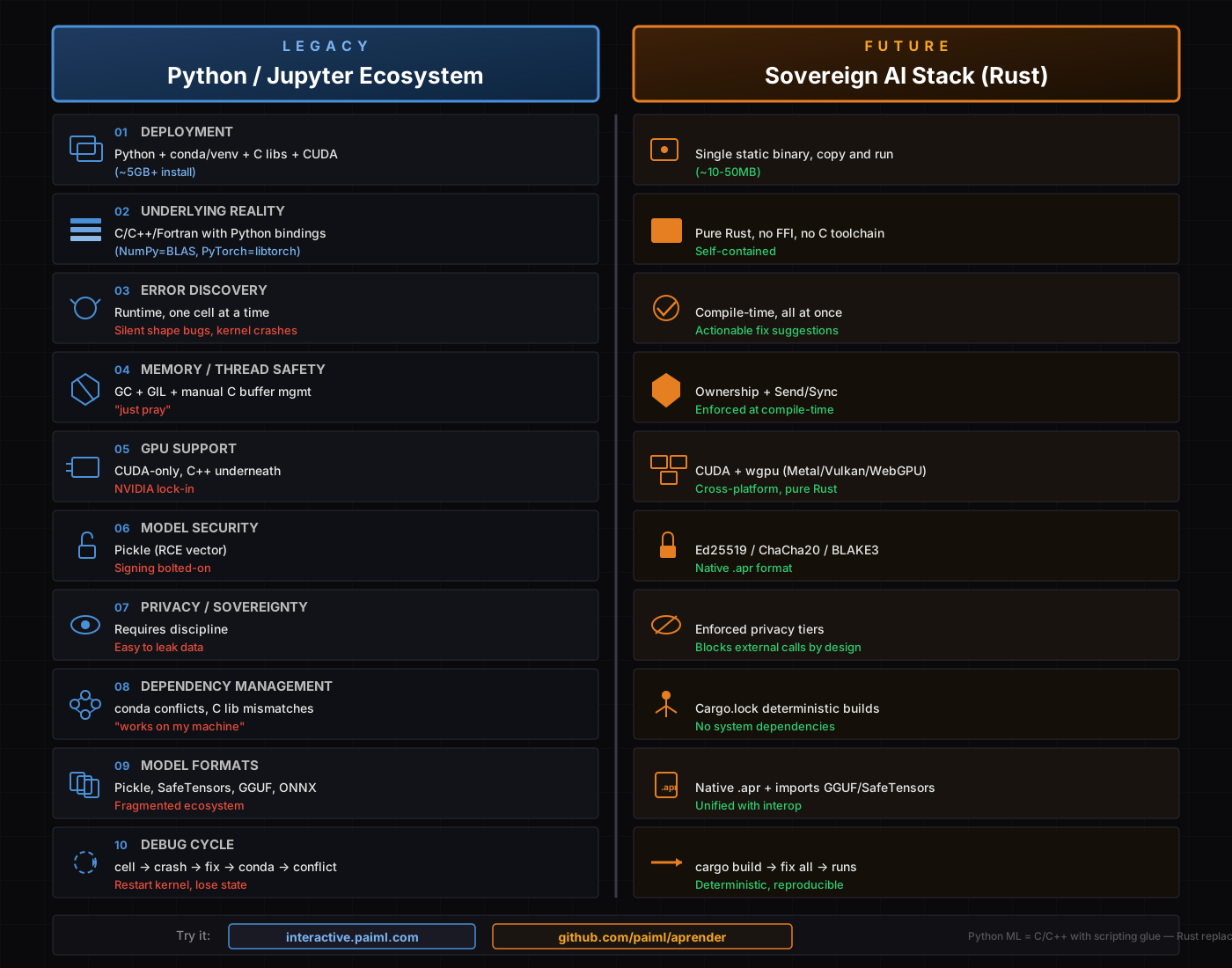
Executive Summary
The core insight: Python ML is actually a C/C++/Fortran stack with scripting glue. The PAIML ecosystem replaces the entire tower with pure Rust, delivering compile-time guarantees, single-binary deployment, cryptographic sovereignty, plus migration tooling to convert existing codebases.
| Trade-off | Python Wins | Rust Wins |
|---|---|---|
| Ecosystem breadth | ✓ Imports GGUF/SafeTensors/ONNX (500k+ HF models) | |
| Deployment simplicity | ✓ Single binary | |
| Correctness guarantees | ✓ Compile-time | |
| Security by design | ✓ Native crypto | |
| Edge/airgap deployment | ✓ Zero dependencies | |
| Migration path | ✓ Automated transpilers | |
| Python ecosystem familiarity | ✓ Existing skills/code |
Complete Ecosystem Architecture
┌─────────────────────────────────────────────────────────────────────────┐
│ MIGRATION LAYER │
│ ┌─────────┐ ┌─────────┐ ┌─────────┐ ┌─────────┐ ┌─────────────────┐ │
│ │ depyler │ │ decy │ │ bashrs │ │ ruchy │ │ New Rust-first │ │
│ │ Py→Rust │ │ C→Rust │ │ Rust→sh │ │ Scripting│ │ Scripting │ │
│ └─────────┘ └─────────┘ └─────────┘ └─────────┘ └─────────────────┘ │
└─────────────────────────────────────────────────────────────────────────┘
│
┌─────────────────────────────────────────────────────────────────────────┐
│ TOOLING LAYER │
│ ┌──────────────────┐ ┌──────────────────┐ ┌────────────────────────┐ │
│ │ pmcp (rust-mcp) │ │ pforge │ │ pmat │ │
│ │ MCP Protocol │ │ Declarative MCP │ │ Quality Analysis │ │
│ │ 16x faster │ │ YAML→Rust MCP │ │ TDG/Mutation/Lint │ │
│ └──────────────────┘ └──────────────────┘ └────────────────────────┘ │
└─────────────────────────────────────────────────────────────────────────┘
│
┌─────────────────────────────────────────────────────────────────────────┐
│ SOVEREIGN AI STACK │
│ ┌─────────────────────────────────────────────────────────────────────┐ │
│ │ batuta v0.1.3 │ │
│ │ Orchestration/CLI │ │
│ ├─────────────────────────────┬───────────────────────────────────────┤ │
│ │ realizar v0.2.2 │ pacha v0.1.1 │ │
│ │ GGUF/SafeTensor Inference │ Model Registry (Ed25519/ChaCha) │ │
│ ├─────────────────────────────┴───────────────────────────────────────┤ │
│ │ aprender v0.14.1 │ │
│ │ ML Algorithms: regression, trees, clustering, .apr │ │
│ ├─────────────────────────────────────────────────────────────────────┤ │
│ │ trueno v0.7.4 │ │
│ │ SIMD/GPU Compute: CUDA + wgpu (Metal/Vulkan) │ │
│ └─────────────────────────────────────────────────────────────────────┘ │
│ Pure Rust │ No FFI │ No C deps │ Single Binary │
└─────────────────────────────────────────────────────────────────────────┘
Layer 1: Sovereign AI Stack (ML Infrastructure)
Python/Jupyter Ecosystem
┌─────────────────────────────────────────┐
│ Python Scripts │ ← What you write
├─────────────────────────────────────────┤
│ NumPy │ Pandas │ sklearn │ PyTorch │ ← Python APIs
├─────────────────────────────────────────┤
│ BLAS/LAPACK │ libtorch │ cuDNN │ ← C/C++/Fortran
├─────────────────────────────────────────┤
│ CUDA Toolkit │ ← NVIDIA only
└─────────────────────────────────────────┘
Sovereign AI Stack (Rust)
┌─────────────────────────────────────────┐
│ batuta v0.1.3 │ ← Orchestration/CLI
├──────────────────┬──────────────────────┤
│ realizar v0.2.2 │ pacha v0.1.1 │ ← Inference │ Registry
├──────────────────┴──────────────────────┤
│ aprender v0.14.1 │ ← ML Algorithms
├─────────────────────────────────────────┤
│ trueno v0.7.4 │ ← SIMD/GPU Compute
└─────────────────────────────────────────┘
Pure Rust │ No FFI │ No C deps
Component Reference
| Layer | Python | Rust (Sovereign) | Function |
|---|---|---|---|
| Compute | NumPy, CuPy, JAX | trueno | SIMD/GPU primitives |
| ML Algos | scikit-learn, XGBoost | aprender | Classical ML |
| Inference | transformers, vLLM | realizar | Model serving |
| Registry | MLflow, HuggingFace Hub | pacha | Model management |
| Orchestration | Airflow, Ray, Kubeflow | batuta | Workflow coordination |
| Data Loading | pandas, Datasets | alimentar | ETL pipelines |
| Analytics DB | DuckDB, Polars | trueno-db | GPU-accelerated queries |
Model Import: Full HuggingFace Compatibility
The ecosystem breadth argument is eliminated. The Sovereign AI Stack imports all major model formats:
| Format | Source | Import Status |
|---|---|---|
| GGUF | llama.cpp, HuggingFace | ✓ Native via realizar |
| SafeTensors | HuggingFace standard | ✓ Native via realizar |
| ONNX | Cross-framework | ✓ Supported |
| PyTorch (.pt/.pth) | Convert to SafeTensors | ✓ Via conversion |
# Load any HuggingFace model
batuta pacha pull meta-llama/Llama-3-8B-Instruct-GGUF
batuta pacha pull mistralai/Mistral-7B-v0.1 # SafeTensors
# Convert and import with provenance
batuta pacha import model.safetensors --sign --encrypt
Result: Access to 500k+ HuggingFace models with single-binary deployment, no Python runtime.
Layer 2: Tooling (MCP & Quality)
pmcp (rust-mcp-sdk) — MCP Protocol Implementation
What it is: Production-grade Rust implementation of the Model Context Protocol (MCP), 16x faster than TypeScript.
| Feature | Specification |
|---|---|
| Performance | 16x faster than TypeScript SDK, 50x lower memory |
| Transports | stdio, HTTP/SSE, WebSocket, WASM |
| Auth | OAuth 2.0, Bearer tokens, OIDC discovery |
| Type Safety | Automatic JSON schema from Rust types |
| Quality | Toyota Way principles, zero unwrap() policy |
#![allow(unused)]
fn main() {
// Type-safe MCP server example
let server = ServerBuilder::new()
.name("weather-server")
.tool("get-weather", TypedTool::new(...))
.build()?;
server.run_stdio().await?;
}Links: github.com/paiml/rust-mcp-sdk | crates.io/crates/pmcp
pforge — Declarative MCP Framework
What it is: Define MCP servers in YAML instead of code. Built on pmcp.
forge:
name: my-server
version: 0.1.0
transport: stdio
tools:
- type: native
name: greet
description: "Greet someone"
handler:
path: handlers::greet_handler
params:
name: { type: string, required: true }
| Handler Type | Description |
|---|---|
| Native | Rust functions with full type safety |
| CLI | Execute shell commands |
| HTTP | Proxy HTTP endpoints |
| Pipeline | Chain multiple tools |
Links: github.com/paiml/pforge | paiml.github.io/pforge
pmat — Code Quality Analysis Toolkit
What it is: Zero-configuration AI context generation and code quality analysis for 17+ languages.
| Capability | Description |
|---|---|
| Context Generation | Deep analysis for Claude, GPT, LLMs |
| Technical Debt Grading | A+ through F scoring, 6 metrics |
| Mutation Testing | Test suite quality (85%+ kill rate target) |
| Repository Scoring | Health assessment (0-211 scale) |
| Semantic Search | Natural language code discovery |
| MCP Integration | 19 tools for AI agents |
# Generate AI-ready context
pmat context --output context.md --format llm-optimized
# Grade technical debt
pmat analyze tdg
# Run mutation testing
pmat mutate --target src/ --threshold 85
Links: github.com/paiml/paiml-mcp-agent-toolkit | crates.io/crates/pmat
Layer 3: Migration Transpilers
The Rust Migration Path
The PAIML ecosystem provides transpilers to migrate existing codebases to Rust:
┌─────────────────────────────────────────────────────────────────┐
│ MIGRATION SOURCES │
├────────────┬────────────┬────────────┬────────────┬─────────────┤
│ Python │ C │ Bash │ (New) │ Rust │
│ depyler │ decy │ bashrs │ ruchy │ (Target) │
│ ↓ │ ↓ │ ↓ │ ↓ │ │
│ .py │ .c │ .sh │ .ruchy │ .rs │
│ ↓ │ ↓ │ ↓ │ ↓ │ │
│ ══════════════════════════════════════════════════════════════ │
│ SAFE, IDIOMATIC RUST │
└─────────────────────────────────────────────────────────────────┘
depyler — Python to Rust Transpiler
What it is: Compiles Python to Rust with semantic verification and memory safety analysis.
| Feature | Details |
|---|---|
| Single-command compile | depyler compile script.py → native binary |
| Semantic verification | Property-based testing for equivalence |
| Type-directed | Uses Python annotations for Rust types |
| 27 stdlib modules | json, datetime, hashlib, etc. (100% validated) |
| MCP Integration | Available as MCP server for AI assistants |
# Compile Python to standalone binary
depyler compile script.py -o myapp
# Transpile with verification
depyler transpile example.py --verify
Python (example.py):
def fibonacci(n: int) -> int:
if n <= 1:
return n
return fibonacci(n - 1) + fibonacci(n - 2)
Rust (generated):
#![allow(unused)]
fn main() {
fn fibonacci(n: i32) -> i32 {
if n <= 1 {
return n;
}
fibonacci(n - 1) + fibonacci(n - 2)
}
}Links: github.com/paiml/depyler | crates.io/crates/depyler
decy — C to Rust Transpiler
What it is: Transpiles legacy C to safe, idiomatic Rust with minimal unsafe blocks.
| Feature | Details |
|---|---|
| Ownership inference | Converts pointers to &T, &mut T, Box, Vec |
| Lifetime inference | Automatic lifetime annotation |
| Unsafe minimization | 4-phase reduction: 100% → <5% unsafe |
| Project-level | decy transpile-project src/ with caching |
| Target projects | CPython, Git, SQLite, NumPy |
# Transpile single file
decy transpile input.c -o output.rs
# Transpile entire project
decy transpile-project src/ -o rust_output/
# Debug transpilation
decy debug --visualize-ownership input.c
Unsafe Reduction Pipeline:
- Phase 1: Pattern-based (100% → 50%) — malloc/free → Box
- Phase 2: Ownership inference (50% → 20%) — &T, &mut T
- Phase 3: Lifetime inference (20% → 10%)
- Phase 4: Safe wrappers (10% → <5%)
Links: github.com/paiml/decy
bashrs (rash) — Bidirectional Shell Safety Tool
What it is: Write shell scripts in Rust with automatic safety, OR purify legacy bash.
| Direction | Description |
|---|---|
| Rust → Shell | Write safe shell scripts in Rust syntax |
| Bash → Safe Shell | Purify messy bash to deterministic POSIX |
Automatic Safety Guarantees:
- Shell injection protection
- Word splitting prevention
- Glob expansion safety
- Idempotent operations
# Transpile Rust to shell
bashrs build install.rs -o install.sh
# Purify legacy bash
bashrs purify messy.sh -o clean.sh
# Lint shell scripts
bashrs lint script.sh
Before (messy bash):
SESSION_ID=$RANDOM # Non-deterministic
mkdir /app/releases/$RELEASE # Non-idempotent
After (purified):
session_id="session-${version}" # Deterministic
mkdir -p "/app/releases/${release}" # Idempotent
Links: github.com/paiml/bashrs | crates.io/crates/bashrs
ruchy — Rust-First Scripting Language
What it is: Modern scripting language that transpiles to Rust. Python expressiveness + Rust safety.
| Feature | Details |
|---|---|
| Self-hosting compiler | Written in Rust, full bootstrapping |
| Interactive REPL | Syntax highlighting, completion |
| WASM support | Browser and edge deployment |
| Notebook integration | Jupyter-style with testing |
| DataFrame support | 80% complete, 200K+ property tests |
| Zero unsafe | All generated code is thread-safe |
// Variables and functions
let x = 42
let name = "Ruchy"
println(f"Hello, {name}!")
fun add(a, b) {
a + b
}
// Pattern matching
match value {
Some(x) => println(f"Got {x}"),
None => println("Nothing"),
}
# Interactive REPL
ruchy
# Run script
ruchy script.ruchy
# Compile to binary
ruchy compile script.ruchy -o myapp
# Package management (Cargo integration)
ruchy new my_project
ruchy add serde tokio
Links: github.com/paiml/ruchy | crates.io/crates/ruchy
The 10-Point Comparison (Python vs Rust)
1. Deployment
| Python | Rust |
|---|---|
| Python runtime (~100MB) | Single static binary |
| conda/venv environment | (~10-50MB total) |
| pip dependencies (GB+ for ML) | No runtime needed |
| CUDA toolkit (~4GB) | Copy file, execute |
| cuDNN (~800MB) | |
| Dockerfile to wrangle it all |
Bottom line: ~5GB+ install vs ~50MB binary.
2. Underlying Reality
| Python | Rust |
|---|---|
| NumPy = BLAS/LAPACK (Fortran) | Pure Rust throughout |
| PyTorch = libtorch (C++) | No FFI boundaries |
| TensorFlow = C++ core | No C toolchain required |
| Python is the glue, not the engine | Self-contained |
Bottom line: You’re not really writing Python ML—you’re configuring C++.
3. Error Discovery
| Python/Jupyter | Rust |
|---|---|
| Runtime errors | Compile-time errors |
| One cell at a time | All errors at once |
| Silent shape mismatches | Type-checked dimensions |
| Stack trace dumps | Actionable fix suggestions |
| Kernel crashes lose state | Build fails safely |
Example:
# Python: runs, produces wrong result silently
result = model.predict(X.T) # Oops, transposed
#![allow(unused)]
fn main() {
// Rust: compile error with fix suggestion
error[E0308]: mismatched types
--> src/main.rs:12:18
|
12 | model.predict(&x)?;
| ^^ expected `Matrix<100, 10>`, found `Matrix<10, 100>`
|
help: consider using `x.transpose()`
}4. Memory & Thread Safety
| Python | Rust |
|---|---|
| Garbage collector | Ownership system |
| Global Interpreter Lock (GIL) | Send + Sync traits |
| Manual C buffer management | Compile-time enforcement |
| Data races possible | Data races impossible |
| “just pray” | Zero-cost abstractions |
Bottom line: Rust eliminates entire categories of bugs at compile time.
5. GPU Support
| Python | Rust |
|---|---|
| CUDA only | CUDA (when available) |
| NVIDIA hardware lock-in | wgpu backend |
| C++ underneath | Metal (Apple) |
| Complex driver dependencies | Vulkan (cross-platform) |
| WebGPU (browser) | |
| Pure Rust implementation |
Bottom line: Rust gives you CUDA performance where available, portable fallbacks elsewhere.
6. Model Security
| Python | Rust |
|---|---|
| Pickle (arbitrary code execution) | Ed25519 digital signatures |
| Signing is afterthought | ChaCha20-Poly1305 encryption |
| Trust-on-download | BLAKE3 content addressing |
| No provenance chain | Native .apr format |
| Cryptographic lineage |
Security primitives in .apr format:
- AES-256-GCM encryption at rest
- Ed25519 signatures for authenticity
- X25519 key exchange for distribution
- CRC32 checksums for integrity
- License blocks and watermarking
7. Privacy & Sovereignty
| Python | Rust |
|---|---|
| Requires discipline | Enforced by design |
| Easy to accidentally leak | Privacy tiers block calls |
| No built-in controls | Configurable per-deployment |
Privacy Tiers:
| Tier | Behavior | Use Case |
|---|---|---|
| Sovereign | Blocks ALL external APIs | Healthcare, Government |
| Private | VPC/dedicated endpoints only | Financial services |
| Standard | Public APIs allowed | General deployment |
#![allow(unused)]
fn main() {
let selector = BackendSelector::new()
.with_privacy(PrivacyTier::Sovereign);
// Only returns: Realizar, Ollama, LlamaCpp (local)
}8. Dependency Management
| Python | Rust |
|---|---|
| conda environment conflicts | Cargo.lock deterministic |
| C library version mismatches | Reproducible builds |
| “works on my machine” | No system dependencies |
| Diamond dependency hell | Semantic versioning enforced |
| Rebuild env from scratch regularly | Build once, run anywhere |
Python nightmare:
$ conda install pytorch
Solving environment: failed
Conflict: libstdc++ 11.2 vs 12.1
Rust reality:
$ cargo build --release
Compiling aprender v0.14.1
Finished release [optimized] target(s) in 45.32s
9. Model Formats
| Python | Rust |
|---|---|
| Pickle (unsafe, Python-only) | Native .apr format |
| SafeTensors | Imports SafeTensors ✓ |
| GGUF | Imports GGUF ✓ |
| ONNX | Imports ONNX ✓ |
| Fragmented, incompatible | Universal import + unified native format |
Key insight: The Sovereign AI Stack can load any model from HuggingFace via GGUF/SafeTensors import. You get access to 500k+ models WITHOUT the Python runtime.
.apr format capabilities:
- Memory-mapped loading (600x faster)
- Zero-copy deserialization
- Built-in Ed25519 signing & ChaCha20 encryption
- Compression (zstd)
- Commercial licensing blocks
- Buyer-specific watermarking
10. Debug Cycle
| Python/Jupyter | Rust |
|---|---|
| Run cell | cargo build |
| Crash | See all errors |
| Fix one error | Fix all errors |
| Run cell | cargo build |
| Different crash | Runs correctly |
| Fix again | |
| conda update breaks something | |
| Nuke environment | |
| Rebuild from scratch | |
| Maybe works now |
Typical Python session:
Cell 1: ✓
Cell 2: ✓
Cell 3: TypeError
Cell 4: Fixed → ✓
Cell 5: OOM, kernel died
Cell 6: Restart, re-run all, different error
Cell 7: Works locally, fails in prod
Typical Rust session:
$ cargo build
error[E0308]: 3 errors
$ # fix all three
$ cargo build
Finished
$ ./target/release/myapp
# Works. Same binary works everywhere.
Correctness Tooling Comparison
| Tool Type | Python | Rust |
|---|---|---|
| Linting | pylint, flake8 | clippy (built-in) |
| Type checking | mypy (optional, incomplete) | Compiler (mandatory, complete) |
| Property testing | hypothesis | proptest |
| Fuzz testing | atheris | cargo-fuzz |
| Mutation testing | mutmut | cargo-mutants |
| Memory checking | valgrind (external) | miri (built-in) |
| Thread sanitizer | external tools | Compiler prevents races |
Edge/Airgap Deployment
Python
# Package everything
docker build -t ml-app . # 4GB+ image
docker save ml-app > ml-app.tar
# Transfer 4GB to airgapped system
docker load < ml-app.tar
docker run ml-app
# Hope all dependencies resolve
Rust
cargo build --release --target x86_64-unknown-linux-musl
# Transfer 50MB binary
scp target/release/ml-app airgapped-host:
ssh airgapped-host ./ml-app
# Done. No runtime. No dependencies.
Complete Ecosystem Reference
ML Infrastructure (Sovereign AI Stack)
| Component | Version | Function | Replaces |
|---|---|---|---|
| trueno | 0.7.4 | SIMD/GPU compute | NumPy, CuPy |
| aprender | 0.14.1 | ML algorithms, .apr format | scikit-learn |
| realizar | 0.2.2 | GGUF/SafeTensor inference | transformers |
| pacha | 0.1.1 | Model registry (Ed25519/ChaCha) | MLflow, HF Hub |
| batuta | 0.1.3 | Orchestration/CLI | Airflow, Ray |
| alimentar | - | Data loading/ETL | pandas, Datasets |
| trueno-db | - | GPU analytics | DuckDB |
| trueno-graph | - | Code analysis | - |
| renacer | - | Syscall tracing | strace |
MCP & Tooling
| Component | Function | Key Feature |
|---|---|---|
| pmcp | MCP protocol SDK | 16x faster than TypeScript |
| pforge | Declarative MCP framework | YAML → Rust MCP servers |
Testing & Quality Analysis
| Component | Domain | Key Feature |
|---|---|---|
| pmat | Static analysis | TDG scoring, SATD detection, complexity |
| oip | Defect intelligence | ML classification, Tarantula SBFL |
| probar | Runtime testing | WASM coverage, visual regression, TUI testing |
Tool Responsibilities (non-overlapping):
┌─────────────────────────────────────────────────────────────────┐
│ pmat │ oip │ probar │
├────────────────┼─────────────────────┼──────────────────────────┤
│ SATD detect │ Fault localization │ Browser automation │
│ TDG scoring │ Defect ML │ Visual regression │
│ Complexity │ Commit classify │ WASM block coverage │
│ Dead code │ RAG enhancement │ Pixel heatmaps │
│ Duplicates │ Ensemble models │ TUI falsification │
└────────────────┴─────────────────────┴──────────────────────────┘
See Testing & Quality Ecosystem Spec for detailed comparison.
Migration Transpilers
| Component | Direction | Key Feature |
|---|---|---|
| depyler | Python → Rust | Semantic verification, 27 stdlib modules |
| decy | C → Rust | Ownership inference, <5% unsafe |
| bashrs | Rust → Shell / Bash → Safe Shell | Bidirectional, deterministic |
| ruchy | Ruchy → Rust | New scripting language, WASM |
When to Choose Each
Choose Python/Jupyter When:
- Rapid prototyping and exploration (notebook UX)
- Team already fluent in Python (existing skills)
- Research/experimentation phase (quick iteration)
- Using Python-only libraries with no Rust equivalent
Choose PAIML Ecosystem When:
- Production deployment at scale
- Edge/embedded/airgapped environments
- Regulatory compliance (healthcare, finance, government)
- Security and provenance are mandatory
- Deployment simplicity is priority
- Long-term maintainability matters
- Migrating existing Python/C/Bash codebases
- Using HuggingFace models (GGUF/SafeTensors import = full access)
Quick Start Commands
Sovereign AI Stack
cargo install batuta aprender
batuta analyze --languages --dependencies --tdg
batuta oracle "How do I serve a Llama model locally?"
MCP Tooling
cargo install pmcp pforge-cli pmat
# Build MCP server with pmcp
cargo pmcp new my-mcp-workspace
cargo pmcp dev --server myserver
# Declarative MCP with pforge
pforge new my-server && pforge serve
# Code quality with pmat
pmat context --output context.md
pmat analyze tdg
Testing & Quality Tools
# Static analysis with pmat
cargo install pmat
pmat quality-gate # Run all quality checks
pmat analyze tdg # Technical debt grade
pmat analyze satd # Self-admitted technical debt
# Defect intelligence with oip
cargo install oip
oip extract-training-data --repo . # Analyze git history
oip localize --passed-coverage passed.lcov --failed-coverage failed.lcov
# Runtime testing with probar
cargo add jugar-probar --dev
# See: https://crates.io/crates/jugar-probar
Migration Tools
# Python → Rust
cargo install depyler
depyler compile script.py -o myapp
# C → Rust
cargo install decy
decy transpile-project src/ -o rust_output/
# Safe shell scripts
cargo install bashrs
bashrs build install.rs -o install.sh
bashrs purify messy.sh -o clean.sh
# New Rust-first scripting
cargo install ruchy
ruchy compile script.ruchy -o myapp
Resources
| Resource | Link |
|---|---|
| Sovereign AI Stack | |
| Interactive Examples | interactive.paiml.com |
| Aprender (ML Library) | github.com/paiml/aprender |
| Batuta (Orchestration) | github.com/paiml/batuta |
| Trueno (Compute) | crates.io/crates/trueno |
| MCP & Tooling | |
| pmcp (MCP SDK) | github.com/paiml/rust-mcp-sdk |
| pforge (Declarative MCP) | github.com/paiml/pforge |
| pmat (Quality Toolkit) | github.com/paiml/paiml-mcp-agent-toolkit |
| Migration Tools | |
| depyler (Python→Rust) | github.com/paiml/depyler |
| decy (C→Rust) | github.com/paiml/decy |
| bashrs (Shell Safety) | github.com/paiml/bashrs |
| ruchy (Scripting) | github.com/paiml/ruchy |
Quality Standards Across Ecosystem
All PAIML projects follow Toyota Way principles:
| Standard | Target | Enforcement |
|---|---|---|
| Test Coverage | ≥80% | CI/pre-commit |
| Mutation Kill Rate | ≥80-90% | cargo-mutants |
| Clippy Warnings | 0 | CI blocking |
| Cyclomatic Complexity | ≤10 | PMAT gates |
| Technical Debt (SATD) | 0 | Zero TODO/FIXME |
| TDG Grade | A- minimum | PMAT scoring |
One-Liner Summary
Python ML is a C/C++ stack with scripting glue. The PAIML ecosystem replaces the entire tower with compile-time correctness, single-binary deployment, cryptographic sovereignty, access to ALL HuggingFace models via GGUF/SafeTensors import, and automated migration from Python, C, and Bash.
Navigate: Table of Contents
Appendix I: Roadmap
Current status of Sovereign AI Stack components, planned features, and community contribution areas.
Stack Component Status
| Component | Version | Maturity | Notes |
|---|---|---|---|
| trueno | 0.14.x | Stable | SIMD/GPU primitives |
| trueno-db | 0.3.x | Beta | GPU-first analytics DB |
| trueno-zram-core | 0.3.x | Beta | SIMD compression |
| repartir | 2.0.x | Stable | Distributed compute |
| aprender | 0.24.x | Stable | ML algorithms, APR v2 |
| entrenar | 0.5.x | Beta | Training, LoRA/QLoRA |
| realizar | 0.5.x | Beta | Inference engine |
| whisper-apr | 0.1.x | Alpha | Pure Rust Whisper ASR |
| simular | 0.1.x | Alpha | Simulation engine |
| jugar | 0.1.x | Alpha | Game engine |
| alimentar | 0.2.x | Beta | Parquet/Arrow loading |
| pacha | 0.2.x | Beta | Model registry |
| renacer | 0.9.x | Stable | Syscall tracing |
| batuta | 0.6.x | Beta | Orchestration |
Planned Features
Near-Term
| Feature | Component | Description |
|---|---|---|
| Plugin API | batuta | Custom transpiler plugins |
| ONNX import | realizar | Direct ONNX model loading |
| WebGPU compute | trueno | Browser GPU acceleration |
Medium-Term (3-6 Months)
| Feature | Component | Description |
|---|---|---|
| Go transpiler | batuta | Go to Rust transpilation |
| Model merge | entrenar | TIES/DARE/SLERP strategies |
| Speculative decoding | realizar | Draft model acceleration |
Long-Term (6-12 Months)
| Feature | Component | Description |
|---|---|---|
| Self-hosted training | entrenar | Full training without Python |
| Federated learning | entrenar + repartir | Privacy-preserving distributed training |
Community Contribution Areas
| Level | Areas |
|---|---|
| Beginner | Docs, Oracle recipes, test coverage, clippy fixes |
| Intermediate | Dependency mappings, benchmarks, ARM SIMD, WASM compat |
| Advanced | Transpiler plugins, GPU kernels, distributed strategies |
Version Policy
Components follow semver. Targeting 1.0 requires: 95%+ coverage, stable API, complete docs.
batuta stack versions # Check current versions
make stack-outdated # Find outdated deps
Navigate: Table of Contents
Contributing Guide
Thank you for your interest in contributing to Batuta!
Getting Started
Prerequisites
- Rust 1.75+ (stable)
- Git
- Cargo
Clone and Build
git clone https://github.com/paiml/batuta.git
cd batuta
cargo build
cargo test
Development Workflow
Branch Strategy
All work happens on main branch. No feature branches.
Quality Gates
Before committing, ensure:
# Format code
cargo fmt
# Run lints
cargo clippy -- -D warnings
# Run tests
cargo test
# Check demo-score (must be A- or higher)
pmat demo-score
Commit Messages
Follow conventional commits:
type(scope): description
- feat: New feature
- fix: Bug fix
- docs: Documentation
- refactor: Code refactoring
- test: Tests
- chore: Maintenance
Example:
feat(stack): Add diagnostics module
- Add anomaly detection
- Add graph metrics
- Add dashboard rendering
(Refs STACK-DIAG)
Code Style
Rust Guidelines
- Use
rustfmtdefaults - No
unwrap()in library code (use?orexpect()with message) - Document public APIs with doc comments
- Add tests for new functionality
Documentation
- Update book chapters for new features
- Keep README current
- Add examples for complex features
Testing
Test Categories
# Unit tests
cargo test --lib
# Integration tests
cargo test --test '*'
# Examples
cargo run --example <name>
Quality Metrics
- Coverage: 85%+ target
- Mutation score: 80%+ target
- Demo score: A- (85) minimum
Pull Requests
- Ensure all quality gates pass
- Update documentation
- Add tests for new code
- Reference issue/ticket in commit
Questions?
- Open an issue on GitHub
- Check existing documentation
Navigate: Table of Contents
License
Batuta is licensed under the MIT License.
MIT License
MIT License
Copyright (c) 2024 Pragmatic AI Labs
Permission is hereby granted, free of charge, to any person obtaining a copy
of this software and associated documentation files (the "Software"), to deal
in the Software without restriction, including without limitation the rights
to use, copy, modify, merge, publish, distribute, sublicense, and/or sell
copies of the Software, and to permit persons to whom the Software is
furnished to do so, subject to the following conditions:
The above copyright notice and this permission notice shall be included in all
copies or substantial portions of the Software.
THE SOFTWARE IS PROVIDED "AS IS", WITHOUT WARRANTY OF ANY KIND, EXPRESS OR
IMPLIED, INCLUDING BUT NOT LIMITED TO THE WARRANTIES OF MERCHANTABILITY,
FITNESS FOR A PARTICULAR PURPOSE AND NONINFRINGEMENT. IN NO EVENT SHALL THE
AUTHORS OR COPYRIGHT HOLDERS BE LIABLE FOR ANY CLAIM, DAMAGES OR OTHER
LIABILITY, WHETHER IN AN ACTION OF CONTRACT, TORT OR OTHERWISE, ARISING FROM,
OUT OF OR IN CONNECTION WITH THE SOFTWARE OR THE USE OR OTHER DEALINGS IN THE
SOFTWARE.
What This Means
You are free to:
- Use Batuta commercially
- Modify the source code
- Distribute copies
- Include in proprietary software
You must:
- Include the license in copies
- Include the copyright notice
Third-Party Licenses
Batuta depends on various open-source libraries. See Cargo.toml for the full list. All dependencies use permissive licenses (MIT, Apache-2.0, BSD).
Stack Component Licenses
| Component | License |
|---|---|
| Trueno | MIT |
| Aprender | MIT |
| Realizar | MIT |
| Depyler | MIT |
| Batuta | MIT |
| All PAIML crates | MIT |
Navigate: Table of Contents