Duende: Cross-Platform Daemon Framework
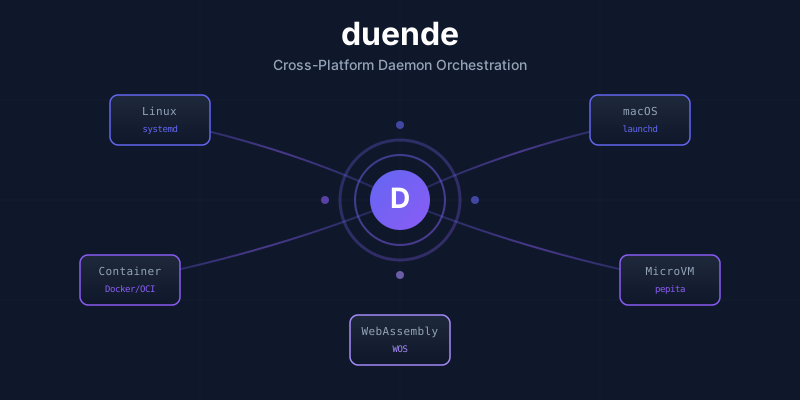
Duende is a cross-platform daemon tooling framework for the PAIML Sovereign AI Stack. It provides a unified abstraction for daemon lifecycle management across:
- Linux (systemd) - Transient units via
systemd-run - macOS (launchd) - Plist files via
launchctl - Containers (Docker/Podman/containerd) - OCI runtime management
- MicroVMs (pepita) - Lightweight VMs with vsock communication
- WebAssembly OS (WOS) - 8-level priority scheduler
Project Status
| Metric | Value |
|---|---|
| Tests | 872 passing |
| Coverage | 91.53% |
| Platforms | 6/6 implemented |
| Falsification Tests | F001-F110 (110 tests) |
Why Duende?
Managing daemons across different platforms is complex. Each platform has its own:
- Service management (systemd units, launchd plists, container specs)
- Signal handling conventions
- Resource limits and cgroups
- Health check mechanisms
- Logging and observability
Duende provides a single Rust trait that works everywhere:
#![allow(unused)]
fn main() {
use duende_core::{
    Daemon, DaemonConfig, DaemonContext, DaemonId,
    DaemonMetrics, ExitReason, HealthStatus, DaemonError
};
use async_trait::async_trait;
use std::time::Duration;

struct MyDaemon {
    id: DaemonId,
    metrics: DaemonMetrics,
}

#[async_trait]
impl Daemon for MyDaemon {
    fn id(&self) -> DaemonId { self.id }
    fn name(&self) -> &str { "my-daemon" }

    async fn init(&mut self, config: &DaemonConfig) -> Result<(), DaemonError> {
        // Setup resources, validate config
        Ok(())
    }

    async fn run(&mut self, ctx: &mut DaemonContext) -> Result<ExitReason, DaemonError> {
        while !ctx.should_shutdown() {
            // Do work...
            tokio::time::sleep(Duration::from_secs(1)).await;
        }
        Ok(ExitReason::Graceful)
    }

    async fn shutdown(&mut self, timeout: Duration) -> Result<(), DaemonError> {
        // Cleanup
        Ok(())
    }

    async fn health_check(&self) -> HealthStatus {
        HealthStatus::healthy(5)
    }

    fn metrics(&self) -> &DaemonMetrics {
        &self.metrics
    }
}
}
Architecture
┌─────────────────────────────────────────────────────────────────┐
│                         Application                              │
├─────────────────────────────────────────────────────────────────┤
│                        duende-core                               │
│  ┌─────────────┐  ┌──────────────┐  ┌────────────────────────┐  │
│  │   Daemon    │  │ DaemonManager│  │    PlatformAdapter     │  │
│  │   Trait     │  │              │  │                        │  │
│  └─────────────┘  └──────────────┘  └────────────────────────┘  │
├─────────────────────────────────────────────────────────────────┤
│  Native │ Systemd │ Launchd │ Container │ Pepita │    WOS      │
│ (tokio) │ (Linux) │ (macOS) │(Docker/OCI)│(MicroVM)│ (WASM)    │
└─────────────────────────────────────────────────────────────────┘
Design Principles
Duende follows the Iron Lotus Framework (Toyota Production System for Software):
| Principle | Application |
|---|---|
| Jidoka | Stop-on-error, no panics in production code |
| Poka-Yoke | Type-safe APIs prevent misuse |
| Heijunka | Load leveling via circuit breakers |
| Muda | Zero-waste resource allocation |
| Kaizen | Continuous metrics (RED method) |
| Genchi Genbutsu | Direct observation via syscall tracing |
Crate Overview
| Crate | Tests | Purpose |
|---|---|---|
duende-core | 352 | Daemon trait, manager, platform adapters |
duende-mlock | 44 | mlockall() for swap safety (DT-007) |
duende-observe | 78 | /proc monitoring, syscall tracing |
duende-platform | 40 | Platform detection, memory helpers |
duende-policy | 62 | Circuit breaker, jidoka, cgroups |
duende-test | 45 | Test harness, chaos injection |
duende-ublk | 45 | ublk device lifecycle, orphan cleanup |
Quick Start
# Add to your project
cargo add duende-core

# Run the example daemon
cargo run --example daemon

# Run the mlock example
cargo run --example mlock
Or add to your Cargo.toml:
[dependencies]
duende-core = "0.1"
duende-platform = "0.1"
async-trait = "0.1"
tokio = { version = "1", features = ["rt-multi-thread", "time", "signal"] }
See Getting Started for a complete walkthrough.
Getting Started
Installation
Add duende to your Cargo.toml:
[dependencies]
duende-core = "0.1"
duende-platform = "0.1"
async-trait = "0.1"
tokio = { version = "1", features = ["rt-multi-thread", "sync", "time", "signal"] }
Your First Daemon
Here's a minimal daemon implementation:
use async_trait::async_trait;
use duende_core::{
    Daemon, DaemonConfig, DaemonContext, DaemonId, DaemonMetrics,
    ExitReason, HealthStatus, Result,
};
use std::time::Duration;

struct MyDaemon {
    id: DaemonId,
    metrics: DaemonMetrics,
}

impl MyDaemon {
    fn new() -> Self {
        Self {
            id: DaemonId::new(),
            metrics: DaemonMetrics::new(),
        }
    }
}

#[async_trait]
impl Daemon for MyDaemon {
    fn id(&self) -> DaemonId {
        self.id
    }

    fn name(&self) -> &str {
        "my-daemon"
    }

    async fn init(&mut self, config: &DaemonConfig) -> Result<()> {
        // Apply resource configuration (including mlock if enabled)
        duende_platform::apply_memory_config(&config.resources)?;

        // Your initialization code here
        println!("Daemon initialized");
        Ok(())
    }

    async fn run(&mut self, ctx: &mut DaemonContext) -> Result<ExitReason> {
        println!("Daemon running");

        loop {
            // Check for shutdown signal
            if ctx.should_shutdown() {
                return Ok(ExitReason::Graceful);
            }

            // Check for other signals
            if let Some(signal) = ctx.try_recv_signal() {
                println!("Received signal: {:?}", signal);
            }

            // Do your work here
            self.metrics.record_request();

            tokio::time::sleep(Duration::from_secs(1)).await;
        }
    }

    async fn shutdown(&mut self, _timeout: Duration) -> Result<()> {
        println!("Daemon shutting down");
        Ok(())
    }

    async fn health_check(&self) -> HealthStatus {
        HealthStatus::healthy(5)
    }

    fn metrics(&self) -> &DaemonMetrics {
        &self.metrics
    }
}

#[tokio::main]
async fn main() -> Result<()> {
    let mut daemon = MyDaemon::new();
    let config = DaemonConfig::new("my-daemon", "/usr/bin/my-daemon");

    daemon.init(&config).await?;

    let (mut ctx, _handle) = DaemonContext::new(config);
    let exit = daemon.run(&mut ctx).await?;

    println!("Daemon exited: {:?}", exit);
    Ok(())
}
Platform-Specific Setup
Linux (systemd)
Create a systemd unit file at /etc/systemd/system/my-daemon.service:
[Unit]
Description=My Daemon
After=network.target

[Service]
Type=simple
ExecStart=/usr/bin/my-daemon
Restart=on-failure
# For swap device daemons:
AmbientCapabilities=CAP_IPC_LOCK
LimitMEMLOCK=infinity

[Install]
WantedBy=multi-user.target
Container
FROM rust:1.83 AS builder
WORKDIR /app
COPY . .
RUN cargo build --release

FROM debian:bookworm-slim
COPY --from=builder /app/target/release/my-daemon /usr/bin/
CMD ["/usr/bin/my-daemon"]
Run with:
docker run --cap-add=IPC_LOCK --ulimit memlock=-1:-1 my-daemon
Next Steps
- Daemon Lifecycle - Understanding the lifecycle phases
- Configuration - Full configuration options
- Memory Locking - Critical for swap device daemons
Daemon Lifecycle
Duende daemons follow a well-defined lifecycle based on Toyota Production System principles.
Lifecycle Phases
┌──────────────────────────────────────────────────────────┐
│                    DAEMON LIFECYCLE                       │
├──────────────────────────────────────────────────────────┤
│                                                          │
│    ┌─────────┐     ┌─────────┐     ┌──────────┐         │
│    │  INIT   │────▶│   RUN   │────▶│ SHUTDOWN │         │
│    └─────────┘     └─────────┘     └──────────┘         │
│         │               │                │               │
│         │               │                │               │
│    Poka-Yoke       Heijunka         Jidoka              │
│    (Fail Fast)   (Level Load)   (Stop Clean)            │
│                                                          │
└──────────────────────────────────────────────────────────┘
Init Phase
The init method is called once before run. It should:
- Validate configuration (Poka-Yoke: fail fast on misconfiguration)
- Allocate resources (memory, file handles)
- Open connections (databases, network)
- Apply resource limits (mlock, cgroups)
#![allow(unused)]
fn main() {
async fn init(&mut self, config: &DaemonConfig) -> Result<()> {
    // Apply memory locking if configured
    apply_memory_config(&config.resources)?;

    // Validate configuration
    config.validate()?;

    // Open database connection
    self.db = Database::connect(&config.db_url).await?;

    Ok(())
}
}
Target duration: < 100ms for most platforms.
Run Phase
The run method contains the main execution loop. It should:
- Check for shutdown via
ctx.should_shutdown() - Handle signals via
ctx.recv_signal() - Process work with load leveling (Heijunka)
- Update metrics for observability
#![allow(unused)]
fn main() {
async fn run(&mut self, ctx: &mut DaemonContext) -> Result<ExitReason> {
    loop {
        if ctx.should_shutdown() {
            return Ok(ExitReason::Graceful);
        }

        // Handle signals
        if let Some(signal) = ctx.try_recv_signal() {
            match signal {
                Signal::Hup => self.reload_config().await?,
                Signal::Usr1 => self.dump_stats(),
                _ => {}
            }
        }

        // Process work
        self.process_next_item().await?;
        self.metrics.record_request();
    }
}
}
Shutdown Phase
The shutdown method is called when the daemon receives a termination signal. It should:
- Stop accepting new work
- Complete in-flight work (within timeout)
- Close connections
- Flush buffers
- Release resources
#![allow(unused)]
fn main() {
async fn shutdown(&mut self, timeout: Duration) -> Result<()> {
    // Stop accepting new work
    self.accepting = false;

    // Wait for in-flight work (with timeout)
    tokio::time::timeout(timeout, self.drain_queue()).await?;

    // Close database connection
    self.db.close().await?;

    Ok(())
}
}
Signal Handling
Duende handles the following signals:
| Signal | Action |
|---|---|
SIGTERM | Graceful shutdown (sets should_shutdown = true) |
SIGINT | Graceful shutdown |
SIGQUIT | Graceful shutdown |
SIGHUP | Reload configuration (custom handler) |
SIGUSR1 | Custom action |
SIGUSR2 | Custom action |
SIGSTOP | Pause daemon |
SIGCONT | Resume daemon |
Health Checks
The health_check method is called periodically by the platform adapter:
#![allow(unused)]
fn main() {
async fn health_check(&self) -> HealthStatus {
    if self.db.is_connected() {
        HealthStatus::healthy(5)
    } else {
        HealthStatus::unhealthy("Database disconnected")
    }
}
}
Configuration
Duende uses a structured configuration system with sensible defaults and validation.
DaemonConfig
The main configuration structure:
#![allow(unused)]
fn main() {
pub struct DaemonConfig {
    pub name: String,              // Daemon identifier
    pub version: String,           // Version (semver)
    pub description: String,       // Human-readable description
    pub binary_path: PathBuf,      // Path to daemon binary
    pub config_path: Option<PathBuf>,
    pub args: Vec<String>,         // Command-line arguments
    pub env: HashMap<String, String>, // Environment variables
    pub user: Option<String>,      // Unix user
    pub group: Option<String>,     // Unix group
    pub working_dir: Option<PathBuf>,
    pub resources: ResourceConfig, // Resource limits
    pub health_check: HealthCheckConfig,
    pub restart: RestartPolicy,
    pub shutdown_timeout: Duration,
    pub platform: PlatformConfig,
}
}
ResourceConfig
Resource limits including memory locking:
#![allow(unused)]
fn main() {
pub struct ResourceConfig {
    pub memory_bytes: u64,         // Memory limit (default: 512MB)
    pub memory_swap_bytes: u64,    // Memory + swap limit (default: 1GB)
    pub cpu_quota_percent: f64,    // CPU quota (default: 100%)
    pub cpu_shares: u64,           // CPU shares (default: 1024)
    pub io_read_bps: u64,          // I/O read limit
    pub io_write_bps: u64,         // I/O write limit
    pub pids_max: u64,             // Max processes (default: 100)
    pub open_files_max: u64,       // Max FDs (default: 1024)
    pub lock_memory: bool,         // Enable mlock (default: false)
    pub lock_memory_required: bool, // Fail if mlock fails (default: false)
}
}
TOML Configuration
Load configuration from a TOML file:
name = "my-daemon"
version = "1.0.0"
description = "My awesome daemon"
binary_path = "/usr/bin/my-daemon"

[resources]
memory_bytes = 536870912  # 512MB
cpu_quota_percent = 200.0  # 2 cores
lock_memory = true
lock_memory_required = true

[health_check]
enabled = true
interval = "30s"
timeout = "10s"
retries = 3

[restart]
policy = "on-failure"

[platform]
# Linux-specific
# container_image = "my-daemon:latest"
Load in code:
#![allow(unused)]
fn main() {
let config = DaemonConfig::load("daemon.toml")?;
config.validate()?;
}
Restart Policies
| Policy | Behavior |
|---|---|
never | Never restart |
on-failure | Restart only on non-zero exit |
always | Always restart |
unless-stopped | Restart unless manually stopped |
See DaemonManager for advanced restart policies with backoff.
Platform Adapters
Duende supports multiple platforms through the PlatformAdapter trait. All 6 adapters are fully implemented.
Supported Platforms
| Platform | Adapter | Status | Falsification |
|---|---|---|---|
| Native | NativeAdapter | Complete | cargo run --example daemon |
| Linux (systemd) | SystemdAdapter | Complete | systemctl --user status duende-* |
| macOS (launchd) | LaunchdAdapter | Complete | launchctl list | grep duende |
| Container | ContainerAdapter | Complete | docker ps | grep duende |
| pepita (MicroVM) | PepitaAdapter | Complete | pepita list | grep duende-vm |
| WOS | WosAdapter | Complete | wos-ctl ps | grep duende |
Platform Detection
#![allow(unused)]
fn main() {
use duende_core::platform::{detect_platform, Platform};

let platform = detect_platform();
match platform {
    Platform::Linux => println!("Running on Linux (systemd)"),
    Platform::MacOS => println!("Running on macOS (launchd)"),
    Platform::Container => println!("Running in container"),
    Platform::PepitaMicroVM => println!("Running in pepita microVM"),
    Platform::Wos => println!("Running on WOS"),
    Platform::Native => println!("Native fallback"),
}
}
Automatic Adapter Selection
#![allow(unused)]
fn main() {
use duende_core::adapters::select_adapter;
use duende_core::platform::detect_platform;

// Auto-detect platform and get appropriate adapter
let platform = detect_platform();
let adapter = select_adapter(platform);

// Use the adapter
let handle = adapter.spawn(Box::new(my_daemon)).await?;
}
PlatformAdapter Trait
All adapters implement this trait:
#![allow(unused)]
fn main() {
#[async_trait]
pub trait PlatformAdapter: Send + Sync {
    /// Returns the platform this adapter handles
    fn platform(&self) -> Platform;

    /// Spawns a daemon and returns a handle
    async fn spawn(&self, daemon: Box<dyn Daemon>) -> PlatformResult<DaemonHandle>;

    /// Sends a signal to the daemon
    async fn signal(&self, handle: &DaemonHandle, sig: Signal) -> PlatformResult<()>;

    /// Returns current daemon status
    async fn status(&self, handle: &DaemonHandle) -> PlatformResult<DaemonStatus>;

    /// Attaches a tracer for syscall monitoring
    async fn attach_tracer(&self, handle: &DaemonHandle) -> PlatformResult<TracerHandle>;
}
}
Supported Signals
#![allow(unused)]
fn main() {
pub enum Signal {
    Term,   // SIGTERM (15) - graceful shutdown
    Kill,   // SIGKILL (9)  - force kill
    Int,    // SIGINT (2)   - interrupt
    Quit,   // SIGQUIT (3)  - quit with core dump
    Hup,    // SIGHUP (1)   - reload config
    Usr1,   // SIGUSR1 (10) - user-defined
    Usr2,   // SIGUSR2 (12) - user-defined
    Stop,   // SIGSTOP (19) - pause
    Cont,   // SIGCONT (18) - resume
}
}
Native Adapter
The NativeAdapter is the fallback for all platforms. It spawns daemons as regular OS processes using tokio::process:
#![allow(unused)]
fn main() {
use duende_core::adapters::NativeAdapter;
use duende_core::types::Signal;

let adapter = NativeAdapter::new();
let handle = adapter.spawn(Box::new(my_daemon)).await?;

// Check status
let status = adapter.status(&handle).await?;
println!("Status: {:?}", status);

// Send graceful shutdown
adapter.signal(&handle, Signal::Term).await?;
}
Handle Types
Each adapter returns platform-specific handle data:
#![allow(unused)]
fn main() {
pub enum HandleData {
    Native { pid: u32 },
    Systemd { unit_name: String },
    Launchd { label: String },
    Container { runtime: String, container_id: String },
    Pepita { vm_id: String, vsock_cid: u32 },
    Wos { pid: u32 },
}
}
Error Handling
All adapter operations return PlatformResult<T>:
#![allow(unused)]
fn main() {
pub enum PlatformError {
    SpawnFailed(String),
    SignalFailed(String),
    StatusFailed(String),
    TracerFailed(String),
    NotSupported(String),
    Config(String),
}
}
Linux (systemd) Adapter
The SystemdAdapter manages daemons as systemd transient units on Linux systems.
Features
- Transient units via
systemd-run(no unit files needed) - User and system mode support
- Signal forwarding via
systemctl kill - Status queries via
systemctl is-active - Journal logging integration
Usage
#![allow(unused)]
fn main() {
use duende_core::adapters::SystemdAdapter;
use duende_core::types::Signal;

// User mode (default) - no root required
let adapter = SystemdAdapter::new();

// System mode - requires root
let adapter = SystemdAdapter::system();

// Spawn daemon as transient unit
let handle = adapter.spawn(Box::new(my_daemon)).await?;
println!("Unit: {}", handle.systemd_unit().unwrap());

// Check status
let status = adapter.status(&handle).await?;

// Send signal
adapter.signal(&handle, Signal::Term).await?;
}
How It Works
- Spawn: Runs
systemd-run --user --unit=duende-<name>-<uuid> <binary> - Signal: Runs
systemctl --user kill --signal=<sig> <unit> - Status: Runs
systemctl --user is-active <unit> - Cleanup: Unit is transient - removed when process exits
Verification
# List duende units
systemctl --user list-units 'duende-*'

# Check specific unit
systemctl --user status duende-my-daemon-abc123

# View logs
journalctl --user -u duende-my-daemon-abc123
mlock Requirements
For swap device daemons (DT-007), grant memory locking capability:
# Via setcap (preferred)
sudo setcap cap_ipc_lock+ep /usr/bin/my-daemon

# Or via systemd unit override
systemctl --user edit duende-my-daemon
# Add:
# [Service]
# AmbientCapabilities=CAP_IPC_LOCK
# LimitMEMLOCK=infinity
Platform Detection
The adapter is automatically selected when:
- Running on Linux
- Not in a container
- systemd is the init system
#![allow(unused)]
fn main() {
use duende_core::platform::detect_platform;
use duende_core::adapters::select_adapter;

let platform = detect_platform();  // Returns Platform::Linux
let adapter = select_adapter(platform);  // Returns SystemdAdapter
}
Requirements
- Linux with systemd 232+
systemd-runandsystemctlin PATH- User session (user mode) or root (system mode)
macOS (launchd) Adapter
The LaunchdAdapter manages daemons via launchd plist files on macOS.
Features
- Plist file generation in
~/Library/LaunchAgents/ - Bootstrap/bootout via
launchctl - Signal forwarding via
launchctl kill - Status queries via
launchctl list - User and system domain support
Usage
#![allow(unused)]
fn main() {
use duende_core::adapters::LaunchdAdapter;
use duende_core::types::Signal;

// User domain (default)
let adapter = LaunchdAdapter::new();

// System domain - requires root
let adapter = LaunchdAdapter::system();

// Spawn daemon
let handle = adapter.spawn(Box::new(my_daemon)).await?;
println!("Label: {}", handle.launchd_label().unwrap());

// Check status
let status = adapter.status(&handle).await?;

// Send signal
adapter.signal(&handle, Signal::Term).await?;
}
How It Works
- Spawn:
- Writes plist to
~/Library/LaunchAgents/com.duende.<name>.plist - Runs
launchctl bootstrap gui/<uid> <plist>
- Writes plist to
- Signal: Runs
launchctl kill <sig> gui/<uid>/com.duende.<name> - Status: Runs
launchctl list com.duende.<name> - Stop: Runs
launchctl bootout gui/<uid>/com.duende.<name>
Generated Plist
<?xml version="1.0" encoding="UTF-8"?>
<!DOCTYPE plist PUBLIC "-//Apple//DTD PLIST 1.0//EN"
  "http://www.apple.com/DTDs/PropertyList-1.0.dtd">
<plist version="1.0">
<dict>
    <key>Label</key>
    <string>com.duende.my-daemon</string>
    <key>ProgramArguments</key>
    <array>
        <string>/usr/local/bin/my-daemon</string>
    </array>
    <key>RunAtLoad</key>
    <false/>
    <key>KeepAlive</key>
    <false/>
</dict>
</plist>
Verification
# List duende services
launchctl list | grep duende

# Check specific service
launchctl list com.duende.my-daemon

# View logs
log show --predicate 'subsystem == "com.duende.my-daemon"' --last 1h
Platform Detection
The adapter is automatically selected on macOS:
#![allow(unused)]
fn main() {
use duende_core::platform::detect_platform;
use duende_core::adapters::select_adapter;

let platform = detect_platform();  // Returns Platform::MacOS
let adapter = select_adapter(platform);  // Returns LaunchdAdapter
}
Requirements
- macOS 10.10+
launchctlin PATH- Write access to
~/Library/LaunchAgents/
Container Adapter
The ContainerAdapter manages daemons in Docker, Podman, or containerd containers.
Features
- Docker, Podman, and containerd runtime support
- Container lifecycle management
- Signal forwarding via
docker/podman kill - Status queries via container inspect
- Automatic runtime detection
Usage
#![allow(unused)]
fn main() {
use duende_core::adapters::ContainerAdapter;
use duende_core::types::Signal;

// Auto-detect runtime (Docker > Podman > containerd)
let adapter = ContainerAdapter::new();

// Explicit runtime selection
let adapter = ContainerAdapter::docker();
let adapter = ContainerAdapter::podman();
let adapter = ContainerAdapter::containerd();

// With custom default image
let adapter = ContainerAdapter::with_image("my-daemon:latest");

// Spawn daemon in container
let handle = adapter.spawn(Box::new(my_daemon)).await?;
println!("Container: {}", handle.container_id().unwrap());

// Check status
let status = adapter.status(&handle).await?;

// Send signal
adapter.signal(&handle, Signal::Term).await?;
}
How It Works
Docker/Podman
- Spawn:
docker run -d --name duende-<name> <image> - Signal:
docker kill --signal=<sig> <container> - Status:
docker inspect --format='{{.State.Status}}' <container> - Stop:
docker stop <container> && docker rm <container>
containerd
- Spawn:
ctr run -d <image> duende-<name> - Signal:
ctr task kill --signal <sig> duende-<name> - Status:
ctr task ls | grep duende-<name> - Stop:
ctr task kill duende-<name> && ctr container rm duende-<name>
Verification
# Docker
docker ps | grep duende
docker logs duende-my-daemon

# Podman
podman ps | grep duende
podman logs duende-my-daemon

# containerd
ctr task ls | grep duende
ctr task logs duende-my-daemon
mlock in Containers
For swap device daemons (DT-007), memory locking requires special container flags:
# Docker/Podman
docker run --cap-add=IPC_LOCK --ulimit memlock=-1:-1 my-daemon

# Or in docker-compose.yml
services:
  my-daemon:
    image: my-daemon:latest
    cap_add:
      - IPC_LOCK
    ulimits:
      memlock:
        soft: -1
        hard: -1
Platform Detection
The adapter is selected when running inside a container:
#![allow(unused)]
fn main() {
use duende_core::platform::detect_platform;
use duende_core::adapters::select_adapter;

let platform = detect_platform();  // Returns Platform::Container
let adapter = select_adapter(platform);  // Returns ContainerAdapter
}
Container detection checks:
/.dockerenvfile exists/run/.containerenvfile existscontainerenvironment variable set- cgroup indicates container runtime
Requirements
- Docker, Podman, or containerd installed and running
- CLI tools (
docker,podman, orctr) in PATH - Appropriate permissions to manage containers
pepita (MicroVM) Adapter
The PepitaAdapter manages daemons in lightweight microVMs via the pepita VMM.
Features
- MicroVM lifecycle management via
pepitaCLI - Vsock communication for host-guest IPC
- KVM-based virtualization
- Memory isolation per daemon
- Fast startup times
Usage
#![allow(unused)]
fn main() {
use duende_core::adapters::PepitaAdapter;
use duende_core::types::Signal;

// Default adapter
let adapter = PepitaAdapter::new();

// With custom vsock port
let adapter = PepitaAdapter::with_vsock_port(9000);

// With kernel and rootfs images
let adapter = PepitaAdapter::with_images(
    "/boot/vmlinuz",
    "/var/lib/pepita/rootfs.img"
);

// Spawn daemon in microVM
let handle = adapter.spawn(Box::new(my_daemon)).await?;
println!("VM ID: {}", handle.pepita_vm_id().unwrap());
println!("Vsock CID: {}", handle.vsock_cid().unwrap());

// Check status
let status = adapter.status(&handle).await?;

// Send signal
adapter.signal(&handle, Signal::Term).await?;

// Destroy VM
adapter.destroy(handle.pepita_vm_id().unwrap()).await?;
}
How It Works
- Spawn:
- Allocates vsock CID
- Runs
pepita run --kernel <path> --rootfs <path> --vsock-cid <cid> --name duende-vm-<name>
- Signal: Runs
pepita signal --name <vm_id> --signal <sig> - Status: Runs
pepita status --name <vm_id> --json - Destroy: Runs
pepita destroy --name <vm_id> --force
Architecture
Host                          MicroVM
┌─────────────────┐          ┌─────────────────┐
│  PepitaAdapter  │          │  pepita guest   │
│  ┌───────────┐  │  vsock   │  ┌───────────┐  │
│  │ VmManager ├──┼──────────┼──┤ DaemonCtl │  │
│  └───────────┘  │          │  └───────────┘  │
└─────────────────┘          └─────────────────┘
Verification
# List duende VMs
pepita list | grep duende-vm

# Check specific VM
pepita status --name duende-vm-my-daemon

# View VM logs
pepita logs --name duende-vm-my-daemon
Requirements
- Linux with KVM support (
/dev/kvm) - pepita VMM installed
- Kernel and rootfs images configured
pepitaCLI in PATH
Platform Detection
The adapter is selected when:
- Running inside a pepita microVM
PEPITA_VSOCK_CIDenvironment variable set
#![allow(unused)]
fn main() {
use duende_core::platform::detect_platform;
use duende_core::adapters::select_adapter;

let platform = detect_platform();  // Returns Platform::PepitaMicroVM
let adapter = select_adapter(platform);  // Returns PepitaAdapter
}
Configuration
[platform.pepita]
vcpus = 2
memory_mb = 256
kernel_path = "/boot/vmlinuz"
rootfs_path = "/var/lib/pepita/rootfs.ext4"
vsock_base_port = 5000
WOS (WebAssembly OS) Adapter
The WosAdapter manages daemons as WebAssembly processes in WOS (WebAssembly Operating System).
Features
- Process lifecycle management via
wos-ctlCLI - 8-level priority scheduler (0-7)
- WebAssembly module isolation
- Capability-based security
- Message-passing IPC
Priority Levels
| Level | Name | Use Case |
|---|---|---|
| 0 | Critical | Kernel tasks, watchdogs |
| 1 | High | System services |
| 2 | Above Normal | Important daemons |
| 3 | Normal+ | User services with boost |
| 4 | Normal | Default for daemons |
| 5 | Below Normal | Background tasks |
| 6 | Low | Batch processing |
| 7 | Idle | Only when system idle |
Usage
#![allow(unused)]
fn main() {
use duende_core::adapters::WosAdapter;
use duende_core::types::Signal;

// Default adapter (priority 4 - Normal)
let adapter = WosAdapter::new();

// With custom priority
let adapter = WosAdapter::with_priority(2);  // Above Normal

// Spawn daemon as WOS process
let handle = adapter.spawn(Box::new(my_daemon)).await?;
println!("WOS PID: {}", handle.wos_pid().unwrap());

// Check status
let status = adapter.status(&handle).await?;

// Send signal
adapter.signal(&handle, Signal::Term).await?;
}
How It Works
- Spawn:
- Allocates PID (starts at 2, PID 1 is init)
- Runs
wos-ctl spawn --name <name> --priority <level> --wasm <path>
- Signal: Runs
wos-ctl kill --pid <pid> --signal <sig> - Status: Runs
wos-ctl status --pid <pid> --json - Terminate: Runs
wos-ctl terminate --pid <pid>
Architecture
WOS Kernel
┌───────────────────────────────────────────┐
│  ┌─────────────┐    ┌─────────────────┐   │
│  │  Scheduler  │    │  Process Table  │   │
│  │  (8-level)  │    │                 │   │
│  └─────────────┘    └─────────────────┘   │
│         │                    │            │
│         ▼                    ▼            │
│  ┌─────────────────────────────────────┐  │
│  │         WASM Runtime                │  │
│  │  ┌───────┐ ┌───────┐ ┌───────┐     │  │
│  │  │ PID 1 │ │ PID 2 │ │ PID 3 │ ... │  │
│  │  │ init  │ │daemon1│ │daemon2│     │  │
│  │  └───────┘ └───────┘ └───────┘     │  │
│  └─────────────────────────────────────┘  │
└───────────────────────────────────────────┘
Verification
# List duende processes
wos-ctl ps | grep duende

# Check specific process
wos-ctl status --pid 42

# View process logs
wos-ctl logs --pid 42
Requirements
- WOS runtime installed
wos-ctlCLI in PATH- WebAssembly module compiled for WASI
Platform Detection
The adapter is selected when:
- Running inside WOS environment
WOS_VERSIONenvironment variable set
#![allow(unused)]
fn main() {
use duende_core::platform::detect_platform;
use duende_core::adapters::select_adapter;

let platform = detect_platform();  // Returns Platform::Wos
let adapter = select_adapter(platform);  // Returns WosAdapter
}
Configuration
[platform.wos]
priority = 4  # 0-7, default is 4 (Normal)
capabilities = ["net", "fs:read"]
Memory Locking (mlock)
DT-007: Swap Deadlock Prevention
Memory locking is CRITICAL for daemons that serve as swap devices. Without it, your daemon can deadlock under memory pressure.
The Problem
When a daemon serves as a swap device (e.g., trueno-ublk), a deadly cycle can occur:
┌─────────────────────────────────────────────────────────────┐
│                    DEADLOCK SCENARIO                        │
├─────────────────────────────────────────────────────────────┤
│  1. Kernel needs to swap pages OUT to daemon's device       │
│                           ↓                                 │
│  2. Daemon needs memory to process I/O request              │
│                           ↓                                 │
│  3. Kernel tries to swap OUT daemon's pages to free memory  │
│                           ↓                                 │
│  4. Swap request goes to... the same daemon                 │
│                           ↓                                 │
│  5. Daemon waiting for itself → DEADLOCK                    │
└─────────────────────────────────────────────────────────────┘
Real-World Evidence
Kernel log from 2026-01-06 stress test:
INFO: task trueno-ublk:59497 blocked for more than 122 seconds.
task:trueno-ublk state:D (uninterruptible sleep)
__swap_writepage+0x111/0x1a0
swap_writepage+0x5f/0xe0
The Solution
Use mlockall(MCL_CURRENT | MCL_FUTURE) to pin all daemon memory, preventing it from ever being swapped out.
Configuration
Via ResourceConfig
#![allow(unused)]
fn main() {
use duende_core::ResourceConfig;
use duende_platform::apply_memory_config;

let mut config = ResourceConfig::default();
config.lock_memory = true;           // Enable mlock
config.lock_memory_required = true;  // Fail if mlock fails

// Apply during daemon initialization
apply_memory_config(&config)?;
}
Via TOML
[resources]
lock_memory = true
lock_memory_required = true
Direct API
#![allow(unused)]
fn main() {
use duende_platform::{lock_daemon_memory, MlockResult};

match lock_daemon_memory(true) {  // true = required
    Ok(MlockResult::Success) => println!("Memory locked"),
    Ok(MlockResult::Failed(errno)) => println!("Failed: {}", errno),
    Err(e) => panic!("Fatal: {}", e),
}
}
Running the Example
# Basic test
cargo run -p duende-platform --example mlock

# With mlock required (fails without privileges)
cargo run -p duende-platform --example mlock -- --required

# Check current status
cargo run -p duende-platform --example mlock -- --status
Container Configuration
Containers require special configuration for mlock.
Docker
# Minimum required
docker run --cap-add=IPC_LOCK your-image

# Recommended (unlimited memlock)
docker run --cap-add=IPC_LOCK --ulimit memlock=-1:-1 your-image
Docker Compose
version: '3.8'
services:
  trueno-ublk:
    image: your-image
    cap_add:
      - IPC_LOCK
    ulimits:
      memlock:
        soft: -1
        hard: -1
Kubernetes
apiVersion: v1
kind: Pod
spec:
  containers:
  - name: daemon
    securityContext:
      capabilities:
        add:
        - IPC_LOCK
Capability Requirements
mlock requires one of:
| Method | Notes |
|---|---|
CAP_IPC_LOCK | Preferred - grants mlock capability |
| Root privileges | Works but not recommended |
Sufficient RLIMIT_MEMLOCK | Default is often 64KB-8MB |
Checking Capabilities
# In container
cat /proc/self/status | grep Cap

# Check CAP_IPC_LOCK specifically (bit 14)
# CapEff: 00000000a80465fb  (bit 14 set = has IPC_LOCK)
# CapEff: 00000000a80425fb  (bit 14 not set)
API Reference
lock_daemon_memory(required: bool)
Locks all current and future memory allocations.
Arguments:
required: Iftrue, returnsErron failure. Iffalse, returnsOk(MlockResult::Failed).
Returns:
Ok(MlockResult::Success)- Memory locked successfullyOk(MlockResult::Failed(errno))- Failed but continuing (whenrequired=false)Ok(MlockResult::Disabled)- Platform doesn't support mlockErr(PlatformError)- Failed andrequired=true
is_memory_locked()
Checks if memory is currently locked by reading /proc/self/status.
#![allow(unused)]
fn main() {
if is_memory_locked() {
    println!("Memory is locked");
}
}
apply_memory_config(config: &ResourceConfig)
Convenience function that checks config.lock_memory and calls lock_daemon_memory if enabled.
#![allow(unused)]
fn main() {
let config = ResourceConfig {
    lock_memory: true,
    lock_memory_required: true,
    ..Default::default()
};

apply_memory_config(&config)?;
}
Testing
Docker Test Suite
cd duende
./docker/test-mlock.sh --build
This runs mlock tests across different privilege configurations:
| Test | Expected Result |
|---|---|
| No capabilities | Fails with EPERM (or succeeds if within ulimit) |
| With CAP_IPC_LOCK | Succeeds |
| With unlimited memlock | Succeeds |
| Privileged container | Succeeds |
Unit Tests
cargo test -p duende-platform memory
Troubleshooting
mlock fails with EPERM
Cause: Missing CAP_IPC_LOCK capability.
Solution:
# Docker
docker run --cap-add=IPC_LOCK ...

# Native Linux
sudo setcap cap_ipc_lock+ep ./your-daemon
mlock fails with ENOMEM
Cause: Memlock ulimit exhausted.
Solution:
# Docker
docker run --ulimit memlock=-1:-1 ...

# Native Linux
ulimit -l unlimited
Memory locked but daemon still deadlocks
Possible causes:
- Container memory limit too restrictive
- Swap enabled for container
- cgroup memory controller limiting
Solution:
# Disable swap for container
docker run --memory=2g --memory-swap=2g ...
Security Considerations
CAP_IPC_LOCKallows locking arbitrary amounts of memory- This can impact host performance if abused
- In production, set reasonable memlock limits
- Monitor daemon memory usage for leaks
Resource Limits
Duende provides resource limiting through ResourceConfig.
Memory Limits
[resources]
memory_bytes = 536870912      # 512MB hard limit
memory_swap_bytes = 1073741824 # 1GB memory+swap
CPU Limits
[resources]
cpu_quota_percent = 200.0  # 2 cores (200%)
cpu_shares = 1024          # Relative weight
I/O Limits
[resources]
io_read_bps = 104857600   # 100MB/s read
io_write_bps = 52428800   # 50MB/s write
Process Limits
[resources]
pids_max = 100        # Max child processes
open_files_max = 1024 # Max file descriptors
Memory Locking
See Memory Locking (mlock) for details.
[resources]
lock_memory = true
lock_memory_required = true
Health Checks
Duende supports periodic health checks for monitoring daemon status.
Configuration
[health_check]
enabled = true
interval = "30s"  # Check every 30 seconds
timeout = "10s"   # Timeout for each check
retries = 3       # Failures before unhealthy
Implementation
#![allow(unused)]
fn main() {
async fn health_check(&self) -> HealthStatus {
    // Check dependencies
    if !self.db.is_connected() {
        return HealthStatus::unhealthy("Database disconnected");
    }

    // Check internal state
    if self.queue.len() > 10000 {
        return HealthStatus::degraded("Queue backlog");
    }

    // Return healthy with score
    HealthStatus::healthy(5)
}
}
Health Status
| Status | Meaning |
|---|---|
Healthy(score) | Operating normally, score 0-5 |
Degraded(reason) | Working but impaired |
Unhealthy(reason) | Not functioning properly |
Observability
Duende integrates with the PAIML observability stack.
Metrics
RED method metrics are collected automatically:
- Rate: Requests per second
- Errors: Error rate
- Duration: Request latency
#![allow(unused)]
fn main() {
fn metrics(&self) -> &DaemonMetrics {
    &self.metrics
}
}
Tracing
Integration with renacer for syscall tracing:
#![allow(unused)]
fn main() {
let tracer_handle = adapter.attach_tracer(&daemon_handle).await?;
}
Logging
Structured logging with tracing:
#![allow(unused)]
fn main() {
use tracing::{info, warn, error};

info!(pid = %process.id(), "Daemon started");
warn!(queue_depth = %depth, "Queue backlog detected");
error!(error = %e, "Failed to process request");
}
API Reference
duende-core
Core types and traits for daemon implementation.
Daemon Trait
#![allow(unused)]
fn main() {
#[async_trait]
pub trait Daemon: Send + Sync + 'static {
    fn id(&self) -> DaemonId;
    fn name(&self) -> &str;
    async fn init(&mut self, config: &DaemonConfig) -> Result<()>;
    async fn run(&mut self, ctx: &mut DaemonContext) -> Result<ExitReason>;
    async fn shutdown(&mut self, timeout: Duration) -> Result<()>;
    async fn health_check(&self) -> HealthStatus;
    fn metrics(&self) -> &DaemonMetrics;
}
}
DaemonManager
Orchestrates multiple daemons with restart policies.
See the source documentation for full API details.
duende-platform
Platform-specific adapters and memory management.
Memory Locking
#![allow(unused)]
fn main() {
pub fn lock_daemon_memory(required: bool) -> Result<MlockResult>;
pub fn is_memory_locked() -> bool;
pub fn apply_memory_config(config: &ResourceConfig) -> Result<()>;
}
Platform Detection
#![allow(unused)]
fn main() {
pub fn detect_platform() -> Platform;
}
Examples
Duende includes two runnable examples demonstrating daemon lifecycle and memory locking.
Running Examples
# Daemon lifecycle example (runs until Ctrl+C)
cargo run --example daemon

# Daemon with memory locking
cargo run --example daemon -- --mlock

# Memory locking example (demonstrates DT-007)
cargo run --example mlock

# Memory locking with required flag (fails without CAP_IPC_LOCK)
cargo run --example mlock -- --required

# Check memory lock status
cargo run --example mlock -- --status
Daemon Example
The daemon example demonstrates a complete daemon lifecycle with:
- Initialization with resource configuration
- Main loop with graceful shutdown via Ctrl+C
- Health checks and metrics
- Memory locking support (DT-007)
$ cargo run --example daemon
╔════════════════════════════════════════════════════════════╗
║              DUENDE DAEMON EXAMPLE                         ║
╠════════════════════════════════════════════════════════════╣
║  Framework: Duende (Cross-Platform Daemon Tooling)         ║
║  Iron Lotus: Toyota Production System for Software         ║
╚════════════════════════════════════════════════════════════╝

[INIT] Daemon 'counter-daemon' initializing...
[INIT] Binary: "/usr/bin/counter-daemon"
[INIT] Initialization complete
[HEALTH] Status: HEALTHY

[RUN] Daemon starting main loop...
[RUN] Press Ctrl+C to stop
[RUN] Count: 1 | Uptime: 0.0s | Rate: 27340.33/s | Memory locked: NO
[RUN] Count: 2 | Uptime: 1.0s | Rate: 2.00/s | Memory locked: NO
...
Command Line Options
| Option | Description |
|---|---|
--mlock | Lock memory to prevent swap (requires CAP_IPC_LOCK) |
--foreground | Run in foreground mode |
--help | Show help |
Memory Locking Example
Demonstrates DT-007: Swap Deadlock Prevention - critical for daemons serving as swap devices.
$ cargo run --example mlock
=== duende mlock Example ===
DT-007: Swap Deadlock Prevention

Method 1: Direct lock_daemon_memory() call
  required = false
  Result: SUCCESS - All memory locked
  VmLck: 6012 KB

Method 2: Using apply_memory_config()
  lock_memory = true
  lock_memory_required = false
  Result: SUCCESS
  VmLck: 6012 KB

=== Example Complete ===

For production use in containers:
  docker run --cap-add=IPC_LOCK --ulimit memlock=-1:-1 ...
Why Memory Locking Matters
Without memory locking, a swap-device daemon can deadlock:
- Kernel needs to swap pages OUT to the daemon's device
- Daemon needs memory to process I/O request
- Kernel tries to swap out daemon's pages to free memory
- Swap goes to the same daemon → DEADLOCK
Docker Testing
# Build and run mlock tests
./docker/test-mlock.sh --build

# Run individual tests
docker run --rm duende-mlock-test
docker run --rm --cap-add=IPC_LOCK duende-mlock-test
docker run --rm --cap-add=IPC_LOCK --ulimit memlock=-1:-1 duende-mlock-test

# Run daemon example with memory locking
docker run --rm -it --cap-add=IPC_LOCK \
    -v $(pwd):/app -w /app rust:1.83 \
    cargo run --example daemon -- --mlock
Example Code
Complete Daemon Implementation
#![allow(unused)]
fn main() {
use std::sync::atomic::{AtomicBool, AtomicU64, Ordering};
use std::sync::Arc;
use std::time::{Duration, Instant};

use async_trait::async_trait;
use duende_core::{
    Daemon, DaemonConfig, DaemonContext, DaemonId, DaemonMetrics,
    ExitReason, HealthStatus,
};

struct CounterDaemon {
    id: DaemonId,
    name: String,
    metrics: DaemonMetrics,
    counter: Arc<AtomicU64>,
    running: Arc<AtomicBool>,
}

#[async_trait]
impl Daemon for CounterDaemon {
    fn id(&self) -> DaemonId { self.id }
    fn name(&self) -> &str { &self.name }

    async fn init(&mut self, config: &DaemonConfig) -> Result<()> {
        self.running.store(true, Ordering::SeqCst);
        Ok(())
    }

    async fn run(&mut self, ctx: &mut DaemonContext) -> Result<ExitReason> {
        while !ctx.should_shutdown() {
            let count = self.counter.fetch_add(1, Ordering::Relaxed) + 1;
            self.metrics.record_request();
            tokio::time::sleep(Duration::from_secs(1)).await;
        }
        Ok(ExitReason::Graceful)
    }

    async fn shutdown(&mut self, timeout: Duration) -> Result<()> {
        self.running.store(false, Ordering::SeqCst);
        Ok(())
    }

    async fn health_check(&self) -> HealthStatus {
        if self.running.load(Ordering::Relaxed) {
            HealthStatus::healthy(1)
        } else {
            HealthStatus::unhealthy("Not running", 0)
        }
    }

    fn metrics(&self) -> &DaemonMetrics { &self.metrics }
}
}
Swap Device Daemon
For daemons that serve as swap devices (like trueno-ublk):
#![allow(unused)]
fn main() {
use duende_platform::{apply_memory_config, lock_daemon_memory, MlockResult};

async fn init(&mut self, config: &DaemonConfig) -> Result<()> {
    // CRITICAL: Lock memory before any allocations
    let mut resources = config.resources.clone();
    resources.lock_memory = true;
    resources.lock_memory_required = true;  // Fail if mlock unavailable
    apply_memory_config(&resources)?;

    // Rest of initialization...
    Ok(())
}
}
Direct Memory Locking
#![allow(unused)]
fn main() {
use duende_platform::{lock_daemon_memory, is_memory_locked, MlockResult};

match lock_daemon_memory(false) {
    Ok(MlockResult::Success) => {
        println!("Memory locked: {}", is_memory_locked());
    }
    Ok(MlockResult::Failed(errno)) => {
        println!("Failed (errno={}), continuing", errno);
    }
    Ok(MlockResult::Disabled) => {
        println!("Platform doesn't support mlock");
    }
    Err(e) => {
        // Only happens when required=true
        return Err(e);
    }
}
}
Troubleshooting
mlock Issues
EPERM: Operation not permitted
Cause: Missing CAP_IPC_LOCK capability.
Solution:
# Docker
docker run --cap-add=IPC_LOCK ...

# systemd
AmbientCapabilities=CAP_IPC_LOCK

# setcap
sudo setcap cap_ipc_lock+ep /usr/bin/my-daemon
ENOMEM: Cannot allocate memory
Cause: Memlock ulimit exceeded.
Solution:
# Docker
docker run --ulimit memlock=-1:-1 ...

# systemd
LimitMEMLOCK=infinity

# shell
ulimit -l unlimited
Container Issues
Daemon deadlocks under memory pressure
Cause: Memory not locked, daemon pages being swapped.
Solution:
docker run --cap-add=IPC_LOCK --ulimit memlock=-1:-1 ...
See Memory Locking for full details.
General Issues
Daemon fails to start
- Check logs:
journalctl -u my-daemon - Verify configuration:
my-daemon --check-config - Check permissions on binary and config files
- Verify resource limits are reasonable
High memory usage
- Check for memory leaks with
heaptrackorvalgrind - Review
VmRSSin/proc/<pid>/status - Ensure mlock is not locking more than needed
Toyota Production System Principles
Duende is designed around Toyota Production System (TPS) principles.
Jidoka (自働化) - Autonomation
Stop on error, don't propagate defects.
In duende:
- Daemons stop cleanly on fatal errors
- Health checks detect problems early
- Restart policies handle recovery
Poka-Yoke (ポカヨケ) - Error Prevention
Design systems to prevent errors.
In duende:
- Configuration validation at load time
- Type-safe APIs prevent misuse
- Feature gates prevent platform mismatches
Heijunka (平準化) - Load Leveling
Smooth out workload variations.
In duende:
- Resource limits prevent overload
- Backoff policies for restarts
- Queue management in daemon loops
Muda (無駄) - Waste Elimination
Eliminate unnecessary resource usage.
In duende:
- Circuit breakers prevent wasted retries
- Memory limits prevent runaway allocation
- Efficient signal handling
Kaizen (改善) - Continuous Improvement
Measure, analyze, improve.
In duende:
- RED metrics collection
- Health check scoring
- Observability integration
Genchi Genbutsu (現地現物) - Go and See
Direct observation of reality.
In duende:
renacersyscall tracing- Process state monitoring
- Real-time metrics
Iron Lotus Framework
The Iron Lotus Framework is PAIML's application of TPS principles to software.
Core Tenets
- No Panics - Explicit error handling everywhere
- No Unwrap - All errors must be handled
- Traceable - All operations traceable to syscalls
- Measured - Continuous metrics collection
Clippy Configuration
[workspace.lints.clippy]
unwrap_used = "deny"
expect_used = "deny"
panic = "deny"
todo = "deny"
unimplemented = "deny"
Error Handling
All functions that can fail return Result:
#![allow(unused)]
fn main() {
pub fn do_something() -> Result<Output, Error> {
    // ...
}
}
Syscall Tracing
Integration with renacer for syscall tracing:
#![allow(unused)]
fn main() {
let tracer = adapter.attach_tracer(&handle).await?;
// All daemon syscalls are now traced
}
Stack Integration
Iron Lotus principles are applied across the PAIML Sovereign AI Stack:
trueno- SIMD/GPU compute primitivesaprender- ML algorithmsrealizar- Inference engineduende- Daemon frameworkrenacer- Syscall tracing