GUI Coverage
Probar Principle: Complete UX verification with minimal boilerplate
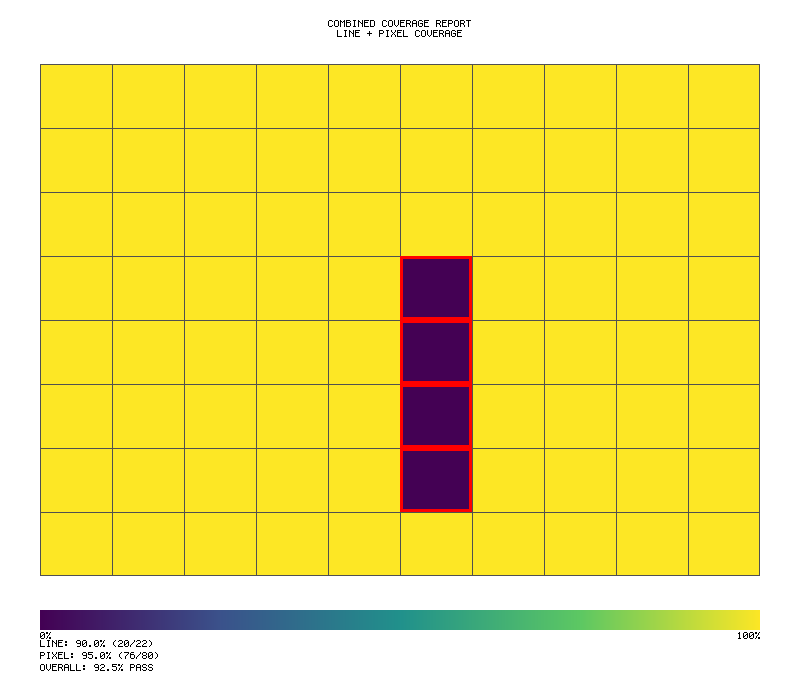
Track 100% user experience coverage for your GUI applications. Probar's GUI coverage is designed to be trivially simple - define what needs testing, run your tests, get a percentage.
Coverage Flow
┌─────────────────────────────────────────────────────────────────┐
│                     GUI COVERAGE TRACKING                        │
├─────────────────────────────────────────────────────────────────┤
│                                                                   │
│  ┌───────────────────────────────────────────────────────────┐   │
│  │                   Define Elements                          │   │
│  │  gui_coverage! {                                           │   │
│  │      buttons: ["start", "pause", "quit"],                 │   │
│  │      screens: ["title", "playing", "game_over"]           │   │
│  │  }                                                         │   │
│  └───────────────────────────────────────────────────────────┘   │
│                              │                                   │
│                              ▼                                   │
│  ┌───────────────────────────────────────────────────────────┐   │
│  │                   Run Tests                                │   │
│  │  ┌─────────┐  ┌─────────┐  ┌─────────┐  ┌─────────┐       │   │
│  │  │ click() │  │ visit() │  │ input() │  │ modal() │       │   │
│  │  └────┬────┘  └────┬────┘  └────┬────┘  └────┬────┘       │   │
│  │       └───────────┬┴───────────┴──────────────┘           │   │
│  │                   ▼                                        │   │
│  │           ┌───────────────┐                                │   │
│  │           │  Tracker      │                                │   │
│  │           │ ☑ start       │                                │   │
│  │           │ ☐ pause       │                                │   │
│  │           │ ☐ quit        │                                │   │
│  │           │ ☑ title       │                                │   │
│  │           │ ☐ playing     │                                │   │
│  │           └───────────────┘                                │   │
│  └───────────────────────────────────────────────────────────┘   │
│                              │                                   │
│                              ▼                                   │
│  ┌───────────────────────────────────────────────────────────┐   │
│  │                   Get Results                              │   │
│  │  gui.summary()  →  "GUI: 33% (1/3 elements, 1/3 screens)" │   │
│  │  gui.meets(80)  →  false                                  │   │
│  └───────────────────────────────────────────────────────────┘   │
│                                                                   │
└─────────────────────────────────────────────────────────────────┘
Quick Start
The simplest way to track GUI coverage:
#![allow(unused)]
fn main() {
use probar::gui_coverage;

// Define what needs testing (one line!)
let mut gui = gui_coverage! {
    buttons: ["start", "pause", "quit"],
    screens: ["title", "playing", "game_over"]
};

// Record interactions during tests
gui.click("start");
gui.visit("title");

// Get coverage - one line!
println!("{}", gui.summary());  // "GUI: 33% (1/3 elements, 1/3 screens)"
assert!(gui.meets(80.0));       // Fail if below 80%
}
Why GUI Coverage?
Traditional code coverage tells you which lines of code executed. But for GUI applications, you also need to know:
- Were all buttons tested?
- Were all screens visited?
- Were all user interactions exercised?
Probar's GUI coverage answers these questions with a simple percentage.
The gui_coverage! Macro
The easiest way to define coverage requirements:
#![allow(unused)]
fn main() {
use probar::gui_coverage;

let mut gui = gui_coverage! {
    buttons: ["save", "cancel", "delete"],
    inputs: ["username", "password"],
    screens: ["login", "dashboard", "settings"],
    modals: ["confirm_delete", "success"]
};
}
Supported Element Types
| Type | What it tracks |
|---|---|
buttons | Click interactions |
inputs | Focus, input, and blur events |
screens | Screen/page visits |
modals | Modal dialog visits |
Simple API Methods
Once you have a tracker, use these simple methods:
Recording Interactions
#![allow(unused)]
fn main() {
gui.click("button_id");      // Record button click
gui.input("field_id");       // Record input field interaction
gui.visit("screen_name");    // Record screen visit
gui.visit_modal("modal_id"); // Record modal visit
}
Checking Coverage
#![allow(unused)]
fn main() {
gui.percent()          // Get coverage as 0-100
gui.meets(95.0)        // Check if meets threshold
gui.is_complete()      // Check if 100%
gui.summary()          // One-line summary string
gui.generate_report()  // Detailed report
}
Pre-built Presets
Calculator Applications
#![allow(unused)]
fn main() {
use probar::calculator_coverage;

let mut gui = calculator_coverage();
// Includes: btn-0 through btn-9, btn-plus, btn-minus, etc.
// Plus screens: calculator, history
}
Game Applications
#![allow(unused)]
fn main() {
use probar::game_coverage;

let mut gui = game_coverage(
    &["start", "pause", "restart", "quit"],
    &["title", "playing", "paused", "game_over"]
);
}
Builder Pattern
For custom coverage requirements:
#![allow(unused)]
fn main() {
use probar::UxCoverageBuilder;

let mut gui = UxCoverageBuilder::new()
    .button("submit")
    .button("cancel")
    .input("email")
    .input("password")
    .screen("login")
    .screen("dashboard")
    .modal("confirm")
    .build();
}
Integration with Test Drivers
With WasmDriver
#![allow(unused)]
fn main() {
use probar::{gui_coverage, UxCoverageTracker};
use showcase_calculator::prelude::WasmDriver;

#[test]
fn test_calculator_gui_coverage() {
    let mut gui = gui_coverage! {
        buttons: ["btn-7", "btn-times", "btn-6", "btn-equals"],
        screens: ["calculator"]
    };

    let mut driver = WasmDriver::new();

    // Test: 7 * 6 = 42
    driver.type_input("7 * 6");
    gui.click("btn-7");
    gui.click("btn-times");
    gui.click("btn-6");

    driver.click_equals();
    gui.click("btn-equals");

    gui.visit("calculator");

    assert_eq!(driver.get_result(), "42");
    assert!(gui.is_complete());
}
}
With TuiDriver
#![allow(unused)]
fn main() {
#[test]
fn test_tui_gui_coverage() {
    let mut gui = gui_coverage! {
        buttons: ["calculate", "clear"],
        screens: ["main", "help"]
    };

    let mut driver = TuiDriver::new();

    // Run TUI tests
    driver.send_input("2 + 2");
    gui.click("calculate");

    driver.press_key(KeyCode::Char('?'));
    gui.visit("help");

    println!("{}", gui.summary());
}
}
User Journey Tracking
Track sequences of user actions:
#![allow(unused)]
fn main() {
let mut tracker = UxCoverageTracker::new();
tracker.register_screen("home");
tracker.register_screen("products");
tracker.register_screen("cart");
tracker.register_screen("checkout");

// Journey 1: Complete purchase
tracker.visit("home");
tracker.visit("products");
tracker.visit("cart");
tracker.visit("checkout");
tracker.end_journey();

// Journey 2: Browse only
tracker.visit("home");
tracker.visit("products");
tracker.end_journey();

println!("Journeys: {}", tracker.journeys().len()); // 2
}
Detailed Reports
Get comprehensive coverage information:
#![allow(unused)]
fn main() {
let report = gui.generate_report();
println!("{}", report);
}
Output:
UX Coverage Report
==================
Overall Coverage: 85.0%
Element Coverage: 90.0% (18/20 elements)
State Coverage:   80.0% (4/5 states)
Interactions:     45
User Journeys:    3
Status:           INCOMPLETE
Assertions
Assert Minimum Coverage
#![allow(unused)]
fn main() {
gui.assert_coverage(0.95)?;  // Fail if below 95%
}
Assert Complete Coverage
#![allow(unused)]
fn main() {
gui.assert_complete()?;  // Fail if not 100%
}
Example: Full Test Suite
#![allow(unused)]
fn main() {
use probar::{gui_coverage, calculator_coverage};

#[test]
fn test_full_gui_coverage() {
    let mut gui = calculator_coverage();

    // Test all digits
    for d in 0..=9 {
        simulate_digit_click(d);
        gui.click(&format!("btn-{}", d));
    }

    // Test operators
    for op in ["plus", "minus", "times", "divide", "equals", "clear"] {
        simulate_operator(op);
        gui.click(&format!("btn-{}", op));
    }

    // Test screens
    gui.visit("calculator");
    gui.visit("history");

    // Assert 100% coverage
    assert!(gui.is_complete(), "Missing: {}", gui.summary());
}
}
Running the Example
cargo run --example gui_coverage
Output:
=== GUI Coverage Example ===

1. Using gui_coverage! macro (simplest)...
   GUI: 50% (1/3 elements, 2/3 screens)

2. Calculator preset (20 buttons + 2 screens)...
   GUI: 60% (14/20 elements, 1/2 screens)

3. Game coverage helper...
   GUI: 90% (4/5 elements, 5/5 screens)

...
Best Practices
- Define coverage requirements upfront - Know what needs testing before writing tests
- Use presets when applicable -
calculator_coverage()andgame_coverage()save time - Track coverage incrementally - Use
gui.percent()to see progress - Assert at test end - Use
assert!(gui.meets(95.0))to enforce thresholds - Generate reports for CI - Use
gui.generate_report()for detailed output
API Reference
UxCoverageTracker Methods
| Method | Description |
|---|---|
new() | Create empty tracker |
register_button(id) | Register a button to track |
register_input(id) | Register an input field |
register_screen(name) | Register a screen |
register_modal(name) | Register a modal |
click(id) | Record button click |
input(id) | Record input interaction |
visit(screen) | Record screen visit |
visit_modal(modal) | Record modal visit |
summary() | Get one-line summary |
percent() | Get coverage 0-100 |
meets(threshold) | Check if meets threshold |
is_complete() | Check if 100% |
generate_report() | Get detailed report |
assert_coverage(min) | Assert minimum coverage |
assert_complete() | Assert 100% coverage |
UxCoverageBuilder Methods
| Method | Description |
|---|---|
new() | Create new builder |
button(id) | Add button requirement |
input(id) | Add input requirement |
screen(name) | Add screen requirement |
modal(name) | Add modal requirement |
clickable(type, id) | Add custom clickable |
element(elem, interactions) | Add custom element |
state(category, name) | Add custom state |
build() | Build the tracker |